
Chat Completions API: The Ultimate Developer's Guide
You've probably done the fun part already. You sent a prompt to the Chat Completions API, got back a solid answer, and thought, “Great, I can ship this.”
That feeling lasts right up until you add conversation history, retries, streaming, tool calls, logging, and a real user interface. Then the simple demo turns into infrastructure work. The API still works well, but production use asks a different question: not “can it answer?” but “can my app keep answering reliably, cheaply, and predictably?”
That's the right way to approach the Chat Completions API. Use it as the fastest path to a proof of concept. Learn the request shape, learn how messages steer behavior, and get something working end to end. Then start tightening the parts that break first: state handling, token growth, rate limits, prompt management, and observability.
Table of Contents
- What Is the Chat Completions API
- Anatomy of a Request and Response
- Mastering System User and Assistant Messages
- Tuning Model Behavior with Parameters
- Streaming Versus Non-Streaming Completions
- Handling Errors and API Rate Limits
- From Prototype to Production with Supagen
- Advanced Topics and Future Outlook
- Frequently Asked Questions
What Is the Chat Completions API
The Chat Completions API is the standard request format most developers start with when building LLM features. You send a list of messages, the model replies with the next assistant message, and your app decides what to do next. That design is simple enough for a weekend prototype and structured enough for serious products.
If you're coming from older prompt-only examples, the first thing to know is that modern model access changed. Latest models like GPT-4 and GPT-3.5-turbo are accessed through the Chat Completions endpoint, while the legacy /v1/completions API is deprecated and tied to older models, as discussed in this Stack Overflow explanation of /v1/completions vs /v1/chat/completions. In practice, that means new work should be built around the chat format, not the legacy completions format.
For a proof of concept, that's good news. The mental model is straightforward:
- You define the model your app should use.
- You pass messages that represent the conversation.
- You receive a reply and decide whether to show it, store it, or use it in another workflow.
What makes the Chat Completions API popular is also what makes it demanding in production. It gives you a lot of control, but it also makes your application responsible for conversation state, prompt quality, and operational safety.
Practical rule: Use Chat Completions first when you need to validate a feature quickly. Don't assume the first working request is a production architecture.
A chatbot, a support copilot, a content generator, and a classification workflow can all start here. The mistake is thinking the API itself handles the hard parts after the first response. It doesn't. Your code does.
Anatomy of a Request and Response
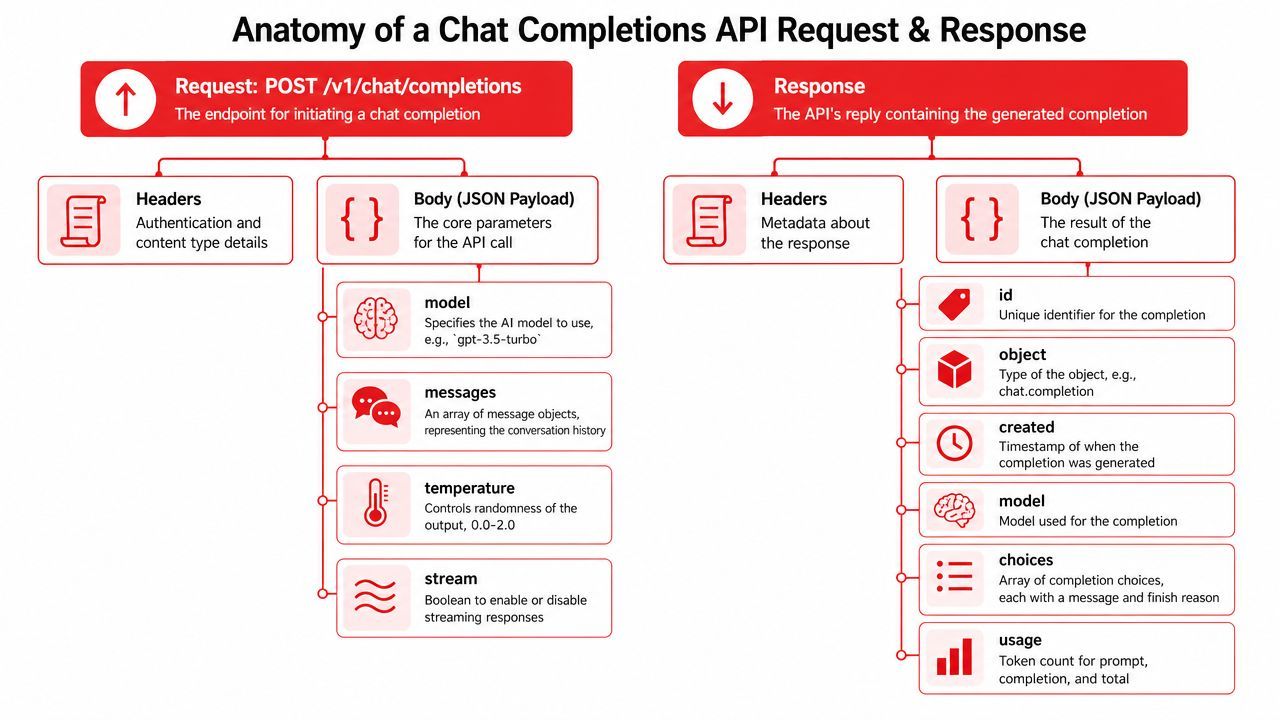
The endpoint shape is easy to memorize. The important part is understanding what each field means operationally, because your app will live inside these objects.
According to Portkey's comparison of OpenAI and Anthropic API formats, POST /v1/chat/completions is stateless by design, which means the client must pass the full conversation history on every request through a messages array.
What goes into the request
A typical request body includes a few fields you'll use constantly:
modelselects the model.messagesholds the conversation as ordered role-based entries.temperatureadjusts how varied or conservative the output should be.streamtells the API whether to send the answer all at once or incrementally.
The messages array is the center of the whole design. Each item usually includes a role and content. The common roles are system, user, assistant, and sometimes tool. Order matters. The model reads the array as a conversation transcript, not as unrelated snippets.
A minimal request often looks conceptually like this:
- A system message sets behavior.
- A user message asks for something.
- Optional assistant messages preserve earlier replies.
- Optional tool messages feed results back into the model.
That stateless design has one big consequence. Your app owns memory. If a user is on turn eight, the API won't remember turns one through seven unless you resend them.
What comes back in the response
The response usually includes metadata plus at least one generated choice.
The fields that matter most in day-to-day work are:
idfor request tracingmodelto confirm what answeredchoicesfor the generated messageusagefor token accounting
Inside choices, you'll usually inspect choices[0].message.content. That's the assistant's reply. If you support tool use or structured outputs, you may inspect more than just plain text, but the same principle applies: parse deliberately, don't assume every response is a simple paragraph.
Store the raw response during development. It makes debugging much easier when the model behaves differently than you expected.
The usage object matters more than many new developers realize. It tells you how much prompt and completion volume each call consumed. If your costs or latency start rising, this is one of the first places to look.
Mastering System User and Assistant Messages
Most quality problems with the Chat Completions API come from weak message design, not weak models. The messages array is your steering wheel. If you treat every request like a single flat prompt, you'll get brittle behavior.
A simple multi-turn pattern
Suppose you're building a support assistant for a SaaS app. A strong conversation might look like this in structure:
- System: You are a support assistant for a billing product. Be concise. Ask one clarifying question when account details are missing. Don't invent policy details.
- User: My invoice looks wrong.
- Assistant: I can help with that. Which charge looks incorrect?
- User: I was billed after I canceled.
That works because each role does a separate job.
The system message sets permanent rules. It's where you define tone, domain boundaries, formatting expectations, and safety constraints. Keep it clear and short enough that another engineer could understand it at a glance.
The user message represents the latest task or question. Write it as real input, not as a hidden instruction dump. If your frontend collects form fields, translate them into a clean user message rather than stuffing raw JSON into prose unless structured input is essential.
The assistant message preserves prior turns. This is how you create continuity. It also enables few-shot prompting naturally. If you want the model to imitate a specific answer style, you can include a short prior exchange that demonstrates the pattern.
What usually goes wrong
New teams often overload the system message with everything they can think of. Then they append long user messages with duplicated rules, examples, disclaimers, and formatting demands. That usually makes behavior less stable, not more.
A better pattern is:
- Put durable rules in
system - Put the actual task in
user - Put prior context in
assistant - Put external results in
toolwhen your workflow uses tools
“If a rule matters every turn, it belongs in the system message. If it only matters now, keep it in the current user turn.”
Another common mistake is preserving too much history. Not every old turn deserves to survive forever. If the earlier exchange no longer affects the current task, summarize it or drop it.
Tuning Model Behavior with Parameters
Parameters are where a lot of teams waste time. They change a value, see a different answer, and conclude they're tuning. Real tuning starts when you know what kind of output your feature needs.
The parameters that matter most
For most applications, you can get far with a small set of controls.
temperature is the first one to understand. Lower values make output more constrained and predictable. Higher values allow more variation. For factual extraction, summaries, or support flows, keep it lower. For brainstorming or ad copy, raise it carefully.
top_p is another creativity control. In practice, many developers pick either temperature as the main knob or top_p as the main knob and avoid changing both aggressively at the same time. If you're mentoring a junior developer, tell them to start by tuning temperature first because it's easier to reason about.
max_tokens is your output budget guardrail. Use it when you need to cap response size, reduce runaway verbosity, or keep downstream costs under control.
frequency_penalty can help reduce repetition. This matters when the model starts echoing phrases or looping on similar wording.
presence_penalty nudges the model toward introducing different ideas instead of sticking to the same concepts. It can help creative tasks, but it can also make factual tasks drift if pushed too far.
Quick reference table
A few practical defaults help:
- For support and Q&A: lean lower on creativity and cap output length.
- For structured extraction: keep sampling conservative and set explicit formatting instructions in the prompt.
- For creative drafting: allow more variation, but still bound length if the result goes into a UI.
A sensible tuning workflow
Don't change five parameters at once. Lock the prompt, test one parameter, and compare outputs side by side. If a feature is unstable, the prompt structure is often the main issue.
Use this sequence:
- Start with a stable prompt and a narrow task.
- Tune temperature first.
- Add a max_tokens ceiling.
- Only then test penalties if repetition or sameness is a real problem.
The best parameter setup is usually the boring one. If your app needs reliable output, predictability wins over “interesting.”
Streaming Versus Non-Streaming Completions
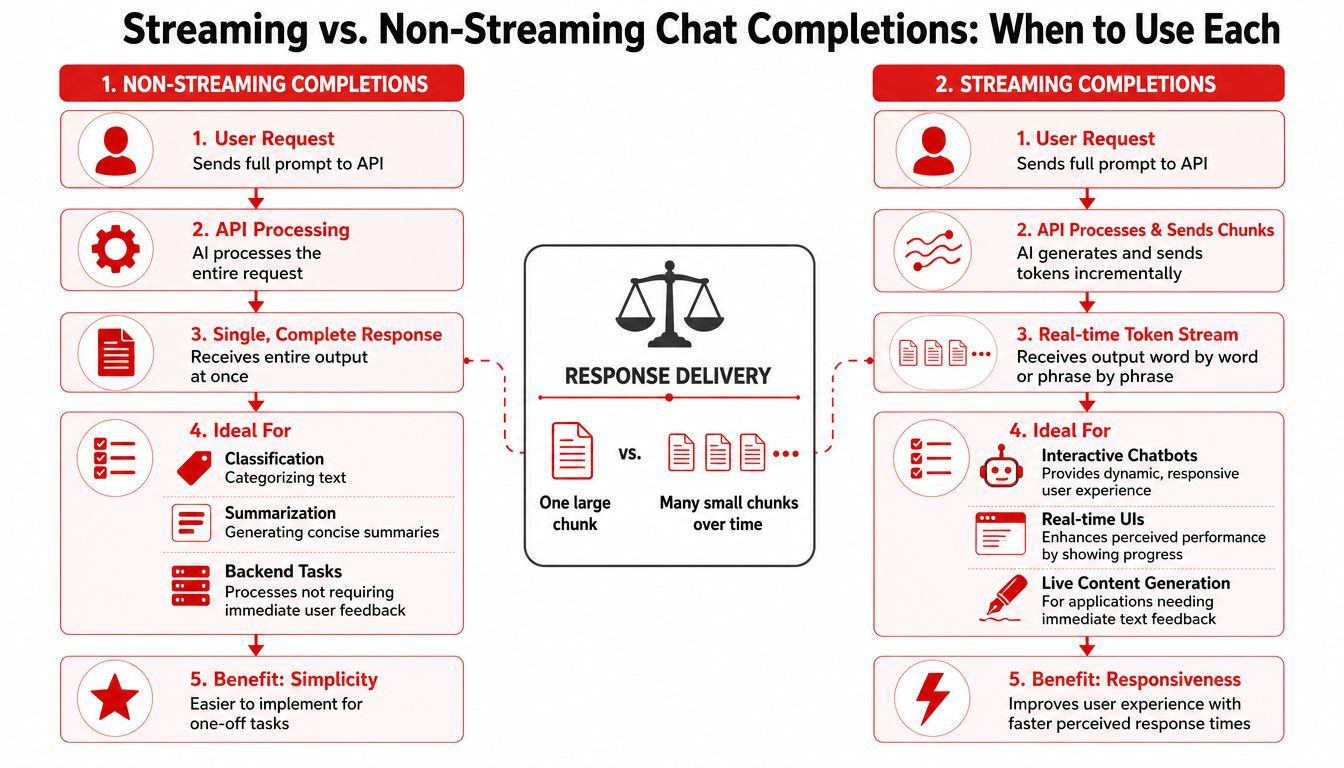
The choice between streaming and non-streaming isn't about what's more advanced. It's about what your feature needs.
When non-streaming is the better choice
Non-streaming returns the full result in one response. That's usually the cleanest option for backend work.
Use it when your system needs the complete answer before doing anything else, such as:
- Classification jobs that route tickets or content
- Summarization tasks that feed another service
- Batch workflows where nobody is waiting on a typing effect
The implementation is simpler. One request goes out, one response comes back, your code parses the final object, and the workflow continues.
That simplicity matters. If the user never sees partial output, streaming adds moving parts without adding value.
When streaming earns its complexity
Streaming shines in user-facing interfaces. A chat product feels faster when the response appears progressively rather than after a pause. Even when total generation time is similar, users perceive the app as more responsive.
Streaming is worth the effort for:
- Interactive chatbots
- Assistants embedded in product UIs
- Live writing tools
- Any experience where visible progress reduces user frustration
The trade-off is implementation complexity. Your frontend or server connection has to handle chunks, append partial text safely, and deal with cancellation, reconnects, and partial failures.
Build choice: If your feature is judged by user experience, streaming usually pays off. If it's judged by workflow correctness, non-streaming is often the safer default.
There's another operational detail. With streaming, moderation, logging, and structured parsing can get trickier because the output arrives in pieces. If you need complete validation before showing anything, non-streaming may still be the better fit.
Handling Errors and API Rate Limits
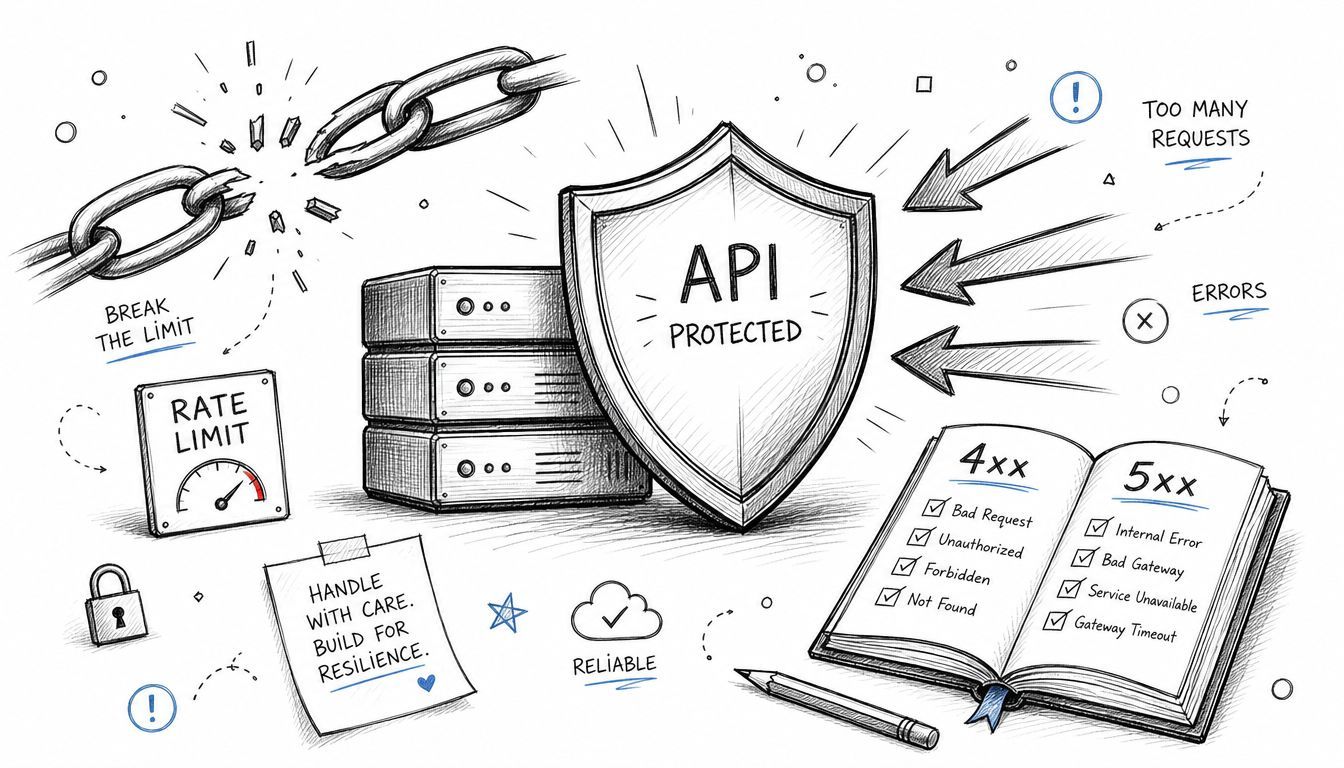
A demo can ignore failure paths. A product can't. The first time traffic spikes or a long conversation inflates token usage, your integration starts behaving like a distributed system instead of a code snippet.
The limits you need to design around
According to Langdock's OpenAI-compatible completion API documentation, the Chat Completions API operates with 500 requests per minute and 60,000 tokens per minute at the workspace level, not the API key level. The same documentation also notes that every call is isolated, so your application must resend accumulated history each time.
Those two facts combine into a real production constraint. If many users are having multi-turn conversations, token usage can grow quickly because the request gets larger every turn. You don't just pay for the new user message. You pay for the repeated context too.
Common failures usually look like this:
400 Bad Requestwhen your payload is malformed or too large for the model context401or403when credentials or permissions are wrong429 Too Many Requestswhen you hit rate limits5xxerrors when the upstream service has a transient problem
The mistake is treating all of these the same. A malformed request should fail fast and log clearly. A rate limit error should usually retry. A growing conversation should trigger summarization or truncation logic.
A retry strategy that actually works
For 429 and some transient 5xx errors, use exponential backoff with jitter. Don't hammer the API with immediate retries from every worker at once.
A practical pattern looks like this:
- Detect retryable status codes.
- Wait briefly before retrying.
- Increase the delay for each attempt.
- Add randomness so concurrent requests don't synchronize.
- Stop after a small retry budget and surface a useful error upstream.
If you're new to this pattern, this walkthrough gives a good visual explanation:
History management matters just as much as retries. If long conversations are causing payload growth, compress older turns. Keep the parts that still matter semantically, and replace stale detail with a summary.
If you only add retries and never control context growth, you haven't solved the production problem. You've delayed it.
From Prototype to Production with Supagen
The raw API gets you to “it works.” Production asks for more than that.
The most important limitation is architectural. As described in this analysis of the shift from Chat Completions to the Responses API, the Chat Completions API does not maintain state across requests, so developers have to manage and resend conversation history manually. In real applications, that increases token use, adds latency, and makes agent-like workflows harder to maintain.
What breaks after the demo works
A single script doesn't show the pain points clearly. They show up after a few weeks of shipping:
- Prompts sprawl across the codebase. A small wording change becomes a redeploy.
- You can't compare versions cleanly. A teammate tweaks a system prompt and nobody can trace why output changed.
- Costs become opaque. You know the feature is “using tokens,” but not which prompt or route is driving spend.
- Reliability becomes your problem. One provider slowdown or one bad prompt rollout can hit the whole feature.
At this point, teams usually realize they didn't just build an API integration. They built an AI control plane badly, inside app code.
What a production layer should solve
A production layer should separate application logic from AI operations.
That means you want:
- Prompt management outside of hardcoded strings
- Versioning so changes are traceable
- Routing and fallback control without rewriting application code
- Per-call observability for tokens, latency, inputs, outputs, and failures
- Centralized debugging instead of searching logs across services
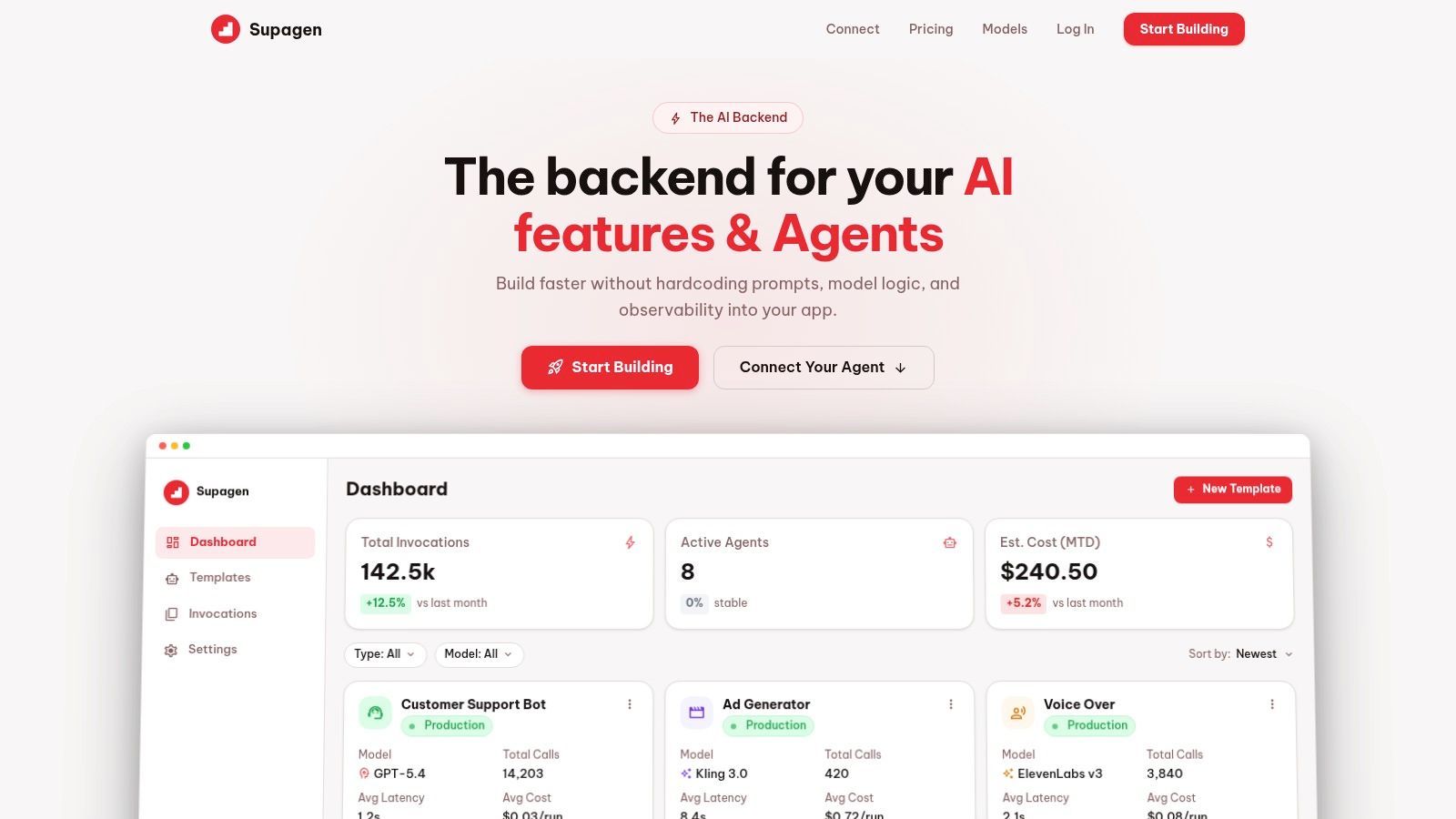
Supagen fits that production layer role well. It gives teams one backend surface for managing prompts, model routing, and AI request logs across providers. That matters when your app starts with one model and one use case, then grows into multiple prompts, multiple tasks, and multiple reliability concerns.
What I'd tell a junior engineer is simple: keep your first Chat Completions implementation direct so you understand the mechanics. But once a feature matters to customers, stop baking prompt operations into app code. You want a system that lets product, engineering, and operations inspect and change AI behavior without turning every prompt tweak into a deployment event.
A strong production setup isn't about making the first request easier. It's about making the hundredth change safer.
Advanced Topics and Future Outlook
Once the core feature works, two things deserve immediate discipline: security and roadmap thinking.
Security and budget discipline
Never expose provider API keys in client-side code. Put the Chat Completions API behind your own backend, authenticate your users there, and apply server-side controls before a request reaches the model.
Input validation matters too. Prompt injection isn't magic. It's untrusted input trying to override your intended behavior. You reduce risk by separating trusted instructions from user content, validating tool inputs, and constraining what downstream actions the model is allowed to trigger.
For budget control, think in terms of token shape, not just pricing pages. The biggest cost mistake is letting prompts and histories grow without review. Track which prompts are long, which routes generate verbose answers, and which features invite unnecessary multi-turn use. Cost control is usually a prompt and product design problem before it becomes a finance problem.
A few habits help immediately:
- Cap output where appropriate
- Summarize stale history
- Log usage per feature
- Review prompts that frequently produce overlong answers
How to think about the roadmap
The industry is moving toward more stateful interfaces. That matters because the Chat Completions API puts context management on the client, while newer approaches aim to keep more context on the service side.
OpenAI has announced a migration timeline to sunset the Chat Completions API by the end of 2026, with the Responses API becoming the forward direction, according to this OpenAI discussion on the migration path. Treat that as a roadmap signal, not a reason to panic.
The practical takeaway is this:
- Use Chat Completions when it fits your current feature well.
- Don't design your whole platform around assumptions that only stateless chat will matter.
- Keep your application architecture flexible enough to swap transport layers later.
Build today's feature on the API that gets you moving. Build the surrounding system so you're not trapped when the platform shifts.
If you plan well, migration becomes an integration task, not a rewrite.
Frequently Asked Questions
What's the difference between Chat Completions and the Assistants-style approach
Chat Completions is the simpler, lower-level interface. You pass messages and manage the workflow yourself. Assistants-style systems or newer stateful APIs usually handle more orchestration for you, including tool flow and context persistence. If you want control and portability for a first implementation, Chat Completions is a strong starting point.
Can I build a real chatbot with the Chat Completions API
Yes. That's one of its most common uses. The catch is that your app must manage conversation history, storage, truncation, and session behavior. The API won't remember prior turns unless you send them.
Should I use streaming by default
No. Use streaming when users benefit from seeing output appear in real time. For backend summarization, extraction, routing, or classification, non-streaming is usually easier and cleaner.
Can I force JSON output
You can ask for structured output with careful prompting and response validation. In production, always validate the returned structure before trusting it. Never assume the model produced valid JSON just because you requested it.
Is fine-tuning part of Chat Completions
The endpoint itself is for inference, not the fine-tuning workflow. In most early-stage products, prompt engineering, examples, and better context design solve more problems than jumping straight to fine-tuning.
What's the best first production improvement after my prototype works
Add logging around prompts, responses, token usage, failures, and latency. Once you can see what the system is doing, the next fixes become obvious.
If your team has a Chat Completions prototype working and you're starting to feel the pain of hardcoded prompts, model sprawl, and missing observability, Supagen is worth a look. It gives you a production layer for prompt versioning, model routing, fallbacks, and per-call visibility, so you can keep shipping AI features without turning every prompt change into an app redeploy.