
How to Use API Key Safely: A 2026 Guide

You just got an API key from a dashboard. The docs say “paste this into your request,” and you're tempted to do exactly that so you can move on.
That's how most key leaks start.
If you're learning how to use API key credentials in a real app, the first job isn't making one request succeed. It's making sure the key still works safely when your code moves from your laptop to staging, production, CI, teammates' machines, and logs you forgot existed. A key that works in a quick test but gets exposed in a frontend bundle, committed to Git, or left unrestricted is a production problem waiting to happen.
Table of Contents
- What an API Key Is and Why It Matters
- Generating and Scoping Your API Key
- Securely Storing API Keys for Different Environments
- Making API Calls with Your Key in Code
- Best Practices for API Key Lifecycle Management
- Troubleshooting Common API Key Errors
What an API Key Is and Why It Matters
A team ships a small integration on Friday, hard-codes one API key, and sees the first requests succeed. On Monday, the same key is in a client bundle, usage spikes from unknown traffic, and the provider starts rejecting real production requests. That failure pattern is common because an API key is more than a string that gets a 200 response. It is a credential tied to identity, quota, billing, and service access.
API providers use keys to determine which project is calling, apply usage limits, and associate requests with an account. In production, that gives every key a blast radius. A leaked key can create surprise charges. A noisy service can burn through quota and starve user traffic. A rushed rotation can take down an integration if the old and new keys are not managed carefully.
Practical rule: Treat an API key like an application password. Store it, scope it, and rotate it with the same care.
The transport format varies by provider. Some APIs expect the key in an Authorization header. Others require a custom header such as x-api-key, or a query parameter like key=.... Developers often lose time by copying an example from one API into another without checking the provider's auth rules first.
A useful way to evaluate a key is to look at what responsibility it carries:
This section is where many beginner guides stop. Production work starts here. Before writing code, decide which system owns the key, which environment gets its own copy, what the key is allowed to access, and how the team will rotate it without downtime. Those decisions prevent the usual problems long before the first API call is made.
Generating and Scoping Your API Key
Creating the key is usually one button in a dashboard. The important work begins right after that.
A lot of tutorials stop at “copy your key and paste it into your app.” That's incomplete. Security guidance from Google Cloud emphasizes restrictions by client type, IP, referrer, or service, and explicitly supports browser, server, Android, and iOS restrictions in its API key restriction documentation.
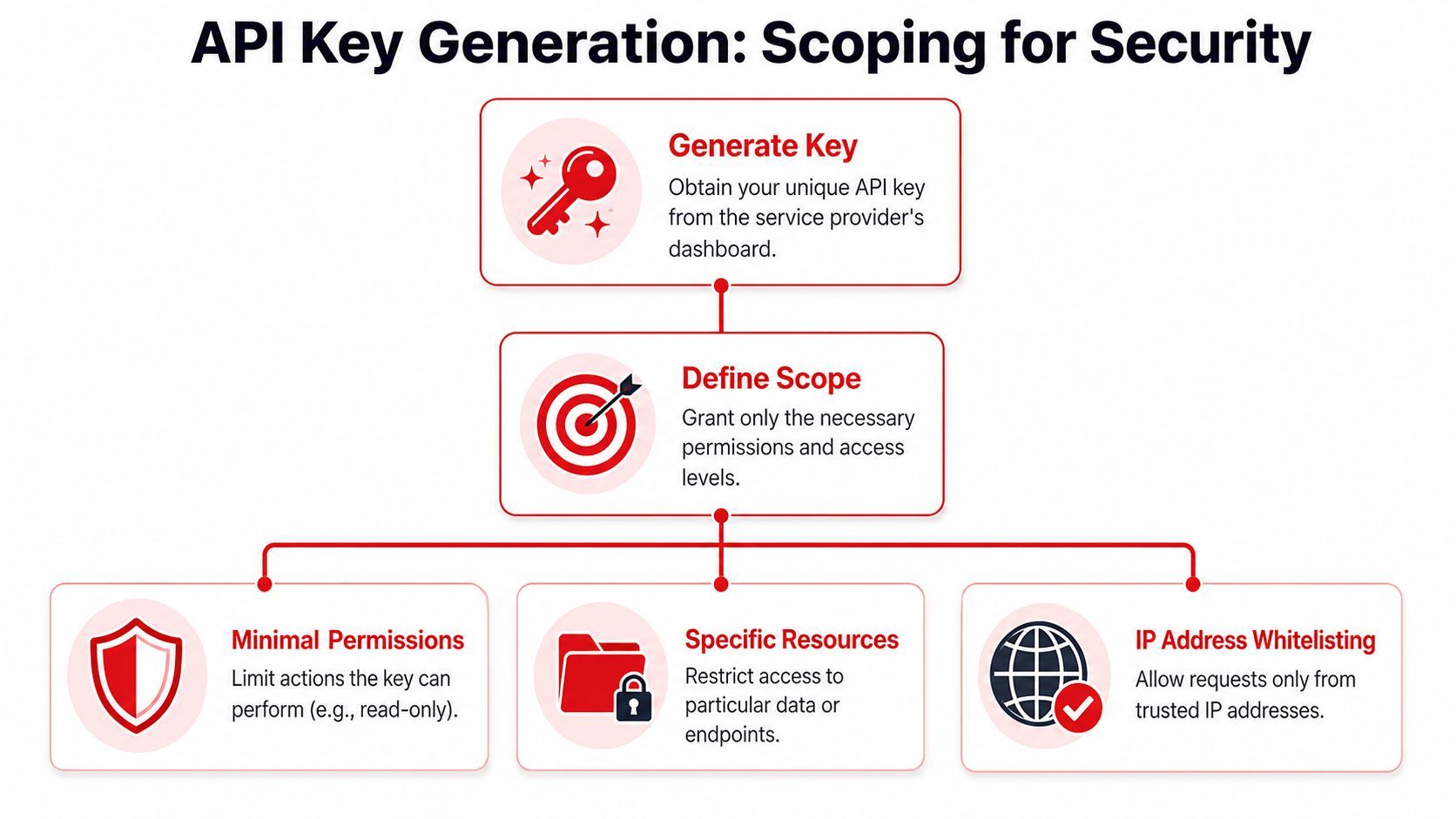
Start with least privilege
When you generate a key, don't ask “What could this key access?” Ask “What is the minimum this key must access to do its job?”
That changes how you configure it.
- Client restrictions: If the key is only for backend use, lock it to server-side patterns the provider supports. Don't leave browser access open by default.
- Service restrictions: If your app only needs one API, don't let the same key access a whole platform.
- Origin or referrer restrictions: For browser-facing cases, use the provider's allowed referrer controls where available.
- Network restrictions: For server workloads, use trusted source restrictions when the provider supports them.
Broad keys are convenient and dangerous
The reason developers skip scoping is convenience. A broad key is easier to test because it fails less often during setup. But the same convenience makes incidents worse. If that key leaks, an attacker doesn't inherit only one narrow permission. They inherit everything the key can do.
Restrict first, debug second. It's easier to loosen one setting on purpose than to discover months later that a key had wide-open access the whole time.
Use separate keys for separate environments and workloads. A local development key shouldn't be the same key that serves production traffic. A cron job shouldn't share a key with your public app if the provider lets you separate them. Segmentation makes incidents smaller and debugging cleaner.
A scoped key can feel annoying the first time you get a forbidden error during setup. That annoyance is a feature. It means your defaults are defensive.
Securely Storing API Keys for Different Environments
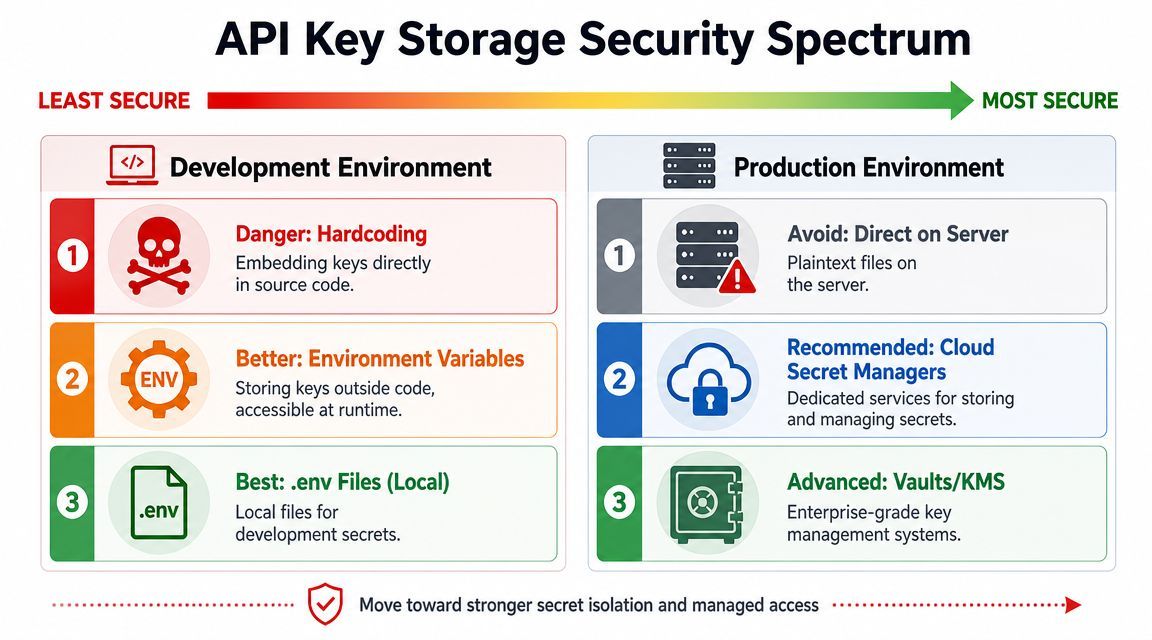
Hardcoding keys into source files is still one of the fastest ways to create a future incident. It feels efficient for five minutes. Then the key ends up in Git history, a screenshot, a shared snippet, or a client-side bundle.
Security guidance from Esri recommends operational discipline around keys, including generating a secondary key before replacing the first one during rotation, and Okta advises storing tokens safely and not committing them to GitHub, as summarized in Esri's API key authentication guidance.
Local development
For local work, environment variables are the baseline.
Instead of this:
API_KEY = "paste-real-key-here"Do this:
import os

API_KEY = os.environ["MY_API_KEY"]
And in Node.js:
const apiKey = process.env.MY_API_KEY;

if (!apiKey) {
  throw new Error("Missing MY_API_KEY");
}
If you want a smoother local workflow, use a .env file with tooling that loads it into the environment at runtime. Keep that file out of version control. The exact loader varies by stack, but the principle is the same: code reads from the environment, not from hardcoded literals.
Production storage choices
Production needs more discipline than “set an env var on the box and hope nobody changes it.”
Here's a useful way to think about storage options:
A few rules hold up well across stacks:
- Don't commit secrets: Not in
.env, not in examples, not in test fixtures. - Don't log them: Avoid printing headers, request URLs with query keys, or full config dumps.
- Don't embed them in frontend code unless the provider explicitly supports that pattern and you've applied browser restrictions.
- Don't share one key across every environment: Segmentation reduces damage.
The habit that saves you later
Teams often don't suffer because they forgot environment variables exist. They suffer because they never built secret handling into the workflow. One developer hardcodes a key for a demo, another copies it, and now that value lives in multiple services and old branches.
Store the key where the runtime can read it, not where humans keep copying it.
If you're serious about learning how to use API key credentials in production, secret storage is part of the feature, not cleanup work after the feature.
Making API Calls with Your Key in Code
Once your key is scoped and stored correctly, the request itself is straightforward. The main gotcha is that different APIs expect the key in different places. Google Cloud documents API key usage through the key=API_KEY query parameter for supported endpoints, and notes that not all Google Cloud APIs accept API keys, as shown in its API key usage guide.

Check how the provider expects the key
Before you write code, answer these questions from the provider docs:
- Does this API support API keys at all
- Does it expect a header, query parameter, SDK token field, or something provider-specific
- Is this intended for server use, browser use, or both
- Are there restrictions you must configure before requests will succeed
Don't assume one provider's pattern applies everywhere.
Curl example
If the provider expects a bearer token style header, a local shell environment variable keeps the key out of the command body:
curl -X GET "https://api.example.com/v1/widgets" \
  -H "Authorization: Bearer $MY_API_KEY" \
  -H "Accept: application/json"
If the provider expects a query parameter instead, the request may look more like this:
curl -X GET "https://api.example.com/v1/widgets?key=$MY_API_KEY"Notice the trade-off. Query parameters can be valid because some providers require them, but they also deserve extra care because URLs can show up in logs, proxies, analytics tools, and debugging output.
Python example
For backend Python, keep the loading and failure path explicit:
import os
import requests

api_key = os.environ.get("MY_API_KEY")
if not api_key:
    raise RuntimeError("Missing MY_API_KEY")

url = "https://api.example.com/v1/widgets"
headers = {
    "Authorization": f"Bearer {api_key}",
    "Accept": "application/json",
}

response = requests.get(url, headers=headers, timeout=30)
response.raise_for_status()

print(response.json())
Two practical notes:
- Set a timeout. Hanging forever is worse than failing fast.
- Don't print the headers during debugging unless you've redacted the key.
Here's a short walkthrough if you want to see the request flow in action:
JavaScript example
For server-side JavaScript:
const apiKey = process.env.MY_API_KEY;

if (!apiKey) {
  throw new Error("Missing MY_API_KEY");
}

async function fetchWidgets() {
  const response = await fetch("https://api.example.com/v1/widgets", {
    method: "GET",
    headers: {
      Authorization: `Bearer ${apiKey}`,
      Accept: "application/json"
    }
  });

  if (!response.ok) {
    throw new Error(`Request failed with status ${response.status}`);
  }

  return response.json();
}

fetchWidgets()
  .then(data => console.log(data))
  .catch(err => console.error(err.message));
If you're writing frontend JavaScript, stop and verify whether that key is meant to be exposed to a browser at all. Many keys should never leave the backend.
That's the part many examples skip. The request format can be correct and still be unsafe if you put the key in the wrong runtime.
Best Practices for API Key Lifecycle Management
Teams often think about API keys only when they create them and when one breaks. Production systems need a middle layer: governance.
That matters even more for API-driven data systems. Eurostat's Statistics API supports structured filtering through URL parameters and returns machine-readable data, which reflects the broader move toward automated, auditable access patterns. In that kind of setup, having a working key isn't enough. Monitoring and observing usage is part of operating the system, as noted in Eurostat's API getting started guide.

Rotation without breaking production
Rotation is where immature setups crack. Someone revokes the old key first, pushes the new one second, and suddenly production can't authenticate.
A safer pattern is simple:
- Create a replacement key
- Deploy the new key everywhere it needs to run
- Verify traffic is using it
- Revoke the old key after the cutover
That overlap matters because distributed systems don't update all at once. Workers, scheduled jobs, background processes, and long-lived containers can lag behind.
The cleanest rotation is boring. No outage, no scramble, no guessing which service still has the old credential.
Monitoring and audit habits
You don't need a giant security program to manage keys better. You do need visibility.
Watch for:
- Unexpected usage patterns: Traffic from the wrong app, wrong environment, or wrong time window
- Permission mismatches: Calls failing because the key's restrictions no longer match the workload
- Noisy retries: A bad deploy can turn one auth issue into a flood of failing requests
- Stale keys: Credentials nobody can confidently identify or assign ownership to
A practical operating model looks like this:
Keys should have owners. If nobody knows why a key exists, nobody will rotate it, restrict it, or safely remove it. That's how credentials turn into permanent debris in production.
Troubleshooting Common API Key Errors
When an API call fails, the status code usually tells you where to look. Don't guess. Start with the likely cause.
401 Unauthorized
This usually means the provider couldn't authenticate the request.
Common causes:
- Missing key: Your environment variable wasn't set in the runtime.
- Wrong transport: The API expected a query parameter, but you sent a header, or vice versa.
- Malformed header: Extra spaces, wrong prefix, or incorrect capitalization in the auth scheme.
- Revoked or invalid key: The key no longer exists or was copied incorrectly.
Fix it by checking the provider docs, confirming the key is present in the runtime, and validating the exact request shape.
403 Forbidden
This usually means the key is valid, but it isn't allowed to do what you're asking.
Common causes:
- Overly strict restrictions: Wrong client type, referrer, service, or server-side restriction.
- Wrong environment key: You used a staging key against a production resource.
- Insufficient scope: The key exists but doesn't have permission for that endpoint.
The fix isn't “make the key broad again.” Adjust the restriction that blocks the intended use case and leave everything else tight.
429 Too Many Requests
This means you've hit a limit or the provider is protecting the service from request bursts.
Common causes:
- Too many requests from one app
- Retry loops after failures
- Shared key used by multiple workloads
Useful responses:
- Add backoff: Don't retry instantly in a tight loop.
- Separate workloads: Give different services their own keys if the provider allows it.
- Check for accidental storms: Background jobs and frontend polling can pile up fast.
A lot of “API key problems” are really runtime discipline problems. The credential is only one part of the system. Storage, scoping, retries, logs, and ownership are what make the system stable.
If you're shipping AI features and don't want prompt logic, model routing, and observability scattered across your app, Supagen gives you a production layer for managing providers, prompts, logs, latency, costs, and fallbacks through one integration. It's a clean next step when your API usage has moved beyond a single test call and into real product infrastructure.