
What Is Retrieval: AI & Engineering Guide 2026
You're probably here because you asked an AI app a question it should've answered easily, and it didn't.
Maybe your support bot gave a vague answer about a feature that exists in your docs. Maybe your internal assistant confidently answered with outdated policy text. Maybe your product search worked for exact keywords, but failed when a user phrased the same question differently.
That gap between “the information exists” and “the system can find and use it” is where retrieval lives.
When people ask what is retrieval, they often get a soft definition like “finding relevant documents.” That's true, but it leaves out the part that matters when you're building real systems. Retrieval is an engineering discipline. It depends on how you prepare data, how you index it, how you search it, how you rank results, and how you evaluate whether the right evidence showed up before the model started talking.
Table of Contents
- Introduction Why Retrieval Is Suddenly Everywhere
- The Two Worlds of Retrieval IR and RAG
- The Core Components of a Retrieval System
- Common Retrieval Architectures and Patterns
- Practical Retrieval Engineering
- Integrating Retrieval into Your AI Application
- Your Next Steps in Mastering Retrieval
Introduction Why Retrieval Is Suddenly Everywhere
Retrieval became visible to a much wider audience when teams started shipping chatbots, copilots, internal assistants, and AI search into products. The failure mode was obvious. A language model could sound polished while still missing the exact fact a user needed.
That's why retrieval matters in AI. Before the model answers, the system tries to find the right information from a larger collection, such as help docs, PDFs, tickets, notes, webpages, or database-derived text. Then it passes that evidence into the generation step.
In classic information systems, retrieval already had a clear meaning. In information retrieval, the goal is to find known information quickly and accurately from document collections using queries, indexing, and relevance ranking, which is different from data mining that tries to discover new patterns, as described in Coveo's overview of information retrieval. Modern AI applications borrow that foundation, then add a language model on top.
Retrieval gives a model access to facts it wasn't guaranteed to memorize, and that changes the quality of the answer more than most prompt tweaks do.
A useful mental model is a library.
If your company knowledge lives in a giant unsorted room full of books, the model is like a smart intern locked outside the room. It can write well, summarize well, and reason fairly well, but it can't quote the page it never saw. Retrieval is the catalog, shelving system, and lookup process that gets the right books onto the desk before the intern starts writing.
That's also why “what is retrieval” is a better engineering question than it first appears. You're not just choosing a search method. You're deciding:
- How content gets split so useful ideas stay together
- How data gets indexed so queries return quickly
- How relevance gets scored when exact terms and semantic meaning disagree
- How results get evaluated before users find the bad cases for you
The Two Worlds of Retrieval IR and RAG
The word retrieval gets overloaded fast because people use it for two closely related systems.
One is Information Retrieval (IR). The other is Retrieval-Augmented Generation (RAG).
They share the same first move: find relevant information. But they don't stop at the same place.
IR finds documents
Classic IR returns a ranked list of results. A search engine, enterprise search portal, or file search tool usually lives here. The system takes a query, searches an index, scores candidate documents by estimated relevance, and shows the user the best matches.
The output is usually “these are the documents you should read.”
RAG finds documents and then uses them
RAG adds another stage. It retrieves relevant chunks or documents, then feeds them into a language model so the model can generate an answer grounded in those retrieved materials.
The output becomes “here's the answer, based on these sources.”
A simple analogy helps:
- IR is a librarian who hands you the right stack of books.
- RAG is a research assistant who finds the books, pulls the useful pages, and drafts an answer from them.
That second step is why AI teams care so much about retrieval now. If the retrieval step misses the evidence, the model often answers with guesswork or partial truth.
Practical rule: If your RAG app gives bad answers, check retrieval before you blame the model.
Here's the side-by-side view.
The confusion usually comes from hearing “retrieval” used in AI demos as if it were only about vector databases. It isn't. Retrieval started in search long before RAG. What changed is that RAG made retrieval visible to teams that previously only thought about prompts and model APIs.
A healthy way to think about it is this: IR is the foundation, RAG is an application pattern built on top of retrieval.
The Core Components of a Retrieval System
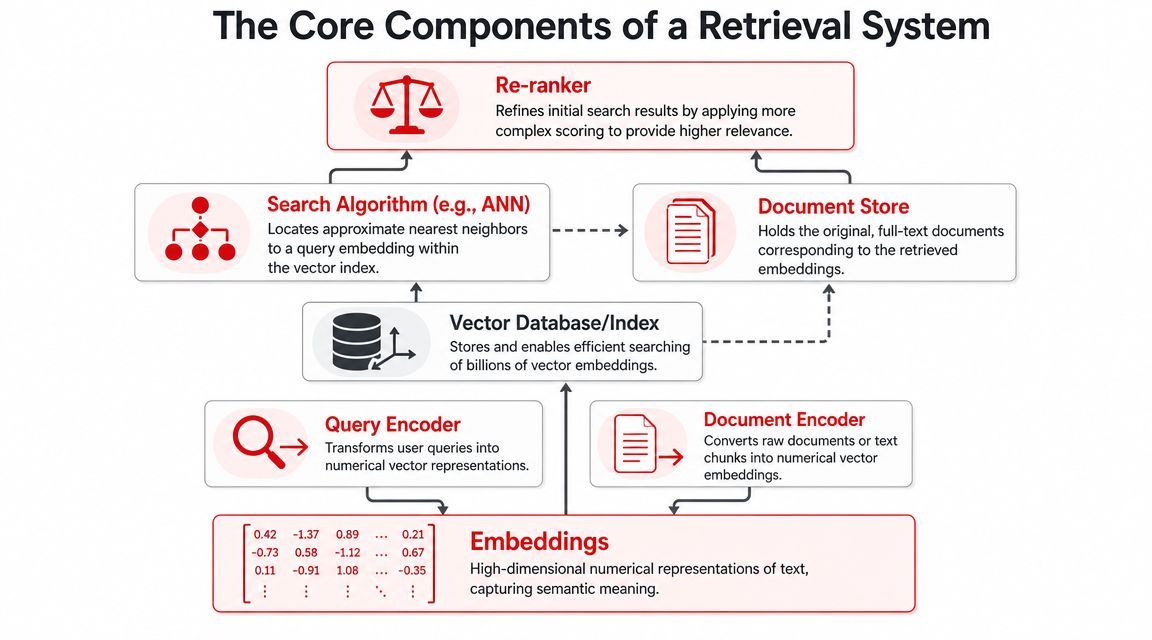
A retrieval system becomes easier to reason about when you follow the path a query takes through it. A user asks a question. The system turns that question into something searchable, finds candidate matches fast, then spends a bit more effort sorting the best ones to the top.
From text to vectors
Start with two raw materials: your content and the user query.
In dense retrieval, both need to be converted into embeddings. An embedding is a list of numbers that places text in a mathematical space so the system can compare meaning, not just wording. One model usually encodes document chunks ahead of time. Another encoder, often the same model family, encodes the query at request time.
A library analogy helps here. Two books on the same topic may use different chapter titles, but a good catalog still shelves them near each other. Embeddings try to do that with language. A question like “How do I regain access to my account?” can land close to a chunk titled “Reset your password and sign-in credentials,” even when the wording does not line up.
That semantic matching is useful, but it also introduces engineering choices that simple definitions skip over.
Your system has to decide what counts as a “document” for encoding. A whole PDF is usually too large and too mixed in topic. A single sentence is often too small and loses context. In production, teams usually split source material into chunks that are large enough to carry meaning and small enough to retrieve precisely. Chunk size, overlap, headings, metadata, and cleanup all shape retrieval quality before the index even exists.
The Role of Indexing
Once your chunks have embeddings, you need a way to search them quickly.
The point of a vector index is not storage by itself. The point is fast similarity search over a large collection. If you compared every query vector against every stored vector one by one, latency would climb as your corpus grew. Vector indexes use approximate nearest neighbor methods to return strong candidates fast enough for an interactive product.
A production stack usually includes four separate pieces:
- Document store: the original text, metadata, and source references
- Vector index: the structure used to search embeddings quickly
- Retriever: the component that pulls an initial set of candidates
- Reranker: a later model or scoring step that reorders those candidates more carefully
That separation matters. The index helps you find likely matches fast. The document store gives you the text you need to show a user or send to an LLM. The reranker improves precision after the first pass.
If you keep only vectors, you can return IDs and similarity scores, but not the evidence a user needs to read or the passages a model needs to ground an answer.
Sparse retrieval belongs in this picture too. Keyword methods search for term overlap. Dense methods search for semantic similarity. They fail in different ways, which is why many production systems combine them. Sparse retrieval is often better for exact strings like error codes, product names, and internal acronyms. Dense retrieval is often better for paraphrases and natural-language questions.
That is why hybrid search shows up so often in real systems. You are not choosing between “old search” and “AI search.” You are deciding how much exact matching and semantic matching your use case needs.
Research on RAG retrieval systems also describes this broader pipeline view, including sparse and dense retrieval, reranking, and query expansion, in this academic review of RAG retrieval approaches.
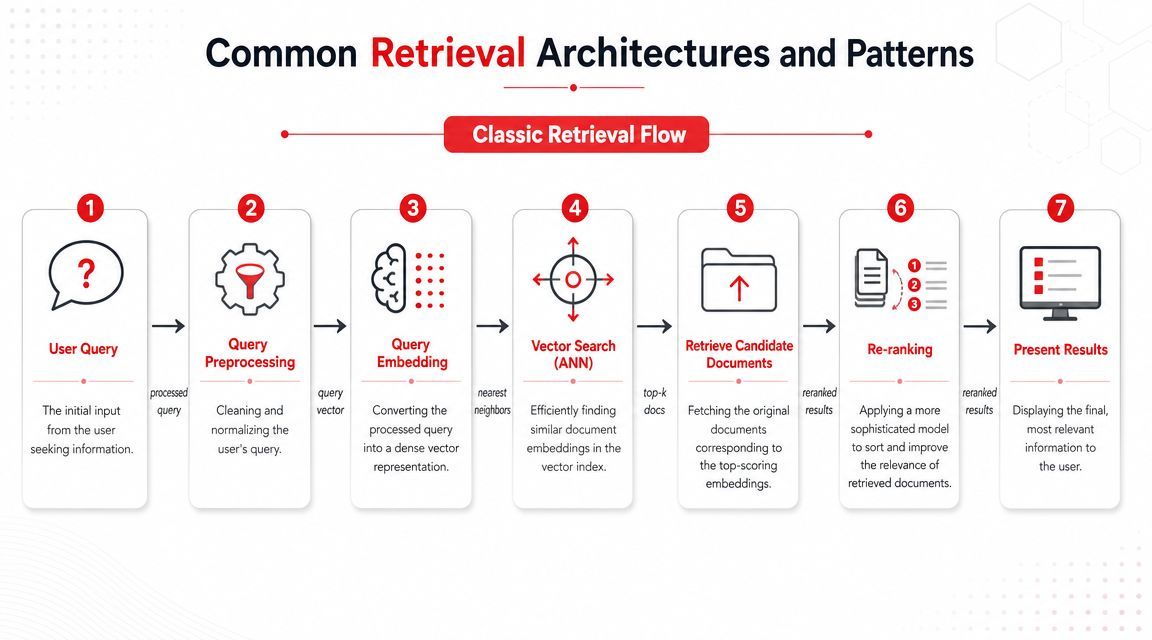
The components usually work in this sequence:
- Prepare text by cleaning source data, preserving useful metadata, and splitting content into chunks
- Encode chunks and queries into searchable representations
- Index those representations for low-latency lookup
- Retrieve a candidate set with sparse search, dense search, or both
- Rerank the top candidates with a more precise scoring step
- Return text and metadata, not just document IDs
- Pass the best evidence onward to a search UI or an LLM
That sequence explains why retrieval quality is rarely fixed by swapping one model. Bad chunking, weak metadata, missing titles, stale content, or no reranking can hurt results long before generation starts.
Common Retrieval Architectures and Patterns
Knowing the parts is useful. Knowing how teams combine them is what helps you make design decisions.
Sparse retrieval when exact words matter
Sparse retrieval is the old workhorse, and it's still very relevant. A common example is BM25, which scores documents using term frequency behavior, inverse document frequency, and length normalization.
In plain language, BM25 is good when the exact wording matters. Product names, error codes, rare entities, legal clauses, model numbers, and internal acronyms often work well here. If a user types a specific feature flag name, a keyword-oriented retriever may beat a semantic one.
That surprises teams that jump straight to vectors.
Dense retrieval when meaning matters more than wording
Dense retrieval does the opposite well. It can find semantically related content even when the words don't match exactly.
If your help center says “multi-factor authentication” and the user searches for “extra login code,” dense retrieval has a better shot at connecting them. It also helps with paraphrases and long-tail questions where users don't know your internal vocabulary.
The tradeoff is subtle but important. Dense retrieval can improve recall, but if the embeddings or chunking are off, it can also surface text that feels related while missing the precise answer.
Why production systems combine them
That's why many teams end up with hybrid search.
Hybrid search combines sparse and dense retrieval, then merges or reranks the candidates. This setup tends to behave better across mixed query types because real users don't stick to one style. Some ask with precise keywords. Others ask in loose natural language. Many do both in the same session.
Modern systems also frequently use a two-stage pipeline. A fast first-stage retriever such as BM25, ANN vector search, or a hybrid method narrows millions of items down to a much smaller candidate set. Then a cross-encoder or LLM reranker scores that smaller set more precisely. That pattern is common because it balances speed with relevance.
A useful way to choose among architectures is this table:
You can map this to product behavior.
- A developer docs search often needs strong sparse retrieval because exact API names matter.
- A support copilot often benefits from dense retrieval because users phrase problems in many ways.
- An enterprise assistant usually needs hybrid retrieval plus metadata filters because the corpus is messy and broad.
The engineering lesson is simple: don't ask “which retrieval method is best?” Ask which failure mode is least acceptable for this product.
Practical Retrieval Engineering
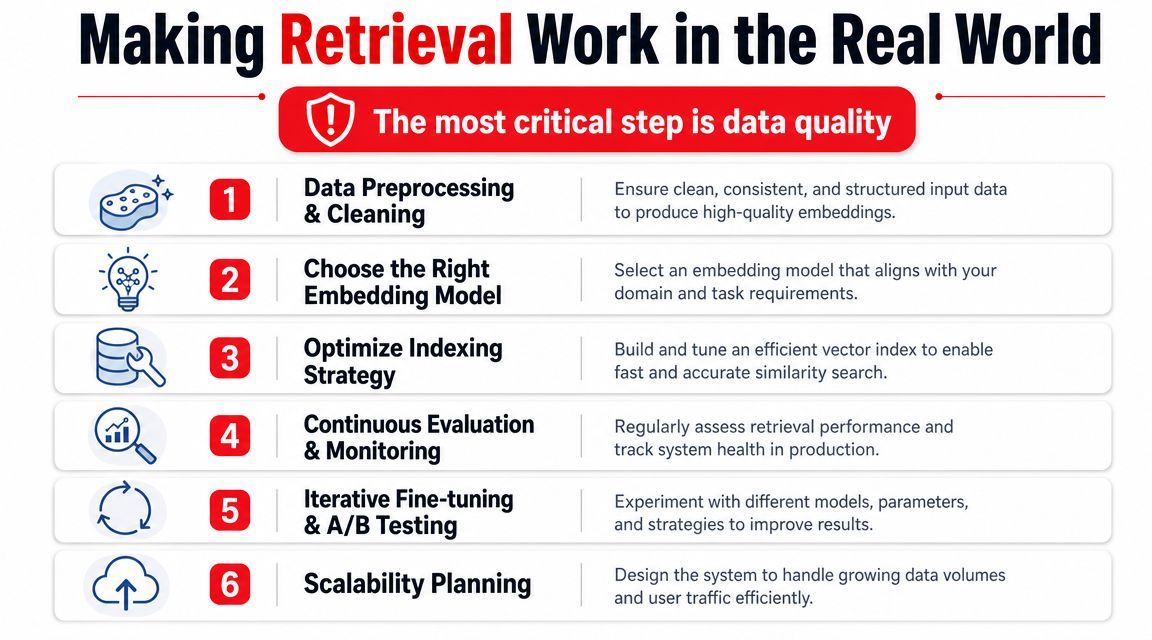
A retrieval system can look impressive in a demo and still fail on ordinary user questions a week later. The usual culprit is not the retriever you picked. It is the quiet engineering work around it: how documents were cleaned, how they were split, what metadata survived ingestion, and whether anyone measured retrieval quality before shipping.
Chunking is a product decision disguised as a data task
A library does not help much if every page is filed separately or if five books are glued into one volume. Chunking has the same effect on retrieval quality. You are deciding what unit of meaning your index can find.
Many production RAG systems split documents into chunks instead of embedding whole files. Teams often start with chunks in the few-hundred-token range plus some overlap. That baseline is useful, but fixed size alone is rarely enough.
Take a policy page with a rule in one paragraph and an exception in the next. If those paragraphs land in different chunks, retrieval may find the rule and miss the exception. The answer will sound grounded and still be wrong. The opposite failure also happens. If one chunk contains setup steps, pricing notes, troubleshooting advice, and release information, its vector has to represent all of that at once. Relevance gets blurry.
Good chunking follows the shape of the content.
- Keep structure intact: headings, list items, table rows, and section boundaries often carry meaning
- Preserve nearby context: overlap helps when one sentence changes how the next should be interpreted
- Split by idea first, length second: token windows are a guardrail, not the whole strategy
- Test against real questions: a chunking scheme that looks tidy in code can still miss the evidence users need
This is why chunking is a product choice, not only a preprocessing step. A docs search tool, a support bot, and a contract assistant often need different chunk boundaries because they answer different kinds of questions.
Metadata narrows the search space before ranking starts
Metadata acts like the shelving system in that library. The text still matters, but you also want to know whether a document is for admins or end users, whether it is current, what product area it belongs to, and who is allowed to see it.
That extra structure matters when several documents say similar things for different audiences. A billing note for internal operators should not outrank a customer-facing setup guide just because both mention the same keywords.
Useful metadata often includes:
- Document type: policy, FAQ, API reference, ticket, changelog
- Scope: product area, region, language, customer tier
- Freshness: created date, updated date, version, status
- Access controls: team, role, tenant, permission scope
Teams also improve retrieval by enriching chunks during ingestion. Summaries, extracted entities, canonical titles, and links to parent documents can give both sparse and dense retrieval more signal to work with. The point is simple. Do not send raw text into an index if your application already knows important context.
Evaluation keeps retrieval honest
A polished answer can hide weak retrieval for a long time. The model writes smoothly. Users trust it. Then someone asks a question that depends on a buried exception or a newer document, and the failure shows up in production.
You need retrieval metrics separate from generation metrics.
Two common ones are Recall@k and nDCG@k:
- Recall@k: did the needed evidence appear anywhere in the top results?
- nDCG@k: did the best evidence appear near the top, where your application is likely to use it?
Those metrics sound academic, but the operational question is straightforward: did your system fetch the right facts early enough to matter?
Evaluation also needs a realistic test set. Use actual user queries, edge cases, abbreviations, internal codes, vague questions, and messy follow-ups. If you only evaluate with neat benchmark-style prompts, you will miss the kinds of failures that support teams and product managers hear about first.
Production retrieval is mostly about failure control
Once a system is live, retrieval quality usually improves through small engineering decisions rather than one dramatic model swap. Teams adjust chunk sizes for one document class, add metadata filters for another, introduce hybrid search for mixed query styles, or add a reranker for the last precision jump.
That pattern is common because production retrieval is about controlling specific failure modes. Missing the right document, returning a near-match with the wrong scope, surfacing stale content, and dropping a key exception are different problems. They need different fixes.
If you want a practical rule to remember, use this one: retrieval gets better when the index reflects how humans organize knowledge and when evaluation reflects how users ask for it.
Integrating Retrieval into Your AI Application
A retrieval pipeline becomes real when it sits inside a user request path.
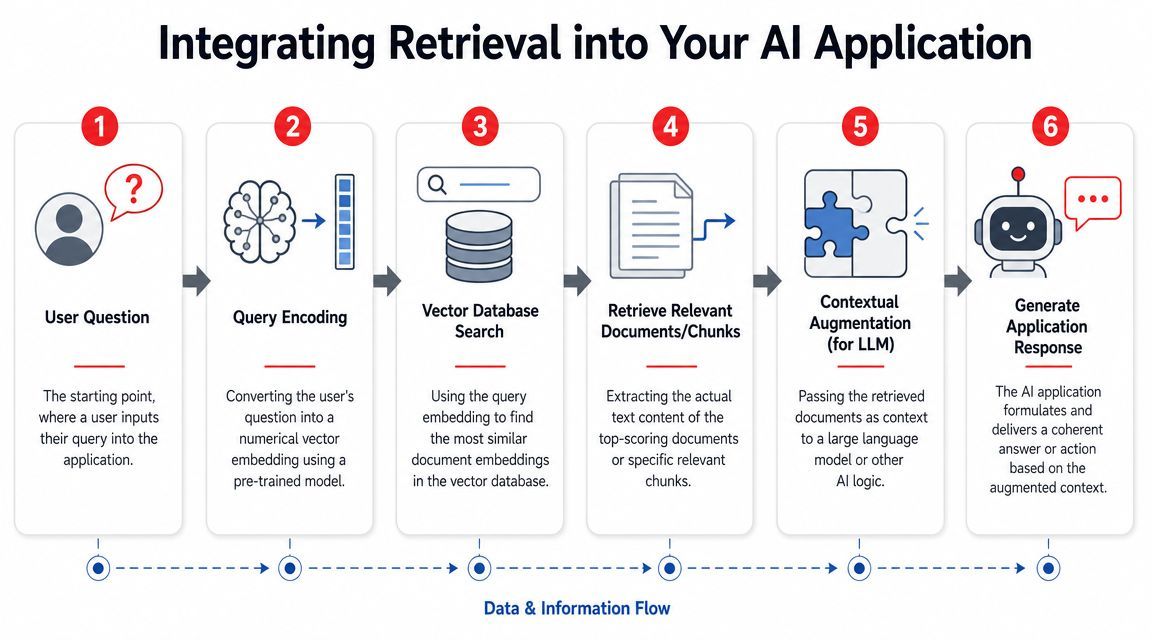
A practical request flow
A typical flow looks like this:
- A user asks a question in your app.
- Your system encodes that question for retrieval.
- The retriever searches the index and returns candidate chunks.
- Optional filters or rerankers improve the candidate list.
- The application packages the top chunks into model context.
- The language model generates an answer grounded in that context.
That's the basic RAG loop commonly implemented.
The tricky part isn't understanding the shape of the flow. It's managing all the details around it. Which prompt version should use which retrieved fields? Which model should answer which class of query? What happens when retrieval returns thin context? How do you log the retrieved chunks that caused a bad answer?
This walkthrough gives a visual sense of the handoff from retrieval to generation:
Where teams usually get stuck
Teams can typically get a prototype working. Production is where complexity piles up.
You need stable ingestion pipelines. You need observability into retrieval outputs, prompt inputs, model choices, latency, and cost. You need a way to update prompts, filters, and routing logic without turning every small change into an application redeploy.
A few failure points show up repeatedly:
- Irrelevant context: The retriever finds text that sounds related but doesn't answer the question
- Stale data: The system indexes docs once, then answers from outdated content
- Weak permissions handling: Users see chunks they shouldn't
- Prompt overload: Too many mediocre chunks get stuffed into context and drown the good one
The fix usually isn't one magical model upgrade. It's careful plumbing across retrieval, filtering, ranking, and prompt assembly.
Your Next Steps in Mastering Retrieval
If you've been asking what retrieval is, the shortest useful answer is this: it's the system that finds the right evidence before search or AI tries to answer.
If you're building products, that definition should immediately expand in your head. Retrieval is also chunking, indexing, metadata, ranking, reranking, and evaluation. It's the difference between “our bot sounds smart” and “our bot can reliably use the right facts.”
For hands-on learning, a good path is:
- Build a tiny corpus first: Use your own docs, changelogs, or support articles
- Compare sparse and dense retrieval: Don't assume vectors win every query
- Add metadata filters early: They often clean up result quality fast
- Label a small evaluation set: Even a lightweight set of real queries teaches more than guessing
- Inspect failures manually: Read the retrieved chunks, not just the final answer
If you want to go deeper, explore tools people use to assemble these systems, such as LangChain or LlamaIndex for orchestration and FAISS or HNSW-based libraries for vector indexing. The key is to experiment with a specific product use case, because retrieval quality depends heavily on your documents, your users, and the kinds of mistakes your application can't afford to make.
If you're turning retrieval into a production feature, Supagen helps manage the messy layer around it. You can keep prompts versioned, route requests across models, set fallbacks, inspect logs, and track latency and cost from one place instead of hardcoding that logic into your app. That makes it easier to iterate on retrieval-powered features without redeploying every time you want to change how the system behaves.