
What Is Multimodal AI: Architectures & Use Cases 2026

Multimodal AI means AI systems that process and reason across multiple kinds of data at once, such as text, images, and audio, instead of relying on only one input type. It's already a commercial category, with Grand View Research estimating the market at USD 1.73 billion in 2024 and projecting USD 10.89 billion by 2030, a 36.8% CAGR from 2025 to 2030.
If you're building AI features right now, you've probably hit the same wall many teams hit. Your text chatbot works in a demo, then a user uploads a screenshot, drops in a voice note, or expects the system to understand what's on their screen. Suddenly the clean prompt flow breaks, and you're no longer solving a language problem. You're solving an application architecture problem.
That's the practical answer to what is multimodal ai. It's not just “AI that accepts images.” It's AI that combines multiple signals the way people use multiple senses to interpret the world. A support agent reads the complaint, sees the screenshot, hears frustration in the audio, and uses all of that context together. A useful multimodal product needs to do something similar.
Most explanations stop at the concept. The harder question is what happens after the demo works once. How do you route different inputs to the right models, trace failures across a multi-step pipeline, control costs when media enters the stack, and degrade gracefully when one modality fails? That's where multimodal projects usually get difficult, and where product teams either build a real feature or ship a fragile one.
Table of Contents
- Beyond Text Why Your Next AI Feature Needs More Senses
- Understanding Multimodal AI and Its Key Ingredients
- Inside the Black Box A Look at Multimodal Architectures
- From Theory to Practice Real-World Multimodal AI Examples
- The Production Reality of Multimodal Workloads
- Getting Started with Multimodal AI on Your Team
Beyond Text Why Your Next AI Feature Needs More Senses
When a customer writes, “The checkout button is broken,” and attaches a screenshot, the useful signal is split across formats. The text gives intent. The screenshot shows the disabled state, the coupon error, and the mobile layout issue. A text-only assistant can apologize and suggest generic fixes. It cannot inspect the interface the customer is seeing.
That gap shows up all over production systems. Users send screenshots, PDFs, voice notes, photos of damaged items, and clips of a workflow failing. If the product only reads text, it drops evidence the user already did the work to provide. That usually leads to weaker answers, slower resolution, and more manual review behind the scenes.
For builders, the point is practical. Multimodal AI lets a system work from the same messy evidence your support team, ops team, or analyst would use to make the call. In real products, that often matters more than model fluency.
The shift is already commercial
This capability has moved well past research demos. Buyers now expect software to interpret the assets they already upload as part of normal work. In many categories, text-only experiences start to feel incomplete once users are accustomed to sharing screenshots, recordings, forms, and images to explain what happened.
That changes the product bar. A support assistant should read the ticket and inspect the screenshot. A commerce flow should handle a photo and a text prompt together. An internal ops tool should be able to combine logs, alerts, and a pasted error message before it routes the case.
Practical rule: Add a modality when it removes manual triage or improves decision quality. Input support by itself is not a product win.
The product question gets sharper
From a product lens, the useful question is where extra context changes the result enough to justify the added complexity. That filter keeps teams from shipping a flashy demo that is expensive to run and hard to support.
Good candidates usually have one thing in common. The user's problem already spans more than one format, and a human reviewer would naturally look at all of them together.
- Support and operations: A user describes a bug, then attaches a screenshot or screen recording that shows the actual failure state.
- Commerce and search: A shopper uploads a reference image and adds text about color, fit, or style changes.
- Internal tools: An employee speaks a note, pastes logs, and includes an image from a dashboard or device.
- Content workflows: A reviewer needs the visual asset, transcript, and metadata in the same decision path.
Teams that succeed here treat multimodality as an operational feature, not a marketing label. Once you accept image, audio, or video input, you also take on routing decisions, observability gaps, cost spikes, and fallback design. Those are the parts that decide whether the feature survives contact with real traffic.
Understanding Multimodal AI and Its Key Ingredients
The simplest way to explain multimodal AI is this. A unimodal system gets one signal. A multimodal system gets several and tries to make sense of them together.
Humans do this constantly. We don't interpret speech only from words. We combine tone, expression, surroundings, and timing. AI systems don't “sense” the world the way people do, but the design goal is similar. The model should use multiple forms of input to build a more complete representation of what's happening.
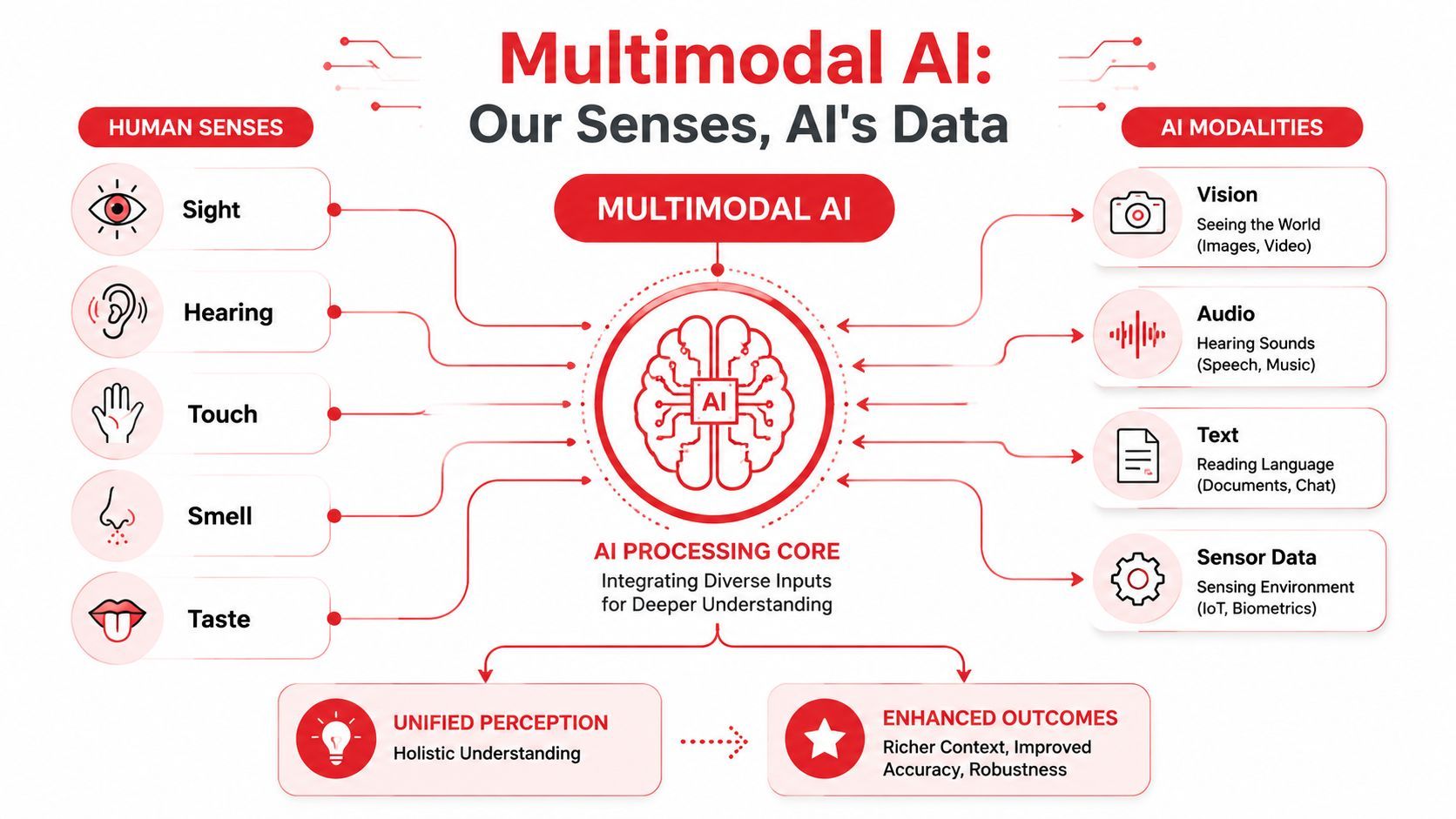
Why multiple modalities matter
Different modalities carry different kinds of information.
- Text captures explicit language, instructions, labels, and structured descriptions.
- Images capture layout, objects, visual defects, screenshots, charts, and scenes.
- Audio captures speech, tone, environmental sound, and spoken context.
- Video adds movement, sequence, and interaction over time.
- Sensor data can represent physical state, device readings, or environmental changes.
A product that combines these inputs can often answer questions a single-modality model can't answer reliably. A screenshot plus a complaint gives more than the complaint alone. A voice message plus transcript gives more than the transcript alone. A document image plus extracted text gives more than OCR alone if the layout matters.
The three parts that show up in most systems
Under the hood, most multimodal systems still follow a fairly grounded structure. IBM describes a typical multimodal AI architecture as having three core components: an input module to ingest different data types, a fusion module to align them in a shared representation, and an output module to generate richer outputs.
That sounds abstract, but in product terms it's straightforward:
- Input module
In this module, the system accepts raw data from different sources. It might receive a user message, an uploaded image, a voice recording, and metadata from the app session. - Fusion module
This is the important part. The system has to combine those inputs so they can influence each other. Without fusion, you don't really have multimodal reasoning. You just have separate models running in parallel. - Output module
This is what the user sees. A generated answer, a classification, a summary, a structured JSON response, or a suggested action.
The leap from single-input AI to multimodal AI isn't just broader input support. It's the ability to use one modality to interpret another.
That distinction matters when teams evaluate vendor demos. Plenty of products can accept both text and images. Fewer can reliably connect them in a way that improves the final answer.
For non-technical founders, that's the key mental model to keep. What is multimodal ai? It's a system designed to understand multiple data types together, not merely tolerate them side by side.
Inside the Black Box A Look at Multimodal Architectures
Once a team moves from concept to implementation, multimodal AI stops feeling like one model and starts looking like a pipeline. That's where complexity enters.
Most production systems don't take raw text, raw image pixels, raw audio, and somehow “just know” what to do. They use components specialized for each modality, then connect those components through a fusion step that lets the system reason across formats.
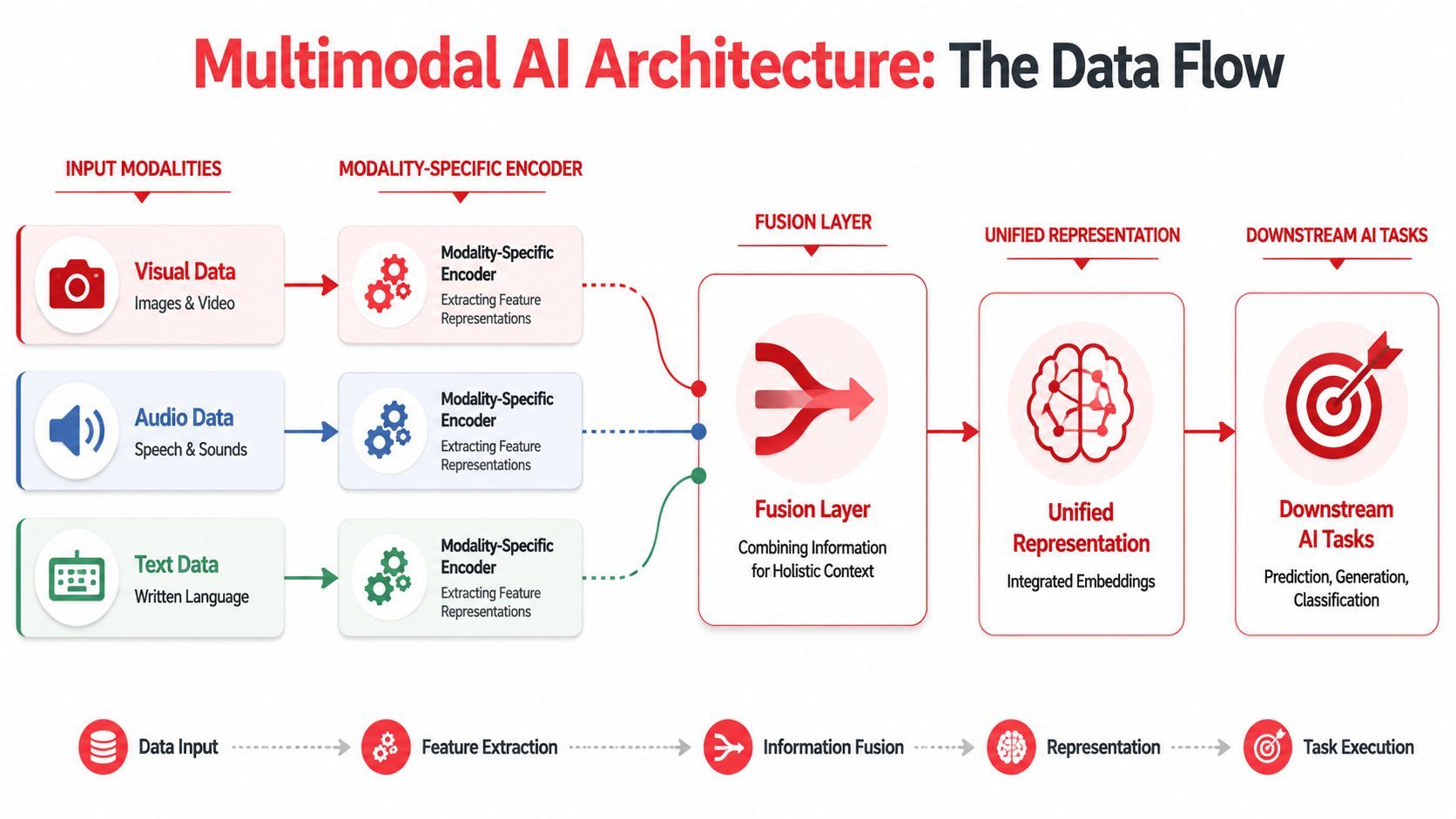
What the pipeline usually looks like
A practical multimodal stack often has at least four stages.
First, each input gets preprocessed. Text may be tokenized. Images may be resized or patch-encoded. Audio may be transformed into features suitable for an audio encoder. Video may be sampled into frames or clips.
Second, each modality goes through its own encoder. SuperAnnotate explains that multimodal architecture usually involves modality-specific encoders, such as transformers for text and CNNs for images, plus a fusion layer that maps varied inputs into a shared latent space and enables cross-modal reasoning.
Third comes fusion. This is the step that lets the model align an image region with a phrase, connect a spoken instruction to a visual target, or combine a screen state with a typed question.
Fourth, the system produces an output. That might be a natural language answer, a generated image, a classification label, or a structured response consumed by your application.
Here's the engineering reality. Every extra modality adds more than one new capability. It adds another preprocessing path, another failure mode, another source of latency, and another evaluation problem.
Build advice: If you can't inspect what each stage received and produced, you won't debug multimodal failures with confidence.
Common modalities in AI systems
Not every application needs all of these. In practice, a more focused initial approach is generally recommended. Text plus image is a common first step because user behavior already supports it. People paste messages and upload screenshots without any training.
The trap is assuming the architecture is only a model choice. It isn't. It's also a systems choice. The moment your feature depends on multiple encoders and a fusion step, you need to think about orchestration, visibility, and operational controls. That's why the production layer matters more in multimodal apps than in simple chat.
From Theory to Practice Real-World Multimodal AI Examples
The easiest way to understand multimodal AI is to look at product behavior that would feel broken without it.
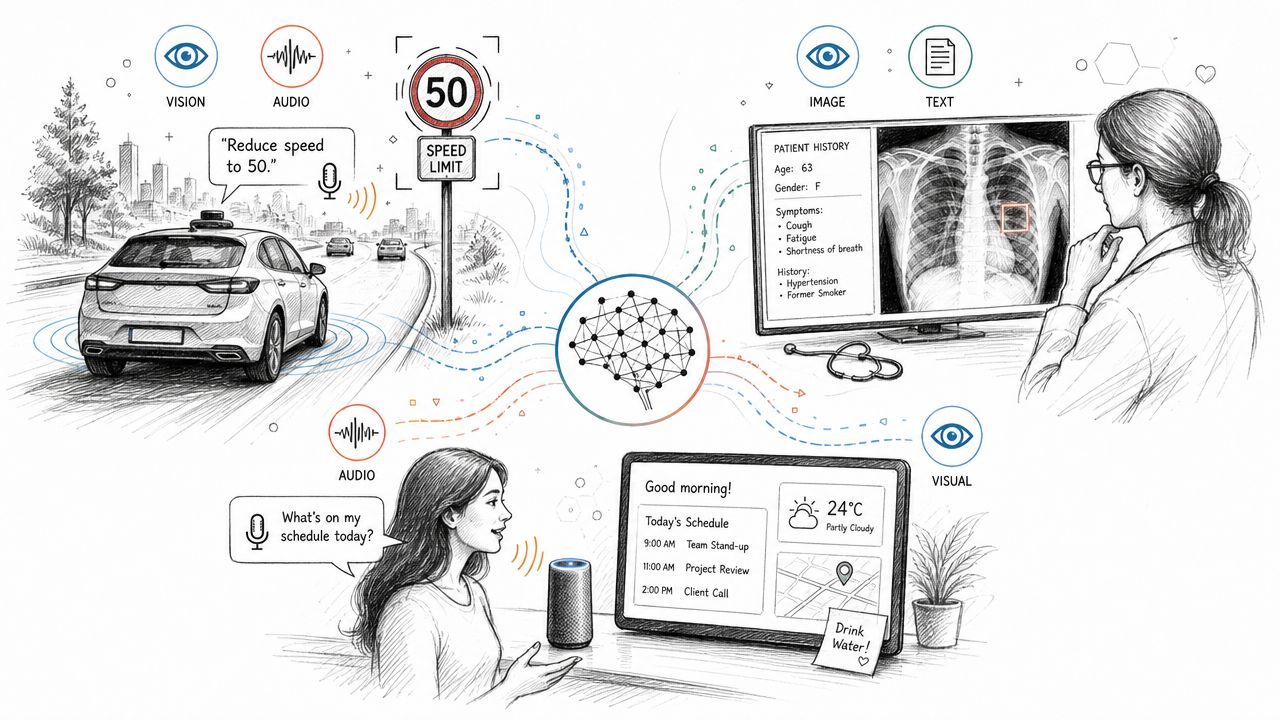
Retail search that understands both look and intent
A shopper uploads a photo of a jacket they saw on social media and asks, “Can I find this style in a waterproof material?” A text-only system can parse the request, but it can't inspect the visual reference. A pure image search system can find similar jackets, but it may miss the requested material change.
A multimodal system can combine both. The image gives silhouette, color, collar shape, and overall style. The text adds the constraint that matters for purchase intent. The useful answer isn't “this looks like a jacket.” It's a ranked set of products that match the visual style while adapting to the user's stated preference.
That's a product feature, not a research toy. The user doesn't care about encoders or shared latent spaces. They care that the search result feels like the app understood both the picture and the ask.
Product workflows that start from messy evidence
Now take a startup shipping an internal QA assistant. A tester records a short screen capture, narrates what went wrong, and adds one sentence: “This happens after I apply a discount code.”
That bundle contains multiple kinds of evidence:
- The recording shows the sequence of actions.
- The voiceover explains what the tester expected.
- The text note adds a quick summary for indexing or triage.
A useful multimodal workflow can extract steps to reproduce, summarize the issue, identify likely UI state transitions, and format a draft bug report for Jira, Linear, or GitHub.
After teams see a few workflows like this, the value becomes obvious. Multimodal AI often shines where human users already communicate in mixed formats. The model's job is to reduce the burden of turning that messy evidence into something actionable.
A visual example helps if you want to see how vendors frame this category in practice:
Multimodal features work best when they remove a translation step. Users shouldn't have to rewrite what a screenshot, recording, or image already shows.
There are plenty of other solid use cases too. Healthcare workflows combine clinical text with images. Autonomous systems combine visual and sensor input. Customer service tools combine chat and voice. Content moderation systems combine text and media review. The common thread isn't novelty. It's that the task is easier when the system can evaluate more than one signal at once.
The Production Reality of Multimodal Workloads
Most glossy explanations of multimodal AI stop being useful at this point.
The hard part usually isn't understanding the concept. The hard part is making a multimodal feature reliable enough to survive real users, unpredictable inputs, and growing traffic. Google Cloud's multimodal AI guidance highlights the operational angle, especially the question of what changes in debugging, routing, and observability when you add image, audio, or video into an app.
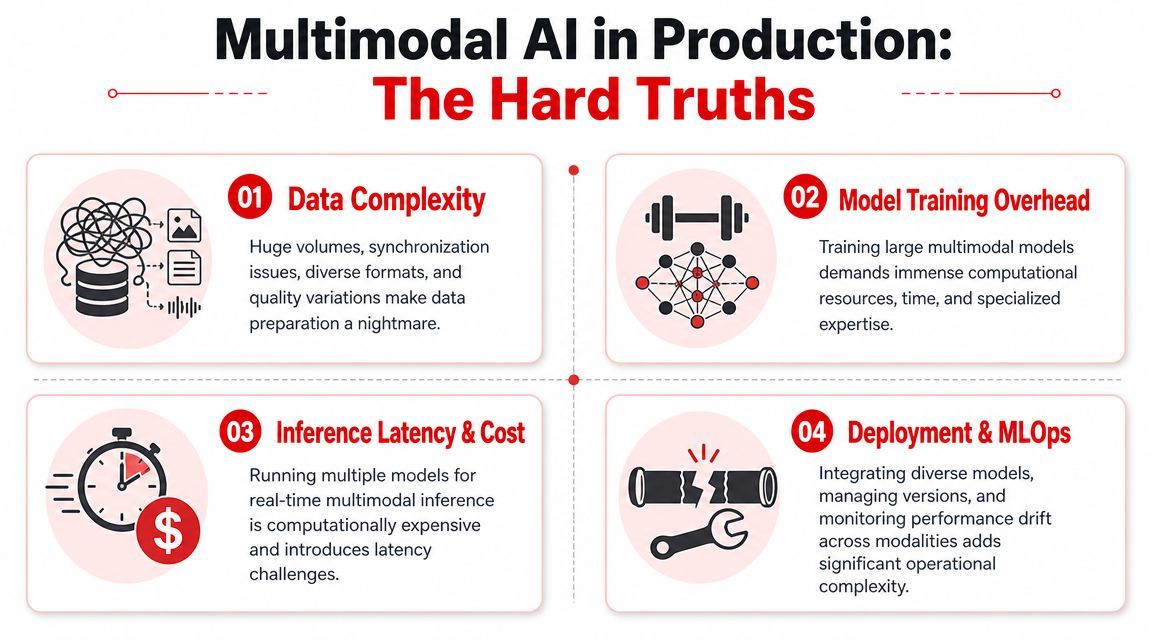
Routing gets harder before it gets better
In a text-only product, routing can be simple. One request goes to one model, maybe with a fallback. In a multimodal workflow, that pattern often breaks.
A user request may need OCR for a document image, speech-to-text for audio, a vision-language model for screenshot interpretation, and a language model for the final synthesis. Some teams try to hide all of this behind one giant prompt. That approach often works for a demo and then becomes expensive, hard to inspect, and brittle.
A better pattern is explicit routing based on workload type. Decide which jobs need full multimodal reasoning and which can be reduced first. Sometimes converting audio to text early is enough. Sometimes you need to preserve the original media because the visual or acoustic signal carries meaning the transcript loses.
Observability has to follow the whole chain
Debugging gets much messier the moment one user request becomes several model calls.
If the answer is wrong, where did it go wrong?
- Input handling problem: the file upload failed or metadata got stripped.
- Preprocessing problem: the image was resized badly or the audio segmentation dropped context.
- Model problem: the vision model missed the relevant region.
- Fusion problem: the final step over-weighted the text and ignored the image.
- Application problem: the UI displayed a stale or partial result.
Without per-step logs, request tracing, and captured inputs and outputs, teams end up guessing. That's expensive engineering time, and it leads to false confidence because intermittent failures are hard to reproduce.
If you only log the final response, you don't have observability. You have a receipt.
Cost and fallback design decide whether the feature survives
Multimodal workloads also force teams to pay attention to cost much earlier. Even without citing hard numbers for every provider, the operational pattern is clear. Processing rich media is heavier than processing plain text. More stages usually mean more inference work, more storage pressure for logs and payloads, and more opportunities for retries.
That changes product decisions:
- Gate expensive paths: Only invoke image or video analysis when the input requires it.
- Separate preview from deep analysis: A fast first-pass answer can be enough in many flows.
- Use graceful degradation: If the vision path fails, can the app still answer from text and tell the user what was skipped?
- Keep model dependencies swappable: You'll want the ability to change providers or routes without rewriting the app.
What doesn't work is treating multimodality as one giant black box. The teams that succeed break the workload into inspectable parts, decide where richer media improves outcomes, and design fallbacks before launch instead of after the first outage.
Getting Started with Multimodal AI on Your Team
Organizations often don't require a sweeping multimodal platform on day one. They need one workflow that clearly improves when the system can use more than text.
Start with one workflow not five
Pick a use case where users already provide mixed inputs and the value is obvious. Good first candidates include support flows with screenshots, document workflows with scanned files, or product issue reporting from screen captures.
Then define success narrowly. Not “build a multimodal assistant.” Build something like:
- Screenshot-aware support replies
- Photo plus text product search
- Voice note to structured task summary
- Screen recording to bug report draft
That keeps the scope honest. It also gives your team something testable. You can review inputs, outputs, and failure cases without drowning in edge conditions from unrelated features.
Design for production on day one
You can prototype quickly with mainstream providers, but don't wait too long to think about operations. The prototype should answer a few questions early:
- How will requests be routed?
Decide whether all inputs go through one model path or whether some media gets preprocessed first. - What will you log?
Keep enough detail to debug failures across text, image, audio, or video steps without making your system impossible to manage. - How will you handle fallbacks?
If one modality fails, define what the app should still do. - How will you control spend?
Put guardrails around expensive paths before users discover them for you. - How will you swap models later?
Avoid hardcoding provider-specific logic deep in the application layer if you know the workflow will evolve.
Start with the smallest multimodal feature that solves a real user problem. Then make that feature observable before you make it broad.
That's the practical lens for what is multimodal ai. It's a capability category with real product value, but the difference between a convincing demo and a durable feature is operational discipline. Teams that plan for routing, logs, costs, and fallback behavior early usually move faster later because they aren't rebuilding the foundation after launch.
If you're building multimodal features and don't want routing, prompt versioning, fallbacks, and observability scattered across your app code, Supagen gives you a unified AI backend for text, image, audio, video, and JSON workloads. It's a practical way to move from fragile prototype logic to production-ready AI operations without turning every model change into a redeploy.