
What Is Graceful Degradation
You're probably dealing with a system that already has too many moving parts. A frontend depends on browser features you don't fully control. Your backend calls internal services and third-party APIs. If you've added AI, there's another layer of uncertainty: model latency, rate limits, provider outages, and answers that look confident even when they're wrong.
That's where graceful degradation stops being a nice architectural idea and becomes a product decision. When part of the stack fails, the question isn't whether the system is perfect. It's whether users can still get the core job done.
If you've ever asked what is Graceful Degradation in a practical sense, the short answer is this: it's the discipline of designing systems to bend instead of break. Not every feature survives a failure. The important part is that the experience remains usable, understandable, and trustworthy.
Table of Contents
- When Systems Bend Instead of Break
- Graceful Degradation vs Progressive Enhancement
- Real-World Examples of Graceful Degradation
- Implementation Patterns and Best Practices
- The New Frontier Degrading Gracefully in AI Systems
- Communicating Failure The Missing UX of Degradation
- A Practical Checklist for Building Resilient Systems
When Systems Bend Instead of Break
A flash sale starts. Traffic spikes. Users are adding items to carts. Then the payment provider starts timing out.
An immature system turns that dependency failure into a full outage. Product pages fail because checkout logic sits on the critical path. Cart pages hang waiting for a payment token. Support gets flooded, not because everything is broken, but because one dependency was allowed to take the whole experience down with it.
A resilient system behaves differently. Product browsing still works. Search still works. Users can save items, join a waitlist, or get notified when checkout returns. The system gives up some capability, but it preserves the main value users came for.
That's graceful degradation.
Where the idea came from
This isn't a trendy cloud-era term. Graceful degradation was originally defined in the 1960s as a principle for nuclear and military systems so that even when large portions of a system were destroyed or inoperative, limited functionality remained available and catastrophic failure was avoided, including in early U.S. Air Force command networks, as described by TechTarget's definition of graceful degradation.
The underlying idea has aged well because the engineering problem hasn't changed. Complex systems fail in parts, not in neat, isolated ways. If one part fails, the rest of the system has to know how to keep moving.
What mature teams optimize for
Teams that practice graceful degradation don't ask only, “How do we prevent failure?” They also ask:
- What must always work: login, search, account access, document retrieval, checkout review, or whatever your product's irreducible value is
- What can become partial: recommendations, analytics panels, advanced filters, personalization, live updates
- What should fail closed or open: some features must stop for safety, while others should return stale or reduced results
Practical rule: Treat every dependency as optional until you've proven it belongs on the critical path.
That changes architecture decisions. It also changes product decisions. A degraded experience can still feel professional if users understand what's available and why.
The simplest example is still a good one: a shopping site that allows browsing even if checkout is temporarily unavailable. That's not just a fallback pattern. It's a statement that preserving business continuity matters more than pretending the system is all-or-nothing.
Graceful Degradation vs Progressive Enhancement
Graceful degradation and progressive enhancement solve related problems, but they start from different engineering assumptions. That difference affects architecture, testing, and product decisions.
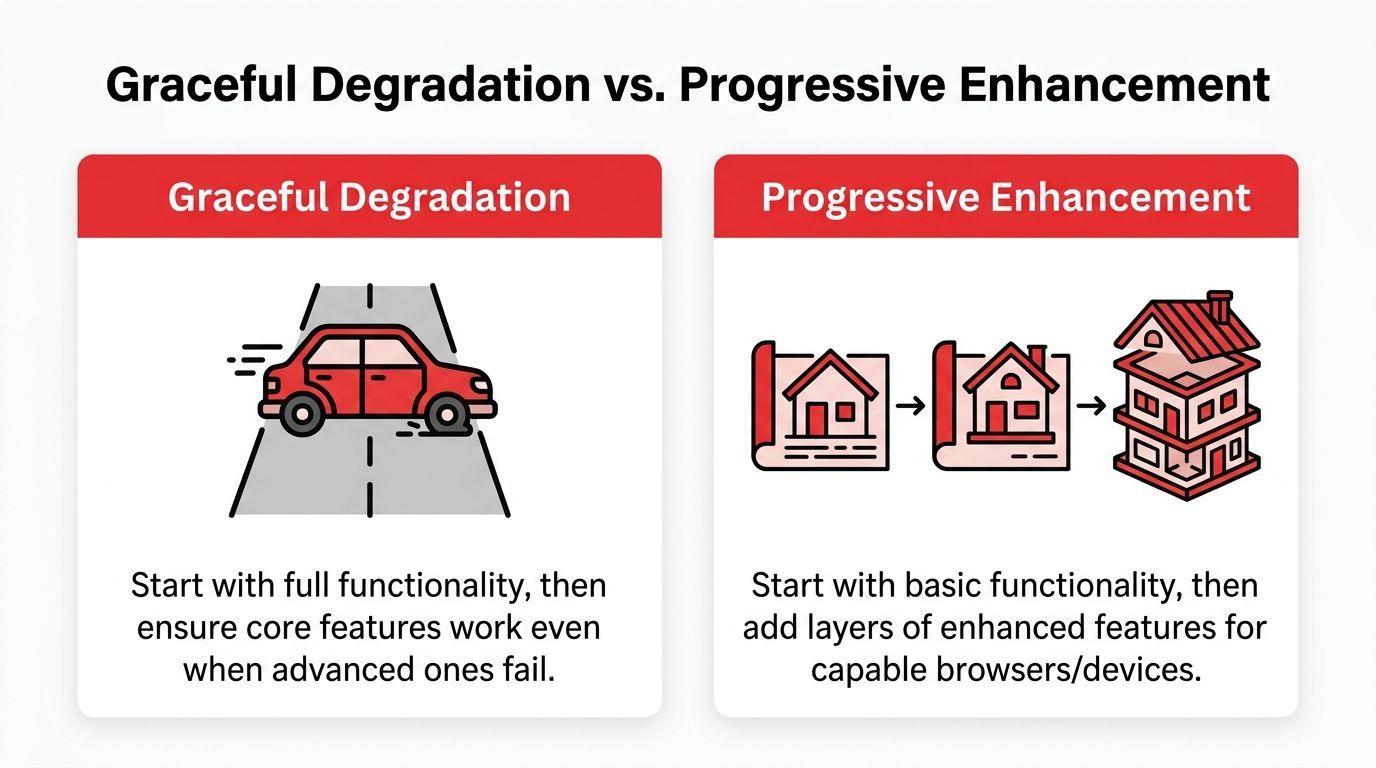
Graceful degradation begins with a richer system and asks how it should behave when parts of that system stop cooperating. Progressive enhancement begins with a simpler baseline and asks what extra capability can be added without putting the baseline at risk.
Two different starting points
With graceful degradation, the team designs the full experience first. Then it defines what remains available if JavaScript fails, an API times out, a third-party script is blocked, or a model endpoint starts rate-limiting requests.
With progressive enhancement, the team ships the minimum useful path first. Then it layers on faster interactions, richer visuals, personalization, or client-side intelligence for environments that can support them.
Good products often use both. A team might serve a plain HTML booking flow that works without client-side code, add richer interactions for modern browsers, and still specify what happens if those richer interactions fail under real production load.
The practical difference
Progressive enhancement is a build-up strategy. It protects access by making sure the core journey works in constrained environments from the start.
Graceful degradation is a failure strategy. It protects continuity by deciding, in advance, how the product behaves after something capable becomes unavailable.
That distinction matters more now than it did in the early browser-compatibility era. Modern products depend on payment providers, search services, feature flags, recommendation engines, and LLM APIs. Failures rarely look like a whole page refusing to load. They show up as one broken panel, one slow dependency, one missing answer, or one workflow that drops from smart to basic.
Where the concepts meet modern AI systems
This old web distinction maps cleanly onto AI product design.
A progressive enhancement approach to AI keeps the base product useful without a model. Search still returns indexed results. Support still routes tickets. Drafting tools still save, edit, and export text. The model improves the experience, but the product does not depend on it to remain usable.
A graceful degradation approach assumes the AI feature is part of the normal experience, then plans for partial failure. If the primary model is unavailable, the system can switch to a smaller model, reduce context length, serve cached results, or return a structured fallback such as "summary unavailable, showing source excerpts instead."
That is the same reliability principle, applied to newer infrastructure.
Graceful Degradation vs. Progressive Enhancement
Choosing between them
The choice depends on failure cost and audience expectations.
Public services, content sites, and accessibility-sensitive products usually benefit from a progressive-enhancement mindset because broad access is the first requirement. Integration-heavy applications, SaaS products, and AI features need explicit degradation plans because the main risk appears at runtime, after launch, under messy conditions no staging environment fully reproduces.
Teams do best when they treat these as complementary tools rather than rival philosophies. Build a baseline that can stand on its own. Then decide how the richer experience should shrink, step by step, when dependencies falter.
A degraded experience should still look intentional. Users can accept reduced capability. They lose trust when reduction feels random.
Real-World Examples of Graceful Degradation
Theory becomes useful when you can see the failure mode and the fallback side by side.
Web experience that stays readable
A news site publishes an article with an interactive chart built in JavaScript. The chart library fails to load on a low-powered device or an older browser. If the article body depends on the same rendering path, readers get a broken page shell and an empty box where the story should be.
A better design keeps the article text, headline, captions, and static summary available even when the interactive element fails. The visualization is additive. The content is not hostage to it.
This is graceful degradation in a very web-native form. The enhanced experience is available when conditions allow it. When it doesn't, the page still communicates.
Mobile app that survives connectivity loss
A travel app is easy to use when the network is stable. Real life is not stable. Airports, trains, and border crossings are exactly where users lose connectivity.
A brittle app puts booking details behind a live API call and turns the screen into a spinner. A resilient app caches downloaded boarding passes, gate information last seen, and booking references for offline access. The user may not get the latest seat-map refresh, but they still get the information needed to move.
The app isn't pretending to be fully online. It's preserving the mission-critical workflow.
Backend service that falls back to generic results
A product feed service depends on a personalization engine. Under normal conditions, users see ranked items adjusted to their behavior. Then the personalization service starts timing out.
If the homepage waits on personalization, the entire feed may fail. A better design serves a non-personalized fallback such as trending products, editor picks, or most popular items. Users lose relevance, but they don't lose the ability to browse.
That trade-off is common in microservice architectures:
- Personalization can be optional: ranking quality drops, but the page renders
- Inventory accuracy may need stronger guarantees: if stock data is stale, the UI should communicate uncertainty
- Payment authorization usually can't fake success: some paths must stop rather than degrade
Good degradation preserves the user's task, not necessarily the original implementation.
AI-flavored example that older articles miss
An AI support assistant adds another version of the same problem. The primary model is overloaded or rate-limited. The worst response is silence, a timeout, or an error blob exposed straight to the user.
A more resilient design returns a simplified answer path. That might mean switching to a smaller model, narrowing the response format, or limiting the assistant to retrieval-backed answers only. The experience is reduced, but not absent.
The important pattern across web, mobile, backend, and AI is consistent: separate core value from premium behavior. Once you know that boundary, graceful degradation becomes a design tool instead of an incident response scramble.
Implementation Patterns and Best Practices
Graceful degradation doesn't happen because teams “believe in resilience.” It happens because they design fallback paths ahead of time and keep those paths simpler than the main path.
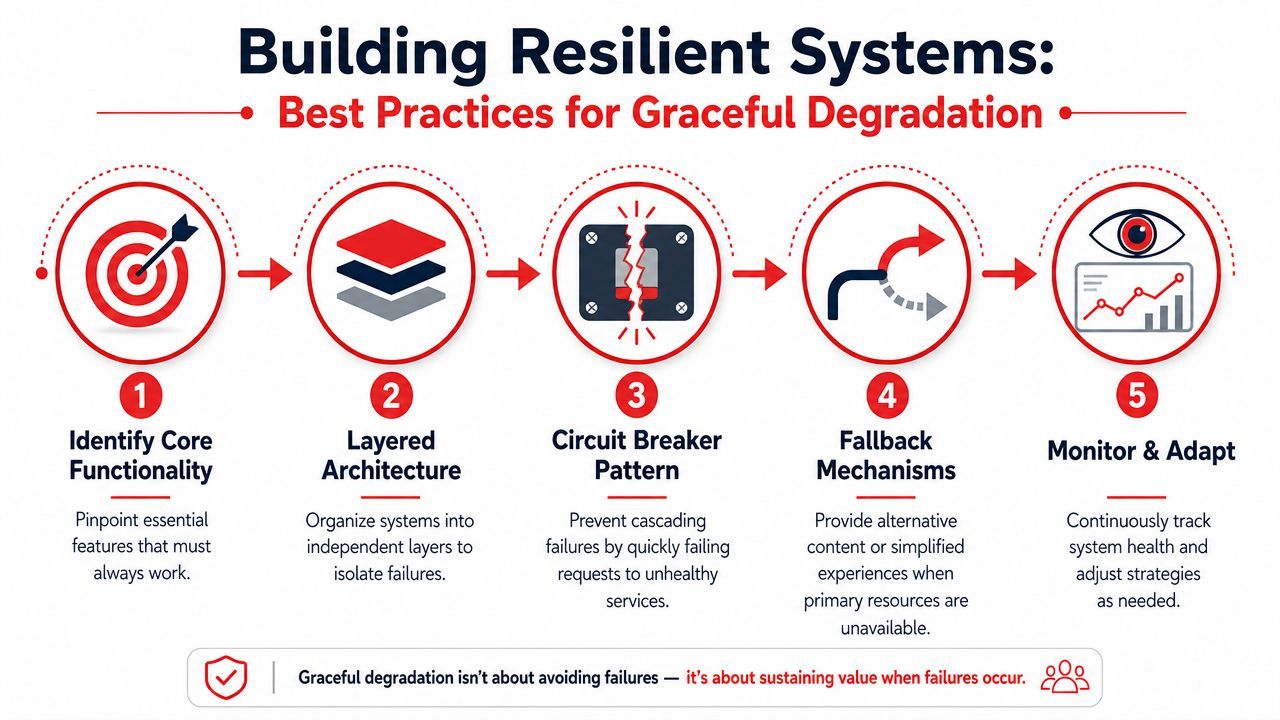
Start with critical user journeys
Before picking patterns, identify the few journeys your product must preserve under stress. Don't list everything. That turns the exercise into paperwork.
For most products, the list is short:
- Access: can users log in, authenticate, and reach their account?
- Core action: can they search, read, message, upload, or complete the main product task?
- Recovery path: can they retry, save progress, or come back later without losing context?
If a component doesn't directly support one of those journeys, it's a candidate for reduced functionality during failures.
Patterns that work in production
Circuit breakers
Circuit breakers stop repeated calls to an unhealthy dependency. Instead of letting every request wait and fail slowly, the system quickly returns a fallback result or a controlled degraded response.
Use them when a dependency can become slow enough to cause cascading failures. That includes payment APIs, recommendation engines, search backends, or model inference endpoints.
Aggressive timeouts
A timeout is a product decision disguised as an infrastructure setting. If your page waits too long for a non-critical service, you've accidentally declared that service critical.
Short timeouts protect the overall experience. They force the system to prefer “good enough now” over “maybe complete later.”
Fallback data paths
A fallback path should be simpler than the primary path. Common options include cached data, stale reads, default rankings, disabled write operations with preserved reads, or buffering writes for later processing.
Google Cloud's architecture guidance notes that in high-availability scenarios, read replicas and buffered writes can reduce downtime by 90% during dependency failures, because the system continues delivering acceptable functionality while dependencies recover, as described in Google Cloud's graceful degradation guidance.
Feature flags and kill switches
Runtime controls let operators disable unstable features without waiting for a deploy. That matters during incidents because code changes are often the wrong first move. You want isolation first, diagnosis second.
Feature flags work best when tied to explicit fallback behavior. Turning a feature off should reveal a safe path, not a hole in the UI.
What doesn't work
Some degradation strategies look good in architecture diagrams and fail in practice.
Operator's view: If you can't explain the degraded mode in one sentence, it's probably too complicated to trust during an incident.
A practical implementation order
- Map dependencies for each core journey.
- Classify components as essential, optional, or deferrable.
- Set timeout budgets that reflect product priorities.
- Add fallback paths using stale, cached, generic, or deferred behavior.
- Expose runtime controls so on-call teams can react fast.
- Test failure modes before production traffic does it for you.
The New Frontier Degrading Gracefully in AI Systems
At 2:13 a.m., the model endpoint is still returning 200s, but customers are already feeling the outage. Answers take too long. Tool calls fail halfway through. The assistant responds in polished language that sounds correct and still misses the mark. That is a harder failure mode than a clean crash because the system looks alive while reliability is slipping underneath it.
Classic graceful degradation in web systems dealt with visible breakage. A browser feature failed, a script did not load, an API timed out. AI products inherit those same infrastructure problems, then add a new layer of ambiguity. Many AI failures still produce an answer.
That changes the design goal. The job is not only to keep the request path alive. The job is to keep the system useful and honest when model quality, latency, context access, or tool execution gets worse.
The AI-specific failure mode
AI systems often fail by sounding more capable than they are. A model can lose retrieval access, miss a rate limit retry, or receive an unusual input and still generate fluent output. If the application presents every response with the same confidence and authority, degradation is already happening. It is just hidden.
Older articles on graceful degradation rarely cover this because the web did not have to manage probabilistic behavior in the same way. A disabled JavaScript widget was obvious. A partially impaired LLM is not. Production teams need fallback logic that accounts for uncertainty, not only downtime.
A better design lowers confidence, narrows scope, or switches modes when signals look bad. Those signals can include latency spikes, failed tool invocations, empty retrieval results, provider throttling, or input patterns that sit outside normal operating conditions.
Practical degradation patterns for LLM products
Model fallback
If a premium model exceeds the latency budget or a provider starts rate-limiting, route eligible requests to a smaller model. That trade-off is often acceptable for summarization, classification, extraction, and first-draft writing.
It is usually a bad trade for tasks that depend on long reasoning chains, strict accuracy, or high-stakes recommendations. The fallback decision should follow task risk, not infrastructure convenience.
Capability downgrade
When tool use becomes unreliable, remove the action path and keep the advisory path. Do not let the model imply that it completed a write, sent a message, or updated a record if the system cannot verify execution.
That means an assistant can still explain billing policy when the billing API is down. A coding assistant can still discuss design options when repository indexing fails. A support bot can still answer from approved documentation when account lookup is unavailable.
Retrieval-only safety mode
If generation quality becomes unstable, restrict responses to retrieval-backed answers or approved snippets. Users get less flexibility, but they get an answer tied to known context instead of free-form guesswork.
This is the AI version of serving a plain HTML page when the richer client experience breaks. Capability drops. Utility remains.
Queue and defer
Some AI work does not need to finish in the request cycle. Long document analysis, image generation, batch enrichment, and report drafting can move to asynchronous processing. The product acknowledges the request immediately, then delivers the result when the heavy path recovers or completes.
This section benefits from seeing the operational side in motion:
Why the web analogy still matters
The old web development lesson still holds up. Advanced behavior should improve the experience, not become the only way the product can do its core job.
That principle maps cleanly to AI systems. Replace "unsupported browser feature" with "model provider instability." Replace "JavaScript enhancement failed" with "tool call failed" or "retrieval returned nothing." The architecture question stays the same: what is the minimum useful experience, and how does the system reach it under stress?
Teams that answer that question early build AI products that fail with discipline instead of improvisation. They preserve the core task, reduce capability on purpose, and avoid the most dangerous outcome in AI systems: confident output from a degraded path.
Communicating Failure The Missing UX of Degradation
A system can degrade correctly at the infrastructure layer and still fail the user.
That happens when the product hides the degraded state. The chart area is blank. The assistant answers vaguely without admitting it lost tool access. The checkout page disables payment options with no explanation. Engineers may call that resilience. Users call it broken.
Reliability without communication isn't enough
A major gap in most guidance is the UX side. A key principle is being explicit about degraded states by acknowledging unavailable features, explaining what can still be done, and annotating outputs with uncertainty, especially for AI agents where failures can be subtle, according to research on graceful degradation in AI agent systems.
That principle matters because partial failure creates ambiguity. If you don't explain the state, users invent their own explanation. Usually it's the least charitable one.
What users need to see
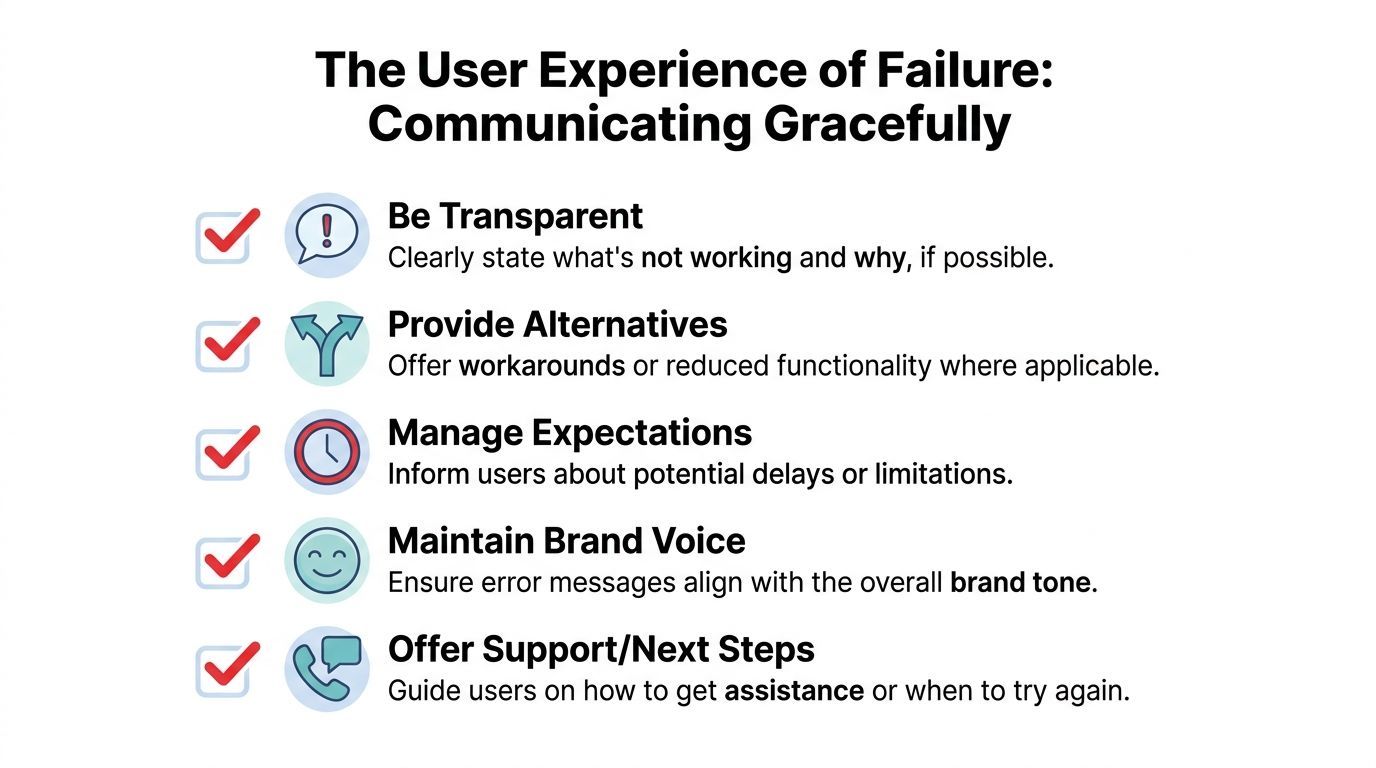
A good degraded-state message does four things:
- Acknowledge the limitation: say what isn't available right now
- Preserve agency: tell users what still works
- Signal uncertainty: especially in AI outputs, label when answers may be incomplete
- Offer a next step: retry, notify, save, continue with reduced functionality, or contact support
Here's the difference in tone.
Billing sync is temporarily unavailable. You can still view your invoices and account settings, but new payment method updates may be delayed.
That message gives the user a map. Compare it with “Something went wrong,” which tells them almost nothing.
A short UX checklist
Transparent degradation protects trust because it shows intentional control. Users don't expect perfection. They do expect honesty.
A Practical Checklist for Building Resilient Systems
Use this as an agenda for your next architecture review.
- Map the core journeys: identify the actions your product must preserve when dependencies fail
- List every dependency: internal services, third-party APIs, browser features, model providers, queues, and data stores
- Classify each dependency: essential, optional, or deferrable
- Define fallback behavior: stale reads, cached content, generic rankings, offline access, queued writes, or reduced AI capability
- Set timeout and retry rules: make sure non-critical services can't stall critical workflows
- Add runtime controls: feature flags, kill switches, and operator-visible health states
- Design the user message: tell people what's unavailable, what still works, and what to do next
- Test degraded modes on purpose: don't wait for a real outage to discover that your fallback also depends on the failing service
- For AI systems, lower confidence appropriately: use safer modes when retrieval, tools, or primary models become unreliable
The test of graceful degradation is simple. When something breaks, can users still make progress?
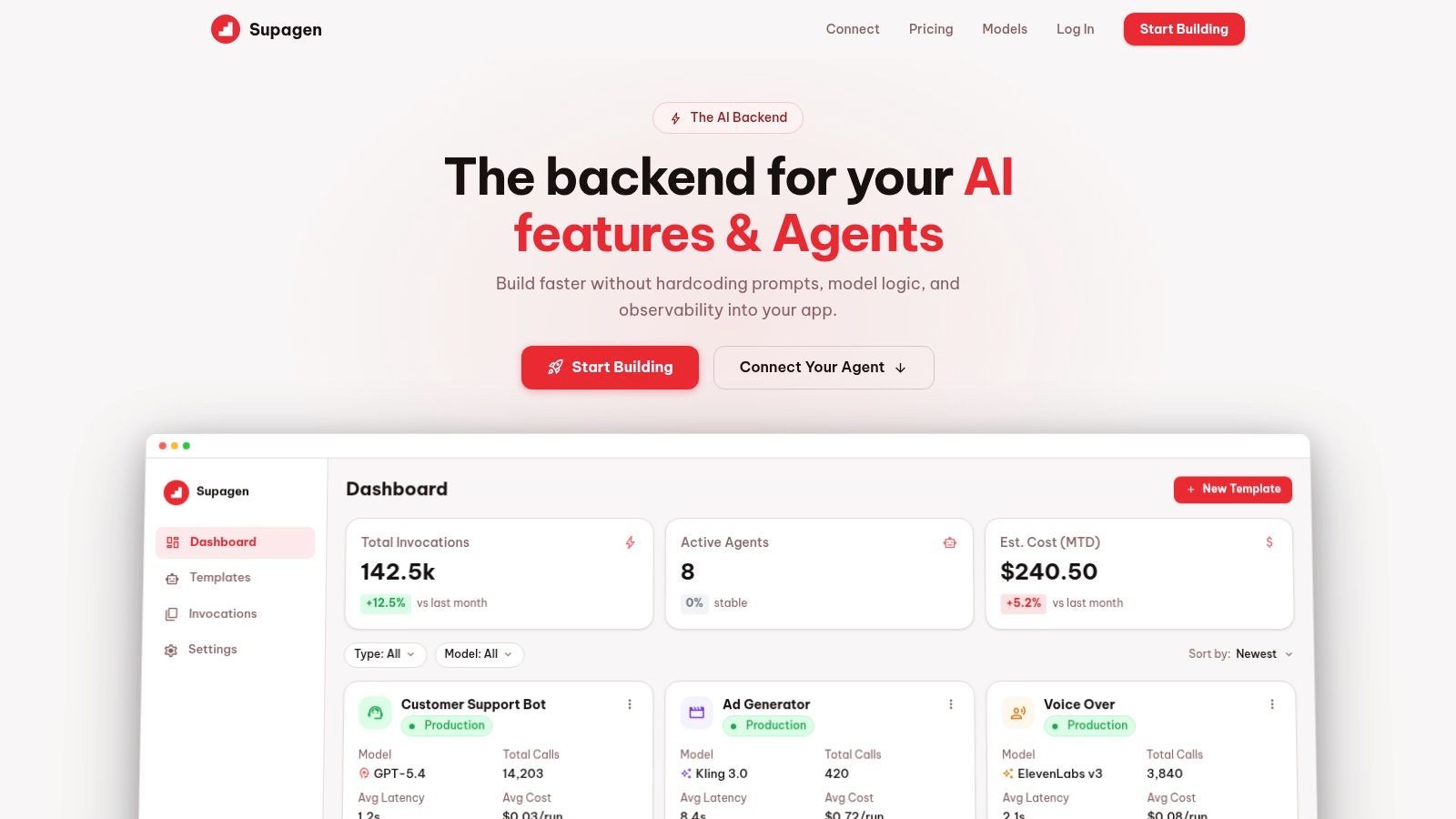
Supagen helps teams operationalize that kind of resilience for AI products. With Supagen, you can manage prompts, model routing, fallbacks, observability, and usage from one backend layer instead of hardcoding those decisions into your app. That makes it much easier to ship AI features that keep working, even when models, providers, or prompt strategies need to change under real production conditions.