
What Is an LLM Agent? from Concept to Production
You're probably here because a normal chatbot got you close, but not far enough.
You asked an LLM to do something useful, maybe review support tickets, research competitors, update a CRM, or summarize a set of bug reports and suggest next steps. It gave you a smart-looking answer. But it didn't perform the work. It didn't check a database, call an API, retry after an error, or keep going until the task was complete.
That gap is where the idea of an LLM agent starts to matter. If you've been wondering what is an LLM agent, the short version is this: it's not just an LLM that talks. It's an LLM wired into a system that can plan, use tools, remember context, and act toward a goal.
The interesting part isn't the definition. The interesting part is what happens when you try to run one in a real product. That's where cost spikes, looping failures, weak visibility, and brittle deployments show up fast.
Table of Contents
- Beyond Chatbots What Is an LLM Agent
- The Core Anatomy of an LLM Agent
- Agents vs RAG vs Basic LLMs
- Practical Use Cases and Agent Architectures
- Designing Safe and Reliable Agents
- From Localhost to Production with a Unified Backend
- Conclusion The Future Is Autonomous
Beyond Chatbots What Is an LLM Agent
A basic LLM is great at producing language. That's not the same as completing a task.
Ask ChatGPT or Claude to draft an email, explain an API, or summarize a document, and you'll often get something strong on the first try. Ask it to investigate a failed payment, look up the customer, check refund policy, file the action, and then write a reply based on what it found, and the limits become obvious. A plain chat model can describe what should happen. It usually can't carry out the sequence on its own.
That's why the cleanest mental model is this: a basic LLM is like a very knowledgeable reference desk. An LLM agent is closer to a personal assistant who can read the request, decide what to do next, use the right tools, and keep working until the goal is reached.
According to TrueFoundry's explanation of LLM agents, an agent is an autonomous system that uses an LLM as its reasoning engine and operates through a sense-think-act loop. That loop is the big shift. Instead of responding once to a prompt in isolation, the system evaluates the task, chooses an action, observes the result, and continues.
A useful question isn't “Can the model answer this?” It's “Can the system finish this?”
That distinction clears up a lot of confusion around what is an LLM agent. People often assume agents are just “better chatbots.” They're not. They're a different software pattern.
From text to action
A normal LLM session often looks like this:
- Input comes in: The user asks a question or gives an instruction.
- Model responds once: It generates the most likely helpful text.
- The human does the rest: You copy the answer, open other tools, and complete the work manually.
An agent changes the last step.
- Input comes in
- The model reasons about next actions
- The system calls tools
- It evaluates results
- It continues until it hits a stopping condition
That's why agents feel more like workflow engines than chat interfaces.
Why people get confused
The term “agent” gets stretched to cover everything from a simple prompt wrapper to a complex autonomous system. For practical engineering, the line is much simpler. If the system can use tools in a loop to pursue a goal, you're in agent territory. If it just answers once, even with retrieved context, you're still dealing with a narrower class of application.
That difference matters later when you think about architecture, testing, and production reliability.
The Core Anatomy of an LLM Agent
The easiest way to understand an agent is to stop thinking about it as one magic model and start thinking about it as a modular system.
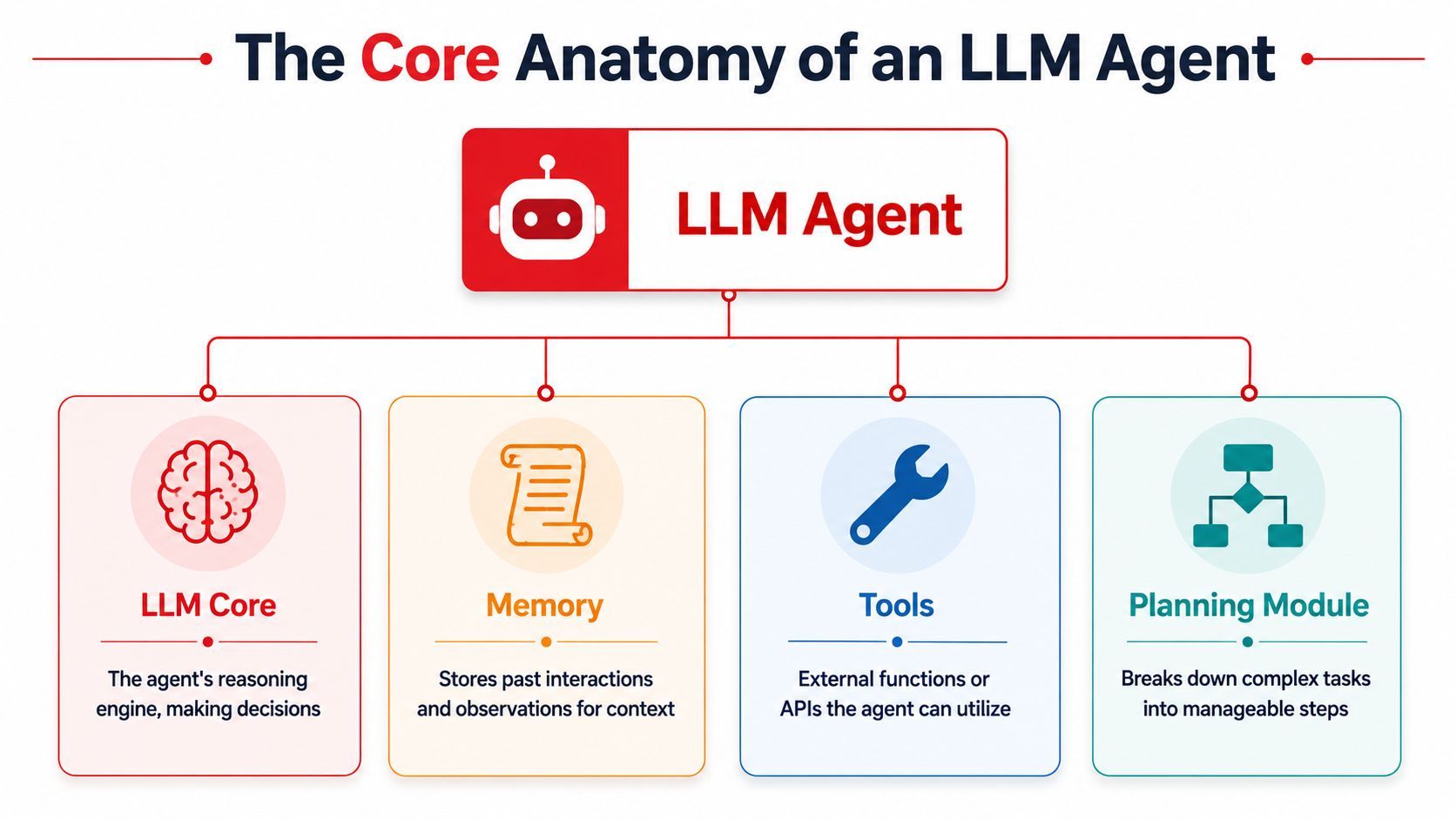
Prompting Guide's research overview of LLM agents describes an LLM agent as a system where the LLM acts as the central brain and orchestrates four critical components: a planning module, a memory module, a tool-use interface, and the LLM core itself.
From text generator to goal seeker
A chef analogy works well here.
The LLM core is the chef's brain. It interprets the order and decides what should happen next. The planning module is the recipe. It turns a broad request into smaller steps. Memory is the chef's notebook, where past attempts, observations, and context are stored. Tools are the kitchen equipment. Without them, the chef can think, but can't cook.
An agent becomes useful when these parts work together in a loop:
- Sense: Observe the user request and any external state.
- Think: Decide the next best step.
- Act: Use a tool, write a response, or update a plan.
- Repeat: Incorporate the new result and continue.
That loop is what gives the system autonomy. Not full human autonomy, but bounded autonomy inside a task.
The four parts that matter
Here's the architecture in plain language:
A few practical notes matter here.
- Planning doesn't need to be fancy: Sometimes it's explicit chain-of-thought-like decomposition. Sometimes it's a lightweight step selector. The key is that the agent doesn't treat the whole request as one shot.
- Memory can be short-term or longer-term: In many products, memory is just structured conversation state and execution logs. In others, it may include persisted user preferences or prior task history.
- Tools define the ceiling: A brilliant model without useful tools is still boxed in. Most real agent systems become valuable when they can query systems of record or trigger actions safely.
Practical rule: The model is rarely the whole product. The harness around the model usually determines whether the agent is useful.
When builders first ask what is an LLM agent, they often focus on model intelligence. In practice, architecture matters more. A stronger model helps, but a weak planning loop, poor memory handling, or unsafe tool layer will still produce a fragile system.
Agents vs RAG vs Basic LLMs
A lot of product mistakes start with a category error. A team needs an answer engine, but builds an agent. Or it needs a system that can take action, but ships a polished chatbot with no real ability to do work.
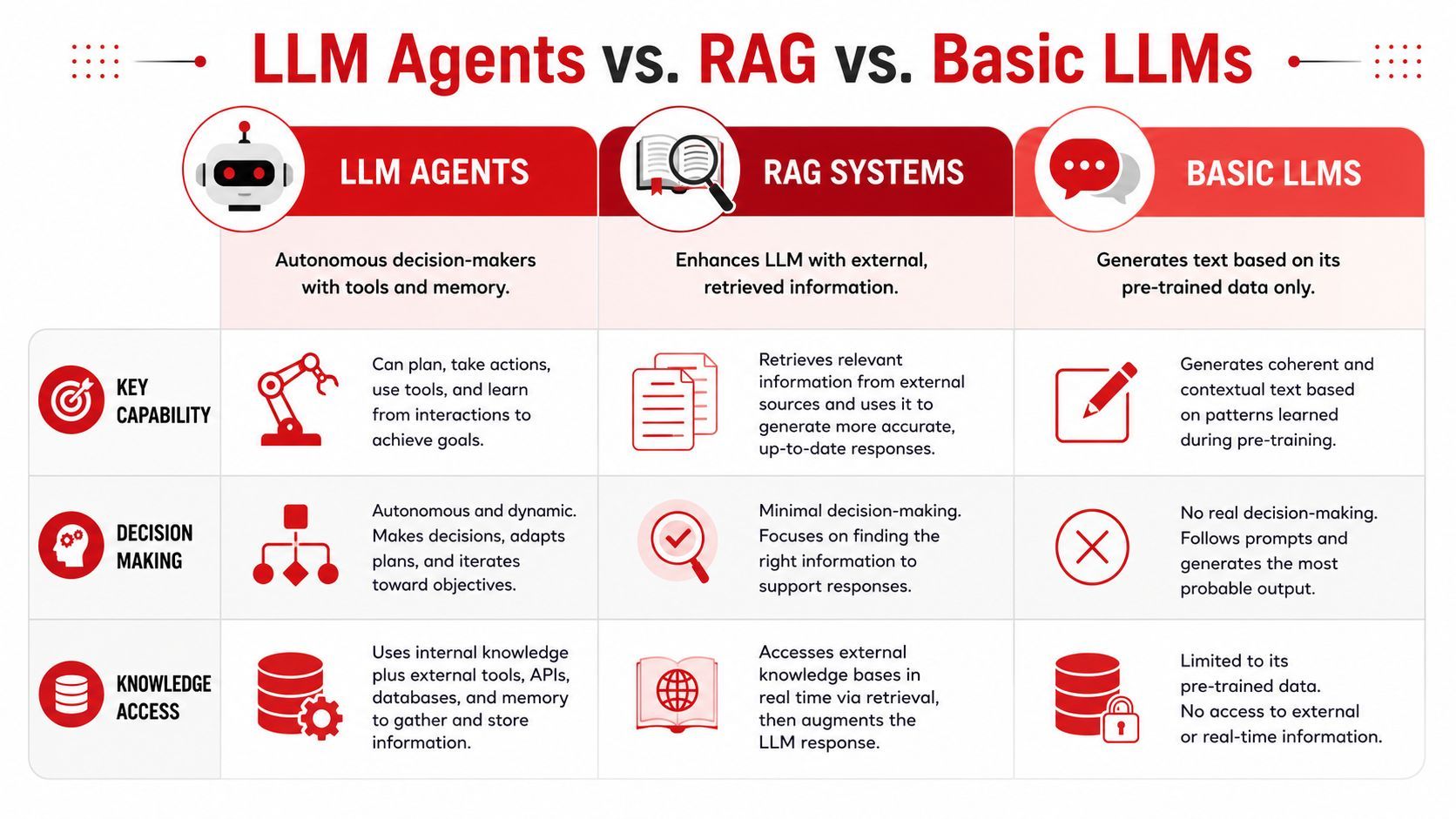
A basic LLM predicts the next tokens from the prompt and its training. A RAG system adds a retrieval step so the model can answer using current, relevant documents. An agent adds control flow. It can inspect the situation, choose a next step, call tools, and keep working until the task is complete or blocked.
Three systems, three jobs
The easiest way to separate them is by asking what each system can do after it generates text.
A basic LLM works well for drafting release notes, rewriting support replies, or summarizing a meeting transcript. The model is the product.
RAG fits cases where the job is "look up the right information, then explain it clearly." A support FAQ bot is the classic example. It searches trusted docs, pulls the relevant passages, and answers with citations or grounded context.
Agents belong in a different class of problem. Consider a refund request. The system may need to verify the order, check shipment status, inspect refund policy, ask a clarifying question, submit an API call, log the action, and then respond to the customer. Retrieval helps, but retrieval alone does not run that workflow.
A short explainer can help anchor the comparison:
Why multi-step work changes the picture
The practical dividing line is whether the path stays fixed.
RAG is strong when the sequence is simple. Find relevant context. Put that context in the prompt. Generate an answer. Once the task starts depending on intermediate results, the system needs more than retrieval. It needs a loop that can decide, "I found X, so the next step should be Y."
That difference matters in production. A RAG pipeline is usually cheaper to run, easier to debug, and easier to evaluate because the flow is constrained. Agents cost more because they often use more tokens, more model calls, and more external tools. They are also harder to observe. If an answer is wrong, you need to know whether the failure came from planning, retrieval, tool execution, state handling, or the model itself.
Reliability changes too. A basic LLM can fail by hallucinating. RAG can fail by retrieving the wrong document or misreading the right one. An agent can fail in all of those ways plus workflow-specific ones, such as choosing the wrong tool, repeating steps, or taking an unsafe action. That is why many teams discover that getting an agent demo to work is much easier than running one consistently in production.
If the task can change course based on what the system learns halfway through, you are usually in agent territory.
A simple selection rule helps:
- Use a basic LLM for language tasks such as drafting, rewriting, and summarization.
- Use RAG when the answer must be grounded in external knowledge.
- Use an agent when the system must decide, act, and adapt over multiple steps.
For teams evaluating a product idea, the most useful question is practical rather than philosophical: Does the system need to do work across systems, or only produce a well-grounded answer? That answer shapes not just the architecture, but also the cost model, test strategy, and backend you need to run it reliably.
Practical Use Cases and Agent Architectures
The concept gets real when you attach it to work somebody wants done.
Salesforce's overview of LLM agent applications lists diverse uses including customer service automation, content creation, code generation, personalized recommendations, and orchestrating multi-step business processes. That range matters because agents aren't one product category. They're a pattern you can apply across functions.
A research agent
Say you need a quick market brief on competing developer tools.
A research agent can take a goal like “compare five products in this category,” then search the web, open documentation pages, extract pricing or feature details where available, organize notes, and produce a report. The value isn't just the final summary. It's the fact that the system can gather and refine evidence over multiple steps instead of waiting for a human to steer every move.
Typical tool stack:
- Web search
- Browser or page retrieval
- Structured note storage
- Document generation
This kind of agent often needs strong planning and source-handling discipline. Without that, it can drift, over-collect, or summarize weak material confidently.
A support agent
A customer writes in and says, “My order never arrived. Can you refund me?”
A normal chatbot can draft a polite response. A support agent can do more. It can look up the order, inspect shipment status, check refund policy, decide whether the case fits the rule set, trigger the refund action if allowed, and then write the final reply based on the actual transaction.
That architecture usually combines:
- A front-end conversational layer.
- A policy-checking step.
- One or more internal tools, such as order lookup and refund APIs.
- A review gate for sensitive actions.
The highest-value agents usually sit close to systems of record, not just content.
At this point, business value becomes concrete. Teams save manual effort on repetitive workflows, but only if the agent can access the right tools and only if action boundaries are clear.
An operations agent
Now take a product or infrastructure workflow.
An operations agent can monitor alerts, inspect logs, look up recent deploy history, run a predefined diagnostic tool, and prepare either a suggested fix or a human-ready incident summary. In a narrow environment, it may even attempt approved remediation steps.
This architecture often looks different from a customer-facing agent:
- Event-driven triggers instead of chat-only input
- Strict tool permissions because actions can be risky
- Audit logs so teams can inspect what happened
- Fallback to human operators for ambiguous cases
The pattern is the same across all three examples. The user sets a goal. The agent decomposes the work. Tools facilitate the process. Memory keeps state coherent. The application around the model determines whether the result is helpful or hazardous.
Designing Safe and Reliable Agents
Most articles stop at capability. Production systems fail on reliability.
That gap is expensive. NVIDIA's industry survey summary reports that 68% of organizations deploying LLM agents face budget overruns due to uncontrolled token usage, while 54% report agent failures in critical tasks due to hallucination loops.
Failure modes builders hit first
The common failure cases are rarely glamorous.
One is the tool loop. The agent keeps calling search, retrieval, or other tools because it never reaches a clean stopping condition. Another is the hallucinated action path. The model invents facts about system state and takes the wrong next step. A third is memory corruption, where stale or incorrect intermediate state pushes the run off course.
Security also enters quickly. If your agent reads untrusted text from the web, email, tickets, or docs, that text can influence behavior unless you isolate instructions from data carefully.
Guardrails that belong in every agent
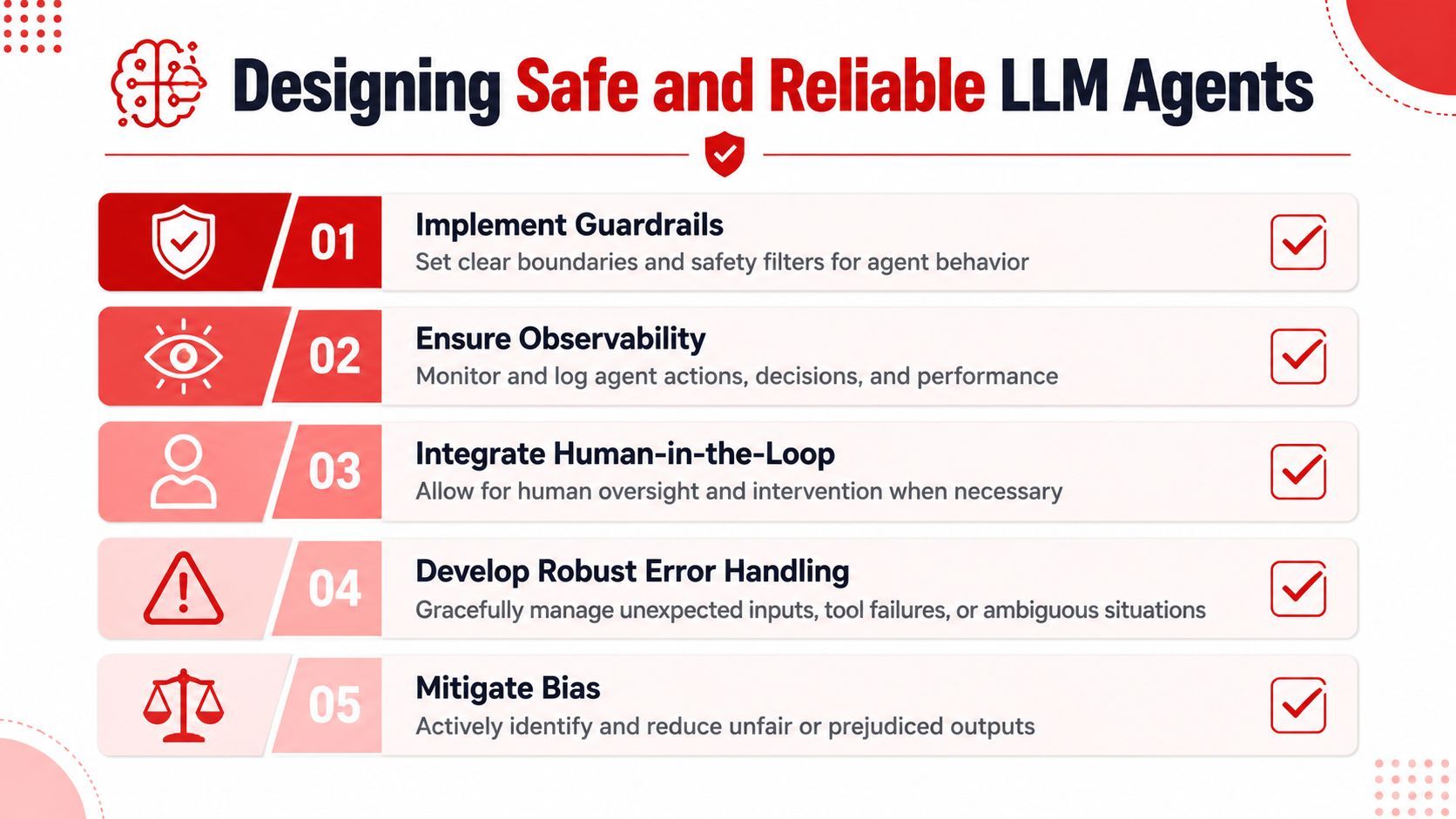
A reliable agent needs constraints at multiple layers, not just one good prompt.
- Bound the objective: Give the system a narrow task, explicit stopping rules, and clear tool permissions.
- Validate tool inputs and outputs: Don't let the model pass unchecked arguments into APIs that can change real state.
- Use human approval for sensitive actions: Refunds, deletions, account changes, and code deployment shouldn't happen on pure model confidence.
- Set spend controls: Token and execution ceilings keep a bad loop from becoming a budget problem.
- Log every step: You need a trace of prompts, tool calls, outputs, and errors to debug failures.
Safe agents aren't the ones that never make mistakes. They're the ones that fail in visible, bounded, recoverable ways.
A useful review checklist before launch:
- Can the agent stop itself?
- Can you inspect every tool call?
- Can a human intervene before risky actions?
- Can the system recover from tool failure or ambiguity?
- Can you see what each run cost?
If the answer to several of those is no, the system may still be a demo, not a production service.
From Localhost to Production with a Unified Backend
Many teams can build an agent demo in a notebook or weekend project. The hard part is keeping it stable once real users touch it.
An agent is still, at its core, an autonomous system using an LLM as its reasoning engine in a sense-think-act loop, as described earlier by TrueFoundry. The production challenge comes from everything wrapped around that loop.
Why demos survive and products break
A local prototype usually has hidden assumptions.
The prompt sits inside application code. Model selection is hardcoded. API credentials are scattered across environments. Logging is shallow. If the agent starts producing worse results after a prompt tweak, there may be no safe version rollback. If latency jumps or costs climb, the team may not know which model call caused it.
Those problems pile up faster with agents than with basic chat features because agents make more decisions, trigger more calls, and have more surface area for failure.
A production system needs infrastructure that treats prompts, routing, and traces as first-class operational objects.
What a production layer needs to do
A unified backend, then, becomes practical, not optional.
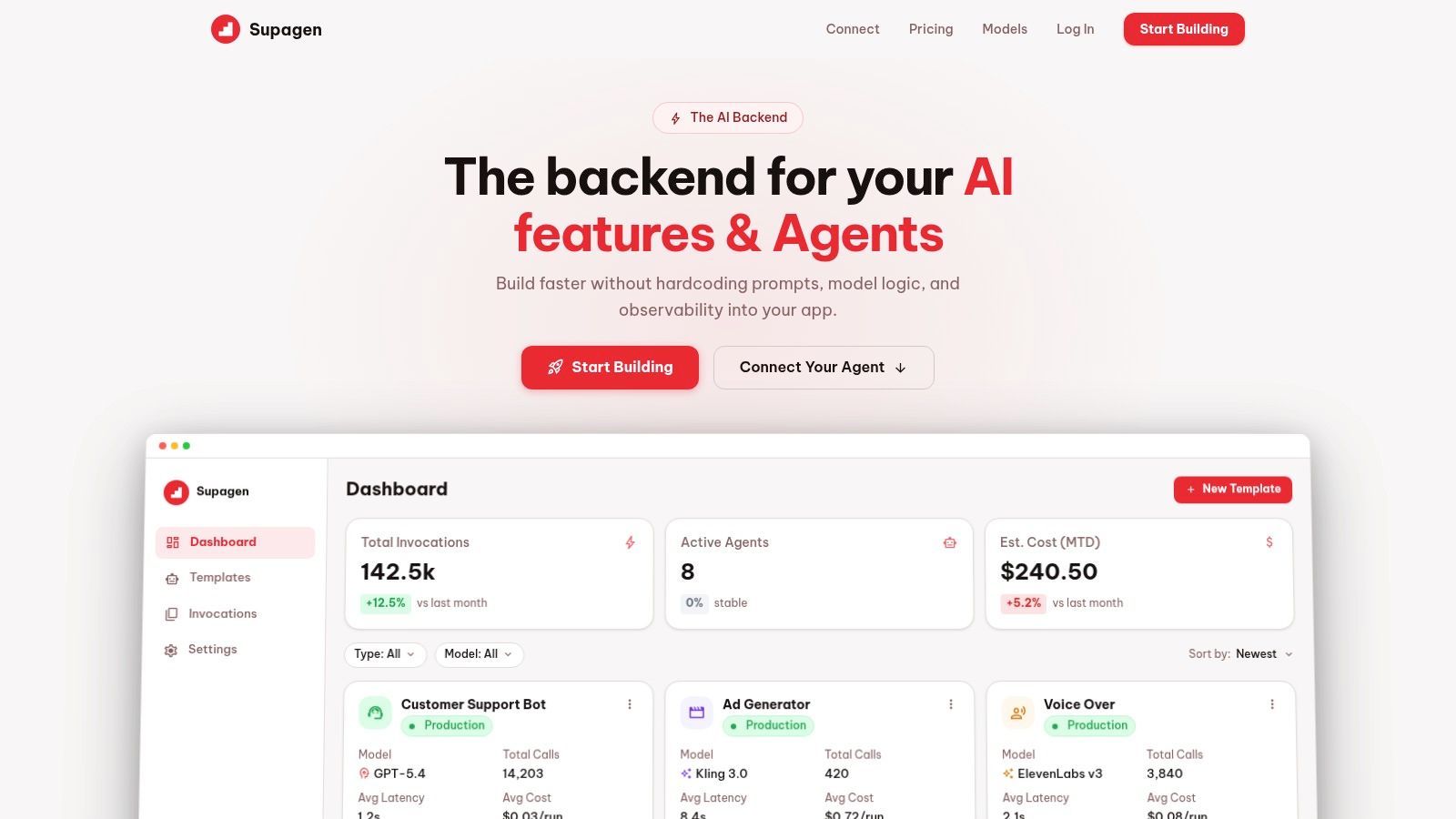
For agent deployments, the backend should support a few concrete jobs well:
This matters for both technical and non-technical teams. Engineers need traces and debugging hooks. Product teams need confidence that a prompt change won't break a workflow unnoticed. Founders need visibility into cost and reliability before usage scales.
Production agent work is often less about “Which model is smartest?” and more about “Can we see, control, and revise the system without chaos?”
Once you reach that stage, the question “what is an LLM agent” stops being theoretical. It turns into a systems question about execution loops, permissions, observability, and operational discipline.
Conclusion The Future Is Autonomous
An LLM agent is best understood as a goal-oriented software system, not a chat interface with better branding.
The core idea is simple. The LLM provides reasoning. Planning breaks work into steps. Memory maintains context. Tools connect the system to the outside world. Together, those parts let the agent operate in a loop until it reaches a defined objective.
That's what separates agents from basic LLMs and from RAG systems. A basic model answers. RAG answers with retrieved context. An agent can decide, act, observe, and continue.
The more important lesson is practical. Once agents leave the demo stage, the hard problems shift. Cost control, logging, tool safety, failure handling, and prompt management start to matter as much as model quality. Teams that ignore that layer usually end up babysitting fragile workflows. Teams that design for visibility and control give themselves a real chance to ship something durable.
The opportunity is large because many software tasks are already structured as goals plus tools plus feedback. That maps naturally to agentic systems. Support operations, internal research, developer workflows, and business process automation are all obvious starting points.
If you've been trying to understand what is an LLM agent, the best takeaway is this: it's not magic, and it's not just hype. It's a concrete architecture for turning language models into systems that can pursue work.
If you're building AI features or agents and don't want prompts, model routing, and observability buried inside application code, Supagen gives you a production layer for shipping faster. You can manage versioned prompts, route across providers, inspect per-call logs for tokens, latency, inputs, outputs, and costs, and update behavior without constant redeploys. It's a practical setup for teams that want agent workflows to be inspectable, controllable, and easier to operate in production.