What Is AI Orchestration: Guide to Production AI
You probably already have an AI feature that “works.”
A user sends text. Your app calls an LLM API. You return an answer. In a demo, it feels done.
Then production requirements arrive all at once. Product wants fallback models when the primary provider is slow. Finance wants cost visibility by feature or customer. Support wants logs for bad outputs. Security wants tighter control over which tools an agent can access. Engineering wants to change prompts without pushing a full redeploy. What started as a neat API wrapper turns into a nest of conditionals, config files, retries, and one-off scripts.
That's the moment many in the field start asking what AI orchestration is, even if they don't use the term yet. They're not looking for theory. They're looking for a way to stop AI logic from spreading through the codebase.
Table of Contents
- Beyond the API Call Why Your AI Feature Needs a Conductor
- What Is AI Orchestration Exactly
- The Core Components of an Orchestration Layer
- AI Orchestration vs Related Disciplines
- Common Architecture Patterns for AI Orchestration
- Practical Use Cases and an Implementation Checklist
- How to Choose Your Orchestration Strategy Build vs Buy
Beyond the API Call Why Your AI Feature Needs a Conductor
The first version of an AI feature is usually one file and one provider call. That's normal. A chatbot, summarizer, copilot, or content generator often starts with a prompt template plus a model name hardcoded into the app.
The trouble starts when the feature becomes important enough to maintain.
A single request now needs pre-processing, policy checks, model selection, a fallback path, tool calls, post-processing, and logging. If you keep layering that directly into product code, the app stops being easy to reason about. Small changes become risky because prompt logic, provider logic, and business logic are tangled together.
Practical rule: If changing a prompt, model, or retry policy requires an application redeploy, you don't have an AI platform yet. You have app code carrying infrastructure responsibility.
Orchestration proves useful. Not as a buzzword, but as a coordination layer. According to Airia's plain-English guide to enterprise AI orchestration, orchestration manages how AI agents, models, data sources, and workflows operate together across an enterprise environment. The same guide notes that without orchestration, organizations risk fragmentation, security gaps, or operational chaos.
The orchestra analogy holds up because it explains the actual job. A conductor doesn't play every instrument. The conductor decides who comes in, when they pause, and how the whole piece stays coherent. Your orchestration layer does the same for prompts, models, tools, memory, and policies.
Here's what usually breaks before teams adopt it:
- Model choice drifts into app code and every feature invents its own routing logic.
- Retries become blind and developers can't tell whether the problem was a provider timeout, a bad tool call, or malformed context.
- Costs become opaque because nobody tracks token usage and output behavior at the workflow level.
- Agent workflows become brittle when multiple steps share state without a clear controller.
A prototype can survive that for a while. A product can't.
What Is AI Orchestration Exactly
The short definition
AI orchestration is the operational layer between your application and the AI systems behind it. Once a team moves past a single prompt wired to a single model, someone has to control how requests are executed, how context is assembled, which tools are allowed, what happens on failure, and how the whole flow is observed in production. Orchestration puts that responsibility in one place instead of scattering it across feature code.

In practice, the app should be able to say, “classify this ticket,” “draft a reply,” or “answer this question from internal docs,” without also owning every execution detail. The orchestration layer picks the model, applies the right prompt version, adds retrieval or tools, enforces policy, records what happened, and chooses a fallback path if a provider call or tool step fails.
EPAM's overview of AI orchestration best practices describes these platforms as systems that automate, manage, and streamline the deployment, execution, and lifecycle of AI workflows across environments. That framing matters for product and engineering teams because production AI is rarely one call and one response. It is a workflow with dependencies, state, policy checks, and operational consequences.
Why it is not just an API gateway
A normal API gateway handles transport concerns such as authentication, rate limits, and request forwarding. AI orchestration handles execution concerns that show up after the request arrives. That includes prompt versions, memory or state, provider-specific settings, tool permissions, response evaluation, and fallback behavior tied to model output quality rather than HTTP status codes.
This distinction shows up fast in production. A support assistant may need retrieval from a knowledge base, a policy check before sending regulated content, a tool call into a CRM, and a second model pass to format the final answer. If step three fails, the system may need to retry with a narrower tool scope, switch providers, or return a safe partial response. An API gateway can pass traffic. An orchestration layer owns the workflow.
It also manages state across multiple steps. One user request can trigger several model calls, intermediate outputs, and tool invocations that all need to stay aligned to the same task and audit trail. In multi-agent systems, orchestration acts as the control plane that breaks work into subtasks, manages dependencies, and keeps outputs coherent. This focus on workflow integrity distinguishes orchestration from simple routing.
That is the practical shift from an API wrapper to a production layer. The question is no longer “can we call a model?” It is “can we run this AI feature repeatedly, safely, and with enough control to debug, govern, and improve it?”
The Core Components of an Orchestration Layer
Teams usually feel the need for orchestration after the first AI feature ships. The prototype worked with one model call and a prompt in code. A month later, product wants A/B prompt tests, support wants audit trails, finance wants cost visibility, and engineering is chasing bugs across model calls, retrieval, and tools. An orchestration layer exists to absorb that operational load.

Prompt management and versioning
Prompt logic should be treated like runtime configuration with change control, not like stray strings buried in controllers.
Once a team starts tuning behavior, prompt changes become product changes. They affect accuracy, tone, tool use, refusal behavior, and cost. If those changes are mixed into normal application deploys, every iteration gets slower and every regression gets harder to explain.
A usable setup usually includes:
- Versioned prompts so teams can compare outputs across revisions
- Environment-aware configuration so staging and production stay aligned
- Controlled edits and approvals so product, engineering, and QA can test changes without touching unrelated code
- Traceability so each response maps back to the exact prompt, model, and settings used
That traceability matters during incidents. If answer quality drops, the team needs to isolate whether the cause was a prompt edit, a model change, a retrieval problem, or a downstream tool failure.
Routing, fallbacks, and execution control
This component is where a simple wrapper turns into a production system.
Different requests need different handling. A cheap model may be fine for classification. A more capable model may be justified for policy-heavy reasoning or long-form synthesis. Some requests need retrieval first. Others should skip tools entirely because the risk of a bad action is higher than the value of automation.
If those decisions are scattered across feature code, behavior drifts. Costs rise. Debugging gets ugly.
A capable orchestration layer centralizes:
- Dynamic routing by task, customer tier, risk level, language, or modality
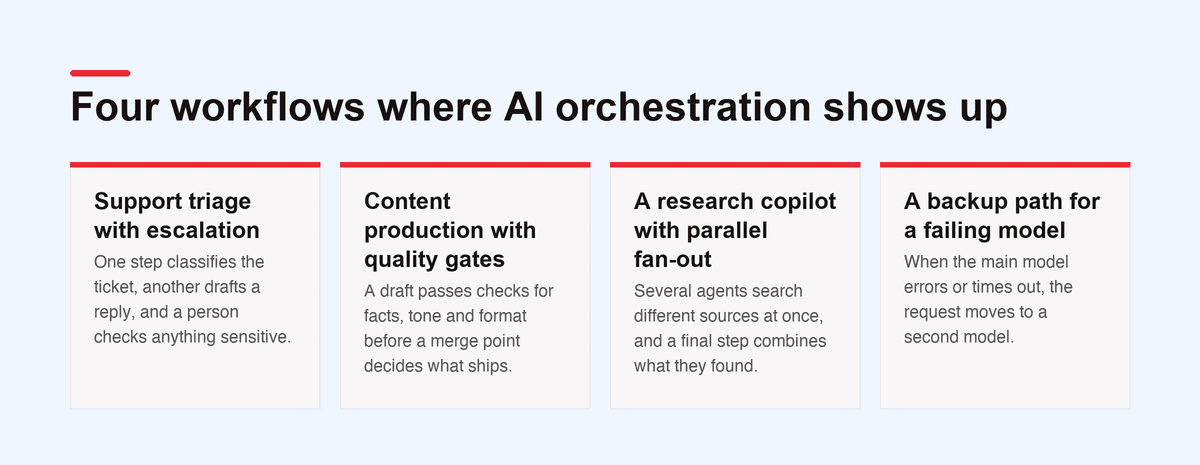
- Fallback paths when a provider is down, too slow, or returns weak output
- Retries with limits so transient failures recover without creating loops
- State handling across multi-step workflows and long-running sessions
- Execution policies that define which tools can run, in what order, and under what conditions
Agent systems frequently fail at this stage. The Redis engineering write-up on AI agent orchestration describes recurring production problems such as distributed coordination, shared state consistency, resource contention, and communication overhead. Those are not abstract concerns. They show up as duplicate tool calls, overwritten context, race conditions between agents, and workflows that pass tests but fail under real traffic.
The practical question is simple. Can the system make a good decision after one step fails?
Observability, cost controls, and multimodal support
AI features need request-level visibility. Standard application monitoring is not enough.
Teams need to inspect the full path of execution: prompt version, model choice, retrieval results, tool calls, latency by step, failure point, and cost for the whole workflow. Without that, the system can return a 200 while still producing low-quality answers, expensive behavior, or unsafe tool use.
The minimum useful controls look like this:
Multimodal traffic raises the stakes. Text, images, audio, and structured outputs do not behave the same way operationally or financially. If the orchestration layer reports them as one undifferentiated stream, product and engineering lose the ability to understand margin, latency, and failure patterns by workflow.
That is usually the moment teams realize they did not just need an API client. They needed control over how the feature runs in production.
Without these basics, the stack stays opaque. Incidents take longer to diagnose, prompt changes become guesswork, and cost reviews turn into invoice archaeology.
AI Orchestration vs Related Disciplines
Where teams get confused
The term gets overloaded because it sits next to several familiar disciplines.
MLOps is mostly about the lifecycle of models themselves. Training, evaluation, packaging, deployment pipelines, model registry work, rollback of model versions, and governance around those assets. That matters for custom models and classical ML systems.
Model serving is narrower. It gives a deployed model an endpoint so another system can call it.
General workflow orchestration tools, such as Airflow-style systems, coordinate tasks in broader software or data pipelines. They're useful, but they weren't designed around low-latency LLM calls, conversational state, prompt management, or per-request model routing.
AI orchestration lives in a different spot. It manages how the application uses AI at runtime. It's the layer that decides which model to call, which prompt version to use, what context to attach, whether tools are allowed, how to recover from failures, and how to observe the whole sequence.
If MLOps helps you ship models, AI orchestration helps you ship products that depend on those models.
Comparison table
A useful mental model is this: model serving gives you a callable model, MLOps helps keep that model operational, and AI orchestration makes the end-user workflow behave like a product feature instead of a lab experiment.
Common Architecture Patterns for AI Orchestration
The first architecture decision usually shows up after the first successful demo. A team starts with a clean API wrapper inside one product. Then a second team wants the same prompt logic, a third app needs different fallback behavior, and someone from security asks for auditability. That is the point where orchestration becomes a production-readiness problem, not just an implementation detail.

Two patterns come up again and again. One pulls orchestration into a shared service. The other keeps it inside each application. Both can work. The right choice depends on where you want control to live, how often workflows change, and which team will own runtime failures at 2 a.m.
Centralized orchestrator
A centralized orchestrator is a dedicated service between applications and AI providers. Web apps, internal tools, background jobs, and agent systems call the same backend for prompt execution, routing, policy checks, tool access, and tracing.
This pattern gets stronger as AI spreads across products. Shared prompts stay shared. Routing rules change once. Guardrails, access controls, and audit logs follow the same path everywhere. Operational changes are easier because changing a model rule or fallback path doesn't require releasing many clients.
It also gives product teams cleaner interfaces. They ask for a capability like "summarize this ticket with approved knowledge sources" instead of rebuilding provider logic in every codebase.
The trade-off is operational weight. The orchestrator becomes a platform dependency with uptime requirements, latency budgets, versioning concerns, and its own backlog. Teams need clear ownership, rollout controls, and good observability. Otherwise the service meant to reduce chaos becomes another bottleneck.
Embedded SDK
The embedded approach keeps orchestration logic inside each application through an SDK or framework. Teams often start here with tools such as LangChain or LlamaIndex because they can iterate close to the product code and avoid waiting on a platform team.
That speed matters early. If one product is still proving user value, local control is often the fastest route. Engineers can tune prompts, add tools, and adjust workflows without coordinating every change through shared infrastructure.
The problems show up later, usually in ways that are expensive to clean up:
- Duplicated prompt and routing logic across services
- Inconsistent observability because each team logs different metadata
- Policy drift when tool permissions or redaction rules vary by app
- Provider sprawl with different retry, timeout, and fallback behavior
Those issues get sharper in multi-step and multi-agent systems. Earlier source material in this article already noted the operational burden: distributed coordination, shared state, contention for tools or compute, and message flow between components. An embedded design can support that, but each product team has to own more infrastructure than they usually expect when they start with "just an SDK."
How the choice usually plays out
A useful rule is simple. Embedded orchestration fits a single product with a narrow scope and a team that wants speed over standardization. Centralized orchestration fits organizations where AI is turning into a shared capability that needs common controls and predictable operations.
In practice, many teams pass through both stages. They begin with an embedded wrapper to prove the feature, then extract the repeated runtime logic into a shared orchestration layer once cost control, governance, and cross-product consistency start to matter. That transition is usually a sign of product maturity.
Practical Use Cases and an Implementation Checklist
Three patterns that show up quickly
A customer support workflow is often the first clear orchestration use case. The system receives a ticket, runs lightweight classification, routes it to the right prompt or specialist agent, pulls context from a knowledge base, and only then generates the final response. Without orchestration, that logic gets split across handlers, provider adapters, and helper functions. With orchestration, the workflow becomes explicit.
Content pipelines are another common case. A team might use one model to draft copy, another to verify facts against approved sources, and a third service to generate visuals or structured outputs. The business requirement isn't “call one model.” It's “produce an asset pack with acceptable quality and controllable cost.”
Data analysis tools create a third pattern. A user asks a natural-language question. The system translates it into sub-questions, calls different tools or APIs, merges results, and formats an answer. The hard part isn't just the final generation step. It's coordinating the intermediate ones.
Keep the business goal stable and let the orchestration layer manage the changing execution path underneath it.
Implementation checklist
If a team is moving from API wrapper to orchestration, this checklist keeps the work grounded.
- Audit current AI touchpoints. List every prompt, model call, tool invocation, and provider dependency already in the product.
- Separate business intent from execution logic. The app should ask for outcomes. It shouldn't decide every provider and fallback rule inline.
- Define runtime policies early. Decide who can use which models, what tools are allowed, and what must be logged.
- Make prompts configurable. If prompt edits require code changes, move them out of the main app path.
- Choose the health signals that matter. Track latency, failures, token usage, and outcome quality in a way the team can inspect.
- Test failure paths on purpose. Simulate provider errors, bad tool results, and incomplete context. Most AI systems look fine until the unhappy path shows up.
- Start with simple routing. Not every workflow needs a fully agentic planner. Clear deterministic logic is often easier to trust and maintain.
A lot of teams skip step seven. That usually creates sophistication before reliability.
How to Choose Your Orchestration Strategy Build vs Buy
A lot of teams reach this decision after the same moment in production. The first version worked as a thin wrapper around one model API. Then product asked for a fallback provider, support needed better logs, legal wanted stricter controls, and latency started to swing. What looked like a feature now behaves like a system.
That is the core build versus buy question. It is less about preference and more about whether your team wants to own that system over time.
When building makes sense
Build your own orchestration layer when execution logic is part of the product itself, or when your constraints are specific enough that an off-the-shelf platform will keep fighting your architecture. That usually means unusual deployment requirements, custom policy enforcement, proprietary tool chains, strict data boundaries, or workflow behavior that needs tight control.
The benefit is obvious. You control the abstractions, the runtime model, the rollout process, and the failure semantics. If model routing or tool coordination is part of your competitive edge, that control matters.
The trade-off is ongoing platform ownership. Prompt versioning, provider switching, observability, access controls, multimodal cost tracking, and recovery paths all become ongoing responsibilities instead of one-time engineering tasks.

When buying is the smarter move
Buy when the goal is to ship reliable AI features without turning your application team into a platform team. For many product orgs, orchestration is necessary infrastructure, but it is not the thing customers are paying for directly.
That matters more than teams expect. A purchased layer can give you prompt management, provider normalization, logs, governance, and rollback controls without asking engineers to assemble and maintain each piece themselves. The savings are usually in operational drag, not just initial build time.
There is also a simpler question to ask before build versus buy. How much orchestration do you need?
Some workflows are short, deterministic, and stable. They do not need a planner, dynamic tool selection, or agent-style control loops. In those cases, lightweight routing and explicit rules are often easier to test, cheaper to run, and easier for product and engineering to reason about together.
Use these criteria:
- Choose lightweight orchestration if the workflow is short, predictable, and easy to express with rules.
- Choose a fuller orchestration layer if requests need routing, retries, fallback behavior, tool coordination, state, auditability, or policy controls.
- Build if your constraints are unusual and your team is prepared to own platform maintenance.
- Buy if speed, operational maturity, and lower maintenance load matter more than custom infrastructure.
The best choice is usually the one that matches your production burden, not your ambition. A small, explicit orchestration layer that your team can operate well is better than an elaborate system nobody wants to maintain.
Ultimately, AI orchestration is about getting control back as the feature grows past a single API call. Whether you build, buy, or start with a lighter approach, the goal is the same: a stable, observable, production-ready foundation your team can keep shipping on.
If you're building AI features and don't want prompts, model routing, fallbacks, and observability hardcoded across your app, Supagen is worth a look. It gives teams a unified AI backend for managing prompts, providers, multimodal workloads, logs, and costs through one integration, so shipping to production feels more like operating a product and less like patching together wrappers.