
What Is Agentic Workflow: Your 2026 Guide

Your team has probably tried this already. You give an LLM a big prompt like “research our competitors, summarize pricing, pull customer reviews, and draft a positioning memo,” then watch it produce something useful but incomplete. It misses a site, confuses a plan tier, or stops the moment one page loads differently than expected.
That gap is where a lot of product teams start asking what is agentic workflow, and whether it's just another buzzword for a more expensive prompt. It isn't. The practical difference is that you stop asking a model for one answer and start giving a system a goal.
That sounds exciting until you try to ship it. The hard part usually isn't getting a demo to work. The hard part is connecting models to tools, managing state, tracing failures, controlling cost, and making the whole thing reliable enough that your team trusts it in production.
Table of Contents
- Beyond Automation The Dawn of Agentic AI
- What an Agentic Workflow Really Is
- The Core Components of an Agentic System
- How Agentic Workflows Differ from Traditional Automation
- Real-World Examples and Common Patterns
- The Benefits Trade-offs and Common Pitfalls
- Your Checklist for Adopting Agentic Workflows
Beyond Automation The Dawn of Agentic AI
A normal automation flow looks like a checklist. Step one, fetch data. Step two, transform it. Step three, send it somewhere. If everything matches the expected pattern, tools like Zapier, Make, or a Python script work well.
Now take a messier task. A founder wants a weekly competitive brief. That means finding rival product pages, checking pricing changes, reading customer complaints across multiple channels, spotting product launches, and turning scattered notes into a summary a human can act on. Half the work is judgment. The other half is handling exceptions.
That's where an agentic workflow starts to make sense. Instead of automating fixed steps, you delegate an outcome. The system gets a goal, decides what sub-tasks are needed, uses tools, checks whether results are good enough, and adjusts when something goes wrong.
Delegating outcomes instead of steps
A useful mental model is a small team of specialists.
- A researcher gathers evidence from the web, docs, or internal systems.
- An analyst compares findings and identifies what changed.
- A writer turns rough material into something concise.
- A reviewer checks whether the output answers the original question.
Humans do this naturally. They don't follow one rigid path every time. They adapt. An agentic workflow tries to bring that same pattern into software.
Practical rule: If the work depends on judgment, tool use, retries, and mid-task course correction, you're no longer talking about simple automation.
Why product teams care now
For product teams, the appeal isn't abstract intelligence. It's a force multiplier. You want AI to handle the annoying middle layer between “I know the goal” and “I can trust the finished result.”
That's also why implementation matters so much. The flashy part is the agent deciding what to do next. The less glamorous part is whether it has access to the right APIs, enough context, permission boundaries, and a way for you to inspect what happened when it fails.
If you only remember one distinction, make it this one. Traditional automation executes a prewritten path. Agentic AI works toward a target and may choose a different path each time.
What an Agentic Workflow Really Is
An agentic workflow is a system where AI agents pursue a goal through an iterative cycle of planning, acting, checking results, and revising the next step. According to Talkdesk's explanation of agentic workflows, agentic workflows differ from traditional automation because they can execute complex, multi-step tasks with minimal human intervention, break problems into dynamic sub-tasks that adapt to real-time data, and iteratively evaluate each step while reflecting on their work.
A picture helps more than a definition:
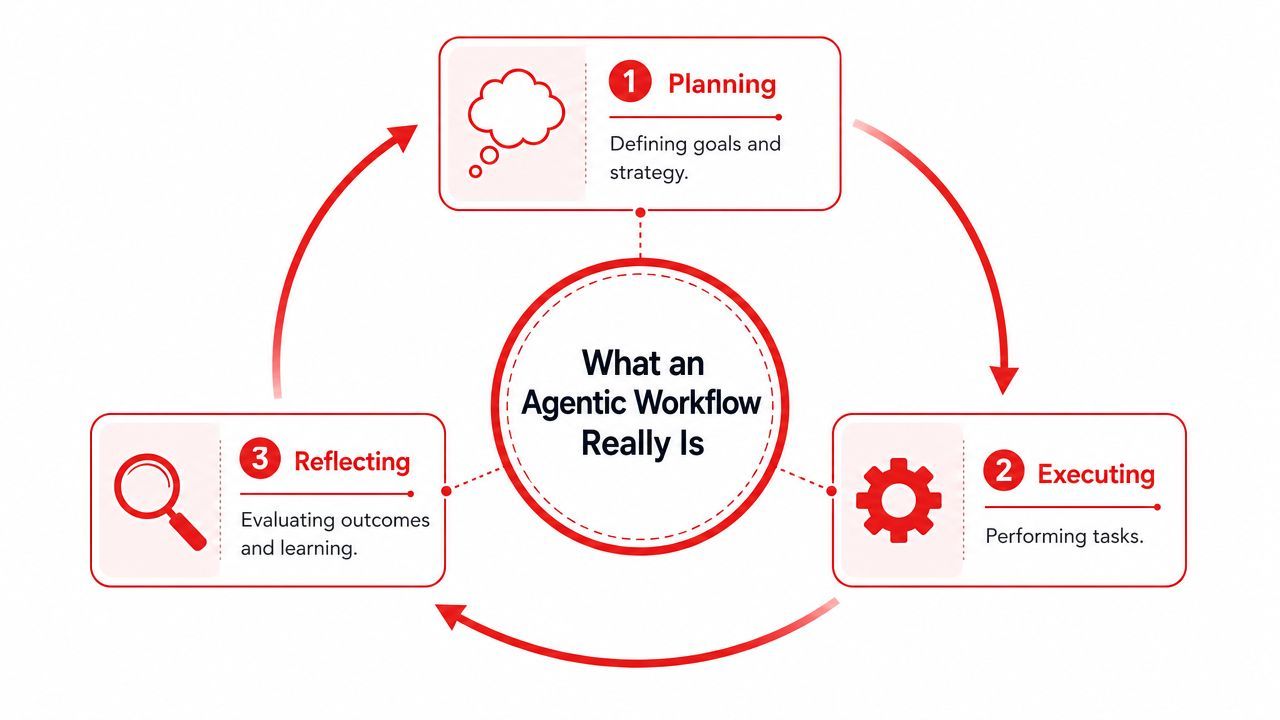
From single response to iterative loop
A plain LLM call is simple. You send a prompt. The model returns one response. That can be powerful, but it's still one turn.
An agentic workflow behaves more like a loop:
- Plan the task from a high-level objective.
- Execute an action using a tool, subagent, or API.
- Observe what happened.
- Reflect on whether the result moved closer to the goal.
- Repeat until the stopping condition is met.
That loop is the key idea behind what is agentic workflow in practical terms. The system doesn't just generate language. It manages progress.
The value comes from the system's ability to notice “that didn't work” and try a different approach without waiting for a human to rewrite the prompt.
Here's a simple example. You ask for a list of competitors and pricing tiers. A one-shot prompt might guess based on stale knowledge. An agentic system can search, open pages, extract pricing tables, compare them, notice when one site blocks scraping, switch tools, and mark a finding as uncertain if it can't verify it.
Later in the process, a video can make the loop easier to visualize:
A detective is a better analogy than a chatbot
A chatbot answers a question. A detective works a case.
The detective starts with a theory, gathers evidence, hits dead ends, interviews new sources, re-evaluates assumptions, and updates the theory. That's closer to how agentic systems operate. They combine reasoning with tool use and memory, then refine their approach as new facts arrive.
This matters because many teams still build “agents” that are really just prompt chains. Prompt chains can help, but they don't become agentic until the system can make conditional decisions, recover from failure, and maintain state across steps.
The Core Components of an Agentic System
The easiest way to understand an agentic system is to pull it apart into components. If the earlier section described the behavior, this section describes the machinery.
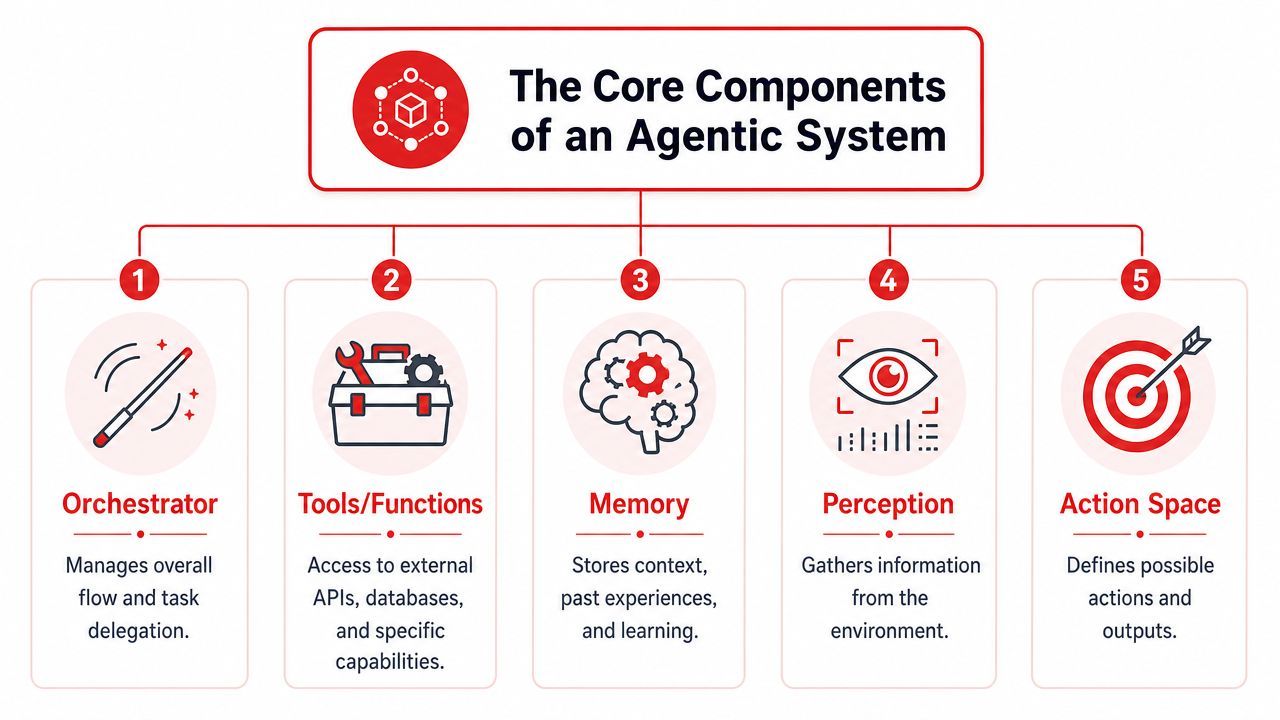
Planning execution refinement and interface
A useful framework comes from Vellum's overview of agentic workflow architectures. It defines four core components: Planning, Execution, Refinement, and Interface. It also notes that production systems need observability with traces of prompts, tool calls, and costs.
Here's what those parts look like in real builds.
Planning
This is the “brain” layer. It interprets the goal and decides what to do first. In code, that might mean task decomposition, choosing between tools, or routing work to a specialist subagent.
A planner shouldn't know everything. It should know how to decide the next best action.
Execution
The system's external interactions occur here. Tools matter here: web search, browsers, internal APIs, SQL queries, CRMs, file systems, ticketing systems, and custom functions.
Without tools, an agent is mostly a text generator. With tools, it can operate.
Refinement
Refinement is the feedback loop. The agent checks output quality, compares results against the original goal, stores useful context, and sometimes asks for human review.
Memory lives here too. Short-term memory tracks current task state. Longer-lived memory can preserve preferences, prior decisions, or useful facts from earlier runs.
The production piece most demos skip
The last architectural piece is the interface. That includes human-to-agent interaction and agent-to-agent coordination. It sounds simple, but it affects whether the system feels controllable or chaotic.
Then there's the part that usually gets neglected in tutorials.
- Observability: You need prompt traces, tool logs, intermediate outputs, and cost visibility.
- State management: You need to know what the agent already tried and what remains unfinished.
- Guardrails: You need limits on tool access, scope, and allowed actions.
- Handoffs: Multi-agent systems need clear contracts for when one agent passes work to another.
A production agent without observability is like a backend service without logs. It may run, but when it fails, your team is blind.
One more technical nuance is worth keeping in mind. An arXiv paper on agentic workflow engineering describes production systems as using multiple specialized agents, heterogeneous models, deterministic orchestration, and tool-first design. That's why mature agentic stacks often look less like one super-agent and more like coordinated services with clear responsibilities.
How Agentic Workflows Differ from Traditional Automation
The fastest way to cut through the hype is to compare agentic systems with the automations teams already know.
A fixed script versus a goal seeking system
Traditional automation is excellent when the path is known in advance. “When a customer submits a form, create a CRM record, send a Slack message, and add them to an email sequence” is classic automation. Every step is explicit.
Agentic workflows work better when the path can't be fully specified upfront. A discussion in this Reddit thread on messy jobs and agentic workflows puts it well: they shine in “messy, slow, jobs full of UI glue or weird edge cases” where rigid rule-based automations break down.
That doesn't make agentic better in every situation. It makes it different.
Agentic Workflow vs Traditional Automation
A quick test helps. Ask yourself whether you can write the exact flow on a whiteboard before you build it. If yes, standard automation is probably enough. If the process depends on interpretation, branching logic, or unpredictable environments, agentic design may be the better fit.
Real-World Examples and Common Patterns
Abstract definitions only get you so far. The best way to grasp what is agentic workflow is to walk through concrete jobs.
Three examples builders can picture immediately
Research agent for a startup founder
A founder wants a morning brief on five competitors. The system searches product pages, scans release notes, checks pricing, reviews public feedback, and produces a short digest with open questions flagged for human review.
This works well as an agentic workflow because the information is distributed, page structures vary, and not every source is equally trustworthy. The system needs to choose where to look, compare conflicting signals, and revise when one lead turns out irrelevant.
Customer support escalation agent
A support agent can do more than answer a ticket. It can read the message, classify urgency, check account history, pull recent logs, detect whether the issue matches an existing incident, draft a reply, and create an engineering ticket if needed.
The key is coordination. One part handles classification, another retrieves context, another writes the response, and a final review step decides whether to escalate to a human.
Good agentic design often looks less like “one bot that does everything” and more like a relay team where each runner has a specific job.
Content engine for a solopreneur
A creator gives the system a topic and target audience. The workflow researches the topic, outlines the piece, drafts an article, proposes visuals, repackages the article into social snippets, and schedules follow-up tasks.
This is only useful if the agent can maintain context across stages. The social post shouldn't ignore the final article. The image prompt should reflect the actual angle. The review step should catch drift before publication.
Common ways to organize agents
Teams usually structure these systems in a few patterns.
- Sequential pattern: One agent hands work to the next, like an assembly line. This fits content generation and document pipelines.
- Hierarchical pattern: A manager agent delegates tasks to specialists, then consolidates results. This fits research, support, and analysis.
- Swarm or decentralized pattern: Agents coordinate more loosely and react to changing conditions. This fits complex environments but is harder to debug.
The pattern matters less than the clarity of responsibilities. When every agent has a vague mandate, overlap and confusion creep in quickly.
The Benefits Trade-offs and Common Pitfalls
Agentic workflows are compelling for a reason. They can coordinate multiple specialist agents, consume real-time data from external providers, and support machine-speed decision-making in areas like healthcare, cybersecurity, and trading, as described in Aisera's discussion of agentic workflow efficiency.
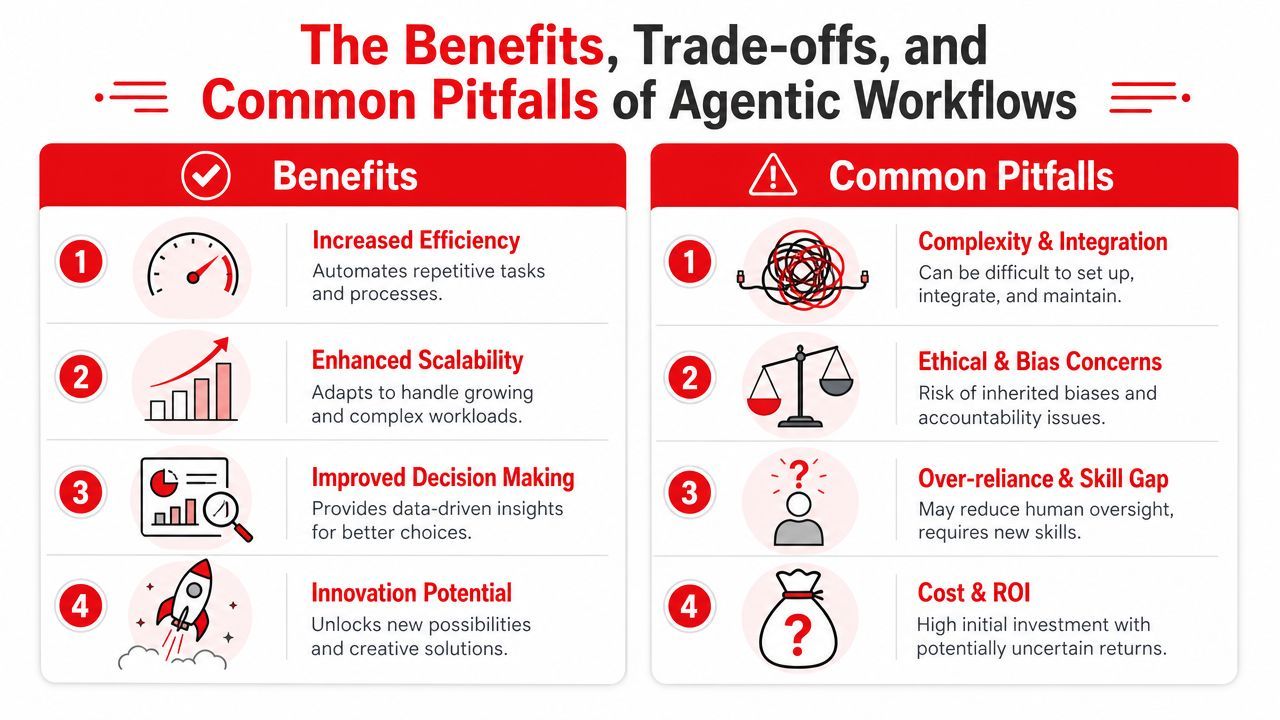
Where the upside is real
The benefit isn't just speed. It's adaptive execution. A well-built agent can continue making progress when inputs are incomplete, systems respond unexpectedly, or a task needs several rounds of refinement.
That opens up work that standard pipelines usually avoid:
- Cross-system coordination: Pulling data from one tool, enriching it in another, and making a judgment before acting.
- Messy operational tasks: Navigating brittle interfaces, inconsistent formats, and partial information.
- Human time recovery: Shifting people away from repetitive triage toward higher-level review and strategy.
Where teams get burned
The trade-offs show up fast in production.
First, cost can climb because one user request may trigger multiple model calls, tool invocations, retries, and evaluation steps. Second, debugging gets harder because there isn't one obvious failure point. Third, poorly bounded agents can wander into unhelpful loops, misuse tools, or produce convincing but wrong intermediate reasoning.
A few pitfalls appear over and over:
- Loose tool definitions: If a tool's inputs and outputs are vague, the agent will use it badly.
- No stopping rules: Agents need limits on retries, step count, and scope.
- Weak memory design: Too little context causes drift. Too much irrelevant context creates noise.
- Late observability: Teams often add logs after the first incident, when they should have added them on day one.
Builder warning: Don't give an agent broad permissions before you've proven it can behave predictably in a narrow lane.
The safest path is usually small and boring at first. Narrow objective. Clear tools. Strong review loop. Then expand.
Your Checklist for Adopting Agentic Workflows
A lot of teams think the challenge is choosing the smartest model. In practice, readiness usually matters more than raw capability. Gigster's analysis of enterprise readiness for agentic AI argues that 89% of pilot projects fail because organizations lack the data maturity and system integration needed for agentic workflows, and that full enterprise adoption remains at 11% because of that infrastructure gap.
That's the part most introductory articles skip. The implementation layer is often the project.
Readiness checks before you build
Start with a checklist that forces precision.
- Pick one narrow, high-value job
Don't begin with “build an autonomous operations agent.” Start with something like “triage incoming support tickets and draft escalation notes.” - Map the tools and permissions
List exactly what the system must access. Browser, CRM, docs, ticketing system, internal API. Then define what it must never do. - Design state explicitly
Decide what the agent needs to remember during a run and what, if anything, should persist across runs. State shouldn't be accidental. - Add human review points
Choose where a person approves, edits, or rejects. Early production systems usually need this more than teams expect.
What strong implementation looks like
A reliable setup usually includes the following operational pieces:
- Prompt and workflow versioning: So changes are auditable and reversible.
- Model routing: So teams can switch providers or use different models for different steps.
- Logs for every call: Including prompts, outputs, tool usage, latency, and spend.
- Fallback behavior: So one model or provider outage doesn't take down the feature.
- Cost controls: So experimentation doesn't unintentionally become a budget problem.
A mature production layer helps because it removes the need to hardcode all of that into the application itself. Teams need a place to manage prompts, inspect agent behavior, track cost, and iterate without redeploying every time they adjust routing or workflow logic.
The first successful production agent usually isn't the most autonomous one. It's the one your team can inspect, constrain, and improve safely.
If you're building AI features or agents and don't want to wire prompt management, model routing, logs, and cost tracking into your app by hand, Supagen gives you that production layer in one place. It helps teams move from fragile prototypes to operable agent workflows with versioned prompts, centralized observability, provider routing, and dashboard-based iteration.