
What Is Agent Orchestration and How It Works in 2026
Agent orchestration is the control layer that decides which AI agent acts, when it acts, what context it can see, and how its output merges back into one workflow. The category's market was $1.2 billion in 2023, with forecasts reaching $8.5 billion by 2030 at 32.4% CAGR or $12.5 billion by 2030 at 40.2% CAGR. If you're building your first multi-agent feature, that sentence probably feels like a lot of machinery for something that started as a chatbot prompt.
You've likely hit the moment where one model isn't enough. A customer asks a question, one agent should search, another should check a database, a third should draft the answer, and now you need to decide who speaks first, who can see what, and what happens when one step fails.
Table of Contents
- A Plain-English Definition of Agent Orchestration
- The Core Components Every Orchestrator Needs
- Orchestration vs Choreography vs a Single Agent
- Real Workflows That Show Orchestration in Action
- Production Architecture and Latency Trade-offs
- How a Unified AI Backend Simplifies Orchestration
- When to Adopt Orchestration and What to Do Next
A Plain-English Definition of Agent Orchestration
A solo builder often meets the term in the middle of a messy prototype. The chatbot works until it needs a search step, then a database lookup, then a fallback model, and suddenly no one knows which piece should run first or what each step is allowed to see.
Agent orchestration is the control layer that decides which AI agent acts, when it acts, what context it can see, and how its output merges back into one workflow. That's the cleanest way to say it. In practice, it means a router, a shared state store, and an observability surface that lets you see what happened when the system made a decision.
The kitchen version of the idea
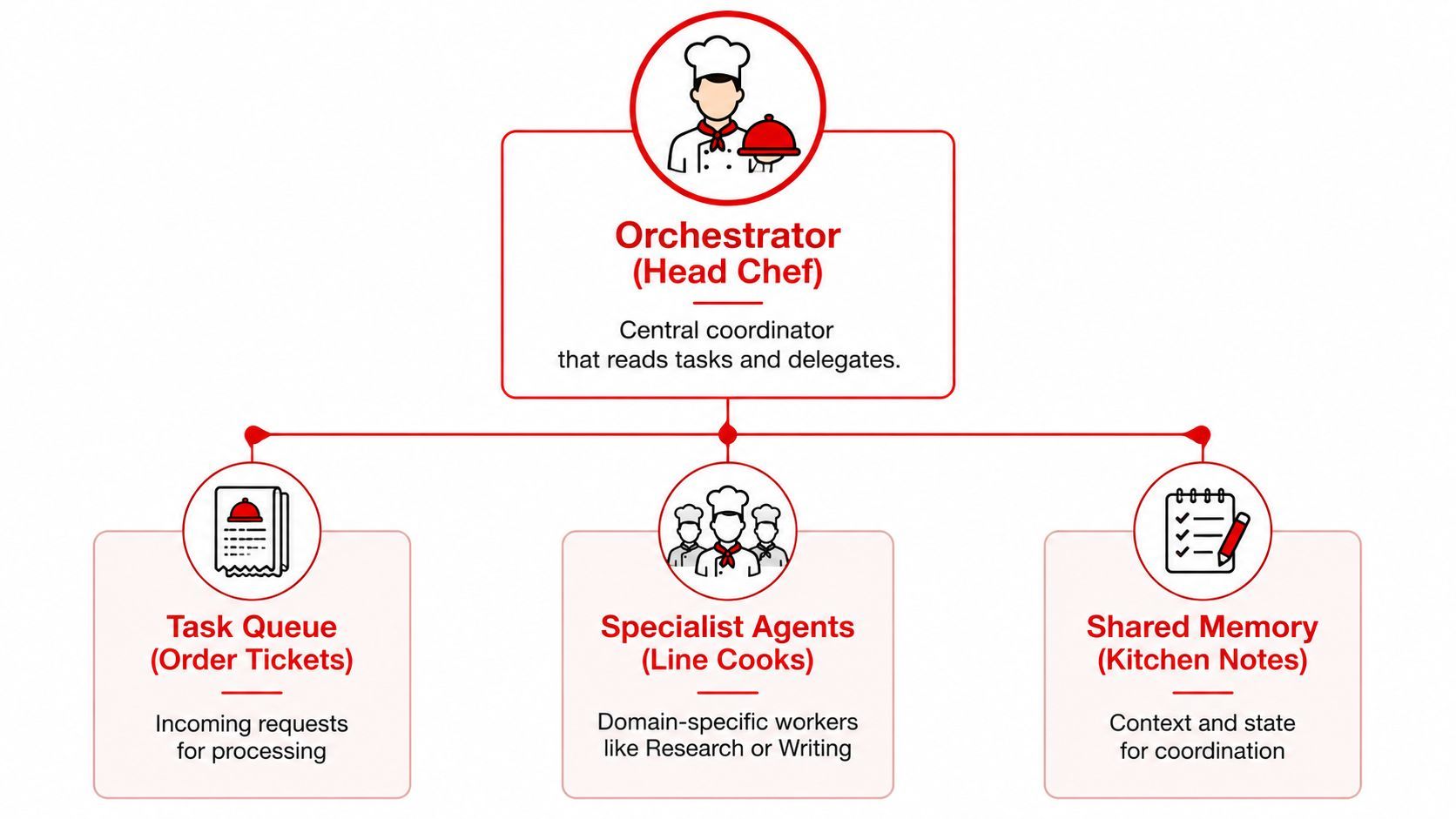
Think of a restaurant kitchen. The head chef doesn't chop every onion, but they decide which ticket goes to which station, keep the orders aligned, and make sure the plate that leaves the pass matches the ticket. The line cooks are your specialist agents, each good at one job.
Practical rule: if your AI feature needs coordination, not just generation, you're already in orchestration territory.
That's why the term feels heavier than it should. Founders hear “orchestration” and picture enterprise software, but the underlying question is simple. Do you need one model to answer, or do you need a coordinator that can hand work off to multiple specialists without losing track of the thread?
The four mental models that make it click
You can picture the same system four ways, and each one helps at a different moment.
- Kitchen. Useful when you care about delegation, timing, and quality control.
- Air-traffic controller. Useful when multiple actions can't collide and every handoff needs a clear landing.
- Switchboard. Useful when the main job is routing the right request to the right specialist.
- Conductor. Useful when several parts need to play in sequence and still sound like one piece.
The biggest mistake is treating orchestration as “multiple agents talking.” That's not enough. In production, the control layer decides who runs, what they can access, and how the final answer is stitched together. The rest of this article keeps coming back to that one idea so you can tell the difference between a clever demo and a system you'd trust with real users.
The Core Components Every Orchestrator Needs
A useful orchestration system has to do more than send work around. It needs to read the ticket, hand the task to the right specialist, remember what already happened, and stop weak output before it leaves the kitchen.
The head chef, the pass, and the inspection point
The orchestrator acts like the head chef. It reads the incoming task, decides which agent should handle it, and keeps the work moving in the right order. Microsoft's guidance for agent design treats this as more than routing, because production systems also need explicit state management, conflict resolution or guardrails, and observability. Without those pieces, multi-agent systems often add coordination overhead and fresh failure modes instead of reliability. See Microsoft's agent design guidance for that framing.
The shared state works like the kitchen pass or the notes board. It holds what the system already knows, so the next agent starts with context instead of repeating work. If the first agent found a customer ID, the second agent should inherit that detail rather than asking for it again.
The observability layer is the inspection point before a plate leaves the kitchen. It shows what happened, what each agent received, what came back, and where the workflow slowed down. That is the difference between saying, “the answer looked wrong,” and tracing the routing step that sent the wrong ticket to the wrong agent.
Practical rule: if you cannot trace a workflow step by step, you should not run it in production.
What breaks when one piece is missing
Routing without state creates repetitive systems. Agents keep asking the same questions because nobody carried the answer forward from the earlier step. State without observability creates mystery. The workflow may finish, but nobody knows why one branch won or why a fallback took over.
Guardrails matter just as much. A kitchen that lets every station improvise will eventually send out the wrong dish. An orchestrator needs policies for which tools each agent can use, what output is acceptable, and when a human should step in. That is the boundary that makes the system safe enough for real use.
Here is the hierarchy in plain language.
- Orchestrator. Chooses the path.
- Specialist agents. Do the actual task work.
- Shared memory. Carries the context.
- Guardrails and logs. Keep the system safe and explainable.
See Dataiku's orchestration explainer for a practical discussion of how these pieces fit together.
Orchestration vs Choreography vs a Single Agent
A founder does not need to add a control plane just because an AI workflow sounds advanced. The core question is simpler. Does the job need one decision-maker, a loose chain of event reactions, or a single agent that can carry the whole request from start to finish?
Choosing the right shape for the task
A single agent fits a request that is narrow and self-contained. One model can answer a question, draft a summary, or classify a message without handing work to another system. That keeps the setup fast and simple. The limit shows up when the task grows beyond what one model can hold in context, because it starts filling gaps with guesses.
Orchestrated multi-agent systems fit work that has several specialized steps, shared memory, or strict handoffs. A restaurant kitchen follows the same logic, one person takes the order, another prepares the food, another checks the plate before it leaves the pass. That structure gives you control and a clear audit trail. It also adds latency, another place for the workflow to break, and more policy work around who can do what.
Choreography sits between those two patterns. Agents respond to events and coordinate with each other without a single central boss making every choice. That works well when the workflow is naturally event-driven and no one step needs to be the authority. Dataiku's explanation makes the same practical distinction, orchestration fits workflows with central dependencies, rollback needs, or a single system view, while simpler flows with more autonomy can fit choreography better.
A simple decision test helps here. If one agent can finish the job reliably, skip orchestration. If two or more specialist agents must coordinate, state has to survive across steps, or you need rollback and auditability, the extra control layer is usually worth it.
Real Workflows That Show Orchestration in Action
Abstract definitions don't stick until you see the handoffs. Once you do, the pattern becomes obvious, and you can start sketching your own product the same way a chef sketches a prep line.
Customer support with a triage step
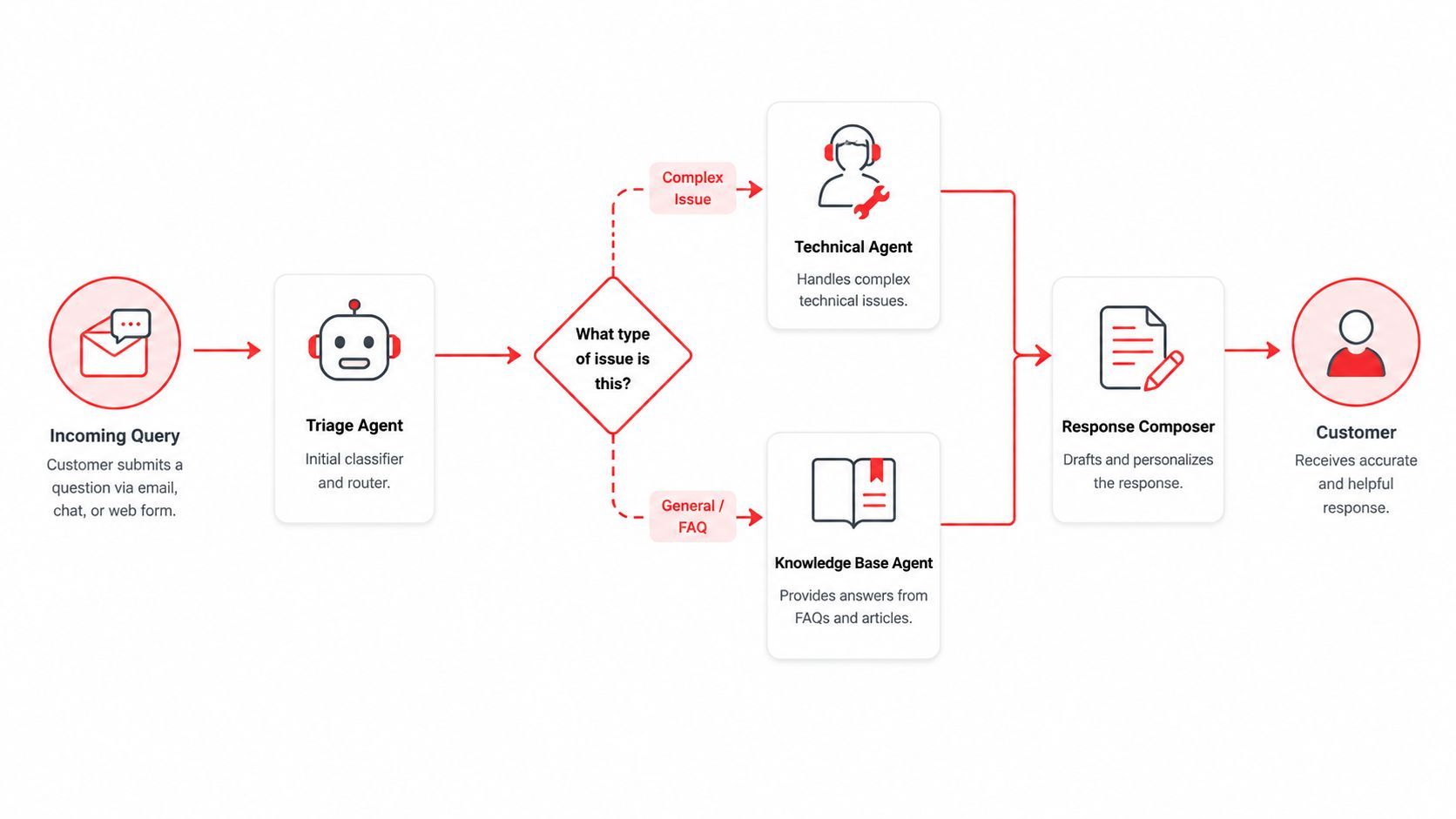
A customer sends a ticket about a failed refund. The triage agent reads the request first, tags it as billing, and routes it to the right specialist. If the issue is simple, the knowledge base agent pulls a policy answer and the response composer sends it back. If the problem is messy, the technical agent takes over and a human queue gets the escalation.
That's orchestration in one line. One agent doesn't do everything, the control layer decides who sees the case, when they see it, and what gets logged before the customer hears back.
Content production with quality gates
A content workflow often needs more than one pass. A researcher agent gathers sources, a writer agent turns them into a draft, and a brand-voice agent rewrites the result so it sounds like one company wrote it, not three tools stitched together. The orchestrator keeps the sequence tight and stops an early draft from going live before the later checks are done.
The important detail is the merge point. The system doesn't just pass work along. It combines the output of different agents into one deliverable, and that merge is where quality lives or dies.
Research copilots with parallel fan-out
Research is a good place to use parallel fan-out. One search agent can scan internal docs, another can inspect public material, and a summarizer agent can merge the results into one answer. The orchestrator decides what can run at the same time and what needs to wait for a consolidated view.
A good orchestrator makes parallel work feel boring. That's the point.
If you're building your own feature, start with the ticket. Ask who should see it first, who should be skipped unless needed, and what the final response should look like after the results come back together. That's usually enough to draw a practical orchestration diagram without overthinking the architecture.
Production Architecture and Latency Trade-offs
The promise of orchestration is cleaner coordination. The bill comes from the extra machinery you need to make that coordination reliable.
The five layers that matter in production
A production system usually needs five pieces. Routing picks the right model or agent for the task. State keeps the workflow from forgetting itself halfway through. Tool calling lets agents use APIs, internal services, and external actions. Guardrails filter or constrain what goes out. Observability records latency, token use, inputs, outputs, and cost so you can debug what happened.
That stack gives you control, but every layer adds overhead. Routing introduces a decision point. State can go stale. Tool calls can fail for reasons unrelated to the model. Guardrails can block useful output if they're too strict. Observability creates more surface area to manage, but without it you're guessing.
Databricks says multi-agent systems can cut task completion time by 35% compared with single-agent approaches, and other industry reporting says multi-agent orchestration systems can reach 35% higher task completion rates in complex workflows. Those gains are real enough to matter, but they only show up when the workflow is complex enough to justify the control layer. Databricks' orchestration guidance makes that trade-off clear.
What to build first and what to postpone
For a first production release, keep the stack lean.
- Build first. Routing, state, logs, and one fallback path.
- Delay. Fancy parallelism, custom scoring layers, and too many specialized agents.
- Keep. Human override paths and clear error messages.
- Watch. Latency per step, tool failure rates, and stale context.
Open-source tools are getting heavier use too. LangGraph logged 1.2 million downloads in 2024, triple the prior year, and AI agent orchestration patent filings increased 290% between 2021 and 2024. Those numbers point to a category that's becoming infrastructure, not a toy feature. The practical lesson is still the same, though. Add control only where coordination is the primary bottleneck.
How a Unified AI Backend Simplifies Orchestration
Most builders don't need more orchestration theory. They need fewer places for prompts, routing rules, logs, and costs to hide.
A unified backend like Supagen collapses prompt management, model routing, fallback behavior, observability, and cost tracking into one dashboard and one integration path. In practice, that means you can version a prompt, change which provider handles a task, and inspect per-call logs without pushing a new app release. It also supports MCP-compatible agents through a URL with OAuth, so tool access doesn't have to become a separate SDK project.
What gets absorbed and what still stays in your app
The backend can absorb the plumbing around orchestration. That includes prompt iteration, provider routing, fallback selection, and call-level logs with tokens, latency, I/O, and cost. The app still owns the actual orchestration logic, the business rules, the domain tools, and the guardrails that decide what an agent is allowed to do.
That split matters for founders. If you're moving fast, the shortest path to something production-shaped is often not building every layer yourself. It's putting the model and prompt mechanics behind a control layer so your team can focus on the workflow instead of redeploying every time a prompt changes.
Practical rule: if prompt tweaks trigger app redeploys, your backend is doing too much work in code.
When to Adopt Orchestration and What to Do Next
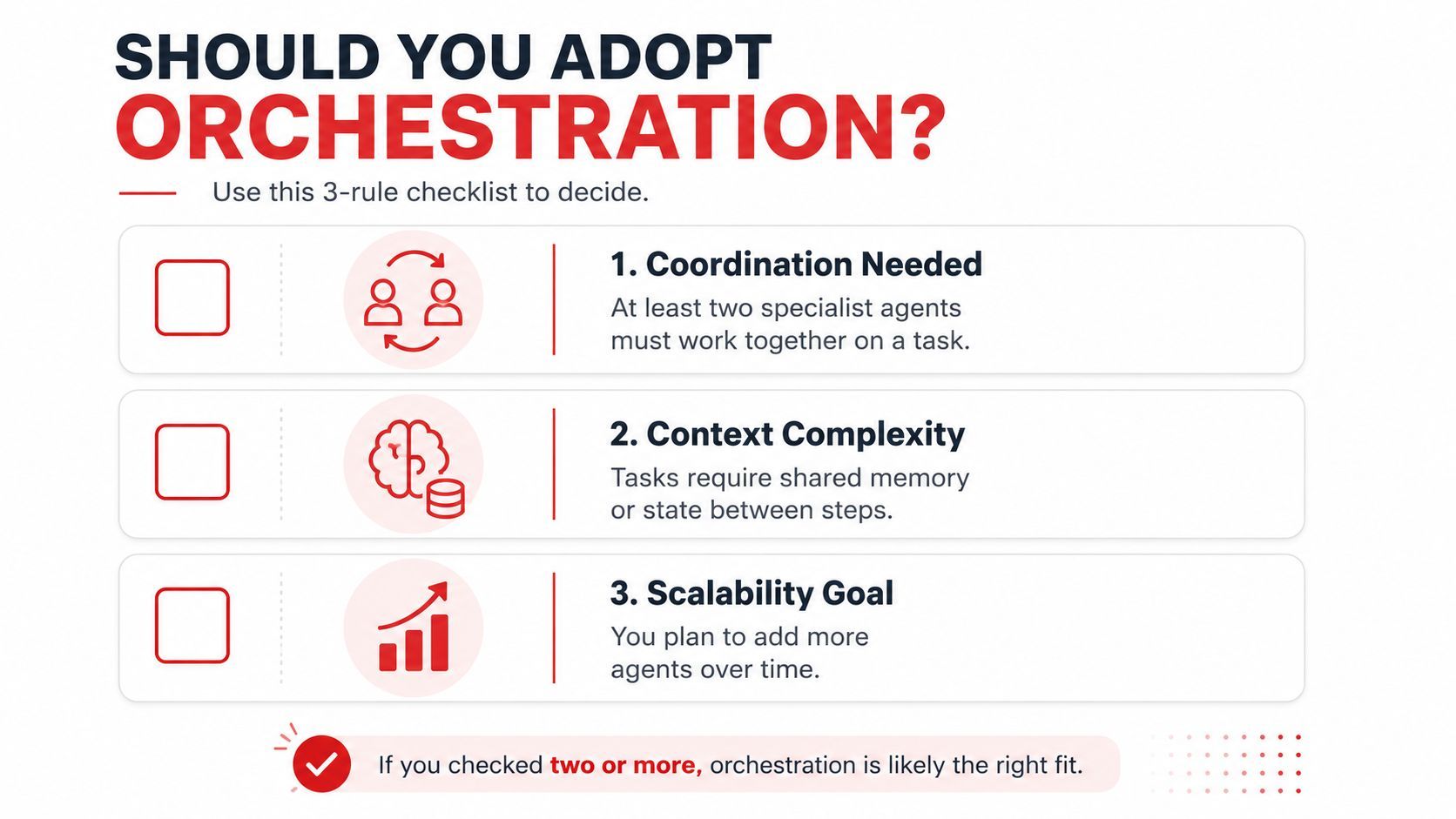
Use orchestration when at least two specialist agents need to coordinate, when handoff state has to survive across steps, or when auditability and rollback are part of the product. Skip it for now when one agent can do the job, when the workflow is mostly one-shot, or when the cost of a control plane would dwarf the value of the task.
The category is moving quickly. Market trackers put it at $1.2 billion in 2023, with projections of $8.5 billion by 2030 at 32.4% CAGR or $12.5 billion by 2030 at 40.2% CAGR, and one industry survey said 67% of Fortune 500 companies were already using agent orchestration frameworks in Q4 2024 while 72% of surveyed tech leaders planned to increase investment in 2025. That growth doesn't mean every app needs orchestration, but it does mean the control layer is becoming a normal part of serious AI product work. Market and adoption data show where the category is heading.
Start this week with one workflow, two agents, a fallback path, and logging on every call. If the bottleneck turns out to be observability rather than coordination, bring in a true orchestrator after you've seen the workflow under real traffic. If you want a unified place to manage prompts, routing, logs, and costs while you build that stack, visit Supagen and treat it as the control layer for the parts of orchestration you don't want hardcoded into your app.