
What Is a Subagent in AI? Definition & Best Practices
You build a single AI agent to do everything. It researches, writes, calls tools, checks output, maybe even edits code. In a demo, it feels magical.
Then production starts pushing back. The prompt gets longer every week. Latency creeps up. Costs stop being predictable. One bad tool call pollutes the rest of the session. A request that worked yesterday fails today because the agent carried too much context, took the wrong branch, or mixed strategy with execution.
That pattern is familiar because it's not really an AI problem. It's a systems design problem. When one worker tries to hold the whole job in its head, quality falls off first, then reliability, then economics. Mature software teams solve that by splitting responsibilities. AI systems are moving in the same direction.
When people ask what is a subagent, they usually want a definition. Instead, they need the production reason behind the pattern. Subagents matter because they give teams a way to isolate work, control tools, reduce context pressure, and route simpler tasks away from expensive general-purpose reasoning. That's what turns an impressive prototype into something you can operate.
Table of Contents
- Introduction Beyond the Monolithic AI Agent
- Clearing Up Confusion AI Subagents vs Real Estate Subagents
- The Core Concept What Is a Subagent in AI
- Common Subagent Architectures and Use Cases
- Best Practices for Designing and Testing Subagents
- Managing Subagents in Production with Supagen
- Subagent Frequently Asked Questions
Introduction Beyond the Monolithic AI Agent
The monolithic agent usually starts as a sensible shortcut. One prompt. One model. One tool bundle. It's easy to build and easy to explain.
It also hides failure modes until real users show up. The same prompt that handles support triage, document extraction, planning, and response drafting in testing starts to wobble when inputs get messy. The agent drags too much irrelevant context into each step. It uses the wrong tool because every tool is available all the time. It spends top-tier reasoning on low-value formatting work.
That's why subagents aren't just a trendy label. They're a practical answer to a predictable scaling problem.
Practical rule: If one agent needs too many instructions, too many tools, and too much memory to stay reliable, it probably isn't one agent problem. It's several smaller problems pretending to be one.
Engineering has leaned on this idea for a long time. Services get split by responsibility. Queues separate producers from workers. Job runners handle bounded tasks. Subagents bring the same discipline to agentic systems. Instead of asking one AI to be strategist, researcher, extractor, critic, and formatter at once, you delegate those jobs to separate workers with narrower scopes.
That shift matters most when reliability and cost become product concerns, not just demo concerns. A production system needs routing rules, repeatable behavior, debuggable outputs, and the ability to swap models or prompts without unraveling everything around them.
A good subagent design gives you that. A bad one just recreates the monolith in smaller pieces. The difference comes down to isolation, task boundaries, and whether the parent agent is orchestrating work or drowning in it.
Clearing Up Confusion AI Subagents vs Real Estate Subagents
The term subagent existed long before AI. That's part of the confusion, and search results often mix two completely different ideas.
In real estate, a subagent is a legal role. The National Association of Realtors explanation of agency relationships describes subagency as a situation where a cooperating sales associate from another brokerage is not the buyer's agent and instead shows property while owing fiduciary duties to the listing broker and seller. In plain English, that person works for the seller's side, not the buyer's side.
That's a legal relationship. It carries questions about duty, representation, and liability. If someone in real estate asks what is a subagent, they may be asking who owes loyalty to whom.
In AI, the same word means something entirely different. It refers to a software architecture pattern where a parent agent delegates a bounded task to a separate specialist worker. No fiduciary duty. No agency-law consequences. No representation issue in the legal sense.
The two meanings are not interchangeable
A fast way to separate them is to look at the core unit of concern:
- Real estate subagent: A human or brokerage relationship defined by agency law
- AI subagent: A delegated execution unit inside an agent system
- Real estate question: Who represents the principal
- AI question: Who should handle this subtask
- Real estate risk: Duty and liability
- AI risk: Reliability, context pollution, cost, and control
The same word points to two different operating models. One is about legal responsibility. The other is about system design.
Why this distinction matters for product teams
If you're building software, the legal definition is useful only as a warning that the word already carries baggage. Don't import its real estate meaning into architectural discussions.
For product and engineering teams, the useful mental model is simpler. An AI subagent is a controlled specialist. It gets a specific job, a limited set of tools, and a clean context boundary. The parent agent decides when to call it and what to do with the result.
That distinction clears up a lot of bad conversations. Teams stop debating terminology and start focusing on the core questions: what work should be delegated, what shouldn't, and how do you observe the whole system once many workers are involved.
The Core Concept What Is a Subagent in AI
A subagent is a specialist worker that the parent agent calls for a bounded job. It runs with its own instructions, its own context window, and usually a narrower toolset. That separation is the point. In production systems, the goal is not elegance. The goal is to stop one overloaded agent from doing planning, retrieval, extraction, validation, and formatting inside the same noisy prompt.
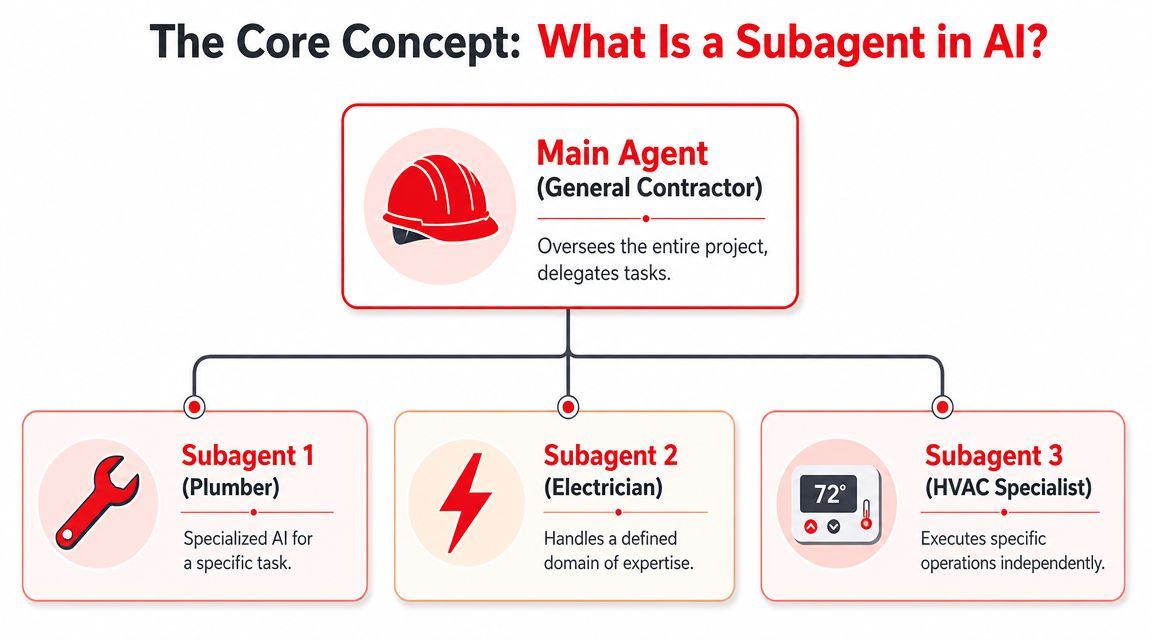
The contractor analogy works for a reason
A subagent system works like a general contractor managing subcontractors.
The parent agent owns the outcome. It breaks work into steps, chooses who should handle each step, and decides whether the combined result is good enough to ship. The subagents do narrower jobs with clearer rules. A research subagent searches and summarizes. An extraction subagent turns messy text into fields. A validation subagent checks the output against policy or schema. A formatting subagent packages the result for an API, UI, or downstream workflow.
That division creates overhead. Someone has to route tasks, pass inputs, and reconcile outputs. But it also creates control, which is why teams adopt this pattern once reliability starts to matter.
A short explainer helps visualize the split between orchestration and execution:
Why subagents matter in production
The main reason is operational discipline.
A monolithic agent tends to accumulate too much context, too many tools, and too many responsibilities. Once that happens, failures get harder to isolate. The model may use the wrong tool, follow the wrong instruction set, or spend tokens reasoning about details that only matter to one small step. You pay more, latency climbs, and debugging turns into transcript archaeology.
Subagents give each task a cleaner boundary. That boundary improves three things that product teams care about:
- Reliability: a narrower prompt and toolset reduce off-task behavior
- Cost control: expensive reasoning can be reserved for planning or exception handling, while simpler steps use lighter models or shorter prompts
- Observability: each unit of work can be logged, tested, and measured independently
The MindStudio analysis of the sub-agent era makes the same economic point from a different angle. Multi-step agent workflows often involve many model calls, so treating every step like a frontier-model problem is hard to justify. In practice, the useful pattern is tiered reasoning. Put broad planning where it matters. Keep bounded execution cheap and deterministic where possible.
What separates a real subagent from a prompt fragment
A subagent is a system component, not a writing trick.
If the parent agent hands over a clearly defined task, passes only the context needed for that task, restricts tools to what the worker should use, and expects a structured result, that is a subagent. If the parent agent keeps dumping the full conversation, the full tool catalog, and a vague instruction into every call, the architecture is still monolithic. It just has more wrappers.
A useful subagent usually has these properties:
- Narrow objective: one class of task, not five
- Defined contract: explicit inputs, outputs, and failure modes
- Limited permissions: only the tools and data required for the job
- Isolated context: enough background to perform well, without dragging in unrelated history
Those constraints are not bureaucracy. They are what make testing possible. When a validation subagent fails, the team should be able to inspect one contract, one prompt, one tool path, and one result format. That is much harder when the same general-purpose agent improvises every step.
The design choice behind the term
The important question is not “what is a subagent” in the abstract. The useful question is “why split this task at all?”
Split work into subagents when the task has stable boundaries, different capability needs, or different quality bars across steps. Keep work in one agent when the overhead of orchestration is higher than the gains from specialization. That trade-off matters. Too few subagents creates a bloated orchestrator. Too many creates a fragile workflow with routing mistakes, extra latency, and a testing matrix nobody wants to maintain.
Good subagent design separates coordination from execution so the system stays predictable as traffic, complexity, and failure handling increase.
Common Subagent Architectures and Use Cases
A product team usually feels the need for subagents when one agent starts doing too many jobs at once. Response times climb, costs drift upward, and failures get harder to trace. The fix is rarely “add more prompt instructions.” It is usually a better execution model.
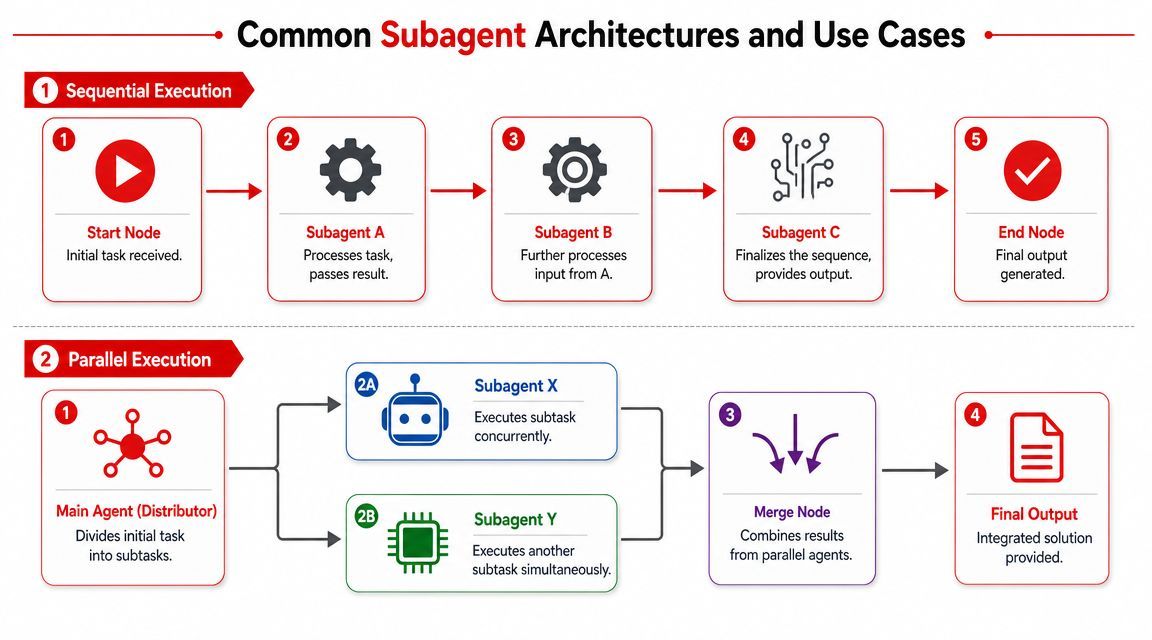
Two patterns cover a large share of real systems: sequential chains and parallel workers. The right choice comes from the dependency graph. It also affects reliability, cost, and how much operational overhead the team will carry later.
Sequential chains for dependent work
Use a sequential chain when each step produces an artifact the next step needs. A general contractor handing work to subcontractors is a good model here. Framing comes before electrical. Inspection happens after both.
Content operations fit this pattern well. One subagent creates an outline. Another writes a draft from that outline. A third reviews tone, structure, and policy requirements. Running those steps out of order creates rework, not speed.
Document processing is another common case:
- Classifier: identifies the document type
- Extractor: pulls the relevant fields for that type
- Validator: checks missing values, contradictions, and rule violations
- Responder: produces the user-facing result
Sequential architectures are easier to test because each handoff is explicit. They are also easier to monitor in production. If extraction quality drops, the team can inspect that stage instead of reading one giant execution trace. The cost is latency. Every stage waits for the previous one, so the total response time grows with each hop.
That trade-off is often worth it when correctness matters more than raw speed.
Parallel workers for independent work
Use parallel workers when tasks can run independently and the system only needs a merge step at the end. This is one of the fastest ways to cut end-to-end latency in an agentic system, but only when the branches do not depend on shared reasoning.
Common examples include:
- Multi-document analysis: one subagent per document, then aggregate findings
- Research workflows: separate workers for product docs, support history, and internal notes
- Codebase review: one worker checks auth, another data access, another test coverage patterns
- Customer ops triage: one subagent scores urgency while another extracts account details
Parallel architectures also help with cost control. The parent agent can send simple branches to cheaper models and reserve the expensive model for synthesis or edge cases. A monolithic agent usually cannot make that distinction cleanly because planning and execution are bundled together.
The catch is coordination. Merge logic needs its own rules. Two branches may return overlapping facts, conflicting conclusions, or different output shapes. If the team skips that design work, the “faster” architecture turns into a noisy reconciliation problem.
Monolithic Agent vs Subagent Architecture
A third pattern shows up in mature systems: a router with specialists. The parent agent first decides which worker should handle the request, then passes the task to a focused subagent such as billing support, contract review, or SQL generation. This architecture works well when incoming requests vary, but each request still maps to a stable specialty. It breaks down when routing is sloppy. Bad routing sends clean inputs to the wrong worker, which is one of the most common production failure modes in multi-agent systems.
The practical rule is simple. Use sequential chains for dependent steps. Use parallel workers for independent steps. Use routing when requests fall into distinct categories and the classifier is reliable enough to trust.
Architecture choice is not style. It determines what you can test, what you can observe, and whether your costs stay predictable once traffic increases.
Best Practices for Designing and Testing Subagents
A subagent only helps if it's more predictable than the generalist agent it replaces. That means design discipline matters more than clever prompting.
The AltexSoft breakdown of subagents makes an important point: subagents have their own context window, instructions, memory, and tools, and they do not inherit the main agent's accumulated context. That separation prevents prompt bloat and makes specialist behavior more reliable. In practice, that's the whole game. Isolation is the feature.
Give each subagent one real job
The best subagents follow the same principle as good services and good functions. They do one thing well.
Bad example: a “document agent” that classifies, extracts, summarizes, validates, and writes the final email.
Better approach:
- Classifier agent for document type
- Extraction agent for schema fields
- Validation agent for rule checks
- Drafting agent for user-facing language
These boundaries make failures visible. If extraction quality drops, you know where to look. If one subagent starts absorbing adjacent work, split it again.
Don't create subagents based on org charts or vague domains. Create them around repeatable units of work with clear handoffs.
Control context tools and failure paths
Many systems regress back into a monolith. Teams define multiple agents, then give every one of them the same giant prompt and the same unrestricted tool belt.
That defeats the point.
Use these controls instead:
- Context scoping: Pass only the documents, fields, or summaries needed for the current step.
- Tool gating: A validator shouldn't have write access. A formatter shouldn't be able to browse external sources.
- Instruction separation: Put the specialist policy inside the specialist, not in a global system prompt that every worker inherits.
- Structured outputs: Ask subagents for defined schemas, labels, or checklists when possible so the parent can merge results cleanly.
Failure handling also needs explicit design. Subagents will fail in different ways. One might time out. Another might return malformed JSON. Another might produce an answer that is coherent but useless.
A production-safe pattern usually includes:
- Retry only for transient failure
- Fallback to a simpler path when confidence is low
- Escalate to the parent for re-routing when output is invalid
- Log both the input contract and output contract
Test subagents before you trust them
A monolithic agent tends to be tested with happy-path chat sessions. That's not enough for subagents.
Test them like components:
- Unit tests for narrow tasks: give fixed inputs and check output shape
- Adversarial tests: missing fields, contradictory documents, noisy context
- Tool permission tests: verify a subagent can't call tools it shouldn't
- Contract tests: ensure the parent can parse and use the child output
- Regression sets: keep examples of previous failures and replay them after prompt changes
A useful habit is to evaluate the subagent in isolation before plugging it into orchestration. If it can't consistently perform its narrow job alone, adding a parent agent won't save it.
Another habit matters just as much. Track whether the subagent's result is actionable by the next step. A response can look smart and still be unusable because it's too verbose, too hedged, or off-format.
That's why production-grade subagents are less about “intelligence” and more about contracts. Inputs, outputs, permissions, fallback rules, and tests. Once those exist, the system gets easier to evolve.
Managing Subagents in Production with Supagen
A team ships its first multi-agent workflow and the demo looks great. Two weeks later, support asks why the research subagent started missing citations, finance asks why inference spend jumped, and engineering cannot reproduce either issue because the prompt changed twice and the routing logic lives in three different places.
That is the point where subagent architecture stops being a design exercise and becomes an operations problem.
Why orchestration gets messy fast
A monolithic agent can hide a lot of operational sloppiness because there is only one prompt, one model path, and one trace to inspect. Subagents remove that simplicity. In return, they give you better specialization, lower context waste, and tighter control over failure domains. That trade-off is worth it in production, but only if you manage the system as a set of components rather than a single chat feature.
The hard part is not delegation. The hard part is keeping each worker observable, configurable, and cheap enough to run at scale.
In practice, teams need to control:
- Prompt versions for each specialist
- Model routing by task type
- Fallback behavior when a provider or model degrades
- Observability across parent and child calls
- Cost attribution at the subagent level
- Reproducibility during incident review
Without that layer, subagents often drift back into a monolith with extra steps. Prompts sit in source files, routing rules get buried in conditionals, and debugging turns into reading application logs that were never designed to explain agent behavior.
What a production control plane needs
A workable setup starts with centralized prompt management. If changing a reviewer subagent or extraction subagent requires a full redeploy, the feedback loop is too slow and incident response is too clumsy. Teams need version history, clear ownership, and a record of which prompt was active for a given run.
Routing needs the same treatment. The whole point of subagents is to stop paying the same reasoning cost for every task. Classification, extraction, summarization, and planning usually do not deserve the same model. Production systems need routing rules that can change as quality, latency, and cost change.
Observability has to go deeper than request-level logs. A parent response can look acceptable while one child failed, retried, or returned malformed output that forced another worker to compensate. If you cannot inspect each subagent call, including inputs, outputs, latency, and model choice, you cannot explain behavior or improve it with confidence.
That matters for reliability, and it matters just as much for cost control. In production, the expensive mistake is rarely one bad prompt. It is an opaque chain of subagent calls that no one can attribute, compare, or tune.
Supagen is aimed at that operating layer. It gives teams one place to manage prompts, configure routing across providers, define fallbacks, and inspect logs, latency, I/O, and spend without hardcoding those concerns across the app. For product teams, that means faster iteration. For engineers, it means the subagent system stays debuggable after the first release, which is usually when significant work starts.
Subagent Frequently Asked Questions
Can subagents call other subagents
Yes, they can. Hierarchies are possible, and sometimes useful.
But nesting only helps when it preserves clarity. If one subagent spawns more workers because it is responsible for a bounded mini-workflow, that can be fine. If every worker starts creating more workers because the task definition is fuzzy, the system gets opaque fast. Keep the tree shallow unless there's a strong reason not to.
How should state move between subagents
Pass state deliberately, not implicitly.
The safest pattern is to send each subagent the minimum task-specific context it needs, then return a compact result to the parent. That keeps boundaries clean and avoids dragging irrelevant history across the whole system. Shared global memory sounds convenient, but it often reintroduces the same context pollution subagents were supposed to remove.
Is an AI subagent a legal subagent
No. In law, a subagent is a different concept altogether.
The legal definition summarized by LSD Law explains that a subagent is appointed by an agent to act in the agent's place and may owe duties to both the appointing agent and the principal, with liability depending in part on whether the principal authorized the appointment. That kind of legal responsibility does not apply to an AI subagent, which is an architectural component inside software.
When shouldn't you use subagents
Don't use them when the task is small, tightly coupled, and easy for one well-scoped agent to handle. Splitting work too early adds orchestration overhead.
Subagents start paying for themselves when you need stronger isolation, clearer testing boundaries, parallelism for independent tasks, or more control over tools and model routing. If none of those pressures exist yet, keep the design simpler.
What's the clearest sign a monolithic agent should be split
Usually it's one of three symptoms: the prompt keeps growing, the tool list keeps expanding, or failures become hard to localize.
If changing one instruction unpredictably affects unrelated behaviors, you're already paying monolith tax. That's often the moment to break the system into parent orchestration plus specialist workers.
If you're building AI features that need prompt versioning, model routing, fallbacks, and per-call observability without burying that logic in your app, Supagen gives you the production layer to do it cleanly. It's a practical way to manage subagents like real system components instead of a pile of prompts stitched together in code.