
What Is a Model Agent: Understanding AI's New Frontier
A model agent in AI is an autonomous system where a large language model acts as the reasoning core, and many implementations follow a four-part architecture with sensors, an internal model, reasoning, and actuators. It goes beyond a single prompt-response API call by perceiving context, deciding what to do next, and taking actions through tools.
If you're building AI features right now, you've probably felt the gap between a nice demo and a real product. A single LLM call can summarize text, draft an email, or answer a question. But the moment you ask it to complete a business task across several steps, things get messy fast.
You start wiring together prompts. Then you add tool calls. Then you realize you need state, retries, permissions, logs, and some way to understand why the thing failed on step three instead of step one. At that point, you're no longer just calling a model. You're trying to build an agent.
That's where the phrase what is a model agent matters. In AI, it usually means a system that uses an LLM as its brain to reason, plan, and execute tasks with external tools. There's also a completely different meaning in the fashion industry, where a model agent represents human models and typically works on commission. For example, agencies often take 20% of the model's initial payment, and there were about 1,200 active modeling agencies worldwide in 2023, with 450 in the United States, according to the industry figures summarized in this guide's background data. That's useful for search intent, but from here on, we're focused on the AI meaning.
The important shift is this. A model isn't just generating text anymore. It's participating in a loop: observe, reason, act, and update its understanding. That loop is what turns “answer my question” into “complete this workflow.”
Table of Contents
- Introduction From Simple Prompts to Autonomous Action
- Model Agents vs Models vs Traditional Agents
- The Core Architecture of a Model Agent
- Real-World Use Cases and Examples
- The Hidden Challenges of Building Production-Ready Agents
- How a Unified Backend Simplifies Agent Development
- Your Next Steps with Model Agents
Introduction From Simple Prompts to Autonomous Action
A lot of teams begin in the same place. They have a clean prompt, a working API key, and a feature idea that sounds straightforward.
“Take a support request, look up the customer, check the order status, decide whether the refund qualifies, then write the response.”
That sentence sounds like one task. In implementation, it's a chain of smaller decisions. The model needs context. It needs access to tools. It needs memory of what already happened. It needs a way to recover when a tool call fails or returns something unexpected.
Why simple prompt chains stop scaling
A prompt chain can work for a prototype. You call the LLM, parse its output, send that into another prompt, and keep going. But every extra step increases fragility.
A few common failure modes show up quickly:
- State gets lost: One call doesn't remember what the previous call discovered.
- Tool outputs get messy: The model receives incomplete or oddly formatted responses from APIs.
- Error handling spreads everywhere: Retries, timeouts, and fallback paths start leaking into app code.
- Behavior becomes hard to debug: You can see the final bad answer, but not the sequence of reasoning that produced it.
Practical rule: If your AI feature needs to choose among tools, remember prior context, or adapt after new information arrives, you're already in agent territory.
Where the model agent enters
In AI, a model agent is an agent architecture where an LLM serves as the central reasoning core. Unlike traditional models that only output predictions, model agents operate through a dynamic cycle of perception, reasoning, and action, which lets them pursue goals more autonomously and handle partially observable situations by inferring hidden facts from past perceptions, as described in IBM's overview of AI agents.
That definition matters because it explains the jump from “respond to input” to “work toward an outcome.”
A support chatbot that only answers FAQs is still mostly a model wrapped in UI. A support system that checks an account, inspects order data, decides which policy applies, asks for clarification, then executes a refund request is behaving more like a model agent.
The LLM is still central. But now it isn't just producing text. It's acting as a decision engine inside a loop.
Model Agents vs Models vs Traditional Agents
The easiest way to understand model agents is to compare them with the two things people confuse them with most often: plain AI models and traditional software agents.
Three systems that look similar but behave differently
Think of a simple AI model as a calculator. You give it an input, it returns an output. A GPT-style API is far more advanced than a calculator, of course, but the interaction pattern is similar. It answers the current request and stops there unless you explicitly provide more context.
Think of a traditional software agent as a rigid script. It can do useful automation, but only inside rules a developer already specified. If condition A happens, do B. If API response matches X, trigger Y. It doesn't reason about ambiguity. It follows logic that humans wrote in advance.
A model agent is closer to a smart intern with tools. You give it a goal, some context, and access to systems. It figures out intermediate steps, decides which tool to use next, and adjusts when new information changes the plan.
That “smart intern” analogy helps because it captures both the value and the risk. Interns can be resourceful. They can also misunderstand instructions, take the wrong action, or need guardrails.
A side by side comparison
The key distinction is the loop. A model gives an answer. A script follows instructions. A model agent observes, reasons, and acts.
A useful test is simple. If your system must decide “what should I do next?” after each new result, you're no longer building a one-shot model feature.
There's another source of confusion here. Some people use “agent” very loosely to mean any app that uses an LLM. That's too broad to be useful for engineering discussions. If the system has no meaningful autonomy, no stateful reasoning loop, and no tool-driven action, calling it an agent hides the actual design choices.
For product managers, this distinction changes scope. For developers, it changes architecture. For both, it changes where failure can happen.
The Core Architecture of a Model Agent
A model agent feels abstract until you break it into parts. Under the hood, the core idea is simpler than the hype makes it sound.
The four parts that matter
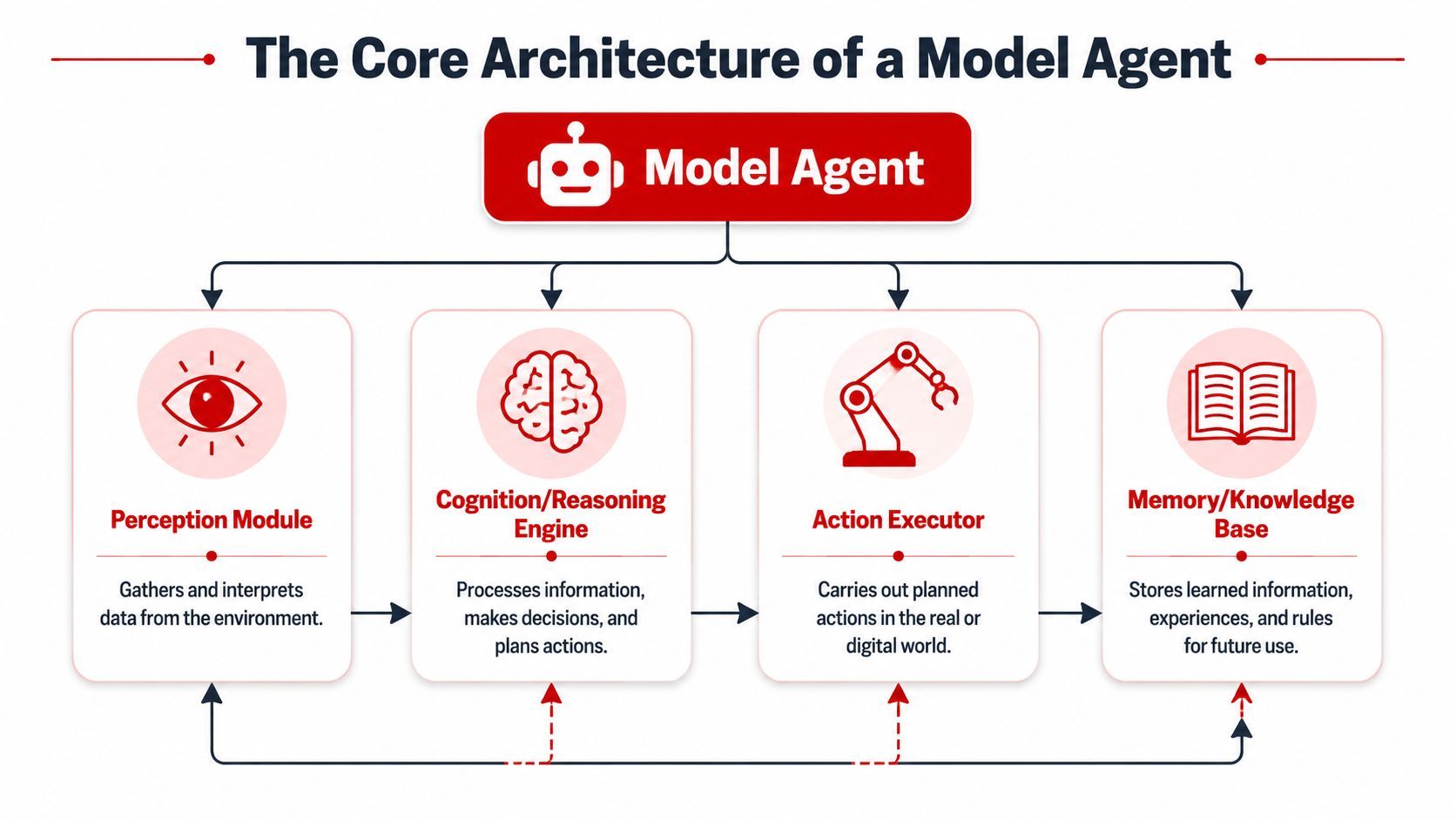
Model-based reflex agents are commonly described with four components: sensors for input, an internal model for maintaining state, a reasoning component for decision logic, and actuators for interaction. That architecture is outlined in this model-based reflex agent reference.
You can translate those parts into modern AI product language like this:
- PerceptionThis is how the agent receives information. In software, that could be user messages, CRM records, logs, API responses, uploaded files, or event streams.
- Internal model or memoryThis is the agent's working understanding of the situation. It isn't memory in the human sense. It's a structured or semi-structured state that helps the agent track what it knows, what happened earlier, and what still needs to be done.
- Reasoning
The LLM interprets the current state, decides which action makes sense, and may revise the plan if the world changed.
- ActionThese are the tools. Database lookups, API calls, code execution, CRM updates, search, messaging, ticket creation, and other operations all live here.
How the pieces work together in practice
Suppose an agent is handling a billing complaint.
- Perception brings in the customer message and account details.
- The internal state records that the customer was charged twice and that one invoice remains pending review.
- The reasoning layer decides it needs the payment history before replying.
- The action layer calls the billing API.
- New information arrives. The agent updates state.
- The reasoning layer decides whether to issue a refund, escalate, or ask a follow-up question.
That loop is the architecture in motion.
A lot of teams add two more concepts on top of the four-part pattern, even if they aren't named as separate components in the classic architecture.
- Planning: breaking a large goal into smaller steps
- Knowledge retrieval: pulling in facts from docs, databases, or prior interactions
Those two capabilities make agents far more useful in real business workflows. They also make them harder to build well.
Engineering shortcut: Don't think of an agent as “an LLM with tools.” Think of it as a state machine whose next transition is chosen by a reasoning model.
That framing helps when you need to debug behavior. The failure usually isn't “the model is bad.” It's more often one of these issues: poor state design, weak tool contracts, missing guardrails, or ambiguous task decomposition.
Real-World Use Cases and Examples
The easiest way to make model agents concrete is to watch them work through jobs that people already do in software teams and business operations.
A research agent
A research agent starts with a broad request like, “Compare the main vendors in this category and summarize product differences.” A normal model can draft a generic answer. An agent can do the job in stages.
It may begin by clarifying scope, then search the web or internal sources, extract the relevant details, compare claims across sources, and compile a structured output. If one source is weak or incomplete, it can pivot and fetch another.
The important behavior isn't just summarization. It's task management under uncertainty.
A support agent
Now consider customer operations. A user asks why an order didn't arrive and whether they can get a refund.
A model agent can read the request, call the order system, inspect shipping status, check policy rules, and decide which resolution paths are valid. If the package is delayed, it may draft a response with the latest status. If the order qualifies for reimbursement, it may trigger the appropriate workflow and log the action.
What makes this agentic isn't the friendly language. It's the fact that the system can choose and sequence actions based on live business data.
Teams get the biggest value from agents when the work requires both judgment and system access.
Here's a short visual explanation of how these kinds of systems are evolving in practice.
A DevOps agent
A DevOps agent is another good example because the environment changes constantly. The agent may monitor logs, detect unusual patterns, search an internal runbook, and suggest or trigger a predefined remediation step.
The “internal model” idea proves its value in practical use. The agent isn't just reacting to one log line. It's maintaining a working picture of what already failed, which systems were checked, and what actions have already been attempted.
A few patterns show up repeatedly across use cases:
- Research workflows: gather, compare, synthesize, cite, and revise.
- Operations workflows: inspect systems, choose actions, record outcomes.
- Developer workflows: read artifacts, use tools, modify plans after errors.
In each case, the same pattern appears. The system isn't valuable because it can talk. It's valuable because it can move a task forward.
The Hidden Challenges of Building Production-Ready Agents
A demo agent can feel magical in a notebook. Production changes the mood quickly.
Where prototypes break
The first challenge is prompt complexity. A one-shot prompt is easy to inspect. An agent prompt stack usually includes system instructions, tool schemas, safety rules, state summaries, memory snippets, and intermediate outputs. Small edits can change behavior in ways that aren't obvious.
Then there's step orchestration. Once the agent can choose tools, you need to decide how much freedom to allow. Too little autonomy and the system becomes a clumsy workflow wrapper. Too much autonomy and it can loop, overuse tools, or wander off-task.
A few hard questions appear early:
- Which actions are safe enough to automate
- How should the system recover after a failed tool call
- What should the agent remember, and for how long
- When should a human review the next step
The operational problems teams underestimate
Debugging is usually the biggest surprise. If a normal API call fails, you inspect the request and response. If an agent fails, you often need the full trace: user input, state snapshot, prompt version, tool calls, model choice, timing, outputs, and the reasoning path that led to the wrong action.
Without that visibility, failures feel random.
Production agent work is less about “making the model smarter” and more about making the system inspectable.
Cost control is another hidden problem. Agent loops can trigger multiple model calls and several tool invocations before they reach a stopping point. That isn't automatically bad, but it means teams need explicit limits, routing logic, and clear stop conditions.
Security gets more serious too. The moment an agent can touch email, billing systems, repositories, support queues, or internal knowledge bases, every tool becomes a permission boundary. The engineering problem is no longer just prompt quality. It's access design.
Here's where teams often get stuck:
- Prompt versioning: You need to know which instructions produced which behavior.
- Observability: You need traces, logs, and inputs across every step.
- Routing: Different tasks may require different models, parameters, or fallback paths.
- Guardrails: Tool access must be constrained by policy, not trust.
- Evaluation: You need a repeatable way to test changes before rollout.
A lot of products fail here because the team built the feature logic but not the production layer around it.
How a Unified Backend Simplifies Agent Development
The more agent behavior you add, the less sustainable it becomes to scatter prompts, routing rules, tool configuration, and logs across app code.
Why the backend becomes the product foundation
Teams usually start with hardcoded prompts and direct SDK calls. That's fine for an experiment. It becomes painful when product, engineering, and operations all need to change behavior quickly.
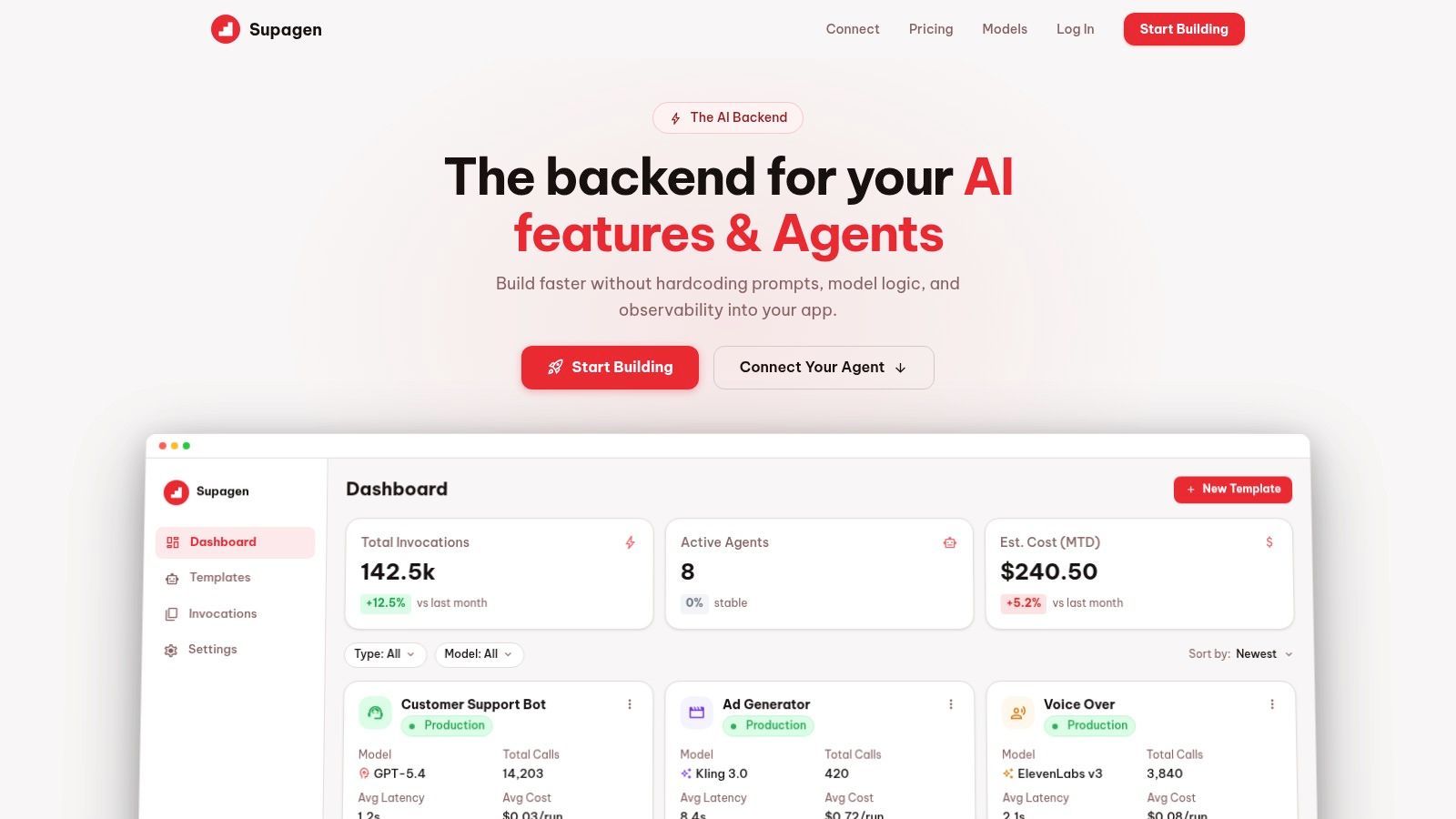
A unified backend helps by moving several concerns into one place:
- Prompt management: update instructions and templates without redeploying the app
- Model routing: choose providers and fallback logic centrally
- Observability: inspect per-call logs, inputs, outputs, latency, and costs
- Cost tracking: understand where spend comes from before it surprises you
- Tool connectivity: standardize how agents access external capabilities
What a unified setup changes day to day
For developers, the immediate benefit is less plumbing in application code. You don't want every product surface managing its own prompt variants, model provider logic, and debugging workflows.
For product managers, the benefit is iteration speed. If changing the agent's behavior always requires a release cycle, the team learns slowly. If prompts, routing, and policies can be adjusted in a controlled backend layer, the team can respond faster while keeping changes auditable.
A good production layer also makes failures legible. Instead of “the support bot did something weird,” you can inspect the exact chain: which prompt version ran, which model answered, what tool response came back, and where the decision path broke.
That changes how teams build. They stop treating agents like black boxes and start treating them like production systems with moving parts.
The practical leap isn't just from model to agent. It's from isolated calls to managed execution.
This matters even more for multi-modal products. Once your app mixes text, JSON, images, audio, or video generation with agent workflows, central coordination stops being optional.
Your Next Steps with Model Agents
If you've been asking what is a model agent, the useful answer is now more precise. It's not just “an AI that does things.” It's a system where an LLM serves as the reasoning core inside a loop that observes, decides, and acts.
Start narrow and learn the loop
Don't begin with a fully autonomous general-purpose assistant. Start with a single-purpose agent.
Good first projects include:
- A research helper: gather and synthesize information for a narrow domain
- A support workflow assistant: read a request and prepare the next operational step
- A developer utility: inspect logs or documentation and suggest a bounded action
That narrow scope forces clarity. You'll learn how state, tool use, and failure handling work before adding more complexity.
Use production tooling earlier than you think
You can experiment with frameworks like LangChain or LlamaIndex to understand agent patterns. They're useful for learning and prototyping.
But if the workflow touches real users, real money, or internal systems, treat observability, permissions, and prompt management as core infrastructure. Those aren't polish items. They're part of the product.
The teams that succeed with agents usually do two things well. They keep the agent's job narrow at first, and they put a proper management layer around it before complexity explodes.
If you're ready to move from scattered prompt code to a production-ready setup for AI features and agents, Supagen gives you a unified backend for prompt management, model routing, observability, cost tracking, and agent connectivity through one integration.