
What Is a Checkpoint in Machine Learning and AI
You kick off a training run before dinner, check it once before bed, and wake up to a cluster restart, a crashed notebook, or a cloud VM that disappeared. The loss isn't just time. It's experiment history, model progress, and confidence in what you were building.
That's usually the moment people ask what is a checkpoint, and why everyone in machine learning treats it like basic survival gear.
If you're building with PyTorch, TensorFlow, Hugging Face, diffusion models, or API-driven AI products, checkpoints sit in the middle of more workflows than is commonly understood. They help you resume training, compare versions, share artifacts, and deploy known-good models. They also create confusion, especially when the word “checkpoint” means one thing in a training loop and something slightly different in community model distribution.
Table of Contents
- Introduction to ML Checkpoints
- Understanding the Key Concepts of Checkpoints
- Exploring Checkpoint Types and Formats
- Practical Use Cases for Checkpoints
- Storage and Distribution of Checkpoints
- Versioning Governance and Security
- Integrating Checkpoints into Production Workflows
- Conclusion and Next Steps
Introduction to ML Checkpoints
A team launches a training job early in the week, expecting it to run for days. Partway through, a machine restarts or a spot instance disappears. If the model has been checkpointed, the team resumes from a recent save. If not, they repeat work the model has already done.
That simple difference explains why checkpoints show up everywhere in machine learning practice.
At first, the term can be confusing because people use it in two related ways. During training, a checkpoint is the saved state that lets you resume work after an interruption. During inference, that same saved artifact often becomes the file people download, share, evaluate, and deploy. In other words, a checkpoint is both a training artifact and, in many workflows, the main distribution unit for using a model.
That dual role causes a lot of community confusion. One practitioner says “ship the checkpoint” and means a model file ready to load for inference. Another says “save a checkpoint” and means protection against losing training progress. Both are talking about the same family of artifacts, but at different points in the model lifecycle.
A useful way to frame it is to compare a checkpoint to a saved project file. While work is in progress, the save protects your latest state so you can return to it. Once the work is ready to share, that file also becomes the thing other people open and use. ML checkpoints follow the same pattern.
This matters in day-to-day operations. Checkpoints let teams recover from failures, compare training runs, promote a known model state into evaluation, and hand off a model for inference without rebuilding everything from scratch each time.
Platforms like Supagen help tie those steps together so checkpoint handling does not stay split across training scripts, storage buckets, experiment logs, and deployment handoffs. That end-to-end view is useful because checkpoint management is rarely just about saving progress. It is also about deciding which saved state becomes the version others download and run.
Practical rule: If losing a training run would waste meaningful time or compute, save checkpoints from the beginning.
Understanding the Key Concepts of Checkpoints
A checkpoint works like a save file with enough information to reopen the same training session, not just the same model. If a long run stops at step 180,000 because a machine crashed or a job timed out, the checkpoint is what lets you continue from that point instead of starting over.
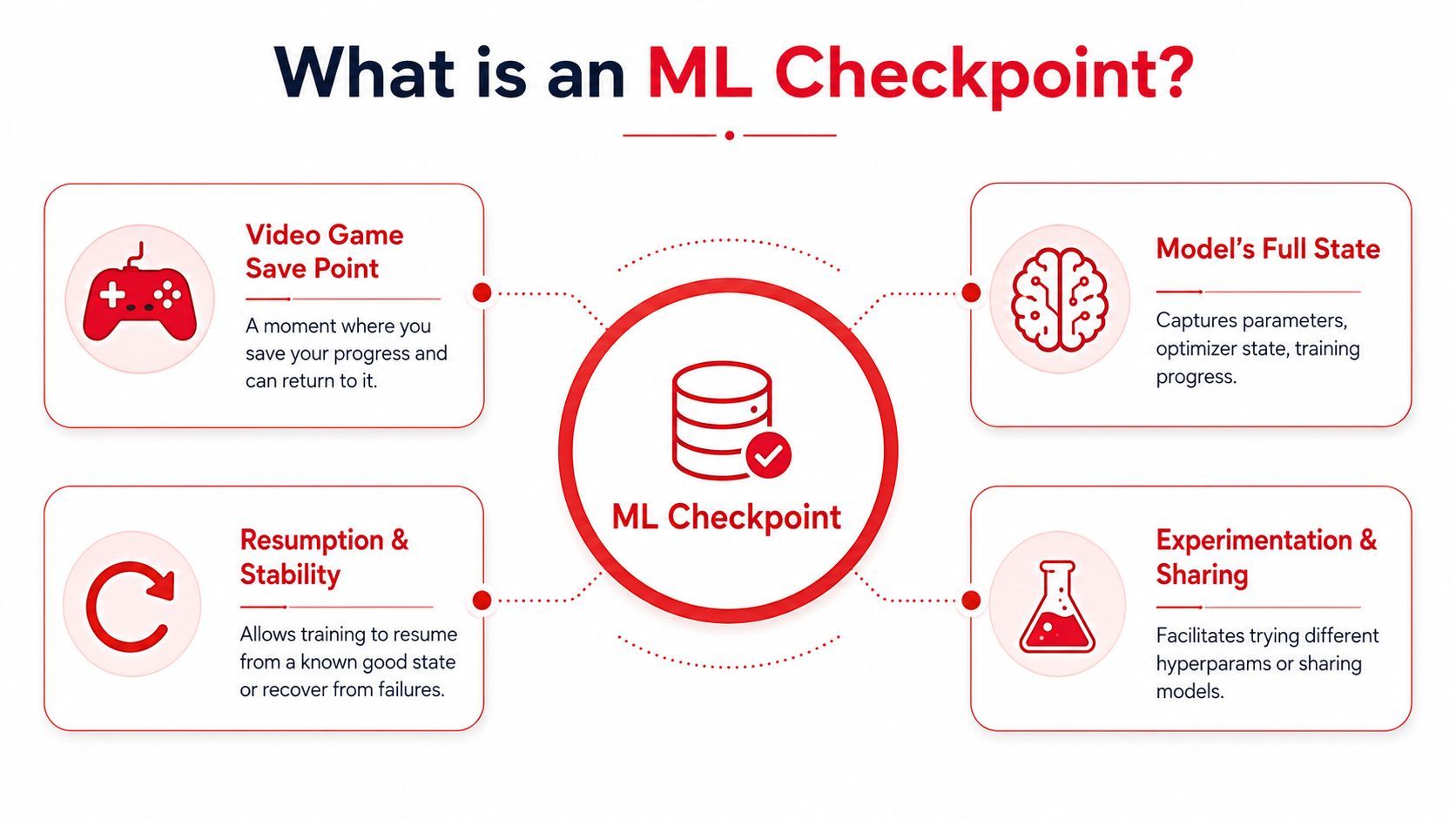
As noted earlier, a formal definition describes a checkpoint as a serialized snapshot of a model's state at a specific training step. The phrase that matters most is model state. In practice, that means the checkpoint captures enough context to reproduce where training had reached, rather than storing a bare description of the network.
That distinction clears up a common confusion among ML practitioners. A model architecture tells you how the system is built. A checkpoint tells you what that specific instance has learned so far, what training process shaped it, and in many workflows, what artifact other people will later download and run for inference.
What gets saved inside
The contents depend on the framework and the team's setup, but checkpoints often include several layers of information:
- Model weights, which store the learned parameters
- Optimizer state, which preserves training memory such as momentum or adaptive update history
- Training metadata, such as epoch, global step, or scheduler position
- Configs and related assets, which can include tokenizer settings or other files needed to reload the model correctly
A good way to read this is: weights answer what the model knows, while optimizer state and metadata answer where training was and how it was proceeding.
That difference matters when people say “I saved the model” and “I saved a checkpoint” as if they mean the same thing. They sometimes do, but not always.
If you save only weights, you often have enough to load the model for inference. If you want to resume training with the same rhythm, optimizer state usually matters too. Adam, for example, keeps running estimates from earlier updates. Remove that history, and the resumed run can behave like a similar training job rather than a true continuation of the old one.
This is also why checkpoints sit at the center of two jobs that often get discussed separately. During training, they are recovery and experiment artifacts. After training, they often become distribution units. The same file family that protected progress can also become the thing a teammate, customer, or community user downloads to generate outputs.
What a checkpoint is not
A checkpoint is not just a filename extension, and it is not always a single self-contained file.
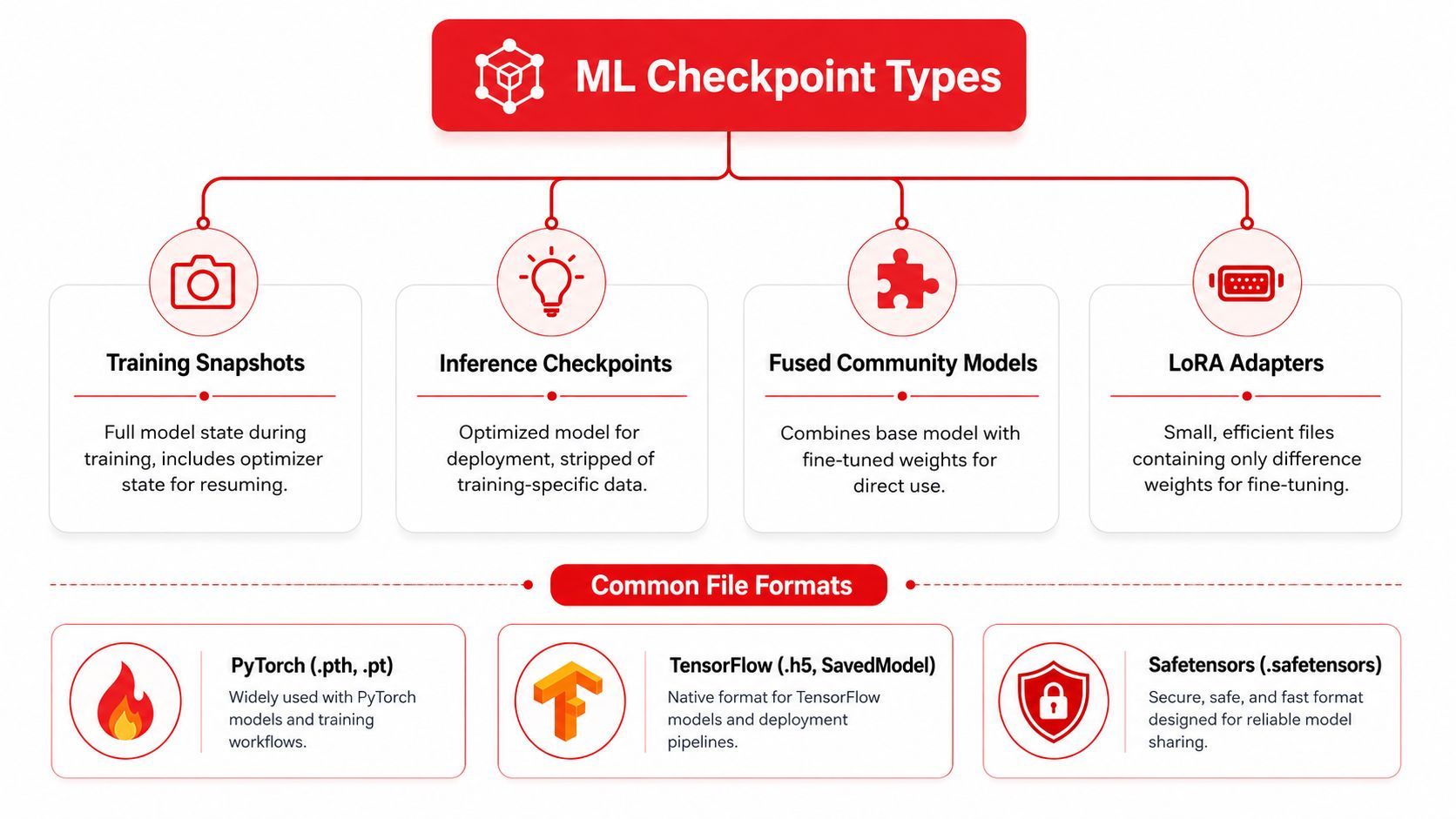
In PyTorch projects, you may see .pt or .pth. In TensorFlow or Keras projects, you may see .ckpt or .h5. Those formats tell you something about storage conventions, but they do not tell you by themselves whether the artifact includes optimizer state, configs, tokenizer data, or only weights. You have to know what the training code wrote into the file.
That is where newer practitioners often get tripped up. They download a “checkpoint,” assume it contains everything, then discover they can run inference but cannot resume training cleanly. Or they expect a training snapshot and instead receive a packaged artifact that is mainly meant to be loaded and used.
A practical habit helps here. Before treating any checkpoint as resumable, check what was saved. Look for weights, optimizer state, step or epoch counters, and the config needed to reconstruct the model correctly.
Teams also use checkpoints for work beyond recovery:
- Debugging a run that started drifting after a certain point
- Auditing which exact saved state produced a result
- Branching experiments from one known model state
- Promoting a selected artifact from training into evaluation or inference use
That last use is where systems like Supagen become especially helpful. Instead of treating checkpoint saving, storage, selection, and deployment handoff as separate chores spread across scripts and buckets, Supagen helps manage the checkpoint through its full lifecycle. That makes the dual role clearer. A checkpoint is not only a training byproduct. It is often the primary artifact a team governs, ships, and runs.
For a quick visual walkthrough, this video gives a helpful mental model before you touch code:
Exploring Checkpoint Types and Formats
Training checkpoints and inference artifacts
A lot of checkpoint confusion comes from the fact that the same word gets used for different jobs.
In one workflow, a checkpoint is a training snapshot. Its purpose is continuity. You save it during training so you can resume later, inspect an intermediate state, or compare runs.
In another workflow, a checkpoint is effectively a distribution artifact. People download it, load it into a UI or runtime, and generate outputs with it immediately. This is especially common in generative AI communities.
According to Morphic's explanation of checkpoints, existing coverage often treats checkpoints only as training artifacts, even though checkpoints are now the primary distribution unit for generative AI models, where a “checkpoint” includes the model, CLIP, and VAE fused into one file.
That single point clears up a common misunderstanding. Many indie builders assume a community checkpoint is “just weights.” Then they discover the file is larger, more self-contained, and closer to a deployable package than a minimal training artifact.
Community checkpoints often behave like ready-to-use model bundles, not bare training leftovers.
LoRA adapters add another layer of confusion. A LoRA adapter is typically a smaller modification artifact that depends on a base model or base checkpoint. If you load a LoRA without understanding which base artifact it expects, the setup breaks or produces poor results.
Common formats and when they show up
Different ecosystems use different formats, but the bigger question is what the file is meant to do.
A simple way to classify checkpoint-like artifacts is this:
- Full training checkpoint
Includes weights, optimizer state, and training metadata. Best for resuming a run. - Weights-only artifact
Better for inference or transfer, but not always enough for full training continuation. - Fused generative model checkpoint
Common in image model communities. Meant to be loaded and used directly. - LoRA adapter
Stores changes relative to a base model. Useful for lightweight customization.
When you inspect a file, ask three questions before using it:
- Was this saved for recovery or deployment
- Does it include optimizer state
- Does it depend on another base artifact
Those questions will prevent a lot of wasted setup time.
Practical Use Cases for Checkpoints
Recovery during training
The most obvious use case is recovering from interruptions. A researcher launches a run on a shared GPU box, the machine reboots overnight, and the process dies. If the project has regular checkpoints, the team restores the latest one and continues. If not, they repeat work they already paid for in time and compute.
This also applies to less dramatic failures. A notebook kernel crashes. A training script hits a bad dependency update. A spot instance disappears. Checkpoints turn these events from disasters into annoyances.
Teams usually become disciplined about checkpointing right after their first painful restart.
Reproducibility rollbacks and experiments
Checkpoints are also useful when nothing breaks.
A product team may want to compare two versions of a fine-tuned classifier. An MLOps engineer may need to roll production back to the last stable artifact after a quality regression. A researcher may want to branch from a promising midpoint instead of retraining from the beginning with slightly different hyperparameters.
That creates several practical patterns:
- Reproducible handoffs let one teammate continue another person's training run without guessing which state was used.
- Rollback safety gives deployment teams a known-good artifact they can return to quickly.
- Experiment branching makes it easier to test different schedules, data mixes, or fine-tuning strategies from a shared starting point.
- Auditability helps teams trace which model state produced a given result in a demo or evaluation.
Keep the checkpoint name tied to a run, purpose, and stage. Names like final_v2_reallyfinal create confusion fast.
A straightforward naming scheme helps more than people expect. Include the model family, task, date or run identifier, and whether the file is for training recovery or inference use. The exact pattern matters less than consistency.
Another good habit is separating “latest,” “best,” and “release” artifacts. Those labels answer different questions. “Latest” means newest. “Best” means strongest according to your chosen evaluation. “Release” means approved for downstream use.
Once a team starts using those labels consistently, checkpoint management becomes much less chaotic.
Storage and Distribution of Checkpoints
Why file size becomes an engineering problem
Checkpointing sounds simple until the files get large.
For large language models, checkpoint size scales with parameter count. As noted in VAST Data's discussion of checkpoints in LLMs, a 7B-parameter model yields about 14 GB of FP16 data, and checkpoint size is directly proportional to model parameter count. The same source notes that this requires high-bandwidth storage to avoid I/O bottlenecks.
That matters because saving a checkpoint isn't free. During a write, the training system may slow down or pause while data moves to storage. If storage can't keep up, checkpointing starts to interfere with training efficiency.
The issue isn't just capacity. It's throughput, restore speed, and operational friction. Large files are harder to copy, mirror, archive, and distribute across environments.
Practical ways teams manage large files
Teams usually respond with a mix of engineering tactics rather than one magic fix.
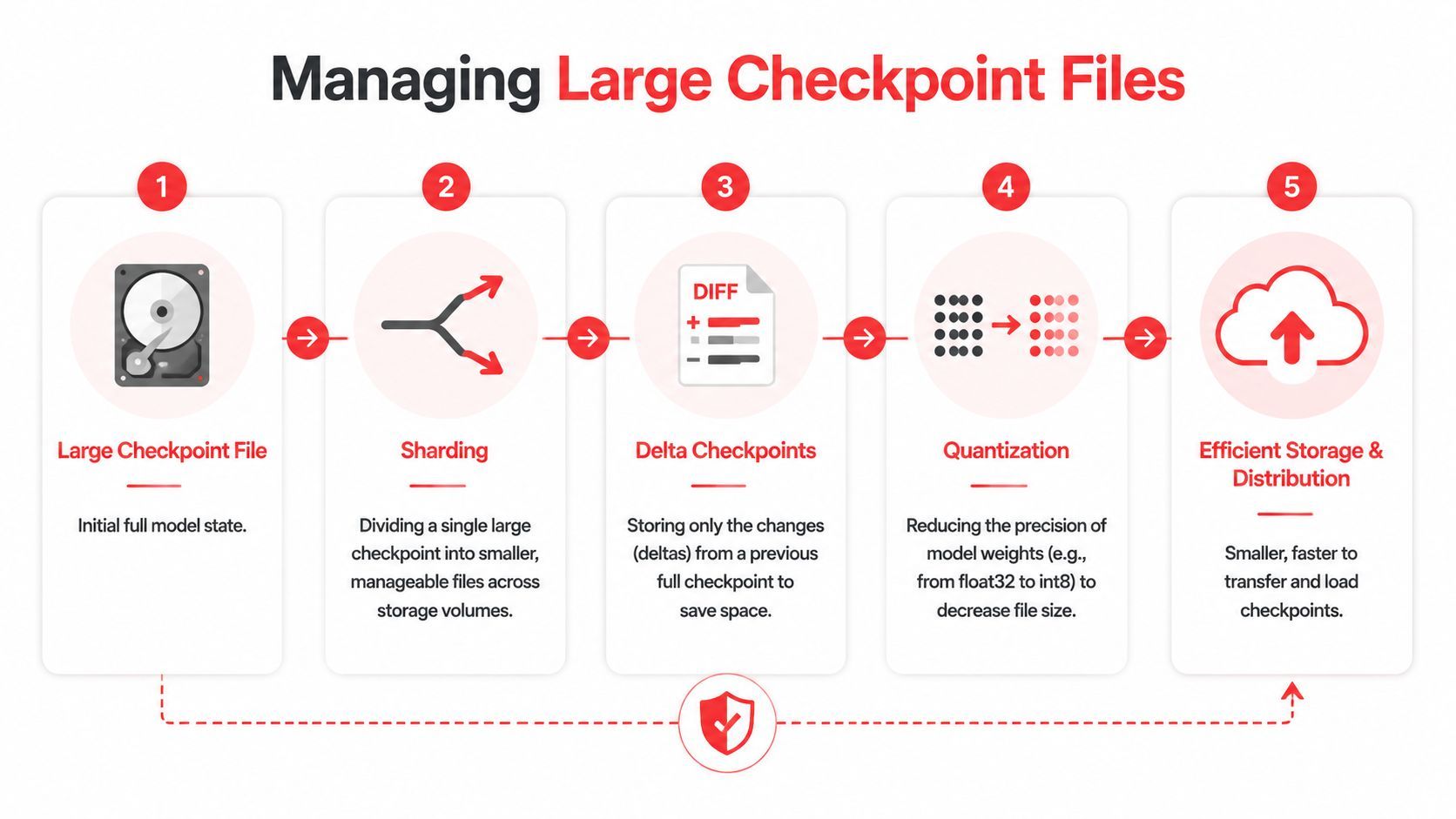
- Sharding splits one large checkpoint into multiple smaller pieces. That makes storage and transfer more manageable, especially across distributed systems.
- Delta checkpointing stores changes relative to another checkpoint instead of always writing a full copy.
- Quantization for distribution can reduce artifact size when the main goal is inference rather than full-fidelity training recovery.
- Tiered storage keeps actively used checkpoints on fast storage and archives older ones elsewhere.
A practical operating pattern often looks like this:
- Save full checkpoints at important milestones.
- Save lighter intermediate artifacts more frequently if your stack supports it.
- Promote only a subset to long-term retention.
- Archive or prune stale files based on policy.
Fast training hardware doesn't help much if checkpoint writes become the choke point.
For distribution, teams should also think about who needs the file. A training engineer may need the complete state. A product engineer may only need an inference-ready artifact. A community user may need a bundled model that works in one click. Treating all three as identical usually creates waste.
The key is matching the checkpoint form to the actual job. Recovery, deployment, and sharing often want different packaging.
Versioning Governance and Security
Versioning rules that reduce confusion
Checkpoint files become messy fast when multiple people touch the same project.
A good versioning system starts with naming. Use names that explain what the artifact is, not just when it was saved. Include model family, task, intended use, and a stable version label. People should know whether a file is a training snapshot, a candidate release, or an approved deployment artifact without opening it.
A lightweight governance checklist helps:
- Semantic naming so humans can identify purpose quickly
- Release tags for approved or production-bound artifacts
- Immutable logs that record who created, promoted, or deprecated a checkpoint
- Review gates before a checkpoint becomes the team default
- Access controls so not everyone can overwrite critical artifacts
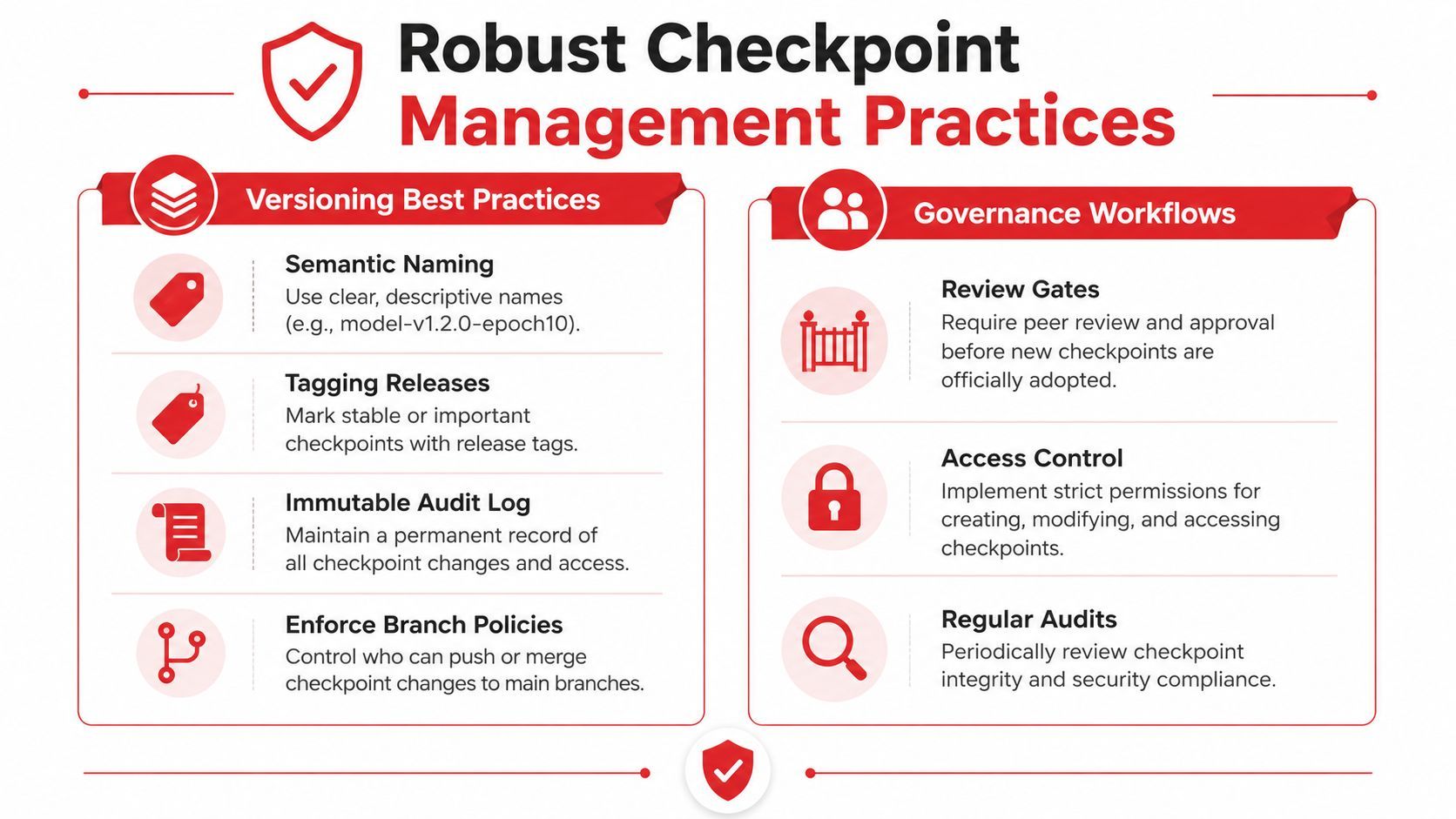
This doesn't have to mean heavy bureaucracy. Even small teams benefit from simple rules like “no silent replacement of release artifacts” and “every promoted checkpoint gets an evaluation note.”
Security and licensing checks
Security is easy to ignore until a checkpoint comes from outside your team.
Before loading or redistributing a model artifact, check integrity and provenance. Verify checksums when available. Store sensitive metadata carefully. Keep a record of where the file came from, what license governs it, and whether it can be used for commercial deployment.
A few habits are worth making standard:
A technically valid checkpoint can still be unusable if its license doesn't fit your product.
Governance also matters for internal collaboration. If one team fine-tunes a proprietary model and another team deploys it, both groups need a shared record of what was approved. Without that, “latest” can become shorthand for “nobody is sure.”
The most reliable systems treat checkpoints like software releases, not random binary blobs.
Integrating Checkpoints into Production Workflows
Loading and promoting a checkpoint
In production, a checkpoint becomes part of a chain. Someone trains it, someone evaluates it, someone promotes it, and someone may need to roll it back.
In PyTorch, a common pattern is to save a dictionary that includes the model state and training state, then load the relevant pieces later. In TensorFlow or Keras, the mechanics differ, but the operational idea is similar: save deliberately, restore deliberately, and keep the artifact tied to an identifiable version.
A practical flow looks like this:
- Train and save a checkpoint at meaningful milestones.
- Evaluate the saved artifact against the metrics your team cares about.
- Mark one checkpoint as a release candidate.
- Promote it to the serving environment only after review.
- Keep the previous approved artifact available for rollback.
For inference systems, you often won't ship the raw training checkpoint directly. You may export, strip, convert, or bundle it first depending on the runtime and framework.
Operational habits that keep deployment stable
Most checkpoint problems in production aren't caused by file formats. They come from weak process.
A few habits reduce avoidable failures:
- Separate training and serving artifacts when they have different purposes.
- Record lineage so every deployed model maps back to a known run.
- Test restore paths instead of assuming a saved file can be loaded.
- Keep rollback simple by preserving the last approved artifact and deployment config.
- Monitor post-release behavior so you can catch regressions quickly.
One subtle but important step is restoring the environment around the checkpoint. Tokenizer settings, preprocessing assumptions, model config, and dependency versions can matter just as much as the weights file itself.
The checkpoint may load successfully and still behave differently if the surrounding pipeline changed.
For teams building AI products quickly, discipline pays off. A checkpoint shouldn't live only on one engineer's laptop or inside a one-off notebook. It should sit inside a repeatable workflow that supports promotion, rollback, and traceability.
That's true whether you're deploying a classifier, a fine-tuned text model, or a community-distributed generative model.
Conclusion and Next Steps
A checkpoint is easier to understand once you stop treating it as a vague ML term. It's a saved model state, and sometimes a deployable model package, depending on the workflow.
That distinction matters.
If you train models, checkpoints protect progress and make recovery possible. If you run experiments, they improve reproducibility and branching. If you ship AI features, they support controlled promotion, rollback, and distribution. If you work with community models, they also help you separate base checkpoints from adapters and bundled inference artifacts.
The practical next step is to audit your current workflow. Ask a few blunt questions. If training stopped today, could you resume cleanly? If a teammate needed the exact model behind a result, could they find it? If production quality dropped, could you roll back without guessing?
Teams that answer those questions early avoid a lot of pain later.
Then put structure around the artifacts you already create. Save intentionally, name consistently, store intelligently, and review what gets promoted.
If you want a cleaner way to manage the production side of AI systems, Supagen gives teams one place to handle versioned prompts, model routing, observability, and controlled updates without hardcoding logic into the app. It's a practical fit for shipping AI features faster while keeping changes auditable and easier to roll back.