
Build a Production-Ready Voice AI Agent
A voice AI agent that sounds great in a demo can still fail the moment real callers show up. The demo is clean, the audio is quiet, the prompts are rehearsed, and the escalation path is usually hidden behind a “contact support” button nobody has to use.
Production is different. Callers talk over the agent, background noise leaks into the mic, accents and dialects stress recognition, and long pauses make the interaction feel broken even when the model is technically “working.” The question isn't whether the agent can hold a conversation, it's whether it can complete a task, hand off cleanly, and keep operating when the call gets messy.
That's why the category has moved from novelty to budget line. The global AI voice agents market was estimated at USD 2.54 billion in 2025 and is projected to reach USD 35.24 billion by 2033, with a 39.0% CAGR from 2026 to 2033, according to Grand View Research. A separate industry summary tied to the same trajectory says a voice AI interaction typically costs $0.40 to $1.18, compared with $7 to $12 for a human agent, which is why teams are pushing these systems into real workflows instead of leaving them in pilot mode.
Table of Contents
- Why Most Voice AI Agents Fail After the Demo
- Core Components of a Voice AI Agent Pipeline
- Architecture Patterns and Integration Approaches
- Evaluating Voice AI Providers and Tradeoffs
- Simplifying Production with Supagen
- Real-World Voice Agent Use Cases
- Production Readiness Checklist for Voice Agents
Why Most Voice AI Agents Fail After the Demo
The most common mistake is treating natural-sounding speech as the finish line. In practice, voice systems fail when the caller's environment is uncontrolled, the conversation drifts, or the handoff logic is weak. A polished demo hides all three problems because the test conditions are too clean.
Production callers are not demo callers
Callers interrupt. They mumble. They speak from cars, warehouses, kitchens, and elevators. They may give partial account numbers, change topics mid-sentence, or pause long enough for the system to think the turn is over. Those are not edge cases in production, they're the daily workload.
Independent reporting on voice agent pain points points to background noise, robotic or unnatural voice, long pauses, and accent or dialect difficulty as the issues people notice most often, with background noise cited at 40%, robotic voice at 37.5%, and long pauses at 35% in one voice-agent report. That list is useful because it shows where demo optimism breaks first, and it's rarely the part that founders spend the most time polishing.
Practical rule: if the agent can't recover from a noisy room, a bad transcript, and a confused caller, it isn't production-ready.
Resolution beats fluency
A voice AI agent shouldn't be judged only by how smooth it sounds. The better metric is whether it finishes the job end to end, or cleanly escalates when it can't. That means the system needs write access to the business tools it depends on, not just a clever prompt and a pretty voice.
McKinsey's guidance in the research brief is blunt on this point, optimize for resolution instead of simple deflection, and build deep integrations plus clear handoff paths to humans. That framing matters because a call that “felt conversational” but required a second callback still cost the business money. In production, repeat calls and cost-to-resolve are usually the failures that matter most.
A lot of teams also overvalue the first-turn experience. The first response can sound perfect and still fail later when the agent has to verify a customer, fetch an order, update a CRM record, or transfer the call. The system has to survive the full path, not just the opening line.
Core Components of a Voice AI Agent Pipeline
A voice AI agent is easiest to understand as a real-time translation booth. One specialist listens, another interprets, another decides what to do, and another speaks back out. If any one of those handoffs is slow or wrong, the caller notices immediately.
The pipeline is a chain, not a single brain
The first stage is speech-to-text (STT), which turns incoming audio into text. In production, this stage is the most unforgiving because every downstream decision depends on the transcript. If the STT layer mangles a product name, a phone number, or a city name, the conversation starts drifting before the agent has even “understood” the caller.
Next comes natural language understanding (NLU), which maps the transcript to intent, entities, and context. That's where the agent decides whether the caller wants a refund, a booking, a password reset, or a live transfer. The result then flows into dialog management, the logic that chooses the next action, checks state, and decides whether to ask a clarifying question or execute a workflow step.
The final user-facing stage is text-to-speech (TTS), which turns the response back into audio. If the voice sounds uncanny, too slow, or strangely timed, the interaction feels broken even if the content is correct. That's why audio output quality matters as much as intent accuracy.
State and memory sit in the middle
State management belongs between interpretation and response. The agent needs to remember what the caller already confirmed, what tool calls succeeded, and whether a human transfer is already in progress. Without that memory, the system loops, asks redundant questions, and wastes seconds that callers interpret as confusion.
The cleanest mental model is this, audio in, transcript out, intent and state checked, action chosen, audio back out. Every step runs inside a tight latency budget, which is why teams usually wire the pipeline as streaming components instead of waiting for full utterances to finish.
One useful analogy is a relay race. The baton is the conversation state. If the STT handoff slips, the rest of the race is compromised.
The architecture choice matters later, but the core workflow stays the same. The agent has to listen, decide, act, and speak with enough speed that the caller feels one continuous exchange.
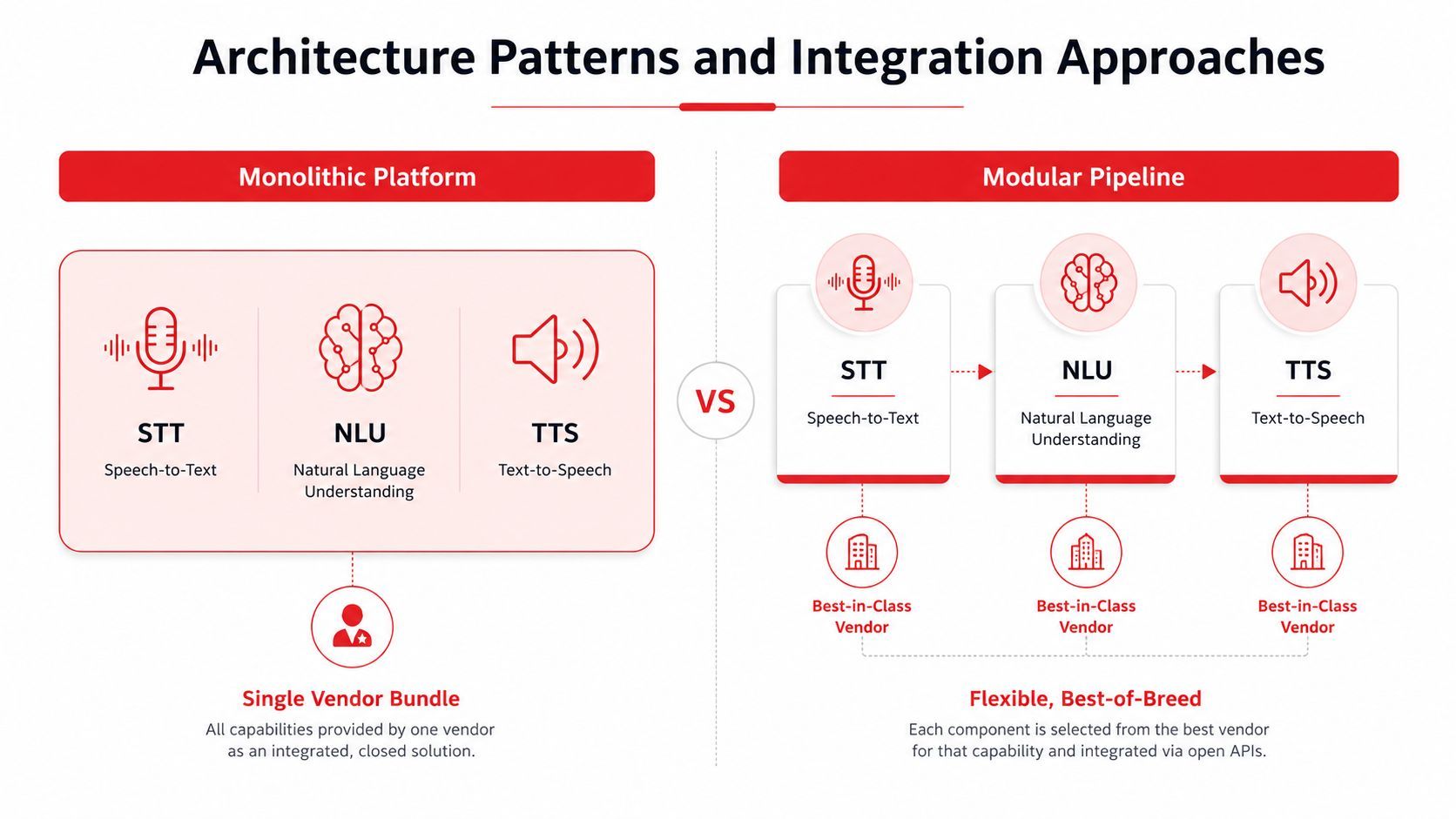
A diagram comparing monolithic platform and modular pipeline architectures for voice AI agent technology integration.
Architecture Patterns and Integration Approaches
There are two broad ways to build this stack. One bundles STT, NLU, and TTS into a single vendor platform. The other splits the pipeline into modules and lets your backend orchestrate the pieces. Both can work, but they fail in different ways.
Monolithic platforms trade control for speed
A monolithic platform is attractive when the team wants a fast prototype and doesn't want to spend days stitching audio services together. The upside is obvious, fewer integration points, fewer API keys, and less initial plumbing. The downside shows up later when you need to swap one component without touching the rest of the stack.
That rigidity becomes painful when latency, voice quality, or pricing pressure changes. If the vendor's STT is fine but the TTS voice is weak, or the agent logic needs a custom fallback, you may not have much room to maneuver. In production, that kind of lock-in often matters more than it did in the demo phase.
Modular pipelines buy flexibility
A modular architecture splits the system into independent pieces and connects them through your own orchestration layer. That makes it easier to choose the best STT engine for accuracy, the best TTS engine for naturalness, and the best dialog logic for your workflow. It also makes failure handling cleaner, because one broken service doesn't have to take the whole call down.
The tradeoff is engineering effort. You're now responsible for streaming, retries, state sync, and barge-in handling. That's more work, but it also gives you room to build fallback paths, route around provider outages, and tune costs more aggressively.
Practical rule: if your use case is narrow and you need to ship fast, a monolith can be enough. If the workflow is high-volume or customer-facing, modular control usually pays for itself.
Streaming changes the design
Real-time voice systems work best when audio is streamed through WebSocket connections instead of waiting for full utterances. That lets the agent start transcribing, interpreting, and responding before the caller finishes every sentence. The result is a more natural turn-taking rhythm and less perceived lag.
Turn-based systems are simpler, but they feel slower and less conversational. They can still work for contained workflows, yet they often struggle once callers interrupt, pause, or revise what they just said. A production architecture should include fallback logic for provider errors, partial transcripts, and escalation to a human agent when confidence drops.
Evaluating Voice AI Providers and Tradeoffs
Provider choice looks like a model benchmark problem, but in production it's really a systems problem. You need to compare end-to-end behavior, not just one component in isolation. A fast STT service with weak handoff logic can still produce a frustrating call.
Compare the path, not the brochure
Teams should measure the whole audio path, from caller speech to spoken response. That includes transcription time, dialog turnaround, TTS generation, and the time spent waiting on external tools or backend services. Vendor-published numbers are useful as a starting point, but they rarely capture how a real call behaves once network jitter and tool calls enter the picture.
A provider can be great for a prototype and still be the wrong choice at scale. The main variables are latency, voice naturalness, language coverage, pricing shape, and API reliability. If you optimize for only one of those, the rest usually becomes a tax later.
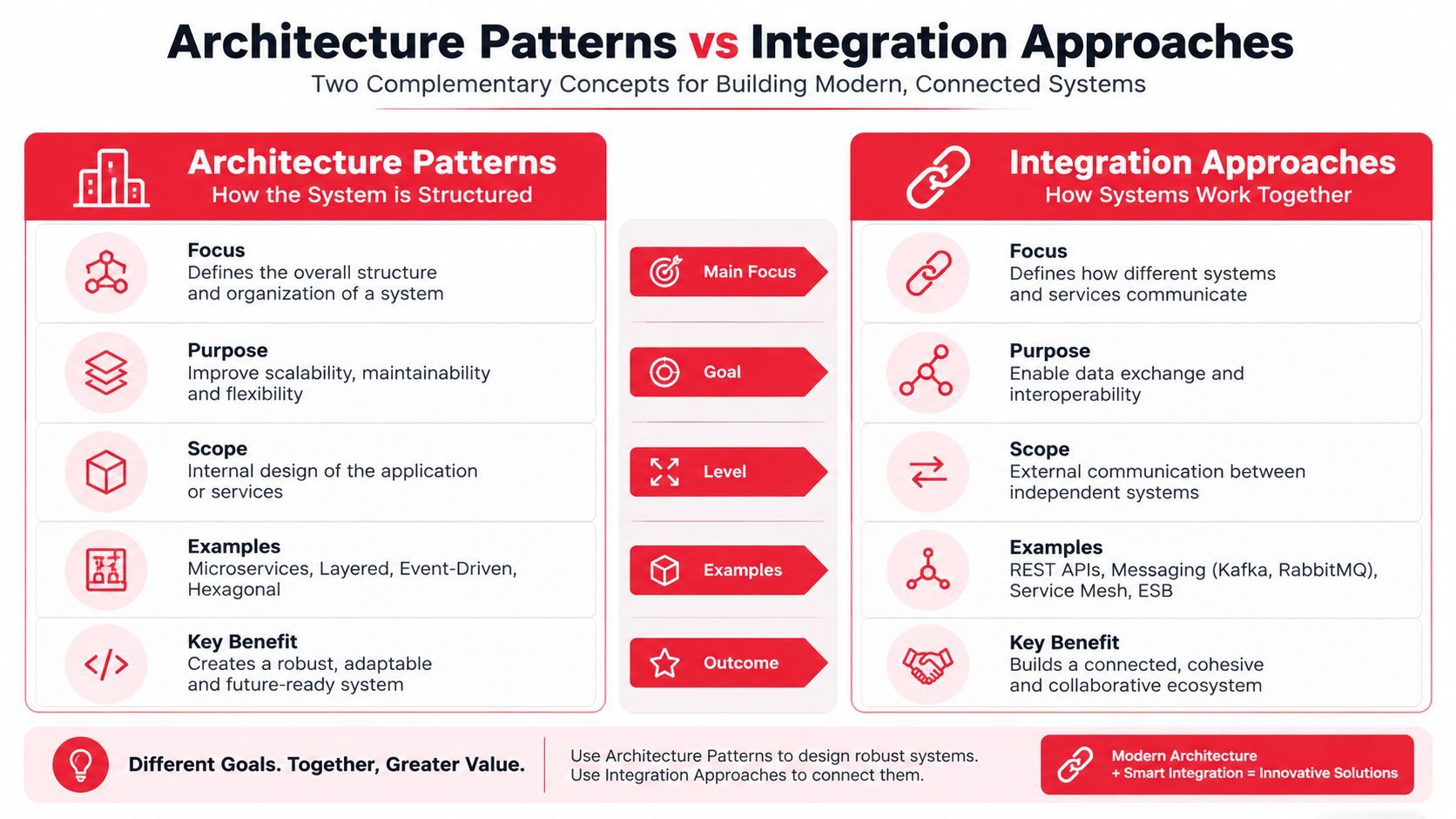
The table is intentionally qualitative because published latency varies with configuration, region, and integration design. That's why the benchmark that matters most is your own call path under realistic load. Measure the actual time from caller speech to response audio on your stack.
Fallbacks matter more than vendor loyalty
A good production setup can route around failure. If one speech provider stalls, the backend should be able to fail over to another service or trigger a human transfer. If a provider's voice quality slips for a particular language or accent, a modular setup lets you adjust without rewriting the entire agent.
The cheapest provider isn't always the cheapest system. If a service causes more retries, more escalations, or more repeat calls, the hidden cost lands elsewhere. That's why cost control and reliability need to be evaluated together, not as separate checkboxes.
Simplifying Production with Supagen
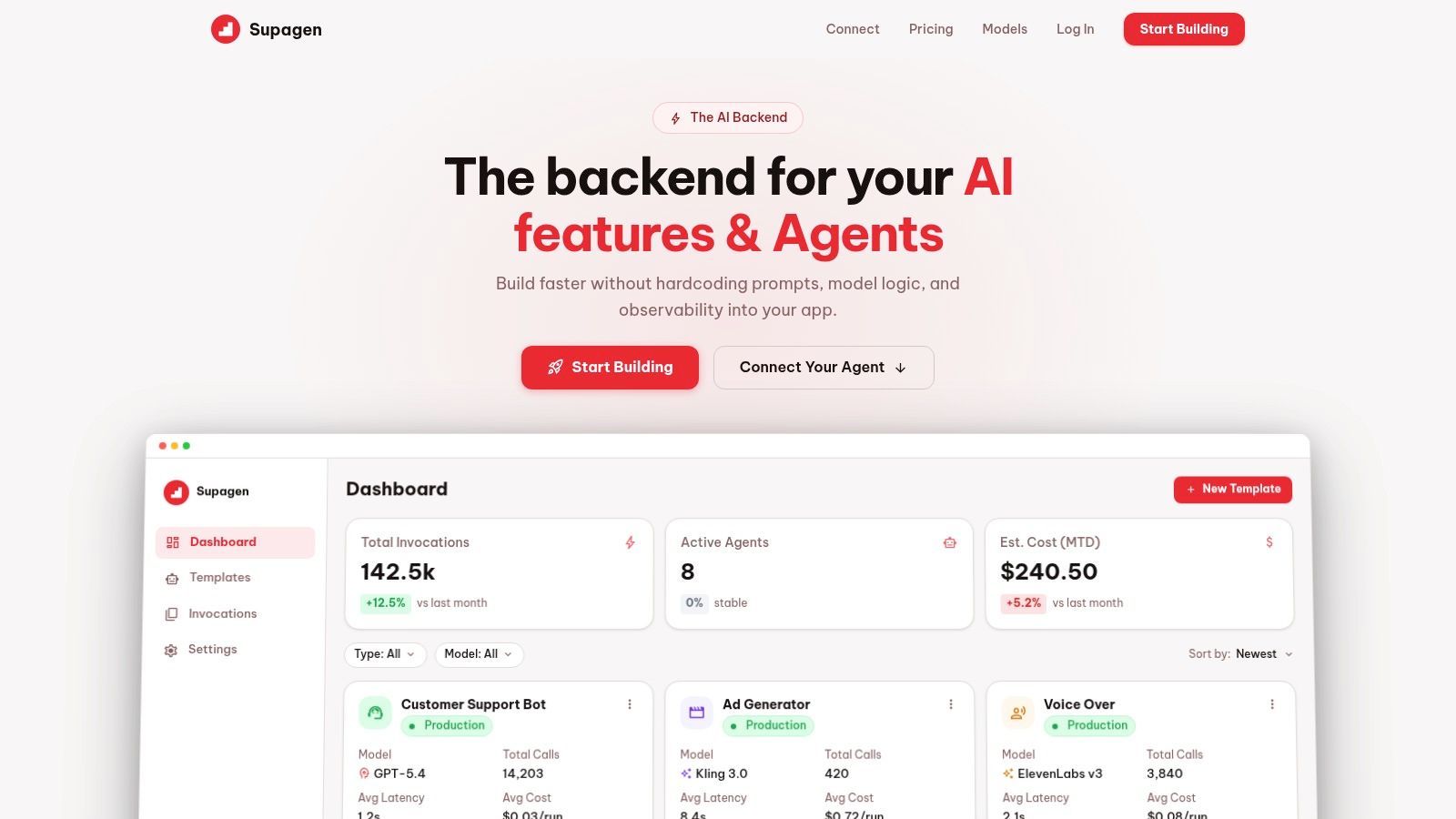
Supagen fits the parts of the stack that become painful after a voice agent leaves the prototype stage. It gives teams a unified backend for versioned prompts, model routing across providers, and per-call logs that surface tokens, latency, I/O, and costs in one place. That matters when agent behavior changes often and every change needs to be auditable.
One backend layer, fewer redeploys
The main operational advantage is prompt and model control without code changes. Instead of hardcoding behavior into the app, the team can update prompts, change routing, or set fallback parameters through a dashboard. That cuts down the number of redeploys needed just to tune conversation behavior.
Supagen also connects to MCP-compatible agents through a simple URL with OAuth, so the agent can reach capabilities without the usual SDK sprawl. For product teams shipping voice features alongside other AI workloads, a shared control surface is often easier to manage than point integrations scattered across the app.
Observability makes debugging cheaper
Call-level logs are where production issues usually show up first. If a caller complained about a pause, the team needs to inspect the transcript, tool calls, latency, and the model path for that exact interaction. A centralized dashboard gives engineers one place to trace the failure instead of jumping across providers and application logs.
That visibility also helps with cost control. Voice agents can look affordable in aggregate and still become expensive on certain paths, especially when retries or long tool calls pile up. Seeing token usage and per-call latency side by side makes those failure modes easier to spot.
Real-World Voice Agent Use Cases
The cleanest way to understand production design is to look at the job the agent is doing. Different workflows need different guardrails, different fallback logic, and different tolerance for silence. A support agent and an outbound follow-up agent may both use the same pipeline, but they shouldn't behave the same way.
Inbound support needs fast containment
Routine customer support is the most obvious fit because the call volume is predictable and the task set is narrow. These agents do best when they can answer common questions, fetch account data, and complete simple changes without transferring the caller too early. The system should still escalate quickly when the caller sounds frustrated or the request falls outside a narrow scope.
The architecture usually favors strong STT and solid dialog state because support calls are full of names, numbers, and account-specific terms. If the caller says something unexpected, the handoff needs to preserve context so the human agent doesn't start from zero. That's where good escalation design becomes part of the product, not just a support feature.
Outbound workflows need consent discipline
Outbound lead follow-up and reactivation are more dangerous than inbound support because the compliance surface is larger. In the U.S., automated or AI calls without prior consent are restricted under the TCPA, and consent needs to be captured and stored with details like date, time, and method, according to the compliance guidance in the research brief.
That means the call logic has to include self-identification, escalation, and an exit path that reaches a person quickly. If the agent can't disclose itself or transfer cleanly, the workflow shouldn't be automated. This is one of those cases where the safest engineering choice is also the simplest one.
The right automation target is the call flow you can document, not the one that merely sounds impressive.
Scheduling and internal ops stay narrow
Appointment scheduling works well when the system has direct access to calendars, availability, and confirmation workflows. Internal productivity agents can be similarly narrow, handling HR questions, basic routing, or status checks. Both use cases benefit from constrained dialog trees and limited action sets because fewer branches mean fewer failure points.
The common pattern is simple, narrow scope, clear escalation, and a transcript that leaves the human or system on the other end with enough context to continue. That's what production-ready looks like in practice, not a voice that sounds flawless for thirty seconds.
Production Readiness Checklist for Voice Agents
A voice AI agent is only production-ready when it can handle bad audio, weak transcripts, and messy handoffs without turning every call into a support ticket. Demo calls hide those problems. Real callers expose them fast, especially when latency creeps up, background noise gets worse, or escalation breaks halfway through the conversation. The checklist below is the one I'd use before exposing the system to real customers.
Start with the failure points
- Budget for latency end to end. Measure the full time from caller speech to response audio, not just one provider hop. If the loop feels slow, callers interrupt, repeat themselves, or hang up.
- Test with noisy inputs. Run calls in cars, offices, and speakerphone conditions because that's where transcription quality usually slips. Demo audio is too clean to trust.
- Exercise escalation paths early. Verify that the human handoff preserves intent, context, and the last known state. A transfer that drops the thread is a broken workflow, even if the speech sounded natural.
- Log every decision. Store transcripts, tool calls, model routes, and timestamps so you can reconstruct failures later. Without that trail, production bugs turn into guesswork.
Lock down compliance and cost control
For outbound calls, the system needs prior consent, stored evidence of that consent, and clear AI self-disclosure. The call flow also needs a live-transfer escape hatch, because a polished script does not matter if the agent cannot identify itself or hand off cleanly.
On the cost side, track per-call spend and watch for paths that trigger retries or unnecessary tool calls. Those are the patterns that inflate spend in production. A unified backend can help because it exposes usage and latency together instead of scattering them across vendor consoles. If you want versioned prompts, routing, and call logs in one place, Supagen can sit in that layer.
Make quality measurable
- Track resolution, not just containment. The question is whether the task got done.
- Measure repeat calls. If callers come back with the same problem, the agent is leaking value.
- Review transcripts by intent. Don't sample random calls only, because rare failure paths hide in the long tail.
- Use prompt and routing experiments carefully. Small A/B changes are safer than wide rewrites when the system is already live.
A good production review also checks whether the agent recovers cleanly from partial failures. If speech confidence drops, it should ask a clarifying question instead of guessing. If a tool call fails, it should retry only when the retry is cheap and likely to help. If the caller gets frustrated, the system should transfer instead of trying to salvage a conversation that is already lost.
Build for graceful degradation
When a provider fails, the agent should fall back to a simpler path or a human, not stall in silence. When audio quality drops, it should shorten prompts, slow the turn-taking, or ask the caller to repeat the last point. When the caller is clearly stuck, the system should hand off with enough context for a person to continue without starting over.
Those rules sound obvious until you ship the first live release. Then you find out which assumptions only held in the demo, and which ones survive noisy audio, impatient callers, and a hard latency budget.