
Prompt Management Tools: Ship AI Features Faster in 2026
Your AI feature probably works in staging, demos well in a founder call, and feels one release away from being solid. Then the serious work begins. A prompt lives inside application code, a product manager asks for a small behavior change, and suddenly an engineer has to patch a string, redeploy, retest, and hope nothing else broke.
That setup holds for a week or two. After that, it becomes a tax on every team involved. Engineers become prompt librarians. PMs wait on backlog slots for copy-level changes. Founders can't tell whether model costs are acceptable, whether latency spikes came from a provider issue, or whether a prompt change hurt output quality. What looked like a simple AI feature turns into a brittle backend with no operational center.
Teams that keep prompts hardcoded usually learn the same lesson the slow way. Prompts aren't just text. In production, they're behavior definitions, routing rules, cost drivers, and debugging evidence. They need a system around them.
Table of Contents
- The Hidden Chaos of Building AI Features
- What Are Prompt Management Tools Really
- The Core Capabilities Every Team Needs
- How to Choose the Right Prompt Management Tool
- Production Architecture and Integration Patterns
- Common Pitfalls When Adopting These Tools
The Hidden Chaos of Building AI Features
The first version is always messy. A team adds a chatbot, support assistant, content generator, or analysis step, and the fastest path is to put the prompt directly in code. It feels fine because there's only one model, one environment, and a handful of users.
Then the app gets traction.
A product manager wants the assistant to sound less robotic. An engineer edits a long prompt string buried in a service file. The team redeploys. Later, someone wants to try Anthropic instead of OpenAI for one workflow, or add a fallback when one provider gets slow. That “simple experiment” now touches application logic, parameter handling, response parsing, and test coverage across multiple paths.
The real problem isn't the prompt
The problem is operational coupling. Prompt logic, model selection, and runtime behavior all get welded to application code. Once that happens, every change becomes more expensive than it should be.
Three symptoms show up fast:
- Behavior changes require code releases. Small prompt edits ride the same deployment path as actual product code.
- Nobody has a reliable audit trail. When outputs degrade, the team can't easily answer which prompt version ran, which model handled the call, or whether parameters changed.
- Costs become blurry. Finance sees provider invoices, but product and engineering still don't know which feature, customer flow, or prompt is driving spend.
Hardcoded prompts are manageable in prototypes. They become a liability the moment multiple people need to change, inspect, or compare AI behavior.
This is why prompt management tools matter. They create a dedicated production layer for AI behavior instead of treating prompts like miscellaneous strings.
The category is expanding because teams need that layer. The market for prompt management tools is projected to grow by USD 2,629.2 million from 2026 to 2030 at a CAGR of 18.9%, driven by the need to optimize prompts for accurate LLM responses, according to prompt engineering market projections compiled by SQ Magazine.
What changes when you add a management layer
Once prompts move into a centralized system, changes stop flowing through random scripts and fragile redeploys. Teams can update prompt versions, inspect request history, compare behavior, and route traffic more safely.
That shift matters beyond engineering.
- Developers stop babysitting text changes.
- PMs get a controlled place to review and test behavior.
- Founders get visibility into usage, latency, and cost patterns.
- Operations teams finally have records that help with debugging and compliance.
If you're building AI into a real product, prompt management isn't a nice-to-have. It's the line between a demo stack and a production system.
What Are Prompt Management Tools Really
Most descriptions are too shallow. A prompt management tool isn't just a nicer text box for editing prompts. The better mental model is Git for language models.
That analogy is useful because it shifts the conversation away from “where do we store prompt text” and toward “how do we manage AI behavior as a production asset.”
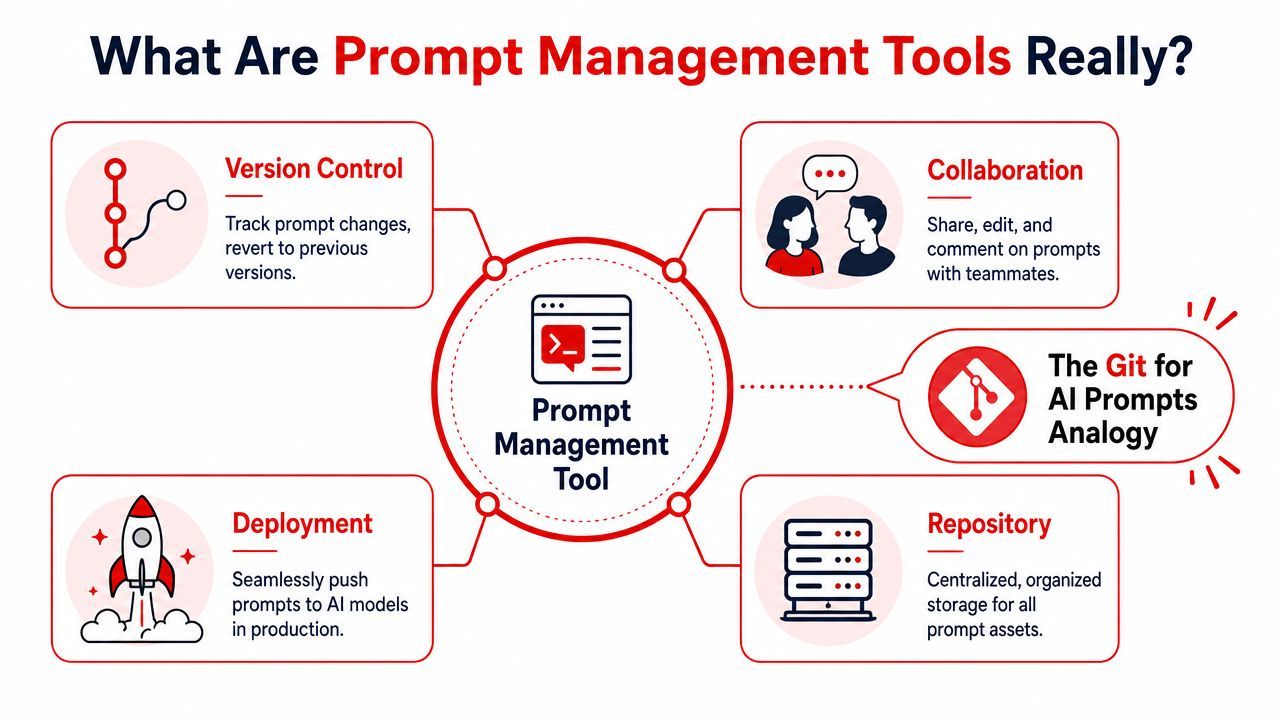
Prompt management tools act as the “Git for language models,” providing rollbacks, history, and reproducibility by storing prompts in a central registry with metadata and decoupling prompt logic from application code for safer iteration, as described in Arize's overview of prompt management platforms.
Prompts stop being strings and become assets
That decoupling is the whole game.
Instead of burying prompt text inside controllers, service classes, or workflow files, the team stores prompts in a central registry. Each prompt can carry metadata such as version, model compatibility, intended use case, and runtime history. That means the prompt becomes addressable and reviewable, not hidden and accidental.
In practice, a production request can be tied back to:
- The exact prompt identifier
- The prompt version used
- The model and provider selected
- Runtime details like token usage, latency, and errors
That's what turns AI debugging from guesswork into engineering.
Why this changes day-to-day delivery
Without this structure, teams often debug by reading old commits, checking deployment timestamps, and rerunning test prompts by hand. That's slow and unreliable. A centralized prompt system shortens the path between “something changed” and “here's what changed.”
Practical rule: If your team can't answer “which prompt version produced this output?” in a few clicks, you don't have production-grade AI infrastructure yet.
This also changes collaboration. Engineers still own integrations, validation, and guardrails, but they no longer need to act as the only doorway to prompt iteration. PMs can review drafts. Founders can compare variants. Ops can inspect failures. Everyone works from one source of truth.
A good platform also makes rollback normal. If a prompt update hurts output quality, you don't need a hurried code patch. You revert the prompt version, keep the app stable, and investigate with actual request history attached.
The biggest benefit is architectural, not cosmetic. Centralized prompt logic lets teams improve AI behavior without constantly redeploying unrelated application code. That separation reduces risk, speeds iteration, and creates the audit trail you need once customers depend on the feature.
The Core Capabilities Every Team Needs
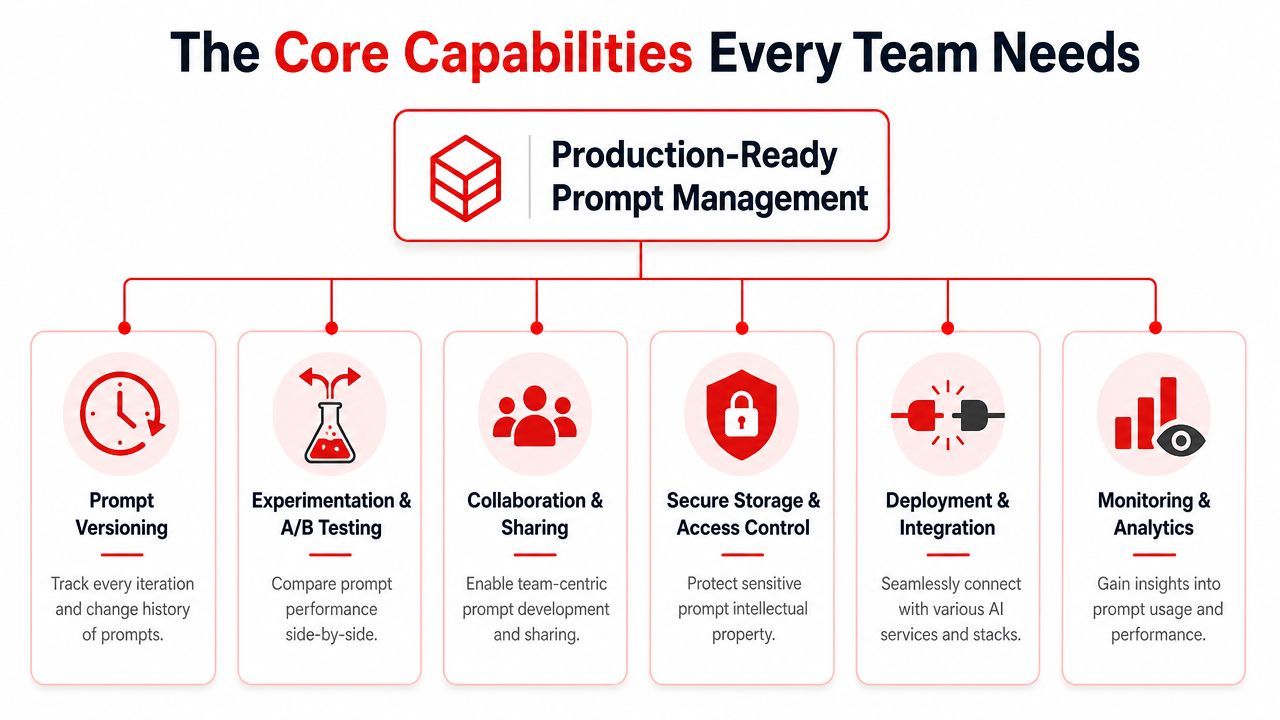
A lot of tools stop at version history. That's useful, but it's not enough. A production system needs to manage prompt behavior across providers, traffic conditions, and team roles.
One reason this matters so much is that prompt quality has direct performance impact. Research cited by Worklytics says only half of the performance gains from switching to a more advanced model come from the model itself, while the other half comes from how users refine prompts. That's why teams need strong iteration and testing workflows, not just access to better models. The claim appears in Worklytics' discussion of measuring prompt usage in workplace GenAI adoption.
Versioning and safe iteration
Prompt versioning is table stakes. Every meaningful change should create a traceable version with notes, ownership, and an easy rollback path. If a support bot starts producing weak responses after Friday's update, the team shouldn't need to diff application releases to find the cause.
Versioning works best when it's tied to environments and release controls. Draft, review, promote, rollback. The pattern is familiar because it mirrors software delivery, and that's exactly how prompts should be treated.
Experimentation and A/B testing belong in the same bucket. Teams need a way to compare prompts under realistic traffic or test sets, not just eyeball outputs in a playground. Without that, the loudest opinion often wins.
Routing fallbacks and orchestration
Model routing and fallbacks are where prompt management tools stop being a repository and start becoming infrastructure. If your app can switch between OpenAI, Anthropic, Google, or another provider without code changes, you've reduced one of the biggest sources of AI backend friction.
That matters for more than cost. Routing lets you handle reliability, latency, capability differences, and regional constraints. Fallbacks matter because providers fail in different ways. Sometimes response time spikes. Sometimes a model handles a task poorly. Sometimes one provider is better for summarization and another is better for extraction.
A mature setup also supports multi-model orchestration. Real products rarely stay text-only. One workflow can involve text generation, image generation, audio transcription, structured JSON output, or chained tasks across several models. Managing each piece in scattered scripts creates a fragile system fast.
If your routing logic lives in custom conditionals across multiple services, your AI backend will get harder to change every month.
Observability cost visibility and team editing
Observability is imperative once users rely on the feature. Every call should be inspectable. You want inputs, outputs, latency, token usage, provider details, and errors in one place. When a customer reports a bad answer, the team should be able to inspect the full execution path, not reproduce it from memory.
Cost tracking belongs beside observability, not in a finance spreadsheet. Teams need to know which prompts, features, and user flows are expensive. Otherwise they optimize blind. Good output quality at the wrong unit economics is still a product problem.
The last capability is often underestimated. Templating and a visual editor decide whether the system serves the whole team or just engineering. If only developers can safely change prompt behavior, you've built a bottleneck, not a platform.
Here's what a complete setup should support:
- Structured templates: Let teams parameterize prompts safely instead of manually editing strings.
- Visual editing: Give PMs and founders a controlled interface for behavior changes.
- Permissions and review: Keep production changes governed, even when non-engineers contribute.
- Shared context: Preserve history, notes, and intended usage so prompt changes don't lose institutional memory.
The tools worth adopting are the ones that combine these capabilities into one operating layer. Anything less usually pushes the missing complexity back into code.
How to Choose the Right Prompt Management Tool
The wrong tool doesn't fail immediately. It passes the demo, looks fine in a feature comparison, and creates a new bottleneck six weeks later. Usually that happens because the team picked something built for engineers alone, then discovered the full workflow spans engineering, product, and operations.
A useful evaluation starts with one question. Are you buying a versioning utility, or are you buying the control plane for your AI backend?
That distinction matters because a big gap still exists in the market. As discussed in a community thread on non-dev prompt management workflows, 25+ tools exist, but most require deep engineering knowledge, leaving founders and other non-technical builders without a safe, centralized way to iterate on prompts.
What to test before you commit
Don't evaluate these tools by reading feature pages alone. Put them in a realistic workflow and see where they break.
Ask the team to perform a normal week of changes:
- A PM updates assistant tone
- An engineer changes model routing for one feature
- A founder reviews cost and latency by workflow
- Support investigates a bad output from production
- Someone rolls back a prompt without shipping new code
If the platform gets awkward during that exercise, it won't improve under scale.
A few trade-offs are worth being direct about:
- Developer-first tools often expose flexible APIs and SDKs, but they can trap all meaningful work inside engineering.
- No-code friendly tools can help collaboration, but some are too shallow for observability, routing, or governance.
- Hosted platforms are easier to start with, but some teams need self-hosting or tighter control for privacy and compliance.
- Single-provider designs feel simpler early on, but they increase switching cost later.
Buy for the workflow you'll have after the feature succeeds, not the one you have while hacking the MVP.
Prompt Management Tool Evaluation Checklist
The best choice is usually the one that centralizes work for the whole team, not the one with the longest SDK docs. If PMs and founders still end up using Google Sheets to track prompt variants while engineers maintain routing logic elsewhere, the tool hasn't solved the actual problem.
Production Architecture and Integration Patterns
The cleanest architecture is simple from the application's point of view. Your app doesn't talk directly to a patchwork of model providers for every feature. It talks to one AI backend layer that handles prompts, routing, logging, and response shaping.
That backend is where prompt management tools earn their keep.
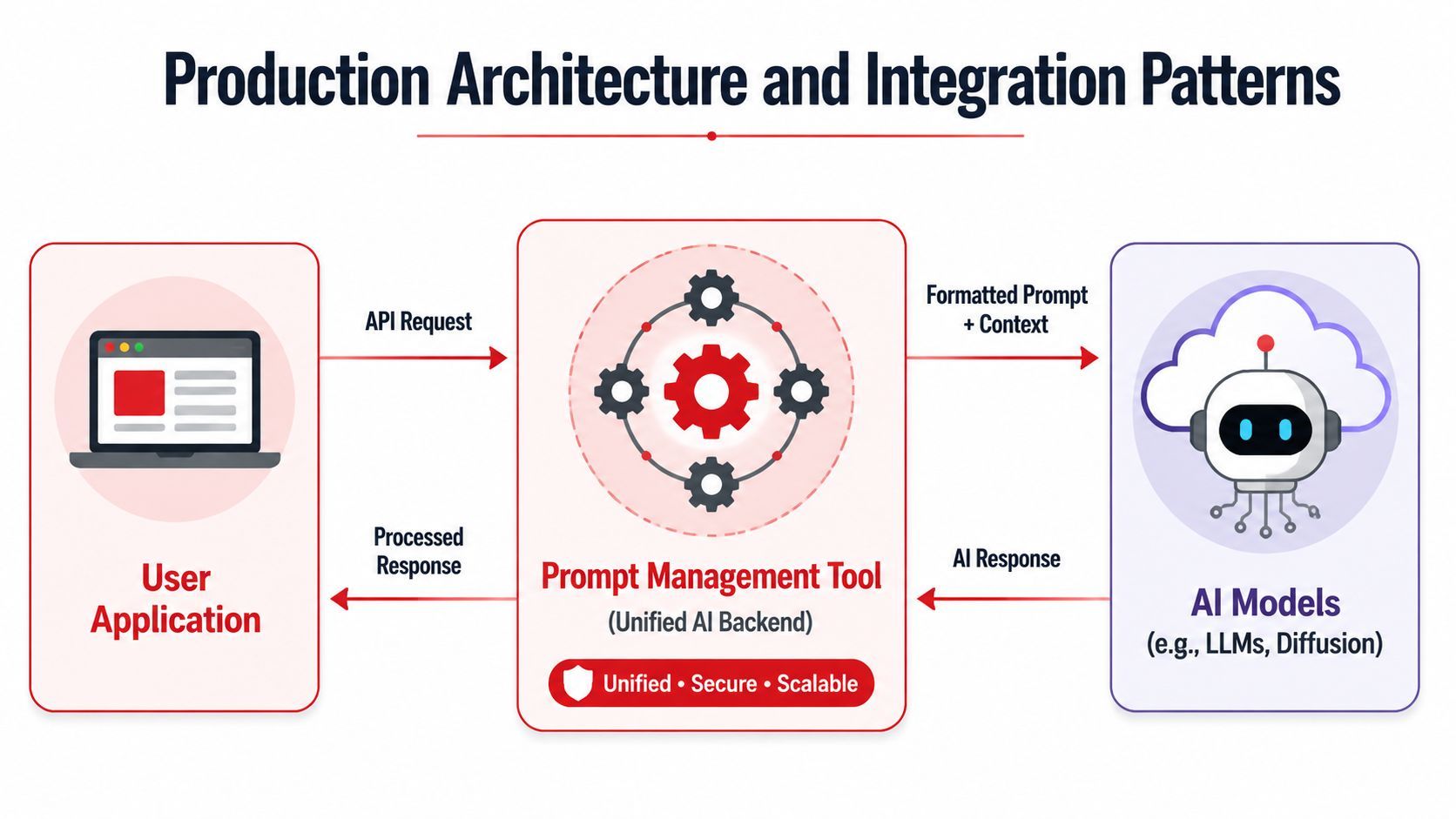
The unified backend pattern
A good pattern looks like this in practice:
- The application sends one request to the management layer with context, user data, and the prompt identifier.
- The management layer resolves the active prompt version and applies any template variables or runtime rules.
- Routing decides which provider or model to call based on configuration, environment, or fallback logic.
- The system records logs and metrics around the full request lifecycle.
- The processed response returns to the app in a consistent format.
The app stays thinner because provider-specific logic no longer leaks into product code. That makes releases safer and integrations easier to maintain.
This pattern also makes cross-model testing realistic. You can compare outputs, latency, and cost behavior inside one control layer instead of wiring custom experiments into the app itself. It's one of the clearest operational advantages of centralizing prompt logic.
What PromptOps looks like in practice
The industry is moving toward PromptOps, but many tools still don't offer built-in automated routing, provider fallbacks without code changes, or unified visibility across text, image, and video workloads, according to Dataversity's discussion of the PromptOps shift.
PromptOps is basically the discipline of running prompt-driven systems with the same seriousness teams already apply to application infrastructure. That means release control, observability, rollback, testing, ownership, and repeatable workflows.
In a mature setup:
- Engineers define integrations, permissions, and runtime constraints.
- Product teams iterate on behavior in a governed environment.
- Operations or support inspect production failures from a single dashboard.
- Leadership gets a clearer view of where spend and performance issues come from.
Centralizing prompt logic doesn't remove complexity. It puts complexity in one place where the team can manage it.
That's the architectural win. You stop scattering model rules across frontend code, backend handlers, cron jobs, and ad hoc scripts. The AI backend becomes a deliberate system instead of a pile of exceptions.
Common Pitfalls When Adopting These Tools
Teams can still get this wrong even after buying the right category of software. The usual failure mode is treating prompt management as a narrow engineering utility instead of a shared production system.
Where teams still get this wrong
The first mistake is choosing a tool that only handles prompt storage and version history. That solves one problem and leaves the rest in code. Routing stays custom. Observability stays fragmented. Cost analysis stays manual. The result is a prettier prompt library sitting beside the same old operational mess.
The second mistake is ignoring non-technical users. If PMs, founders, or operators can't safely inspect and contribute to prompt behavior, engineers remain the bottleneck. You haven't improved throughput. You've just relocated the work.
Another common miss is underestimating provider flexibility. A team builds around one model vendor because that's what they started with, then later discovers that changing providers affects far more than the API key. When prompt logic, parsing assumptions, and fallback behavior are tightly coupled to one provider, migration gets painful fast.
A better adoption pattern
A healthier rollout starts small but not shallow. Pick one workflow with real user traffic. Move prompt logic into a centralized system. Make sure the team can version it, inspect it, route it, and roll it back without touching unrelated app code.
Then test the operating model, not just the output quality.
- Can support inspect a bad run without asking engineering?
- Can product review prompt changes before they hit users?
- Can the team compare providers without rewriting application logic?
- Can someone explain where the cost of a feature is coming from?
If the answer is no, the implementation isn't done.
The long-term goal isn't better prompt editing. It's a cleaner AI backend that the whole team can operate with confidence. That's what keeps an AI feature from collapsing into script sprawl once usage grows.
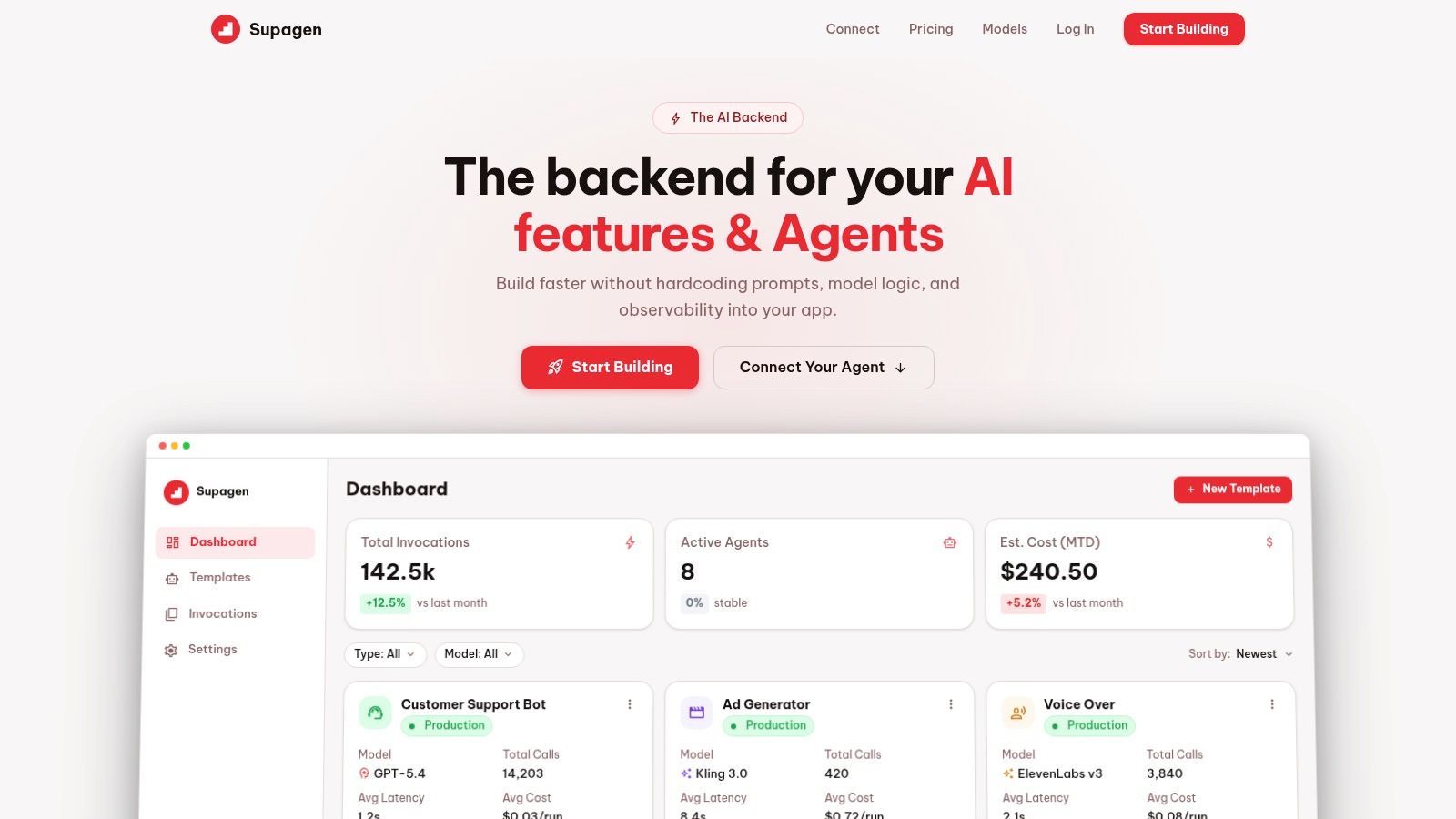
Supagen is built for teams that want that production layer from day one. Instead of hardcoding prompts, model routing, and observability into the app, teams can use Supagen as a unified AI backend for versioned prompts, provider routing, fallbacks, multi-modal workloads, per-call logs, and cost visibility, all through a centralized dashboard that's usable by developers and non-technical teammates alike.