
Prompt Engineering Best Practices: AI Mastery 2026
Your team has an AI feature in production, but the prompt layer probably looks rougher than anyone wants to admit. A few prompts live in code, another sits in a config file, someone on the team pasted a “better” version into Slack, and now outputs vary by model, by day, and by who last touched the system. Then the bill lands, and nobody can explain why one endpoint suddenly got expensive.
That's the point where prompt engineering stops being a writing exercise and becomes an engineering problem. The strongest teams don't just ask, “What prompt gets the best answer?” They ask, “How do we make prompts reliable, testable, secure, observable, and cheap enough to run at scale?”
That shift matters because ambiguous prompts degrade output quality, while specific, context-rich prompts with clear format instructions improve reliability, according to a systematic review of prompt design in PMC. In practice, the difference between a toy demo and a stable product usually comes down to process.
These prompt engineering best practices are written for that reality. They cover the full lifecycle: how to write prompts, how to structure them, how to test them, how to version them, and how to keep them from drifting when models or traffic patterns change. If you're building with a unified backend like Supagen, these practices become much easier to operationalize because prompts, model routing, logs, and parameters can live in one place instead of being scattered across your stack.
Table of Contents
- 1. Be Specific and Descriptive with Context
- 2. Use Few-Shot Learning with Examples
- 3. Structure Prompts with Clear Delimiters and Sections
- 4. Implement Chain-of-Thought Reasoning
- 5. Establish Role and Persona Clarity
- 6. Set Clear Output Format and Schema
- 7. Use Negative Instructions and Constraints
- 8. Implement Temperature and Parameter Tuning
- 9. Leverage Prompt Versioning and A-B Testing
- 10. Monitor, Measure, and Iterate Based on Real Production Data
- 10-Point Prompt Engineering Comparison
- Build Your Production AI Flywheel
1. Be Specific and Descriptive with Context
A team ships a customer support assistant on Friday. By Monday, it has answered one ticket like a sales rep, another like a policy manual, and a third with details the product does not support. The model did exactly what the prompt allowed.
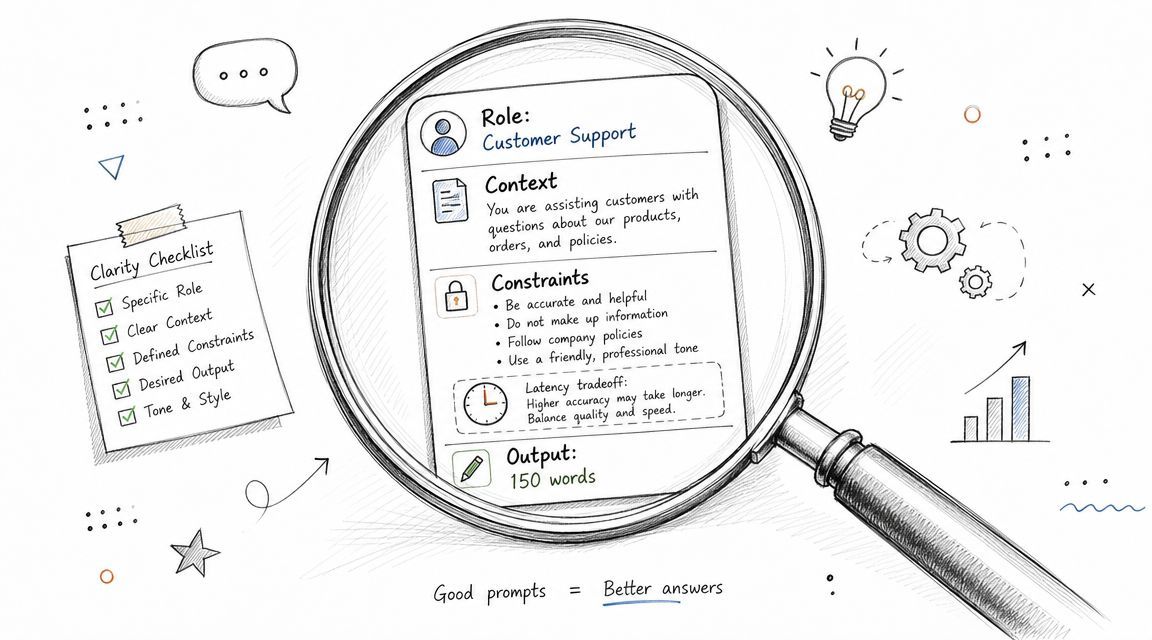
Specificity is the first production control. A usable prompt defines the job, the audience, the available facts, the boundaries, and the output shape. Without that context, you do not have a repeatable system. You have a best-effort guess.
What better specificity looks like
A weak prompt:
“Write a product description.”
A production-ready prompt:
“Write a 150-word product description for a B2B SaaS platform aimed at engineering managers. Emphasize deployment speed, auditability, and cost visibility. Use a professional but friendly tone. End with one concise call to action.”
That change matters because the model now has five constraints to optimize against instead of one vague request. It knows who the buyer is, what benefits to stress, how long to write, what tone to use, and how to end. Fewer degrees of freedom usually means fewer bad surprises.
The same pattern applies outside marketing copy. For moderation, do not ask the model to “check if this is bad.” Give it a bounded task with categories and a contract for the response:
“Act as a content safety reviewer. Flag text containing hate speech, personal attacks, or spam. Return valid JSON with flagged and reason.”
One practical test works well in reviews: if a smart teammate could read the prompt and reasonably produce two different outputs, the model will too.
In production, the hard part is not writing one good prompt. It is keeping that prompt consistent as requirements change, models change, and more people touch the system. Context should live with the prompt, its variables, its test cases, and its version history. In Supagen, teams can keep that prompt context beside the versioned prompt across OpenAI, Anthropic, and Google model workflows, which makes changes easier to audit and cheaper to debug. That is the difference between prompt writing as a one-off task and prompt design as an operational discipline.
2. Use Few-Shot Learning with Examples
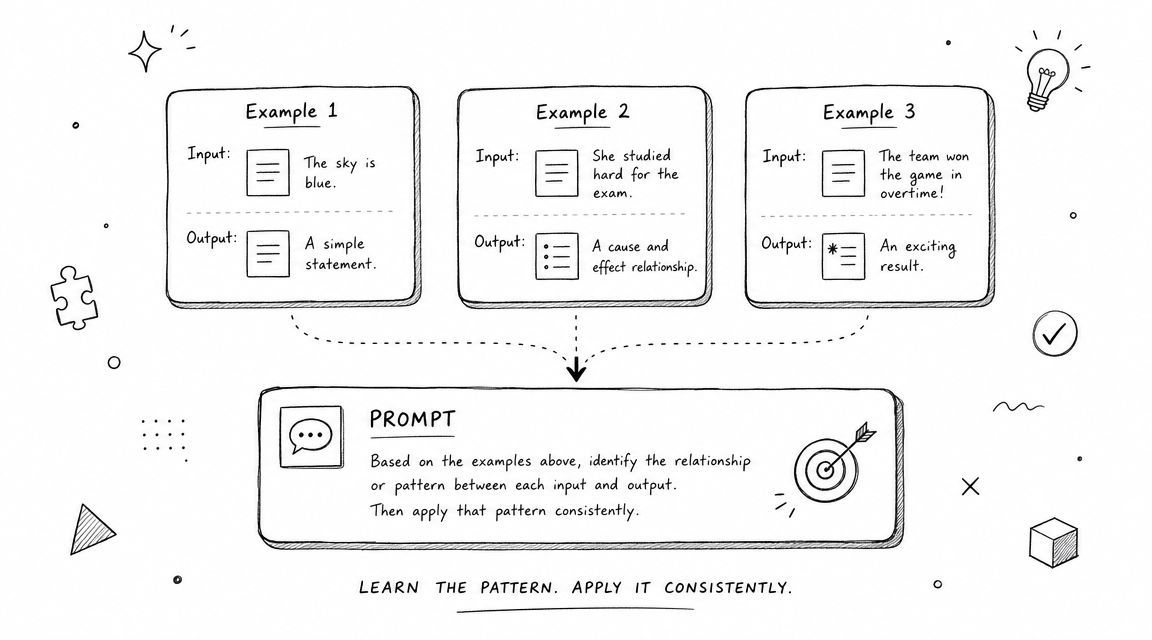
If you want consistency, show the model what “good” looks like. Few-shot prompting has become standard because examples remove ambiguity faster than instructions alone.
This isn't just intuition. The PMC review identifies few-shot prompting and explicit instruction-based prompting as standard methods for improving reliability, and market analysis reports that n-shot prompting held more than 40.3% of the prompt-engineering market in 2024, with the broader market projected to reach USD 7,071.8 million by 2034 at a 33.9% CAGR in Market.us prompt engineering research. That tells you where production teams are placing their bets.
Examples beat abstract instructions
Suppose you're classifying inbound emails into support, sales, or spam. You can write a long instruction set, or you can add examples like these:
- Support example: “I can't export my invoices” →
support - Sales example: “Can I get pricing for 50 seats?” →
sales - Spam example: “Boost your SEO instantly” →
spam
For product categorization, include edge cases. For code generation, include a couple of functions that match the house style you want. For summarization, include one example of a good summary and one bad one.
How many examples to use
Microsoft's guidance formalized repeatable practices like grounding data and example ordering, and separate 2026 industry guidance adds that 3 to 5 good examples can improve consistency, as summarized in Microsoft's prompt engineering guidance. In practice, start small. Two or three examples often reveal whether the model understands the pattern.
The trade-off is cost and maintainability. More examples can improve consistency, but they also increase prompt length and can overfit the behavior. In Supagen, templates help because you can store reusable few-shot blocks once and update them centrally instead of copying the same examples into five services.
3. Structure Prompts with Clear Delimiters and Sections
A good prompt has architecture. If you jam instructions, context, examples, and user input into one undifferentiated block of text, you force the model to guess which parts matter most.
Clear separators reduce that confusion. Delimiters, numbered steps, and labeled sections are especially useful when prompts get long, when multiple people maintain them, or when you pass prompts through a routing layer.
A structure that works in production
A reliable pattern is:
- Role section: Who the model is
- Task section: What it must do
- Constraints section: What it must avoid
- Context section: Relevant background data
- Examples section: Input-output patterns
- User input section: The live request
That can look like XML-style tags, markdown headers, or plain labeled blocks. The exact syntax matters less than consistency.
For example:
- System context: You are a customer success assistant for a SaaS platform.
- Task: Answer the customer's question in under 100 words.
- Constraints: Don't speculate about pricing or roadmap.
- Context: Customer plan is Premium.
- User query: How do I export my data?
Structure helps twice. The model parses it better, and your team debugs it faster.
Prompt order also matters. Microsoft notes that the order of instructions and examples can change results because recency bias affects model behavior, as described in the guidance cited earlier. That's one reason teams using Supagen often standardize prompt layouts. Once the structure is fixed, you can test individual sections without rewriting the whole thing.
4. Implement Chain-of-Thought Reasoning
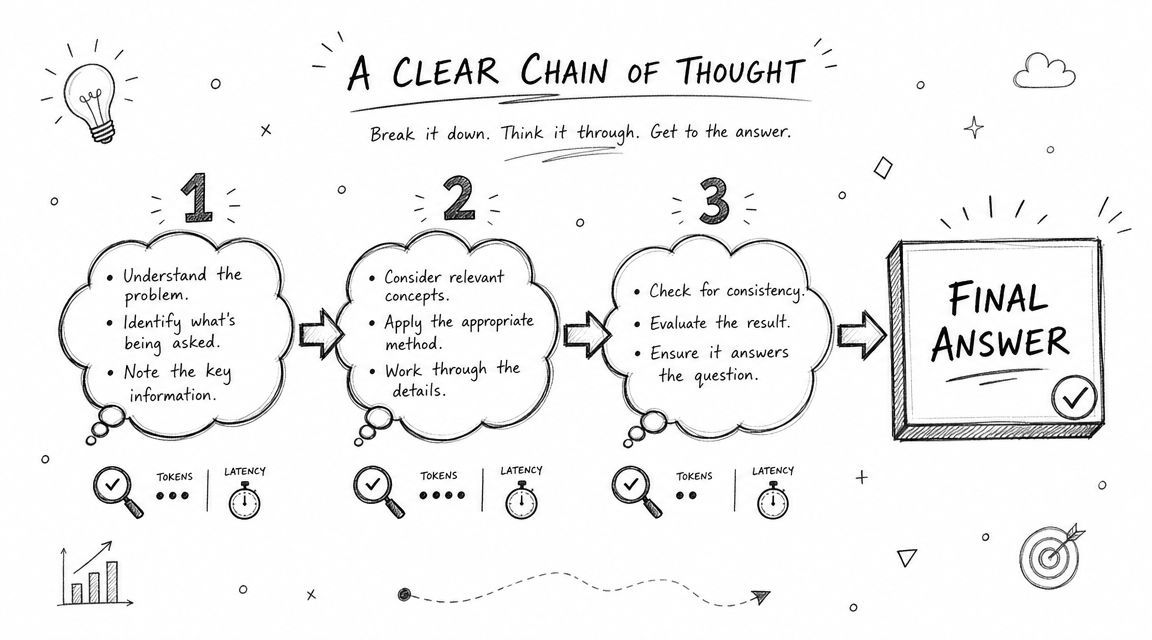
Some tasks don't fail because the model lacks knowledge. They fail because the model jumps too quickly to an answer. That's where stepwise reasoning helps.
The research base is straightforward here. The PMC review notes that chain-of-thought prompting is particularly useful for complex tasks because it encourages stepwise reasoning. That makes it a strong fit for analytical work such as policy review, multi-step classification, and difficult transformations where intermediate reasoning improves the final output.
When to use it and when not to
For a moderation workflow, ask the model to reason in sequence:
- Identify the likely policy category.
- Explain why the content does or doesn't violate policy.
- Return the final decision in the required schema.
For analytics, try:
“Review the dataset summary. First identify patterns. Then list plausible explanations. Then state your conclusion.”
This works well when the task has real intermediate steps. It works poorly when teams add “think step by step” to everything, including simple extraction jobs that only need strict formatting.
The trade-off is token cost
Reasoning tokens cost money and time. If you're generating creative headlines or extracting fields from a receipt, chain-of-thought often adds overhead without improving outcomes.
Use it where correctness matters more than brevity. In Supagen, that decision is easier to operationalize because you can route only specific workloads, like compliance review or complex triage, to prompts and models configured for deeper reasoning while keeping simpler tasks lean.
5. Establish Role and Persona Clarity
Role prompts aren't magic, but they are useful. A well-defined role anchors tone, depth, and decision style. A weak role prompt turns into theater.
“Act like an expert” doesn't do much. “You are a senior software architect reviewing backend service code for maintainability, performance, and failure handling” gives the model a narrower frame. That kind of anchoring is especially helpful when the same product uses different AI behaviors across support, content, and internal tooling.
The right persona is operational, not decorative
Good persona design answers practical questions:
- What expertise should the model apply
- How should it communicate
- What priorities should it optimize for
- What should it avoid doing
For a support agent, “friendly and concise” might matter. For a code reviewer, “critical but constructive” is better. For a legal intake assistant, “neutral, careful, and non-committal” reduces risk.
A persona should change decisions, not just the tone of the opening sentence.
Where teams get this wrong
The common failure mode is overstuffing the role with unnecessary biography. The model doesn't need a fictional backstory unless that backstory drives output quality. What helps is explicit behavioral framing: be concise, explain trade-offs, avoid speculation, escalate uncertainty.
Supagen's versioned prompt dashboard is useful here because persona text tends to spread across prompts over time. Centralizing it makes voice consistency far easier, especially if your app mixes providers like OpenAI, Anthropic, and Google and you need to compare how each one responds to the same role definition.
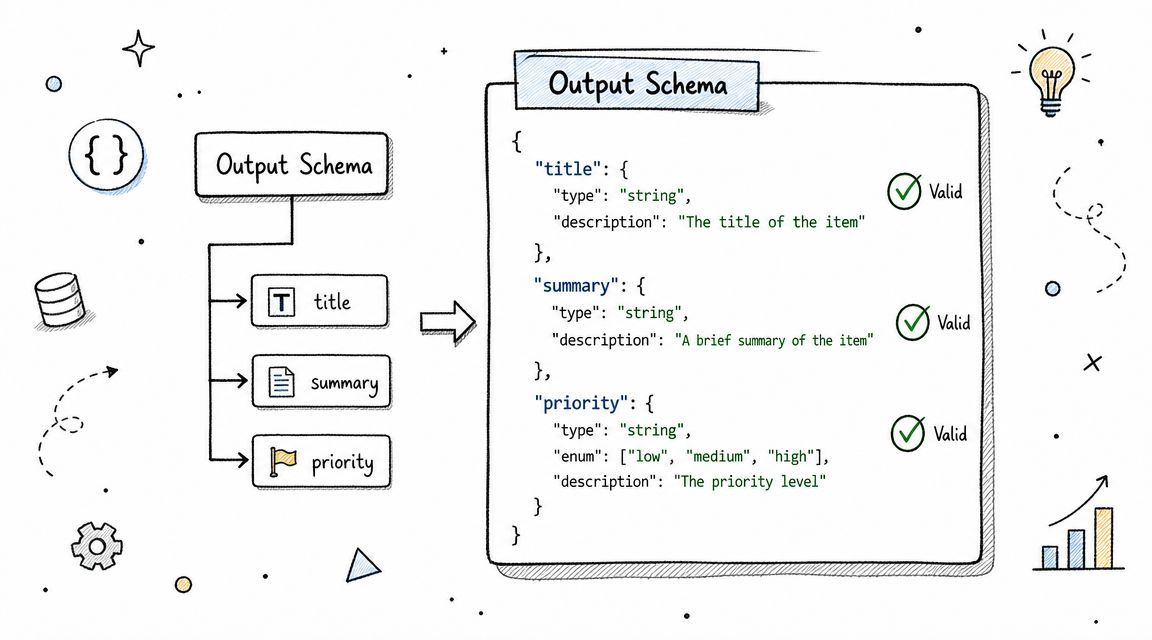
6. Set Clear Output Format and Schema
If the output feeds another system, format is not a style preference. It's an interface contract.
Many promising prototypes often fail. The prompt “summarize this email” seems fine until your parser expects JSON and gets three paragraphs plus a bullet list. Prompt engineering best practices in production always include schema control because structure determines whether the output is usable.
Treat the output like an API response
Ask for a concrete format:
“Return valid JSON with title, summary, action_required, and priority.”
For an agent workflow:
“Return JSON with action, parameters, and explanation.”
For decision systems:
“Format as DECISION, CONFIDENCE, REASONING, and NEXT_STEPS.”
Then add validation hints. State field types. Set maximum lengths. Tell the model what to do if it can't comply. A fallback instruction like “If you can't return the requested schema, explain why” prevents silent failure.
Why this matters more over time
As prompt engineering matured into an operational discipline from 2022 through 2026, platform guidance increasingly emphasized repeatable patterns like grounding data, prompt ordering, and giving the model an out for more reliable answers, as summarized in PromptHub's discussion of evolving prompt practices across model changes. The lesson for builders is simple: don't rely on “usually valid JSON.” Build prompts that make formatting explicit and test them whenever models change.
In Supagen, structured JSON workflows are easier to maintain because you can inspect outputs, compare versions, and adjust prompt text or model routing without shipping code just to fix a formatting issue.
7. Use Negative Instructions and Constraints
Positive instructions tell the model what to do. Negative instructions stop it from doing the expensive or dangerous thing you forgot to mention.
This matters most when the model has room to improvise. Sales assistants invent policy details. Support bots promise timelines. Analysis tools infer facts that weren't present in the input. A good constraint section narrows that failure surface.
Strong constraints are concrete
Weak:
“Be accurate.”
Strong:
“Don't make up product capabilities. If the answer isn't in the provided context, say you don't know.”
“Don't mention pricing, discounts, or roadmap items.”
“Don't generate code that disables authentication checks.”
The key is specificity. “Don't hallucinate” is too abstract. “Don't cite information that isn't in the retrieved documents” is enforceable.
Pair prohibitions with escape hatches
The best constraints include an approved fallback behavior. Tell the model how to fail safely.
- For support: “If details are missing, ask a clarifying question.”
- For compliance: “If policy is ambiguous, return
needs_review.” - For search-backed answers: “If the context is insufficient, state that the information isn't available.”
This pattern lines up with platform guidance that recommends giving the model an out rather than forcing a guess, as noted earlier. In Supagen, logs make it easy to spot where models still violate constraints so you can revise the wording instead of arguing about one-off screenshots.
8. Implement Temperature and Parameter Tuning
A support bot answers the same refund question three different ways in an hour. A product copy generator produces ten near-identical headlines. In both cases, the prompt may be fine. The settings are often the actual problem.
Temperature is one of the fastest ways to change model behavior. Lower it when you need stable, repeatable output. Raise it when you want the model to explore more of the solution space. Teams waste a lot of time rewriting prompts to fix behavior that should have been handled with configuration.
Match parameters to the job
Use lower temperature for tasks where variance creates risk: classification, entity extraction, support responses, policy checks, and structured JSON generation.
Use higher temperature for tasks where variation is useful: brainstorming, campaign concepts, naming, and creative drafts.
Other controls matter too. Top-p affects how broad the model's token choices are. Max tokens caps length and cost. Frequency and presence penalties can reduce repetition, though their effect varies by provider and model family. The practical lesson is simple. Tune the full request, not just the prompt text.
If the output is wrong in a repeatable way, rewrite the prompt. If it is wrong in a different way every time, inspect the parameters first.
Tune against production goals, not taste
Good parameter choices depend on what you are optimizing for. Support teams usually care about consistency and policy compliance. Content teams may accept more variation if it improves originality. Evaluation changes too. For a classifier, the question is whether labels stay stable across runs. For a creative tool, the question is whether the spread of outputs is wide enough without drifting off-brief.
In day-to-day work, a unified backend earns its keep. Supagen lets teams change parameters without redeploying application code, compare behavior across models, and keep settings tied to prompt versions instead of scattering them through handlers and config files. That makes temperature tuning part of an actual production workflow, alongside versioning, testing, observability, and cost control, rather than a one-off tweak someone forgets to document.
9. Leverage Prompt Versioning and A-B Testing
If prompts affect user experience, cost, and system behavior, they should be versioned like code. Teams that skip this usually end up debugging folklore.
One person says the old prompt worked better. Another says the new one reduced hallucinations. Nobody can prove either claim because nobody preserved the variants, the traffic split, or the logs. Versioning fixes that.
What disciplined prompt iteration looks like
Keep a version history with a reason for every change:
“Added stronger JSON constraints.”
“Reduced verbosity for mobile UI.”
“Inserted support-policy examples.”
“Changed provider for lower latency.”
Then test one variable at a time when possible. If you change the examples, schema, model, and temperature in one release, you won't know what caused the result.
A practical rollout pattern is gradual exposure: start with a small share of traffic, inspect logs, then expand. Supagen is well suited to this because prompt versions, model routing, and fallback behavior can be managed in one backend instead of requiring redeploys.
Version prompts for model changes too
This is one of the most overlooked prompt engineering best practices. Prompt behavior is not stable across model upgrades. OpenAI recommends using the latest model and re-testing prompt strategies when switching, and PromptHub similarly notes that prompts that worked for older models may need tweaks for newer variants, as discussed in the source cited earlier from PromptHub.
That means your version history shouldn't only capture prompt edits. It should capture model assumptions. Otherwise, a silent model upgrade can look like a prompt regression even when the text never changed.
10. Monitor, Measure, and Iterate Based on Real Production Data
The best prompt in a notebook isn't the best prompt in production. Real users send messy inputs, edge cases cluster in weird ways, and traffic economics change faster than anyone expects.
That's why prompt engineering best practices have shifted from “write a good prompt” to building a measurable, testable workflow. Security guidance has also become part of the operational picture. For public-facing AI, teams should clean inputs, set rate limits, control access levels, and monitor unusual usage patterns, according to LaunchDarkly's prompt engineering guidance for production systems.
What to monitor every week
Watch the basics first:
- Output quality: Where are users rejecting answers or asking follow-ups
- Latency: Which prompts or providers slow down critical flows
- Token usage: Which prompt versions are bloated
- Failure modes: Which inputs trigger malformed output or policy issues
- Security signals: Which requests look like abuse, injection, or scraping
Then connect prompt behavior to business outcomes. A support assistant isn't successful because it writes elegant prose. It's successful if it resolves issues accurately, avoids risky claims, and does so at a sensible cost.
Here's a useful walkthrough before you operationalize monitoring:
Observability is what makes iteration real
Per-call logs are where prompt engineering stops being guesswork. You need to see the prompt version, model, parameters, latency, token usage, output, and error context together.
That's why unified backends matter. In Supagen, teams can inspect logs, compare prompt versions, understand cost by call, and route fixes without hardcoding observability into each service. Once that loop is in place, prompt improvements stop being sporadic cleanup and start becoming a steady operating rhythm.
10-Point Prompt Engineering Comparison
Build Your Production AI Flywheel
A common approach to prompt work starts as copy editing, involving tweaking wording, testing a few outputs by hand, and hoping the improvement holds after release. That approach works for demos. It breaks down the moment the prompt becomes part of a product with users, budgets, edge cases, and security concerns.
A stronger approach treats prompts as production assets. They need clear structure, examples, constraints, schemas, parameters, version history, rollout controls, and monitoring. When those pieces are in place, the team doesn't have to rely on memory or taste. They can evaluate changes with evidence, recover from regressions faster, and understand the trade-off between quality, latency, and cost.
That lifecycle mindset is where many teams find an advantage. A prompt isn't isolated from model choice. Model choice isn't isolated from routing. Routing isn't isolated from observability. Observability isn't isolated from iteration. Once you see those pieces as one system, a lot of frustrating AI behavior starts to look solvable.
This is also why “best practices” that stop at wording are incomplete. In real products, the hard problems aren't only about phrasing. They're about drift after a model update, a broken JSON response that crashes a downstream service, an expensive reasoning chain applied to simple tasks, or a user prompt that tries to override your instructions. Production prompt engineering has to account for all of that.
Supagen fits this workflow because it gives teams a single place to manage the operational layer around prompts. You can version prompts, adjust parameters, route across providers, inspect logs, track usage and cost, and handle multimodal workloads without pushing every change through code. That matters for startup teams, indie builders, and product groups that need to ship quickly but still want control.
The flywheel is straightforward. Design a prompt with clear context and constraints. Test it with representative examples. Deploy it behind version control and routing rules. Observe what happens with real traffic. Refine the prompt, the parameters, or the model. Repeat. Over time, that loop compounds into a system that's easier to trust and cheaper to run.
If you only adopt one habit from this list, make it versioned iteration tied to production logs. Once your team can see what changed, where it changed, and what it cost, every other prompt engineering improvement gets easier.
If you're building AI features and want a cleaner way to manage prompts, models, routing, logs, and costs, Supagen gives you that production layer in one place. It's a practical fit for startup product teams, indie hackers, and founders who want to ship fast without hardcoding prompt logic into the app.