
OpenAPI Spec Example a Practical Guide for 2026
You're probably staring at an API description that started small and got messy fast. A few endpoints were added by hand, examples drifted from real payloads, error responses were never documented properly, and now every frontend dev, QA engineer, and SDK consumer is guessing what the API does.
That's where a solid OpenAPI spec stops being “docs work” and starts acting like infrastructure. A good spec tells people what they can send, what they'll get back, which fields are required, how auth works, and what failure looks like. This reliability also enables tools to parse, render, validate, mock, and test.
This guide focuses on practical OpenAPI spec examples that real teams can adapt. It starts with the core document shape, moves through CRUD, auth, and multipart payloads, and ends with an advanced example for AI APIs that need to describe dynamic model routing and multi-modal inputs. That last part matters because most tutorials still stop at ordinary REST payloads, while many modern teams are shipping endpoints that need to handle text, images, audio, and provider selection in one contract.
Table of Contents
- Why a Great OpenAPI Spec Is Your API's Best Friend
- The Anatomy of an OpenAPI Document
- Quick Reference YAML vs JSON Formatting
- Example 1 The Simple CRUD API
- Example 2 Securing Endpoints with Authentication
- Example 3 Handling Complex Payloads and File Uploads
- Advanced Example Spec for AI and LLM APIs
- Tools Best Practices and Common Pitfalls
- Frequently Asked Questions
Why a Great OpenAPI Spec Is Your API's Best Friend
Bad API docs create the same pattern every time. A consumer opens the reference, finds one example request, no example error, a vague field description like “status of item,” and a response body that doesn't match production. Then they message your team, inspect traffic, or read backend code just to figure out whether null is allowed.
A strong OpenAPI spec prevents that. It gives you a machine-readable contract that tools and humans can both rely on. The OpenAPI Initiative maintains the specification as an open standard, and it's explicitly designed so humans and computers can understand an API's capabilities without source code access or network inspection, as described in the OpenAPI Specification repository.
That's why OpenAPI became the de facto machine-readable format for REST APIs after the Swagger Specification was adopted and renamed by the OpenAPI Initiative. It isn't just for pretty docs. Teams use OpenAPI documents written in YAML or JSON for interactive documentation, code generation, and automated test cases, and the specification continues to evolve, with the current published version listed there as v3.2.0.
The contract matters more than the prose
When an API grows, prose alone stops scaling. You need types, required fields, examples, enums, response variants, and security rules encoded in one place.
Practical rule: If a client can only discover a request rule by trial and error, your spec is incomplete.
A good OpenAPI spec example does three jobs at once:
- Documents behavior clearly so frontend and backend teams speak the same language.
- Feeds tooling directly so Swagger UI, Redoc, mock servers, generators, and validators all work from the same source.
- Reduces drift because request and response contracts aren't scattered across wiki pages, Postman collections, and code comments.
What a mid-level dev should aim for
You don't need to model every edge case on day one. You do need to be precise about the parts clients depend on.
Focus on these first:
- Request shapes: required fields, allowed formats, defaults, nullable behavior.
- Response coverage: success and error payloads, not just happy-path JSON.
- Examples: enough to show real usage without turning the spec into a dump of sample data.
The payoff is simple. Your API becomes easier to integrate, easier to test, and much harder to misunderstand.
The Anatomy of an OpenAPI Document
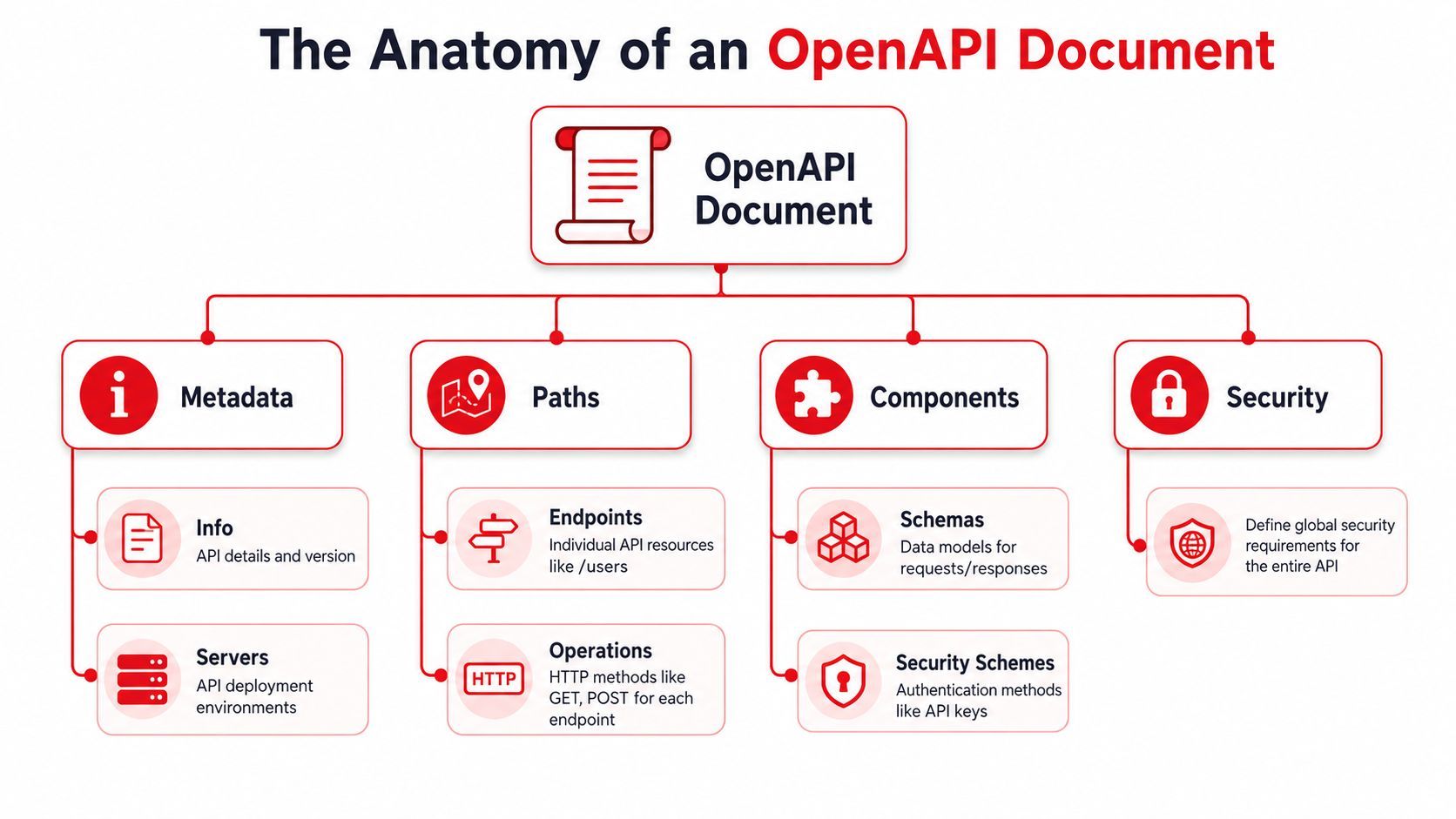
An OpenAPI document is easiest to read like a blueprint. The top of the file tells you what the API is. The middle tells you what routes exist. The reusable section tells you what data structures and security patterns show up across the surface area.
The top-level objects that matter first
Here's a minimal skeleton:
openapi: 3.1.0
info:
  title: Task API
  version: 1.0.0
  description: API for managing tasks
servers:
  - url: https://api.example.com
paths:
  /tasks:
    get:
      summary: List tasks
      responses:
        '200':
          description: A list of tasks
components: {}
A few top-level keys do most of the heavy lifting:
If you're reviewing an unfamiliar spec, start there. You can usually tell within a minute whether it's structured well or whether it grew by copy-paste.
Why reusable components save real maintenance time
The components section is where disciplined specs separate themselves from fragile ones. Stoplight notes that components lets teams define a schema once and reuse it throughout the spec instead of repeating structures, which reduces drift and makes large API definitions easier to maintain at scale in its guide to OpenAPI components and reuse.
That matters because repetition is how specs rot. One endpoint says userId is a string, another says integer, a third omits the field entirely, and your generated docs end up contradicting themselves.
Use components for:
- Schemas like
User,Task,Error, orPaginationMeta - Parameters like
taskId,page,limit - Security schemes like API keys and bearer auth
- Reusable responses if the same error shape appears often
Define shared structures once. Reference them many times. Edit them in one place.
A maintainable OpenAPI spec example is rarely the shortest file. It's the one where the same concept is modeled once and reused consistently.
Quick Reference YAML vs JSON Formatting
Most OpenAPI teams prefer YAML for authoring because it's easier to read and comment. JSON is still valid and sometimes useful when a toolchain already emits or consumes strict JSON.
A tiny schema in both formats
Here's the same schema two ways.
YAML
components:
  schemas:
    User:
      type: object
      required:
        - id
        - email
      properties:
        id:
          type: string
          example: usr_123
        email:
          type: string
          format: email
          example: dev@example.com
        displayName:
          type: string
          nullable: true
JSON
{
  "components": {
    "schemas": {
      "User": {
        "type": "object",
        "required": ["id", "email"],
        "properties": {
          "id": {
            "type": "string",
            "example": "usr_123"
          },
          "email": {
            "type": "string",
            "format": "email",
            "example": "dev@example.com"
          },
          "displayName": {
            "type": "string",
            "nullable": true
          }
        }
      }
    }
  }
}
Choose based on workflow:
- YAML fits hand-written specs because it's easier to scan and supports comments.
- JSON fits generated artifacts when another service or build step emits the file.
- Mixed teams usually author in YAML and convert only when a specific tool needs JSON.
If you're writing an OpenAPI spec example for humans to learn from, YAML usually wins.
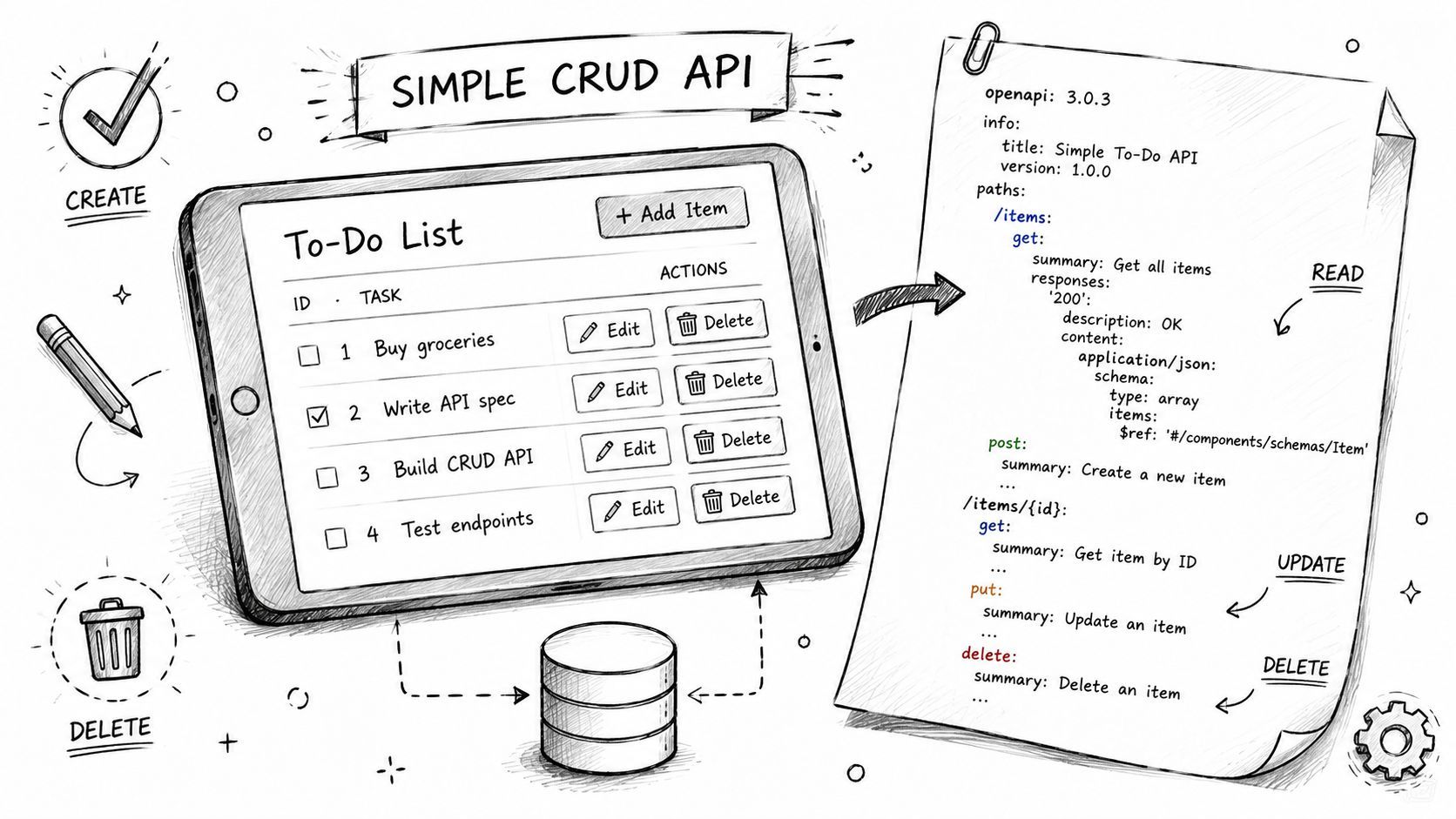
Example 1 The Simple CRUD API
Most tutorials jump straight into abstract fragments. That's not how teams learn. A better starting point is a complete, usable slice of API surface with list, create, retrieve, and delete.
A clean baseline spec
This example models a task API in YAML.
openapi: 3.1.0
info:
  title: Task API
  version: 1.0.0
  description: A simple API for managing tasks

servers:
  - url: https://api.example.com

paths:
  /tasks:
    get:
      operationId: listTasks
      summary: List tasks
      responses:
        '200':
          description: Tasks retrieved successfully
          content:
            application/json:
              schema:
                type: object
                required: [data]
                properties:
                  data:
                    type: array
                    items:
                      $ref: '#/components/schemas/Task'
              example:
                data:
                  - id: task_001
                    title: Write OpenAPI guide
                    completed: false
                  - id: task_002
                    title: Review pull request
                    completed: true

    post:
      operationId: createTask
      summary: Create a task
      requestBody:
        required: true
        content:
          application/json:
            schema:
              $ref: '#/components/schemas/CreateTaskRequest'
            example:
              title: Draft release notes
      responses:
        '201':
          description: Task created successfully
          content:
            application/json:
              schema:
                $ref: '#/components/schemas/Task'
              example:
                id: task_003
                title: Draft release notes
                completed: false
        '400':
          description: Invalid request payload
          content:
            application/json:
              schema:
                $ref: '#/components/schemas/Error'

  /tasks/{id}:
    get:
      operationId: getTaskById
      summary: Retrieve a task
      parameters:
        - $ref: '#/components/parameters/TaskId'
      responses:
        '200':
          description: Task retrieved successfully
          content:
            application/json:
              schema:
                $ref: '#/components/schemas/Task'
        '404':
          description: Task not found
          content:
            application/json:
              schema:
                $ref: '#/components/schemas/Error'

    delete:
      operationId: deleteTask
      summary: Delete a task
      parameters:
        - $ref: '#/components/parameters/TaskId'
      responses:
        '204':
          description: Task deleted successfully
        '404':
          description: Task not found
          content:
            application/json:
              schema:
                $ref: '#/components/schemas/Error'

components:
  parameters:
    TaskId:
      name: id
      in: path
      required: true
      description: Unique identifier for a task
      schema:
        type: string
      example: task_001

  schemas:
    Task:
      type: object
      required:
        - id
        - title
        - completed
      properties:
        id:
          type: string
          readOnly: true
          example: task_001
        title:
          type: string
          minLength: 1
          example: Write OpenAPI guide
        completed:
          type: boolean
          example: false

    CreateTaskRequest:
      type: object
      required:
        - title
      properties:
        title:
          type: string
          minLength: 1
          example: Draft release notes

    Error:
      type: object
      required:
        - type
        - title
        - status
      properties:
        type:
          type: string
          example: https://api.example.com/errors/validation
        title:
          type: string
          example: Validation error
        status:
          type: integer
          example: 400
        detail:
          type: string
          example: The title field is required
What works in practice
This spec stays clean because it makes a few good choices early.
- Operation IDs are explicit.
listTasksis better thangetTasksif one endpoint may later support filtering, pagination, or views. - Path parameters are reused.
TaskIdlives once incomponents/parameters, not copied into every operation. - Request and response models are separate.
CreateTaskRequestdoesn't exposeidbecause clients shouldn't send it. - Error payloads are structured. Even in a small API, that pays off fast.
What usually doesn't work is stuffing too much convenience into one schema. Teams often try to use Task for create, update, response, internal admin views, and bulk operations. That makes fields ambiguous. Split schemas when the contract differs.
Clients don't care how elegant your backend model is. They care whether each endpoint has one unambiguous contract.
If you want one reliable openapi spec example to copy into a small service, this is the shape I'd start with.
Example 2 Securing Endpoints with Authentication
Auth documentation is where many otherwise decent specs get vague. You'll see “Requires authentication” in a description field, but no defined scheme, no header name, and no indication of which operations are public.
That's avoidable. OpenAPI gives you a formal way to describe security in components/securitySchemes, then apply it globally or per operation.
Documenting an API key scheme
For simple internal or service-to-service APIs, an API key in a header is common.
openapi: 3.1.0
info:
  title: Task API
  version: 1.1.0

components:
  securitySchemes:
    ApiKeyAuth:
      type: apiKey
      in: header
      name: X-API-Key

security:
  - ApiKeyAuth: []

paths:
  /tasks:
    get:
      summary: List tasks
      responses:
        '200':
          description: Tasks retrieved successfully
This tells tools and consumers exactly what to send. Don't bury header names in prose when the spec can encode them directly.
A useful pattern is global security with operation-level overrides:
paths:
  /health:
    get:
      summary: Health check
      security: []
      responses:
        '200':
          description: Service is healthy
That empty security: [] marks a public endpoint even when the rest of the API is protected.
Documenting bearer token auth
JWT-style bearer auth is also straightforward.
components:
  securitySchemes:
    BearerAuth:
      type: http
      scheme: bearer
      bearerFormat: JWT

security:
  - BearerAuth: []
bearerFormat is descriptive rather than enforceable, but it helps consumers understand what kind of token the server expects.
Here's a route with operation-level auth:
paths:
  /tasks/{id}:
    delete:
      summary: Delete a task
      security:
        - BearerAuth: []
      responses:
        '204':
          description: Task deleted successfully
        '401':
          description: Missing or invalid token
        '403':
          description: Authenticated but not allowed
A few practical habits make auth docs much better:
- Declare every security scheme centrally so generated docs stay coherent.
- Document
401and403separately when your API distinguishes authentication from authorization. - Use public overrides intentionally for health checks, webhooks, or onboarding endpoints.
What doesn't work is mixing business authorization rules into security schemes. The scheme should describe how a client authenticates. Resource-specific permissions belong in operation descriptions and error responses.
Example 3 Handling Complex Payloads and File Uploads
Simple JSON requests aren't where OpenAPI gets tested. Multipart payloads are. The trouble usually starts when an endpoint accepts both a file and metadata, and the docs hand-wave the details with “upload a file plus optional fields.”
That's exactly the kind of ambiguity a spec should remove.
Multipart request bodies done cleanly
Here's a practical file upload endpoint using multipart/form-data:
openapi: 3.1.0
info:
  title: Media API
  version: 1.0.0

paths:
  /uploads:
    post:
      operationId: uploadAsset
      summary: Upload a media asset
      requestBody:
        required: true
        content:
          multipart/form-data:
            schema:
              type: object
              required:
                - file
                - ownerId
              properties:
                file:
                  type: string
                  format: binary
                  description: The file to upload
                ownerId:
                  type: string
                  description: The user who owns the asset
                  example: usr_123
                description:
                  type: string
                  nullable: true
                  example: Product demo screenshot
                tags:
                  type: array
                  items:
                    type: string
                  example:
                    - demo
                    - launch
      responses:
        '201':
          description: File uploaded successfully
          content:
            application/json:
              schema:
                $ref: '#/components/schemas/UploadResult'
        '400':
          description: Invalid multipart payload
          content:
            application/json:
              schema:
                $ref: '#/components/schemas/Error'

components:
  schemas:
    UploadResult:
      type: object
      required:
        - id
        - filename
      properties:
        id:
          type: string
          example: upl_001
        filename:
          type: string
          example: screenshot.png
        description:
          type: string
          nullable: true
    Error:
      type: object
      properties:
        title:
          type: string
        status:
          type: integer
        detail:
          type: string
The important part is format: binary on the file field. Without that, tools may render the property like ordinary text.
What usually goes wrong
The mistakes are predictable:
- Everything gets flattened into vague strings. Arrays, booleans, and files lose their intended shape.
- Metadata isn't marked required. Then consumers don't know whether
ownerIdis mandatory. - Response bodies are under-documented. Upload endpoints often return IDs, URLs, processing status, or normalization results. Write that down.
If an endpoint accepts mixed payload types, the example request matters as much as the schema.
One more pragmatic point. Keep multipart endpoints focused. If an upload route also triggers processing, enrichment, moderation, and publication, your spec becomes harder to understand because the operation itself is doing too much.
Advanced Example Spec for AI and LLM APIs
Most OpenAPI tutorials still assume a request is plain JSON text in and plain JSON text out. That misses how AI APIs behave in production. Teams now need to describe preferred models, routing behavior, fallback expectations, structured outputs, and multi-modal inputs in a way clients can trust.
A big gap remains here. There's no clear guidance on documenting multi-modal AI workloads in OpenAPI even though multi-modal API usage has increased 40% year over year, according to the benchmark claim provided in the prompt's verified data. Most tutorials still focus on single-text REST APIs, which leaves teams without strong examples for endpoints that accept combinations like text, image, audio, and JSON payloads.
Documenting dynamic routing without lying in the contract
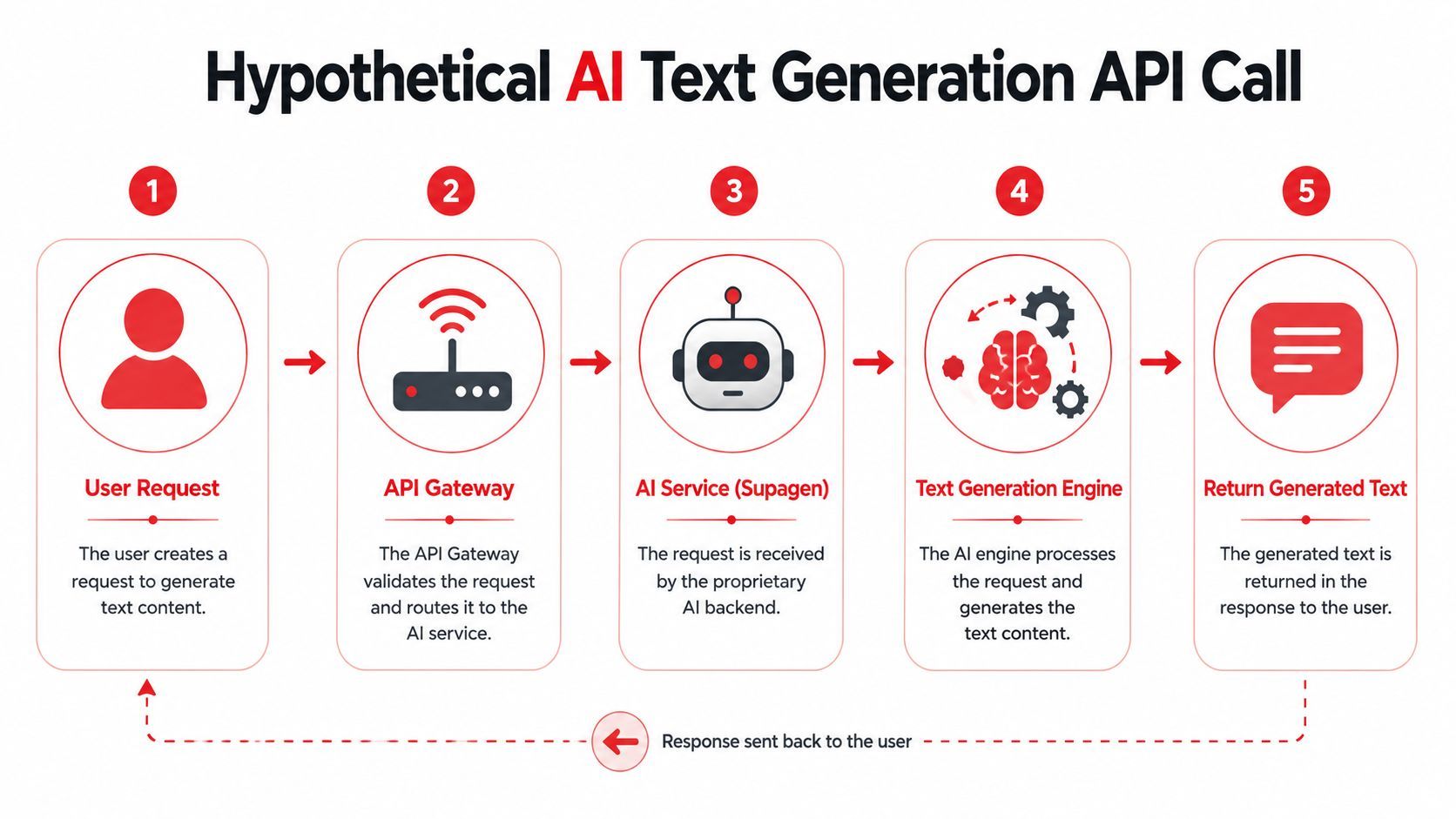
The trick is to document what the client can control, what the platform may choose, and what the response will reveal afterward.
Here's a strong pattern:
- Client preference fields such as
model,modality, orresponseFormat - Server-managed routing semantics described clearly in
description - Response metadata that tells the client what provider or model handled the request
- Consistent error schema for validation, provider unavailability, or unsupported payload combinations
Don't encode fake certainty. If your service may route to a compatible fallback model, the spec shouldn't imply that a specific provider is guaranteed unless the contract guarantees it.
This walkthrough is easier to follow when you see the request flow first.
A practical multi-modal OpenAPI example
openapi: 3.1.0
info:
  title: AI Generation API
  version: 1.0.0
  description: API for text and multi-modal generation requests

paths:
  /generate:
    post:
      operationId: generateContent
      summary: Generate content from text or multi-modal input
      description: >
        Accepts a preferred model and input payload. The service may route
        the request to a compatible provider based on availability or policy.
        The response returns the selected provider and model used to fulfill
        the request.
      requestBody:
        required: true
        content:
          application/json:
            schema:
              $ref: '#/components/schemas/GenerateRequest'
            example:
              model: auto
              input:
                text: Summarize the attached product screenshot
                imageUrl: https://example.com/assets/screenshot.png
              responseFormat: text
              temperature: 0.2
      responses:
        '200':
          description: Generation completed successfully
          content:
            application/json:
              schema:
                $ref: '#/components/schemas/GenerateResponse'
              example:
                id: gen_001
                output:
                  text: The screenshot shows a dashboard with revenue and usage panels.
                route:
                  provider: openai
                  model: gpt-4.1
        '400':
          description: Unsupported input or invalid request
          content:
            application/json:
              schema:
                $ref: '#/components/schemas/Problem'
        '503':
          description: No compatible provider available
          content:
            application/json:
              schema:
                $ref: '#/components/schemas/Problem'

components:
  schemas:
    GenerateRequest:
      type: object
      required:
        - model
        - input
      properties:
        model:
          type: string
          description: Preferred model identifier or auto for managed routing
          example: auto
        input:
          type: object
          properties:
            text:
              type: string
              nullable: true
              example: Describe this image
            imageUrl:
              type: string
              format: uri
              nullable: true
              example: https://example.com/image.png
            audioUrl:
              type: string
              format: uri
              nullable: true
              example: https://example.com/audio.mp3
            json:
              type: object
              nullable: true
              additionalProperties: true
          description: One or more supported input modalities
        responseFormat:
          type: string
          enum: [text, json]
          default: text
        temperature:
          type: number
          minimum: 0
          maximum: 2
          nullable: true
          example: 0.2

    GenerateResponse:
      type: object
      required:
        - id
        - output
        - route
      properties:
        id:
          type: string
          example: gen_001
        output:
          type: object
          properties:
            text:
              type: string
              nullable: true
            json:
              type: object
              nullable: true
              additionalProperties: true
        route:
          type: object
          required:
            - provider
            - model
          properties:
            provider:
              type: string
              example: openai
            model:
              type: string
              example: gpt-4.1

    Problem:
      type: object
      required:
        - type
        - title
        - status
      properties:
        type:
          type: string
          example: https://api.example.com/problems/unsupported-input
        title:
          type: string
          example: Unsupported input combination
        status:
          type: integer
          example: 400
        detail:
          type: string
          example: audioUrl requires a model that supports audio input
A few details make this practical:
model: autois explicit. Clients know routing is managed.- The response reveals actual route details. That matters for auditability and debugging.
- Input supports multiple modalities without pretending they're always all valid together. The error schema handles unsupported combinations.
What doesn't work is pretending every provider behaves identically. Keep the common contract stable, then describe provider-specific caveats in field descriptions or separate endpoints when needed.
Tools Best Practices and Common Pitfalls
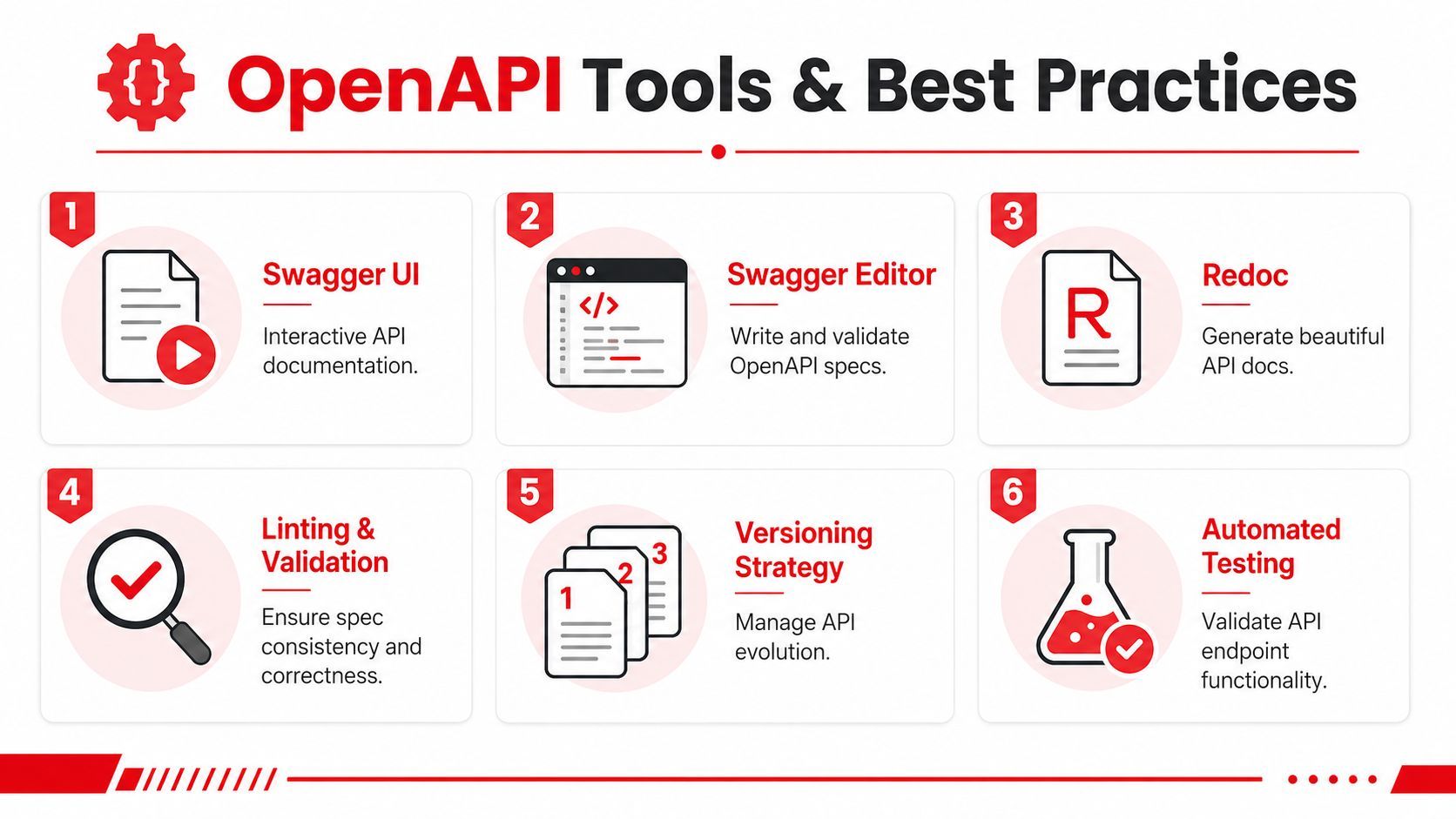
A spec file becomes useful when it enters a toolchain. Swagger Editor helps write and validate it. Swagger UI renders interactive docs. Redoc is a strong choice when you want polished reference documentation that's easy to use.
The toolchain most teams actually use
In practice, a healthy workflow looks like this:
- Author in YAML using Swagger Editor or your code editor with OpenAPI linting.
- Render docs automatically with Swagger UI or Redoc from the same committed spec.
- Validate in CI so broken references, invalid schema keywords, and missing response objects fail early.
- Generate mocks or SDKs carefully after the contract is stable enough to trust.
OpenAPI becomes much more valuable when the spec lives next to the code and changes through review, not as an afterthought in a separate docs repo.
A checklist for production-ready specs
Speakeasy's guidance for production-grade OpenAPI recommends treating schemas as strict contracts. That means defining field types with formats, adding validation constraints like required, nullable, readOnly, writeOnly, bounds such as minimum and maximum, documenting every success and error response, and using a single error schema, preferably RFC 7807 Problem Details, as explained in its article on OpenAPI data types and formats.
Use that advice as a review checklist:
- Tighten schema definitions: Add formats and constraints where they matter. Don't leave everything as a generic string.
- Document failure states: Include validation errors, unauthorized access, missing resources, and provider or dependency failures where relevant.
- Standardize error payloads: One shared error shape is much easier for clients to parse.
- Write examples that look real: Examples should illustrate contract behavior, not marketing copy.
- Prefer reuse over duplication: Shared parameters, schemas, and responses reduce drift.
The fastest way to make a spec hard to trust is to be precise on success and vague on failure.
A few common pitfalls show up repeatedly:
Frequently Asked Questions
How should I version my API in OpenAPI
Use versioning in two places for different reasons. Put the document version in info.version so readers know which contract they're looking at. If your public API uses path-based versioning like /v1/tasks, include that in paths and servers because it's part of the actual interface clients call.
The prevailing practical rule is consistency. Pick one external versioning strategy and reflect it clearly across routes, examples, and changelogs.
Should I upgrade from Swagger or OpenAPI 2.0
Yes, in most cases. Modern tooling and examples tend to center on OpenAPI 3.x, and the current OpenAPI specification has continued evolving beyond the Swagger era, as noted earlier. The biggest practical gains are better request body modeling, improved content-type handling, and more expressive schema support.
If your existing tooling is stable, migrate deliberately. Don't do it halfway. Partial upgrades create more confusion than value.
Can I add comments to YAML and JSON spec files
YAML supports comments, so it's a good authoring format when humans maintain the spec. JSON doesn't support comments in standard form, which is one reason teams rarely hand-author large OpenAPI files in JSON.
That said, comments aren't a substitute for actual schema descriptions. Important contract meaning should live in description, examples, and schema constraints so tooling can render and validate it.
What makes a good OpenAPI spec example
A good example is realistic without being bloated. It shows required fields, examples, security, multiple responses, and reusable components. It also avoids “magic” payloads that only make sense if you already know the backend.
If a mid-level developer can copy the pattern into a real service and improve it without rewriting the whole thing, the example is doing its job.
If you're building AI features and want a production layer for prompts, model routing, fallbacks, observability, and multi-modal workloads without hardcoding that logic into your app, take a look at Supagen. It's a practical way to ship AI-backed endpoints faster while keeping the behavior auditable and easier to evolve.