
N8n vs Make: AI Integration & Automation Guide 2026
Your team has probably reached the same point many product teams hit. The first few automations were easy. A webhook here, a cron job there, maybe a script that pushes form submissions into your CRM. Then the edge cases arrived. Retries started failing unnoticed. AI calls needed prompt changes. One workflow touched five systems and nobody wanted to edit it because breaking it would block customers.
That's where the n8n vs Make decision becomes real. This isn't only about workflow builders. It's about what kind of system you're building, who will maintain it, and whether your next automation is just a back-office shortcut or the beginning of a product feature with AI in the middle.
If you're choosing for a startup or product team, the wrong pick usually doesn't fail on day one. It fails later, when costs rise, logic gets tangled, or your team needs more control than the platform comfortably gives you.
Table of Contents
- The Automation Crossroads Choosing Your Path
- n8n vs Make at a Glance
- Core Features and Developer Experience Compared
- Pricing Models and How They Affect Scalability
- Integrating Modern AI and LLM Backends
- Ideal Use Cases Who Wins When
- The Final Verdict A Decision Framework
The Automation Crossroads Choosing Your Path
Typically, teams don't choose an automation platform at the start. They back into it.
A founder wants leads routed faster. Customer success wants tickets enriched automatically. Engineering wants AI summaries added to internal tools. Soon there's a patchwork of scripts, SaaS rules, and manual handoffs. The work still gets done, but the system becomes fragile. Small changes take too long. Nobody trusts the failure paths. AI features make it worse because prompt changes, model swaps, and latency issues don't behave like normal SaaS triggers.
That's the crossroads. You're not choosing between two similar products with slightly different UIs. You're choosing between two operating models.
n8n leans toward developer control. Make leans toward visual speed and accessibility. Both can automate real work. The difference is what happens after the first version ships.
Teams usually regret this choice for one of two reasons: they either picked a tool that non-technical users couldn't extend safely, or they picked a tool that looked easy until the workflow became part of the product.
For AI-powered products, that distinction matters more. A standard CRM sync is mostly fixed logic. An AI workflow often needs prompt versioning, fallback behavior, response shaping, and custom API calls. That pushes a platform beyond “connect app A to app B” and into orchestration.
A product team should make this decision by asking three questions:
- Who owns the workflows: marketing ops, founders, or engineers?
- What kind of logic is involved: standard SaaS actions or custom branching and API-heavy flows?
- Will this stay internal: or become customer-facing product behavior?
If the answer trends toward internal automation and common SaaS tools, Make often feels faster. If the answer trends toward product logic, custom integrations, and AI orchestration, n8n usually ages better.
n8n vs Make at a Glance
The fastest way to understand n8n vs Make is to stop thinking in features and start thinking in posture.
n8n is a builder's platform. Make is an operator's platform. That doesn't mean one is better overall. It means each one optimizes for a different kind of team.
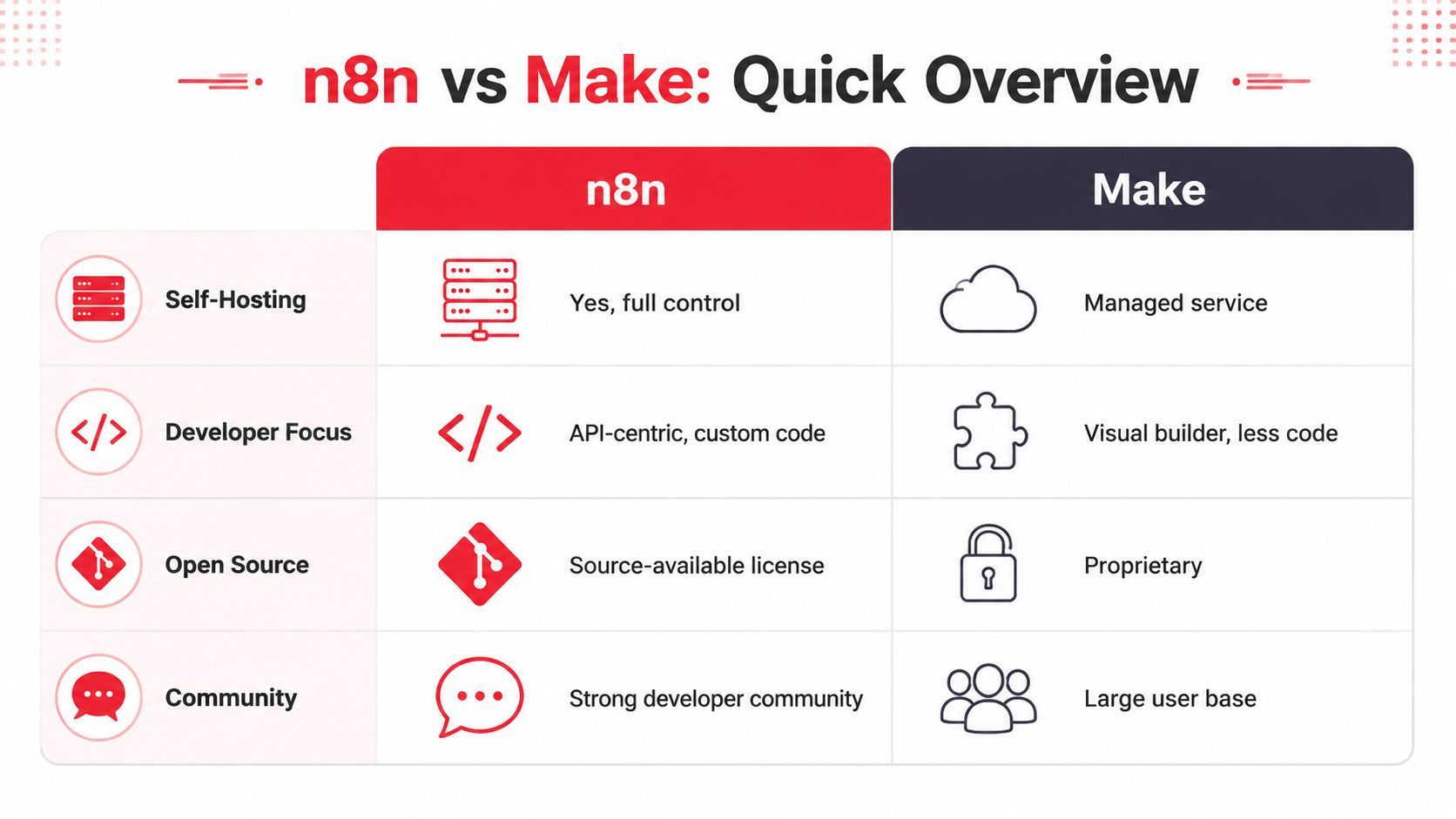
n8n in one line: pick it when your team wants control over code, infrastructure, and workflow behavior.
Make in one line: pick it when your team wants the shortest path from idea to working automation for common SaaS tools.
That split shows up everywhere.
n8n gives technical teams more room to design around edge cases, internal systems, custom APIs, and AI-oriented logic. Make gives operators and business teams a cleaner path for assembling scenarios visually without needing to think like backend engineers.
This isn't just opinion. HatchWorks' comparison of n8n and Make for AI agents describes n8n as materially more extensible for technical teams because it supports self-hosting, custom code, HTTP/API connectivity, and AI-oriented workflow components such as LangChain-style orchestration and reusable multi-step logic. The same comparison describes Make as stronger on quick visual prototyping and broad connector depth, but with less control for advanced AI or infrastructure-heavy workflows.
If your team includes developers and the workflow is likely to evolve into application logic, n8n deserves serious attention early. If the main problem is connecting familiar tools quickly, Make often reduces friction immediately.
Core Features and Developer Experience Compared
The day-to-day experience matters more than marketing pages. Teams live inside these editors. They debug failures there, inspect payloads there, and explain flows to coworkers there. A platform that looks fine in a demo can become painful once the workflow has branches, retries, and custom transformations.
Workflow design and readability
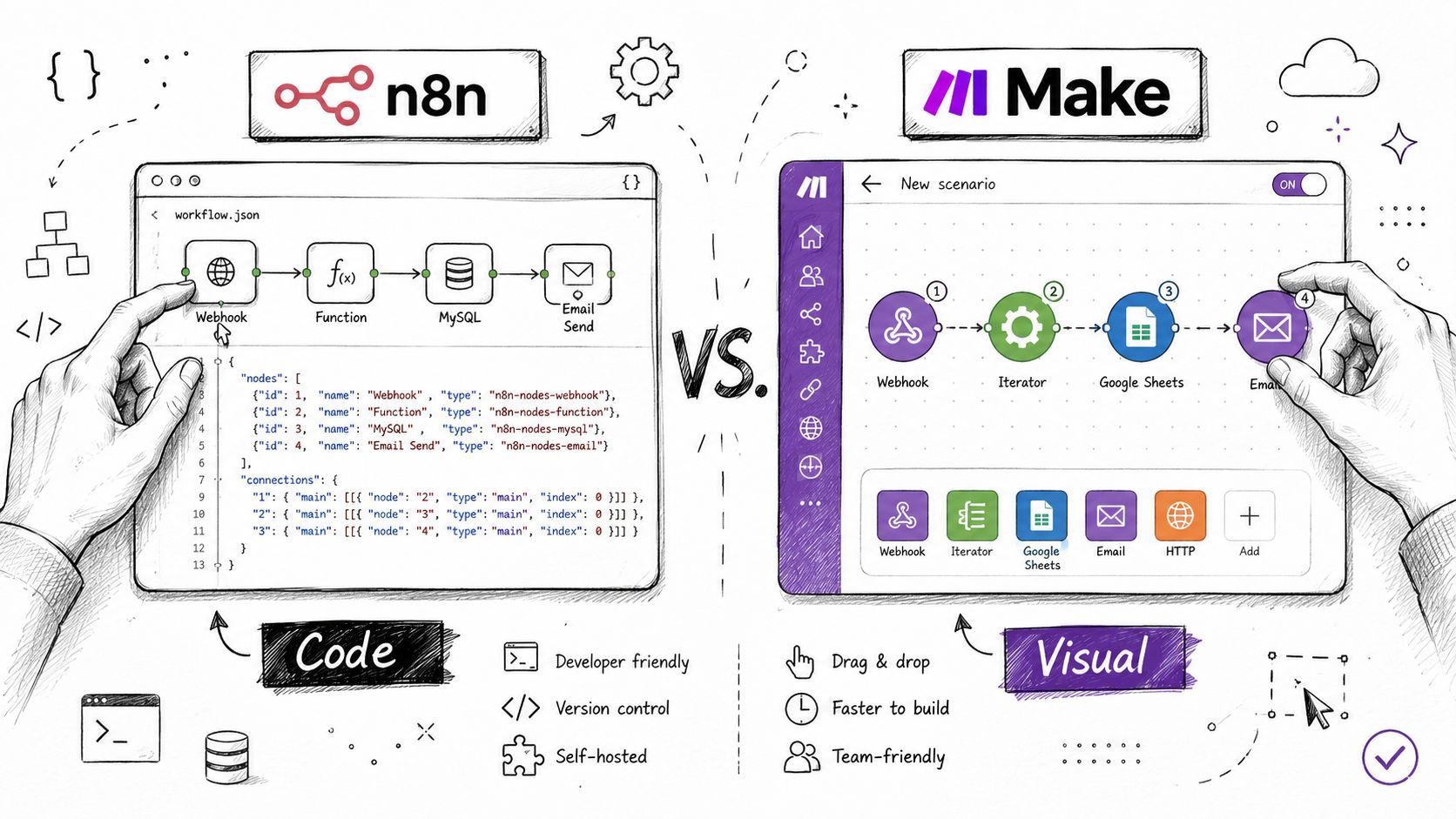
Make is usually easier to read at the beginning. Its scenario builder is approachable, especially when the logic is linear. If a team is connecting forms, spreadsheets, Slack, and a CRM, the visual model is friendly. Business users can often understand the flow without much translation.
n8n becomes easier to live with once the flow stops being simple. Branching, reusable patterns, custom transformations, and API-heavy steps fit more naturally into a developer-oriented mental model. The canvas feels less constrained when a workflow behaves more like an application process than a simple app-to-app relay.
A useful rule is this:
- Short, business-friendly sequences: Make feels cleaner.
- Deep branching and custom processing: n8n stays manageable longer.
The best workflow editor isn't the one that wins a screenshot comparison. It's the one your team can still debug six months later.
Hosting and operational control
Hosting is where the philosophical split becomes operational.
Make is managed for you. That's attractive for teams that don't want to think about infrastructure, updates, or maintenance. A marketing or ops team can adopt it quickly because the platform behaves like a polished SaaS tool.
n8n gives you the option to self-host. For technical teams, that changes the conversation around privacy, internal connectivity, and architectural freedom. If workflows need to touch internal services, private databases, or controlled environments, self-hosting can be the deciding factor. It also matters for teams that want tighter ownership over deployment patterns instead of accepting platform defaults.
This is often where product teams separate from business teams. Internal automations can often live comfortably in managed SaaS. Product logic tied to private systems or stricter control requirements usually benefits from an environment the team can shape directly.
Extensibility for APIs and AI logic
In these situations, n8n usually pulls ahead for engineering-led work.
If your workflow depends on custom endpoints, structured payload transformations, reusable logic, and AI-specific processing, n8n gives technical teams more surface area to work with. Code nodes and direct HTTP/API connectivity matter because modern product workflows rarely stay inside prebuilt connectors forever.
Make's strength is different. It offers strong connector depth for common SaaS systems and makes quick visual prototyping easier. That's valuable when the workflow mostly lives inside familiar business apps. It's less ideal when your team needs to bend the system around unusual APIs, infrastructure constraints, or evolving AI behavior.
Here's what tends to work in practice:
- Use Make when the workflow mostly depends on standard tools and your team values a visual setup over custom engineering.
- Use n8n when the workflow needs custom API handling, logic that won't fit neatly inside prebuilt modules, or AI flows that are likely to grow in complexity.
- Be careful with Make when the first version looks simple but the roadmap includes custom branching, internal tools, or non-standard model orchestration.
For developers building AI-powered products, extensibility isn't a nice-to-have. It's the difference between a maintainable system and a workflow your team keeps rebuilding around.
Pricing Models and How They Affect Scalability
A team can make the wrong platform choice on pricing even after reading both plan pages carefully. The usual mistake is comparing monthly entry prices instead of asking a harder question: what exactly gets metered as the product grows?
That distinction matters more here than the sticker price.
Why the billing unit matters more than the sticker price
According to Make's comparison page for Make vs n8n, Make's Free plan includes 1,000 credits per month, paid plans start at $9 for 10,000 credits per month, and n8n cloud pricing starts at about $20 per month for 2,500 workflow executions, with unlimited workflows and unlimited steps included.
The strategic difference is simple. n8n charges by workflow execution. Make charges by operations or credits consumed inside the scenario.
That creates two very different cost curves.
With n8n, one run is one billable event even if the workflow contains a lot of internal logic. With Make, each action inside the scenario can consume operations. If the automation stays short and connector-driven, that model can be efficient. If the workflow grows into multi-step logic with filters, routers, retries, enrichment, and post-processing, cost usually rises with every extra piece of product logic.
This is not just finance math. It shapes architecture decisions. Teams working on AI-powered features often start with a small flow and then add guardrails, validation, fallback paths, logging, and multiple model calls. In an execution-based model, that added logic is easier to predict. In an operation-based model, every new branch can raise the monthly bill.
Practical rule: estimate pricing from the mature version of the workflow, not the prototype.
Where step-heavy workflows change the math
The same source cites an example of a 50-step workflow run 1,000 times per month. In that analysis, n8n stays around 1,000 executions and about $20 per month, while Make reaches 50,000 operations and may push into a much higher pricing tier.
That does not make Make a bad deal. It means Make favors a specific workflow shape.
If the job is a clean handoff between common SaaS apps, Make often prices well and gets teams live quickly. If the workflow behaves more like application logic, especially in AI use cases, the economics can turn against you fast. I have seen this happen when a “simple” AI automation picked up moderation checks, prompt routing, result scoring, structured output cleanup, database writes, and alerting. The business saw one feature. The platform counted many more operations.
For product teams, the safer question is not “Which plan is cheaper today?” It is “What happens to cost when this workflow becomes part of the product and we iterate on it every sprint?”
That question usually leads to a clearer choice. If scale means more runs of a stable scenario, both tools can work. If scale means more logic per run, n8n is often easier to budget for. That is especially relevant if your automation layer will sit in front of a modern AI backend such as Supagen, where the workflow should stay focused on orchestration while model behavior evolves underneath it.
Integrating Modern AI and LLM Backends
The biggest mistake teams make with AI automation is stuffing model logic directly into the workflow tool.
It works for a prototype. Then the product team wants to swap providers, update prompts, compare outputs, or change fallback logic. Suddenly the automation layer is carrying responsibilities it shouldn't own. Every prompt adjustment becomes a workflow edit. Every provider change becomes a redeploy.
A cleaner pattern is to let the automation tool orchestrate events and let a dedicated AI backend own model behavior.
The clean architecture pattern for AI automations
The pattern is straightforward:
- A trigger fires in n8n or Make.
- The workflow gathers context from your app, database, or SaaS tools.
- The workflow sends one structured request to a unified AI backend.
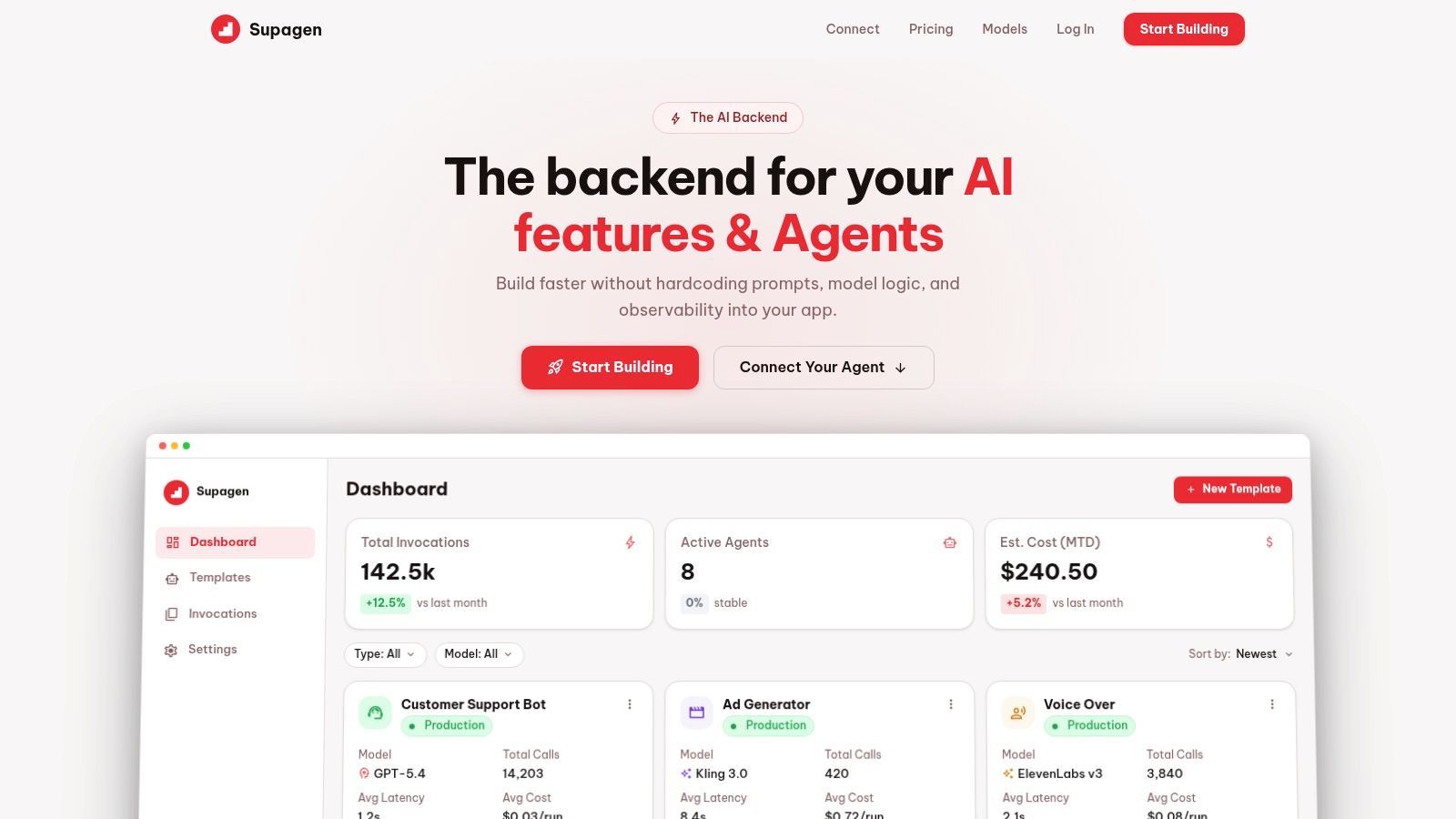
- The backend handles prompt versioning, model routing, parameters, fallbacks, and observability.
- The workflow receives a response and continues with business logic.
That separation matters because AI behavior changes more often than automation logic. Your workflow should decide when to ask for AI and what context to pass. It shouldn't be responsible for managing provider-specific behavior every time the product team wants to iterate.
How this looks in n8n
n8n is well suited to this pattern because it already accommodates API-heavy work and custom logic comfortably.
A typical implementation uses an HTTP request node to send a payload that includes the user input, structured metadata, and any retrieval context your application already has. The response can be validated, transformed, and routed through subsequent steps without hardwiring model-specific assumptions into every node.
This works well when you need:
- Custom payload construction for product-specific context
- Conditional routing after the AI response
- Post-processing before storing results or showing them to users
- Reusable multi-step logic across several AI-enabled workflows
For teams building customer-facing AI features, n8n's advantage is that it doesn't fight the architecture. It lets the automation layer stay thin while still giving developers room to shape inputs and outputs precisely.
How this looks in Make
Make can follow the same architecture, and it's often a good choice when the AI step is only one part of a broader SaaS automation.
A scenario might start with a form submission, CRM event, or spreadsheet row, assemble the relevant fields, send them to the AI backend over HTTP, and then push the result into tools like Slack, Notion, or email. For teams that want fast setup and broad app coverage, that can be enough.
The limitation shows up when AI behavior gets complicated. If the workflow starts carrying prompt variants, provider-specific branches, or layered fallback logic, the scenario can become harder to reason about. That's why externalizing those decisions into a unified backend is so useful. It keeps Make focused on orchestration instead of turning it into a pseudo-application server.
Keep the workflow tool responsible for triggers, data movement, and downstream actions. Keep the AI backend responsible for prompts, models, routing, and logs.
That pattern works in both platforms. It just becomes more important as your AI feature moves from demo to production.
Ideal Use Cases Who Wins When
A product team usually reaches the n8n vs Make decision at the same point. The first workflows are already live, AI is starting to touch customer experience, and the question shifts from "Can we automate this?" to "What happens when this logic gets harder to maintain?"
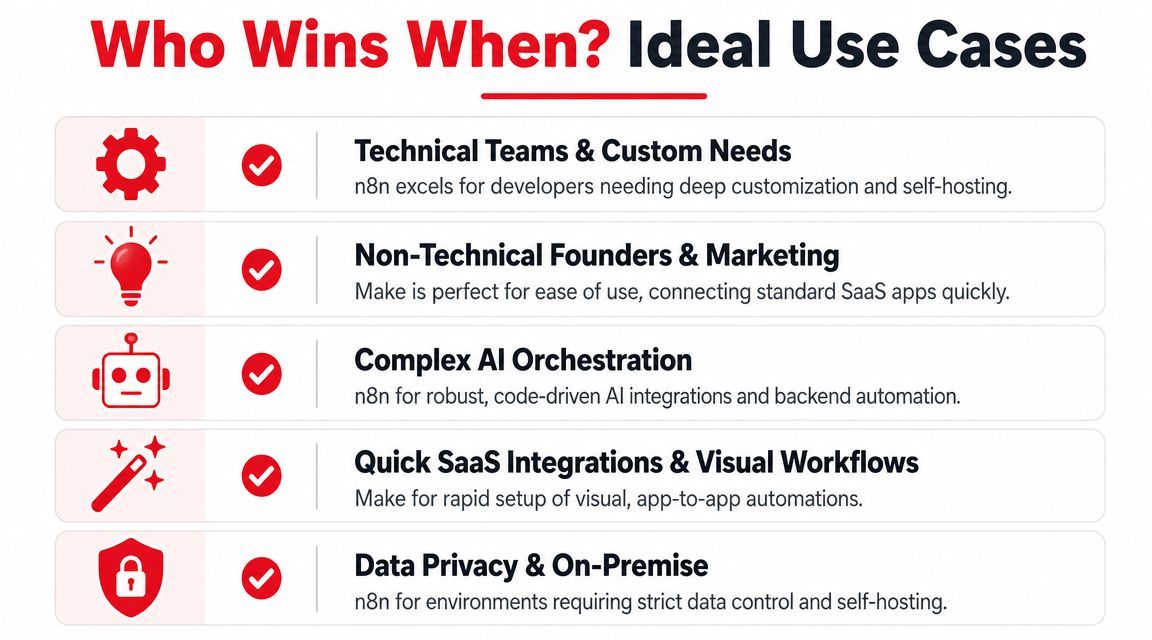
The right choice depends on where the complexity sits.
Choose Make if the workflow is mainly connecting SaaS apps your team already uses. Choose n8n if the workflow is starting to behave like product infrastructure, especially if an AI backend such as Supagen sits in the middle and the automation layer needs to pass structured inputs, handle conditional logic, and return outputs cleanly to the rest of the stack.
Choose Make for operational automations with fast setup
Make is the better fit for teams that care more about speed of delivery than deep implementation control.
That usually means marketing, revenue operations, customer success, and founders building internal automations without dedicated engineering support. If the job is to move data between forms, CRMs, spreadsheets, Slack, email platforms, and other standard SaaS tools, Make gets there faster and asks less of the team maintaining it.
Good fits include:
- Lead routing and enrichment across forms, CRMs, spreadsheets, and team alerts
- Campaign and reporting handoffs between ad platforms, dashboards, and internal notifications
- Light AI-assisted operations such as summarization, tagging, or draft generation inside an existing business process
- Department-owned workflows where the people maintaining the automation are not developers
Make starts to lose its edge when the scenario needs heavy branching, custom payload shaping, or logic that changes often because the product itself is evolving.
Choose n8n for workflows that are becoming software
n8n is the stronger choice when the workflow needs to behave like a controllable execution layer, not just a visual connector map.
That matters for developer-led teams building customer-facing AI features, internal tools with unusual APIs, or systems that need tighter control over infrastructure and data handling. In those cases, workflow readability is only part of the job. The bigger concern is how safely the system can grow once you add retries, validation, fallbacks, custom transforms, or backend calls that do not fit a standard SaaS connector pattern.
n8n is usually the better fit for:
- Product teams building automations behind user-facing features
- AI applications that call an external backend for prompts, routing, guardrails, and logs
- Teams integrating internal systems or APIs that need custom request and response handling
- Companies that want self-hosting for security, compliance, or infrastructure control
- Workflows expected to accrete logic over time rather than stay as simple app-to-app transfers
For AI products, this distinction matters early. If Supagen or another AI backend is managing prompts, model routing, and observability, n8n gives developers more room to treat automation as a thin orchestration layer instead of forcing product logic into a visual scenario that becomes harder to reason about six months later.
A practical recommendation by team type
Use this table as a shortcut during platform selection:
The winner is the platform that matches your operating model.
If the automation supports the business, Make often keeps delivery faster and ownership clearer. If the automation is becoming part of the product, n8n usually ages better.
The Final Verdict A Decision Framework
The most useful way to think about n8n vs Make is simple. Make optimizes for accessibility. n8n optimizes for control.
If your team wants to connect common SaaS tools quickly, reduce setup friction, and let non-technical users own automations, choose Make. Its visual model and connector depth are strong for that style of work.
If your team is building custom logic, needs self-hosting, expects workflows to grow in complexity, or plans to embed AI integrally into product behavior, choose n8n. That choice becomes even stronger when scale sensitivity matters. As Digidop's comparison explains, the most actionable technical distinction is the pricing and execution model: n8n uses per-workflow-execution pricing, which can be advantageous for massive processing volumes, while Make's scenario-based model and strong connector depth make it efficient for common SaaS automations.
The wrong choice isn't the one with fewer features. It's the one that clashes with your team's operating model.
If your workflows are business automations, pick simplicity.
If your workflows are becoming software, pick flexibility.
If you're building AI-powered products and want your automation layer to stay clean, Supagen gives you a unified AI backend for prompt management, model routing, fallbacks, and observability so your team can iterate on AI behavior without hardcoding those decisions into every workflow.