
8 Multimodal Texts Examples for 2026
What if your app had to interpret a screenshot, a spoken request, and a typed correction in the same interaction, and your team still treated those as separate features? That gap is where most multimodal projects stall. Product teams often understand the definition of multimodality, but they don't translate it into system design, routing rules, fallback behavior, or cost controls.
That matters because multimodal communication isn't new or niche. Major literacy research formalized the idea in the 1990s through the New London Group's work on multiliteracies, and current teaching materials now frame common formats like websites, posters, comics, podcasts with companion pages, and presentations as multimodal texts because meaning is made through linguistic, visual, aural, spatial, and sometimes gestural modes, not language alone (Lumen Learning on examples of multimodal texts). For builders, that maps directly to product reality. Users expect interfaces that combine text, images, audio, video, and layout into one experience.
The practical problem isn't recognizing multimodal texts examples. It's choosing the right format for the job and wiring the backend so the experience stays reliable when one model slows down, a provider fails, or costs spike. That's where product strategy matters more than theory.
Below are eight multimodal texts examples that matter in real products. Each one shows where multimodality creates value, what usually breaks in production, and how to design the workflow so the system remains usable when conditions aren't ideal.
Table of Contents
- 1. Interactive AI Chatbots with Text and Voice
- 2. Content Generation with Image and Text
- 3. Video Analysis and Summarization Tools
- 4. Document Intelligence and Data Extraction
- 5. AI-Powered Product Recommendation Systems
- 6. Educational Content Generation with Multimedia
- 7. Real-Time Monitoring and Alert Systems with Visual and Textual Data
- 8. Multimodal Search and Discovery Interfaces
- Multimodal Texts, 8-Example Comparison
- Putting Multimodal AI to Work Your Next Steps
1. Interactive AI Chatbots with Text and Voice
Voice chat feels simple to users and messy to teams. A typed input can go straight to an LLM. A spoken input has to pass through speech recognition, text interpretation, response generation, and text-to-speech before it feels effortless. That stack creates more failure points than most chatbot demos admit.
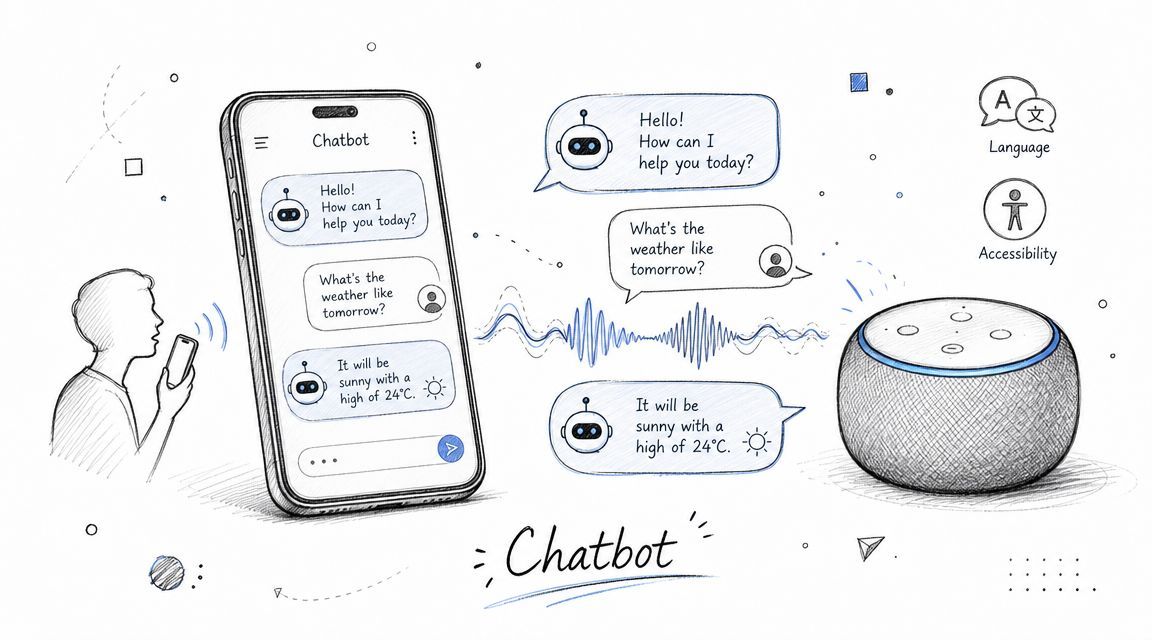
Products like ChatGPT voice, Google Assistant, customer support bots, and appointment scheduling assistants all fit the same multimodal pattern. The user may speak, listen, type, tap, or switch channels mid-flow. The system has to preserve intent across those shifts.
Where this format works
Text-and-voice chat works best when users need speed, accessibility, or hands-free interaction. Support, scheduling, field operations, and healthcare intake are common fits because users don't always want to read dense text or type detailed answers.
The reason this belongs on any serious list of multimodal texts examples is that the conversation itself isn't only linguistic. Tone, pacing, turn-taking, interface layout, and recovery prompts all shape comprehension. In practice, a voice bot with bad transcript recovery performs worse than a text-only bot with clear clarifying questions.
Practical rule: Design voice as a first-class path, not a thin audio layer on top of text chat.
What works in production
The strongest implementation pattern is split orchestration. Route speech recognition, LLM reasoning, and synthesis as separate services with separate logs. If ElevenLabs or another speech layer fails, the user should still receive the response as text rather than a generic error.
A few habits prevent most avoidable failures:
- Separate prompts by channel: Spoken replies need shorter phrasing and clearer turn boundaries than chat replies.
- Log modality-specific latency: Users tolerate some delay in text. They tolerate much less in voice.
- Store the canonical turn as text: Audio is an interface layer. Text is usually the durable record for retrieval, QA, and analytics.
- Use fallback intentionally: When speech confidence is weak, ask for confirmation instead of pretending the system understood.
For teams using Supagen, a unified backend helps. It allows you to route text generation to one provider, speech to another, keep versioned prompts for voice versus chat, and inspect per-call logs without burying that logic in application code.
2. Content Generation with Image and Text
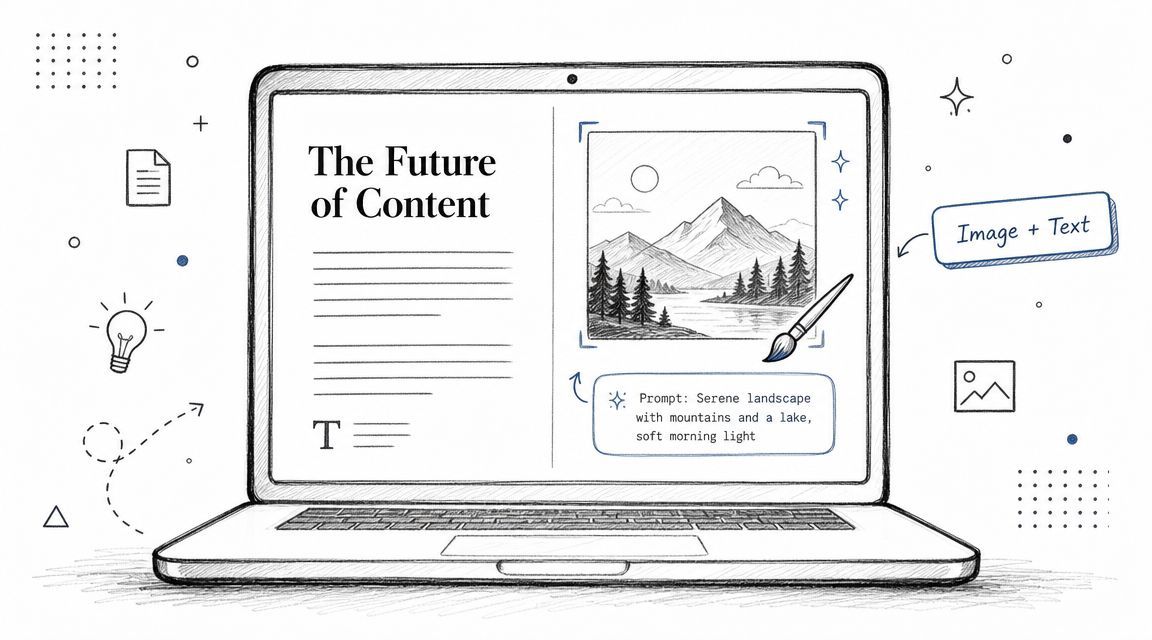
Teams often discover this the hard way. Generating a paragraph and generating an image aren't the hard parts. Making them say the same thing is the hard part.
Newsletter tools, ecommerce product pages, social campaigns, and AI-assisted blog systems all use the same pattern: one system produces language, another produces visuals, and the product team hopes they stay aligned. They often don't. The copy promises one mood, the image shows another, and the final asset feels stitched together.
Why paired generation is harder than it looks
This category is one of the most commercially useful multimodal texts examples because publishing has already normalized mixed modes across print, digital, and live contexts. Educational references commonly classify multimodal texts into paper-based, digital, and live forms, with digital examples including films, animations, e-books, video games, blogs, vlogs, and social content. Those same references note that digital multimodal texts often combine linguistic, visual, gestural, and aural modes (Vaia overview of multimodal texts). That's exactly how modern content systems behave.
The trade-off is control versus throughput. If you tightly template visuals and copy, you get consistency but lose freshness. If you allow wide model freedom, output quality drifts fast.
A practical workflow
A reliable setup usually starts with a shared creative brief. Don't prompt the text model and image model independently from scratch. Generate a structured content spec first, then pass that spec to both branches.
Keep one source of truth for subject, audience, tone, constraints, and prohibited claims. If those variables diverge, the bundle diverges.
Useful implementation choices include:
- Use a planning layer first: Generate a content brief, then derive copy and image prompts from it.
- Template the brand voice: Let the models vary examples and phrasing, not the brand's core style.
- Require review gates: Marketing bundles should have an approval step before publishing.
- Track costs by asset type: Hero images, lifestyle visuals, and text revisions don't carry the same operational cost.
Supagen fits well here because teams can manage text prompts and image prompts separately, route across providers like OpenAI and fal.ai, and change parameters in a dashboard instead of redeploying each prompt tweak.
3. Video Analysis and Summarization Tools
Video isn't one modality. It's several synchronized modalities packed into one file. You have speech, ambient audio, scene changes, on-screen text, timing, and layout. If your summarizer only transcribes speech and calls it done, it misses a large part of the artifact.
That matters for meeting summaries, lecture recap tools, creator workflows, security review, and media indexing. A tutorial video with sparse narration and dense screen action needs a different processing path from a talking-head interview.
A good reference point comes from multimodal case-study methodology. The workflow is to select a representative case, contextualize it, collect all modal materials, then transcribe, code, and interpret each mode before reporting how they work together. That approach is explicitly described as producing “in-depth insights” and “detailed and nuanced” findings (Discourse Analyzer on methodologies for analyzing multimodal texts). Product teams can treat a video pipeline the same way. Capture every modality, log interaction between them, then compare outputs across contexts.
The core design choice
For most production systems, the first decision is whether transcript-first summarization is enough. Sometimes it is. For meetings and lectures, transcript-led analysis often gives the highest utility per unit of effort. For product demos, sports footage, design walkthroughs, or surveillance review, frame-level cues matter much more.
Here is the embedded example video:
How to keep summaries useful
Useful summaries don't just condense. They preserve actionability. That usually means a stable output format with sections like decisions, risks, timestamps, visual events, and unanswered questions.
- Process sequentially when possible: Transcribe first, then enrich with visual cues.
- Use different prompts for different video classes: Meetings, tutorials, and incidents shouldn't share a summary template.
- Degrade gracefully: If transcription fails, return visual observations instead of nothing.
- Expose uncertainty: A summary that signals missing audio is more trustworthy than one that fabricates confidence.
I've found that teams get better results when they stop calling every video summary "AI notes" and start defining what the user needs to do next with the summary. That shifts the prompt from compression to decision support.
4. Document Intelligence and Data Extraction
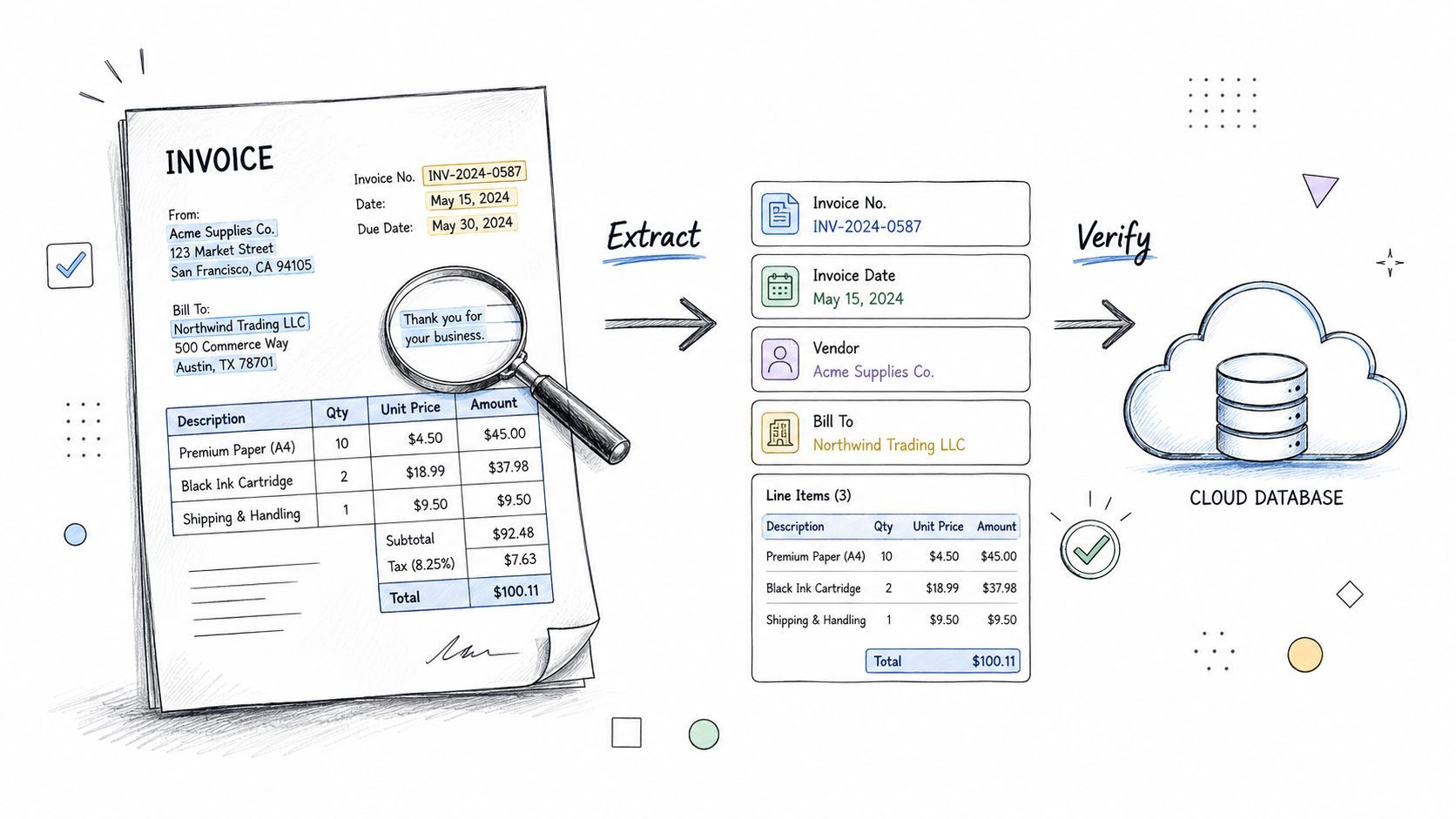
Document AI looks like a text problem until layout breaks it. Invoices, contracts, IDs, claim forms, and scanned PDFs aren't just strings. Position, grouping, headers, stamps, signatures, and whitespace all affect meaning.
That's why document intelligence is one of the most practical multimodal texts examples for product teams. The visual structure often determines which extracted text matters and how fields relate to each other. A total amount in an invoice footer doesn't mean the same thing as the same number in a line item.
Why layout matters
Even plain documents qualify as multimodal because design features like font choice, spacing, and margins contribute to meaning. Some educational sources now go so far as to say that “most, if not all texts today, can be considered multimodal texts” for exactly that reason (LibreTexts examples of multimodal texts/10:_Module-_Multimodality/10.05:_Examples_of_Multimodal_Texts)). Builders should take that seriously. OCR alone isn't document understanding.
A contract review flow proves the point. Clause text matters, but so do section hierarchy, table formatting, annexes, redlines, and signature blocks. If the system flattens everything into plain text too early, it loses signal.
Operational rules that save time
Route simple extraction and deep reasoning differently. A receipt scan and a legal agreement shouldn't hit the same model path.
A few rules improve reliability fast:
- Classify document type first: Invoice, receipt, ID, contract, and form each need different prompts.
- Preserve structure in intermediate data: Keep page, block, and field coordinates when possible.
- Use confidence thresholds: High-confidence fields can flow through automatically. ambiguous ones should go to review.
- Keep humans in the loop for regulated workflows: Low-confidence identity, financial, or legal extraction needs oversight.
Supagen is useful here because routing can happen by document class, with approval workflows and prompt templates separated by use case. That gives teams a cleaner production layer than hardcoding every extraction rule in the app.
5. AI-Powered Product Recommendation Systems
Recommendations stop feeling intelligent when they only rank items. Users also want to know why something is relevant. That's where multimodality helps. Product imagery, descriptions, reviews, metadata, and behavior signals can work together to produce both a recommendation and an explanation.
Fashion apps, streaming platforms, marketplace search, and real estate discovery all use this pattern. A shopper may upload a photo, browse similar items, read reviews, and then choose based on a text explanation of fit or style. That isn't a single-model problem. It's a retrieval, similarity, ranking, and language-generation problem.
Recommendations need explanation, not just ranking
Many teams build recommendation quality around embeddings alone and forget the final mile. But users often decide based on the narrative around a result. "Similar in color and silhouette, but better for warm weather" is more actionable than a bare list.
This is also where the common advice around multimodal texts examples falls short. Existing explanations usually identify formats such as comics, posters, podcasts with websites, and infographics, but they rarely help builders choose the right format for a specific conversion task or user job. More useful strategy maps example types to audience goal and channel, not just mode labels.
What to tune first
When recommendations underperform, the issue often isn't the model. It's the objective.
- Tune for task completion: "Find a matching outfit" needs a different ranking logic than "discover new brands."
- Generate explanations separately from ranking: Keep the recommender focused on relevance and let an LLM verbalize the rationale.
- Use cheap paths for obvious matches: Save premium model calls for ambiguous or high-value sessions.
- Measure failure by user behavior: If users open recommended items but don't act, the explanation or ranking may be off.
A recommendation system earns trust when the explanation matches what the user sees in the image and reads in the product details.
For teams using Supagen, this is a good place to separate embedding flows, ranking logic, and explanation prompts into distinct, observable components.
6. Educational Content Generation with Multimedia
Educational content fails when teams confuse more media with better learning. Adding visuals, audio, and interactive elements doesn't automatically improve comprehension. The design has to be scaffolded so learners can observe, interpret, and connect the modes.
That lesson shows up clearly in educational work on multimodal texts. A case-based study of a digital multimodal text design task reported that students could draw on out-of-school resources and experiences, while teaching guidance emphasizes that multimodal analysis must be modeled because learners often identify modes but struggle to turn those observations into arguments. Reported outcomes include improved engagement, stronger participation for emergent bilingual learners, and better vocabulary inference when gesture and audio cues are intentionally integrated (British Journal of Educational Technology study summary).
Good educational multimodality is scaffolded
That makes this one of the most important multimodal texts examples for AI product teams. Tutors, lesson builders, language apps, exam prep tools, and coding education platforms all benefit when the same concept can be explained in text, diagram, spoken explanation, and worked example.
The mistake is generating all of that at once without instructional structure. Learners don't need maximum output. They need the right representation at the right moment.
How teams should build it
A durable workflow usually starts with a concept graph or lesson outline, not freeform generation. Then each modality serves a role. Text defines the concept. A diagram anchors relationships. Audio reinforces explanation. Practice items test transfer.
- Create prompts by difficulty level: Beginner, intermediate, and advanced learners need different wording and visual density.
- Assign one job to each modality: Don't let text, image, and audio all repeat the same explanation in slightly different words.
- Build review into publishing: Subject matter experts should validate educational content before release.
- Close the loop with learner feedback: Confusion patterns should feed prompt revisions.
I've seen teams improve educational output quality just by asking one operational question before generation: what should the learner do after consuming this asset? That keeps the system focused on learning progress instead of media variety.
7. Real-Time Monitoring and Alert Systems with Visual and Textual Data
Real-time monitoring is where multimodal systems stop being a nice UX layer and become operational infrastructure. A useful alert may combine a camera frame, a sensor reading, a log anomaly, and a text summary that tells an operator what happened and what to check next.
Security operations, facility monitoring, manufacturing oversight, cloud observability, and workplace safety tools all use some version of this pattern. A motion detection event without context creates noise. A long narrative without evidence slows response.
Why alert quality matters more than model sophistication
Most alerting systems don't fail because they lack advanced models. They fail because they overwhelm people with low-context notifications. Teams route everything through a premium model, generate verbose summaries, and then wonder why operators ignore alerts.
Current guidance on multimodal literacy is useful here because it emphasizes not just recognizing modes but observing how they work together. Teaching resources increasingly stress interpretation and synthesis over simple identification, which mirrors production reality in monitoring systems. Operators don't need raw mode labels. They need correlated meaning.
The routing pattern that usually works
The better pattern is tiered routing. Lightweight models or rules handle routine classification. Vision models inspect periodic frames or event-triggered imagery. A stronger LLM synthesizes only when multiple weak signals line up.
- Use event gating: Don't send every frame to a vision model.
- Separate detection from narration: First decide whether something unusual happened. Then generate an alert summary.
- Escalate uncertain cases to humans: High-uncertainty incidents need review workflows.
- Log by modality: If costs rise, you'll want to know whether images, text synthesis, or continuous analysis caused it.
Supagen's routing and per-call observability are especially practical. Teams can tune low-latency paths for urgent alerts and reserve more expensive reasoning for events that justify it.
8. Multimodal Search and Discovery Interfaces
Search has changed from "type keywords, get links" to "show this item, describe it, and help me find related things." Users now expect to upload an image, speak a request, paste text, or combine all three. The search system has to normalize that into intent before ranking anything.
Google Lens, Pinterest visual discovery, YouTube search across captions and metadata, Shopify product search with image upload, and media libraries with mixed search inputs all fit here. This category matters because it reflects the mainstream shift from static multimodal artifacts toward interactive, changing, AI-mediated outputs.
Search should normalize intent first
If a user uploads a jacket photo and says "similar, but lighter for spring," the image and the phrase are doing different jobs. The image defines visual reference. The text defines the transformation. Good search systems preserve both.
Support for this idea appears in teaching guidance that treats multimodal literacy as careful observation of how visuals, audio, and alphabetic text work together, rather than just labeling modes (University of Michigan guidance on supporting multimodal literacy). That same principle applies to search pipelines.
Where teams go wrong
The most common mistake is parallel search without reconciliation. Teams run image search and text search separately, then mash the results together. That often produces relevance conflicts and confusing explanations.
Search quality improves when every input gets translated into one unified representation of user intent before ranking starts.
Practical fixes include:
- Create modality-specific intake steps: Parse images, voice, and text differently before unification.
- Use shared ranking criteria: Don't let the image branch optimize for one goal while the text branch optimizes for another.
- Design fallbacks clearly: If visual recognition is weak, let the user refine with text instead of failing without indication.
- Explain the match: Tell users whether a result was chosen for visual similarity, textual features, or both.
For teams shipping AI search, this is one of the most impactful multimodal texts examples because it directly affects discovery, conversion, and trust.
Multimodal Texts, 8-Example Comparison
Putting Multimodal AI to Work Your Next Steps
The big lesson across these multimodal texts examples is simple. Multimodality isn't a feature category. It's an orchestration problem. Teams rarely fail because they can't access a model that handles text, images, audio, or video. They fail because they don't define how those modes should interact, when one should take priority, what happens when one fails, and how cost should be monitored across the whole path.
This shift has been building for a long time. The idea that meaning is created through multiple modes was formalized in the 1990s through multiliteracies research, and the rise of digital publishing made multimodal communication standard across paper-based, digital, and live formats. That's why modern users expect hybrid experiences rather than text-only systems. They already live in interfaces made of language, visuals, sound, layout, and interaction.
For builders, that means the old pattern of "add an LLM endpoint and ship" isn't enough. A production-grade multimodal system needs at least four disciplines working together. Prompt design decides how each modality contributes. Routing decides which provider or model handles which job. Observability tells you what happened on each call. Cost tracking tells you whether the experience is commercially sustainable.
The best place to start isn't the flashiest use case. It's the clearest one. Pick a workflow where combining modes obviously improves the user outcome. A support bot that can speak and type. A document pipeline that understands layout. A search experience that accepts images and text together. Then define the production rules before you polish the UX. What is the canonical representation of the request? What counts as success? What fallback appears when one modality degrades? Which steps require human review?
Teams that answer those questions early usually move faster later. They spend less time rewriting prompts in code, less time guessing which provider call caused failures, and less time arguing about costs after launch. They can see how the system behaves, adjust templates safely, and route requests based on context instead of hardcoded assumptions.
That is the true opportunity in multimodal AI. Not just generating richer outputs, but building systems that coordinate multiple kinds of meaning reliably. The technology is already good enough to create tangible value. The advantage now comes from operational discipline. If you treat multimodality as product architecture instead of demo polish, you'll build experiences that feel more natural to users and stay manageable for your team.
Supagen gives product teams a practical way to ship multimodal AI without hardcoding every prompt, route, and fallback into the app. If you're building chatbots, search, content generation, document workflows, or agentic features, Supagen provides the production layer for versioned prompts, model routing across providers, per-call logs, latency and cost visibility, and fast iteration through a centralized dashboard.