
Multi Turn Conversations for AI Apps: A Practical Guide
A user opens your app and types, “I need help with my order.” The bot asks which order. The user answers. Then they add, “Also, I need it sent to my work address.” Two turns later, the bot asks for the order number again and replies as if the shipping question never happened.
That's the moment many teams realize they're not building a chatbot. They're building a system that has to remember, prioritize, recover, and stay affordable while doing it.
Multi turn conversations sound simple from the outside. Keep the chat history, send it back to the model, and you're done. In production, that approach breaks fast. Context gets noisy. latency climbs. token spend grows. Early mistakes spread through later turns. Non-technical builders often keep trying to “fix” a broken thread when the better move is to summarize, restart, and continue cleanly.
Product teams run into the same wall from different directions. Developers worry about state and routing. PMs worry about task completion. Founders worry about reliability and cost. All of them are really asking the same question: how do you make an AI app hold a useful conversation without turning the backend into a mess?
Table of Contents
- Introduction
- Understanding the Key Concepts
- Technical Challenges in Multi Turn Conversations
- Architecture Patterns for Session and State Management
- Prompt Versioning and Model Routing Strategies
- Testing Evaluation and Monitoring for Multi Turn
- Hands on Implementation Examples and Best Practices
- Conclusion and Next Steps
Introduction
Most AI demos stop at the second message. Real products don't.
A customer support bot has to carry account details forward. A scheduling assistant has to keep track of time slots, confirmations, and corrections. A voice agent has to remember what “that file” or “the earlier option” refers to. Once users start clarifying, changing direction, and referring back to earlier turns, your app needs a memory strategy, a routing strategy, a testing strategy, and a way to inspect failures after the fact.
The hard part isn't generating one good answer. The hard part is managing a thread over time without letting the thread drift.
That's why a unified production workflow matters. You need one path from conversation state to prompt selection, from prompt version to provider routing, from testing to observability. If those pieces live in separate scripts, dashboards, and guesses, your team won't know whether a failure came from bad context, a stale prompt, the wrong model, or a broken fallback.
Multi turn conversations fail less often when teams treat them like systems engineering, not prompt magic.
Understanding the Key Concepts
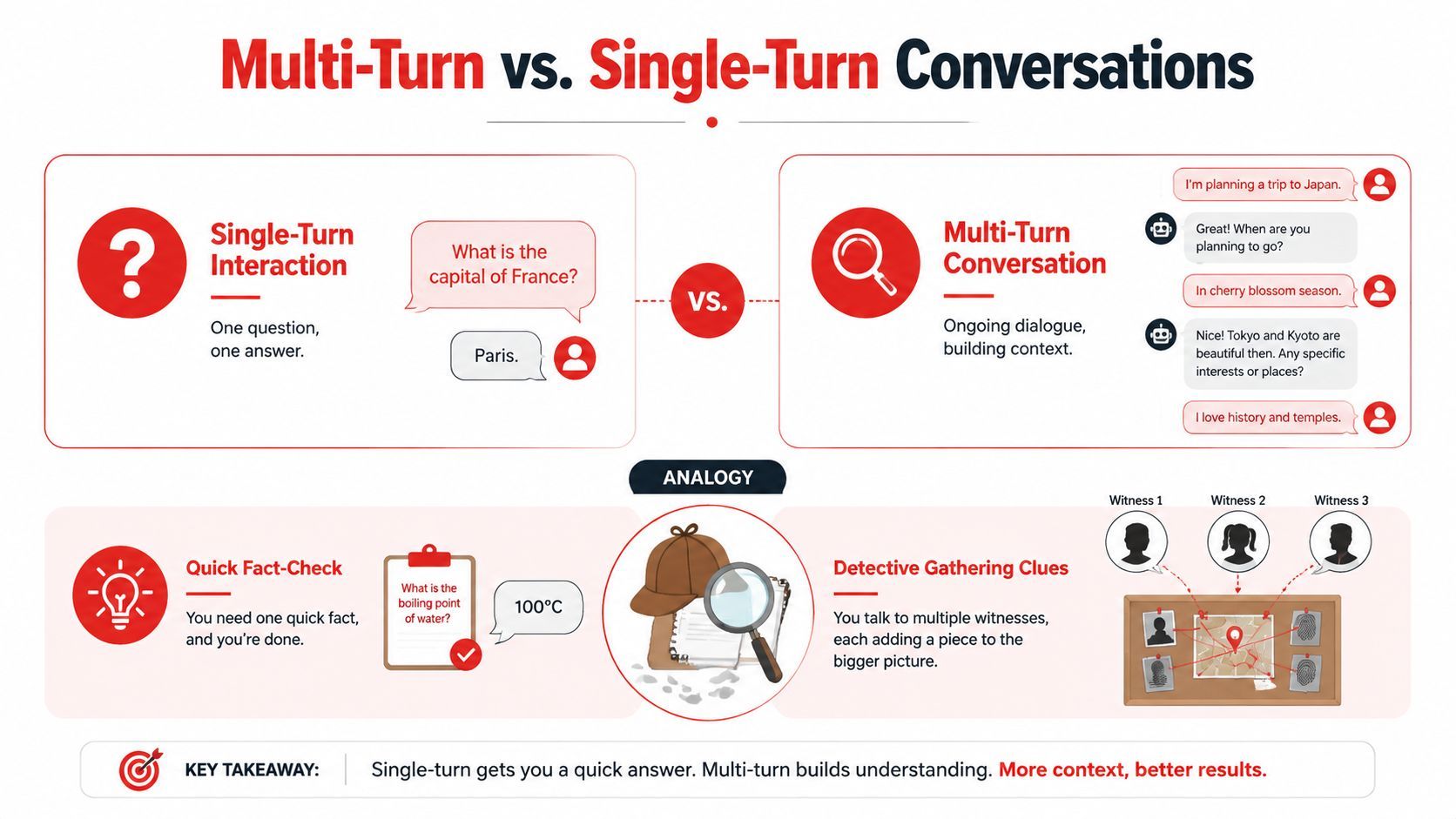
A single-turn interaction is self-contained. The user asks one question. The model answers using only that request.
A multi turn conversation is different. Each turn depends on what happened earlier. The model has to interpret the new message through the conversation's accumulated state.
What makes a conversation multi turn
The easiest analogy is a detective interviewing witnesses.
In a single-turn task, the detective gets one complete report and makes a decision. In a multi turn conversation, the detective gathers one clue at a time. A witness says the car was blue. Another says it turned left. A third corrects the timeline. If the detective forgets the first clue or overweights the wrong one, the case goes sideways.
That's how chat systems behave too.
A user might say:
- “I'm booking travel for next month.”
- “Make it a window seat.”
- “Not the morning flight.”
- “Use the card I used last time.”
Every later message depends on earlier context. “It,” “that,” and “last time” only make sense if the system keeps state.
Why raw history is not the same as memory
Teams often confuse conversation history with usable memory.
Dumping the full transcript into every request gives the model access to prior turns, but it doesn't guarantee good recall. The history may contain resolved issues, irrelevant small talk, and old assumptions that shouldn't influence the next answer. On the other hand, aggressive truncation can cut away the one detail that still matters.
A useful mental model is this:
Practical rule: store structured state outside the model when you can. Let the prompt carry meaning, not your whole database.
That applies whether you're a product team with an orchestration stack or a solo builder using API calls from a simple app. The principle is the same. Keep what matters, compress what's old, and don't assume the model will sort it out for you.
Technical Challenges in Multi Turn Conversations
Multi turn systems don't usually fail in dramatic ways first. They fail in small, annoying ways. The bot asks for the same detail twice. It answers the last message but ignores the broader task. It gets slower after every turn. Then your bill goes up and task completion goes down.
A 2025 study on multi-turn degradation in LLMs found a statistically significant 39% performance degradation when moving from single-turn to multi-turn conversations, driven by a 112% increase in unreliability across dialog tasks.
Why performance drops across turns
That result matters because it shifts the diagnosis. The model doesn't just become less capable. It becomes less reliable inside an ongoing exchange.
In plain language, the system is more likely to latch onto an early assumption and keep building on it. If it misreads the user's intent in turn two, it may spend the next five turns confidently solving the wrong problem. Recovery gets harder with each added reply because the conversation itself now contains the mistake.
That's why teams see behavior that feels inconsistent. One run works. Another drifts. A third gets stuck asking follow-up questions that the user already answered.
The four failure modes teams hit first
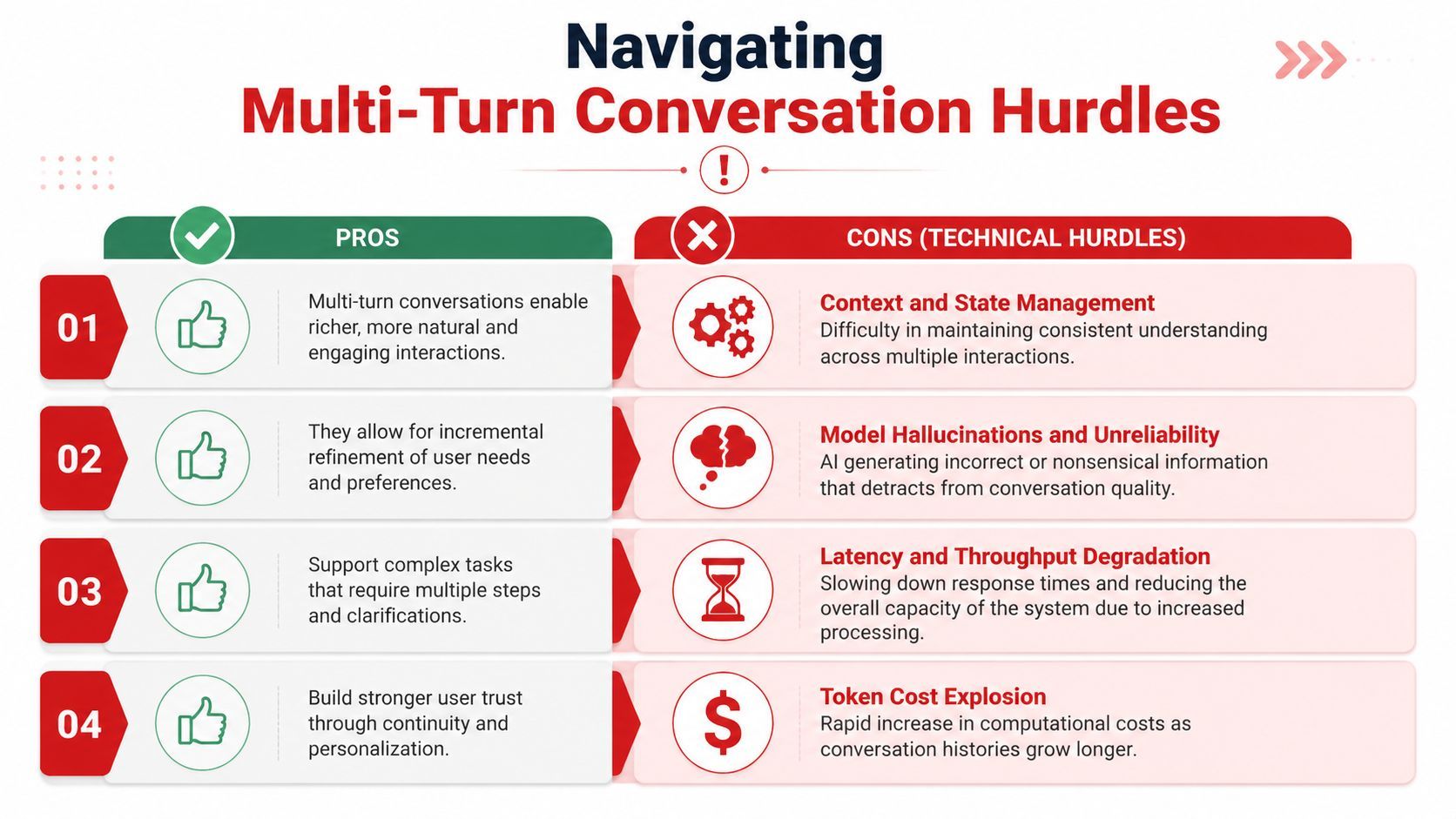
Context and state management
A FAQ bot can survive with weak memory. A workflow assistant can't.
Suppose a user says, “Book the Thursday slot, but only if it's after lunch.” Later they ask, “Can you move it thirty minutes later?” If your app doesn't track the chosen slot as structured state, the model has to reconstruct everything from raw text each turn. That's fragile.
Two naive patterns show up a lot:
- Send everything: simple to implement, but context grows until old turns drown the signal.
- Keep only the last few messages: cheaper, but the app forgets details that are still active.
Hallucinations and unreliability
In multi turn settings, the model often sounds coherent while using the wrong premise. That's more dangerous than an obvious failure.
A support bot may confidently reference the wrong subscription tier because it attached to an earlier mention. A legal or medical assistant may blend facts from separate turns into a single answer that sounds neat but doesn't match the actual thread.
When users say “that's not what I meant,” they're often diagnosing context drift, not bad wording.
Latency and throughput degradation
Every turn adds more processing work if you keep expanding the context. Users feel that as slower replies. Engineering teams feel it as reduced throughput.
The practical infrastructure issue is that context growth strains the serving path, especially when the model keeps more prior tokens active. The slowdown is rarely visible in toy demos because short chats hide it.
Token cost explosion
Longer transcripts cost more to resend and process. Even when a conversation produces useful outcomes, the unit economics can get ugly if every turn drags the entire thread behind it.
Here's the trade-off often learned the hard way:
The production problem isn't just “how do we remember.” It's “how do we remember selectively, cheaply, and in a form that still helps the next answer.”
Architecture Patterns for Session and State Management
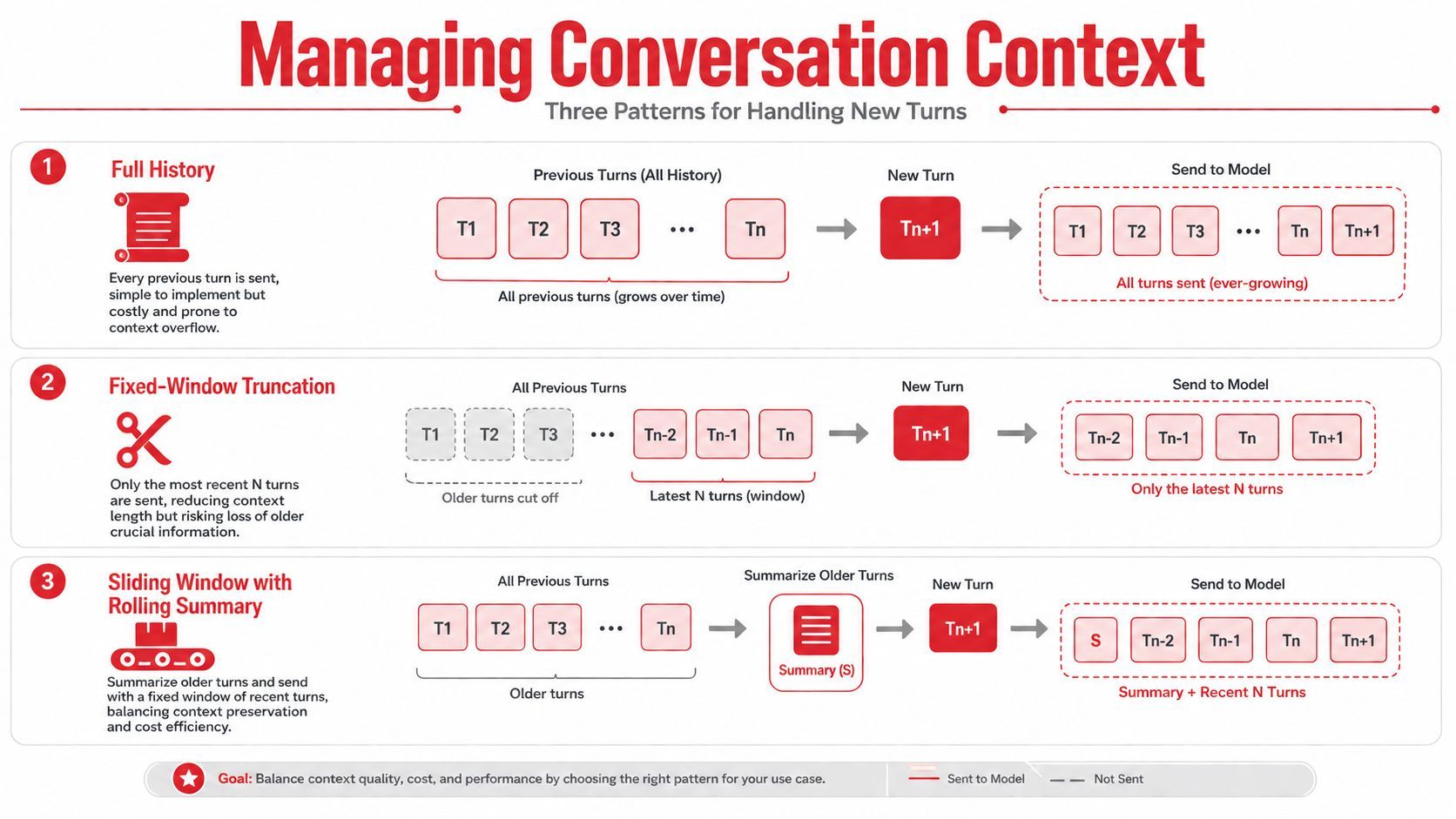
Once teams accept that raw transcript replay won't scale, they usually converge on one of three patterns. Each pattern answers the same question differently: what exactly should the model see on the next turn?
Three patterns teams usually try
Full history
This is the first implementation because it's obvious. Append every user and assistant message, send the whole thing each time.
It works well early. It's also the fastest way to discover that a working prototype isn't a production architecture. Full history preserves everything, including stale assumptions, irrelevant detours, and expensive token baggage.
Fixed-window truncation
The next step is usually a cutoff. Keep only the last N exchanges and discard the rest.
This reduces context size, but it treats all older information as equally disposable. That's a bad fit for task-oriented conversations. A detail from six turns ago may still be essential, while the last two assistant messages may be harmless filler.
Sliding window with rolling summary
This is the pattern production teams tend to land on. A stateful conversation infrastructure guide describes the most pragmatic strategy as a sliding window with rolling summary that keeps the last 8–15 exchanges verbatim and compresses older history into a 200–300 token summary.
A practical production default
That pattern works because it splits memory into two layers:
- Recent turns stay exact. The model needs precise wording for the current exchange.
- Older turns become compact state. The app preserves decisions, constraints, and unresolved items without carrying every sentence forever.
A simple request flow looks like this:
- Append the new user turn.
- Check whether the recent window is too large.
- If needed, summarize older turns with a secondary model call.
- Inject that summary plus the recent verbatim window into the next generation request.
- Save both transcript and summary artifacts for debugging.
That design also helps with infrastructure pressure. The same guide notes that KV-cache utilization becomes the main bottleneck after 15–20 turns in models without efficient attention mechanisms. You don't need to memorize the serving internals to use that insight. Just recognize the operational lesson: long chats create a latency problem even before they create a correctness problem.
A good summary shouldn't read like prose. It should read like state.
For example:
- User goal: reschedule annual review
- Constraints: afternoon only, remote preferred
- Resolved facts: manager confirmed next week works
- Open question: choose between Tuesday and Thursday
That's far more useful than a fluffy paragraph that says the conversation discussed scheduling.
Prompt Versioning and Model Routing Strategies
Teams version application code carefully and treat prompts like copy pasted strings. That creates chaos in multi turn systems because a tiny prompt edit can change how the model interprets history, asks follow-ups, or decides what to remember.
Treat prompts like code
A production prompt should have:
- A version ID so you know which instruction set handled a conversation
- A release path such as draft, test, and production
- A rollback option when a change makes later turns worse
- A schema contract for summaries, extracted state, or tool-call decisions
A prompt registry can be simple. The important part is that the prompt is externalized and tagged.
{
  "prompt_id": "support_agent",
  "version": "v12",
  "mode": "production",
  "instructions": [
    "Use session summary before recent turns.",
    "Ask for missing details only once.",
    "If state conflicts, confirm before acting.",
    "Return updated structured state after each turn."
  ]
}
This matters even more when your app uses more than one model. One prompt may work well for extraction and badly for open-ended dialog. Another may be great at summarization and weak at clarification.
Route by task not by loyalty to one provider
The smartest routing rule often isn't “use the cheapest model” or “use the biggest model.” It's “use the model that is most stable for this subtask.”
A 2026 analysis of multi-turn voice agent reliability highlights a 39% accuracy drop in complex multi-turn voice tasks and argues for routing critical subtasks to models with stronger multi-turn resilience.
That leads to a practical design:
A lightweight policy might look like this:
function selectModel({ taskType, turnCount, riskLevel }) {
  if (taskType === "summary") return "fast-low-cost-model";
  if (taskType === "state_extraction") return "structured-output-model";
  if (riskLevel === "high" || turnCount > 8) return "high-reliability-model";
  return "default-chat-model";
}
That kind of routing gives product teams room to improve reliability without rewriting the whole app. It also gives non-technical builders a better lever than endless prompt tweaking. Sometimes the issue isn't the wording. It's that the current model shouldn't own that turn.
Testing Evaluation and Monitoring for Multi Turn
A single prompt test won't tell you whether your assistant can hold a conversation. You need to evaluate the whole thread and inspect local failures inside the thread.
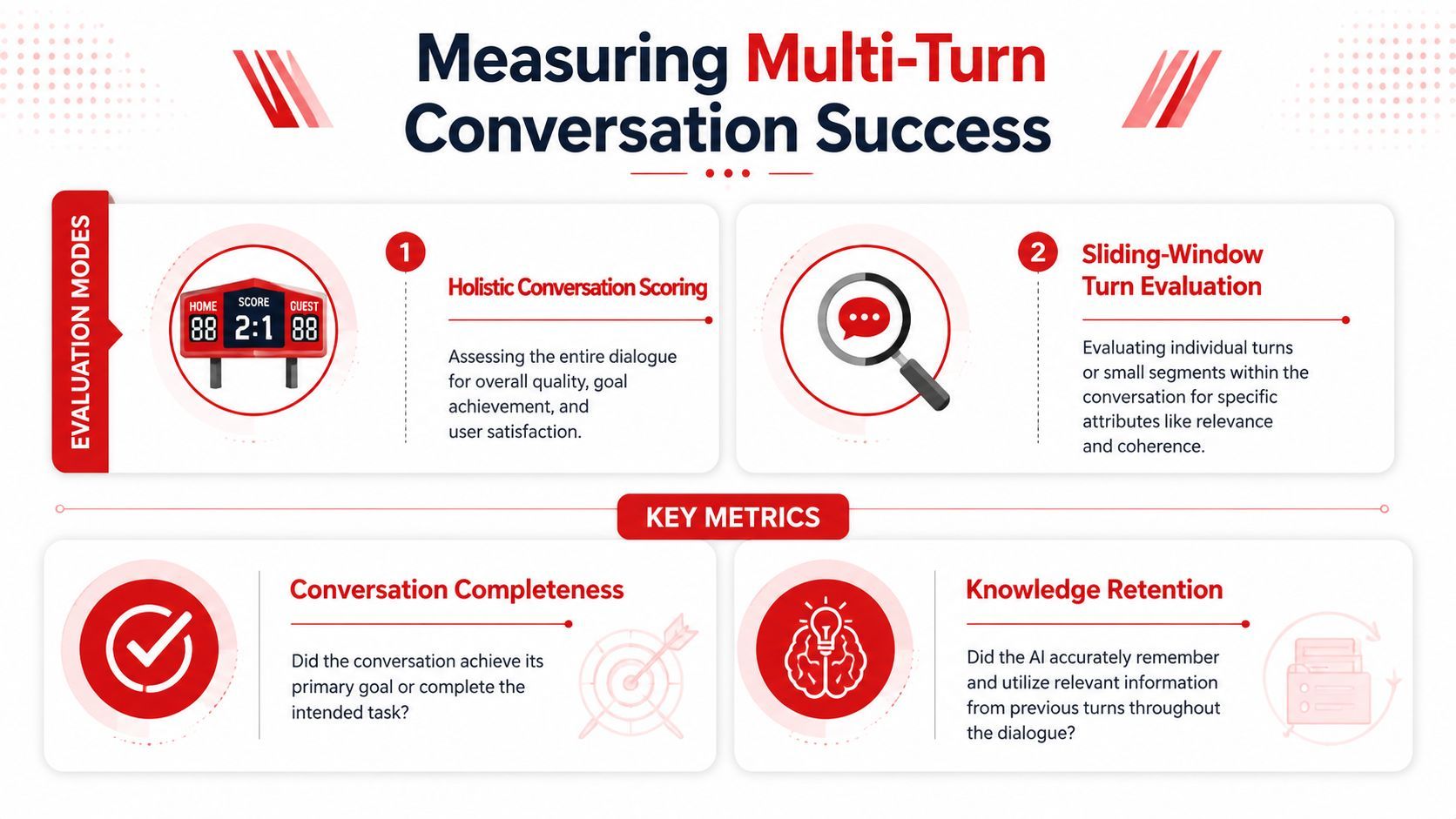
A 2026 guide to multi-turn LLM evaluation recommends two modes: overall conversation scoring and sliding-window turn evaluation, with a 3–5 turn context window as the best trade-off between missing context and paying for ineffective tokens.
Two ways to evaluate a conversation system
Holistic conversation scoring
This asks a simple product question: did the assistant complete the user's actual job?
If the user wanted to update an address, did the conversation end with the right address confirmed and applied? If the user wanted a recommendation, did the assistant use the full thread and land on something that matches the stated constraints?
This mode catches failures that look fine turn by turn but fail the overall mission.
Sliding-window turn evaluation
This mode narrows the lens. Instead of judging the whole thread at once, you inspect small local windows of turns.
That helps you answer questions like:
- Did the assistant ignore a correction?
- Did it ask for an email the user already provided?
- Did it switch tasks without confirming the pivot?
- Did summary quality degrade the next answer?
The same evaluation guide calls Conversation Completeness the most important metric and highlights Knowledge Retention as the signal for whether the bot asks for information already given earlier in the thread.
A pleasant conversation that fails the task is still a failed conversation.
What to monitor in production
Offline evaluation isn't enough. Once real users arrive, you need observability for the conversation system itself.
I'd track at least these dimensions:
- Conversation completeness: did the session reach the intended outcome
- Knowledge retention: did the system remember previously supplied facts
- Latency by turn: are replies slowing down as context grows
- Cost by dialogue: which workflows are becoming too expensive
- Session resets: how often the system has to restart with a summary
- Fallback frequency: when routing leaves the default model path
A practical dashboard view often looks like this:
The same evaluation guidance suggests simulating 50–200 conversations with 5–10 per scenario using cooperative and adversarial personas. That's useful because production failures rarely come from polite, linear users. They come from people who interrupt, change goals, answer vaguely, or contradict themselves.
A basic harness should include both styles.
Cooperative persona
- Answers directly
- Confirms details
- Follows the intended flow
Adversarial persona
- Uses pronouns and shorthand
- Changes direction mid-task
- References earlier turns indirectly
- Challenges wrong assumptions
When a session crosses your quality threshold for drift, don't force the model to keep digging. Trigger a controlled reset. Save a structured summary, open a fresh session, and continue from the clean state. That's often the difference between graceful recovery and six more bad turns.
Hands on Implementation Examples and Best Practices
The simplest reliable workflow is not “keep chatting until it works.” It's stateful, versioned, testable, and willing to restart when the thread gets messy.
A minimal workflow that teams can actually run
At the app layer, store three things separately:
- Raw transcript
- Structured session state
- Rolling summary
That separation lets you debug what the user said, what the system believed, and what context you sent.
A minimal session object could look like this:
{
  "session_id": "sess_123",
  "prompt_version": "support_agent_v12",
  "model_route": "default-chat-model",
  "summary": {
    "goal": "change delivery address",
    "constraints": ["use work address", "keep Friday delivery if possible"],
    "resolved": ["identity verified"],
    "open_items": ["confirm updated address"]
  },
  "state": {
    "customer_verified": true,
    "delivery_preference": "friday_if_possible"
  }
}
For each new turn:
async function handleTurn(input, session) {
  const packagedContext = {
    summary: session.summary,
    recentTurns: session.recentTurns,
    state: session.state
  };

  const route = chooseRoute(session);
  const response = await generateReply(route, packagedContext, input);

  const updatedState = await extractState(response, input, session);
  const maybeReset = shouldResetSession(session, response);

  return { response, updatedState, maybeReset };
}
If the system starts looping or contradicting itself, use a restart pattern instead of another clarifying turn. A practical guide for non-technical builders argues that summarizing and restarting sessions often gives higher reliability than endless clarification.
That's useful advice for indie builders because it doesn't require heavy orchestration. You can prompt the model to generate a clean handoff note like:
- current user goal
- confirmed constraints
- unresolved questions
- facts to preserve
- assumptions to discard
Then save that note and start a fresh chat.
Best practices that prevent expensive mistakes
- Keep summaries structured: Lists beat paragraphs for state transfer.
- Version the summarizer prompt separately: A weak summary can break a strong main prompt.
- Log route decisions: You need to know why a provider or model handled a turn.
- Reset on drift, not frustration: Don't wait until the user is angry.
- Separate assistant style from task logic: Friendly tone shouldn't live in the same prompt block as state rules.
- Test with corrections: Users will say “no, the other one.” Your workflow should survive that.
If you can't inspect the summary, prompt version, selected model, and final response for the same session, debugging multi turn behavior becomes guesswork.
Conclusion and Next Steps
Multi turn conversations aren't just longer chats. They are stateful systems with failure modes that compound over time.
The teams that ship reliable AI features usually do five things well. They manage context deliberately. They version prompts like software. They route subtasks to the right models. They test both entire conversations and local turn windows. They monitor real sessions with enough detail to understand drift, latency, and cost.
That unified workflow matters for both engineers and non-technical builders. If your stack makes you redeploy code for every prompt change, hides route decisions, or gives you no session-level visibility, you'll spend most of your time guessing. If your stack centralizes prompt changes, routing, logs, and usage, iteration gets much faster and much safer.
A good first week plan is simple:
- define session state for one use case
- add a rolling summary
- version the main prompt
- route one high-risk subtask separately
- build a small test set with cooperative and messy users
- add observability before launch
Production quality in multi turn conversations doesn't come from one clever prompt. It comes from treating memory, routing, evaluation, and monitoring as one system.
If you're building AI chat, voice, or agent workflows and want one place to manage prompt versions, provider routing, fallbacks, logs, latency, token usage, and costs, Supagen gives you that production layer without hardcoding it into your app. It's a practical fit for startup teams, indie builders, and product engineers who want to ship faster and debug multi turn systems without stitching together separate tools.