
Load Balance Software: A Guide for Web & AI Workloads
Your app is doing well, then a launch lands, traffic spikes, and the experience gets weird fast. Pages hang. Chat responses slow down. A few users get errors, then support messages start piling up. The painful part is that nothing is “down” in the obvious sense. You still have servers running. They're just getting overwhelmed unevenly.
That's the moment when it becomes clear that availability isn't only about having compute. It's about sending each request to the right place at the right time. That's what load balance software handles.
For product teams adding AI features, the stakes are even higher. A normal web request might tolerate some delay. An LLM call that feels slow, fails mid-response, or routes to the wrong backend can make the whole feature feel broken. If you understand how load balancing works, you can ask better architecture questions, spot bad assumptions earlier, and choose the right layer of infrastructure for both web and AI workloads.
Table of Contents
- What Load Balance Software Really Does
- Core Concepts L4 vs L7 Algorithms and Sticky Sessions
- Modern Deployment Models Where Your Balancer Lives
- How to Choose the Right Load Balancing Solution
- The New Frontier Routing for AI and LLM Workloads
- When to Use an AI Backend Instead of a Generic Load Balancer
- Conclusion Your Path to a Resilient Application
What Load Balance Software Really Does
A lot of guides define load balancing as “distributing traffic across servers.” That's true, but it's incomplete.
A better mental model is a restaurant host. The host doesn't just split guests evenly. They avoid overloading one waiter, stop seating people in a closed section, and keep service moving when the kitchen gets slammed. Load balance software does the same thing for requests. It decides where traffic should go, avoids unhealthy backends, and keeps one bad node from ruining the whole system.
That matters far beyond huge consumer apps. Even a small SaaS product might have a web app, an API, background workers, and one or more AI endpoints. If any one part gets overloaded or goes unhealthy, users don't care which component failed. They only notice that your product feels unreliable.
Reliability is the real product feature
A good load balancer helps with more than scale:
- Availability: It can stop sending requests to an unhealthy instance.
- Maintenance: You can drain traffic from a server before deploying or restarting it.
- Performance: It can keep hot nodes from becoming bottlenecks.
- Consistency: Users keep hitting a stable endpoint while the backend changes underneath.
Practical rule: If clients have to know which backend server is healthy, you don't really have a resilient architecture yet.
The category has also moved into the center of modern infrastructure. The global load balancer market was valued at about USD 5.2 billion in 2024 and is projected to reach USD 8.7 billion by 2030, with cloud-native options accounting for over 40% of new deployments in 2024, according to Strategic Market Research on the load balancer market. That shift tells you something important. Teams increasingly want software-defined and managed balancing inside cloud and hybrid systems, not only hardware sitting in a data center.
What teams usually miss
People often think the balancer is only there for traffic spikes. In practice, it also protects you during ordinary messiness:
- one instance is slower than the others
- a node is alive but unhealthy
- a deployment creates temporary imbalance
- one region needs to stop taking traffic
- an AI provider starts responding slowly
Load balance software is the control point that absorbs those problems before users feel them.
Core Concepts L4 vs L7 Algorithms and Sticky Sessions
The easiest way to get lost in this topic is to hear terms like Layer 4, Layer 7, least connections, and session persistence all at once. They're related, but they answer different questions.
One asks what information the balancer can inspect. Another asks how it chooses a backend. A third asks whether repeat requests from the same user should keep going to the same place.
A visual helps before we get technical.
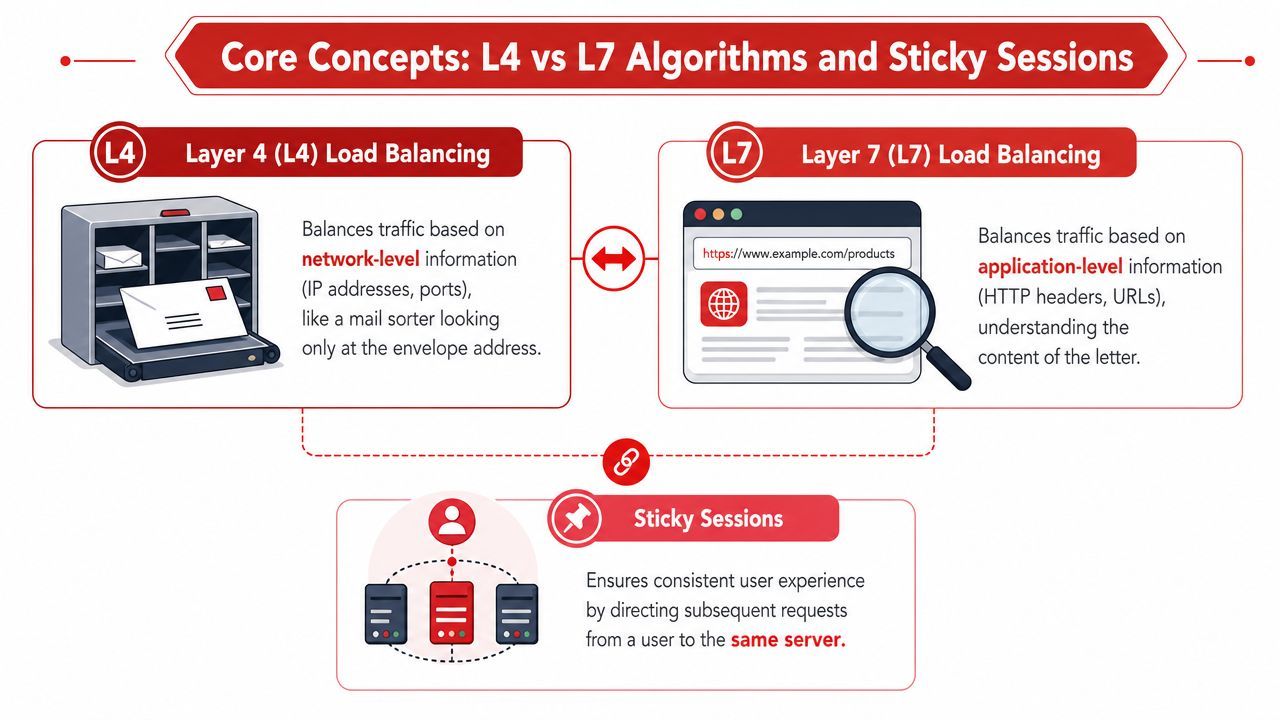
L4 and L7 in plain English
Think of Layer 4 as a mail sorter. It looks at the envelope details, not the letter inside. In networking terms, that means transport-level details like TCP or UDP flows.
Think of Layer 7 as a receptionist who reads the form before deciding where to send it. It can inspect application-level details like HTTP headers, URL paths, or hostnames.
According to IO River's explanation of load balancer layers, L4 load balancers operate at the transport layer and distribute TCP/UDP flows with lower overhead, while L7 load balancers inspect application-layer data and can route based on content, headers, or service-specific policies.
That distinction drives real product decisions:
If you're routing /api/chat to one service and /billing to another, you're in L7 territory. If you just need to spread a high volume of network connections efficiently, L4 may be enough.
Here's a short explainer if you want a second format for the same concepts:
How routing algorithms make decisions
Once you know what the balancer can inspect, the next question is how it chooses a backend.
Some common patterns:
- Round robin: Send each new request to the next server in line. Simple. Predictable. Blind to real-time load.
- Least connections: Send traffic to the backend handling the fewest active connections.
- Least load or response-time aware routing: Prefer the backend that currently looks least busy or fastest.
- Hash-based routing: Use something stable, such as a client identifier, to keep requests landing on the same backend.
The key technical point is that algorithm choice changes performance. Static methods like round robin ignore backend state. Dynamic methods factor in current server load or observed behavior. The practical result is less queueing on hot nodes and better use of your fleet.
When backends aren't interchangeable in real time, a “fair” distribution can still be the wrong distribution.
For product managers, this is the part worth remembering: equal traffic split doesn't always mean equal user experience. If one node is slow, busy, or degraded, sending it the same share of requests can make the whole system feel slower.
Where sticky sessions help and hurt
Sticky sessions mean a user keeps getting routed to the same backend over time. That's useful when state lives on the server.
Classic example: a shopping cart stored in local memory on one app server. If the next request lands on a different server, the cart may appear empty. Sticky routing avoids that.
Sticky sessions can help when:
- Legacy app state lives locally: The server remembers the user.
- Login flows assume affinity: Session data isn't shared cleanly yet.
- Some AI workflows rely on warm context: A backend may hold in-memory conversation state or cached model setup.
But stickiness can also create imbalance. If one server attracts many active users, it can become overloaded while others stay underused. That's one reason modern teams often try to move state into shared stores instead of relying on session affinity forever.
The best way to think about it is simple. Sticky sessions are often a practical compatibility tool, not an ideal long-term architecture.
Modern Deployment Models Where Your Balancer Lives
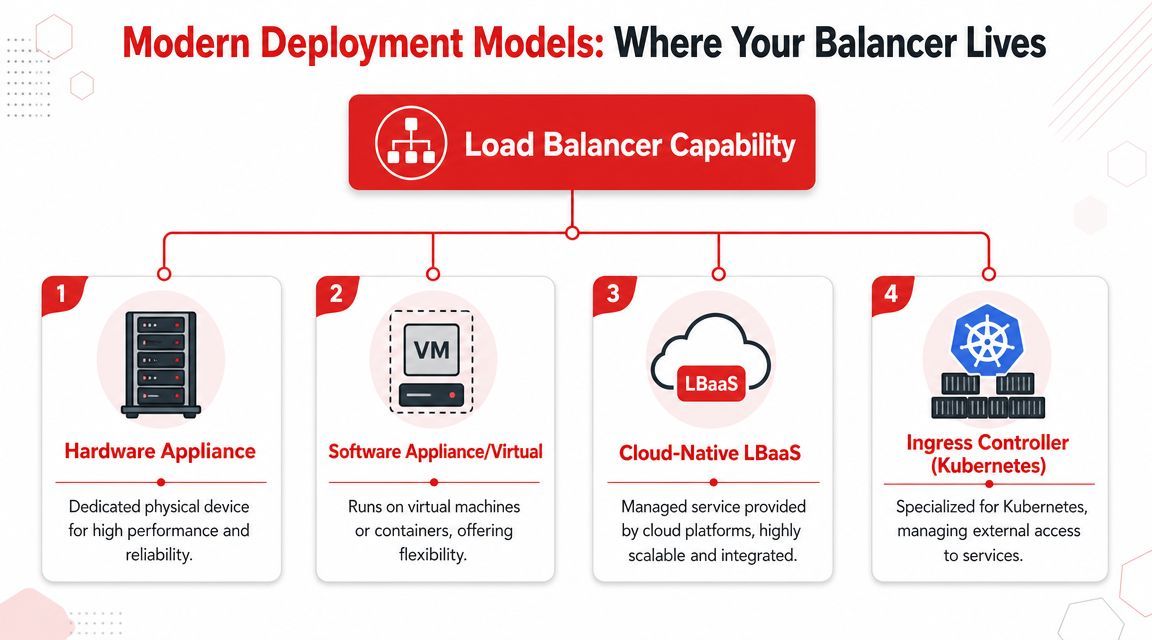
When people say “we need a load balancer,” they often talk as if that means one product category. It doesn't. Load balancing is a capability, and you can place that capability in different parts of the stack.
That placement affects control, operational burden, and what kinds of routing decisions are possible.
Self-managed software balancers
Tools like NGINX, HAProxy, and Envoy are software balancers you run yourself. That might be on virtual machines, containers, or dedicated instances.
This model gives you a lot of control. You can tune routing rules, decide exactly how health checks behave, and integrate the balancer tightly with your own systems. It also gives you more to own. Your team handles upgrades, failover design, monitoring, and debugging.
This approach fits teams that need:
- Fine control: You have unusual routing rules or compliance constraints.
- Portable architecture: You want the same pattern across cloud and on-prem.
- Deep customization: The balancer is part of your platform, not just a managed utility.
Managed cloud and Kubernetes options
Cloud providers turned load balancing into a service. AWS Elastic Load Balancing, Google Cloud Load Balancing, and Azure Application Gateway reduce the amount of infrastructure you have to operate directly.
That's appealing for startups and product teams because you get a production-grade entry point without staffing a networking team. In Kubernetes, the same idea often appears through an ingress controller or service mesh layer, where tools manage external and internal service traffic more dynamically.
A useful split is:
Choose where the balancer lives based on who has to operate it at 2 a.m., not just on feature lists.
Edge and global routing
Some apps don't just need in-cluster balancing. They need global traffic steering.
That's where edge platforms and Global Server Load Balancing come in. For globally distributed apps, traditional load balancing can be the wrong abstraction. Cloudflare's explanation of load balancing and GSLB distinguishes ordinary balancing from global routing across regions, which is used to optimize latency and handle regional failover.
That's a different problem from spreading traffic across three app servers in one region.
If you serve users across multiple geographies, edge and global balancing can answer questions like:
- Which region should this user hit first?
- What happens if an entire region degrades?
- How do we fail over across providers without changing client endpoints?
For AI products, this matters more than many teams expect. The slow part may not be your frontend. It may be which region or provider your inference request takes.
How to Choose the Right Load Balancing Solution
Teams often compare load balancers like they're buying a feature bundle. That's backward. Start by asking what failure looks like in your app.
If one backend hangs, does traffic reroute quickly? If a deploy goes wrong, can you drain connections cleanly? If TLS, health checks, and routing policy break, who notices first and how fast can they see it? Those questions will narrow the field faster than a giant comparison sheet.
Start with failure not features
A load balancer sits in the request path. That means it can improve resilience, but it can also become part of the blast radius if chosen badly.
Three questions expose most weak decisions:
- What happens when a backend is unhealthy but not fully dead?
This is the classic gray failure. A process still accepts connections but responds slowly or inconsistently. - How visible is routing behavior?
If your team can't see backend health, latency patterns, and retry behavior, incidents get harder to explain. - Can operations stay simple as the app grows?
A design that's fine for one service can become painful when you add APIs, workers, regions, and AI calls.
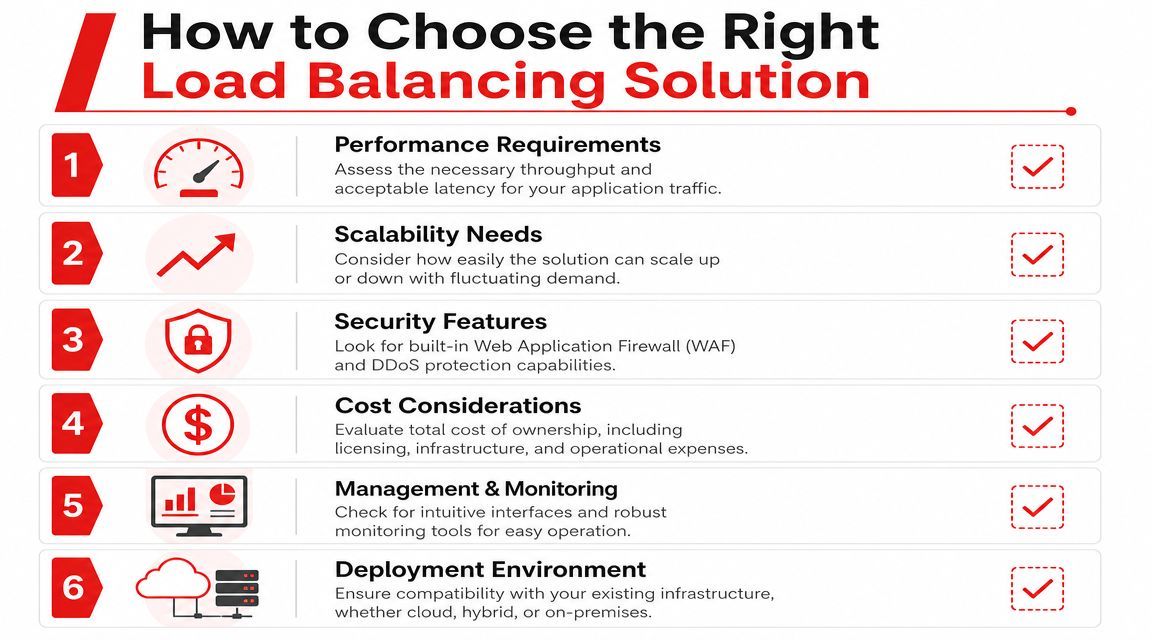
The real evaluation checklist
The total cost and complexity of load balancing go far beyond the license price. AWS's overview of load balancing notes core functions like health checks, failover, and TLS offload, and the verified guidance for this article highlights that buyers care about features such as SSL offloading, session persistence, DDoS protection, and auto-scaling because production readiness is the primary issue.
Use that as a practical checklist.
- Performance requirements: Match the balancer to your traffic type. TCP-heavy systems, browser-based apps, APIs, and streaming workloads don't all want the same thing.
- Failover behavior: Look closely at health checks, connection draining, and how quickly unhealthy nodes leave rotation.
- Observability: You want usable logs, metrics, and enough request visibility to debug routing issues without guesswork.
- Security controls: For public traffic, WAF support, TLS handling, and DDoS-aware front doors often matter as much as balancing itself.
- Deployment fit: Cloud-native options are convenient when your stack already lives in one cloud. Self-hosted tools make more sense when you need portability or deep custom logic.
- Team burden: Every custom rule your engineers own today becomes operating complexity later.
A founder-friendly way to frame this is simple. The cheapest load balancer is often the one that creates the most hidden engineering work.
A low sticker price doesn't help if your team has to hand-build health policies, failover behavior, and visibility on top of it.
One more decision filter helps. If your application mostly routes standard web traffic, a general-purpose balancer may be enough. If your architecture includes lots of model calls, provider switching, prompt logic, or multimodal workloads, you may be solving a different class of routing problem entirely.
The New Frontier Routing for AI and LLM Workloads
Traditional web traffic is usually routed across instances that are supposed to behave roughly the same. AI traffic often isn't like that.
One request may go to a fast model for autocomplete. Another may need a stronger model for long-form reasoning. A third may require a provider that supports structured JSON well. Even when all requests use HTTP, the backends aren't interchangeable in the old load balancer sense.
Why AI traffic behaves differently
With LLM features, latency is only one dimension. Teams also care about output quality, model capability, token cost, modality support, and provider reliability. That creates a routing problem that looks more like policy orchestration than plain request distribution.
A generic HTTP balancer can route to healthy endpoints. It usually doesn't understand why one request should prefer one model and the next should avoid it.
That distinction matters because intelligent balancing can dramatically affect performance. In a 2017 study on load balancing for key-value data stores, unbalanced regions produced 3,296 transactions per minute with an average response time of 1,550.805 ms. After applying a static load balancer to create similarly sized regions, throughput rose to 36,761 transactions per minute and average response time dropped to 16.858 ms. That's roughly a 10x throughput increase and about a two-order-of-magnitude reduction in latency.
That study wasn't about LLMs. The principle still carries over cleanly. When backend behavior varies a lot, routing quality matters.
What intelligent routing looks like for models
For AI products, useful routing policies often include:
- Latency-aware routing: Prefer the backend that can answer fastest right now.
- Capability-based routing: Send image generation, speech, or structured JSON requests to the provider best suited for that modality.
- Fallback logic: If one provider errors, retry with another without forcing the app to manage the whole decision tree.
- Cost-sensitive routing: Reserve expensive models for requests that require them.
- Region-aware choices: Put users closer to where inference or provider access performs best.
A restaurant analogy still works here. Standard load balancing asks which open table should take the next guest. AI routing asks which kitchen should prepare this dish, based on speed, price, equipment, and whether one kitchen is currently backed up.
That's why AI infrastructure discussions now sound less like classic reverse proxy design and more like runtime policy design.
When to Use an AI Backend Instead of a Generic Load Balancer
A generic Layer 7 load balancer can route HTTP requests, terminate TLS, and remove unhealthy backends from rotation. That's useful infrastructure. It's just not the full answer for many AI products.
The moment your app needs to choose between model providers, manage prompts outside deploys, inspect per-call cost, or apply fallback logic by workload type, you've moved beyond what is typically considered load balance software.
What a generic balancer can do
Generic balancers are strong when the job is mostly transport and request routing:
- send traffic to healthy endpoints
- route by path or host
- maintain session affinity when needed
- support standard reliability and security patterns
That works well when your backends are near-equivalents.
What AI products usually need beyond that
AI applications often need context that a normal balancer doesn't have:
- Prompt-aware control: You may want to change prompts without shipping code.
- Provider-aware routing: OpenAI, Anthropic, Google, ElevenLabs, and others don't behave like identical servers behind one pool.
- Per-call observability: Teams need to inspect latency, tokens, I/O, and cost for each model interaction.
- Fallbacks by model policy: A retry isn't just “same request, different server.” It may mean “different provider, same product behavior.”
- Multimodal handling: Text, image, audio, video, and JSON workflows create different routing rules.
That's when a specialized AI backend starts to make more sense than stretching a generic balancer into application logic it was never designed to own.
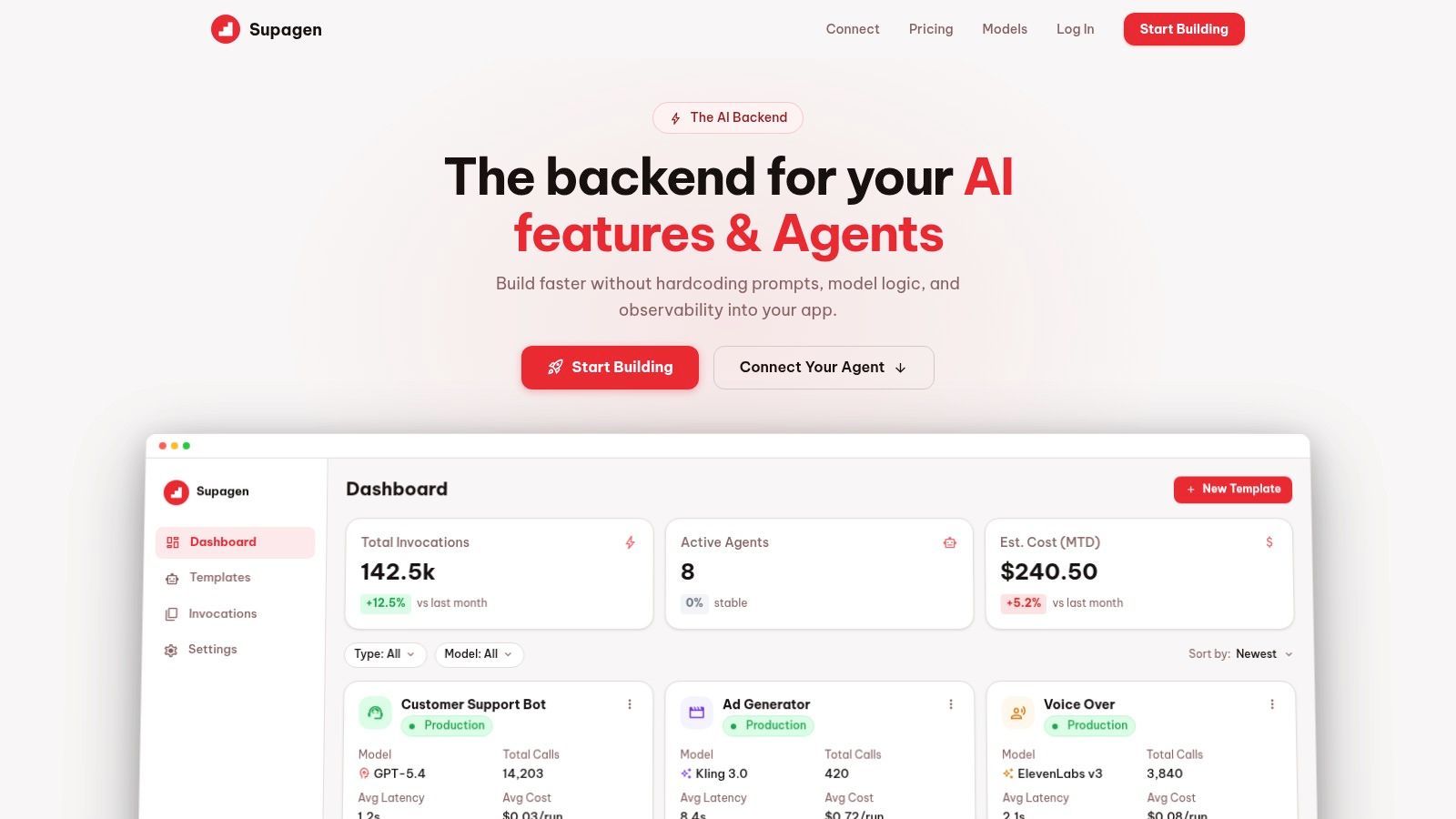
A good test is this: if your team keeps adding model selection logic, provider failover rules, prompt versioning, and usage tracking into app code, you're not solving a simple traffic distribution problem anymore. You're building an AI runtime layer.
Generic load balancing decides where a request can go. AI backend infrastructure decides where it should go, why, and what to do when that choice changes.
For web workloads, a standard balancer is often the right tool. For AI-heavy products, it may only be one layer underneath a more specialized control plane.
Conclusion Your Path to a Resilient Application
Load balance software started as a way to spread traffic. In modern systems, it's a decision layer for reliability, maintenance, and performance.
For web apps, the core ideas are straightforward. Pick the right layer, choose routing policies that match real backend behavior, and place the balancer where your team can operate it confidently. For AI features, the routing problem gets more nuanced because latency, provider differences, fallbacks, and cost all shape the user experience.
The key takeaway is simple. Don't treat load balancing as plumbing you bolt on at the end. Treat it as part of product design. The way requests move through your system affects uptime, speed, and how trustworthy your app feels when people use it.
If you're building AI features and don't want to hardcode prompt logic, model routing, fallbacks, and observability into your app, Supagen gives you a unified backend to manage those decisions in one place. It's a practical way to ship faster while keeping model behavior, costs, and production debugging under control.