
How to Use Templates in Supagen for AI Features
You've probably hit the same wall many organizations encounter with AI features. The first version ships fast because the prompt lives in code, the model name is hardcoded next to it, and changing behavior feels like a normal deploy task. Then the feature gets real traffic. Product wants faster iteration, support wants safer changes, finance wants cost visibility, and engineering wants a way to debug failures without digging through scattered logs.
That's where most generic advice on how to use templates falls apart. It treats a template like a text snippet. In production, a template is closer to a control surface. It needs to hold prompt structure, input variables, model selection, fallback behavior, and an audit trail for changes. If it can't do that, it's not solving the hard part.
Teams that use templates well usually standardize repeated work instead of rewriting it every time. A good example comes from sports data systems. GameDay's statistics templates let administrators define a data structure once and reuse it across competitions, which keeps records comparable and reduces configuration drift across events, as described in GameDay's statistics template configuration guidance. That same idea applies cleanly to AI features. You want one reusable structure for prompts, inputs, and outputs, then you want to manage it centrally.
Table of Contents
- Moving Beyond Hardcoded Prompts with Supagen
- Your First Supagen Template A Visual Guide
- Parameterizing and Versioning Templates for Flexibility
- Testing and Observing Template Performance
- Advanced Logic Routing Fallbacks and Integrations
- Best Practices and Practical Template Recipes
Moving Beyond Hardcoded Prompts with Supagen
Hardcoded prompts work until they don't. The failure usually isn't technical first. It's operational. A minor prompt edit turns into a pull request, a review cycle, a redeploy, and a wait to see whether the change helped or broke something else.
That setup gets worse when the prompt is only one part of the AI call. In production, the request also carries provider choice, model settings, output expectations, fallback rules, and sometimes feature-specific logic. If all of that lives in application code, your release process becomes the bottleneck for every experiment and every fix.
What breaks in the hardcoded approach
A few patterns show up repeatedly:
- Prompt edits become deploy work. Product asks for a wording change or output tweak, and engineering has to ship code for what should've been a configuration update.
- Model changes are risky. Swapping providers or trying a different model means touching code paths that may be tied to retries, parsing, and error handling.
- You lose visibility. When cost, latency, and prompt behavior are spread across different systems, debugging becomes slow and ownership gets muddy.
- Version history disappears. Teams remember that “the old prompt worked better,” but they can't easily compare what changed.
Practical rule: If a non-breaking AI behavior change still requires a full app deployment, your AI layer is coupled too tightly to your product code.
A template fixes that by turning the AI call into a managed object instead of an inline string. The template holds the repeatable structure. Your app passes in inputs. The behavior changes where it should change, in the template, not in scattered files across the codebase.
Why templates matter more in AI than in ordinary content work
Templates are useful anywhere repeated work needs consistency. Canva's statistics template library shows how template systems became mainstream because people need reusable structures for polished outputs, not one-off documents, as seen in Canva's statistics templates collection. In AI systems, the same pattern matters even more because the template isn't just presentation. It also shapes runtime behavior.
A production template should answer questions like these:
That shift changes how to use templates in practice. You're not using them to save writing time. You're using them to control cost, latency, versioning, and resilience without turning every AI adjustment into an engineering incident.
What a production template should contain
The strongest templates don't stop at “prompt plus variables.” They capture the operating method of the feature. In real systems, that usually means:
- Inputs your app must send
- Prompt format that stays stable across requests
- Output expectations so downstream parsing doesn't drift
- Model selection rules based on task needs
- Fallback behavior when providers fail
- Version history so changes stay auditable
Once you treat templates this way, AI features become easier to evolve. The app focuses on product logic. The template becomes the control plane for the AI call.
Your First Supagen Template A Visual Guide
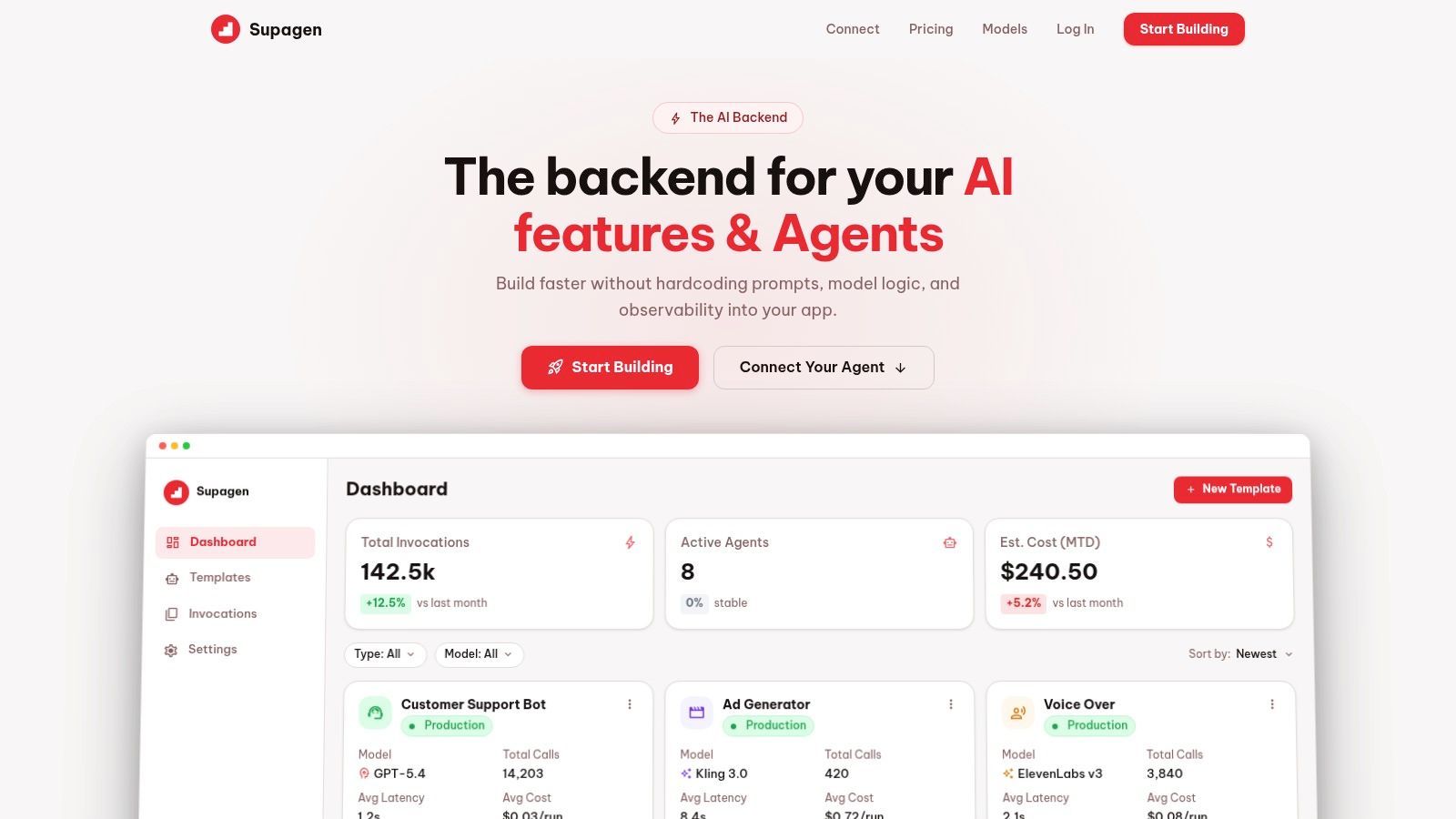
The first useful template should be small and boring. Don't start with routing, fallback chains, or elaborate system instructions. Start with one task that already exists in your app and move only that logic into a template.
A good first example is a support classifier. It has one clear input, one clear job, and an output you can inspect quickly.
Build the smallest useful version
Create a template with a descriptive name like customer_support_classifier. Use names that tell your team what the template does, not where it was first used. Avoid names like prompt_v2_final because they decay immediately.
Then write a prompt that does one job. Keep the structure explicit.
- State the task. Example: classify a support ticket by issue type and urgency.
- Define the input field. Insert a variable like
{{ticket_body}}. - Define the output shape. Ask for a compact JSON response or another format your app can consume reliably.
- Pick an initial model. Choose one that matches the job rather than defaulting to the most expensive option.
A simple prompt might look like this in practice:
Classify the following support ticket. Return the issue category, urgency, and a short reason.
Ticket:{{ticket_body}}
That's enough to create a working template. Don't overfit the prompt on day one.
Parameterization is where templates become reusable
The variable is the whole point. Without parameterization, you haven't built a template. You've just moved a static prompt from one place to another.
Use variables for inputs that change per request:
- User content such as
{{ticket_body}},{{article_text}}, or{{customer_message}} - Behavior controls such as
{{summary_length}}or{{tone}} - Context fields such as account type, language, or feature mode
What usually works well is separating stable instructions from dynamic content. Stable instructions live in the template. Dynamic request data comes from your app. That split keeps your prompt easier to reason about and easier to maintain.
Put long-lived behavior in the template. Put request-specific facts in parameters.
Choose the first model with constraints in mind
Model selection isn't only about quality. It's also about response time, output format reliability, and cost tolerance. For a first template, use the simplest model that can do the job acceptably.
People often misunderstand how to use templates. They focus on wording but ignore operating constraints. In a production app, the template should reflect the actual trade-off. A support triage path might favor speed. A legal summary path might favor stronger reasoning and tighter output control.
Save with a naming pattern you can live with
When you save the template, treat the name as part of your API design. Good names make dashboard filtering, logs, and incident review much easier later.
A useful pattern is:
The first template doesn't need to be elegant. It needs to be stable enough that your application can call it repeatedly with different inputs and get structurally consistent outputs back. That's the baseline for every improvement that follows.
Parameterizing and Versioning Templates for Flexibility
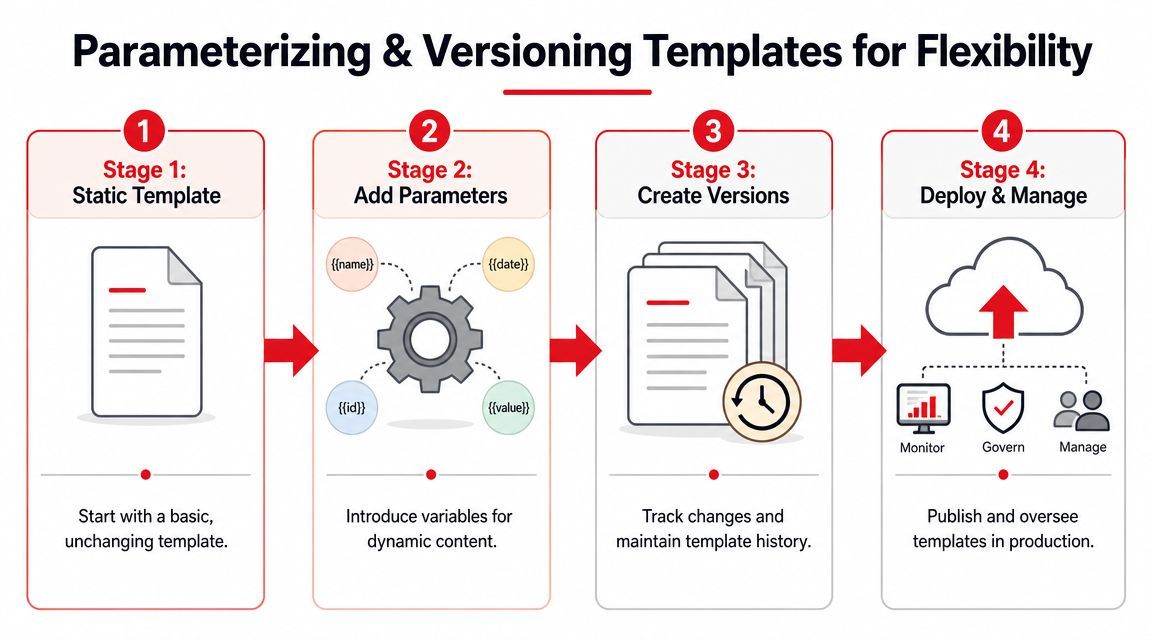
The dangerous moment in AI development isn't the first draft. It's the first live edit. Someone sees a weak output, adjusts wording directly in production, and assumes the change is harmless. Then parsing breaks, latency changes, or the model starts returning a different shape than your downstream code expects.
That's why versioning matters. Prompt changes are behavior changes. They need the same discipline you'd apply to any other production logic.
Parameterize for change you already expect
A template gets safer once you stop baking assumptions into the prompt. If the output length, language, tone, or audience changes by request, those shouldn't require prompt rewrites.
Use parameters for known variation points such as:
- Length controls like
{{summary_length}} - Audience controls like
{{reader_level}} - Formatting rules like
{{output_format}} - Context selectors like
{{product_tier}}
That approach follows a broader template discipline. Process templates are strongest when they capture the objective, scope, target users, sources, methods, and limitations up front, as described in UNHCR's methodology template guidance. AI templates benefit from the same habit. If a feature has important boundaries, encode them in the template design rather than leaving them implicit.
A reliable template often includes a short internal checklist before the actual prompt text is finalized:
Branch before you change behavior
Live editing a primary template is the prompt equivalent of patching production without review. It feels fast. It usually creates cleanup work later.
Create a new version or branch when you want to test:
- a new model
- a revised system instruction
- a different output schema
- stricter formatting rules
- a fallback path
The point isn't ceremony. The point is controlled comparison. You need to know which version handled which requests, and you need a fast rollback path when a change underperforms.
A safe workflow usually looks like this:
- Clone the current working template.
- Change one meaningful thing at a time.
- Test with representative inputs, including awkward edge cases.
- Promote the new version only after the output shape and behavior are stable.
This matters most when the template powers user-facing automation. If your support classifier changes category names, your queues break. If your extraction template changes JSON keys, your pipeline breaks. Versioning isn't optional there.
Here's a visual walkthrough of that discipline in action:
A prompt edit can be a product change, an ops change, and a cost change at the same time. Treat it that way.
What not to do
Some failure modes are predictable:
- Changing prompt and model together. If results improve or degrade, you won't know why.
- Using versions as backups instead of experiments. Version history should explain intent, not just archive accidents.
- Leaving parameters undocumented. If teammates can't tell which inputs are required, they'll guess, and the template will behave inconsistently.
The practical answer to how to use templates well is simple here. Parameterize what varies. Version what changes. Promote only what you can explain.
Testing and Observing Template Performance
A template that looks clean in an editor can still fail badly in production. The failures are rarely dramatic. More often, you get slow calls, strange outputs on edge-case inputs, rising spend on a feature that used to look cheap, or intermittent parsing errors that nobody can reproduce locally.
That's why testing isn't enough by itself. You also need observation after release.
What to inspect on every live template
The most useful call log shows four things together:
- Input so you can see what the model received
- Output so you can judge whether the result failed semantically or structurally
- Latency so you can spot slow providers, overloaded prompts, or bad routing choices
- Cost and token usage so you can tie template design to spend
Looking at any one of those in isolation leads to bad decisions. A prompt may be accurate but slow. A response may be fast but too verbose. A model may be cheap on a single request but expensive across a noisy feature because the prompt bloats context.
Read failures as operational signals
When a template misbehaves, don't just ask whether the prompt is “good.” Ask what kind of failure happened.
Teams usually get their first real production lesson in how to use templates. The template isn't just a writing artifact. It's an operating unit. Its structure affects speed, reliability, and spend.
If you can't inspect a single bad call end to end, you can't debug an AI feature responsibly.
Testing that reflects reality
Most prompt tests are too neat. They use ideal inputs and ignore messy source data. Production traffic doesn't. Users send broken formatting, irrelevant text, contradictory instructions, and incomplete context. If you only test the happy path, your template will look better than it is.
A stronger test set includes:
- Short inputs that force the model to work with missing context
- Long inputs that pressure latency and token usage
- Ambiguous inputs that reveal whether your labels or categories are clear
- Malformed inputs that test output stability under bad data
One underexplained part of template work is handling irregular source shape. In physical template-making, people often have to create a usable template from odd angles, arches, or complex profiles using ad hoc methods instead of relying on pre-made shapes, as shown in this woodworking discussion of making templates for irregular forms. AI work has the same problem. Source content is often irregular. Good template testing accounts for that instead of pretending every input will fit a clean schema.
Use observation to improve the system, not just the prompt
Once a feature is live, the best fixes often aren't more words in the prompt. They may be:
- changing which requests use a premium model
- separating one overloaded template into two narrower templates
- trimming boilerplate context that adds cost without improving output
- adding stronger app-side validation before the call is made
That's the difference between prompt tinkering and production operation. Observation gives you enough context to make structural decisions, not just wording changes.
Advanced Logic Routing Fallbacks and Integrations
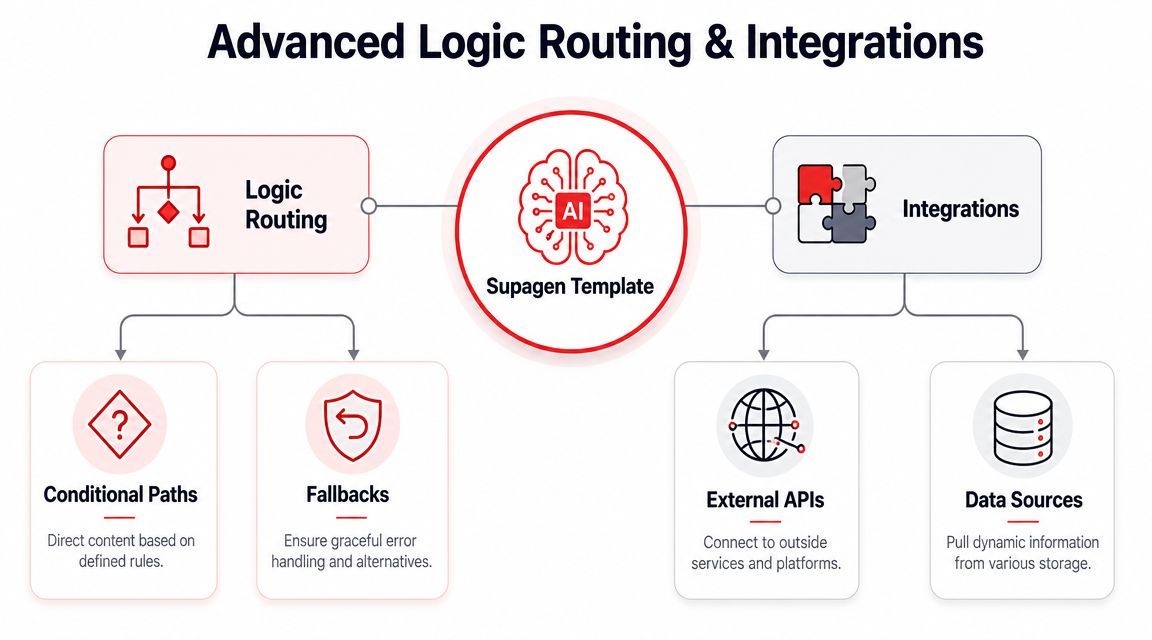
A production AI feature rarely survives on one prompt and one model path for long. Traffic changes. Latency spikes. Providers degrade. Finance asks why a background classification job is using the same model as a customer-facing escalation flow. At that point, templates stop being prompt storage and start acting as a control plane.
Route by task value, not by habit
Routing should reflect business impact, response-time requirements, and output constraints. Teams often start by sending everything to the model they trust most. That works in early demos and becomes expensive in production.
A better setup uses request context such as urgency, content_type, customer_tier, or requires_json to choose the path before the call is made. For example:
- Low-priority support triage can use a faster, lower-cost model.
- High-risk complaint analysis can use a stronger model with better reasoning under ambiguity.
- Structured extraction can use the path that holds JSON shape more consistently.
- Internal batch jobs can run on a cheaper route with looser latency targets.
Supagen supports versioned prompts, provider routing, fallbacks, and per-call observability from one integration. That matters because routing decisions affect more than output quality. They directly shape cost per request, tail latency, and how safely a team can roll out changes without touching application code.
I have seen this pay off most when teams stop arguing about "the best model" and start defining service levels per task. A refund-risk classifier, an answer generator, and a data extractor should not share the same runtime policy just because they all call an LLM.
Fallbacks are about resilience
Fallback policy needs to be explicit. If the primary provider times out, the system should know whether to retry, switch providers, downgrade to a cheaper model, or return a partial result. Leaving that logic vague usually creates the worst outcome: slow failures that still cost money.
The useful question is simple. What failure are you trying to absorb without breaking the feature?
Fallbacks also need their own acceptance standard. A secondary path that returns valid syntax but weaker decisions can still damage the product if it handles edge cases badly. For customer-facing features, I usually define a degradation policy in advance: preserve correctness first for regulated or high-trust flows, preserve speed first for low-risk assistance flows, and fail closed when the output could trigger a bad action downstream.
The strongest fallback is the one you've tested with real inputs, not the one that looks complete in a diagram.
Another common mistake is reusing one fallback stack across unrelated features. A backup path that is fine for summarization may be unacceptable for extraction or policy classification. Reuse saves setup time, but it can hide mismatched reliability assumptions.
Another overlooked issue is repeatability across adaptations. Template workflows often seem easy the first time, but the hard part is keeping them dependable after they've been reused, rotated, or modified for a new context. That challenge appears outside AI too. Guidance around creating an angle in reporting workflows points to the practical issue of preserving reliability across variations in setup and reuse, as discussed in Angles for SAP documentation on creating an angle. The same warning applies here. A route that works for one feature variant may not remain reliable when you reuse it elsewhere without recalibration.
Integrations should keep the contract stable
Application code should call a stable interface and stay unaware of provider-specific policy where possible. If the app knows every model preference, routing rule, and retry condition, template management has failed. You still have hardcoded AI operations, just spread across more files.
A stable template contract usually includes:
- expected inputs
- expected outputs
- one invocation path
- internal routing that can change without app rewrites
That separation is what makes templates operationally useful. You can swap providers, tune fallback thresholds, split heavy paths from cheap ones, and pin versions for sensitive features without refactoring the product surface that depends on them.
The broader value of templates is reuse at scale. Canva's wide template adoption reflects how reusable structures help people produce consistent deliverables without building each asset from scratch. In AI systems, the same principle applies to routing rules and fallback behavior. The template becomes a managed behavior layer, not just a formatted prompt.
Best Practices and Practical Template Recipes
The cleanest template systems usually come from restraint. Teams that standardize early don't create the most templates. They create the fewest templates that cover repeated patterns well, then govern them carefully.
A strong template workflow usually starts with an audit of recurring structures, followed by a flexible outline, validation in the workflow, and ongoing governance, as recommended in Docsie's template standardization workflow. That maps directly to AI work. Audit common requests, define a reusable base, validate it with real traffic, then maintain it as the feature evolves.
Best practices that hold up in production
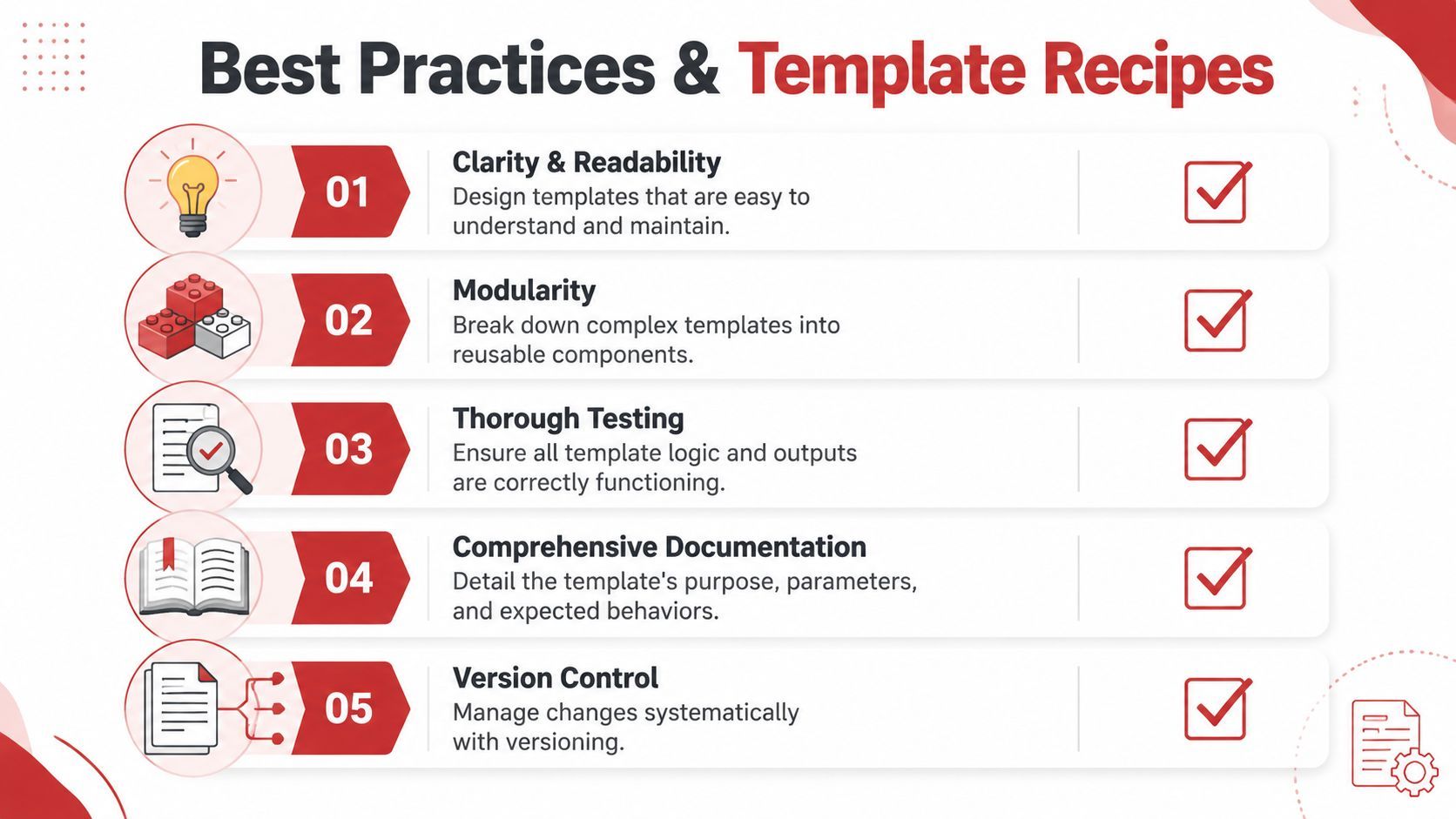
- Name templates by job, not history.
refund_request_classifieris maintainable.new_prompt_final_v4isn't. - Keep one template to one primary responsibility. If a template summarizes, classifies, extracts, and rewrites, it will be harder to test and more expensive to operate.
- Document required parameters near the template. Missing or malformed inputs create avoidable drift.
- Change one thing per version when possible. If you modify prompt structure, model, and output schema together, debugging becomes guesswork.
- Review edge-case inputs deliberately. The hard failures usually come from irregular source data, not clean examples.
Three practical recipes
Content summarizer
Use this when your app needs a concise summary from long text.
Core parameters
{{article_text}}{{summary_length}}{{audience}}
Prompt pattern
Summarize the following content for{{audience}}. Keep the summary{{summary_length}}. Focus on the main claims, risks, and next actions.
Content:{{article_text}}
This works best when output expectations are narrow. Don't ask for summary, tone analysis, and action extraction in one pass unless you've tested the trade-off.
Feedback sentiment classifier
Use this for app reviews, survey comments, or support feedback.
Core parameters
{{feedback_text}}{{product_area}}
Prompt pattern
Classify the sentiment of this feedback as positive, neutral, or negative. Identify the main issue or praise point and reference the relevant product area{{product_area}}.
Feedback:{{feedback_text}}
This is a good candidate for a lower-latency route because the task is narrow and repeatable.
Structured support triage
Use this when you need stable fields for downstream automation.
Core parameters
{{ticket_body}}{{customer_tier}}{{language}}
Prompt pattern
Analyze the support ticket below. Return issue category, urgency, customer impact, and recommended next queue in JSON. Respect the language context{{language}}and customer tier{{customer_tier}}.
Ticket:{{ticket_body}}
This is the recipe where versioning matters most because downstream systems usually depend on a stable schema.
If you're figuring out how to use templates for real product work, start with one repeated AI task, define its contract tightly, and only then add routing, fallback, or provider complexity.
If you want a cleaner way to manage prompt versions, routing rules, fallbacks, observability, and multi-provider AI behavior without baking that logic into app code, Supagen is built for that production layer.