
How to Build AI Agents: A Production-Ready Guide 2026

You probably already have an agent that looked great in a demo.
It answered questions well, called a tool or two, maybe summarized a document, maybe even completed a tidy multi-step workflow. Then real users showed up. They asked vague questions, submitted incomplete data, retried requests, triggered edge cases, and exposed every hidden assumption in the system.
That's where the same lesson is often learned. How to build AI agents isn't mainly a prompt-writing problem. It's a production systems problem. The hard part is making the agent behave predictably when tools fail, schemas drift, latency spikes, costs rise, and the model takes a plausible but wrong path.
Table of Contents
- From Demo to Durable The New Reality of AI Agents
- The Anatomy of a Production-Ready AI Agent
- Designing the Agent's Brain Prompts and Tools
- Building the Production Layer for Your Agent
- Testing and Safeguarding Your Autonomous Agent
- Deployment Scaling and Managing Agent Costs
From Demo to Durable The New Reality of AI Agents
A demo agent usually fails in boring ways.
It picks the wrong tool because two tool descriptions overlap. It loops because no stop condition was defined. It writes an answer that sounds complete even though one upstream API timed out. It sends an action too early because nobody inserted an approval gate. None of those failures come from a lack of model intelligence. They come from missing system design.
That shift matters now because agents have moved past the novelty stage. PwC's AI agent survey found that 79% of organizations say AI agents are already being adopted in their companies, and among adopters 66% report higher productivity while 57% report cost savings. Once teams tie agents to productivity and cost outcomes, the bar changes. A clever prototype isn't enough. It has to hold up under load, scrutiny, and budget pressure.
Practical rule: If an agent will touch customer data, trigger a business action, or appear in a customer-facing workflow, treat it like production software on day one.
The teams that ship durable agents think in layers:
- Reasoning: what the model should decide
- Execution: what deterministic code should enforce
- Observation: what engineers need to inspect after failure
- Control: what product and operations teams need to change without redeploying the app
That's why “prompt engineering” by itself doesn't carry far in production. A prompt can influence behavior. It can't guarantee valid JSON, recover from a flaky third-party API, enforce idempotency, or explain where cost spiked last Tuesday.
A good mental model is simple. The model is the planner, not the entire system. Your job is to build the rails around it so planning remains useful when reality gets messy.
The Anatomy of a Production-Ready AI Agent
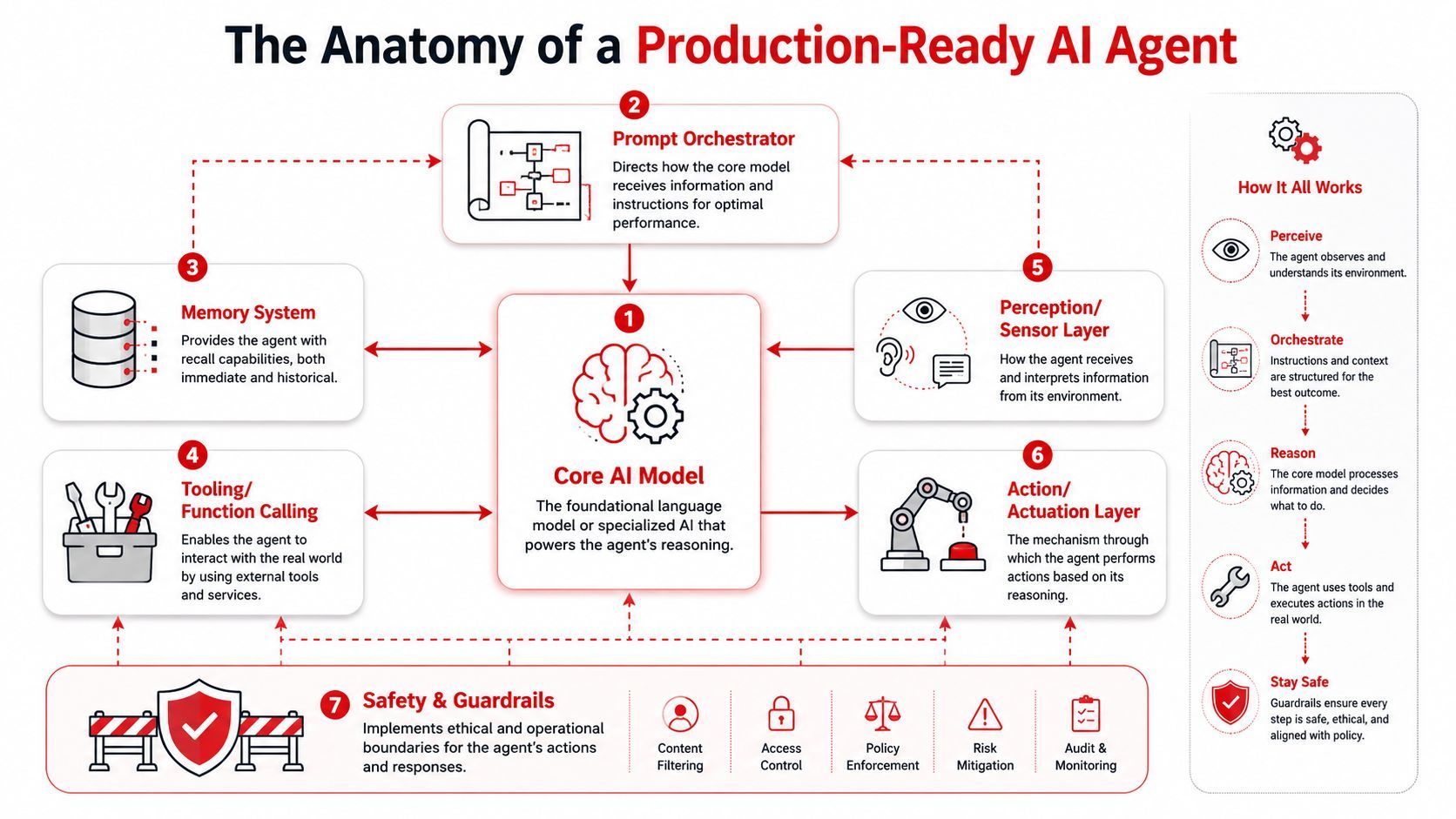
A production-ready agent isn't a single prompt wrapped around an LLM API call. It's a stack of components that each solve a different failure mode.
The three parts that matter first
The cleanest starting point comes from how major model providers frame agents. Anthropic's guidance on building effective agents and OpenAI's framing both center on three core parts: model, tools, instructions. That sounds basic, but most failed agent implementations are weak in one of those three.
Here's the shortest useful blueprint:
A lot of people still think of agent architecture through the old ReAct-style loop: observe, think, act. That's still a useful mental model. The model receives context, decides what it needs, calls a tool if needed, gets new information back, and continues until it reaches a stopping condition.
That loop is only the center of the system, though. It isn't the whole system.
The layers demo builders skip
A durable agent usually needs several supporting layers around that loop:
- Memory: short-term task memory and, where appropriate, longer-lived user or workflow context
- Perception: adapters that normalize input from chat, documents, events, forms, or other systems
- Action layer: controlled execution of side effects such as sending emails, updating records, or posting tickets
- Safety and guardrails: schema checks, permission boundaries, approval gates, and blocked operations
- Orchestration: the workflow logic that decides what happens after success, failure, retry, or timeout
- Observability: logs, traces, tool call history, latency, and cost visibility
A model can suggest an action. Your application decides whether that action is allowed.
For non-technical founders, the simplest analogy is this: the model is the strategist, tools are the hands, instructions are the job description, and the rest of the platform is operations. If operations are weak, the strategist won't save you.
One more architectural point matters early. Keep the first version small. Provider guidance consistently pushes teams toward a simple, transparent design rather than jumping straight into complex multi-agent systems. That advice is sound because every extra layer adds routing overhead, test surface, and new failure paths. One disciplined agent with clean tools and clear policy usually outperforms a swarm of loosely defined sub-agents.
Designing the Agent's Brain Prompts and Tools
A production agent fails in familiar ways. It picks the wrong tool, skips a required check, loops on incomplete context, or produces output your application cannot safely execute. Those failures usually trace back to prompt and tool design, not model intelligence.
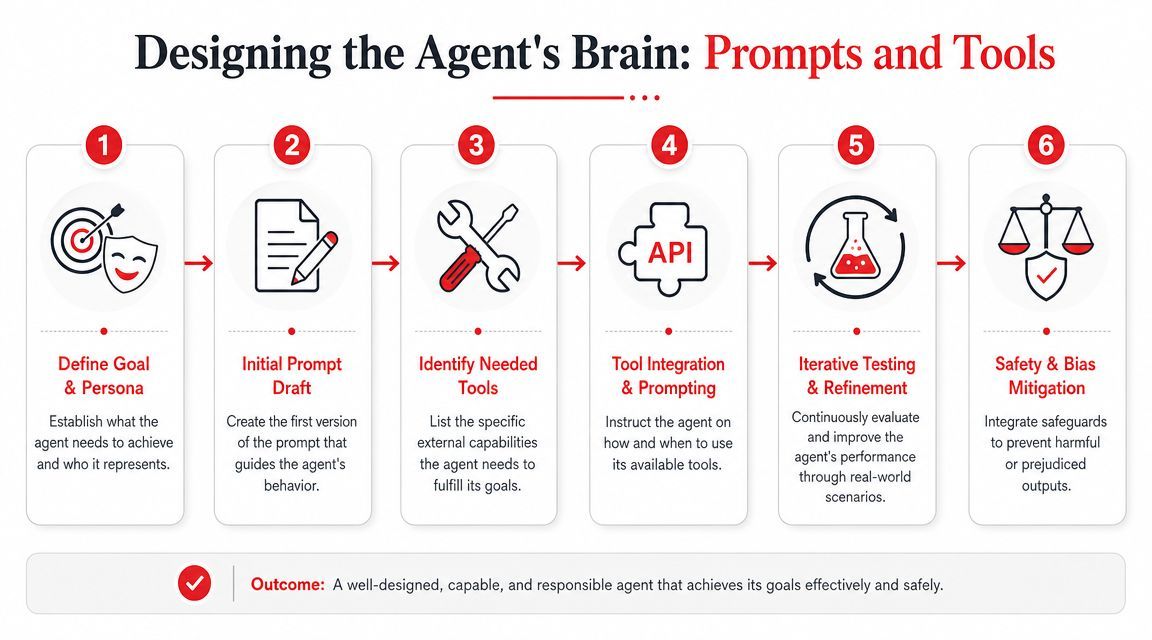
The prompt is an operating policy. The tools are the contract between model reasoning and application code. If either one is vague, reliability drops and cost rises because the agent spends tokens recovering from avoidable mistakes.
Write policy before personality
Start with rules the model can follow under pressure. Brand voice can come later.
A practical system prompt usually defines:
- Mission
The problem space the agent is allowed to handle - Boundaries
Claims, actions, and assumptions the agent must avoid - Tool policy
Which tool fits which job, and what to do when no tool fits - Escalation policy
When to ask a clarifying question, stop, or hand off to a human - Output contract
The schema, required fields, tone, and length limits your application expects
That order matters. Put style first and the model often optimizes for fluency. Put constraints first and it is more likely to produce something your system can validate and route safely.
Stopping rules deserve special attention. Agents that can touch money, records, customer messaging, or regulated workflows need explicit limits on retries, side effects, and confidence thresholds. "Be helpful" is not a control surface.
Later in the design process, it helps to watch another builder walk through tool-driven prompting choices:
Treat tools like product surfaces
Tool design often determines whether an agent stays a demo or becomes a dependable feature.
The LLM is consuming your tool interface. Parameter names, descriptions, enum values, permission scopes, and return schemas all shape behavior. If the contract is loose, the model fills gaps with guesses. In production, guesses show up as wasted calls, bad routing decisions, and hard-to-debug edge cases.
A good starting point is a small toolset and a regression suite built from real tasks. Teams that keep the first version narrow tend to debug faster and learn where the agent needs autonomy. Guidance from CodeWave on agent validation and early tool design makes the same point: constrain the tool surface, test against realistic scenarios, and rerun those cases after every prompt or tool change.
Good tool design usually includes:
- Strong typing: require clear inputs such as
customer_id,date_range, orticket_priority - Narrow scope: one tool should do one job, instead of exposing a broad catch-all endpoint
- Clear naming: use names like
get_invoice_statusinstead ofhandle_billing - Predictable outputs: return strict JSON or another machine-validated schema
- Failure semantics: return explicit errors and status codes your orchestrator can act on
Tool docs now serve two audiences. Engineers need correctness. The model needs clarity. Write for both.
A concrete support agent example
Take a support agent for a SaaS product. A demo version gets a user message, has broad access to account data and billing systems, and decides what to do in one pass. It looks impressive until it hits ambiguous identity, partial account matches, or a refund request that should never be auto-approved.
A production design is tighter:
The prompt can then instruct the agent to verify account context before discussing billing, ask a clarifying question if multiple accounts match, avoid promising refunds, and return a structured object with summary, customer_message, recommended_next_action, and confidence_notes.
This design is less flashy than a wide-open assistant. It is easier to test, easier to observe, and much cheaper to trust.
Building the Production Layer for Your Agent
The agent's brain gets the attention. The production layer decides whether the product survives contact with users.
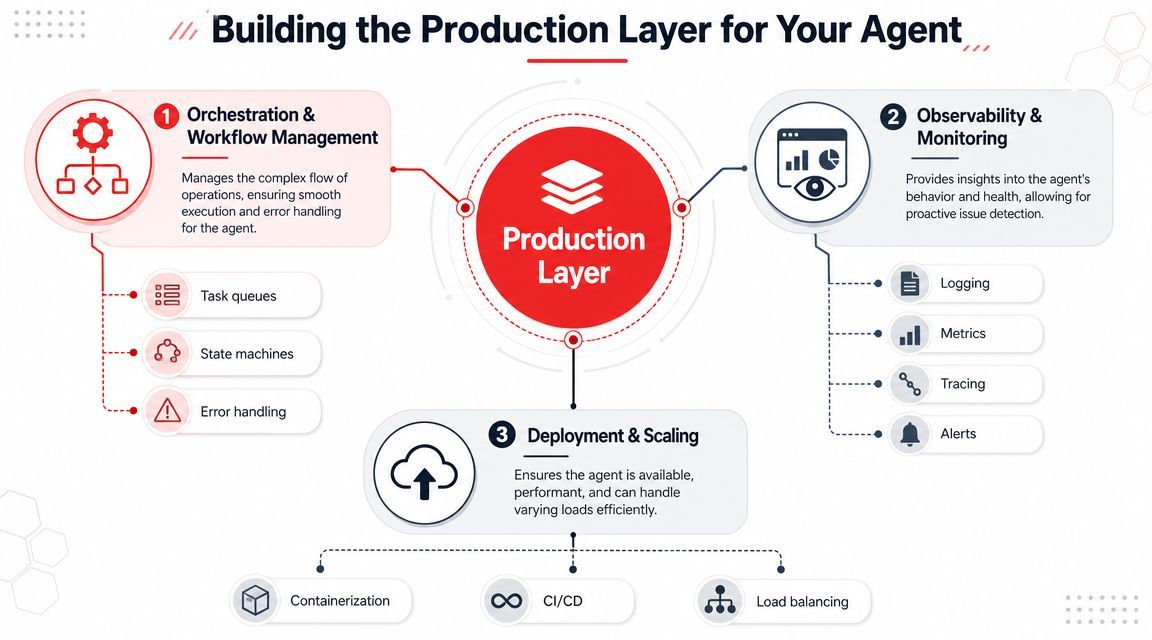
A lot of tutorials stop after “the model can call tools.” That's where the hard operational work starts. Google's developer guidance is unusually direct about this. In Google's agent reliability guidance, the recommendation is to use LLMs for reasoning but deterministic code for execution, with strict JSON validation. That matches what production teams learn quickly: don't let the model own the parts of the system that need guarantees.
Prompt management is a release system
If prompts live hardcoded in the application, every behavior change becomes a code deploy. That's slow, risky, and painful for product iteration.
Treat prompts and policies as versioned assets. You want to know:
- which prompt version handled a given request
- what tool schema version it saw
- what model and parameters were active
- whether a fallback path was triggered
- which regression tests passed before release
This is why teams often pull prompt management out of app code and into a dedicated layer. That can be a homegrown config service, an orchestration framework, or a backend platform such as Supagen, which provides versioned prompts, model routing across providers, and per-call observability without pushing all of that logic into the application itself.
Routing and fallbacks decide your margins
Not every request needs the same model.
Simple extraction, classification, or formatting jobs can usually run on a faster and cheaper model. Harder planning tasks, ambiguous user requests, or tool selection under uncertainty may need a stronger one. If you route everything to your most capable model, costs climb and latency follows.
A practical routing setup uses decision criteria like:
- Task type: extraction versus planning versus synthesis
- Risk level: internal draft versus user-facing response versus business action
- Latency requirement: interactive chat versus background workflow
- Failure path: retry same provider, fallback to another provider, or escalate to human review
The mistake is making routing invisible. Product teams need to know which flows hit premium models, and engineers need logs that explain why.
Observability has to include the reasoning path
Standard application logs won't tell you why an agent failed.
You need visibility into the sequence: user input, prompt version, selected model, tool choice, tool arguments, tool response, validation result, final output, latency, and cost. Without that trace, “the agent did something weird” turns into a long debugging session with no reliable reproduction path.
The minimum useful observability layer logs:
If you can't inspect a failed tool call, a prompt revision, and the final validated output in one place, the system isn't ready for fast iteration.
Testing and Safeguarding Your Autonomous Agent
A production agent usually fails in ordinary ways.
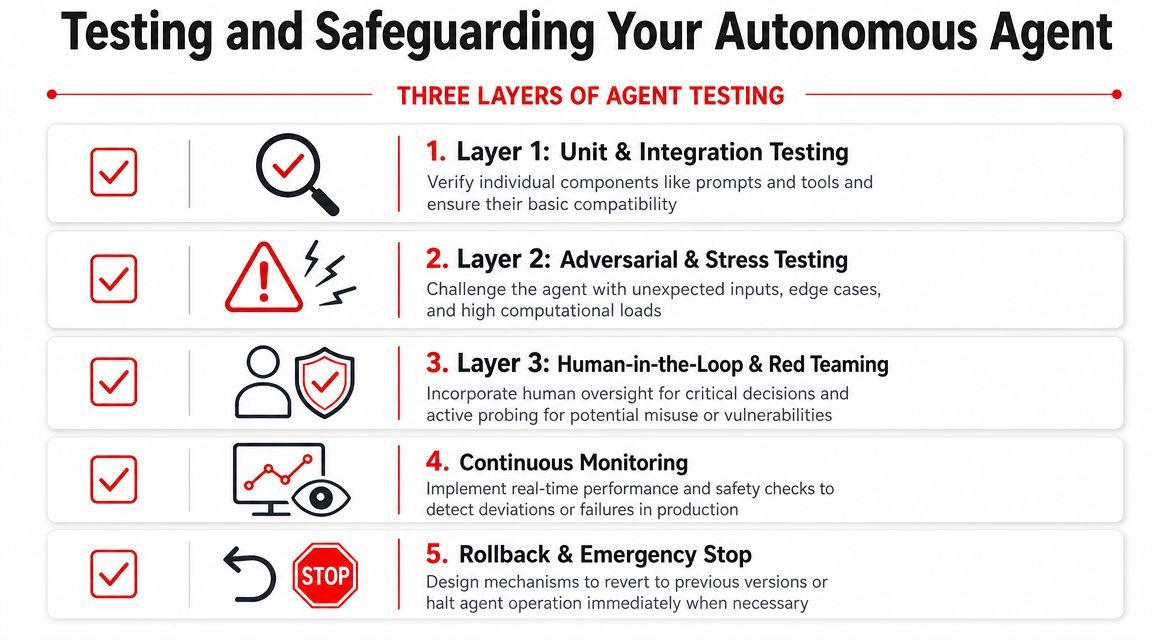
A user submits an incomplete request. A downstream API times out. A tool returns a field in the wrong format. The model still tries to complete the task and produces an answer that looks plausible enough to ship. That is why agent testing has to cover the full system, not just prompt quality.
Test the tools before the agent
Start below the model layer. If a tool is unreliable on its own, the agent will hide the failure behind fluent text and make debugging slower.
Test every tool as a normal software interface:
- Schema validity: reject missing or malformed fields before execution
- Auth and permissions: confirm read-only tools cannot mutate state
- Error handling: return structured errors for timeouts, rate limits, and downstream failures
- Deterministic transforms: keep parsing, mapping, formatting, and lookups in code instead of asking the model to improvise
Then test the orchestration around those tools. Keep the first version narrow. A smaller tool surface is easier to observe, easier to evaluate, and cheaper to harden. As noted earlier, a constrained initial toolset plus a realistic scenario set is a better starting point than a wide-open agent that appears capable but fails unpredictably.
Regression testing matters more than a clever prompt
Prompt changes rarely fail loudly. They shift behavior at the edges.
One revision might improve extraction accuracy but make the agent more willing to call a tool with partial inputs. Another might reduce verbosity while increasing the rate of unsafe assumptions. Teams that only spot-check a few prompts miss these trade-offs until customers hit them first.
Build a regression suite that covers failure modes, not just ideal answers:
- ambiguous user requests
- conflicting tool outputs
- missing account or session context
- denied permissions
- risky actions that should pause for approval
- malformed tool responses
- retries that could create duplicate actions
A simple evaluation matrix is enough to start:
For higher-risk flows, add replay tests from real traces. That is where production issues show up. Synthetic cases help, but they rarely capture the messy combination of weak user input, stale state, and partial tool failure that breaks live systems.
Safety controls belong in code and policy
Instructions alone are too soft for production safeguards. The model can propose an action. Your application has to decide whether that action is allowed, complete, and safe to execute.
In practice, that means putting hard boundaries around the agent:
- Explicit stop conditions
End a run on success, failure, timeout, or clarification required - Approval gates
Require human review before sending emails, changing records, issuing refunds, or taking other sensitive actions - Output validation
Reject malformed, incomplete, or out-of-policy structured responses before they reach users or systems - Rollback and kill switches
Disable a prompt version, tool, provider route, or workflow quickly when a release starts failing
I would also separate "answer generation" from "action execution." That design adds some latency, but it reduces the chance that a convincing model output turns into an expensive mistake.
Trust the model to propose. Trust your software to decide.
The reliable pattern is straightforward. Give the agent limited authority, test it against realistic failure cases, and keep enforcement outside the model. That is what turns an impressive demo into a system a product team can operate.
Deployment Scaling and Managing Agent Costs
Deployment is where technical decisions become product economics.
The broader market is moving fast. One industry source projects the AI agent market will grow from $3.7 billion in 2023 to over $103 billion by 2032, a 44.9% CAGR, according to this AI agent market projection. When a category expands that quickly, teams don't just need working agents. They need agents that can scale without wrecking margins.
Choose the deployment shape that matches the task
There isn't one correct deployment model.
A lightweight, event-driven agent may fit a serverless function if requests are short and stateless. A long-running research or operations agent often needs a dedicated service with queues, retries, state management, and durable storage. A customer-facing assistant may need a hybrid setup: low-latency interaction at the edge, heavier orchestration in the backend.
Use these decision criteria:
The common mistake is deploying every agent like a chat endpoint. Many useful agents are really workflow engines with a language model in the loop.
Cost has to be visible per workflow
The headline cost isn't “tokens used.” The useful cost is per completed task.
Track cost and latency at the workflow level so product teams can answer questions like:
- Is this feature affordable at current usage?
- Which tool path is causing overruns?
- Which model route handles most requests?
- Which failure mode creates repeated retries?
- Does this automation save enough labor or time to justify its run cost?
For cost discipline, the high-impact actions are straightforward:
- Route by complexity: Reserve stronger models for hard cases
- Trim context: Don't send the full conversation or giant documents if the task only needs a slice
- Cache repeated work: Retrieval, summaries, and metadata extraction often repeat
- Bound loops: Cap retries and tool-call depth
- Separate draft from action: Drafting can use cheaper routes than final approval or execution
Scaling failures are usually product failures first
A lot of “scaling problems” start as product definition problems.
If users don't know what the agent can do, they'll ask for everything. If the UI hides uncertainty, they'll trust wrong outputs too much. If the product offers instant execution for risky actions, support and operations teams inherit the fallout. Good deployment design includes UI affordances, escalation paths, and realistic promises about what the agent handles automatically versus what it prepares for review.
Reliable agents usually feel narrower than demo agents. That's a feature, not a flaw. Scope makes them understandable, testable, and economically sane.
If you're building agents and don't want prompt versions, model routing, observability, and cost tracking scattered across app code, Supagen is one way to centralize that production layer. It gives teams a single backend for managing prompts, provider routing, logs, latency, tokens, and spend so they can iterate on AI behavior without turning every agent change into a full redeploy.