
FinOps for AI: A Practical Guide to Controlling LLM Costs
You ship the AI feature on Friday because the product needs it. The demo looks clean, the prompt is short, and the first users love it. Then Monday morning lands with a bill that makes no sense, because one long-tail workflow turned into your biggest line item.
That's the moment FinOps for AI stops sounding like finance process and starts feeling like a shipping problem. For builders, it's the discipline of seeing cost at the point of use, tying spend to features and users, and keeping model behavior from turning into a surprise tax on growth. The teams who get this early don't just save money, they avoid the awkward sprint where engineering, product, and finance all point at the same dashboard and nobody can explain it.
Table of Contents
- The Bill That Arrives on Monday Morning
- What FinOps for AI Means
- Why LLM and Multimodal Costs Behave Differently
- The Metrics That Translate AI Usage into Unit Economics
- Roles, Processes, and the Cost Allocation Map
- The FinOps for AI Toolchain and the Case for a Unified Backend
- A 30/60/90 Roadmap to FinOps for AI in Production
- Common Questions Builders Ask First About FinOps for AI
The Bill That Arrives on Monday Morning
The story usually starts small. A founder adds an LLM assistant to a support flow, or a solo builder wires up a content feature behind a paywall, and the first day feels cheap enough to ignore. Then a prompt variant gets reused more than expected, or a long conversation path becomes the default, and the traffic pattern changes faster than anyone notices.
That's where the bill turns from background noise into product risk. In FinOps for AI, the point isn't to treat usage as a scary finance artifact after the fact. It's to see the cost of each call while the feature is still being shaped, so a pricing mistake or prompt drift doesn't get baked into production habits.
Who this actually matters for
This is written for the people who feel the bill before they have a formal process for it. Vibe coders, non-technical founders, indie hackers, and startup product teams usually discover AI cost control at the exact moment they'd rather be polishing the user experience.
The pattern is familiar. A small team ships fast, adds one model to save time, then adds a second model for quality, then adds retries, streaming, fallback logic, and a couple of prompt versions. Each step feels reasonable in isolation. Together, they create a cost shape that looks nothing like a normal API bill.
Practical rule: if you can't say what a feature costs per request, you're not done building it yet.
What changes after the first surprise
Once AI spend becomes recurring, the question shifts from “Can we afford this model?” to “Can we keep this feature profitable as usage grows?” That's a different discipline. It means you need telemetry on every call, enough metadata to tie usage back to features, and a way to compare models without hand-waving.
The good news is that the first version of this system doesn't need to be fancy. For small teams, the win is usually visibility, not perfection. You don't need a finance transformation program. You need a shipping discipline that makes the bill legible before it gets a vote in product decisions.
What FinOps for AI Means
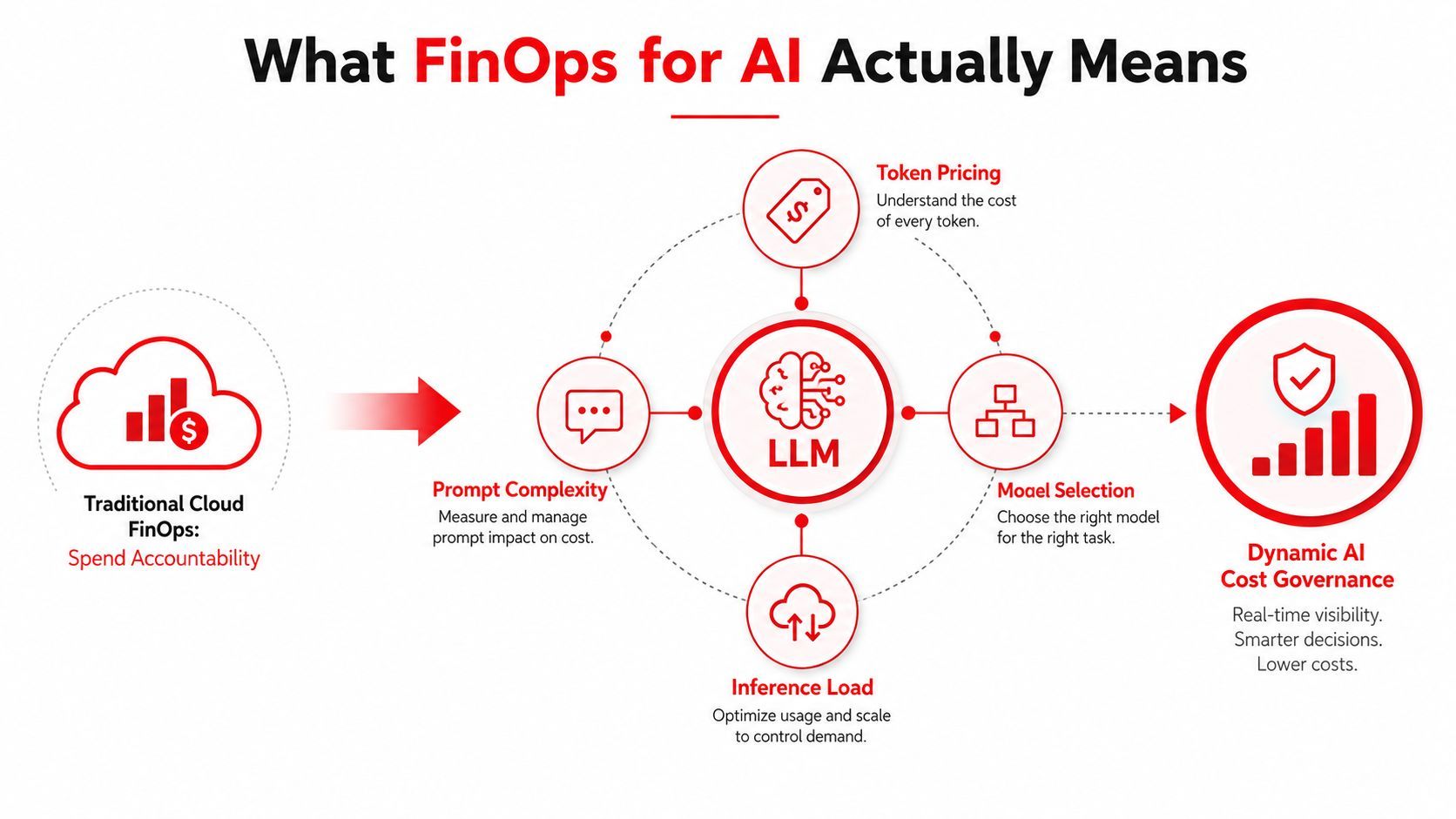
Traditional FinOps is about cloud spend accountability. You tag infrastructure, allocate costs, watch trends, and make sure engineering knows what the bill is doing. That model still matters, but AI breaks the old mental shortcut where cost follows a neat server or instance boundary.
A prompt can be cheap in isolation and expensive in production once retries, longer context windows, fallback routing, and higher-quality models enter the picture. A small team usually feels that shift first in the usage dashboard, then in the monthly invoice.
Why AI needs a different unit
The FinOps Foundation defines Cost Per Inference = Total Inference Costs / Number of Inference Requests in its AI guidance, which is a practical way to frame the problem because the unit of value is the call, not the box. AI workload economics are increasingly measured in cost per token and cost per inference, because those metrics translate raw model usage into something the business can own and discuss. The Foundation's overview also gives concrete examples, including $0.05 per inference when $5,000 is spread across 100,000 inference requests, and $0.0025 per token when $2,500 is spread across 1,000,000 tokens. Those examples help make the economics visible without pretending every workload behaves the same way. FinOps Foundation overview
That framing matters because older cloud measures often miss the primary cost driver. A vCPU-hour tells you something about infrastructure. It does not tell you whether a prompt was too long, a model was overkill, or a retry loop doubled the cost of a user session.
The portable definition
FinOps for AI is per-call cost governance for AI features, with token-level visibility, model-aware allocation, and business-facing unit economics.
That definition is intentionally practical. It puts the focus on request-level telemetry, prompt and model versioning, and the ability to compare choices on the same basis. It also fits the way modern AI products behave, where pricing and resource demand can shift quickly and where the useful question is often what was paid for this output rather than what the server cost this month.
In FinOps for AI, the point is not to treat usage as a scary finance artifact after the fact. The point is to make cost visible at the call level, route traffic with intention, and give builders a backend that turns cost control into a setting, a dashboard, or a policy, instead of a code change every time the bill starts to drift.
Why LLM and Multimodal Costs Behave Differently
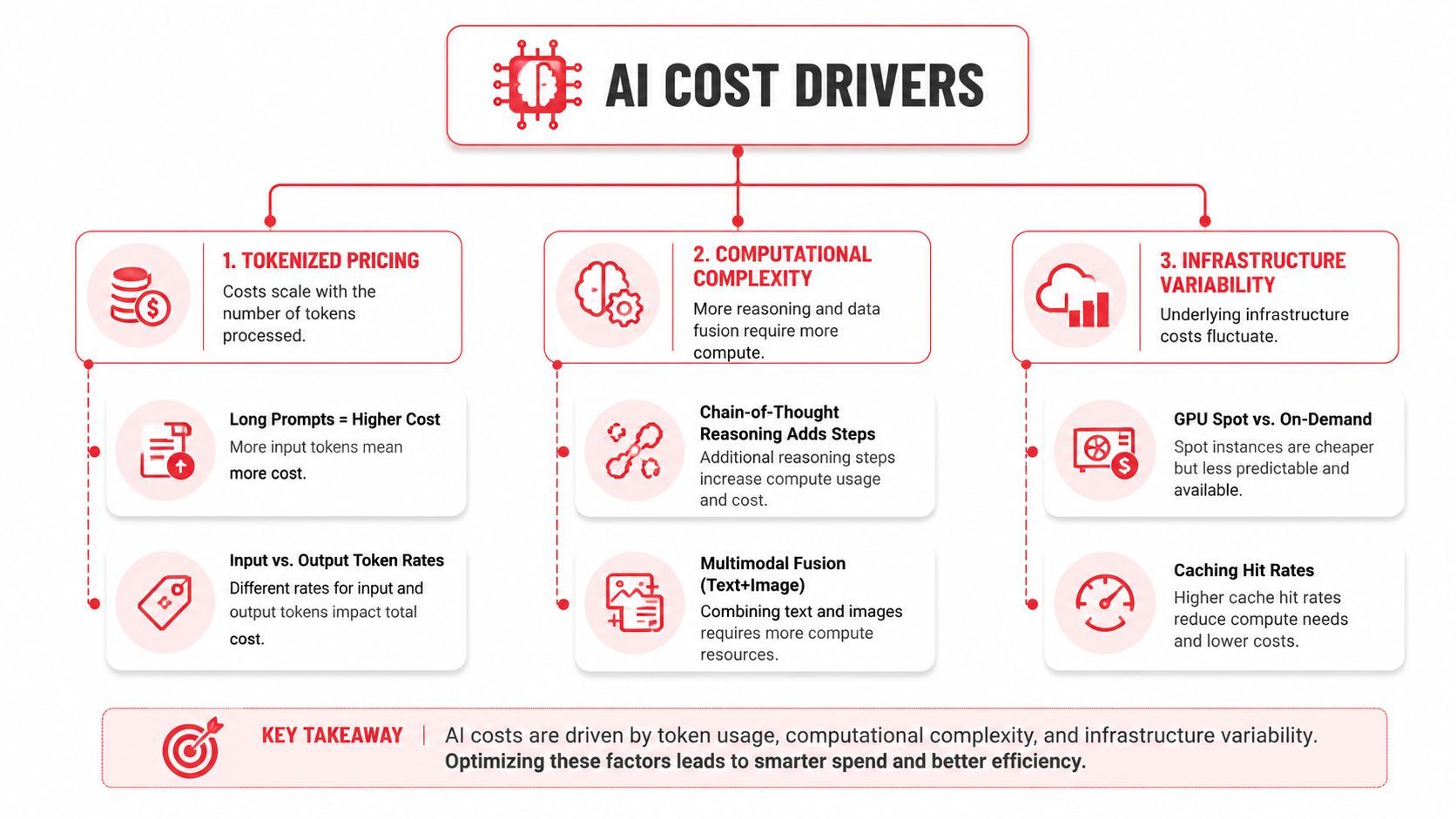
AI bills have a personality because the cost drivers are different from ordinary cloud workloads. In classic infrastructure, you mostly fight idle compute, oversized instances, and poor scheduling. In LLM and multimodal systems, the expensive part is often hidden in the request shape itself.
Tokenized pricing changes the economics of writing
Long prompts cost more. So do verbose outputs, repeated context, and chains of thought that expand the request footprint. That's why teams get burned by features that look elegant in a demo but become expensive when users start pasting entire documents or asking follow-up questions in the same session.
The same logic applies to multimodal systems, but the slope gets steeper. Text, image, audio, and video workloads often don't scale linearly in the way a normal app team expects. The moment you move from a single text response to a mixed workflow, the billing logic gets harder to predict, and the margin between “useful” and “too expensive” can narrow fast.
Infrastructure variability makes forecasting messy
AI also depends on scarce accelerator capacity, and that creates a capacity-planning problem that feels more like airline overbooking than ordinary cloud scheduling. GPU availability, latency needs, caching behavior, and provider differences can all change the economics of a single feature path. That's why self-hosting an open-source model can look cheap on paper, but become costly once you include orchestration, idle capacity, and the effort required to keep the system reliable.
A retry loop on a failed JSON parse isn't a small bug in AI systems. It's often a cost multiplier.
The hidden costs are usually the ones teams miss first. Validation failures that trigger retries, streaming responses that still count as output usage, and cache misses that force the system back onto the most expensive path all make the bill jump in ways a normal app checklist won't catch. The practical response isn't to avoid advanced AI features. It's to treat request shape, fallback logic, and caching strategy as cost features, not just engineering details.
The Metrics That Translate AI Usage into Unit Economics
The first number needed is cost per inference. The FinOps Foundation's AI guidance uses exactly that framing, and it's the cleanest way to turn raw spend into a product metric. If you know what each request costs, you can compare features, model choices, and traffic patterns without arguing from gut feel.
Start with request and token economics
The simplest telemetry schema starts with the call itself. Tag each inference with feature, tenant or user, prompt-template ID, and model, then store those events in a telemetry layer that can be reconciled against the vendor bill. That structure is what turns “AI usage” into something you can allocate and discuss.
A useful rule from one practical playbook is to keep summed per-call costs within about ±2% of the vendor bill and to surface hourly spike alerts when usage reaches about 3× the rolling 7-day average. It also recommends hard kill-switches for contractual caps, which is a strong guardrail when a feature can go viral overnight. AI project FinOps playbook
A simple metric table
What to watch before you optimize
GPU utilization matters because underused accelerators can hide a lot of waste. Retry rate matters because a failed call isn't just an engineering annoyance, it can become a billing leak. Cost per successful task matters because a cheap request that fails twice is often worse than a slightly pricier request that resolves on the first pass.
Practical rule: don't optimize raw spend before you can explain spend per successful outcome.
If you're building the minimum viable FinOps stack, this is the floor, not the ceiling. The point is to create numbers that a product manager can read, an engineer can debug, and a founder can use in pricing discussions without translating a cloud bill into another spreadsheet.
Roles, Processes, and the Cost Allocation Map
Once the metrics exist, ownership matters more than tooling. AI cost control fails when everyone can see the dashboard but nobody knows who should act on it. For small teams, that owner is often a product manager, a founder, or the engineer closest to the feature, not the finance function.
Who owns what
Engineering should tag calls and keep the telemetry honest. Product should decide which features deserve budget and which ones need tighter limits. Finance or ops can reconcile the totals and spot drift, but they usually can't infer prompt behavior or routing logic from the bill alone.
That split sounds simple, but it changes how decisions get made. When a prompt template changes, the person who shipped the change needs to know how it affected cost. When a feature starts serving multiple tenants, the owner needs to decide whether the spend still matches the value delivered. That's the whole point of allocation, to make the cost visible at the level where the decision happened.
A lightweight operating loop
The FinOps loop still applies, but a startup version is much leaner. Inform means shipping a dashboard that people open. Optimize means changing prompts, model routes, or caching before you reach for larger infrastructure changes. Operate means making those checks routine instead of reactive.
A practical cadence looks like this:
- Weekly cost review: check feature-level spend, compare it with recent usage, and look for call patterns that changed.
- Per-feature budget: give each shipped AI feature a ceiling that forces a conversation before costs drift.
- Pricing review: use unit economics to decide whether a feature belongs in the base plan, an add-on, or a premium tier.
The cost allocation map
The best map is the one that mirrors your product structure. If a call serves onboarding, support, or content generation, the tag should say so. If a team is running experiments, those calls should be separable from production traffic so the learning budget doesn't hide inside customer spend.
Practical rule: if your tags can't answer “which feature, which user, which model?” then they're not allocation tags yet.
This is also where early pricing decisions get sharper. If a feature's cost per successful task keeps climbing, you either rework the feature, narrow its scope, or charge for it differently. AI economics should shape product strategy, not sit below it.
The FinOps for AI Toolchain and the Case for a Unified Backend
There are four patterns builders usually end up with. The first is a custom wrapper around provider SDKs, which feels fast until routing, logging, and fallbacks start multiplying. The second is a stitched-together stack of separate tools for prompts, observability, and model selection, which gives flexibility but often creates three dashboards and one broken mental model.
Comparing the common patterns
An LLM gateway sits in the middle. It can centralize requests, abstract providers, and make swapping models less painful, but it still tends to leave prompt versioning and cost analysis as separate concerns. A unified AI backend goes one step further by tying prompts, routing, observability, and cost surfaces together in one control plane.
The trade-off is straightforward. A custom wrapper gives maximum control and maximum maintenance. A stitched stack gives modularity and maximum integration overhead. A gateway reduces some duplication but still tends to require code changes for behavior shifts.
Why the unified backend pattern is attractive
What works best for small teams is the version of the stack that lets non-core changes happen without a redeploy. Versioned prompts, multi-provider routing, fallback chains, and per-call logs should all be available from the same surface if you don't want every experiment to become an engineering task. That matters when the primary bottleneck isn't model access, it's the speed of iteration.
Supagen is one example of that pattern. It combines prompt management, routing across providers like OpenAI, Anthropic, Google, ElevenLabs, and fal.ai, plus per-call logs for tokens, latency, I/O, and cost. The practical advantage is simple, changing behavior becomes an auditable dashboard update instead of a code release.
The trade-offs to keep in view
No unified backend removes all risk. You're still depending on a platform, so vendor lock-in and platform maturity matter. You'll also want to be clear about what belongs in the backend versus what should stay in application code, especially for features that need very specific business logic.
The upside is speed with less chaos. For teams under twenty engineers, a unified backend often replaces the need for a homegrown gateway and lets the product team spend less time wiring observability into every new feature. The win is not abstraction for its own sake, it's reducing the number of places where model logic can drift.
A 30/60/90 Roadmap to FinOps for AI in Production
The cleanest way to start is to treat this like any other production rollout. In the first month, the goal is visibility. In the second, it's control. In the third, it's optimization that's grounded in real usage instead of hope.
Days 1 to 30, instrument
The first checkpoint is call-level metadata. Every AI request should carry feature, user, prompt, and model tags so you can tell which part of the product created the cost. The dashboard doesn't need to be perfect on day one, but it does need to show cost per inference and give you a baseline worth comparing.
This is also when alerts matter. Set the first budget warning as soon as the feature is live, because the first surge usually arrives before the team expects it. If you can't tell whether a spike came from a product launch or a bug, you're still in the dark.
Days 31 to 60, analyze
By the second month, the team should be looking at the top cost drivers, not just the total bill. That usually means identifying which prompts are too long, which flows need smaller models, and where retries are inflating spend. Prompt versioning becomes valuable here because it lets you compare behavior instead of guessing which change caused the increase.
A hard cap or kill-switch is worth putting in place once the feature is stable enough to matter. It's not a sign of distrust. It's how you keep one bad traffic event from eating the rest of the month's budget.
Days 61 to 90, optimize
At this point, caching common queries starts paying off, especially if your product has repeat questions or repeated task patterns. Smaller, task-specific models may also make sense for narrow flows where a large model is overkill. The decision should come from the unit economics, not from model hype.
The last milestone is a monthly review that combines product, engineering, and whoever owns spend. Use it to compare expected versus actual cost per feature, decide what should be rerouted, and identify which workloads deserve stronger automation. By then, FinOps for AI should feel less like an emergency response and more like a standard part of shipping.
Common Questions Builders Ask First About FinOps for AI
The first question is usually whether a team is too small for this to matter. If you've shipped a paid AI feature, you're already big enough for FinOps for AI to matter, because the cost is no longer hypothetical. The earlier you make the bill legible, the less likely you are to discover a margin problem after users start relying on the feature.
The second question is what to do when a prompt change spikes spend. Versioned prompts and per-prompt cost alerts are the practical answer, because they let you connect a cost jump to a specific release instead of arguing from memory.
The third question is whether unit economics should drive pricing or the other way around. Unit economics should anchor pricing, because if the feature costs more than the margin can tolerate, the pricing model is the part that needs to move.
The fourth question is whether a unified backend replaces an in-house gateway. For teams under twenty engineers, yes, it usually replaces the gateway and frees people to focus on the product instead of the plumbing.
If you want a cleaner way to ship AI features without hardcoding prompts, routing, and observability into every app release, Supagen gives you a unified backend built for that exact job. It keeps per-call cost visibility, versioned prompts, and model routing in one place, so FinOps for AI becomes something your team can manage from a dashboard instead of a code change. Visit Supagen to see how it fits into a production AI stack.