
Build a Future-Proof Enterprise AI Architecture
In 2025, global corporate spending on generative AI reached $37 billion, a 3.2x year-over-year increase from $11.5 billion in 2024, and $18 billion of that went to infrastructure, the layer that underpins enterprise AI architecture, according to Menlo Ventures' 2025 enterprise generative AI analysis. That changes the conversation.
Enterprise AI architecture isn't a side topic for architects and platform teams anymore. It's the difference between an AI feature that works in a demo and an AI system that survives real users, messy data, compliance reviews, provider outages, shifting prompts, and budget scrutiny from finance.
A useful way to think about it is city planning. A single AI feature is like one building. You can construct it quickly and make it impressive from the street. But if roads, utilities, zoning, emergency services, and maintenance don't exist, that building becomes expensive to operate and hard to extend. Enterprise AI architecture is the city plan. It decides how data moves, where models run, how requests are routed, who gets access, what gets logged, and how the whole system keeps working as conditions change.
Table of Contents
- Why Your AI Architecture Defines Success
- The Core Components of Enterprise AI Architecture
- Key Architectural Design Patterns Explained
- Strategies for Scalability and Reliability
- Integrating Governance and Compliance by Design
- Your Enterprise AI Implementation Checklist
- Conclusion The Future Is an Adaptable AI Backend
Why Your AI Architecture Defines Success
Teams usually discover the actual architecture questions after the pilot works. The first demo answers, "Can the model do this?" Production adds harder questions. "Can the system do this every day, with the right data, at the right cost, under the right controls?"
Those are the questions that decide whether an AI feature becomes a product capability or a recurring fire drill.
Where does the model get trusted data? What happens when one provider slows down or changes pricing? How do you prevent a draft policy from being retrieved as if it were approved? Who can inspect prompts, outputs, and logs without exposing customer data? How do you update routing rules, prompts, or guardrails without redeploying the whole application?
Those are architecture decisions.
A prototype can survive with local scripts, hardcoded prompts, and a developer watching logs by hand. An enterprise system cannot. Once AI supports customer service, underwriting, contract review, internal search, or sales workflows, the surrounding system starts to matter as much as the model itself. Reliability, permissions, observability, and change management stop being background details. They become part of the product.
Architecture decides whether AI becomes infrastructure
As noted earlier, current spending patterns show that buyers are putting serious budget into the infrastructure around generative AI, not only into foundation models. That shift makes sense. Enterprise teams buy AI to support recurring work, and recurring work needs predictable behavior across changing conditions.
A helpful way to frame it is to compare a lab experiment with a transit network. An experiment can succeed once and still be useful to the research team. A transit network has to keep working during rush hour, maintenance windows, bad weather, and route changes. Enterprise AI faces the same kind of pressure. It has to keep producing acceptable results while documents change, traffic spikes, policies tighten, and model providers evolve.
Practical rule: If a team cannot explain how data enters the system, how decisions are routed, how outputs are logged, and how failures are contained, they do not have an enterprise AI architecture yet. They have a promising demo.
The hidden cost of static diagrams
Many architecture diagrams look finished because they include the familiar boxes. Data source. Vector store. Model. Application. Dashboard.
Real systems do not stay still.
Prompts change as teams learn. Retrieval rules need tuning when search quality slips. Access permissions shift as business units expand access. Model behavior drifts as inputs, users, and downstream tasks change. A provider that looked cheap in a pilot can become expensive at scale. A product manager may ask for image or audio support after the text workflow is already live.
Static diagrams miss that motion. They show structure, but not operations.
That gap is where many enterprise AI programs struggle. The challenge is no longer choosing one model and wiring up one workflow. It is managing a living system: routing between models based on latency, quality, and cost; detecting drift before users report it; tracing which prompt version produced which output; and changing policies without rewriting the application. Modern unified backends matter because they centralize those moving parts. They give teams one control plane for orchestration, observability, governance, and cost management instead of scattering that logic across the app.
A strong enterprise AI architecture is a plan for controlled change. It assumes the models, prompts, retrieval logic, and workflow rules will keep moving, then gives the team safe ways to adjust without breaking the product.
The Core Components of Enterprise AI Architecture
A successful enterprise AI architecture is built from four connected layers: data, models, orchestration, and governance. Those layers are easy to draw as boxes. The harder part is designing them so the system keeps working as prompts change, providers change, costs rise, and model behavior shifts over time.
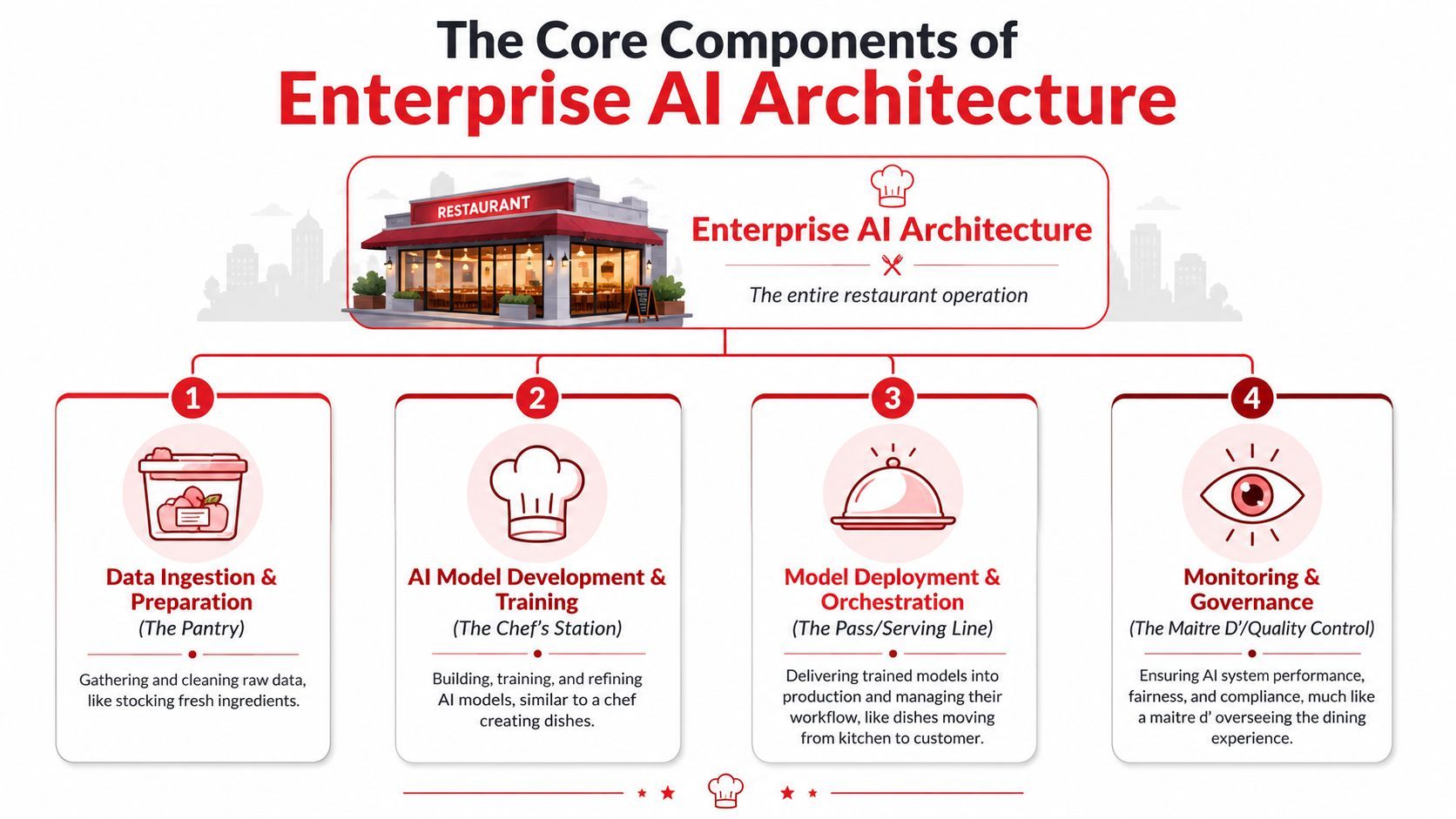
A useful way to read these components is to ask a practical question about each one. Where does the system get trustworthy context? Which model should handle this request? Who decides the workflow and fallback path? What prevents unsafe or untraceable behavior? If any layer is weak, the application may still look fine in a demo, but it becomes difficult to operate in production.
Earlier, one source framed enterprise AI around data, model, and governance. That is a solid starting point. In production systems, teams usually separate orchestration and serving into its own layer because that is where multi-model routing, retries, caching, tool calls, and budget controls get enforced.
The data layer
The data layer handles ingestion, storage, transformation, retrieval, and filtering. This is the foundation for answer quality. If the source material is outdated, duplicated, badly labeled, or missing access controls, the model can still produce fluent output. It just will not be dependable.
Retrieval-Augmented Generation often gets misunderstood. RAG means the system fetches relevant context at request time and sends that context with the prompt. The model is not memorizing your internal documents. It is working from the materials your architecture retrieves for that specific request.
Good data layer design usually includes:
- Ingestion pipelines: Pull content from tools like Salesforce, Notion, Google Drive, SharePoint, Zendesk, or internal databases.
- Preparation logic: Clean records, attach metadata, remove duplicates, normalize formats, and exclude obsolete states.
- Retrieval systems: Combine keyword and semantic search so the system can find exact policy names and conceptually similar passages.
- Access-aware retrieval: Apply permissions before any context reaches the model.
A common failure pattern looks like this. The answer sounds polished, cites the wrong policy, and passes basic testing because nobody noticed the retrieval set was incomplete. That is rarely a model problem first. It usually starts in data preparation, indexing, or permission handling.
A short visual explainer helps if your team is new to the stack:
The model layer
The model layer covers model selection, prompt design, tool access, response formatting, and version control. Teams often focus here first because model choice is visible and easy to compare. In production, it is only one part of system behavior.
This layer includes:
- Base model selection: OpenAI, Anthropic, Google, and open-weight models all have different strengths.
- Prompt and tool design: Output quality often depends on the system prompt, available tools, and response schema.
- Versioning: Teams need to know which prompt and model produced which output.
- Fine-tuning or specialization: Useful in selected cases, though retrieval quality and workflow design often matter more.
The model should be treated as a reasoning component inside a larger service. That framing prevents a lot of expensive mistakes. If search quality drops, switching providers may not help. If approvals are missing, a stronger prompt does not create governance. If one model is too costly for routine tasks, the answer may be routing rather than replacement.
This is also where the article's operational lens matters. Enterprises rarely stay with one model for every request. They end up using a mix of fast models for simple tasks, higher-performing models for complex reasoning, and specialized models for vision, transcription, or structured extraction. The architecture has to support that mix without forcing the application team to rewrite business logic every time a provider or price changes.
Orchestration and serving
Orchestration turns separate components into a working service. It manages the sequence of steps, chooses which model to call, decides when to retrieve data, applies fallbacks, and returns the result in a form the application can use.
In city terms, this layer is closer to traffic control than road construction. The roads may exist, but someone still has to direct flow, handle congestion, and reroute around outages.
A few examples make the responsibility clear:
This layer is where operational reality shows up. Latency targets, retry logic, queueing, caching, model failover, tool calling, and token budgets all live here. It is also where teams control multi-model routing, which has become one of the defining concerns in enterprise AI. A static architecture diagram might show one model box. A real backend often makes request-by-request decisions based on cost ceilings, response format requirements, provider health, and task complexity.
If the orchestration layer is weak, every change spills into application code. If it is designed well, teams can adjust routing rules, prompts, providers, and workflow logic from one control plane.
Governance and security
Governance and security set the operating rules for the entire system. They cover who can access what, which actions require approval, what gets logged, how outputs are reviewed, and how long data is retained.
That includes:
- Role-based access control
- Audit logging
- Compliance rules
- Explainability requirements
- Human approval paths
- Data retention policies
Some teams hear "governance" and picture paperwork. In practice, it is runtime architecture. These controls decide whether sensitive context can be retrieved, whether a model output is traceable to a prompt version, whether regulated workflows need a human checkpoint, and whether the team can investigate drift or incidents after deployment.
Governance also connects directly to cost and reliability. Without logging and policy enforcement, teams cannot see which workflows are consuming the budget, which provider path is failing, or which prompt revision caused output quality to slip. A living AI system needs that visibility built in from the start.
When these four layers are designed together, the system becomes easier to change without becoming harder to trust.
Key Architectural Design Patterns Explained
Once the components are in place, a key design question is how requests should flow through them. Design patterns give teams repeatable ways to make those choices. In enterprise AI, the useful patterns are less about static diagrams and more about runtime behavior. Which model should answer this request? Which inputs need extra processing? Which work should stay local, and which should move to centralized infrastructure?
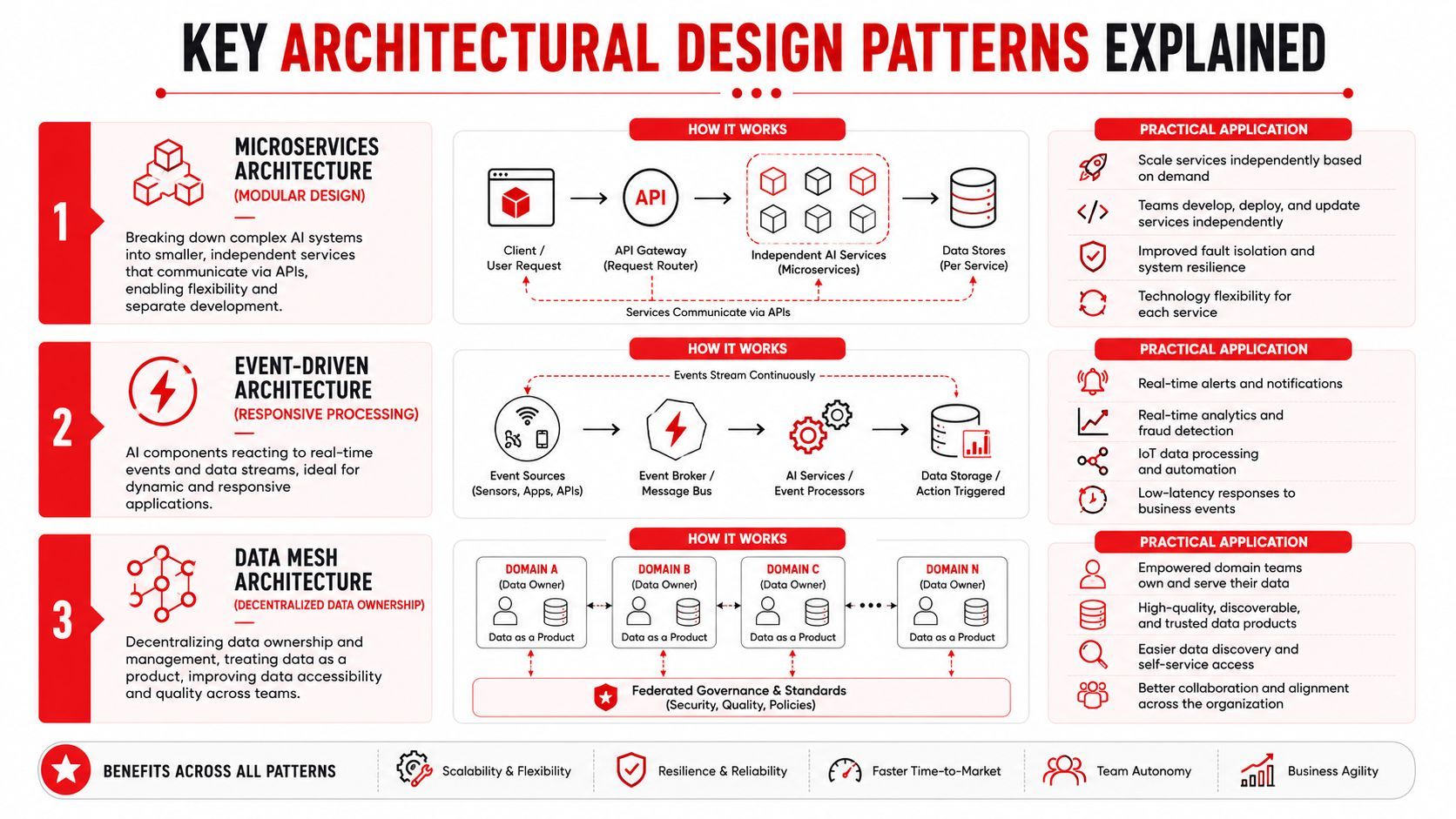
Model routing as an AI traffic controller
Model routing solves this by acting as a traffic controller for AI requests, directing them based on rules for cost, latency, or capability.
A single model often looks attractive during a pilot. Production systems expose the limits quickly. The same application may need cheap classification for one step, strict structured output for another, and stronger reasoning for a third. If every request goes to the same model, teams usually overpay, miss latency targets, or force a powerful model to do simple work.
A routing layer evaluates each request and sends it to the best-fit path. The rules can be simple or complex. They may account for task type, expected response format, provider health, policy restrictions, budget ceilings, or fallback order. In practice, this works much like assigning different roads to trucks, buses, and bicycles in a city. The goal is not complexity for its own sake. The goal is to keep traffic moving without sending every vehicle onto the most expensive highway.
A practical routing setup might separate requests like this:
- Fast low-stakes tasks: Short summaries, tagging, classification, simple rewrites.
- Structured outputs: JSON extraction, schema-constrained generation, field normalization.
- Higher-reasoning tasks: Multi-step planning, hard comparisons, policy interpretation.
- Fallback paths: Alternate providers when the preferred path fails or exceeds a budget rule.
The important operational detail is where the routing logic lives. If those rules are buried in application code, every pricing change, provider issue, or prompt adjustment turns into an engineering release. Product teams want to tune behavior. Finance wants to control spend. Operations wants failover options. A unified backend gives all three groups a shared control point, which matters much more in production than a tidy architecture slide.
Routing also needs to change over time. Models drift. Provider performance shifts. A model that was the cheapest option last quarter may no longer be the right default. Good architecture treats routing as a living policy layer, not a one-time engineering decision.
Multi-modal pipelines as a shared language layer
Enterprise workflows rarely stay text-only for long. Real business processes involve scanned forms, images, transcripts, tables, emails, and application records. If the architecture handles each format as a separate mini-system, teams end up with duplicated logic and inconsistent outputs.
A multi-modal pipeline creates a common processing path for different kinds of inputs. It does not erase the differences between image, audio, and text data. It standardizes how those inputs are prepared, enriched, retrieved, and handed to downstream workflows.
A few examples make the pattern clearer:
- A field technician uploads a photo of damaged equipment. The system combines image analysis with maintenance history from enterprise systems before generating a recommendation.
- A finance team ingests scanned invoices, extracts key fields, validates them against purchase records, and sends exceptions for review.
- A support workflow combines call transcripts, CRM notes, and product screenshots to create a case summary with the right customer context.
The architectural consequence is easy to miss. Storage, indexing, retrieval, and evaluation all need to support more than one media type. Teams that postpone image or audio support are often postponing a data model decision, a retrieval decision, and a workflow decision all at once.
When teams say “we're adding image input later,” they're usually postponing an architectural decision, not a feature detail.
This pattern also changes how teams monitor quality. Text pipelines can drift in one way. Document extraction pipelines drift in another. Image understanding can fail because of lighting, formatting, or file quality. A living AI backend has to observe each modality separately, then bring those signals back into one operational view.
Edge versus cloud depends on the job
Deployment choices should follow workload constraints, not team preference. Some requests benefit from local execution because latency, privacy, or intermittent connectivity matter more than model flexibility. Other requests belong in the cloud because they need larger models, centralized retrieval, shared governance, or easier operational control.
Edge deployment means the model or part of the workflow runs on-device or close to the device. Cloud deployment means requests run on centralized infrastructure.
Many enterprise systems end up hybrid. A device may handle lightweight preprocessing locally, such as speech capture, redaction, or first-pass classification, then send selected requests to the cloud for retrieval and heavier reasoning. That split can reduce latency and data exposure while preserving central control over routing, evaluation, and spend.
The practical trade-off is management overhead. Edge can reduce round trips, but fleet updates are harder. Cloud makes policy control easier, but every request competes for shared capacity and budget. Strong architecture makes those trade-offs explicit, then gives teams a backend that can shift the split as requirements change.
Strategies for Scalability and Reliability
A scalable AI system doesn't just handle more traffic. It keeps producing acceptable results when real life gets messy. Providers slow down. Retrieval indexes drift away from source systems. A new prompt improves one workflow and breaks another. Finance asks why one feature suddenly costs more to run.
Reliability starts with controlled failure
Every production system fails somewhere. The difference between a brittle system and a resilient one is whether failure is designed.
In enterprise AI architecture, controlled failure usually means:
- Fallback models: If one provider errors or degrades, another path can take over.
- Graceful degradation: If the advanced workflow can't run, the app returns a simpler but still useful result.
- Timeout rules: The system stops waiting and chooses the next best action.
- Approval gates: High-risk outputs pause for human review instead of auto-executing.
That last point matters for agent-like workflows. If a system can send messages, modify records, or trigger approvals, failure handling needs to include action control, not just text generation control.
Scalability means operational visibility
Traditional app scaling focused on compute and storage. AI systems add new moving parts: token usage, provider latency, prompt versions, retrieval quality, per-step logs, tool calls, and output review.
A team can't operate what it can't see. Useful observability in AI includes:
A lot of teams discover too late that “the AI is slow” isn't one problem. It might be slow retrieval for large document sets, a high-latency model, an overloaded external API, or repeated retries caused by malformed output.
Drift is a system problem not just a model problem
One of the biggest misunderstandings in enterprise AI is that drift only means model degradation. In practice, drift can happen at multiple layers.
The source data changes. Business terms evolve. Permission structures move. Prompt wording gets updated by one team but not reflected in test cases. The system of record changes field definitions. A retrieval index lags behind document updates.
Futra Solutions argues that sustainable architecture needs model lifecycle management and monitoring with automated drift detection in its guide to scalable AI design. That's the right framing because drift management is not a monthly cleanup task. It's part of runtime operations.
Operational insight: Treat every model, prompt, and retrieval pipeline as a versioned asset with observable behavior. If you can't compare today's performance with last week's setup, drift will surprise you.
There's another useful warning from Agility at Scale. It reports that 70% of enterprise AI failures stem from human execution inconsistencies and outdated model logic, not technical flaws in its implementation roadmap for enterprise AI architecture. That's why reliability can't depend on tribal knowledge. The system needs automated checks, repeatable release processes, and clear ownership.
Integrating Governance and Compliance by Design
Governance decisions shape the system long before a legal review or security audit begins. In enterprise AI, they determine what the model can see, what it can do, what the team can prove later, and how expensive mistakes become to investigate.
A useful way to picture it is a city plan. Zoning rules, utility lines, and emergency routes are part of the map before the first building goes up. AI architecture works the same way. Access policy belongs in retrieval design. Audit evidence belongs in workflow design. Explainability belongs in the way you store prompts, context, outputs, and human approvals.
That matters even more in a living AI system. Static diagrams usually show one model, one data flow, and one clean decision path. Real enterprise systems are messier. They route requests across multiple models, pull context from changing sources, and adjust prompts and policies over time. Governance has to survive that motion.
Governance belongs in the blueprint
Start with a practical question. If an internal assistant can search company documents, how does it avoid pulling records from the wrong team, region, or clearance level? The answer is architectural. Retrieval needs permission-aware indexing, document metadata that reflects current access rules, and request-time checks tied to the identity system.
The same logic applies to action-taking agents. If an agent can submit approvals, update a CRM record, or trigger a refund workflow, the system needs approval logs, rollback paths, and clear boundaries on which actions are allowed without a human in the loop.
If a customer or auditor asks why a recommendation appeared, the team needs more than a polished demo. It needs evidence. Which model handled the request? Which prompt version ran? Which documents were retrieved? Which policy rules were active? In a multi-model setup, that routing history matters because the answer may change based on cost thresholds, latency limits, or fallback logic.
Four artifacts that force clarity before launch
Four artifacts help teams make these decisions concrete before rollout.
- Data lineage map: Shows where inputs originate, how they are transformed, and which system is authoritative at each step.
- Model card: Records intended use, known limits, input and output expectations, failure patterns, and the active version.
- RBAC matrix: Defines which roles can access which data, tools, and actions.
- Adversarial test suite: Tests prompt injection, data leakage, unsafe outputs, and policy bypass attempts.
These are not paperwork for its own sake.
A lineage map helps engineers trace a bad answer back to a stale index, a missing metadata field, or the wrong source system. A model card helps product, support, and compliance teams align on where automation is appropriate and where human review is required. An RBAC matrix prevents retrieval from becoming a side door around existing permissions. An adversarial test suite catches failure modes that rarely appear in happy-path demos but show up quickly in production.
Trust comes from traceability
Trust depends on whether the team can reconstruct a decision under pressure. That is the true test.
A governed system keeps enough evidence to answer basic operational questions quickly:
- Store prompt versions with outputs
- Log retrieval context and source references
- Track model routing decisions for each request
- Record approval actions, overrides, and handoffs
- Separate draft, obsolete, and authoritative records
- Validate indexed content against source systems as they change
- Tag requests with cost, latency, and policy outcomes
That last group often gets missed in architectural diagrams. Unified AI backends make it easier because they centralize logs, routing rules, policy enforcement, and usage data in one control plane. Without that layer, teams end up stitching together evidence from model vendors, vector databases, application logs, and identity systems after an incident has already happened.
Cost control belongs here too. Governance is not only about safety and compliance. It is also about predictable operation. If the system routes routine requests to the most expensive model without immediate oversight, or retrieves far more context than needed, the budget drifts before quality dashboards show a problem. Good architecture records why a model was selected, what context was fetched, and whether that choice matched policy.
The most trustworthy AI systems are inspectable systems. They give teams a clear record of what happened, why it happened, and how to change it without guessing.
Your Enterprise AI Implementation Checklist
Teams rarely struggle because they cannot draw the architecture. They struggle because they cannot turn that diagram into a sequence of decisions they can ship, observe, and revise. A good checklist works like a city construction plan. You do not pour every road, utility line, and building at once. You decide what must exist first, what can be reused later, and what needs a control point so growth does not create chaos.
Phase one and two align the problem and the foundation
Start with one workflow that has clear boundaries. “Add AI to the product” is too vague to design against. “Draft support replies from knowledge base articles and ticket history” is specific enough to test, govern, and improve.
That distinction matters because architecture follows the job. If the workflow is narrow, you can trace inputs, define success, and see where quality breaks. If the workflow is vague, every later decision gets fuzzy too.
A practical discovery checklist looks like this:
- Choose one bounded use case. Internal support assistant, document summarization, intake triage, image-based inspection, CRM note generation.
- Define success in product terms. Faster handling, cleaner structured output, lower manual review burden, better search quality.
- Map the source systems. Identify where context comes from and which system is authoritative.
- Classify the risk. Determine whether the output is advisory, user-facing, or able to trigger actions.
- Set operating rules early. Decide access scope, logging policy, approval steps, and retention expectations.
Then build the foundation that will support later use cases without rework:
- Prepare data paths: ingestion, cleaning, metadata, and permissions.
- Choose a retrieval design: especially if documents and structured records both shape the answer.
- Version the parts that change: prompts, models, workflows, and tests.
- Add observability immediately: quality issues are easier to fix when the first pilot already produces usable traces.
Phase three builds a pilot that can survive contact with production
A pilot should answer one question clearly: can this workflow run under real conditions without turning every adjustment into an engineering project?
Teams often get stuck here. Prompts live inside application code. Provider logic gets scattered across helper functions. Retrieval settings sit in one service, while fallbacks sit in another. That setup can get a demo out the door, but it creates friction as soon as product teams want faster iteration or operations teams need tighter control.
A better pattern puts a managed backend between the application and the models. The app sends an intent. The backend applies prompt versions, retrieval settings, policy checks, evaluation hooks, and request handling rules in one place. That gives developers a stable interface and gives product and operations teams a place to tune behavior without changing the app every time.
This is also where static architecture diagrams fall short. In production, the hard part is not only getting one model call to work. The hard part is keeping the system healthy as prompts change, models drift, traffic mixes shift, and costs rise in places no one expected. Your pilot should prove that the backend can absorb those changes.
Use this pilot checklist:
- Keep application code thin: the app should call capabilities, not embed model behavior.
- Centralize prompt and workflow configuration: changes should be traceable and reversible.
- Test failure paths early: provider timeouts, low-confidence outputs, missing context, and malformed structured responses.
- Capture evaluation data from the start: sample outputs, reviewer feedback, and known-good test cases.
- Set budget guardrails: define acceptable latency and cost before usage grows.
Phase four and five scale through repeatable patterns
Scaling is less about adding more AI and more about avoiding a new architecture for every team. A city does not build a different power grid for each neighborhood. Enterprise AI should not create a different control model for each assistant, summarizer, or agent.
Reuse is the multiplier.
A strong scaling checklist looks like this:
- Expand by pattern: reuse the same backend control points across new workflows.
- Match models to tasks intentionally: reserve higher-cost models for work that benefits from them.
- Standardize evaluation: compare prompt and model changes against shared acceptance criteria.
- Track cost by workflow: spending is easier to control when each feature has visible usage and unit economics.
- Review production behavior regularly: a fallback or retrieval setting that looked safe in testing can become expensive or lower quality at scale.
This phase is where multi-model systems become an operational problem, not a design idea. One workflow may need fast classification first, retrieval second, and a stronger generation model only for edge cases. Another may need the opposite. The goal is to configure those paths centrally so teams can change routing rules, thresholds, and provider choices without rewriting application logic each time.
You are building traffic control, not just roads.
Ongoing operation keeps the system useful
Enterprise AI does not stay still after launch. Source content changes. User behavior shifts. Prompts that performed well last month may weaken as the mix of requests changes. A checklist that stops at deployment misses the part that determines long-term value.
For ongoing operation, ask:
That last row matters more than teams expect. Optimization is not only prompt tuning. It includes detecting drift, deciding when a cheaper model is good enough, spotting retrieval waste, and finding cases where a workflow should escalate to a human instead of spending more tokens trying to recover.
A useful checklist should leave the team with fewer hidden dependencies. If a product manager wants to tighten answer style, an engineer wants to test a new model, and an operations lead wants to cap spend, the system should support all three without a redesign. That is the difference between an AI feature and an AI capability the business can keep running.
Conclusion The Future Is an Adaptable AI Backend
Enterprise AI systems rarely fail because the first demo looked weak. They fail because the system behind the demo cannot keep up with change.
The better mental model is an operating layer for AI, not a one-time architecture diagram. Static diagrams help teams agree on components. Production systems have to survive drift, changing model performance, shifting costs, new compliance rules, and a growing mix of use cases that all want different behavior from the same foundation.
That shift changes what "future-proof" means. A stable enterprise AI backend is not one that stays the same. It is one that can change in controlled ways. You should be able to test a new model without rewriting the application, route simple tasks to a cheaper option, send higher-risk requests through stricter checks, and trace a bad answer back to the prompt, retrieval step, or model decision that caused it.
A useful way to frame it is software infrastructure versus software wiring. Wiring connects one model to one workflow and works until requirements change. Infrastructure gives the team controls. Versioning. Routing. Observability. Policy enforcement. Cost guardrails. Those controls matter more over time than the first model choice.
For developers, that means treating model selection, prompt logic, retrieval settings, and fallback behavior as configurable system layers. For product managers, it means recognizing that answer quality, latency, and cost are product decisions, not only engineering details. For leadership teams, it means funding the backend as an operating capability that supports many AI features, instead of approving each new assistant as a separate build.
The common thread across this article is simple. Enterprise AI architecture succeeds when it is designed for operation, not just deployment.
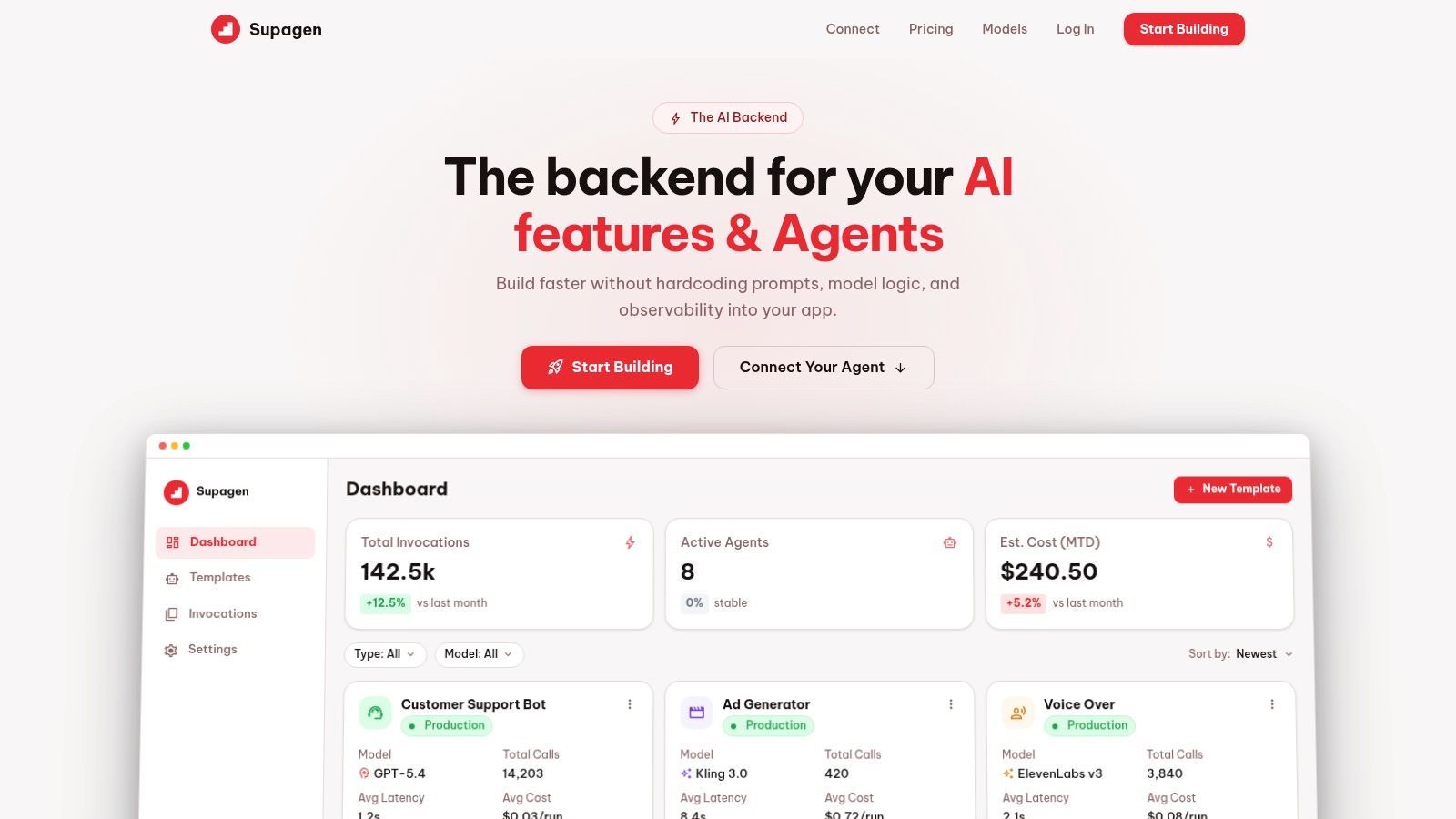
If you want a practical way to run that kind of adaptable backend, Supagen gives teams one place to manage prompts, route models across providers, set fallbacks, inspect logs, and track cost without hardcoding those concerns into the app. That makes it easier to move from AI prototype to production system while keeping the architecture flexible as your product evolves.