
Conversational AI Design: A Production-Ready Guide
Your team has probably already built the demo. The chatbot answers cleanly in a sandbox, the prompt looks elegant, and the first internal test feels encouraging. Then real users arrive with messy phrasing, half-finished requests, and edge cases your happy-path script never saw, and suddenly the feature feels fragile, expensive, and hard to trust.
That gap is where conversational AI design stops being a copywriting exercise and becomes a production discipline. The market pressure reflects that shift, too. One independent estimate puts the global conversational AI market at $13.64 billion in 2025, rising to $17.12 billion in 2026 and $42.51 billion by 2030, with a 25.6% CAGR over that period, which is why teams now need a formal design process that covers goals, persona, flow mapping, dialogue, guardrails, and testing instead of improvising prompts one by one Azumo's conversational AI statistics.
Table of Contents
- Beyond the Demo Why Real Conversational AI Needs Design
- The Four Pillars of Effective Conversation Design
- Architecture for Production-Ready Conversational AI
- Essential UX Patterns and Conversation Flows
- How to Measure Conversational AI Performance
- Designing for Safety Privacy and Cost
- Your Practical Conversational AI Design Workflow
Beyond the Demo Why Real Conversational AI Needs Design
The easiest mistake is to treat a conversational agent like a polished demo with a smarter model behind it. A product team wires up a GPT wrapper, adds a friendly system prompt, and watches the first internal users get the right answer on the first try. Then support tickets start showing up because the model forgets earlier context, users ask compound questions, and the cost of every extra turn becomes visible in the bill.
That failure mode is not a model problem alone. It's a design problem, because the system was never shaped to handle live traffic, unpredictable phrasing, or recoverable error states. Conversational AI design exists to make those interactions repeatable, testable, and supportable, not merely impressive in a demo room.
From scriptwriting to system design
A chatbot script assumes conversation is linear. Production traffic doesn't behave that way. Users interrupt themselves, switch topics, repeat instructions, and bring in details the flow never anticipated.
Once you accept that reality, the work changes. The job is to define goals, design the persona, map flows, write dialogue, add guardrails, and test the whole experience as a system, not as isolated lines of text Azumo's conversational AI statistics. That's why the field now blends psychology, UX, and linguistics. The interface has to stay comprehensible, consistent, and recoverable when things go wrong.
Practical rule: if the bot cannot explain what it can do, recover from confusion, and finish a task without a human stepping in, it's not production-ready.
The shift matters because teams are no longer optimizing for novelty. They're optimizing for reliability, scalability, and measurable business value. In that environment, conversational AI is judged less by whether it sounds natural and more by whether it can handle enough volume, with enough consistency, to justify its place in the product.
Why the old prompt-and-pray approach breaks
Prompt-and-pray works when traffic is tiny and tolerance for failure is high. It fails when every unsupported edge case becomes a support burden, every long turn adds latency, and every model drift changes the customer experience. At scale, the product team needs a design system that survives changes in model behavior, user behavior, and policy.
That's the practical meaning of production-grade conversational AI. It's not just a bot that chats. It's a measurable interaction system with defined goals, known failure modes, and a design process that can keep up with growth.
The Four Pillars of Effective Conversation Design
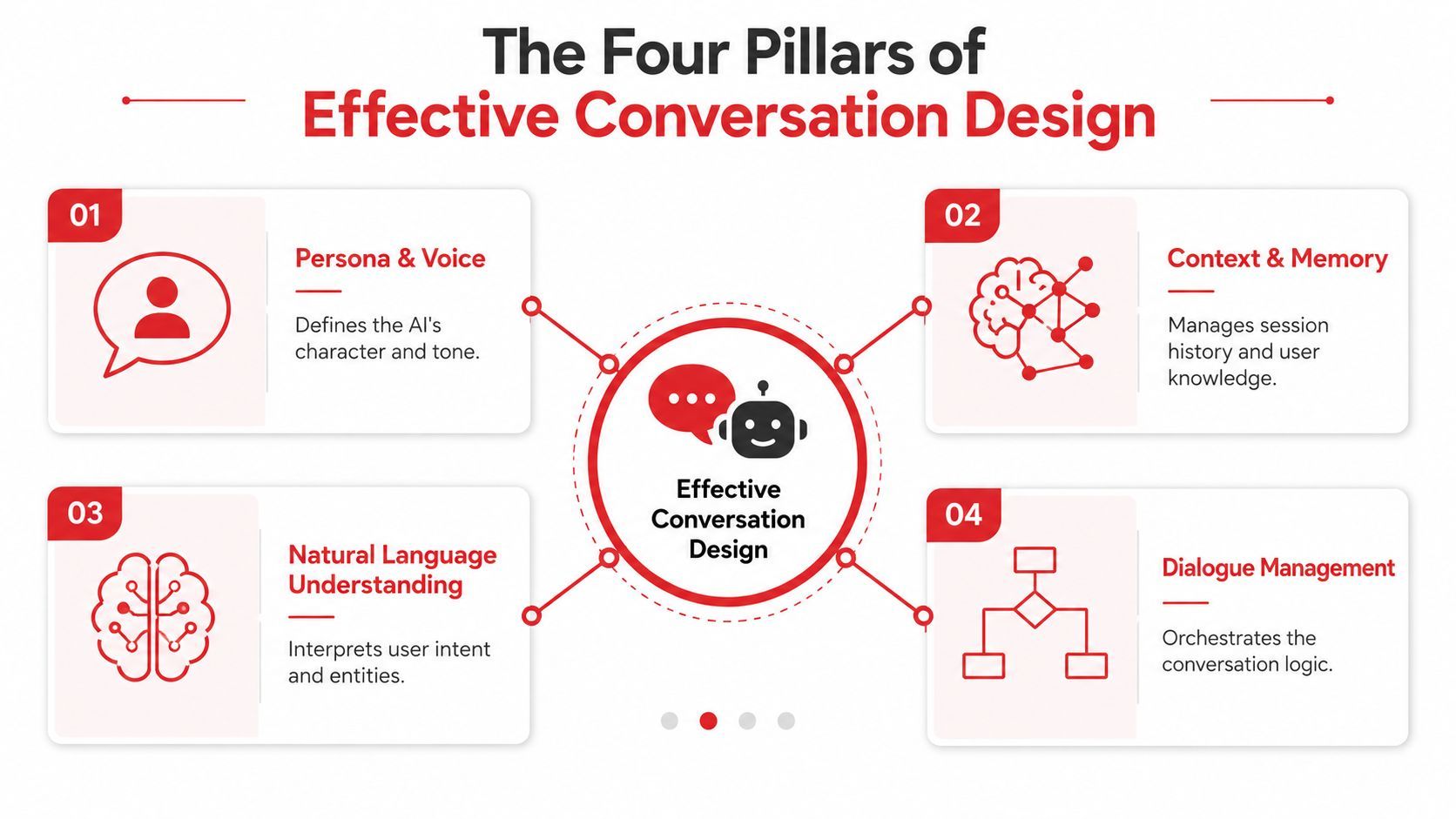
A useful way to think about conversation design is to separate the experience into four working parts. If one of them is weak, the whole interaction feels off, even when the model technically “knows” the answer. The four pillars are persona, context, turn-taking, and error recovery.
Persona and context give the bot its shape
Persona is the bot's brand voice. It's the equivalent of a style guide, only applied to every response the system generates. Without it, the same assistant can sound cheerful in one turn, cold in the next, and oddly formal after that.
Context is the short-term memory that keeps the conversation coherent. It tells the assistant what the user already said, what step they're on, and which assumptions still hold. If context is weak, users get asked the same question twice or get answers for the wrong task.
A strong persona doesn't mean the bot becomes a character for its own sake. It means users can predict how it will speak, how direct it will be, and how it handles uncertainty. A strong context model means the system doesn't behave like it forgot the last turn every time a user changes wording.
Turn-taking and error recovery keep the flow usable
Turn-taking is the conversational dance. Good systems don't overtalk, interrupt the user, or bundle too many actions into one step. They make it obvious whose turn it is and what the assistant expects next.
Error recovery is where many bots collapse. A weak system either blames the user, loops endlessly, or throws a dead-end message. A good one acknowledges the issue, narrows the next step, and gives the user a path forward without forcing a restart.
The best flows assume confusion will happen and design for recovery, not perfection.
That's why the field has moved beyond isolated dialogue lines. A usable conversational system needs a stable voice, a memory model, a clear turn structure, and a recovery path that doesn't break trust when the model misses.
What this means in practice
The four pillars are not abstract branding language. They're operational levers. When persona is inconsistent, quality feels random. When context is brittle, the assistant asks repetitive questions. When turn-taking is messy, users lose confidence. When recovery is weak, they abandon the flow.
Once you diagnose issues that way, improvement gets much easier. You stop asking whether the bot "sounds human enough" and start asking which pillar is failing, why it's failing, and what change will make the experience better.
Architecture for Production-Ready Conversational AI
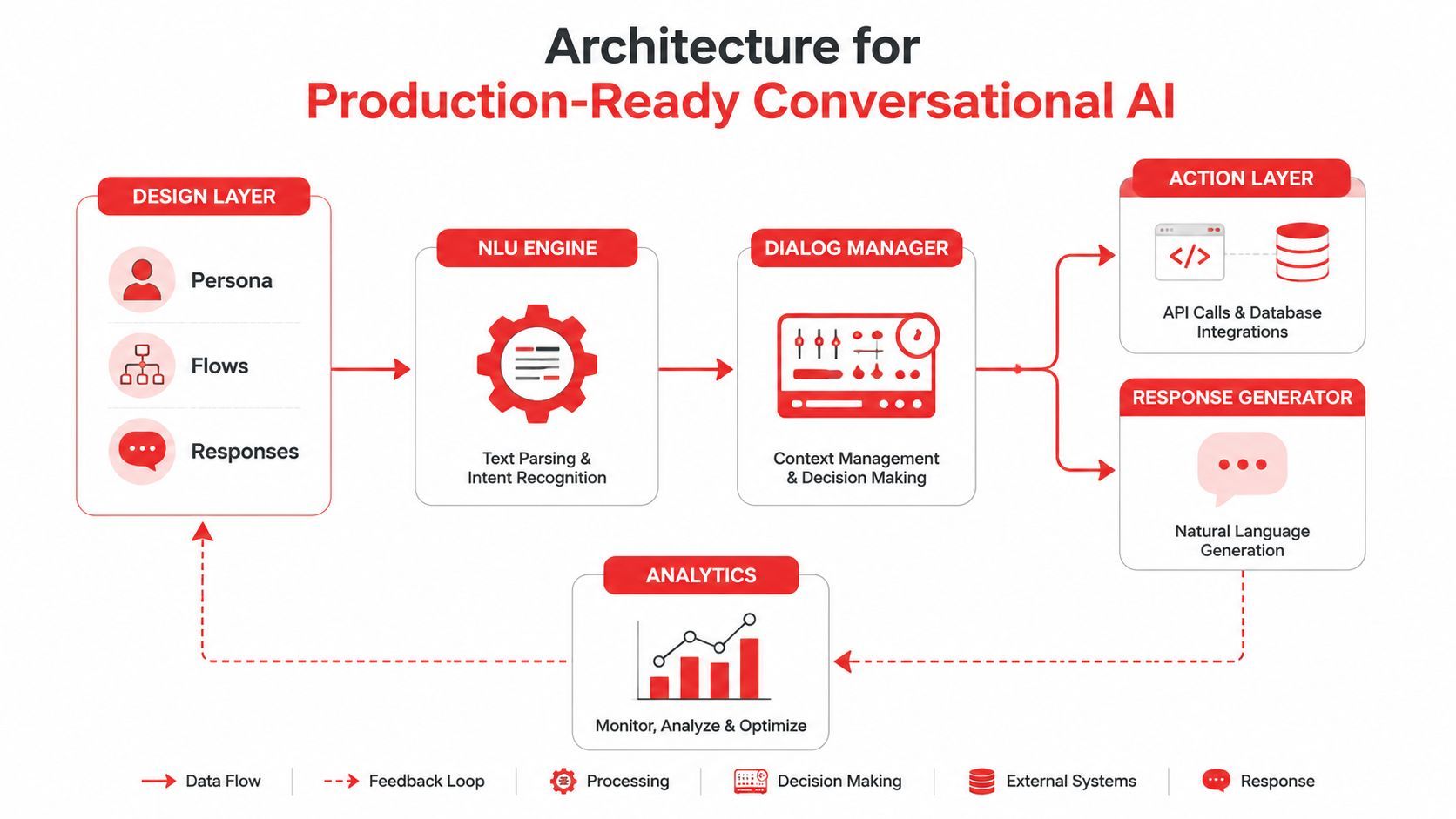
A production conversational product needs an architecture that makes behavior easier to control, measure, and change. If prompts, policy, routing, and business logic sit together in application code, every edit carries unnecessary risk. If those layers are separated cleanly, the team can improve the experience without treating every change like a full product rewrite.
Design layers need to stay separate from application logic
A production system usually includes a design layer for persona, flows, and response rules, an NLU engine that interprets intent and entities, a dialog manager that tracks state, and an action layer that calls APIs or databases. The response generator then turns that structure into text the user can follow.
That separation matters because it keeps conversation design independent from the rest of the app. The team can adjust prompts, policies, or fallback behavior without rewriting the integration code that powers the product. In practical terms, prompt management becomes the implementation of persona and policy, not a pile of hardcoded strings buried inside the app.
It also makes routing easier to govern. Different models can handle different tasks, and that choice is much easier to manage when product teams can change behavior without waiting on a full release cycle.
Multi-turn control is where systems become reliable
Production conversations need more than a single prompt. They need state, grounded actions, and clear limits on what happens in each turn. Bland's conversational AI design guidance recommends operational controls such as three prompt templates per intent, ten approved sample outputs as acceptance tests, a one-action-per-turn rule, and fault-injection tests that push unclear failure messages to a 90% clarity rubric before release Bland's conversational AI design guidance.
Those controls do two things. First, they reduce drift by giving the model fewer degrees of freedom in risky flows. Second, they create a review surface for QA and product teams, so behavior can be checked before it reaches users.
Engineering insight: if the output can't be tested, it can't be trusted.
The system becomes auditable. The team can see whether a specific intent is producing the right structure, whether the response stays inside policy, and whether the failure path still makes sense after prompt changes.
Analytics closes the loop
A production architecture should feed observations back into design. Logs, transcripts, latency, and failure patterns are not side effects. They are the raw material for improvement. That feedback loop is what separates a one-off bot from a maintained product.
A platform like Supagen fits this style of architecture because it keeps prompt management, model routing, and observability outside the core app logic. The principle is larger than any one tool, though. If you cannot see behavior clearly, you cannot design for it responsibly.
Essential UX Patterns and Conversation Flows
Good conversational UX doesn't try to make every exchange feel like small talk. It tries to move the user forward with the least confusion possible. The best flows are often short, explicit, and a little less “chatty” than people expect.
Disambiguation and progressive disclosure
Disambiguation matters when the user's request could mean two different things. A bot that asks, “Did you mean order status or cancel order?” is doing real design work. It's narrowing uncertainty without forcing the user to repeat the whole request.
Progressive disclosure works differently. It reveals information only as needed, so the conversation doesn't drown the user in choices. That pattern is useful for multi-step tasks because it keeps the interaction focused and lowers cognitive load.
A simple example looks like this:
User, “I need help with my plan.”
Assistant, “Do you want to change the plan, compare options, or see billing details?”
That's not a clever conversation. It's a useful one.
Guided task completion and human handoff
For tasks with multiple steps, the assistant should behave like a patient operator, not a generalist. It should gather one piece of information, confirm it, then move to the next step. That keeps the state clean and reduces the chance of the assistant making assumptions the user never confirmed.
A handoff to a human should feel deliberate, not like a failure. The system should preserve context, summarize the issue, and make it obvious why the transfer happened. If the user has to repeat themselves, the handoff design has already lost.
“If the bot can't finish the task safely, it should pass the conversation with context, not pass the frustration.”
The more complex the workflow, the more important that transition becomes. In practice, the best assistants know when to stop improvising and when to escalate cleanly.
Why these patterns outperform generic chat
These patterns work because they reduce guesswork. They constrain the interaction enough for the system to stay useful while still leaving room for natural language. They also make downstream measurement easier, since each flow has a clearer success condition.
That's the difference between conversational design and a loose collection of prompts. A well-structured flow gives users a path, gives the model boundaries, and gives the product team something worth measuring.
How to Measure Conversational AI Performance
A conversational feature only earns its place if the team can prove it works in production. The metric set has to show whether users are getting help, whether the system stays stable under real traffic, and whether the experience makes economic sense. Without that evidence, the product team is guessing about value.
The clearest operational measures are containment rate, resolution rate, latency, and task success rate. Each one answers a different question, and together they show whether the assistant is doing useful work or just generating activity.
Containment tells you whether the bot can carry the load
Containment rate measures how often the assistant resolves the interaction without human help. That matters because the business value of conversational AI often depends on how much volume it can absorb. One evaluation guide says enterprise containment rates typically fall between 70% and 90%, while FAQ bots often sit between 40% and 60%, and voice latency should stay under 800 milliseconds for natural conversation flow Ringly's conversational AI statistics.
Those figures give teams a reference point, not a universal target. The right benchmark depends on the use case, but the principle stays the same. If containment is low, the assistant is not reducing workload enough to justify itself.
Resolution rate is different. It tells you whether the issue was solved, not just whether the conversation ended. A bot can “contain” a user and still fail the task.
Latency shapes trust more than many product teams expect
Latency is one of the fastest ways to ruin the feel of a good agent. If the assistant pauses too long, users start wondering whether the system is stuck. If it responds too quickly but inaccurately, it can feel reckless or unhelpful.
High-performing systems are often designed with explicit performance targets. One architecture guide recommends intent recognition accuracy above 85%, response latency under 500 ms, and conversation completion rates that match human-handled interactions Bland's conversational AI architecture. Those thresholds force the system to optimize the full pipeline, not just the wording of the reply.
Business value has to show up in the metrics
The cost side is why these metrics matter. One market analysis estimates voice AI can cost roughly $0.40 per call versus $7 to $12 per call for human agents, a reduction of about 90% to 95% per automated interaction. The same source reports an average 340% ROI in the first year for AI chatbot implementations, with payback periods of 3 to 6 months Ringly's conversational AI statistics.
Those figures do not mean every assistant will deliver the same return. They do mean the economics are real enough that teams need instrumentation, not optimism. If a flow is slow, low-resolving, or constantly escalating, it will not hold up under scrutiny.
Measure the conversation the way finance measures a feature, by volume handled, time saved, and failure avoided.
That is the right mindset. Metrics are not just dashboards. They are the evidence that turns a promising assistant into a product decision the business can defend.
Designing for Safety Privacy and Cost
Safety and cost are not edge concerns. They shape what the assistant should be allowed to do in the first place. If a product team treats them as add-ons, the system becomes hard to trust, hard to govern, and expensive to operate.
Safety begins before the first prompt is written
The most overlooked safety issue is inclusion. A health-equity roadmap for AI recommends starting with formal needs assessments, co-designing with intended communities, and testing for cultural and language sensitivity so the system reduces, rather than reproduces, existing disparities PMC health-equity roadmap. That's a more operational answer than generic “be fair” advice because it turns safety into a design process.
It also changes who needs to be involved. Diverse design teams, community input, and ongoing auditing all matter because the assistant will mirror the assumptions built into it. If the team only tests with people like themselves, the model will likely fail in ways that don't show up until launch.
The other part of safety is policy. A bot that can answer anything will eventually answer something it shouldn't. Clear capability boundaries, fallback paths, and escalation rules are essential.
Cost control belongs in the interaction design
A lot of cost waste comes from bad conversation structure, not just the model choice. Long unnecessary turns, repetitive clarification, and poor routing all increase spend. That's why efficient conversational design often means asking fewer questions, collecting only the data you need, and moving the user through the task in a straight line.
Model routing helps too. A lighter model can handle routine tasks, while a stronger one can be reserved for harder cases. The key is to make that decision deliberately instead of letting every request hit the most expensive path by default.
Trust comes from visible restraint
A safe assistant doesn't overpromise. It says what it can do, admits what it can't, and hands off when uncertainty becomes risky. That restraint can feel less impressive in a demo, but it's exactly what users trust in production.
Cost and safety are linked here. A design that avoids unnecessary turns and dangerous improvisation is usually cheaper to run and easier to govern. In production, that's not a trade-off, it's the point.
Your Practical Conversational AI Design Workflow
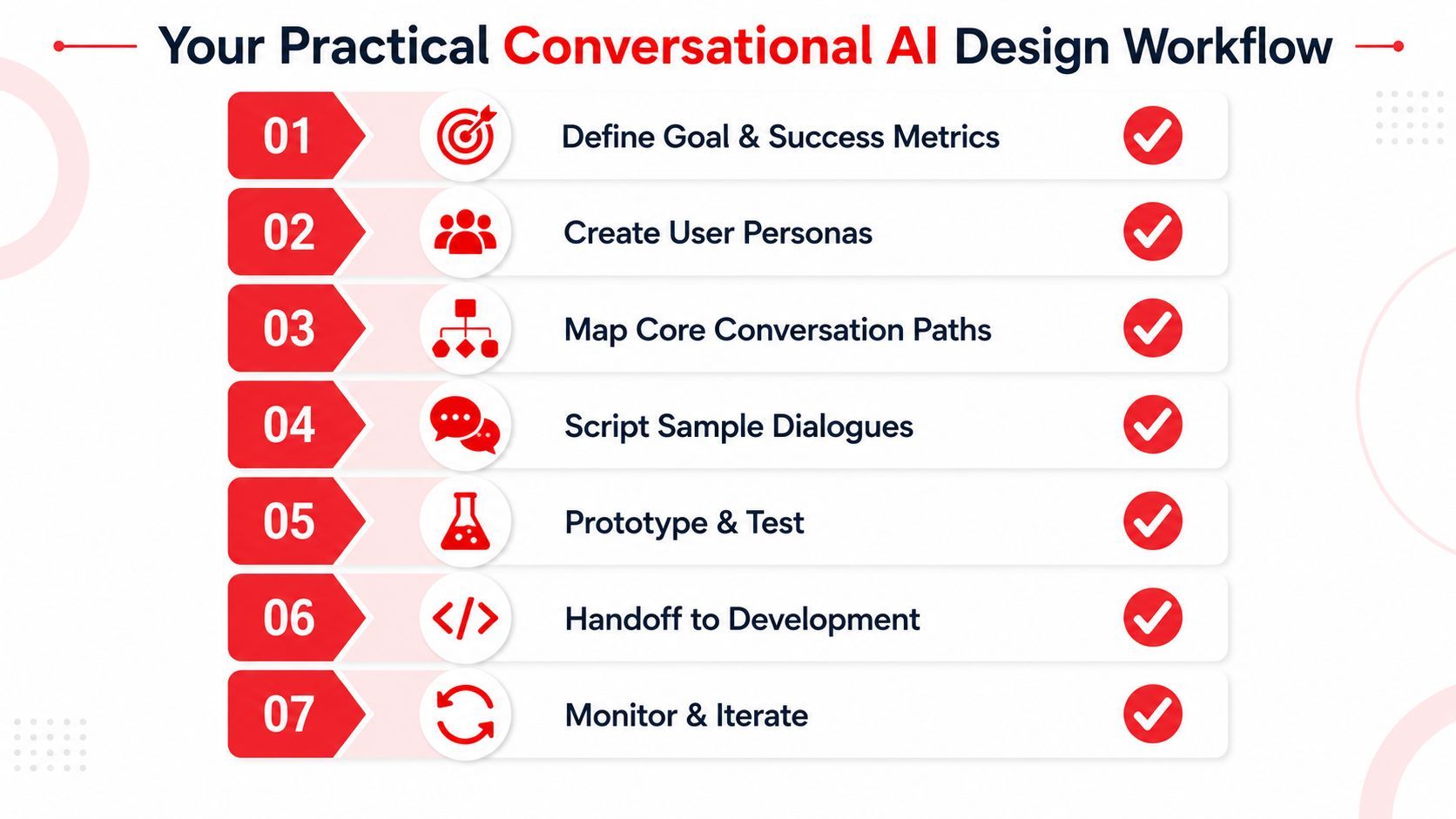
A small team can build a production-minded assistant without a huge research budget if the workflow is disciplined. The mistake is starting with prompts before the team knows what success looks like. The better sequence is to define the business outcome first, then shape the conversation around it.
Start with the goal and the failure modes
Define the task the assistant should complete. Then name the situations where it should escalate, refuse, or ask for clarification. If the team can't write those boundaries down, the flow is probably too broad.
Map the conversation before you write the copy
Sketch the user's path, including detours and recovery states. Keep the number of required turns as low as possible, and design for the moments where the user might change direction. That makes the eventual prompt work easier because the structure is already clear.
Build the prompt and policy layer as artifacts
Use versioned prompts, sample outputs, and clear response rules. Treat each intent as something that can be tested, reviewed, and updated. The emphasis should be on repeatability, not on chasing one perfect response.
Test against messy reality
Recent best practices from Microsoft and Twilio point to a gap many teams miss. They recommend explicitly defining capabilities and edge-case recovery, testing against real user transcripts, and running AI in parallel with human agents before full launch to ensure safety under live, messy conditions Twilio's conversational AI best practices. That is the right instinct, because demo traffic never reveals the same problems as production traffic.
Checklist for launch: real transcripts, clear fallback rules, human shadowing, and a review loop that can catch drift before users do.
Monitor, then iterate with purpose
Once the assistant is live, watch the logs, not the headlines. Look for failed intents, repeated clarifications, escalations, and slow responses. Then revise the flows that are causing friction instead of guessing where the problem might be.
A production-ready assistant is rarely finished. It gets better because the team keeps tightening the design around real usage, real failure, and real cost.
If you're moving from a chatbot demo to a real product feature, Supagen gives you the production layer this article keeps pointing to, prompt management, model routing, observability, and cost tracking in one place. If you want to stop hardcoding prompt behavior into your app and start shipping conversational features with more control, visit Supagen and see how it fits into your stack.