
ChatGPT Context Window: Effective Management for 2026
The most repeated advice about the ChatGPT context window is also the most misleading: get the biggest window you can, then stuff more into it.
That works right up to the point where your app becomes slower, more expensive, and less reliable.
Teams building production AI features learn this fast. A larger window helps only when the extra tokens are relevant, well-ordered, and structured for the task. If you dump in a long conversation, a full product spec, a pile of support tickets, and half a codebase, the model doesn't magically become wiser. It often becomes distracted. The result is familiar: answers drift, early constraints disappear, and important details buried in the middle never influence the output the way you expected.
The primary job isn't maximizing context. It's managing it.
That means treating the ChatGPT context window as a constrained resource, like CPU, memory, or database connections. You budget it. You shape it. You decide what belongs in immediate working memory and what should stay in external storage until retrieval is justified. That mindset changes system design. Instead of asking, “Can this model hold everything?” you start asking, “What does it need right now to do this step well?”
Table of Contents
- Introduction The Context Window Paradox
- What Is a ChatGPT Context Window
- Context Window Sizes Across Different Models
- The Real World Impact of Context Limits
- Why Bigger Is Not Always Better
- Techniques for Effective Context Management
- Choosing Your Strategy Production Trade-Offs
Introduction The Context Window Paradox
Developers love a clean spec sheet. A model with a larger context window sounds better in the same simple way that a server with more RAM sounds better.
But LLM systems don't behave like that in production.
A context window is useful capacity, not guaranteed comprehension. Modern models can take in far more text than the early generation that worked with roughly 4,096 to 8,192 tokens, and current ChatGPT-era models are commonly cited at 128,000 tokens, with some API-accessible models reaching 200,000 to 1,000,000 tokens depending on model and interface according to this context window history summary. That jump changed what teams can attempt. It made long documents, larger code slices, and deeper conversation history feasible in a single request.
It also created a bad habit. People started equating larger windows with fewer architecture decisions.
That's the paradox. Bigger windows remove one bottleneck, then expose a harder one: relevance. Once you can fit a lot more material into a prompt, the main failure mode shifts from truncation to dilution. The model sees more, but the task signal gets weaker. Contradictions creep in. Old instructions stick around. Less relevant text competes with the important text.
Practical rule: A bigger context window should reduce retrieval mistakes, not replace retrieval strategy.
In product work, the trade-off shows up fast:
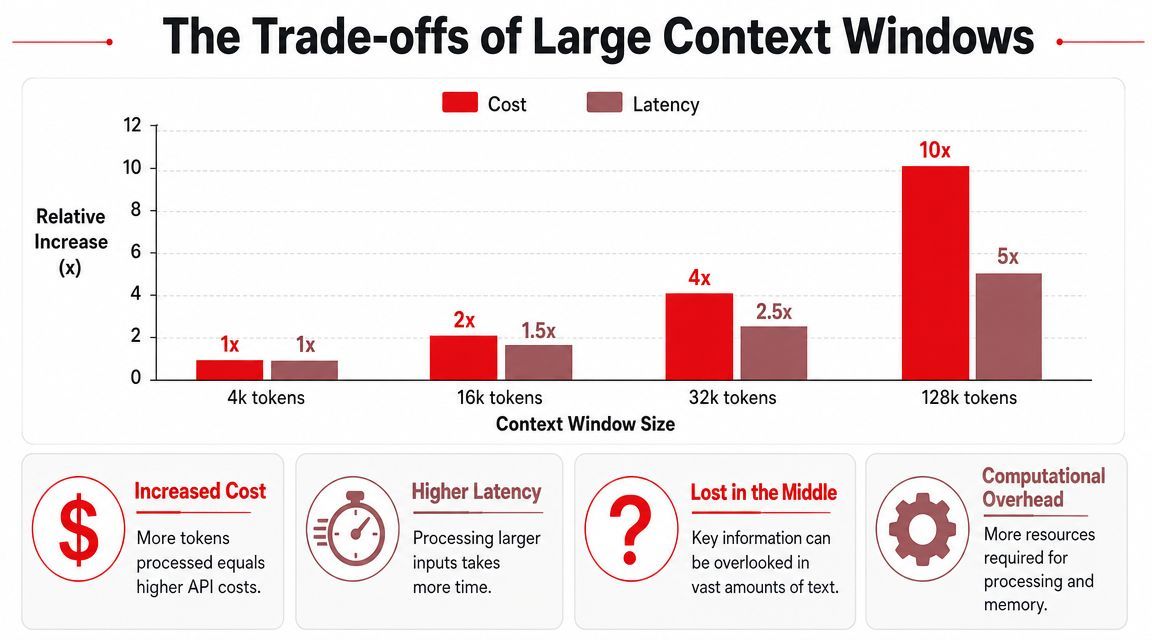
- Cost pressure: More input means more tokens processed.
- Latency pressure: Larger prompts take longer to run.
- Accuracy pressure: Extra context can help, or it can bury the thing that mattered.
The strongest AI features usually don't come from feeding the model everything available. They come from building a narrow path through available information. Good systems retrieve the right snippets, preserve key constraints, summarize stale history, and start fresh sessions when contamination risk gets too high.
That's the primary upgrade path for the ChatGPT context window. Not “more.” Better curation.
What Is a ChatGPT Context Window
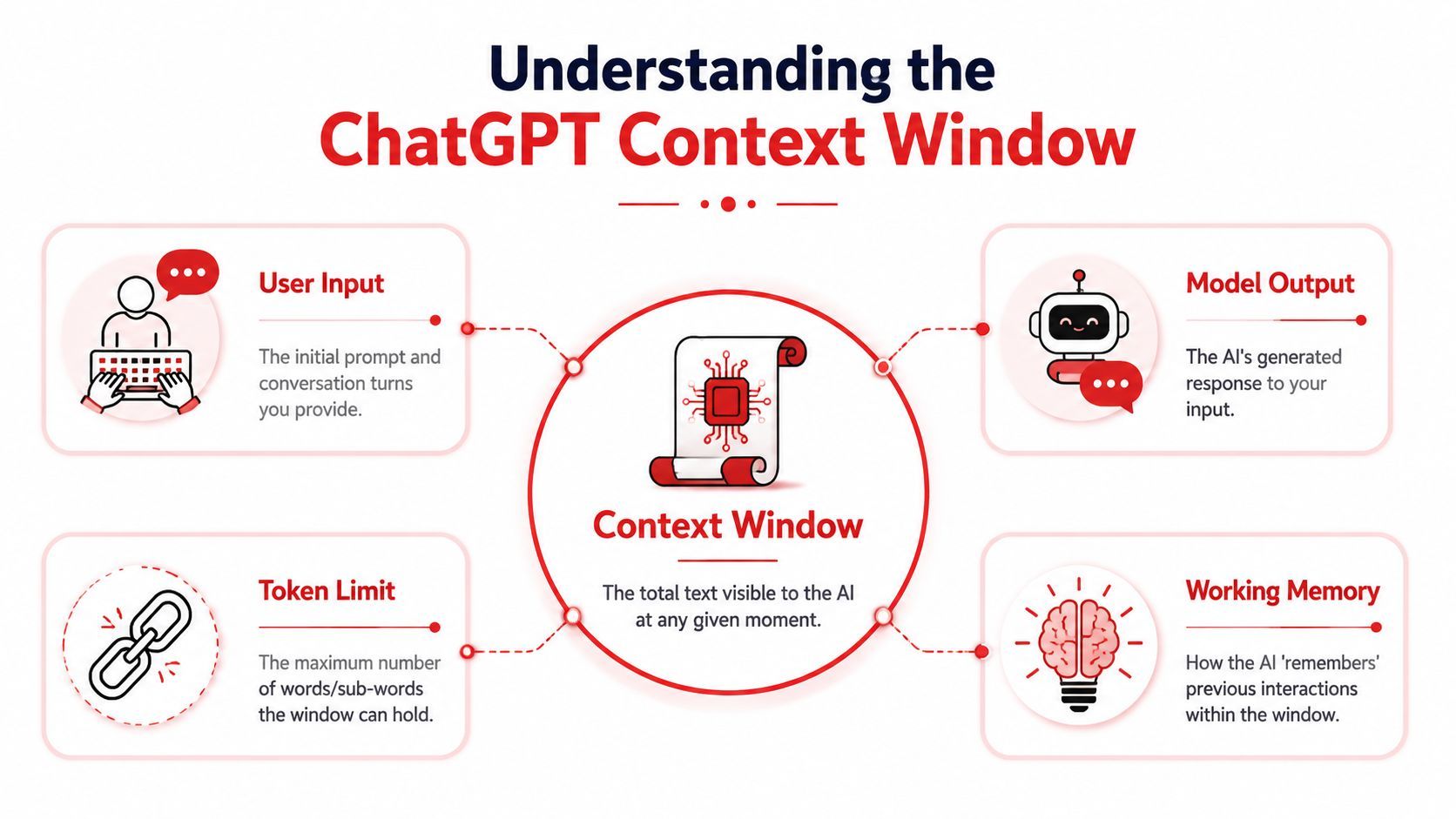
A ChatGPT context window is the model's working memory for a single interaction. IBM describes it this way: it's the maximum number of tokens an LLM can consider at one time, including both your prompt and the model's reply, and when that limit is exceeded the system must truncate or summarize earlier text, which is why long chats and large code tasks can lose earlier details or become inconsistent in IBM's explanation of context windows.
That definition matters because many product bugs come from misunderstanding it. The model doesn't have a stable mental record of your whole app, user, or repository unless you keep reintroducing the right details inside the current working set.
Working memory, not permanent memory
The simplest mental model is this: the context window is a whiteboard with limited space.
You write the user request on it. You add system instructions, examples, tool results, and previous turns. The model reads what's on the whiteboard and writes its answer. If the board gets crowded, something has to go. Sometimes the oldest text disappears. Sometimes a framework summarizes earlier notes. Either way, raw detail is lost.
That's why a chatbot can sound sharp in the first few turns and then start missing constraints later. It's not being stubborn. It's operating with bounded working memory.
Long-running chat sessions often fail because teams treat conversation history as truth instead of treating it as context that needs pruning.
Why tokens matter more than words
The context window is measured in tokens, not words.
That distinction matters because text, code, JSON, logs, and markdown consume tokens differently. A short-looking code block can be surprisingly expensive. Structured data can blow up token usage fast. Even punctuation and spacing patterns can affect tokenization.
For day-to-day engineering decisions, you don't need to obsess over exact token math in every sentence. You do need to remember three practical rules:
A useful design habit is to ask, before every request: what belongs in working memory, and what should stay outside it until needed?
That one question improves prompts more than squeezing in another block of text.
Context Window Sizes Across Different Models
The market moved fast. What used to be a narrow prompt budget is now large enough to affect product architecture.
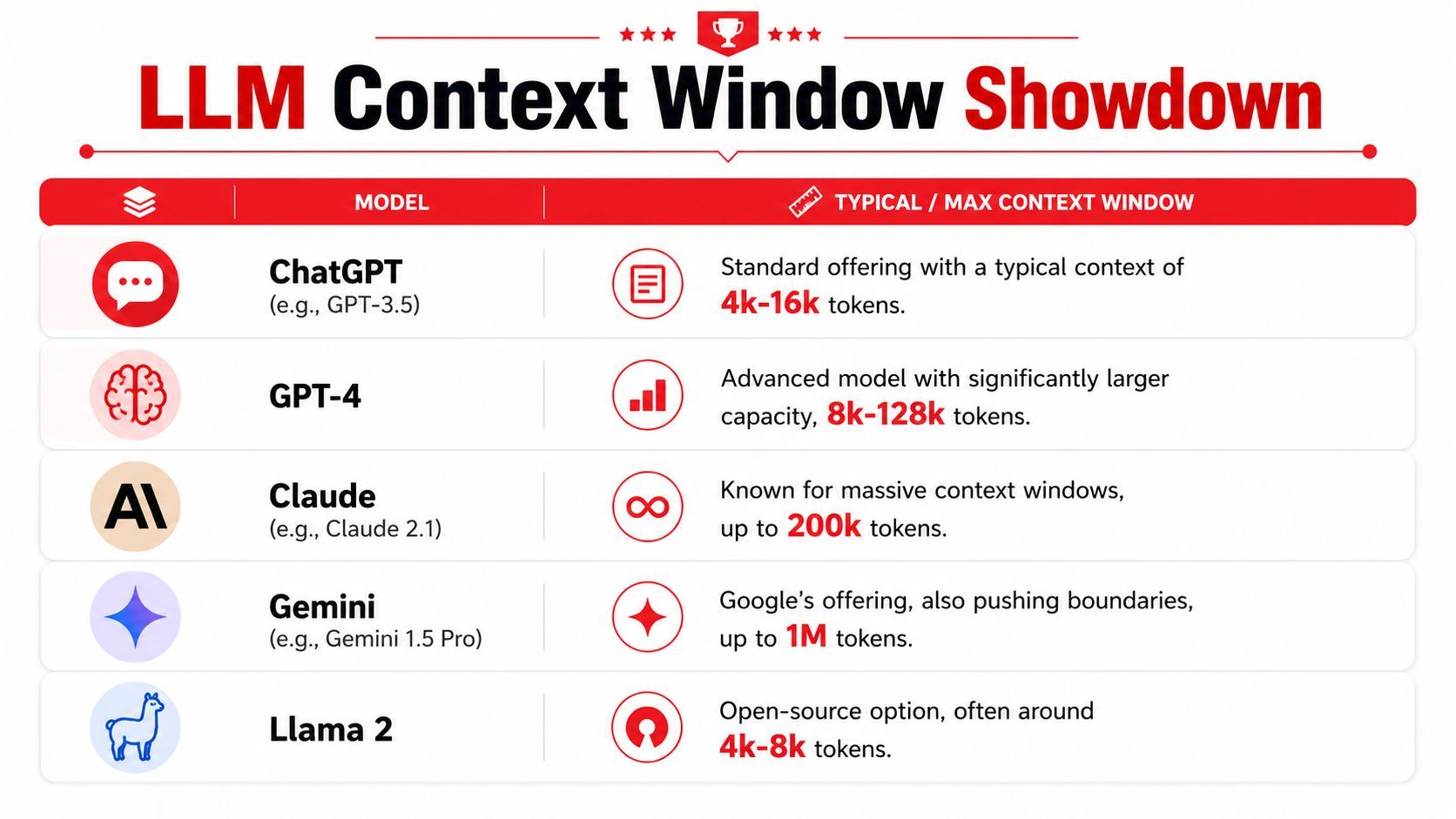
For major commercial models, Zapier's model comparison overview notes that OpenAI's GPT-4o and the o1 family support a 128,000-token window, while Google's Gemini 1.5 Pro reaches up to 2 million tokens. The same write-up also notes an important caveat: larger input windows help with documents and code, but output is capped separately, so a long input window doesn't guarantee an equally long response.
That last part gets ignored too often. Input capacity and output capacity are different knobs.
The jump from early limits to modern windows
The broad historical shift matters more than the exact leaderboard.
Early systems forced teams to think in very small slices. You could handle a short conversation, a few pages of text, or a limited code excerpt before hitting the wall. Modern systems changed that by making much larger single-pass tasks possible. You can now pass in long policy documents, larger pull requests, broader customer histories, or more retrieval results without immediate truncation.
That changed several product patterns:
- Document analysis became simpler: Teams could send more of a report in one request instead of pre-splitting everything.
- Coding workflows improved: Models could inspect larger function groups or multiple related files together.
- Multi-turn chat became more forgiving: Bots could retain more interaction history before forgetting key details.
What those sizes change in practice
A large window is best seen as design headroom.
If you're building a support assistant, a bigger window can hold recent turns, account notes, safety instructions, and current tool output at once. If you're building a repo assistant, it can hold architecture notes, the active files, and the test failure trace in one call. That's useful. It can reduce orchestration overhead and simplify prompt assembly.
Still, window size alone doesn't answer the main engineering questions:
The right takeaway isn't that big windows are hype. They're not. They're a major capability increase.
The right takeaway is narrower: they expand your options, but they don't remove the need for context discipline.
The Real World Impact of Context Limits
Most context problems don't show up as explicit errors. They show up as confidence paired with drift.
A support assistant starts a conversation correctly. It asks for the user's billing issue, confirms the account state, and offers a path forward. Then the thread gets long. The user adds background, asks a side question, and returns to the original issue. Later replies start ignoring the original constraint. The bot suggests steps that don't match what the user already said.
Support bots forget the setup
This happens when the system treats the full conversation as equally important.
In practice, support flows have layers of value. Current issue, account status, and the last few actions matter a lot. Greetings, repeated clarifications, and resolved side paths usually don't. If you keep all of it in the prompt, the important pieces stop standing out.
The result isn't just “memory loss.” It's inconsistency. The model may remember fragments, but not the right hierarchy of facts.
A better production pattern looks like this:
- Track canonical facts externally: Store issue type, selected plan, current step, and verified account details outside the chat transcript.
- Summarize old turns: Replace resolved discussion with a compact state summary.
- Rebuild the prompt each turn: Don't blindly append every past message forever.
Code assistants lose the file shape
The same failure mode hits coding tools.
A developer asks an assistant to refactor a large module. The first answer is plausible because the model still sees enough of the file structure. After more back-and-forth, the assistant starts proposing changes to functions that no longer exist in the visible working set. It renames symbols inconsistently or misses a constraint declared near the top of the file.
The model doesn't need the whole repository most of the time. It needs the active task, the relevant files, and the invariants that must not change.
For code features, the cost of bad context is higher than a mediocre answer. You get changes that look polished but violate architecture, tests, naming conventions, or interface assumptions. That's why mature code assistants stage information. They fetch files on demand, preserve compact summaries of decisions, and keep hard constraints separate from transient discussion.
The impact of context limits is practical, not academic. They shape whether users trust your feature after the fifth turn, not just the first.
Why Bigger Is Not Always Better
Here, the common advice breaks.
Large context windows are useful, but they don't guarantee stable performance across the whole window. Recent industry analysis covered by Atlan's discussion of LLM context window limitations notes that some frontier models can degrade well before their advertised maximum. The same analysis cites a 2025 review reporting failures in some models at as little as 100 tokens of context and clear accuracy degradation by around 1,000 tokens in some tests. It also reports that context rot can reduce accuracy by more than 30% in mid-window positions across 18 frontier models.
That should reset expectations. Window size is capacity. It isn't proof that attention remains equally sharp across that full space.
Context rot is a product problem
“Context rot” sounds academic, but product teams feel it as unpredictability.
You pass more information into the model because you want safer answers. Instead, answer quality gets less stable. Sometimes it uses the right passage. Sometimes it latches onto a nearby but weaker one. Sometimes the same prompt works until the chat gets longer, then starts missing facts that are plainly present.
That unpredictability hurts three areas at once:
- User trust: The feature seems smart, then suddenly sloppy.
- Debugging: Logs show the needed info was present, but the output ignored it.
- Cost control: Teams spend more on tokens without getting proportional quality.
Lost in the middle changes prompt design
A related issue is the lost in the middle effect. A practitioner summary in this Product Talk article on context rot argues that when the window is less than 50% full, models can lose tokens in the middle, and when it is more than 50% full, they can lose the earliest tokens.
That matches what many builders see in practice. Important information is safest when it's structured, repeated carefully when necessary, or surfaced close to the active instruction. Burying the key rule inside a large blob of reference material is a poor prompt strategy even when the model can technically “fit” it.
A few practical implications follow:
Big windows are still valuable. They just work best when treated as a flexible staging area, not a junk drawer.
Techniques for Effective Context Management
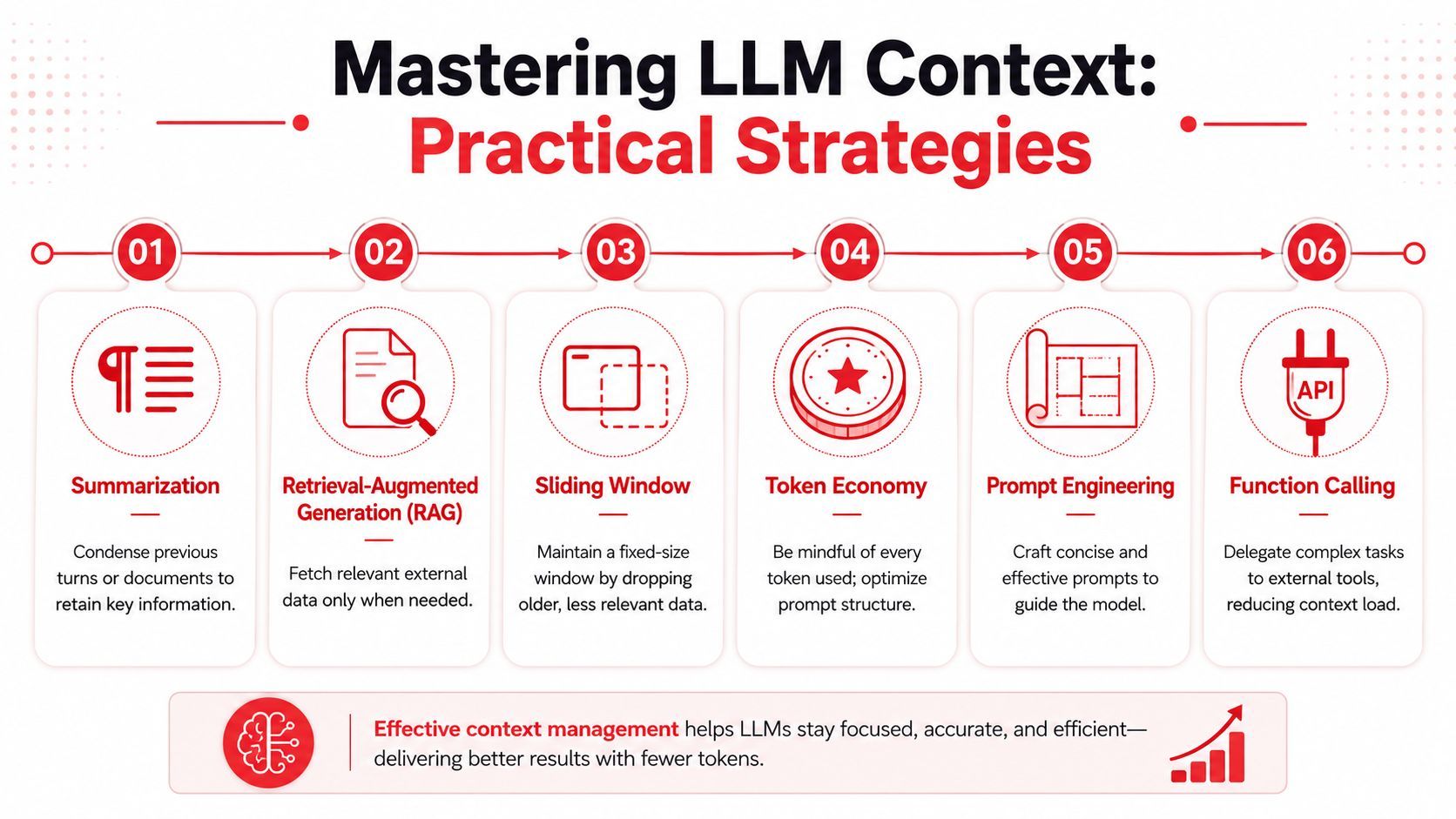
Once you stop assuming bigger is always better, the design choices get clearer. The goal is to feed the model the minimum useful context for the current step, not the maximum possible context.
Use retrieval instead of stuffing everything in
Retrieval-augmented generation (RAG) is usually the first serious fix.
Instead of sending all documents, messages, or files every time, you index them and retrieve only the pieces relevant to the user's current request. That reduces noise, lowers token load, and improves the odds that the model pays attention to the right evidence.
RAG works well when your source material is large, changes often, or contains many unrelated parts. Support knowledge bases, internal docs, product catalogs, and code search are obvious fits.
What works in production:
- Chunk by meaning, not arbitrary size: Split docs around headings, sections, functions, or API boundaries.
- Retrieve a small set of high-relevance passages: More passages aren't always better.
- Preserve metadata: Title, source, section name, and timestamp help the model reason about what it's seeing.
What usually fails is “poor man's RAG,” where teams fetch too much, don't rerank, and then assume the model will sort it out.
A quick walkthrough helps frame the mechanics:
Summarize, segment, and isolate tasks
Summarization is the second core tool, especially for chat systems.
You don't want to keep every prior turn. You want a compact state record: what the user wants, what has been confirmed, what constraints apply, and what remains unresolved. Good summaries are factual, structured, and refreshed as the session evolves.
Research also shows another risk that matters beyond chat. In this study on ChatGPT for text analysis, keyword extraction and topic classification varied significantly depending on the order of texts, and the authors advise running zero-shot analyses in separate chat windows to avoid context deterioration. That's a strong reminder that context can distort analysis tasks, not just conversations.
Three techniques consistently help:
- Isolate distinct jobs: Run classification, extraction, summarization, and rewriting in separate sessions or calls when possible.
- Use sliding windows for chat: Keep recent turns plus a durable summary, not the entire raw transcript.
- Offload with tools and function calls: Let the model call search, database, or application functions instead of carrying all raw data in prompt text.
Operator mindset: Every token should either define the task, constrain the output, or supply evidence. If it does none of those, cut it.
For many products, the best architecture is a small or mid-sized model paired with retrieval, summaries, and tool use. That combination often beats a giant raw prompt because it gives the model cleaner inputs instead of just larger ones.
Choosing Your Strategy Production Trade-Offs
The production question isn't “What's the biggest context window available?” It's “What combination of model, retrieval, summarization, and prompt assembly gives us acceptable quality at acceptable speed and cost?”
A simple decision framework
Use a larger window when the task genuinely depends on broad local context. Reviewing a long contract section, inspecting several connected files, or reasoning over a tightly related packet of material can justify it.
Use retrieval-first design when your information is large, heterogeneous, or only partly relevant to each request. That's the default choice for knowledge assistants, support systems, and most agent workflows.
Use fresh sessions when tasks are analytically distinct. That matters because context-window size doesn't equal usable memory in practice. As noted in the earlier discussion of context limitations, some models degrade much earlier than their headline limits suggest.
What reliable teams optimize for
Reliable teams optimize for repeatability.
They preserve durable facts outside the prompt. They treat chat history as a temporary buffer, not the system of record. They log prompt inputs and retrieved passages so they can debug failures. They measure whether extra context improves answers or just increases spend.
If you're building with LLM APIs, the winning posture is conservative and modular. Keep the active context narrow. Retrieve late. Summarize often. Reset when contamination risk rises. Spend token budget where it changes the answer, not where it just feels safer.
If you're shipping AI features and don't want prompt versions, model routing, fallbacks, latency logs, and cost tracking scattered across your app code, Supagen gives you a cleaner production layer. You can manage prompts, switch providers, inspect per-call behavior, and scale agent workflows without turning every iteration into a redeploy.