
Best Practices for Coding AI Products: A 2026 Guide
Building AI-powered features feels smooth right up until the first production incident. A prompt change breaks a workflow, a provider rate-limits your app, the logs don't tell you what happened, and the team is stuck redeploying for a one-word fix. The best practices for coding AI products in 2026 aren't about prettier functions or cleaner comments, they're about building a backend you can inspect, test, route, and roll back without losing momentum. That means treating prompts, models, logging, tests, and security as production infrastructure, not side effects. The old habit of hardcoding everything into application code doesn't survive contact with real AI usage.
Table of Contents
- 1. Separation of Concerns Decoupling Prompts from Application Code
- 2. Model Routing and Provider Abstraction
- 3. Comprehensive Observability and Structured Logging
- 4. Cost Tracking and Token Optimization
- 5. Version Control and Rollback Capabilities for Prompts
- 6. Prompt Testing and Evaluation Frameworks
- 7. Error Handling and Graceful Degradation
- 8. Prompt Engineering Iteration and A/B Testing
- 9. Security and Input Validation for LLM Integrations
- 10. Documentation and Team Knowledge Sharing for Prompts
- Top 10 Prompting & LLM Integration Best Practices Comparison
- Build Your AI Backend, Not Just an AI Feature
1. Separation of Concerns Decoupling Prompts from Application Code
The quickest way to make an AI product brittle is to bury prompts inside route handlers, UI callbacks, and helper functions. That might hold up in a prototype, but every wording tweak turns into a code deploy. A better setup keeps prompt logic, model configuration, and business logic separate, which supports reproducibility, traceability, documented workflows, range checks, duplicate checks, consistency checks, and auditable editing processes, as described in an NIH-indexed review on reproducible statistical computing.
This separation matters even more when teams use systems like Supagen to manage prompts outside the codebase. You can update instruction text in a centralized editor, version it, and test a variation without touching application code. In practice, that means the team stops treating prompts like magic strings and starts treating them like product assets with ownership, review, and intent.
Start with the prompts that change most
Don't boil the ocean. Pull out the prompts that get edited every week first, usually extraction, classification, summarization, or generation prompts. Those are the ones that create the most deploy friction and the most accidental regressions.
Practical rule: if a prompt changes more often than the code around it, move it out of the codebase.
Use a simple versioning convention, document the expected output shape, and create reusable templates for common patterns. A classification prompt should not live next to payment logic, and a JSON extraction prompt should not be coupled to a React component. Teams that separate these concerns can move faster because they are no longer rebuilding the whole app just to fix the phrasing of a single instruction.
2. Model Routing and Provider Abstraction
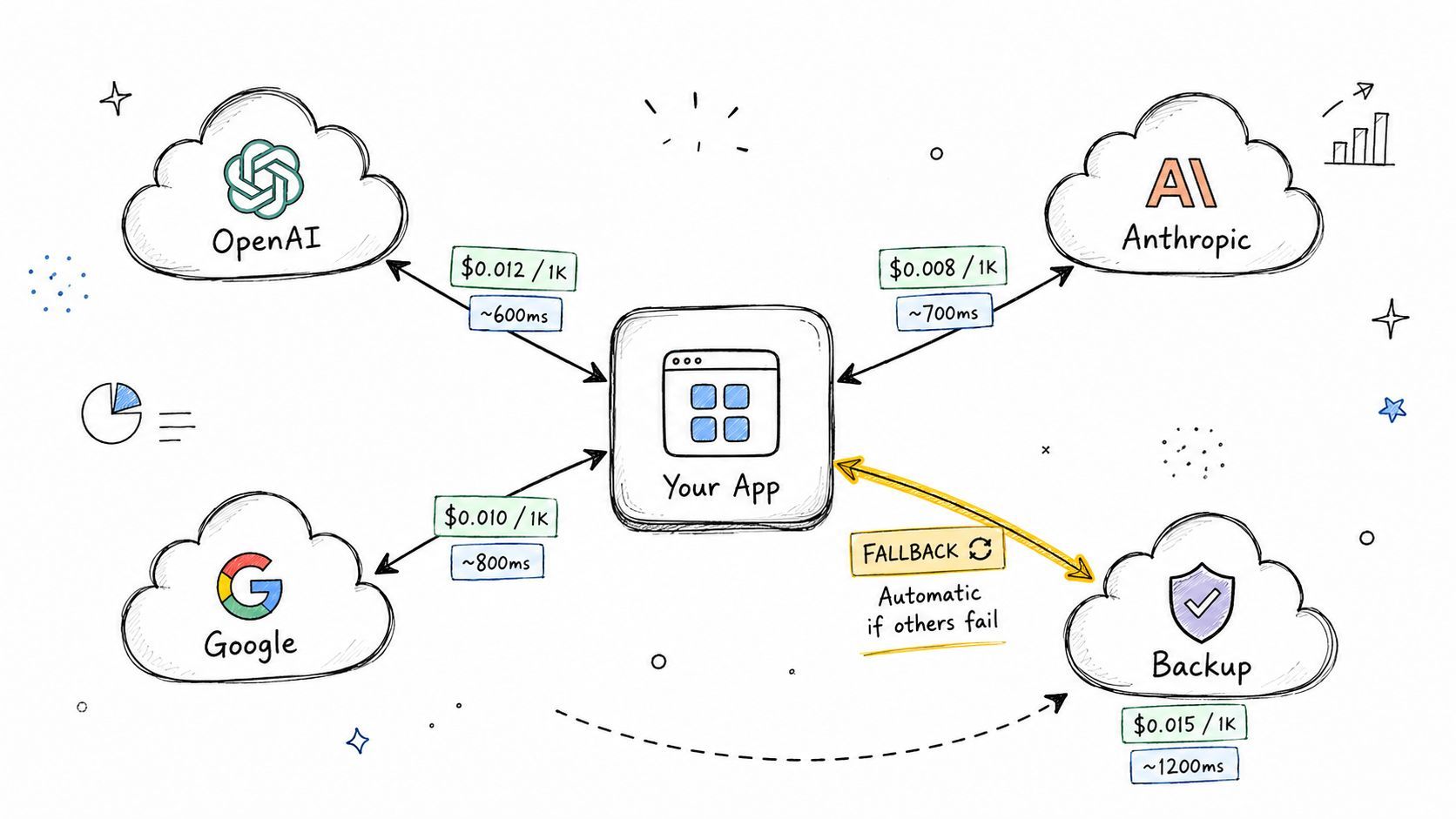
Most AI products don't have one model problem, they have a routing problem. One request needs speed, another needs deeper reasoning, another needs a fallback when the primary provider is slow or unavailable. The practical answer is to add a provider abstraction layer so the app can route requests without rewriting business logic every time you switch vendors.
That abstraction is already baked into tools like LiteLLM, which is used to normalize access across many models, and the Vercel AI SDK, which helps production apps swap providers cleanly. Supagen's routing layer is built around the same principle, letting teams switch between providers like OpenAI, Anthropic, Google, and ElevenLabs without changing the app contract. The engineering win is obvious. Your product logic asks for “summarize this transcript,” not “call this exact vendor in this exact way.”
Route by task, not by habit
A lot of teams default to their favorite model for everything. That gets expensive and leaves quality on the table. Define routing rules based on the job. Use a stronger model for complex synthesis, a cheaper one for deterministic classification, and a fallback path for interruptions or outages.
- Primary path: send the normal request to the best-fit provider for the task.
- Backup path: retry through a second provider when the first one fails or degrades.
- Emergency path: fall back to a cached result, a simpler response, or a graceful failure message.
The key trade-off is control versus simplicity. More routing logic means more test cases, but it also means you're not locked into one model's price, latency, or uptime profile. That flexibility becomes the difference between shipping AI features and babysitting them.
3. Comprehensive Observability and Structured Logging
AI systems fail in messy ways. A request can succeed technically and still return a useless answer, burn too many tokens, or route to the wrong provider. If you can't see those details, you can't fix them. That's why the best practices for coding AI features include structured, queryable observability from the first production call.
A survey of developers using automatic static analysis tools found that 48% used them multiple times per day and 23% once per day, with tools used across local development, code review, and CI (static analysis workflow survey). That pattern matters for AI too, because the highest benefit comes from seeing issues early and repeatedly, not waiting for a release gate to notice something broke.
Log the request context, not just the error
Text logs are too weak for AI work. Use structured JSON and include the prompt, inputs, outputs, latency, token usage, routing decision, trace ID, and any fallback behavior. That gives you a timeline you can query instead of a wall of text you have to read manually.
If a customer says the answer was wrong, the first question is not “what did the model say?” It's “what did the whole request look like?”
Tools like LangSmith, Honeycomb, DataDog, and New Relic help teams inspect LLM behavior, and Supagen's dashboard is designed to show per-call logs with tokens, latency, I/O, and costs in one place. Add PII redaction before logging, set retention policies that match compliance requirements, and make sure your traces connect AI calls back to the user action that triggered them. Once that wiring exists, debugging stops being a guessing game.
4. Cost Tracking and Token Optimization
AI costs usually do not spike in one clean jump. They creep up through longer prompts, more expensive models, higher usage, and extra retries, then show up in the invoice after the fact. Production teams need per-request cost tracking in real time, plus a habit of fixing the biggest repeat offenders first.
Repeated context should not be paid for every time it appears. Anthropic's prompt caching guidance treats repeated prompt material as a target for cost reduction, and the guidance notes that caching can reduce the cost of repeated prompts by 90% when it applies (Anthropic prompt caching guidance). That does not mean every feature should cache everything. It means repeated deterministic work, such as parsing, translation, or stable summarization flows, should have a caching strategy before traffic grows.
Optimize the expensive paths first
Start by measuring baseline token use for each feature before trimming context. That shows which parts of the product are driving spend, and it keeps you from optimizing the wrong thing. Then cut the obvious waste.
- Cache deterministic outputs: reuse answers for repeated inputs when the output should stay the same.
- Batch related work: group multiple small requests into one where the task allows it.
- Trim irrelevant context: do not send the model everything if it only needs the latest record or a short excerpt.
- Use cheaper models for simple tasks: classification and routing logic rarely need the heaviest model.
- Set alerts early: watch for cost spikes before they turn into billing surprises.
Supagen's per-call cost visibility helps teams see which prompts and providers are expensive. The trade-off is straightforward, aggressive token cutting can hurt quality if it removes needed context. Optimize with measurements, not guesses, and review cost trends weekly instead of waiting for finance to tell you the feature is too expensive.
5. Version Control and Rollback Capabilities for Prompts
Prompts need rollback the same way code does. If a prompt change degrades answers or a compliance review forces a wording update, the team needs a clean way to revert. The safest pattern is to treat prompts as versioned artifacts with history, diff views, metadata, and rollback behavior, not as inline strings buried in source files.
Prompt platforms and code workflows converge on this principle. Git-style history for prompts lets teams see what changed, why it changed, and who approved it. Supagen's prompt management supports version history and rollback, which fits the same operational mindset that reproducible analytical work depends on in documented workflows, as described in an NIH-indexed review on reproducible statistical computing.
Make rollback boring
Keep prompt changes small, named, and reviewable. Use semantic versioning if it fits your team, and require commit messages or changelog entries that explain why the change was made. That context matters when a bug report points back to a prompt edit from two sprints ago.
A prompt that cannot be rolled back is a production risk, not a configuration choice.
Canary rollout is worth using when a prompt affects customer-facing behavior. Send it to a small slice of traffic first, watch the outputs, and only then expand. The goal is not perfection. The goal is to shrink the blast radius when the model behaves differently than expected.
6. Prompt Testing and Evaluation Frameworks
If you're not testing prompts, you're just hoping they still work. That's a bad bet in production, especially when tiny wording changes can shift model behavior in ways that look fine in a sandbox and fail in front of users. The right habit is to define a test set, run evaluations before release, and wire those checks into CI/CD.
The Berkeley statistical computing guide is blunt about the discipline needed for reliable coding, including reusable functions, testing each function, and not hard coding assumptions (Berkeley statistical computing guide). The same principle applies to prompts. A prompt with no test cases is just a guess that happens to be written down.
Build a small but real evaluation set
Start with representative examples, not a giant synthetic suite. Include the normal cases your product sees every day, plus the edge cases that usually break things.
Use multiple metrics. Accuracy matters, but so do consistency, hallucination behavior, and cost. If the output is technically correct but too expensive or too verbose, that still counts as a failure in production. Test against the exact output shape your downstream code expects, especially when one bad field can break a workflow.
Useful habit: keep the test cases next to the prompt version they were written for, so regressions are easy to compare later.
Tools like LangSmith support LLM evaluation workflows, and products like Supagen let teams iterate in a visual editor before pushing changes. That combination is valuable because prompt work becomes much easier to trust when every revision has a visible evaluation trail. Human review still matters for tone and usefulness, but automated checks should catch the obvious breakages first.
7. Error Handling and Graceful Degradation
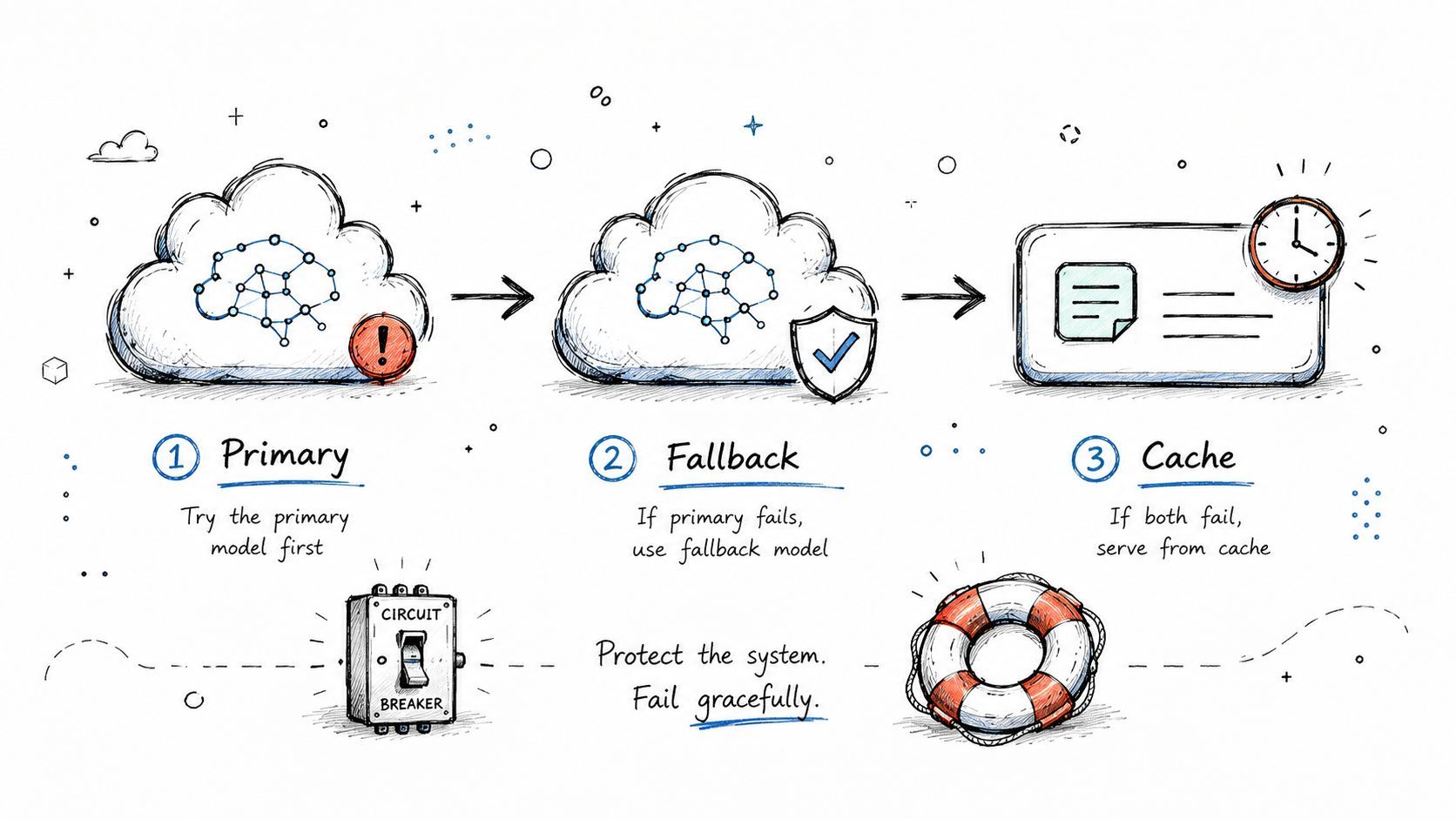
AI features should fail softly. Users do not care that the model hit a temporary provider issue, they care whether the product still works. That means you need clear handling for recoverable errors, permanent errors, timeouts, fallback providers, and partial functionality.
Retry logic should start with exponential backoff, and the OpenAI API documentation on retry handling points to that approach for temporary failures and rate limits. Retry alone is not enough, though. If your app has no fallback path, retries only postpone the outage.
Design for partial success
Classify the failure before you decide what to do next. A malformed input should usually fail fast. A provider timeout might trigger a retry. A full provider outage should move the app into a degraded but still useful state.
- Set a timeout: do not let an LLM call hold the user experience indefinitely.
- Retry with backoff: use a staggered retry pattern instead of hammering the provider.
- Fail over cleanly: route to a backup provider, cache, or simpler fallback response.
- Tell the user the truth: do not expose internal API details in the error message.
- Log the full context: capture enough detail to reproduce the issue later.
Supagen's fallback configuration helps automate part of that workflow, but the product decision still matters. A support assistant might degrade to a search-only response, while a content feature might save the draft and ask the user to try again. Graceful degradation is usually a product design decision wrapped around a technical one, and good teams treat it that way.
8. Prompt Engineering Iteration and A/B Testing
The best prompt rarely shows up on the first try. Teams get better results by testing small variations, measuring the effect, and keeping what performs better in production. That's especially true for AI features because what sounds clearer to a human doesn't always produce cleaner model output.
The most reliable pattern is controlled iteration. Change one variable at a time, keep the traffic split small at first, and let the data tell you whether the new prompt is better. Supagen supports prompt versioning that can be rolled out to small traffic percentages, which is useful because you can compare variants without rewriting the app.
Test behavior, not just wording
A/B tests should reflect the outcome you care about, not the prompt text itself. If the feature is a support assistant, measure whether the answer is more useful. If it's an extraction flow, measure whether downstream parsing succeeds. If it's a summarizer, measure whether the summary stays within the desired shape and tone.
Run tests long enough to avoid reacting to noise, and make sure the team agrees on success before the experiment starts. Cost matters too. A “better” prompt that burns significantly more tokens may not be the right default for a product that needs margin discipline.
The model doesn't know which version you prefer. Your users only feel the one you ship.
The practical trade-off here is speed versus confidence. Faster iteration gets you to a usable prompt sooner, but structured rollout protects the product from regressions. Mature teams keep both by using versioned variants, clear metrics, and a rollback path that doesn't involve a scramble in the middle of the day.
9. Security and Input Validation for LLM Integrations
LLM integrations open new attack surfaces as soon as they sit inside a real product flow. Prompt injection, data leakage, token abuse, and exposed credentials all surface quickly when user text reaches the model without controls. Security cannot sit at the end of the project, because the model will process anything that gets through.
The OWASP LLM Top 10 is a useful frame for this work because it pushes teams beyond standard API protection and into model-specific risks. Anthropic's guidance also puts weight on input validation and system prompt protection, while OpenAI's security practices cover API key management and related basics. OWASP LLM Top 10 and secure coding guidance. The practical takeaway is simple. Treat the model as a powerful component, but do not trust it by default.
Reduce what the model can touch
Start at the input boundary. Validate length, type, and format before anything reaches the model. Add rate limits so one user cannot drain your token budget or flood the provider, and keep API keys in secret storage rather than in code. Restrict permissions to the minimum needed for the task.
- Validate user input: block malformed or oversized requests early.
- Redact sensitive data: remove PII before logging or passing it downstream.
- Limit request volume: cap requests and token counts per user or per minute.
- Audit prompt changes: track who changed what and when.
- Filter outputs when needed: use moderation or guardrails for sensitive workflows.
Prompt injection needs special attention in apps that mix user text with instructions. If the user can smuggle instructions into the same context as system rules, the model may follow the wrong part of the prompt. Strong structure, strict separation, and output validation lower that risk, even though they do not remove it completely.
A common failure mode is assuming the model will respect your intent because the surrounding application is well built. It will not. The application has to enforce boundaries before the request is sent, after the response comes back, and anywhere sensitive data could be exposed along the way.
10. Documentation and Team Knowledge Sharing for Prompts
Prompt knowledge disappears fast when it lives in people's heads. One engineer remembers why the extraction prompt rejects empty strings, another knows which fallback is safe for customer-facing text, and six weeks later nobody remembers which version went live. Good documentation fixes that by making prompts understandable, searchable, and reviewable.
Software teams already use architecture decision records, changelogs, and runbooks for this kind of knowledge. The same approach works for AI features, especially when prompt behavior affects quality or compliance. LangChain's documentation approach also emphasizes clear intent and chain behavior, which is exactly the kind of clarity teams need when prompts become part of production systems.
Write for the next person who opens the file
Each prompt should have a short README that explains what it does, what it expects, and where it breaks. Include input constraints, sample inputs and outputs, known failure modes, and a brief note on why the prompt exists in the first place. That makes onboarding faster and review comments more useful.
If a teammate can't tell what a prompt is for in under a minute, the documentation is too thin.
Keep a changelog of major prompt edits, especially when output style or user trust is affected. Add runbooks for recurring issues, like what to check when the model starts answering in the wrong format or when a provider returns strange completions. Documentation doesn't eliminate bugs, but it does stop your team from relearning the same lessons over and over. For AI products, that's a real engineering advantage.
Top 10 Prompting & LLM Integration Best Practices Comparison
Build Your AI Backend, Not Just an AI Feature
The strongest best practices for coding AI products all point in the same direction. Separate prompts from code so you can iterate safely. Route across providers so you're not trapped by one model's failure mode. Log every important call in structured form so debugging is possible. Track cost, version your prompts, test them, and roll them back when needed. Add graceful failure paths, A/B tests, security controls, and documentation, and the result is a real production layer instead of a pile of fragile integrations.
That shift matters because AI features behave more like living systems than static software. They change when models change, when prompts change, when traffic changes, and when a provider has a bad day. The teams that win don't just write good prompts, they build the operational structure around those prompts so the product can evolve without constant emergency work.
Supagen exists for exactly that layer. It gives teams a unified AI backend for versioned prompts, provider routing, observability, fallback handling, and cost tracking, so you can ship AI features without hardcoding every decision into your app. If you're building with LLMs and want the production discipline behind the feature, visit Supagen and see how much faster AI development feels when the backend is built for it.