
AI Workflow Automation: A Practical Guide for 2026
Your AI feature probably works in the demo. A user submits text, you call OpenAI or Anthropic, and something useful comes back. Then the main product work starts.
Prompts live in code. API keys are scattered across environments. One route uses GPT-4o, another uses Claude, and nobody remembers why. A support issue appears because latency spiked or output quality dipped, but there's no clean trace showing what prompt ran, which model answered, what the payload looked like, or why the fallback didn't trigger. The team isn't struggling with intelligence. It's struggling with operations.
That's where AI workflow automation becomes a serious engineering discipline instead of a buzzword. It's the layer that turns fragile model calls into systems you can observe, tune, govern, and scale. The shift matters because this isn't niche anymore. One industry roundup says 78% of organizations now use AI in at least one business function, and another says more than 65% of global businesses had implemented some form of workflow automation by 2025, according to this AI workflow automation statistics roundup.
In practice, the hard part of AI products isn't getting one response from one model. The hard part is everything around that response. Routing, retries, prompt versioning, auditability, cost visibility, human review, and controlled failure modes. Those are production problems. They decide whether your AI feature stays a toy or becomes part of the product.
Table of Contents
- Introduction Beyond the API Call
- What Is AI Workflow Automation Anyway
- The Seven Core Components of Production AI Workflows
- Common Architectures and Implementation Patterns
- AI Workflow Automation in Action Three Examples
- Six Pitfalls That Sink AI Projects and How to Avoid Them
- Conclusion Build Workflows Not Just Features
Introduction Beyond the API Call
A team ships its first AI feature in a sprint. Search gets a summary. Support gets draft replies. Internal ops gets auto-tagging. The first version looks cheap and fast because the requirement is simple: send input to a model and return output.
Actual work starts a week later.
Product asks for tenant-specific behavior. Ops wants a kill switch and retry rules. Finance wants usage and cost by feature. Legal asks what data is retained, who can review outputs, and how to disable logging for sensitive flows. Engineering wants the option to switch providers without rewriting half the service. None of those problems are solved by the API call itself.
AI workflow automation starts at that point. The production layer decides how requests enter the system, what context they carry, which prompt or model version runs, what happens on failure, and how the team inspects the result later. That is the difference between an AI demo and an AI capability a product can depend on.
The difference between demo logic and production logic
A prototype can survive on one prompt and a happy-path response. Production cannot.
Real systems need explicit control around the model call:
- Input handling: Validate structure, clean bad payloads, redact sensitive fields, and reject requests that should never reach a model.
- Routing: Choose the right model, tool, or workflow path based on task, customer tier, latency budget, or policy.
- Prompt selection: Serve the correct prompt version for the channel, language, tenant, and use case.
- Execution control: Set timeouts, retries, fallbacks, rate limits, and failure behavior before users feel the blast radius.
- Review and logging: Capture enough detail to debug decisions, audit output quality, and trace spend.
That chain is the workflow. After building a few AI features, prompt engineering stops being the hard part. Operating the system becomes the hard part.
Practical rule: If changing a prompt requires a code deploy, you do not have an AI workflow yet. You have application code calling a model.
Teams that ship reliable AI treat it like a production subsystem. They define contracts, version behavior, observe outputs, and close the loop with evaluation and review. They also accept the trade-offs. More control adds complexity. More logging helps debugging but raises privacy questions. More fallback logic improves uptime but can hide quality regressions if nobody watches the metrics.
This is also where a unified backend like Supagen earns its keep. Instead of stitching together prompt storage, routing logic, execution state, logs, retries, provider abstractions, and admin controls across five separate services, teams get one place to run and manage the workflow. That does not remove engineering judgment. It removes a lot of repetitive infrastructure work that slows teams down and creates failure points.
Why this matters now
For builders, the competitive gap is no longer "can we call a model." It is "can we run AI reliably inside the product."
If the roadmap includes chat, extraction, generation, summarization, recommendations, or agent-like flows, the production layer is the job. Model quality still matters, but the product succeeds or fails on the surrounding system that makes those model calls safe, observable, and maintainable.
What Is AI Workflow Automation Anyway
A single model call answers a question. An AI workflow runs a process.
That process usually starts before the model and ends after it. It gathers input, transforms data, chooses the right step, executes tasks, and captures feedback so the system can improve. The cleanest mental model is air traffic control. The model is the plane. The workflow is the control tower deciding where it should go, when it should land, and what happens if conditions change.
It's an orchestrated system
AI workflow automation works best as an orchestrated system, not a standalone API hit. The workflow center coordinates input collection, data processing, decision-making, task execution, and a feedback loop, as described in Box's explanation of AI workflow automation.
That matters because most business work isn't one step. A support ticket might need classification, priority scoring, knowledge lookup, reply drafting, and then either human approval or direct action. An invoice might need OCR, field extraction, validation, exception routing, and export to a finance system.
Here's the practical distinction:
The workflow is the product boundary
In healthy systems, the application doesn't need to know every prompt detail or provider-specific parameter. The app asks for an outcome. The workflow layer decides how to produce it.
That separation gives you room to evolve:
- Swap models without rewriting feature code
- Version prompts without hunting through repositories
- Add fallbacks when one provider degrades
- Log every call for debugging and audit review
- Tune behavior based on actual usage instead of intuition
Good AI products rarely fail because the first prompt was imperfect. They fail because nobody built a layer for change.
Where AI workflow automation earns its keep
Rule-based automation handles fixed paths well. AI workflow automation starts paying off when inputs are messy. Resumes, invoices, legal documents, support conversations, and user-generated content don't arrive in neat fields. They arrive as text, files, screenshots, and edge cases.
That's why teams use AI workflows to route unstructured work with less manual intervention. The workflow doesn't just “use AI.” It decides how AI fits into a larger operational path.
Once you see it that way, the architecture gets clearer. The primary asset isn't only the model response. It's the reliable machinery around the response.
The Seven Core Components of Production AI Workflows
A production AI system isn't one clever prompt. It's a chain of boring, necessary components that keep outputs useful when real users hit the product all day.
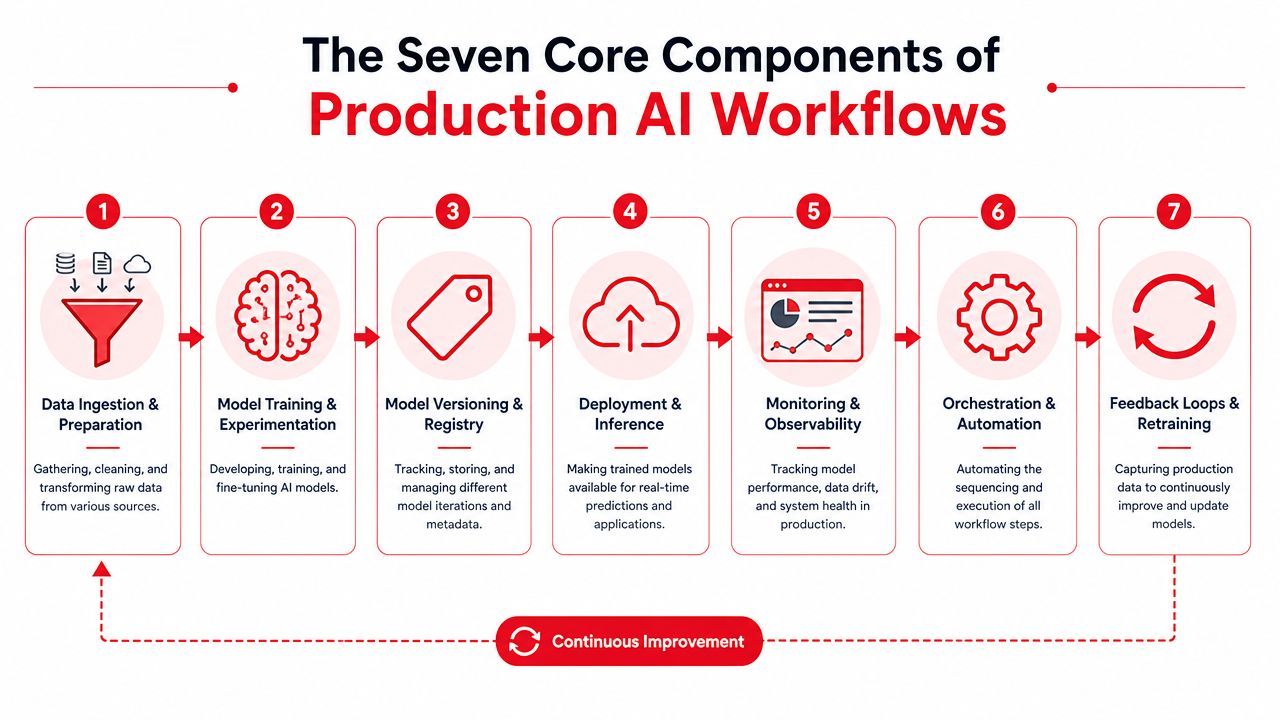
Data ingestion and preparation
Everything starts here. Your workflow needs a reliable way to collect inputs from APIs, forms, queues, documents, databases, or event streams. Then it needs to normalize them.
Bad ingestion creates downstream noise. Missing fields, malformed JSON, duplicate events, or inconsistent text formatting can make a strong model look unreliable.
Useful patterns include:
- Schema checks: Validate required fields before the AI step runs.
- Normalization: Standardize timestamps, user identifiers, languages, and document formats.
- Context assembly: Pull the surrounding data the model needs, not the whole database record.
Model training and experimentation
Not every workflow needs custom training, but every serious workflow needs experimentation. Teams need to test prompts, compare providers, evaluate latency and output quality, and decide where a reasoning model makes sense versus a cheaper classifier or extraction model.
This layer gets messy when experiments stay trapped in notebooks or local scripts. Production teams need a repeatable path from trial to rollout.
Model versioning and registry
If you can't answer “what exactly ran for this request,” you don't have a production system. You have a mystery box.
Versioning isn't only for models. It should include prompt templates, tool definitions, output schemas, safety settings, and fallback rules. Registry discipline matters most during incidents, when you need to compare behavior before and after a change.
Operator mindset: Treat prompts like code, model configs like deployable assets, and routing rules like infrastructure.
Deployment and inference
This is the serving layer. Models and workflow logic have to be callable under real product conditions, with sane latency, retries, rate limiting, and authentication.
The common mistake is thinking inference is just “call the endpoint.” In practice, deployment also means controlling concurrency, handling partial failures, and deciding whether requests should run synchronously, asynchronously, or through a queue.
Monitoring and observability
Observability is where production teams separate themselves from teams that are still guessing. You need logs for prompts, outputs, tool calls, tokens, latency, errors, and cost. You also need enough structure to inspect bad outcomes without replaying an incident by hand.
This is also where teams verify whether automation is improving throughput and quality. Guidance on AI workflow automation recommends starting with high-volume, repetitive work and then measuring workflow efficiency, error reduction, and time saved, as described in Wrike's guide to AI workflow automation.
Orchestration and automation
Orchestration decides sequence. It controls branching, retries, approvals, and handoffs between humans, models, and external tools.
This component is the heart of AI workflow automation. Without it, teams end up with scattered model calls hidden inside route handlers and background jobs.
Look for orchestration that supports:
- Conditional routing based on content or confidence
- Human checkpoints for sensitive actions
- Fallback paths when providers fail
- State management across multi-step flows
Feedback loops and retraining
Production isn't the end of the workflow. It's where the workflow starts learning from reality.
Capture the signals that matter after execution:
- Human corrections: What did reviewers change?
- Escalations: Which outputs triggered manual intervention?
- Compliance checks: Which actions required override?
- Outcome quality: Did the result help the user or create more work?
These signals tell you whether your workflow is inside its reliable range. They also show whether the fix belongs in prompt design, routing logic, validation rules, or model choice.
Common Architectures and Implementation Patterns
Teams usually end up choosing between two broad paths. They either stitch together their own stack from SDKs, cloud services, and internal tooling, or they adopt a unified backend that centralizes the production layer.
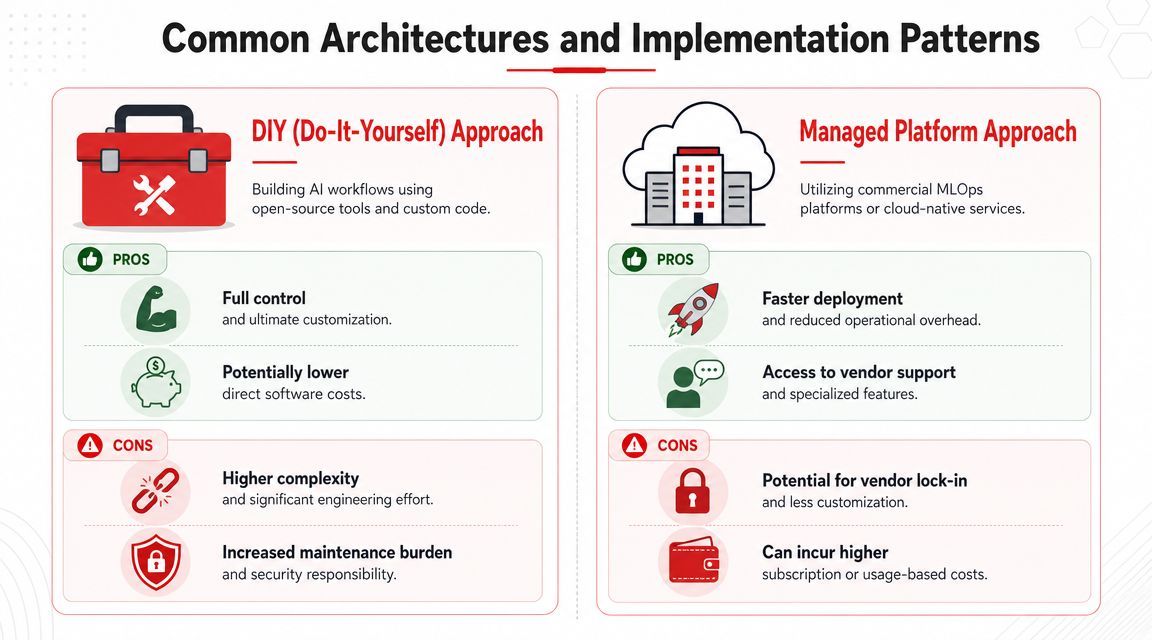
DIY versus unified backend
The DIY route is attractive early. It feels fast because developers can move with familiar tools. A Next.js app calls OpenAI. A worker process handles retries. Logs go to one service, metrics to another, prompts sit in code, and costs get pieced together later.
That works until you need consistency across multiple features.
DIY is still reasonable in some cases.
- You need deep customization: Research-heavy teams or infra teams may want full control of every layer.
- You have strong platform capacity: If you already run internal gateways, config systems, and observability pipelines, adding one more subsystem may be acceptable.
- Your AI surface area is small: One narrow internal tool doesn't always justify a broader platform decision.
A unified backend becomes attractive when AI moves from feature experiment to product surface. That's usually the point where prompt edits, provider swaps, audit trails, and cost visibility stop being nice-to-have and start blocking releases.
When to chain tasks
The more interesting architecture decision isn't just build versus buy. It's whether to automate isolated steps or redesign whole chains of work.
MIT Sloan notes that research on chaining tasks suggests AI creates the most value when organizations redesign workflows rather than automate single tasks, because work is a sequence of handoffs between humans and machines, as discussed in MIT Sloan's analysis of how AI is reshaping workflows.
That sounds ambitious, but it needs restraint. End-to-end automation can improve outcomes when the handoffs are clear and the exception paths are governed. It also increases risk if teams remove human review too early or hide too much logic inside autonomous steps.
A practical implementation pattern is:
- Crawl: Automate one bounded task with clear review.
- Walk: Add routing, fallbacks, and structured logging.
- Run: Chain adjacent tasks only after the earlier stages behave predictably.
The best workflow design is often less about replacing a person and more about deciding exactly where a person should stay in the loop.
AI Workflow Automation in Action Three Examples
Concepts get clearer when you trace them through real product flows.
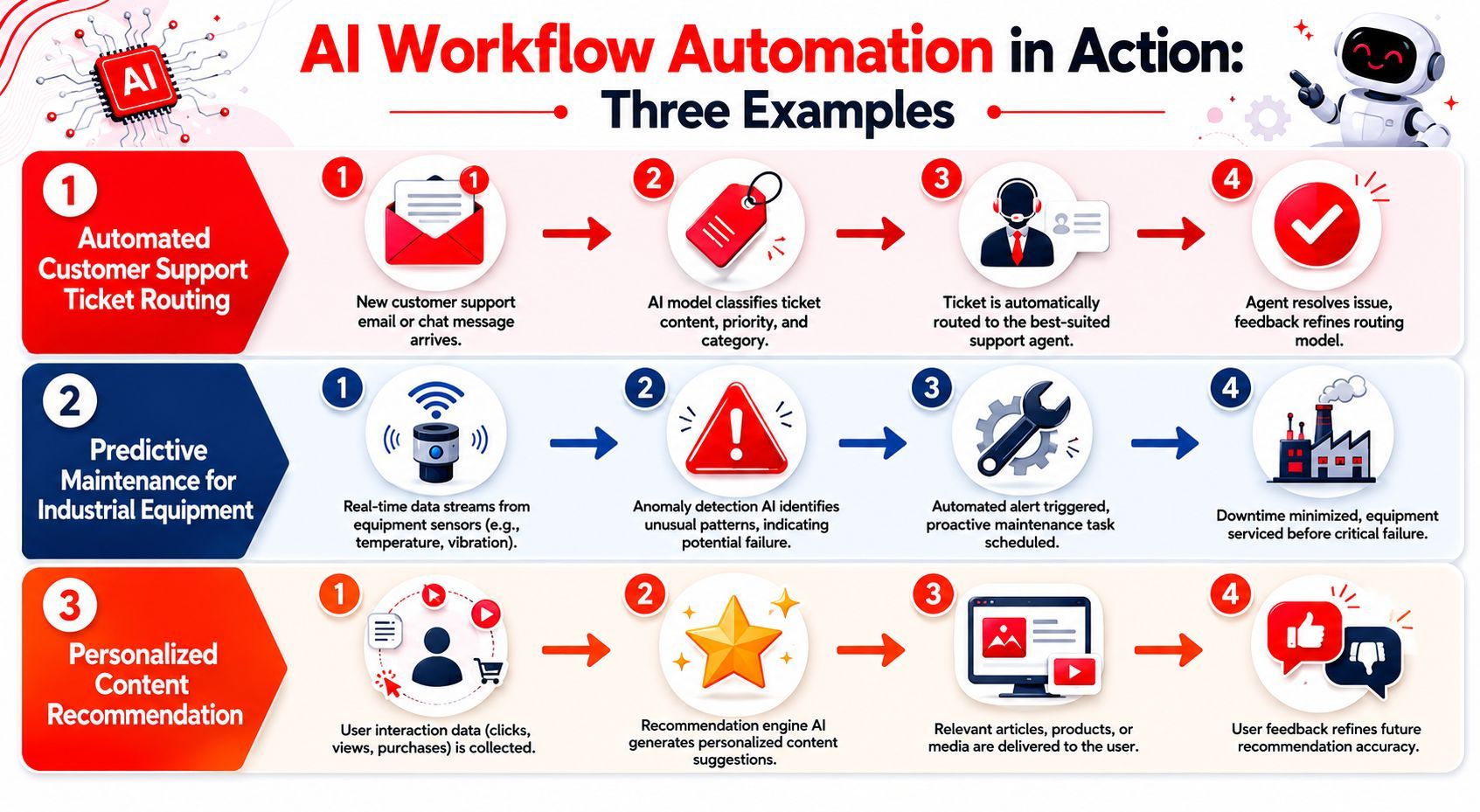
Intelligent chatbot routing
A support chatbot looks simple from the outside. User asks a question, model answers. In production, it's rarely that simple.
A durable support flow often does this:
- Validate the incoming message and user context.
- Classify intent. Billing, technical issue, refund request, account access.
- Route to the right model or retrieval path.
- Draft a response.
- Decide whether to send directly or request human review.
- Log the result and store signals from any edits.
The friction usually shows up in routing and prompt changes. One team wants a concise billing tone. Another wants more caution for account access requests. If those rules are embedded in application code, every behavior change becomes an engineering task.
Later in the build, it helps to see a different production pattern in motion:
Content generation factory
Content workflows are where many teams discover they don't need one prompt. They need a pipeline.
A product marketing flow might:
- Start with inputs: Product notes, positioning, keywords, and audience constraints
- Generate a draft: Long-form article, email, or landing page copy
- Transform outputs: Social snippets, summaries, metadata, structured JSON
- Review and approve: Brand edits, compliance checks, and final publishing actions
This isn't just text generation. It's orchestration across stages with different requirements. The drafting step may favor one model. The summarization step may use another. The publishing step shouldn't happen until a reviewer signs off.
The hidden production issues are predictable. Teams need prompt version history, reusable templates, output validation, and a way to compare changes without redeploying every time a tone instruction shifts.
A content workflow breaks when every improvement requires opening the repo. It scales when non-code changes stay out of the deploy pipeline.
AI agent orchestrator
Agent workflows add one more layer. The system doesn't just produce content. It calls tools, gathers state, and takes actions.
A basic agentic product flow might look like this:
The production layer becomes unavoidable. Tool definitions need versioning. Permissions need boundaries. Failures need containment. If a tool call errors halfway through a multi-step action, the system needs to know whether to retry, compensate, or ask a human.
AI workflow automation is what keeps these examples from collapsing into ad hoc scripts. It provides structure around each handoff so the product behaves like software, not a chain of hopeful guesses.
Six Pitfalls That Sink AI Projects and How to Avoid Them
Most failed AI projects don't fail because the model was incapable. They fail because the workflow around the model was brittle, vague, or impossible to operate.
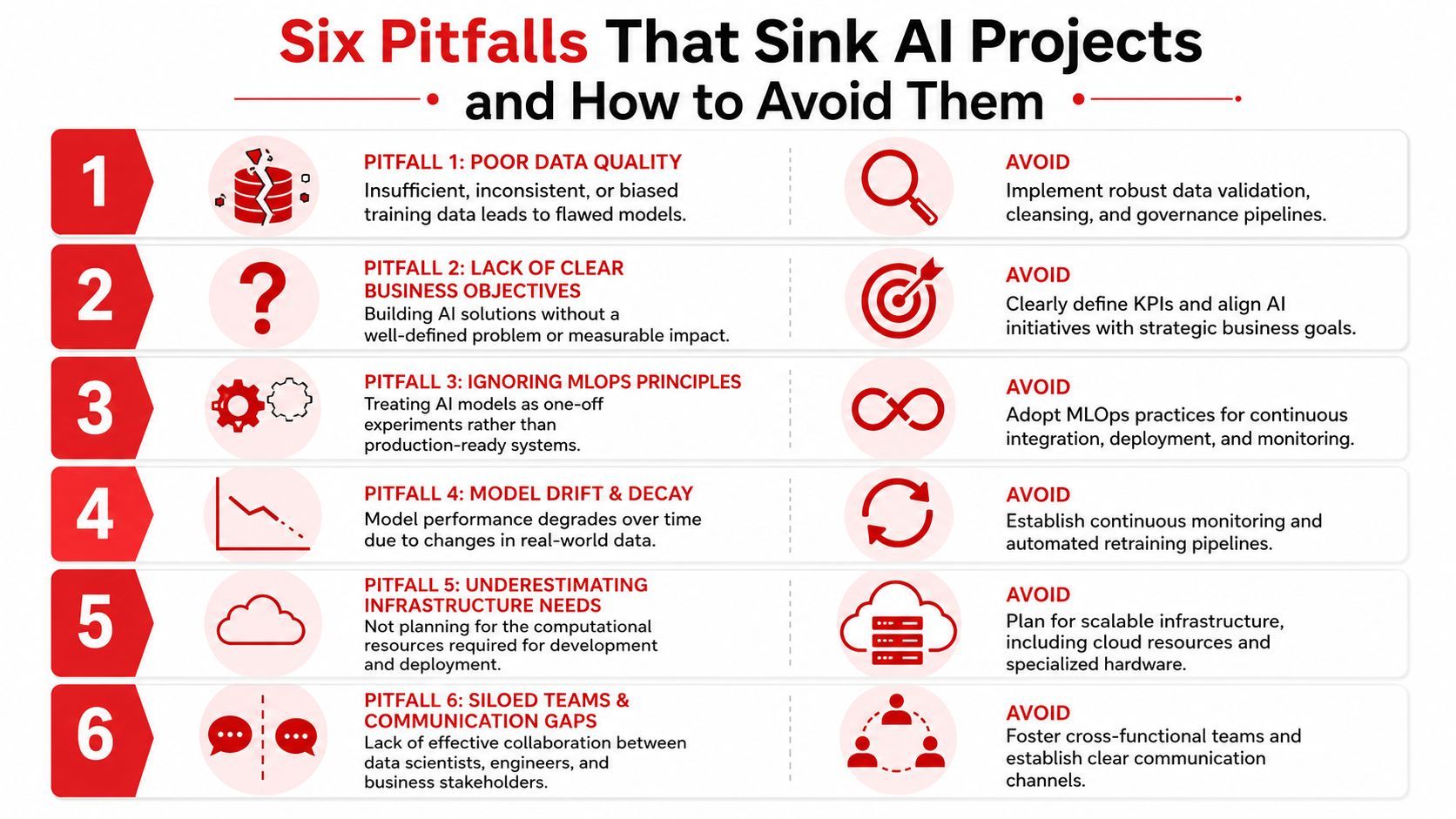
The failure modes that show up in production
The first and most common mistake is automating a process that nobody has documented. AI workflow automation tends to fail when the workflow is undocumented, full of exceptions, or only understood by frontline staff. Guidance on this problem recommends interviewing frontline operators and recording work before mapping it, as explained in this discussion of undocumented workflows in AI automation.
That one issue hides several others.
- Hardcoded prompts and model choices: Teams lock behavior into code, then every adjustment turns into a release problem.
- Weak observability: Nobody can inspect why a bad output happened, so fixes become guesswork.
- No fallback logic: A provider timeout becomes a user-visible outage.
- Task automation without workflow redesign: One step gets faster, but the full process doesn't improve.
- Exception blindness: Real-world edge cases pile up outside the happy path.
- Human correction data gets ignored: Reviewers keep fixing outputs, but the system never learns from those edits.
What good teams do differently
Strong teams map the existing process before they automate it. They don't ask only what the ideal workflow should be. They ask what people do when the input is incomplete, risky, late, contradictory, or unusual.
A practical operating checklist looks like this:
- Interview operators early: The people handling edge cases know where automation will break.
- Record exception paths: Don't treat exceptions as noise. They are part of the workflow.
- Track post-output correction: Repeated edits are a signal that prompts, routing, or validations need work.
- Measure escalation volume: Rising escalations often show the system moved outside its reliable boundary.
- Add compliance checkpoints: Sensitive actions need explicit review and auditability.
- Separate workflow config from app code: This keeps changes fast and reduces redeploy churn.
If the real process lives in someone's head, automating the documented version won't save you. It will automate the wrong thing faster.
The other habit that matters is staged rollout. Teams that succeed don't give the system broad authority on day one. They start with narrow scope, visible logs, and a human checkpoint. Then they widen the workflow only after they trust the failure handling.
That's less glamorous than shipping an “agent,” but it's how production systems stay alive.
Conclusion Build Workflows Not Just Features
The hardest part of AI product work isn't picking a model. It's building the production layer around it. Reliable AI workflow automation means controlled inputs, clear routing, prompt versioning, observability, fallbacks, and feedback loops that keep the system improving after launch.
Teams that win in this space won't be the ones with the flashiest demo. They'll be the ones that can change behavior safely, inspect failures quickly, and scale AI features without turning the codebase into a tangle of vendor-specific logic.
If you're building AI features and don't want to keep reinventing prompt management, model routing, observability, and fallback logic, Supagen gives you that production layer through a single integration. It's built for teams shipping chatbots, agents, generation pipelines, and multimodal workflows that need to be manageable in practice, not just impressive in a demo.