
AI token costs: what you pay for and why the bill grows
On a small team, one person is usually finance, engineering and procurement at once. The model provider sends that person an invoice with one total on it, and nothing says which feature or customer ran it up.
AI token costs are what a model provider charges for the text your app sends to a model and the text the model writes back, billed by the token.
The Tokenomics Foundation article Token Economics: Managing AI Value in SaaS Model Token Costs, by Mike Fuller, sets out how to get this spend under control. The Tokenomics Foundation article condenses a longer FinOps Foundation paper of the same name. We follow its argument in order, for a team with no FinOps department, and put a provider's own price beside each estimate where one exists.
What AI token costs are
A token is a small piece of text, often part of a word. Your prompt is input tokens, and the model's answer is output tokens. Providers price the two separately, per million tokens.
AI token pricing varies widely between models from one provider. Anthropic's price list gives the range for its current models. Prices as of October 2026.
- Claude Haiku 5.5, the smallest, costs $0.10 per million input tokens and $0.50 per million output tokens, for prompts up to 100,000 tokens.
- Claude Sonnet 5.5 costs $2 for input and $10 for output.
- Claude Opus 5.5 costs $4 and $20.
- Claude Fable 5.1, the largest, costs $10 and $50.
Anthropic says the tokenizer in Claude 4.7 and later models makes about 30% more tokens from the same text. Compare prices only after you know how many tokens your prompts become.
A worked example: from tokens per call to cost per customer
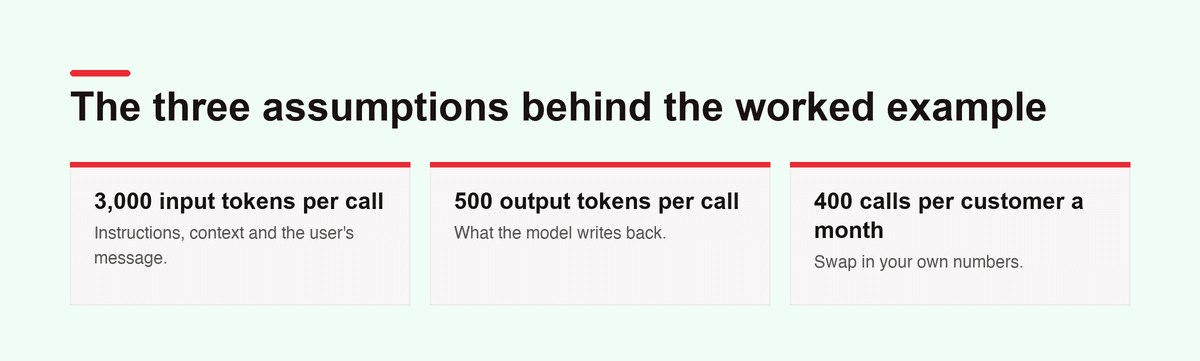
A price per million tokens means little until it becomes the cost of one customer. Take one AI feature and three assumptions, and swap in your own numbers:
- Each call sends 3,000 input tokens: instructions, context and the user's message.
- Each call gets back 500 output tokens.
- Each customer makes 400 calls a month.
On Claude Sonnet 5.5, that input costs $0.006 and the output $0.005, so a call costs $0.011. At 400 calls, one customer costs $4.40 a month.
| Model | Input per million tokens | Output per million tokens | Cost per call | Cost per customer a month |
|---|---|---|---|---|
| Claude Haiku 5.5 | $0.10 | $0.50 | $0.00055 | $0.22 |
| Claude Sonnet 5.5 | $2 | $10 | $0.011 | $4.40 |
| Claude Fable 5.1 | $10 | $50 | $0.055 | $22 |
Claude Fable 5.1 costs 100 times as much as Claude Haiku 5.5 for the same call. The model tier moves the cost per customer far more than any other lever on this page.
Five ways to buy AI, and the one that resists control
The Tokenomics Foundation article sorts AI buying into five channels:
- Direct APIs from providers such as Anthropic, OpenAI and Google.
- Cloud marketplaces: AWS Bedrock, Azure OpenAI and Vertex AI.
- Open-source models you host yourself.
- AI features inside SaaS products.
- Developer tools such as Cursor, GitHub Copilot and Claude Code.
Direct provider APIs are the hardest to manage, in the article's view, because they slip past every usual cost control at once:
- The invoice shows total tokens, with no team, cost center or app.
- A developer opens the account on a credit card, and procurement never hears of it.
- New models arrive at new prices, so the cost of a unit of work keeps moving.
- Spikes are hard to predict and hard to cap.
- Few people in finance have ever priced a token.
The other channels are easier. A cloud marketplace puts token prices inside a cloud bill that FinOps tools already read. Self-hosting turns the problem into GPU spend, and bundled SaaS AI looks like a seat contract.
Developer tools split in two. On a seat plan the vendor pays for the model calls. With your own provider key, the spend lands back on a direct account, with all five problems.
Six pricing mechanics behind every token bill
The Tokenomics Foundation article names six mechanics that shape every workload's cost. Where a provider publishes the real number, it sits beside the estimate.
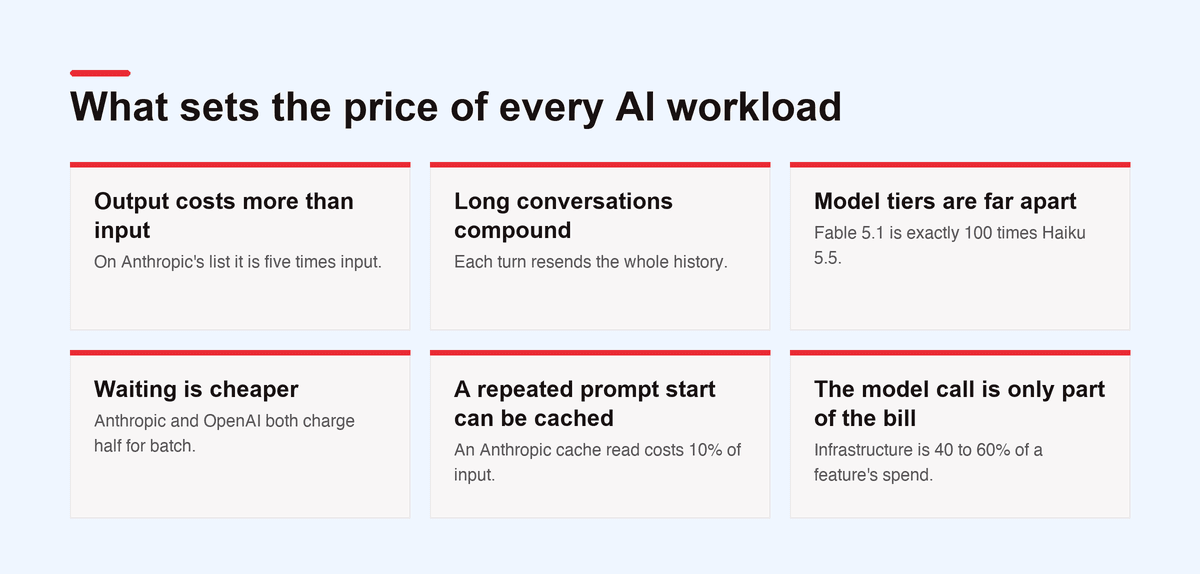
- Output costs more than input. The article says three to five times more. On Anthropic's list it is five times, for Haiku 5.5, Sonnet 5.5 and Fable 5.1.
- Long conversations compound. Each turn resends the whole history, so a ten-turn chat may cost ten times as much per turn as one question. Agents that pile up tool results are hit hardest.
- Model tiers are far apart. The article estimates 50 to 100 times between the top and smallest model. Fable 5.1 is exactly 100 times Haiku 5.5 on Anthropic's prices.
- Waiting is cheaper. Batch APIs return results later at about 50% off. Anthropic and OpenAI both charge half for batch, and OpenAI's turnaround is 24 hours.
- A repeated prompt start can be cached. The article puts the saving on a cached system prompt at 80 to 90%. An Anthropic cache read costs 10% of input, or 5% on Sonnet 5.5 and Opus 5.5. Cache writes cost 1.25 times input at Anthropic and on OpenAI's GPT-5.6 and later.
- The model call is only part of the bill. The FinOps Foundation paper puts vector databases, embeddings, reranking and orchestration at 40 to 60% of a feature's spend in production.
Where the savings are, ranked by size
The Tokenomics Foundation article ranks six levers by typical impact. The percentages are its own estimates, and neither the article nor the paper shows the data behind them. Test each one on your own traffic.
| Lever | What it means | Article's estimated saving |
|---|---|---|
| Model right-sizing | The smallest model that does the task well | 60 to 90% |
| Batch | Work that can wait, at the batch price | 50% |
| Prompt caching | The provider caches a fixed prompt start | 50 to 90% of cached tokens |
| Context management | Summarize history, trim tool output | 20 to 60% |
| Output length | Short answers or a fixed format | 10 to 40% |
| Commitments | Prepaid credits, reserved throughput | 10 to 30% |
Right-sizing leads because most work doesn't need the top model. Routing each query to a model picked for it can cut the average cost per query by 60 to 80%, the article adds.
Commitments need care. Reserved throughput is billed whether you use it or not. For several frontier models, the article says, it costs more per token than pay as you go even at 100% use. Work out your break-even point first; the article puts it at 50 to 80% utilization in common cases.
Building the measurement layer
The Tokenomics Foundation article applies the FinOps cycle of inform, optimize and operate to tokens. Providers don't ship the instrumentation, so you build it.
Tagging and attribution
The FinOps Foundation paper notes that an OpenAI or Anthropic invoice shows spend by API key or project, never by team. An API key is the password your app sends with each call. So the simplest control is one key per team, app or use case, each with a named owner.
OpenAI project keys, Anthropic workspace keys and AWS Bedrock application inference profiles help, and with one provider they are often enough. With several providers, or rules on each call, the article recommends a gateway such as LiteLLM, Portkey or Helicone. A gateway sits between your app and the provider and records every call.
Unit costs people outside engineering can read
A token count means nothing to the person who sets prices. Cost per query, per user per month, per finished workflow and per transaction tie spend to results. In the FinOps Foundation paper's words, the token is how you are billed, not how you measure value.
Budgets and anomalies
Measure for 30 to 60 days, take that as a baseline, then set budgets at 110 to 120% of it. The article lists four anomalies that keep coming up:
- an agent stuck in a loop, calling the model again and again
- a long session whose context keeps growing
- a model version that changed by accident
- testing with no spend limit
When one of these shows up, the Supagen guide to running AI cost governance, with caps, owners and a bill-shock runbook has the steps.
Governance needs a named owner
AI token spend sits between finance, engineering, security and procurement. The Tokenomics Foundation article sees three owners in practice: a FinOps team, a platform engineering team, or an AI center of excellence. Whichever you pick, one named person owns AI cost visibility and can act on it. On a two-person team, that is usually a founder.
Guardrails mark where engineers can act without asking: approved models, a context limit per use case, data rules for outside providers, a review of agent designs, and spend levels that bring procurement in. Keep them light. In the article's words, "Governance that slows engineering teams will be circumvented."
A staged path: crawl, walk, run
The Tokenomics Foundation article warns that full governance before you can see the spend won't last. It sets out three stages.
- Crawl, months 1 to 3. Inventory AI spend, control API keys, add light tagging, publish a spend dashboard and set budget alerts.
- Walk, months 3 to 9. Attribute cost per workload, review model sizes, turn on caching and batch, trim context and watch for anomalies.
- Run, month 9 onward. Charge costs back, route requests by model, negotiate commitments and estimate cost before code ships.
A small team can do most of crawl in its first week. One key per feature, a log of each call with its cost, and a monthly look at the costliest features is a start.
What to do first
The Tokenomics Foundation article closes with five recommendations:
- Take an inventory now. Shadow AI spend is likely bigger than finance knows.
- Instrument before you optimize. A proxy layer gives you attribution, showback, anomaly detection and policy.
- Right-size models first. It is the biggest lever, and engineers back it once they see unit costs.
- Bring procurement in early. Treat provider spend like any other supplier.
- Help build the standard. The article wants FOCUS, the FinOps Open Cost and Usage Specification, to cover AI tokens. The FOCUS site now lists AI vendors among those its billing data covers.
In the FinOps Foundation's State of FinOps survey, 98% of FinOps teams now manage AI spend, up from 31% two years earlier.
Where Supagen fits
The Tokenomics Foundation article is written for companies with a FinOps team. Our readers are small teams and solo founders with the same first problem: one invoice total and no way to tell which feature spent it.
Supagen is the backend for AI features and agents: small teams and solo founders keep prompts, model choice and routing, and call logging out of their code and call every model, from text to image, video and speech, through one API.
One place for every call
Your app sends each request to Supagen over HTTPS, using one key for the Workspace, and Supagen calls the model. Each AI task in Supagen is a Template, which holds the model, the prompt and its settings.
Supagen can call models on its own provider accounts, billed to your AI credits at the provider's price. Or you bring your own key (BYOK), and the provider bills you. Supagen doesn't charge per seat, so the person who owns the budget can join for free.
Cost per call and per customer
Supagen's Invocation Logs show each call's cost, tokens, latency, input and output, and any call opens as a trace. Your app can tag calls with its own customer IDs, such as an organization and a user, and Supagen groups the cost by them. Supagen turns the worked example above into real numbers from real traffic. Our guide to LLM observability covers what else to log.
Right-sizing without a redeploy
In Supagen, the model is part of a Template's Version, and every change makes a new Version. To try a cheaper model, create a Version with it, compare it with the current one side by side, and activate it in the dashboard. The next call uses it with no code change, and rolling back means activating the old Version. The model catalogue lists each model's price, context length and capabilities.
What Supagen doesn't cover
Supagen leaves several of the article's levers to you. Supagen calls run live, as a wait, a stream or a job to poll, and none gets a batch discount. Supagen has no budget caps, spend alerts or response caching. Supagen routes to a fixed primary model and backup models, with no per-query choice. Supagen holds no compliance certificates and offers no contractual SLA.
If you need gateway guardrails, caching and enterprise features today, Portkey is further along. If your problem is a small team's first AI bill with nothing behind the total, start building free.
Frequently asked questions
How much do AI tokens cost?
AI token costs depend on the model. At Anthropic's list prices in October 2026, Claude Haiku 5.5 costs $0.10 per million input tokens and $0.50 per million output tokens. Claude Fable 5.1 costs $10 and $50. Output is the dearer side on every model in that list.
What is token cost in AI?
Token cost in AI is the price a provider charges per token a model reads or writes, quoted per million tokens. Your AI cost per token times the tokens in a call gives the cost per call. The cost per call times each customer's calls gives the cost per customer.
Why do output tokens cost more than input tokens?
Providers price output higher than input. The Tokenomics Foundation article puts output at three to five times the input price, and on Anthropic's current list it is five times.
What is the biggest way to cut AI token costs?
Model right-sizing, meaning the smallest model that does the task well. The Tokenomics Foundation article estimates 60 to 90% savings from it, ahead of batch, caching and shorter prompts. On Anthropic's prices, Claude Haiku 5.5 costs a hundredth of Claude Fable 5.1.
How do I work out AI token costs per customer?
Multiply a typical call's input and output tokens by the model's prices to get the cost per call. Then multiply by the calls one customer makes a month. The worked example above uses 3,000 input tokens, 500 output tokens and 400 calls.
Sources
- Tokenomics Foundation: Token Economics: Managing AI Value in SaaS Model Token Costs, by Mike Fuller, 3 June 2026, licensed under Creative Commons Attribution 4.0 International
- FinOps Foundation: Tokenomics: Managing AI Value in SaaS Model Token Costs
- FinOps Foundation: State of FinOps
- FOCUS: FinOps Open Cost and Usage Specification
- Anthropic: Pricing
- OpenAI: Batch API
- OpenAI: Prompt caching