
AI Orchestration Platforms: Choose the Best
Your AI feature probably started as three direct API calls and a prompt in a controller file.
That works for a week. Then product wants retries, model fallback, better answers for premium users, support for image input, and a way to update prompts without waiting for a full deploy. Finance asks why one feature suddenly costs more. Engineering asks which provider call is timing out. Nobody has a clean answer because the logic is scattered across app code, environment variables, background jobs, and vendor dashboards.
That's the point where teams discover the missing middle layer in the AI stack. The model API isn't enough anymore, but a full internal platform feels too heavy to build from scratch. AI orchestration platforms sit in that gap. They turn a fragile prototype into a system you can operate, debug, and evolve without rewriting your product every time the model context changes.
Table of Contents
- The Hidden Chaos of Building AI Features
- What Exactly Is an AI Orchestration Platform
- The Core Capabilities of a Modern Orchestrator
- How AI Orchestration Platforms Are Architected
- Real World Use Cases and Examples
- How to Evaluate and Choose a Platform
- Your Adoption Guide and Decision Checklist
The Hidden Chaos of Building AI Features
The first version usually feels fast. A developer wires up OpenAI or Anthropic, drops a prompt into the backend, and gets a working demo by the end of the day. Product sees it and wants it live.
The trouble starts when that demo becomes a feature with real users. Prompts multiply. One engineer tunes a system prompt in code, another adds a fallback model in a job worker, and someone else stores provider-specific parameters in environment variables. Soon the app is technically working, but nobody can tell which prompt version produced which answer, which provider failed, or what one user interaction cost.
Where the prototype starts to break
A direct API integration usually fails in predictable ways:
- Prompt changes require redeploys when they should be simple config updates.
- Provider logic spreads everywhere because each new model gets added in the nearest convenient place.
- Debugging becomes forensic work since logs live in different systems and don't share request context.
- Costs stay opaque because usage is visible per vendor, not per feature or user journey.
- Reliability drops under edge cases when retries, fallbacks, and timeouts are handled inconsistently.
The biggest mistake is thinking these are minor cleanup tasks. They're operating model problems. Once AI becomes part of the product, the team needs a stable control layer between the app and the model vendors.
Practical rule: If changing a prompt means shipping application code, you're still running a prototype.
That's why this category is growing so quickly. The AI orchestration platform market was valued at USD 11.1 billion in 2025 and is projected to reach approximately USD 82.15 billion by 2035, with a 22.16% CAGR from 2026 to 2035. The same source ties that growth to the rising complexity of enterprise AI deployments.
What an orchestration layer fixes
An orchestration layer gives teams one place to manage the parts that don't belong inside product code:
That's the production gap in plain terms. A cool AI feature isn't the same as an operable AI system.
What Exactly Is an AI Orchestration Platform
An AI orchestration platform is the control plane between your application and the models, tools, and services that do the work.
The easiest way to think about it is air traffic control. The platform doesn't generate text, transcribe audio, or synthesize speech by itself. It decides where each request should go, what context it needs, which fallback to use, what to log, and how to enforce policy across the whole flow.
This visual captures that role well:
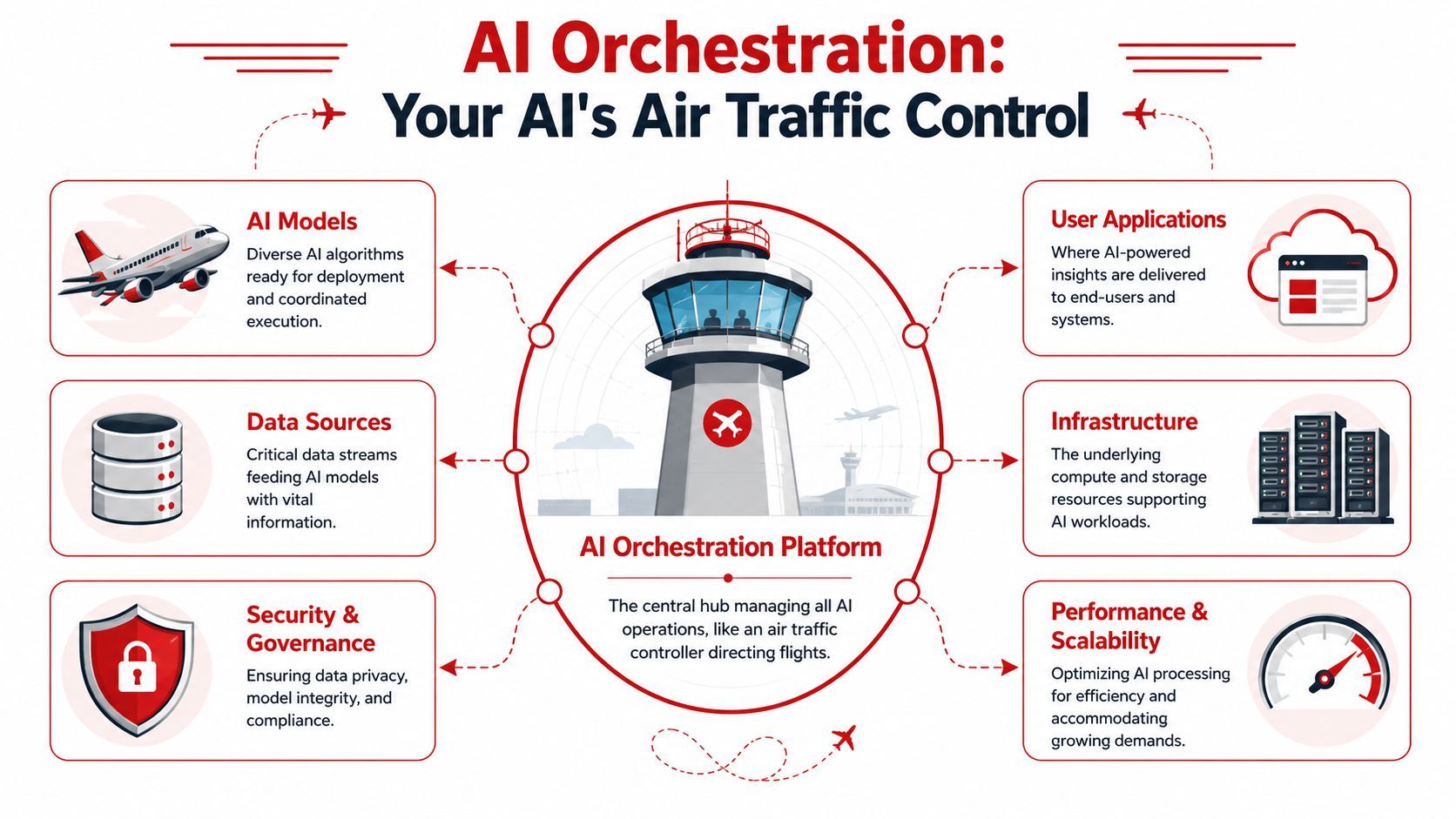
Without that middle layer, the application backend ends up owning too many concerns at once. It isn't just serving business logic anymore. It's also acting as prompt store, model router, retry manager, provider abstraction, cost monitor, and debugging console. That architecture works until you need to move fast without breaking things.
Where it sits in the stack
A typical production stack looks more like this:
- User app or backend sends a request tied to a product action.
- Orchestration layer applies prompt templates, policies, routing rules, memory, and logging.
- Model and tool layer handles LLMs, image models, speech systems, vector stores, and external APIs.
- Infrastructure and governance layer enforces security, observability, and operational controls.
A key point is that not every tool in the AI ecosystem is an orchestration platform.
What it is not
A chaining framework like LangChain is useful, but it isn't the whole answer. It helps build multi-step flows. It doesn't automatically give you the operational surface a team needs to run those flows safely in production.
A vendor SDK isn't an orchestration layer either. SDKs help you call one provider. Orchestration helps you manage a changing system across providers, modalities, workflows, and teams.
A good mental model is this: frameworks help developers compose behavior. Orchestration platforms help teams operate that behavior.
A short explainer is worth watching if your team is still aligning on the concept:
The distinction becomes obvious once multiple people touch the same AI feature. Product wants safer iteration. Engineering wants less branching logic in the app. Ops wants visibility. Security wants one place to enforce policy. That's when AI orchestration platforms stop sounding optional.
The Core Capabilities of a Modern Orchestrator
A prototype usually breaks in familiar ways. Prompt edits live in code, one model timeout turns into a user-facing failure, nobody can explain why costs spiked last Tuesday, and the team starts adding one-off fixes around every edge case.
That is the point where an orchestrator stops being a nice idea and becomes an operating layer.
Prompt management outside the codebase
Hardcoded prompts work in a demo. They slow teams down in production.
A modern orchestrator moves prompts into a versioned system where teams can update templates, compare revisions, test changes, and roll back quickly. That changes the speed of iteration. Engineers still own the application and integration logic, but product, design, and applied AI teams can improve behavior without waiting for a full deployment cycle.
What works:
- Versioned prompts tied to environments or features
- Reusable templates for shared instructions
- Clear rollback paths when a prompt change hurts output quality
What fails under production pressure:
- Prompt strings embedded in handlers
- Provider-specific wording scattered across services
- No audit trail for behavior changes
The business impact is simple. If every prompt change needs engineering time, experimentation gets expensive and quality improvements slow down.
Routing that reflects product intent
Direct API calls treat every request as if it deserves the same model, timeout policy, and fallback plan. Real products do not work that way.
Some requests need the cheapest model that can classify correctly. Others need a stronger model because the cost of a wrong answer is higher than the cost of extra tokens. Routing is where orchestration starts paying for itself, because it lets the team match model behavior to the value and risk of the user action.
Good routing policies often include:
- Fast paths for simple tasks such as classification or short summarization
- Higher-capability paths for complex cases when the request crosses a complexity threshold
- Fallbacks for provider errors so one outage does not take down the feature
- Modal-specific routes for text, image, audio, or video workflows
This also reduces lock-in. The app integrates with the orchestration layer once, while provider choices can change underneath as pricing, quality, and availability shift.
Observability that engineers can use
Once a request includes prompt assembly, model execution, tool calls, retries, and post-processing, ordinary application logs stop answering the important questions.
Teams need trace-level visibility into prompt version, model choice, latency, token usage, tool invocation, fallback behavior, and final output. The reason this is important is that AI failures are rarely binary. A request can return a 200 status and still be too slow, too expensive, poorly grounded, or wrong in a way the user notices immediately.
If you can't trace a bad output back to a prompt version, model choice, and tool call sequence, you can't debug production AI. You can only guess.
Good observability shortens incident response and improves iteration quality. It also gives product and finance a shared view of what is happening, instead of forcing every question through engineering.
Cost controls before finance gets involved
Many teams do not start with an output quality problem. They start with a visibility problem.
Monthly invoices arrive too late to be useful. Cost control has to happen at the request and feature level, where teams can see which flows are expensive, which prompts are bloated, and where retries or fallback chains are driving spend. A useful orchestrator exposes that data alongside traces and logs, so cost review becomes part of engineering work instead of a separate reporting exercise.
There is a trade-off here. Better routing, caching, and prompt discipline take setup time. That effort is still cheaper than discovering after launch that one popular workflow is burning margin on every call.
Multi-modal workflow handling
Production AI features rarely stop at text generation. A single user action might trigger OCR, transcription, retrieval, model reasoning, structured extraction, and speech output.
Without orchestration, teams end up writing custom glue for every handoff and debugging each step in isolation. An orchestrator gives those workflows a consistent execution path, with shared policies, logging, and failure handling. That consistency matters when several systems contribute to one user-facing result.
The value is not just cleaner architecture. It is lower integration cost each time the product adds a new AI-powered step.
Agent connectivity without custom glue everywhere
As products become more agentic, tool access becomes an operational problem, not just a development task.
Agents need predictable ways to call internal APIs, reach model endpoints, pass context, and respect authentication and policy rules. A strong orchestration layer becomes the control point for those interactions. It reduces one-off wrappers, inconsistent auth patterns, and temporary connectors that eventually turn into permanent dependencies.
That is the missing middle layer many teams discover the hard way. The prototype proves the feature can work. The orchestrator is what makes it repeatable, governable, and cheaper to scale.
How AI Orchestration Platforms Are Architected
Architecture starts to matter the day the prototype succeeds.
A document summary feature works in a demo with a direct model call and a prompt in application code. Then product asks for action-item extraction, customer-specific instructions, audit logs, retries, and a cheaper path for low-priority jobs. The feature still looks simple from the UI. Under the hood, it now needs a control layer.
What happens on a single request
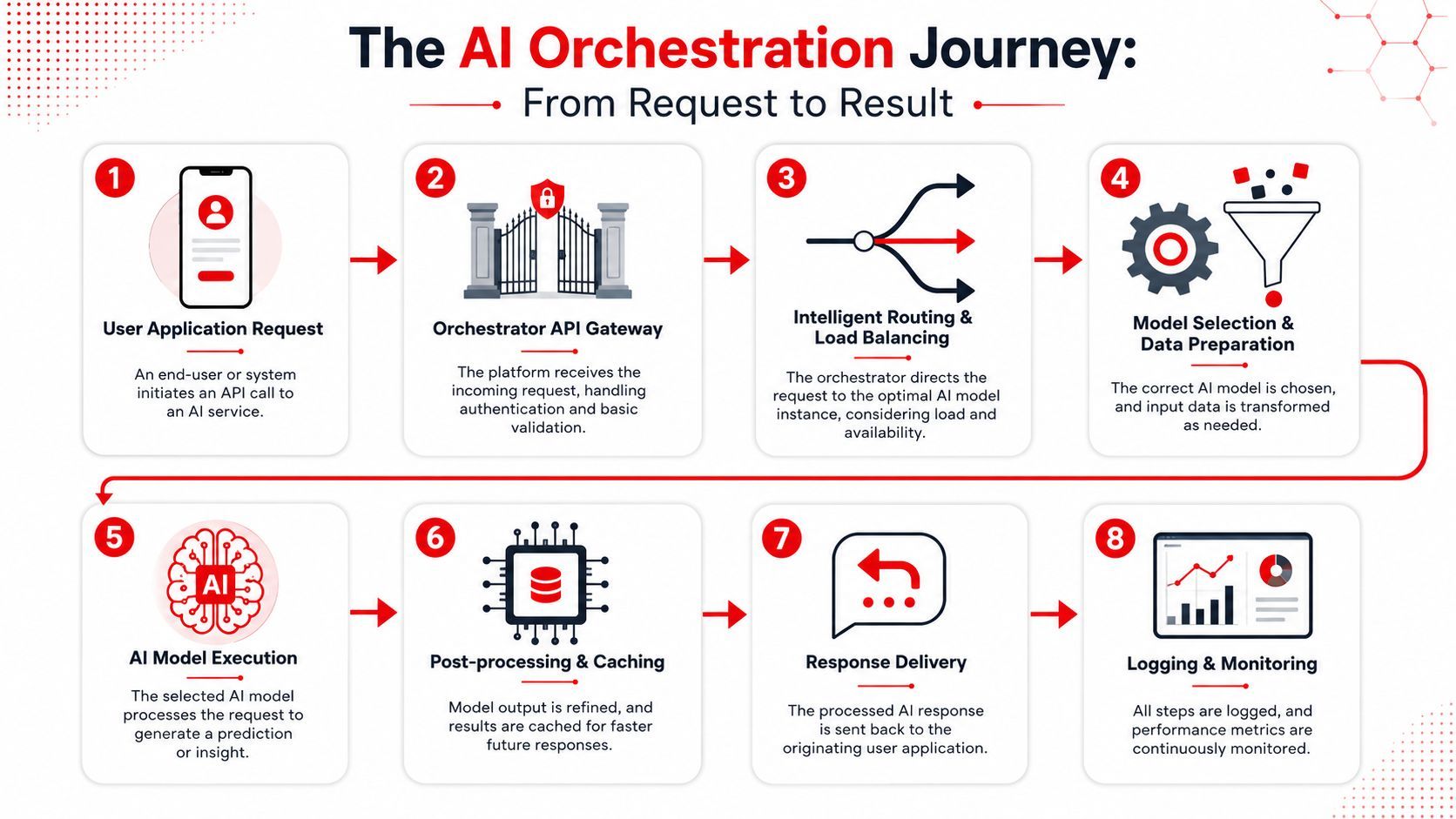
Take a common production workflow. A user asks your app to summarize a document and extract action items.
In a scalable setup, the request first passes through the orchestrator. That layer authenticates the call, identifies the product route, loads the right prompt and policy, pulls any stored context, chooses a model based on cost and quality rules, and decides whether fallback logic should be active before the provider sees the request.
The response path matters just as much.
After the model returns, the orchestrator can validate the output format, normalize it for the application, trigger retries if the result is incomplete, log the trace for support and engineering, and record latency and spend for later review. If the same request pattern appears often, it can also cache or reuse prior work.
That is the difference between a feature that merely calls a model and a system that can be operated. Direct SDK usage is fine early on. It breaks down once teams need consistency, debugging, and cost control across many requests.
The three layers that turn workflows into systems
Mature orchestration stacks usually settle into three layers:
That split maps to real operational problems.
Without an orchestration framework, every team builds routing and retry logic in its own service. Without a memory layer, multi-step flows lose context between requests or recompute expensive work. Without observability, failures across OCR, retrieval, model inference, and downstream formatting show up as vague user complaints with no clear root cause.
The architecture changes when AI output becomes part of a business process instead of a one-off assistant response.
Here, teams make an important design choice. They can spread orchestration logic across application services, background workers, and prompt files owned by different teams. That often feels faster at first and gets expensive later. Or they can centralize model routing, context injection, policy enforcement, and tracing in a dedicated layer.
In practice, centralization usually wins once the product has multiple AI features, more than one model provider, or any requirement for auditability. It keeps product code thinner, reduces duplicate logic, and gives engineering one place to tune cost, reliability, and behavior without editing five services for every change.
Real World Use Cases and Examples
The easiest way to spot the value of orchestration is to look at features that become brittle without it.
Support systems that escalate intelligently
A support chatbot is the classic case. Early versions route every question to the same model with the same prompt. That's easy to ship and expensive to scale.
A production setup usually needs at least two paths. Simple order-status questions, FAQ lookups, or refund-policy prompts can go to a fast low-cost model with tight instructions. Complex cases such as policy exceptions, account disputes, or emotionally sensitive interactions can be escalated to a stronger model with richer context and stricter logging.
What makes orchestration useful here isn't just routing. It's the policy layer around routing. Teams can adjust thresholds, fallbacks, and prompt variants without changing application code in five places.
Content pipelines that span text image and audio
A prototype content tool might stop at generating copy. A real product often doesn't.
A campaign workflow might create ad text, generate a supporting image, and produce a voiceover script or audio clip as part of one user action. Those steps involve different providers, different failure modes, and different output formats. If each call lives in separate service code, the workflow becomes hard to retry and harder to inspect.
An orchestrator makes the chain explicit. It can coordinate the text stage, pass structured output into the image stage, then route the final script into text-to-speech, all while keeping one trace for the full transaction.
That's useful for product teams because they can reason about the workflow as one feature, not three unrelated integrations.
Internal agents with controlled tool access
Internal analysis agents are where ad hoc architectures usually get exposed.
An employee asks, “What changed in customer churn last month?” The agent may need to query a database API, summarize results, compare segments, and return a structured answer. If every tool call is custom-wired inside the agent runtime, governance gets messy fast.
A better setup puts tool access behind the orchestration layer. The agent gets approved paths to use internal data tools, the team logs each step, and security has a clearer place to enforce permissions and review behavior.
Here's the broader pattern:
- Customer-facing flows need routing and resilience.
- Creative workflows need multi-modal coordination.
- Internal agents need controlled tool access and traceability.
Those look like different products on the surface. Operationally, they all need the same middle layer.
How to Evaluate and Choose a Platform
A lot of teams hit the same point. The prototype worked with a few direct API calls, then traffic grew, a second model got added, prompts started changing weekly, and nobody could explain why one request succeeded while the next one failed. That is the moment to evaluate an orchestration platform like production infrastructure, not like a model demo.
A polished playground is nice. It does not tell you whether the platform will hold up once AI becomes part of a real product with uptime expectations, cost limits, and multiple teams making changes.
Don't judge by demo quality alone
Early evaluations often focus on the visible layer:
- The UI is clean
- It supports the providers you already know
- The quickstart works
- A sample workflow completes successfully
Those checks matter, but they are screening criteria, not selection criteria.
The question is whether the platform reduces the operational burden that appears after the first launch. Can the team trace one user request across prompt, model, tool, and output? Can product or operations change routing and prompts without waiting for an application deploy? Can engineering see why a fallback fired, why latency spiked, or why cost jumped for one feature but not another?
If the answer is no, the platform may help you build a demo faster while leaving the hard production problems in your application code.
Questions that expose production readiness
A better evaluation looks at three layers, not just output quality. As discussed in the multi-agent benchmarking discussion on Reddit, teams get a clearer read on these systems when they inspect task results, process quality, and system reliability together.
That approach applies even if you are not building a complex agent.
A platform that only shows the final answer hides the part your team will spend time operating.
Ask for a walkthrough of a real trace from a failed request, not a happy-path demo. Ask how the system handles prompt versioning, rollback, structured outputs, retries, fallback routing, tool-call logging, and per-request cost tracking. Ask what changes require code deploys versus configuration changes. Ask how access controls work when multiple teams need to edit prompts, workflows, or tool permissions.
Those questions usually separate products built for experimentation from products built for ongoing ownership.
Evaluate the fit, not just the feature list
The platform also has to match your architecture and operating model.
A small team shipping one internal workflow may prefer a hosted product with strong defaults and faster setup. A larger company with strict data controls, regional requirements, or existing platform engineering standards may need self-hosting, private networking, and tighter integration with internal observability and identity systems.
This trade-off matters more than vendor comparison grids suggest. The fastest way to create future rework is to choose a platform that fights your security model, deployment process, or team structure.
A practical evaluation usually comes down to a short list of questions:
- Can it centralize the logic that is currently scattered across services?
- Can it support the providers and tools you will likely add next, not just the ones you use now?
- Can it give engineering and product shared visibility into quality, latency, and cost?
- Can it handle failures predictably under load?
- Can your team change behavior safely without turning every prompt edit into an app release?
Choose the platform that makes a growing AI feature easier to run, debug, govern, and improve. That is usually the point of buying or adopting orchestration in the first place.
Your Adoption Guide and Decision Checklist
A team ships an AI feature with direct API calls, a few hardcoded prompts, and some fallback logic in application code. It works in staging. Three months later, product wants faster prompt changes, support wants answers for failed runs, finance wants cost by feature, and engineering is tracing behavior across multiple services. That is usually the point where orchestration stops sounding optional and starts looking like infrastructure.
The adoption question is not whether orchestration is useful in theory. It is whether the operational cost of staying with ad hoc integrations is now higher than the cost of adding a control layer.
Use that test against your current system. You have likely outgrown direct API calls if several of these are already true:
- More than one provider is in use, or likely to be soon
- Prompt changes require deploys instead of config updates with version control
- Fallback logic lives in application code across multiple services
- Failures are hard to trace across prompts, models, tools, and outputs
- Costs show up at the vendor level but not by workflow, feature, or customer segment
- One user action triggers multiple AI steps across text, audio, image, or external tools
- Product, ops, or domain teams need controlled access to change AI behavior without waiting on app releases
- Agent permissions and tool access are spreading faster than governance can keep up
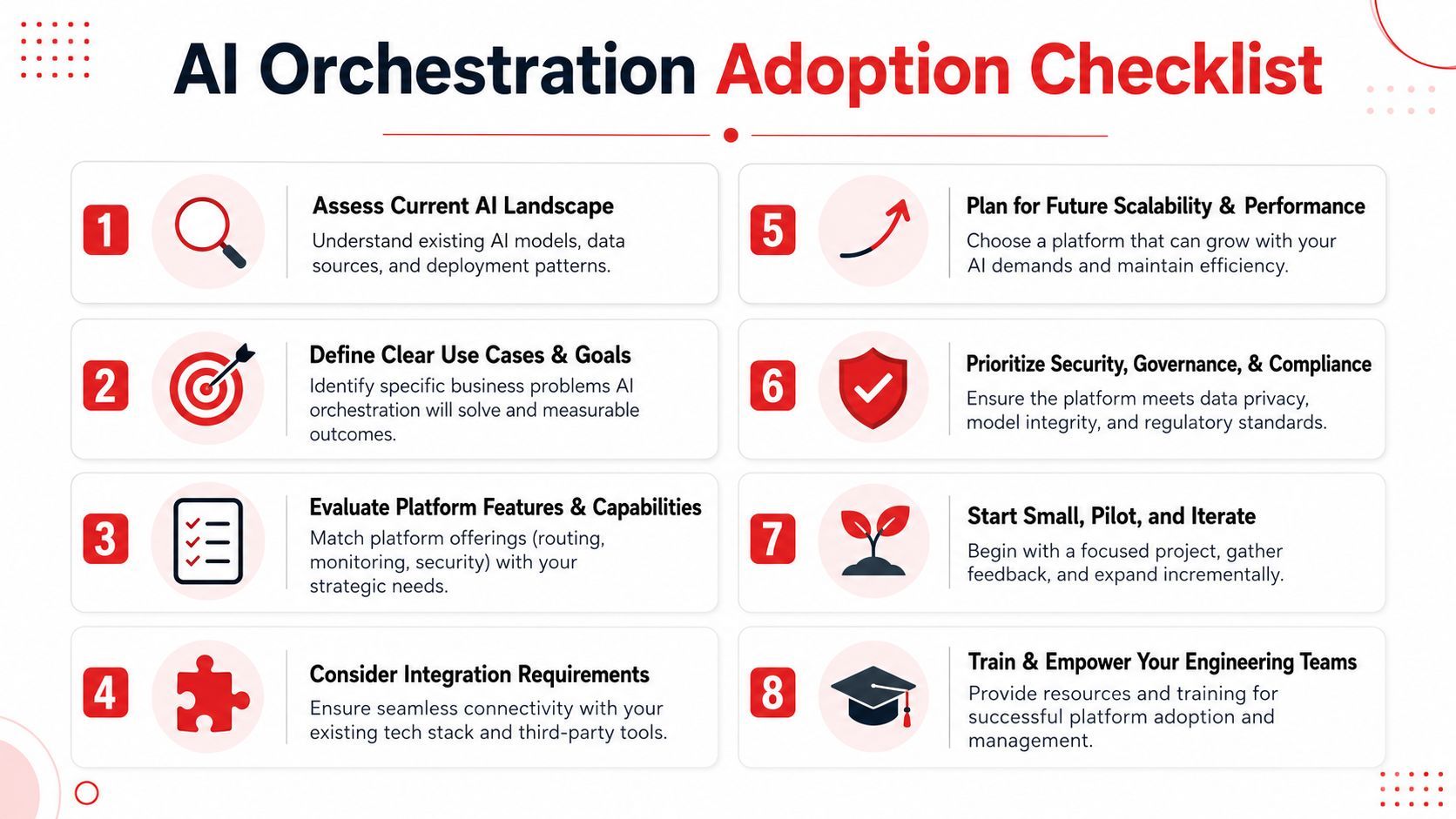
The best rollout pattern is narrow and boring. Pick one production workflow that already causes pain, usually a support assistant, document pipeline, or internal copilot with visible usage. Move prompt management, routing rules, and execution tracing into one place. Keep the application surface stable while the orchestration layer absorbs the change.
That approach lowers risk for two reasons. First, the team gets a clear before-and-after comparison on deploy frequency, incident debugging, and model spend. Second, it avoids the common mistake of turning an orchestration project into a platform rewrite before anyone has proven day-to-day value.
A simple decision checklist helps:
- Is the AI feature important enough to maintain for the next 12 months, not just demo this quarter?
- Do failures need to be explainable to support, compliance, or customers?
- Will multiple teams need to tune behavior over time?
- Are model, prompt, or tool decisions changing faster than your release cycle can handle?
- Would central control over cost, quality, and permissions reduce real operational drag?
If the answer is yes across that set, add the orchestration layer before the next wave of complexity lands. Teams that wait too long usually pay twice. Once in engineering time to patch the prototype, then again to extract the logic into a production system later.
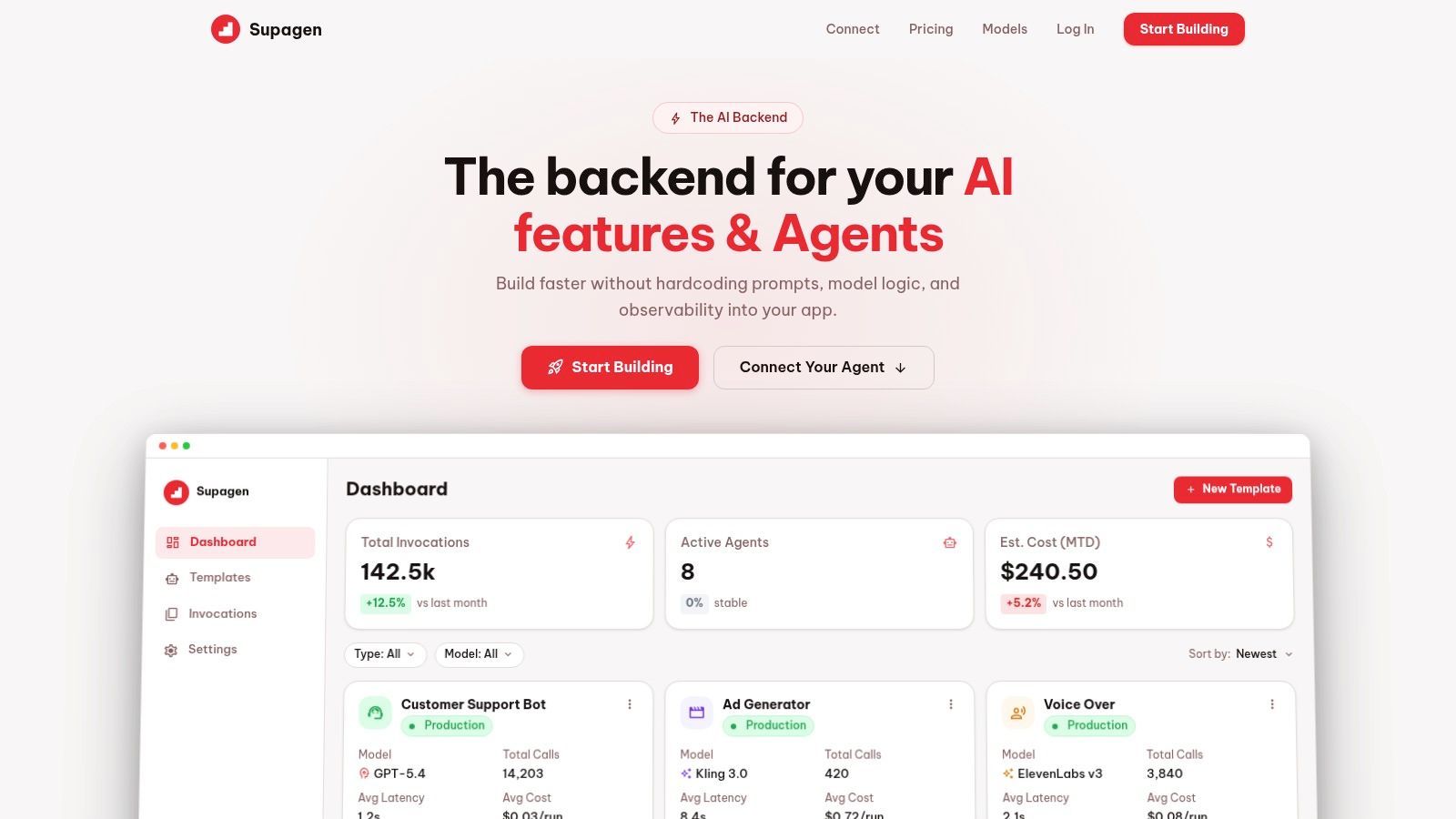
If your team is already feeling the pain of hardcoded prompts, scattered model logic, and weak visibility, Supagen is worth a look. It gives you a unified AI backend for versioned prompts, provider routing, multi-modal workloads, observability, and agent connectivity so you can move from prototype code to a production system without rebuilding your app around every new model decision.