
AI Model Comparison: A Practical Guide for 2026
Most AI model comparison articles still answer the wrong question. They ask which model is best, as if you're buying a single database or picking a web framework for the next three years.
That framing is already outdated.
Between November 2022 and October 2024, the inference cost for an AI system performing at the level of GPT-3.5 dropped over 280-fold, and open-weight models cut the benchmark gap with closed models from 8% to 1.7% on key evaluations, according to the Stanford HAI AI Index 2025 report. When capability gaps shrink and cost changes that fast, a one-model strategy stops looking elegant and starts looking expensive.
Teams building real products feel this quickly. The first demo works with one premium model. Then support volume rises, latency matters, edge cases appear, and the bill starts climbing. That's when leaderboard thinking breaks down. Production systems don't need a winner. They need a portfolio.
A better AI model comparison starts with workload design. Which requests need deep reasoning? Which ones need instant replies? Which ones can tolerate a cheap first pass and only escalate when confidence is low? Those questions matter more than who won the latest benchmark screenshot on social media.
Here's the practical lens I use:
Table of Contents
- Introduction Beyond the Leaderboard
- The Modern AI Evaluation Framework
- Comparing the Titans A 2026 Model Family Showdown
- Mapping Models to Your Product Use Case
- Building a Dynamic AI Strategy
- Putting It All Together with a Unified Backend
- What to Expect Next in AI Model Development
Introduction Beyond the Leaderboard
The old way to do AI model comparison was simple. Pick the smartest model you can afford, wire it into your app, and treat everything else as a downgrade path.
That approach doesn't hold up anymore.
The market now rewards teams that separate requests by value and difficulty. A billing support question, a code refactor request, a long-form research summary, and a retrieval-heavy compliance answer should not all hit the same model tier. If they do, you'll pay premium rates for tasks that don't need premium reasoning, and you'll still under-serve the tasks that need stronger orchestration around context, retrieval, or validation.
Why single-model stacks age badly
A single-model stack creates three predictable problems:
- Cost creep: Easy requests consume the same expensive capacity as hard ones.
- Latency drag: Every user pays the time penalty of your most thoughtful model.
- Refactor pain: Swapping providers later becomes a plumbing project instead of a config change.
The bigger issue is architectural. Most applications don't have one job. They have a sequence of jobs. Intent classification, retrieval, drafting, validation, formatting, and fallback are separate steps with different requirements. Treating them as one giant call is convenient during prototyping and wasteful in production.
Practical rule: Don't choose a model first. Choose the failure mode you can tolerate for each request class, then assign the model.
What a better comparison looks like
A useful AI model comparison asks questions like these:
- Which tasks need premium reasoning and which need speed?
- Where can a smaller model handle the first pass?
- When should the system escalate to a stronger model?
- Which paths need retrieval before generation?
- How will you detect bad outputs before users do?
This changes procurement and implementation. You stop thinking in terms of one provider and start thinking in terms of capability lanes. One lane for instant responses. Another for hard reasoning. Another for multimodal or long-context work. Another for fallback and resilience.
That's also why static leaderboard articles tend to disappoint engineers after the first week. They tell you which model scored highest in a vacuum. They don't help you build a stack that survives traffic spikes, budget pressure, provider outages, and shifting product requirements.
The Modern AI Evaluation Framework
Roughly 80 percent of the work in production AI happens after the model answer comes back. You still need to decide whether that answer was fast enough, cheap enough, grounded enough, and reliable enough to ship.
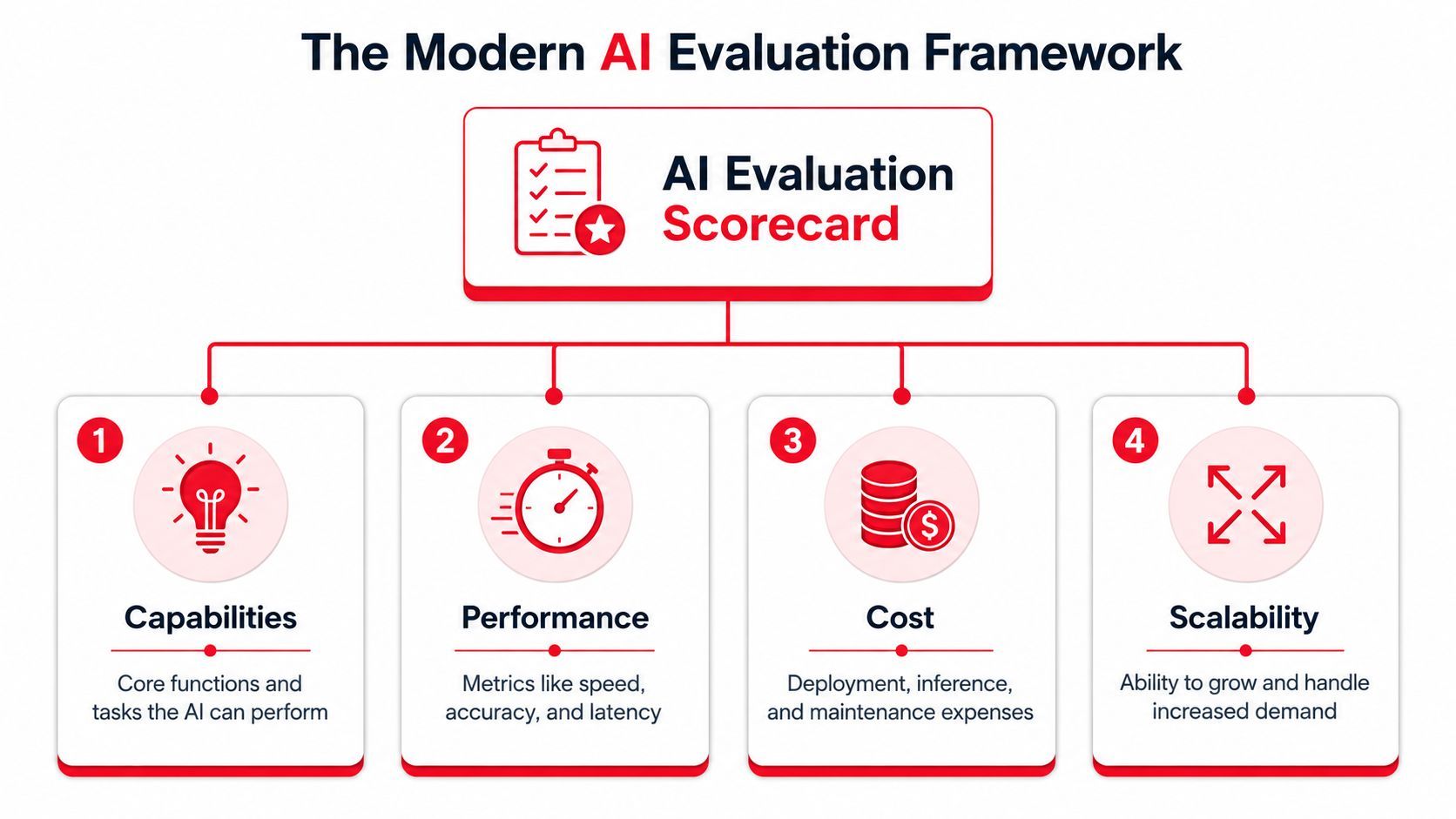
A useful evaluation framework covers four areas: capabilities, performance, cost, and scalability. The point is not to crown one winner. The point is to decide which model belongs on which path in your system, and what should happen when that path misses.
Capabilities decide where a model should sit in the stack
Benchmarks help when they line up with the actual jobs your product runs.
The comparative summary at Future AGI's technical analysis of AI model benchmarking reports Grok-4 at 87.5% on GPQA Diamond and 100% on AIME 2025, while Gemini 2.5 Pro scores 84.0% on GPQA Diamond and offers a 1-million-token context window, with up to 2 million tokens for academic research. The same analysis reports Grok-4 at 75% on SWE-bench, GPT-5 at 74.9% on SWE-bench Verified, and Claude 4 Sonnet at 72.5%.
Those gaps matter for products that live or die on hard reasoning, long-context synthesis, or code generation. They matter much less for support drafting, extraction, summarization, and other tasks where prompt design, retrieval quality, and output validation often dominate the result.
That distinction affects routing. A premium reasoning model should usually sit behind an escalation rule, not at the front door for every request.
Performance changes the product, not just the benchmark sheet
Latency is a feature.
The broad model analysis at Artificial Analysis model comparisons shows a clear split between frontier reasoning models and speed-oriented ones. Mercury 2 reaches 833 tokens per second, which is over 15 times faster than typical high-intelligence models. The same comparison notes that Command A+ can reach first-token latency as low as 0.25 seconds, while heavier “thinking” models can take longer to start, often exceeding 0.5 seconds.
That changes interface design. For chat, autocomplete, and triage, users notice first-token delay immediately. For research, planning, and code repair, they will tolerate more wait time if the first answer is materially better and avoids a second pass.
I usually evaluate latency in two slices. First-token latency determines whether the app feels responsive. End-to-end completion time determines whether the workflow feels efficient.
Cost and safety need one scorecard
Teams often track model price and quality, then treat failure handling as a separate problem. In production, those costs merge.
A model that looks cheap on paper can become expensive if it produces long outputs, misses tool calls, or triggers retries and escalations. A pricier model can reduce total cost when it lowers review load or resolves a task in one pass. This is why per-token pricing is only the starting point. The actual number is cost per successful outcome on a given route.
Safety belongs in the same review because bad outputs create direct operational cost. Hallucinated facts create support load. Unstable tool use creates broken workflows. Weak grounding creates silent errors that are expensive to detect later.
For factual tasks, retrieval usually beats unsupported generation. Pinecone's overview of retrieval-augmented generation evaluation explains why teams separate retrieval quality from generation quality instead of judging the final answer alone. That is the right mental model for production evaluation. Test whether the system found the right evidence, then test whether the model used it correctly.
Scalability determines whether your evaluation system survives success
Scalability is partly throughput, but the harder problem is change management.
Model catalogs keep shifting. Prices change. Context limits change. A provider that looks great for one quarter can become the wrong default after a pricing update or latency regression. If your evaluation framework is tied too tightly to one SDK or one prompt format, every model swap becomes engineering work.
A sane framework checks a few operational questions early:
- Can this model be routed in and out without touching application logic?
- Can we compare outputs by route, prompt version, and provider?
- Can we apply different policies for chat, extraction, coding, and retrieval-backed answers?
- Can we fail over to a backup model without changing the user-facing workflow?
That last point matters more than static rankings suggest. The best production stacks are designed for substitution. They assume one model will be too slow, one will get expensive, and one will regress on a task you care about. Evaluation should make those shifts visible before users do.
Comparing the Titans A 2026 Model Family Showdown
A small set of model families handles a large share of production traffic, but the useful comparison is not who tops a benchmark this month. The useful comparison is which family should own which lane in your system.
That changes how you read the market. Instead of asking for a single winner, ask which provider you want on the hard cases, which one can carry your high-volume path, and which one gives you enough control to keep margins predictable.
OpenAI and Anthropic for hard thinking
OpenAI and Anthropic still set the pace on work that breaks weaker models. That includes multi-step reasoning, code generation with revision loops, tool use under tight constraints, and prompts where the instructions are incomplete or slightly contradictory.
In production, I rarely want these models answering every request. I want them handling the requests that are expensive to get wrong.
Good fits include:
- Complex support escalations: Cases that require policy interpretation across several retrieved documents
- Code assistant backstops: Requests where a fast first pass needs a stronger review or repair step
- Analysis workflows: Product synthesis, strategic writing, and document-heavy reasoning
The trade-off is straightforward. You pay more for better judgment, and you usually wait longer for it. That is a good trade when the task has real business value. It is a bad trade for routine chat, simple extraction, or broad top-of-funnel traffic.
Google for context-heavy systems
Google's Gemini family is strongest when context length changes output quality in a visible way.
Some products need the model to keep a large working set in view: long contracts, multiple reports, research packets, or mixed text and image inputs. In those cases, context size is not a marketing bullet. It affects whether the model can compare evidence across files without aggressive pre-processing or brittle chunking rules.
That makes Gemini a practical option for jobs like these:
- “Compare these long documents and flag conflicts.”
- “Review this research set and summarize the key differences.”
- “Use text, tables, and images in one pass.”
Large context still comes with a cost. Bigger prompts can hide weak retrieval design and inflated token bills. Teams get the best results when they use long context for tasks that require broad memory, not as a substitute for system design.
Fast models and open weights for cost control
The easiest way to improve unit economics is usually traffic routing, not prompt tinkering.
Fast models belong on front-door tasks such as classification, extraction, moderation, short-form drafting, and lightweight chat. They keep latency low for common requests and protect your premium models from doing low-value work. They also handle burst traffic better, which matters during launches, incidents, and support spikes.
Open-weight models deserve a place in this comparison for a different reason. They give teams more deployment control, more room for task-specific tuning, and a credible low-cost lane for internal or narrow workflows. The trade-off is operational burden. You have to own more of the stack, from hosting to evaluation to rollback plans, and that work is easy to underestimate.
Here's the model I use when planning a stack:
Pick the family for the job it performs in the system.
Teams run into trouble when they force one family to do everything. Premium models get expensive fast when they absorb repetitive traffic. Fast models fall apart on edge cases if there is no escalation path. Open-weight deployments become a distraction if the team is not ready to operate them well. The practical goal is role clarity. One family for high-stakes reasoning, one for scale, and one for control where control matters.
Mapping Models to Your Product Use Case
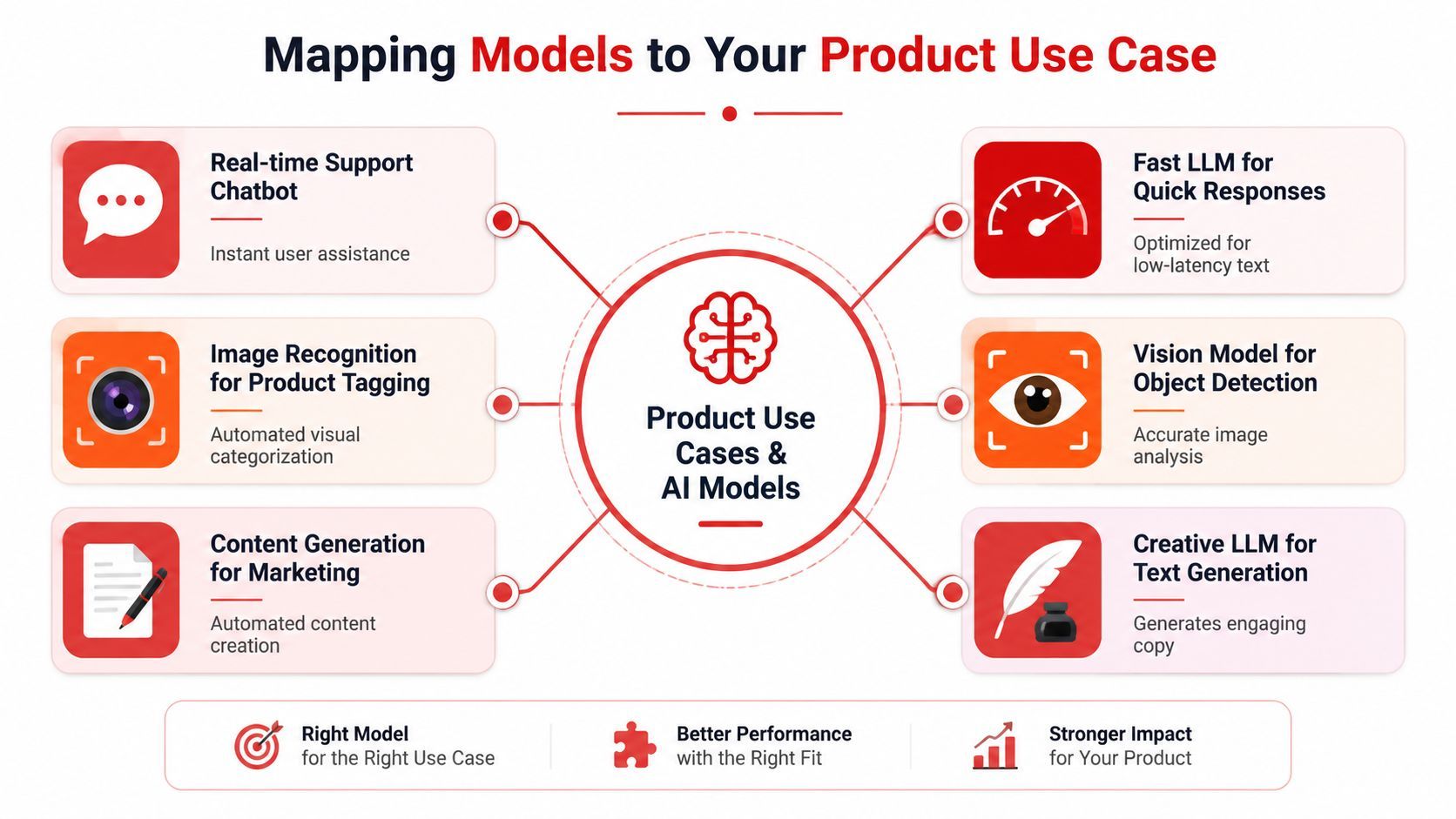
The fastest way to make a bad model choice is to compare models without naming the product job. A support chatbot, a legal analyzer, and a code agent don't need the same thing, even if they all use text in and text out.
Real-time support and conversational apps
For a support chatbot, users judge the system in seconds. First-token latency matters more than benchmark prestige.
Use a fast model for the default path. Let it handle account FAQs, order status explanations, lightweight troubleshooting, and basic summarization of prior conversation. Add retrieval for policy answers. Reserve a stronger fallback model for ambiguous or high-risk cases, such as refunds, billing disputes, or questions that mention legal, medical, or financial consequences.
A practical pattern looks like this:
- Primary lane: Speed-optimized model for common chat and routing
- Fallback lane: Premium reasoning model for escalations
- Guardrail: Retrieval before generation for factual account or policy responses
Research, legal, and document analysis
Long documents punish small-context assumptions.
If the product analyzes contracts, academic papers, diligence materials, or compliance packets, prioritize context length and reasoning stability over sheer speed. A model with strong long-context behavior reduces the need to split everything into tiny fragments, and that often preserves important cross-reference details.
For these products, I'd usually choose:
- A context-heavy model as the primary analyzer
- A premium reasoning model as a second opinion for contested passages
- Retrieval or citation scaffolding when the answer must tie back to source text
Coding assistants and agent workflows
Code tools need more than clever completions. They need reliability across instructions, file context, and iterative repair.
The benchmark spread discussed earlier is useful here because coding tasks expose weaknesses quickly. A model that writes impressive snippets but fails during verification creates more work than it saves. In production, the best setup is often a two-stage pipeline: use a fast model for boilerplate, repo navigation hints, or issue triage, then pass higher-stakes generation or bug-fix loops to a stronger coding model.
A code assistant should optimize for fewer bad edits, not just more generated lines.
Content generation and extraction pipelines
Marketing copy, summaries, tagging, structured extraction, and CRM note cleanup usually don't need your most expensive model.
These workloads benefit from strict output formats, short prompts, and aggressive cost control. Use smaller or faster models first. Then add validators around schema conformance, banned phrases, length limits, or citation requirements. If the validator fails, retry with a stronger model rather than paying the premium tier upfront for every request.
That pattern works well because the workload is repetitive and measurable. You can compare output quality with human review, schema success, or downstream acceptance without pretending benchmark scores tell the whole story.
Fairness is part of model fit
Teams often leave fairness out of AI model comparison because it's harder to summarize than speed or reasoning.
That's a mistake. The TigerData analysis of the invisible gap in AI systems argues that underserved communities face exclusion because benchmark datasets and evaluation metrics lack diversity, creating an “invisible gap” where models fail underserved populations without intentional action. It also notes that bias “hides in plain sight” and needs intentional diversity and transparency frameworks.
In product terms, that means your evaluation set should include language styles, dialects, edge-case names, accessibility needs, and user intents that mirror your real audience. Don't just test the model on polished prompts written by your own team. Test it on the kinds of input your users submit, especially when those users don't sound like benchmark authors.
Building a Dynamic AI Strategy
Teams usually discover the limits of a single-model design in production, not in a demo. One route gets overloaded. Another starts missing formatting requirements. Costs spike because the strongest model is handling work a cheaper model could finish just fine.
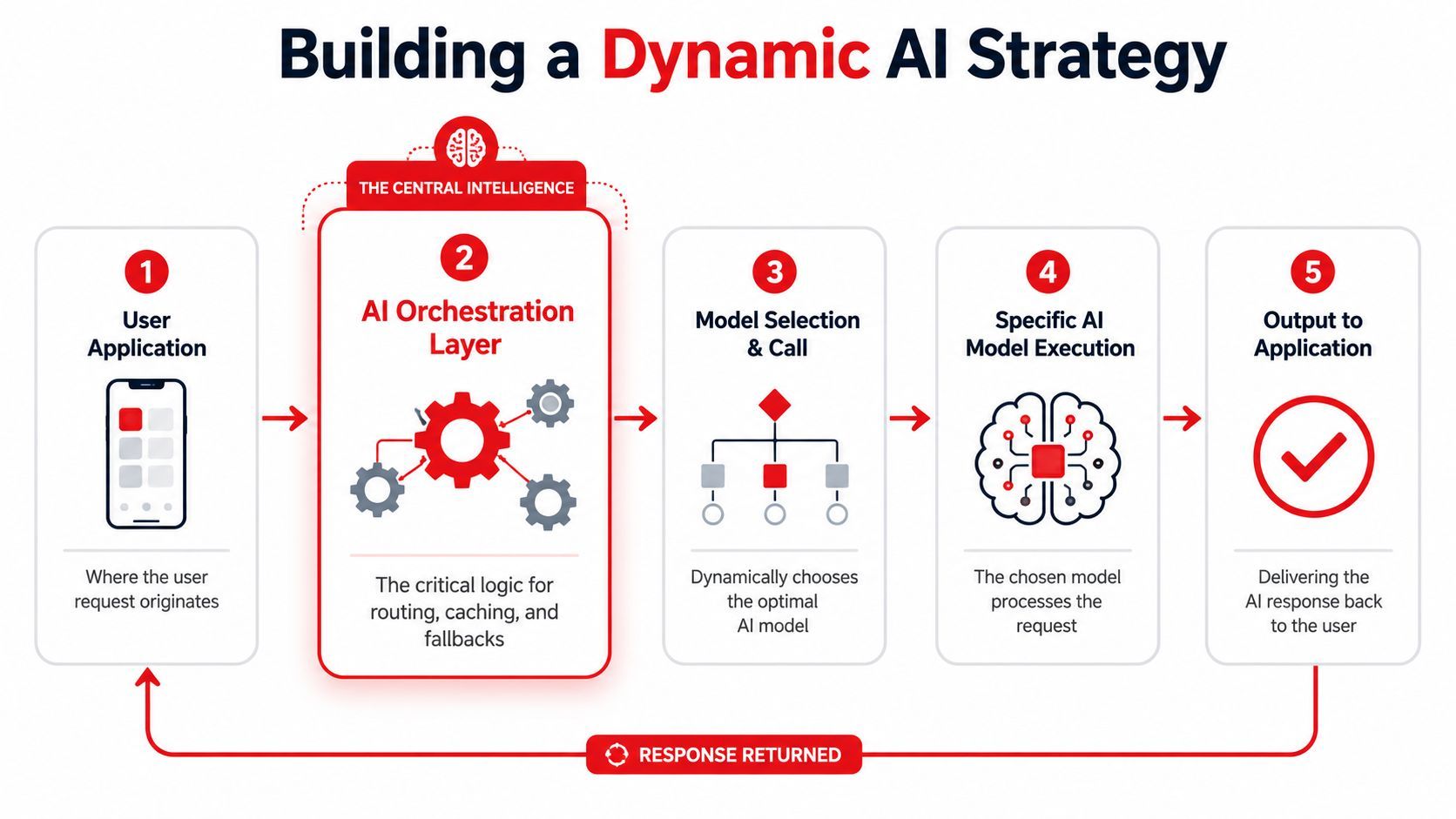
A dynamic strategy puts a policy layer between the app and the model providers. The application sends a task with context, constraints, and priority. The orchestration layer decides the route, prompt, model, retry policy, and logging rules for that specific request. That is the difference between an AI feature that survives launch traffic and one that turns into a weekly cleanup job.
Routing should be explicit
Routing decides your unit economics. It also decides where quality matters enough to pay for it.
The common mistake is treating model choice as a static config value. In production, model choice is a runtime decision. A support bot answering order-status questions does not need the same route as a code assistant repairing a failing test suite. A document extraction task with strict JSON output has different failure modes than a research assistant working across long context windows.
Useful routing signals include task type, input length, required output format, user tier, safety level, and whether tools or retrieval are involved. Those signals let the system send work into separate lanes instead of pushing everything through one expensive default.
Strong routing policies usually include:
- Intent-based routing: Send support, coding, extraction, and analysis tasks to different model lanes.
- Complexity-based escalation: Start with a cheaper route, then upgrade only when the result fails validation or shows low confidence.
- User-tier controls: Reserve higher-cost models for paid plans, urgent workflows, or internally approved tasks.
- Context-aware routing: Keep long documents and multi-step tool use away from models that perform well only on short prompts.
In practice, model selection works more like query planning than brand preference. The system should choose the cheapest route that can still hit the quality bar for that task. That requires policy, not instinct.
Before the next layer, it helps to see the orchestration pattern visually.
Fallbacks should protect quality and uptime
Fallback logic exists to recover from known failure modes without turning every bad response into a user-facing incident.
That includes provider outages, but availability is only part of the problem. More often, the first route fails unannounced. The model returns malformed JSON. It ignores a citation rule. It answers a sensitive request with the wrong tone. It truncates a response because the context was larger than expected. Those are product failures, even when the API returns 200.
Good fallback design is narrow and deliberate:
- Schema fallback: Retry structured output with a model that follows formatting rules more reliably.
- Reasoning fallback: Escalate tasks that fail acceptance checks or require more synthesis than the first-pass model can handle.
- Provider fallback: Shift traffic when rate limits, latency spikes, or regional outages affect one vendor.
- Context fallback: Move oversized inputs to a route built for long-context work instead of forcing them through a short-context default.
Blind retries create cost without fixing the root cause. If retrieval returned the wrong documents, or the tool call arguments were invalid, switching models may only produce three different bad answers at three different price points.
The goal is controlled recovery. Every fallback should exist for a named failure mode, with a clear stop condition and a measurable success rate.
Observability is the control layer
Multi-model systems are hard to improve if each request disappears into provider logs.
Track each call with enough detail to answer practical questions: Which route handled the request, which prompt version ran, how many tokens were used, how long it took, what validation checks passed or failed, whether a fallback fired, and what the final user-visible result looked like. Without that data, routing debates turn into opinion fights.
Good observability also changes how teams compare models. Instead of asking which model is best in general, you can ask which route is cheapest for invoice extraction, which provider is drifting on latency in one region, or which prompt revision raised fallback rates for paid users.
That operating view is the core point of AI model comparison after Hello World. The hard part is not picking a winner once. The hard part is running a system that can switch models, contain failures, and keep cost, speed, and quality in balance as the market keeps changing.
Putting It All Together with a Unified Backend
Once you move beyond one-model demos, the hard part isn't calling a model API. It's managing everything around the call without scattering logic across your app.
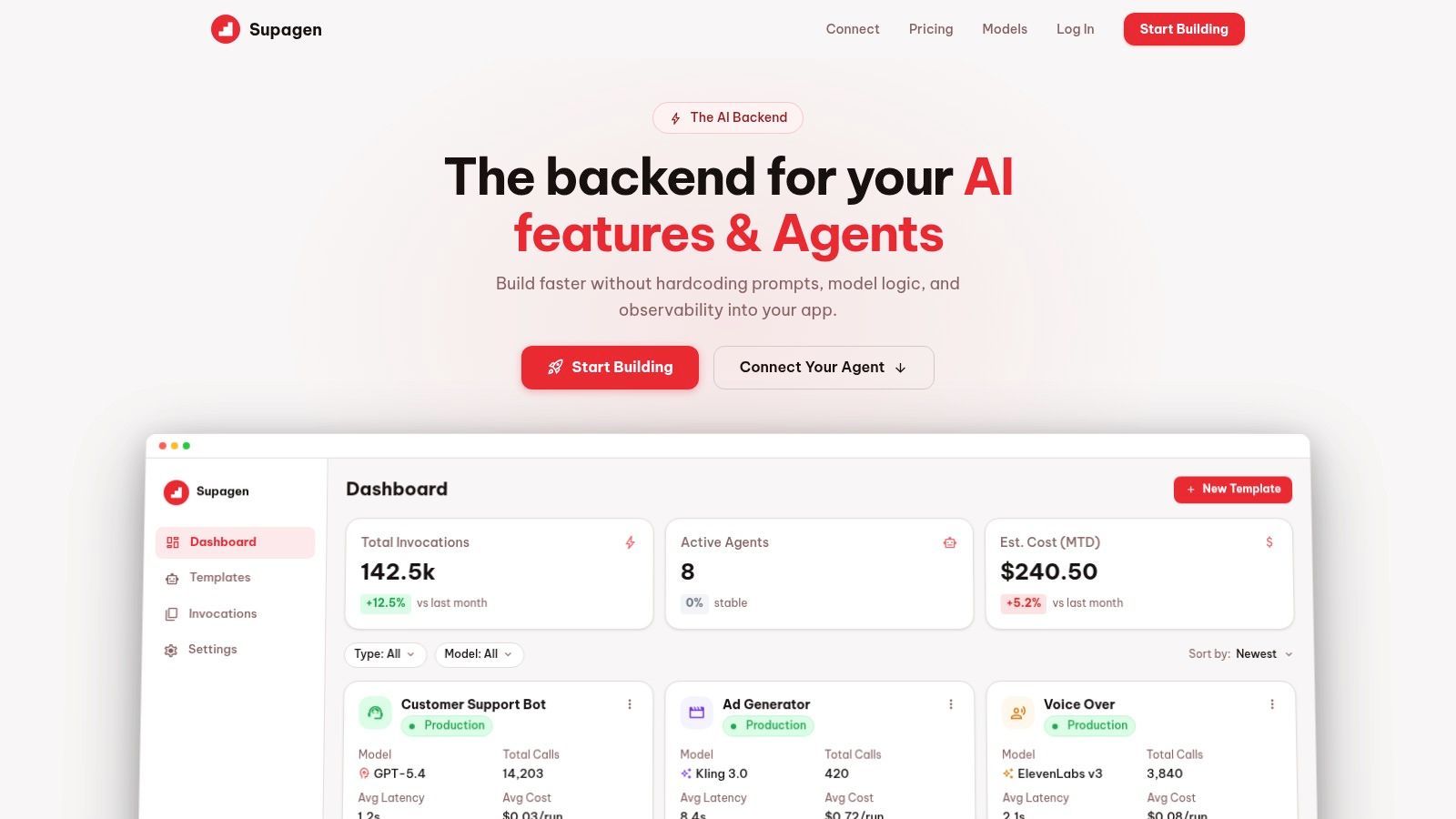
A unified backend solves that by pulling prompts, routing, fallbacks, and observability into one control plane. The application sends a task request. The backend decides which prompt version to apply, which provider to call, how to handle failure, and what to log.
What the control plane should manage
A good implementation should let the team change model behavior without shipping a new app build every time.
That means the backend should manage:
- Prompt versioning: So you can revise instructions safely and roll back bad prompt changes.
- Routing policies: So summarization, chat, extraction, and analysis can each use different model lanes.
- Fallback chains: So quality and availability problems don't become user-facing incidents.
- Per-call observability: So latency, token usage, I/O, and costs are visible for each request.
Here's what that kind of interface looks like in practice.
What a healthy implementation looks like
The healthiest stacks share a few traits.
They keep application code thin. They avoid hardcoding provider-specific prompt logic deep in product flows. They separate user intent from model choice. And they treat AI calls like any other production dependency, with logs, policies, and rollback paths.
In practical terms, a unified backend makes it possible to do things like route “summarize this call transcript” to a cheaper model, send “review this contract clause” to a context-heavy analyzer, and escalate “fix this failing test and explain why” to a premium coding model without rewriting the app for each change.
That's the difference between a clever prototype and a maintainable AI product. The prototype proves the feature can work. The backend makes sure the team can keep improving it without turning every prompt change into a redeploy.
What to Expect Next in AI Model Development
The next phase of AI model comparison won't be dominated by one universal winner. It will be shaped by specialization.
You can already see the pattern. Some models push hard on deep reasoning. Others optimize for throughput, low latency, long context, coding reliability, or retrieval-backed accuracy. That trend will make static rankings less useful and routing logic more important. Teams that design for substitution will adapt faster than teams that bind product behavior to one flagship provider.
Another shift is efficiency. The cost collapse and performance convergence discussed earlier changed the baseline. In practice, that pushes more workloads toward smaller, faster, or open-weight options for the first pass, with premium models reserved for the narrow slice of work that needs them.
On-device and edge deployment will also matter more, especially for privacy-sensitive features, low-latency interactions, and products that can't afford to ship every task to a remote premium endpoint. Even when the core workflow stays cloud-based, teams will increasingly break off small tasks for local or highly optimized execution.
The safe bet for 2026 and beyond is not any one provider. It's an architecture that assumes models will keep changing.
Build around interfaces, routing rules, validation, and observability. If a new model appears next month with a better speed-quality tradeoff for one lane of your product, you should be able to swap it in with minimal drama. That's what good AI model comparison is really for. Not picking a champion, but building a system that stays flexible as the field keeps moving.
If you want to put this multi-model approach into production without hardcoding prompts, routing logic, fallbacks, and observability into your app, take a look at Supagen. It gives you a unified AI backend for managing prompts, model routing across providers, per-call logs, costs, and iteration from a dashboard, which is exactly the kind of control layer that keeps AI features shippable as your stack gets more complex.