
AI Integration Platform: Building Scalable AI in 2026
You shipped the prototype in a weekend. It summarizes support tickets, drafts replies, and even pulls a few customer details into the answer. In the demo, nobody cares that the prompt is hardcoded, the model choice lives in one controller file, and the retry logic is a mess. They care that it works.
Then production shows up.
A customer asks why the bot answered with stale account data. Finance asks why the AI bill jumped. Support asks why responses got slower on Monday. Engineering realizes nobody can tell which prompt version generated which output. The feature isn't failing because the model is weak. It's failing because everything around the model is still improvised.
That gap is why the AI integration platform category matters now. It has become large enough to look less like a niche toolset and more like core infrastructure. Grand View Research estimates the market at USD 11.17 billion in 2026 and projects it to reach USD 88.32 billion by 2033, a projected 34.4% CAGR from 2026 to 2033, according to its AI integration platform market report.
The important part isn't just market size. It's what the growth implies. Teams are moving beyond raw model access and buying the production layer that sits between their app, their data, and the model providers they depend on.
Table of Contents
- Introduction Beyond the First API Call
- What Is an AI Integration Platform Really
- The Anatomy of a Powerful AI Platform
- Key Integration Patterns and Architectures
- From Code to Customer Value Top Use Cases
- Selecting Your Platform A Practical Checklist
- Implementation Roadmap and Common Pitfalls
Introduction Beyond the First API Call
The first API call is the easiest part of building AI into a product. You send text in, get text back, and everyone feels like the hard part is over. It rarely is.
The hard part starts when the feature becomes shared infrastructure instead of a demo. Product wants to tweak instructions without waiting for a deploy. Engineers want a clean way to switch from one provider to another. Operations wants logs. Security wants access controls. Finance wants cost visibility. Users want the system to stay fast, stable, and predictable even as usage grows.
That's where development groups frequently find themselves writing a lot of glue code they never planned to own. One file handles prompt templates. Another handles provider routing. Someone adds a fallback path in a rush. A queue appears. Then a cache. Then a homemade logging table. None of this is glamorous, but all of it determines whether the feature survives contact with real customers.
The prototype trap
A prototype can tolerate hidden assumptions. Production can't.
Common examples show up quickly:
- Prompt drift: Teams edit prompts directly in code, then lose track of which version improved quality and which one broke it.
- Provider sprawl: One feature uses OpenAI, another uses Anthropic, and a third starts testing an open model. Every integration exposes different request shapes and failure modes.
- Invisible spend: The app works, but nobody can attribute model usage to a tenant, workflow, or feature.
- Weak debugging: When a user reports a bad answer, there's no durable record of input, output, latency, or tool activity.
Practical rule: If your AI feature depends on screenshots, Slack messages, and tribal memory to debug, you don't have a production system yet.
An AI integration platform exists to pull that chaos into one operating layer. It gives teams a controlled place to manage prompts, route requests, inspect execution, track costs, and evolve the system without turning the application codebase into a maze.
Why teams are treating it as infrastructure
The strategic shift is simple. Models are becoming replaceable components. The operating layer around them is where reliability comes from.
That's why the modern AI stack looks less like “frontend plus one model API” and more like “application plus an AI control plane.” Once a team sees that distinction, architecture decisions get better fast. They stop hardcoding behavior that should be configured. They stop treating logs as optional. They stop assuming a good prompt is the same thing as a good product.
What Is an AI Integration Platform Really
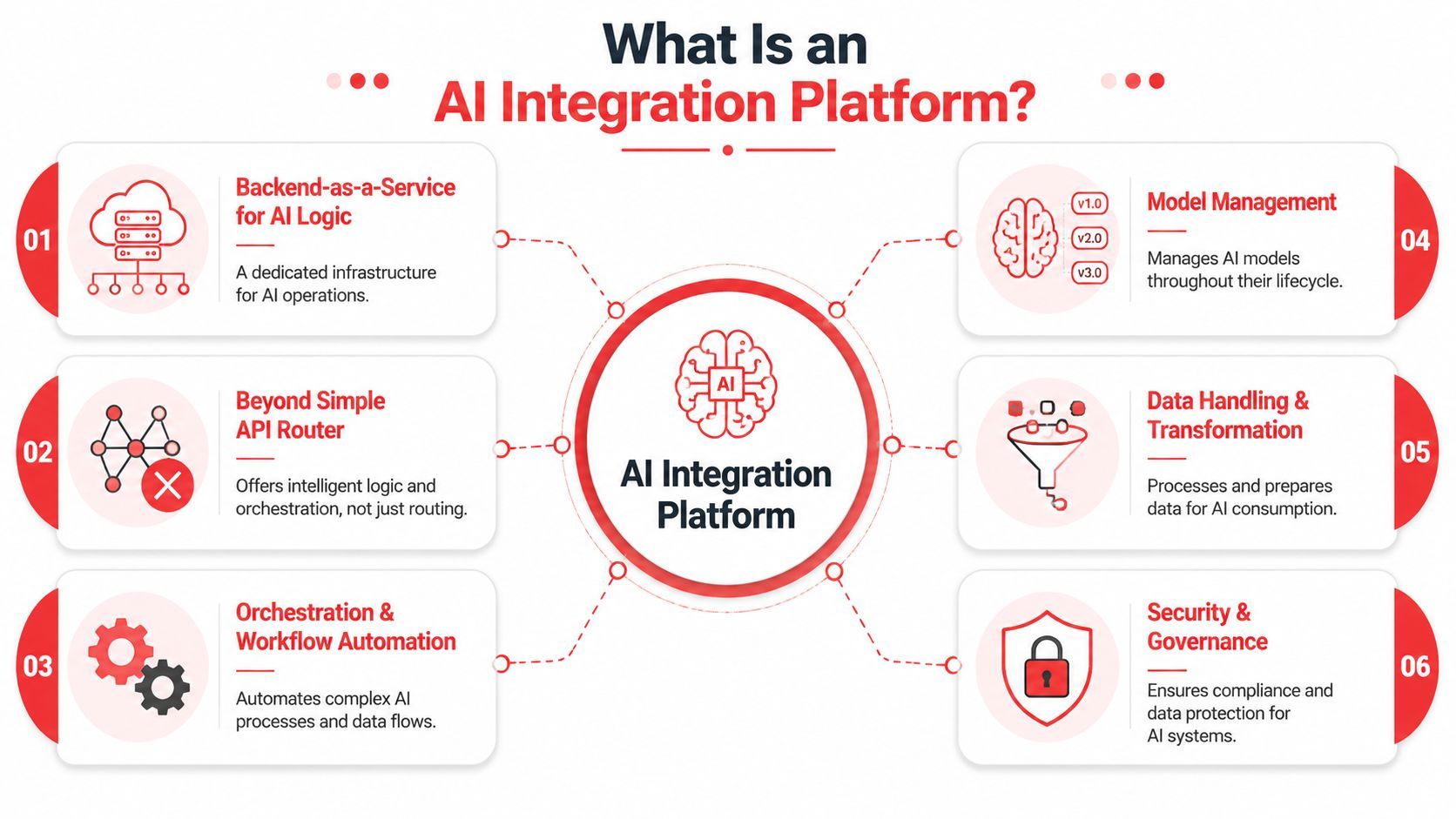
An AI integration platform is best understood as a control plane for AI features. It doesn't just pass requests along. It centralizes the operational parts of using models in production so application code stays focused on user behavior and business rules.
More than request forwarding
A plain API proxy can hide credentials and maybe normalize a few request formats. That's useful, but it isn't enough for a serious product.
A real AI integration platform usually does several jobs at once:
- Centralizes prompts and model settings: Teams can version instructions, swap providers, and adjust parameters without touching business logic everywhere.
- Captures execution data: Every call can be inspected with request context, outputs, latency, and usage details.
- Supports workflow logic: The platform can coordinate multi-step operations such as retrieval, transformation, generation, and tool execution.
- Handles governance concerns: Teams can constrain access, manage environments, and create a more auditable path from experiment to release.
Think about Stripe. Teams often could build direct payment processing integrations, but they usually don't want to own tokenization, retries, edge cases, compliance concerns, and event handling across the full payment lifecycle. AI has reached the same point. Making one model call is easy. Operating hundreds of thousands of calls across multiple features is not.
Why this layer changes team behavior
Without a shared platform, every squad reinvents the same machinery. That creates drift fast. One team logs raw inputs, another logs almost nothing, and a third builds custom wrappers around a single provider. You end up with fragmentation before you even have scale.
With an AI integration platform, engineering can set a standard interface for how AI enters the product. That changes how teams work day to day.
The platform isn't the intelligence. It's the discipline around the intelligence.
This distinction matters because strong products usually fail at the boundaries, not at the demo center. They fail when context is stale, when retries duplicate actions, when nobody notices spend trends, or when an update changes behavior unnoticed.
The most useful way to describe an AI integration platform is this: it's the backend service you wish you had once AI stops being a feature experiment and starts becoming part of your product contract.
The Anatomy of a Powerful AI Platform
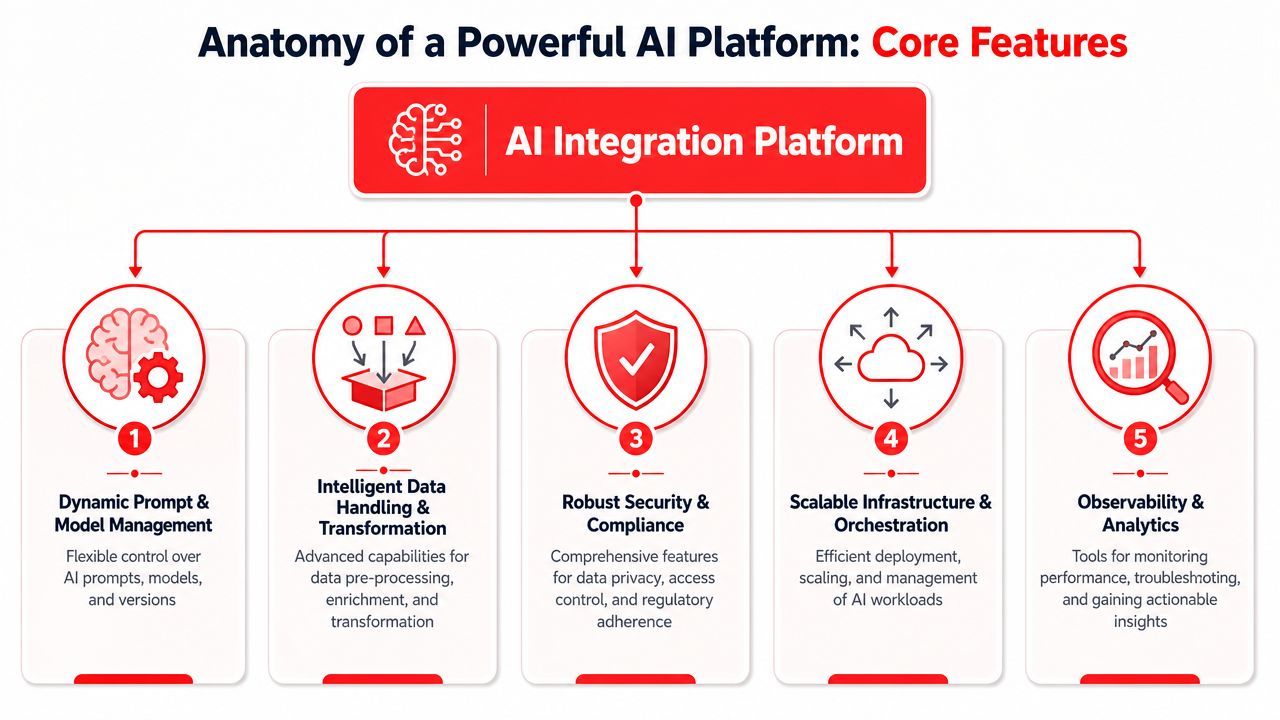
A production-ready platform earns its keep after launch. That's when debugging, iteration, and operating discipline matter more than the initial setup.
The pressure is real. In a 2024 survey discussed in this healthcare and AI adoption analysis, 89% of respondents said they had implemented AI in the past 12 months, but 69% reported a lack of readiness or confidence in their capabilities. The bottleneck wasn't interest. It was execution, observability, governance, and transparent performance measurement.
Control over prompts and models
The first pillar is dynamic prompt and model management. It enables teams to stop treating prompts like scattered string literals.
Useful platform behavior includes prompt versioning, environment separation, fallback configuration, and routing across providers such as OpenAI, Anthropic, Google, or open models. The key advantage isn't convenience. It's controlled change. Product can test a revised instruction set while engineering keeps the calling interface stable.
What doesn't work is baking provider choices directly into feature code. That makes every experiment expensive. Even small updates turn into deploys, review cycles, and rollback risk.
Observability and cost as first class concerns
The second pillar is centralized observability. If a user says “the answer was wrong,” the team needs to see what happened on that specific run. That means logs tied to prompts, model responses, latency, and any tool interactions.
Later, this media walk-through is useful if you want to see how AI product teams think about structured evaluation and deployment concerns in practice.
Cost tracking belongs in the same conversation. Many teams discover too late that “AI cost” is too vague to manage. You need to know which feature is expensive, which customers drive heavy usage, and whether one model choice is worth the latency and output differences.
A strong platform gives you operational answers, not just request success or failure.
- Per-call inspection: Useful for debugging weird outputs and latency spikes.
- Spend attribution: Essential when one AI feature subsidizes another.
- Change visibility: Critical when a prompt update improves quality for one path and hurts another.
Operator's mindset: Don't ask only whether the call succeeded. Ask whether it was fast enough, cheap enough, and controllable enough to keep.
Multi modal and agent ready execution
The third pillar is support for multi-modal inputs and outputs plus reliable tool connectivity. Real products don't stay text-only for long. Teams start adding image generation, speech input, structured JSON extraction, or document analysis. Once that happens, a generic wrapper around one chat endpoint starts to look painfully narrow.
The fourth pillar is tool and system connectivity. AI features become far more useful when they can read from internal systems, pull context from external apps, and take actions safely. But this only works if the execution path is predictable. The agent shouldn't improvise around every side effect.
The fifth pillar is orchestration. Some tasks need retrieval, classification, ranking, generation, validation, and action in sequence. A platform helps separate those concerns so the application doesn't become a brittle workflow engine by accident.
Key Integration Patterns and Architectures
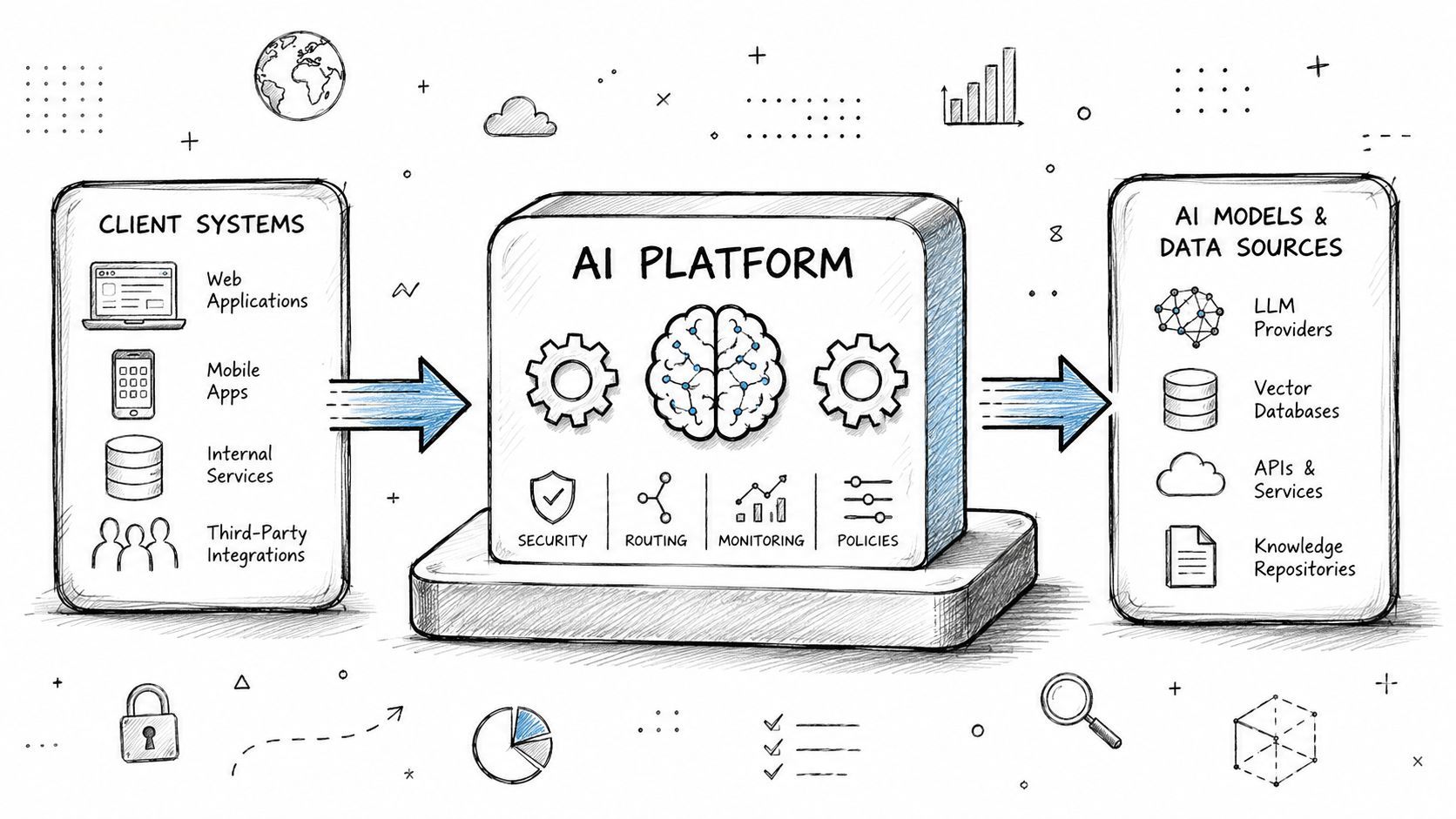
The right architecture depends on what the product is doing. Some teams need a thin control layer. Others need a full execution backbone for agentic behavior.
Proxy layer for fast control
The simplest pattern is the proxy layer. Your frontend or backend sends AI requests through the platform instead of directly to the provider. The platform injects prompt versions, logs metadata, applies routing rules, and records usage.
This works well when the product already has clear application logic and just needs one stable gate for all model calls. Teams usually adopt this first because it gives immediate benefits without a deep rewrite.
A proxy layer is often enough for:
- Chat interfaces that need model swapping and call logging
- Text generation features with prompt configuration managed outside code
- Internal tools where governance matters more than workflow complexity
Orchestration hub for compound workflows
The next pattern is the orchestration hub. Here, the platform doesn't just forward one request. It coordinates multiple steps such as retrieval, transformation, ranking, generation, and post-processing.
This matters once a feature stops being “ask a model for text” and becomes “run a repeatable AI workflow.” For example, support triage might classify a ticket, retrieve customer context, draft a response, and produce structured tags for downstream systems.
A hub architecture helps when teams want repeatability. It keeps the workflow definition closer to the AI operating layer instead of scattering state transitions across controllers, workers, and scripts.
Embedded backend for agent products
The most demanding pattern is the embedded backend. In this setup, the platform becomes part of the product's core runtime for agents that must read context, react to events, and execute actions across external systems.
According to Nango's analysis of AI integration platforms, production-grade AI integration requires continuous syncs for fresh RAG context, real-time webhook triggers for reactivity, and deterministic tool-calling for reliable action execution. That's a different shape than traditional enterprise iPaaS.
If your agent can answer questions but can't trust its context or execute actions predictably, you haven't built an agent product. You've built a demo with permissions.
This pattern becomes necessary when your product handles end-user OAuth, external SaaS data, and agent-facing APIs. At that point, the AI integration platform isn't just a helper. It becomes part of the product backend.
From Code to Customer Value Top Use Cases
The value of an AI integration platform shows up when technical control turns into product advantage. Teams don't adopt this layer because “integration” sounds nice. They adopt it because production AI creates problems that normal app code doesn't solve cleanly.
Shipping the first real feature faster
One common use case is getting from prototype to release without hardwiring every AI decision into the app.
A team building a meeting assistant, for example, often starts with one summarization endpoint. Then the roadmap expands. They need one prompt for executive recaps, another for action items, and a different one for follow-up emails. They may also want to compare providers, tune output formats, and inspect edge cases from real customer transcripts. A platform helps them do that from one operating layer instead of scattering logic across handlers and config files.
This has a practical product effect. Engineering spends less time re-plumbing the same feature and more time improving the customer-facing behavior.
Running multi source AI products
The second use case appears when AI depends on more than one system. Support copilots pull CRM data, ticket history, billing status, and knowledge base content. Sales assistants combine calendar context, call notes, and account records. Internal search tools blend documents, structured fields, and recent activity.
That's where integration starts correlating with success. No Jitter's coverage of independent research on AI project success reports that 90% of organizations that successfully deployed an AI project used integration platforms, and 93% of organizations with enterprise-wide integration platforms ran AI projects with three or more data sources or applications.
The takeaway is straightforward. Once the product depends on multiple systems, integration quality affects model quality. Clean, governed, well-coordinated data beats a clever prompt sitting on top of fragmented inputs.
Controlling spend without freezing progress
The third use case is operational. Teams need to optimize output quality and cost at the same time.
That usually means making choices like these:
What doesn't work is trying to solve spend with blanket restrictions. If the team can't see where cost originates, they respond by slowing experimentation everywhere. Good platforms let teams keep moving while making the economics visible enough to manage.
Selecting Your Platform A Practical Checklist
Choosing an AI integration platform is less about feature count and more about operational fit. A platform can look polished in a demo and still create pain once real users, real costs, and real incidents arrive.
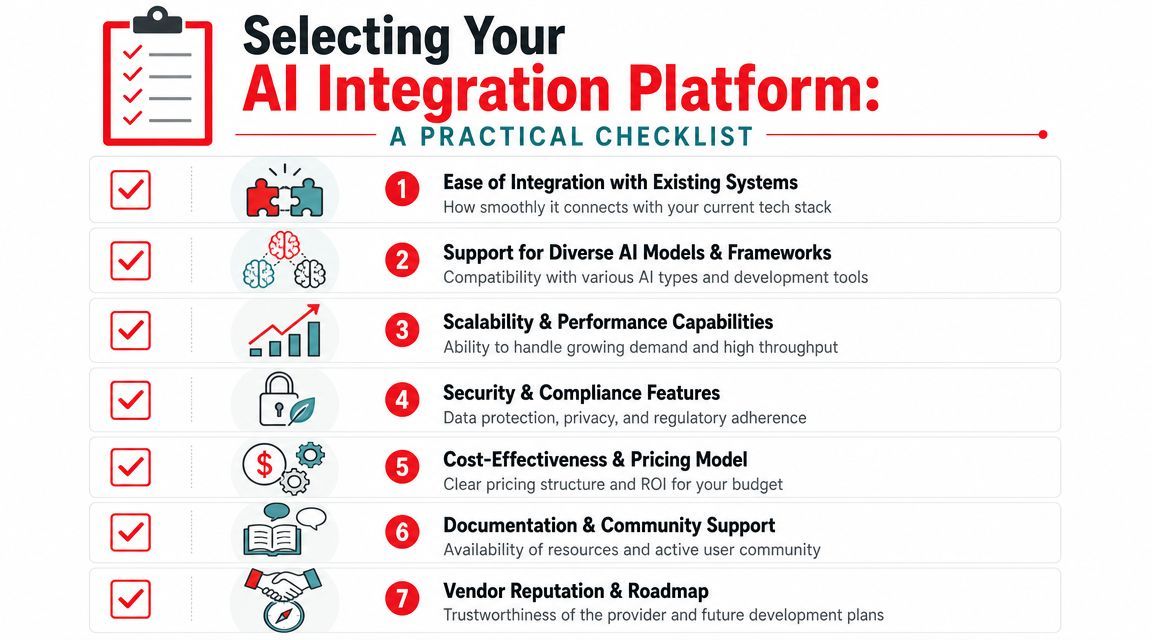
Vendor survey findings summarized in G2's report on AI in data integration indicate that AI integration platforms primarily reduce ongoing maintenance by automating monitoring and routine execution, with the strongest impact appearing after deployment through early issue detection and fewer manual interventions. That's the lens to use when evaluating options. Don't ask only how quickly you can connect. Ask how much maintenance the platform removes later.
Questions that reveal the real platform
A useful shortlist usually comes from hard operational questions:
- How many providers can you switch between cleanly: If model support exists only on a marketing page, but configuration differs wildly in practice, the abstraction is weak.
- What does one execution trace show: You want prompt version, inputs, outputs, latency, and enough detail to debug failures without guessing.
- Can the platform handle structured and multi-modal work: Text-only support often becomes a ceiling faster than expected.
- How are environments and permissions handled: Dev, staging, and production need separation. Teams also need a safe way to limit who can change prompts or routing.
- What happens when a provider degrades: Good answers include fallback behavior, retries, and visible alerts.
What usually creates regret later
The fastest way to pick badly is to optimize for setup speed alone. Teams often choose a platform because they can make something work in one afternoon. Then they discover the true cost in month two.
Watch for these failure modes:
- Opaque pricing: If you can't predict cost behavior from usage patterns, finance pressure will arrive before the product matures.
- Weak exportability: If prompts, logs, and workflow logic are trapped inside a proprietary interface, future migration gets expensive.
- Thin debugging: “We have logs” isn't enough. You need logs that answer user-facing questions.
- UI-first lock-in: Some low-code tools are excellent for internal automation but awkward for product teams that need programmatic control and CI-friendly workflows.
Buy for the incident you haven't had yet, not just the demo you can give today.
A solid evaluation process usually includes one realistic test workflow, one failure scenario, and one pricing review. If a vendor performs well only when everything goes right, keep looking.
Implementation Roadmap and Common Pitfalls
Rolling out an AI integration platform works best when the first use case is narrow and visible. Pick a feature with real user demand, clear ownership, and enough activity to expose quality, latency, and cost behavior quickly.
A rollout path that works
Start with one production path. Put every model call for that path through the platform from day one. Keep prompts out of application code, configure call logging before launch, and define who can change routing or prompt versions.
Then add guardrails early:
- Set cost alerts before usage climbs
- Create prompt versioning discipline before multiple people edit behavior
- Separate experimental flows from stable customer-facing ones
Mistakes that create rework
The most common mistake is partial adoption. Teams route some calls through the platform but leave fallback paths, admin tools, or background jobs calling providers directly. That destroys observability and creates drift.
Another mistake is placing business logic in the wrong layer. The platform should own prompt management, model routing, execution visibility, and AI workflow control. Your app should still own user permissions, product rules, and customer-facing state. Mixing those responsibilities usually creates brittle systems that are hard to test and harder to change.
If you want a production layer that handles prompt management, model routing, observability, cost tracking, and agent connectivity without hardcoding that logic into your app, Supagen is worth a look. It's built for teams shipping AI features and agents that need to move from prototype speed to production reliability.