
AI Inference Platform Guide: Components and Choices

You're probably here because the prototype works, the demo gets nods, and then the first real users arrive and everything gets awkward. Prompts drift, one model is cheaper but slower, another is faster but less reliable, and suddenly the app team is debugging latency, retries, and surprise spend instead of shipping features. An AI inference platform exists to put a disciplined layer between your product and that mess.
It is not just model hosting. It is the production control plane that decides which model runs, where it runs, how requests are routed, what gets logged, and how failures are handled when the load shifts, a provider stalls, or a prompt change breaks behavior. In practice, that layer turns inference from a one-off API call into an operational system.
Table of Contents
- What an AI Inference Platform Actually Does
- How Inference Fits Into the AI Lifecycle
- Core Components Every Inference Platform Needs
- Hardware and Deployment Choices That Actually Matter
- Real Workload Patterns and Their Trade-Offs
- An Evaluation Checklist for Choosing a Platform
- Why a Unified Backend Speeds Up Adoption
- A 30-Day Pilot Plan to Get Started
What an AI Inference Platform Actually Does
A lot of teams start with a direct call to a model API. That works until the product needs retries, prompt versioning, model fallback, audit trails, or multiple providers behind one feature. At that point, the simple integration starts acting like a fragile shortcut.
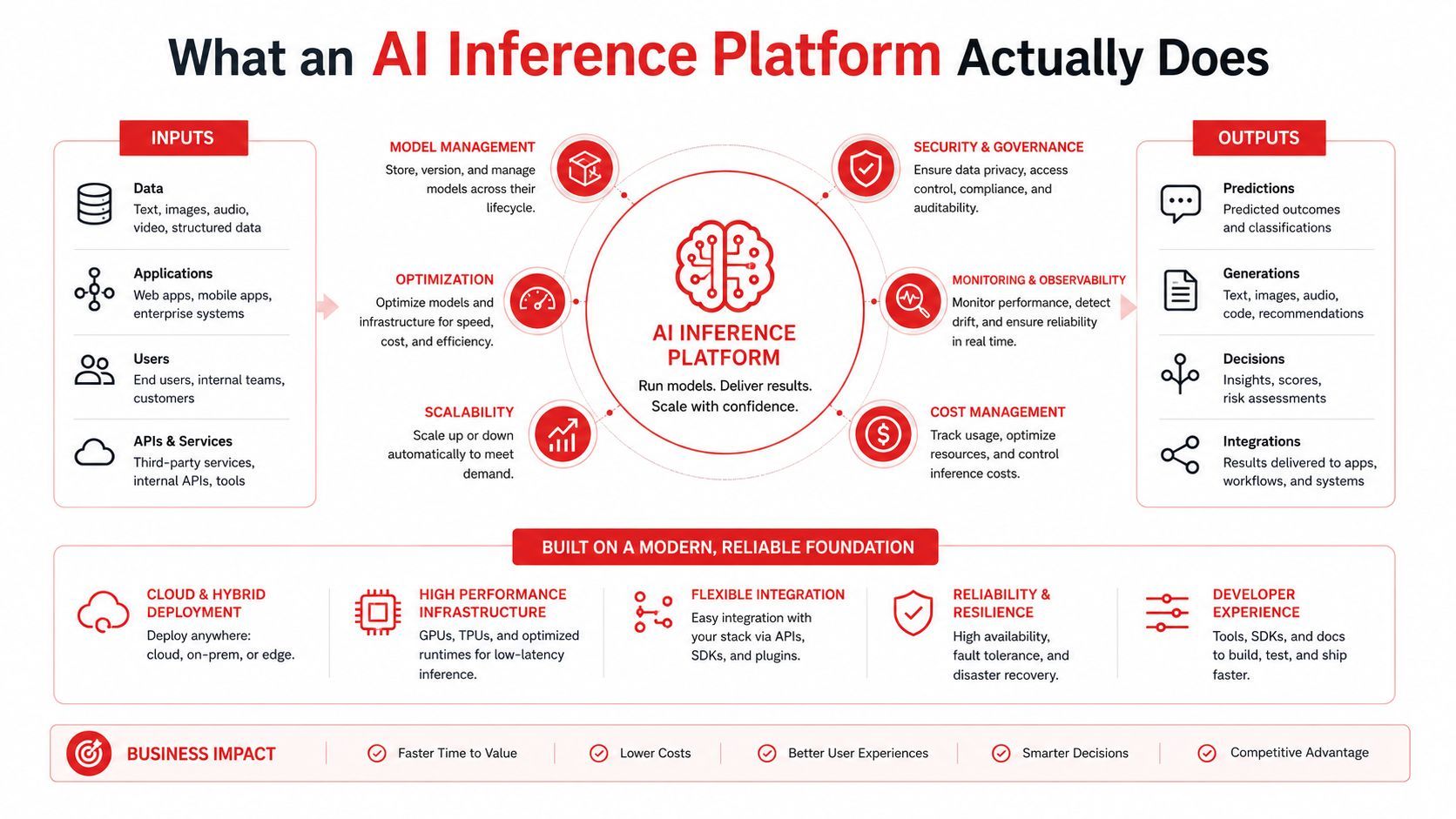
A practical mental model
The request comes in from your app. The platform decides which model or provider should handle it, applies the right prompt and parameters, and sends the call onward. Then the response comes back with logs, latency data, token usage, and, in better systems, a cost trail you can inspect later.
That workflow matters because production AI doesn't fail only at the model layer. It fails when a provider is slow, a prompt version was pushed too early, or the app has no record of what produced a bad answer. An inference platform absorbs those details so your application doesn't have to carry them in every feature branch.
Practical rule: if your app team is hardcoding provider choice, prompt text, and logging logic in the product code, you don't have a platform yet, you have a brittle integration.
Why the layer exists at all
The point is control. A routing layer lets you send easy requests to a cheaper model, reserve a stronger one for high-value steps, and switch providers when the workload or cost profile changes. It also gives you a place to keep prompt versions, rollbacks, and audit history separate from the main app deploy.
That separation saves real time when something breaks. Instead of hunting through backend code to find which prompt was live, you can inspect the call that went out, the model that answered, and the latency that followed. In production, that kind of traceability is the difference between a short incident and a long one.
How Inference Fits Into the AI Lifecycle
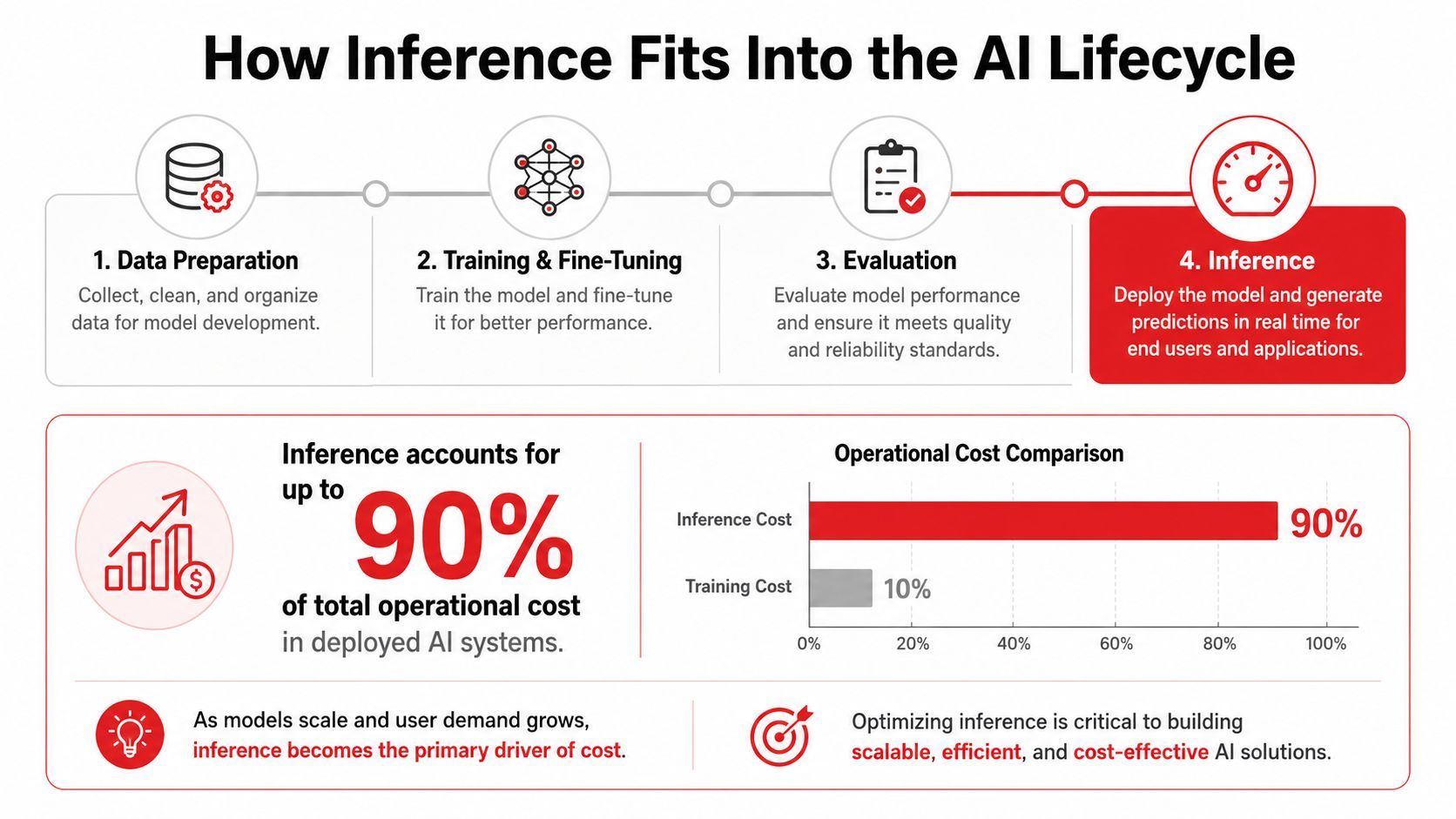
Inference is where an AI feature stops being a project and becomes an ongoing expense. Training and fine-tuning matter, but they happen intermittently. Inference keeps happening every time a user opens the chat, uploads an image, triggers an agent, or runs a batch job.
The scale of that shift is why this category has become so large. One market estimate values the AI inference market at USD 106.15 billion in 2025 and projects USD 254.98 billion by 2030, which implies a 19.2% CAGR over that period, while another forecast puts it at USD 97.24 billion in 2024 and USD 253.75 billion by 2030 at a 17.5% CAGR MarketsandMarkets. The broad message is the same, inference is already a major software-and-hardware market, not a sidecar feature.
Why the lifecycle order matters
Data preparation sets the foundation. Training and fine-tuning create the model behavior. Evaluation checks whether it behaves as intended. Inference is the stage that meets users, so it inherits the most operational risk because it runs under real traffic, real latency expectations, and real cost pressure.
That's why platform choices at inference time look different from training-time choices. Training can tolerate delayed jobs and offline tuning. Inference needs traffic shaping, fallback paths, observability, and cost controls that keep working when demand spikes or providers change behavior.
What this means for product teams
If a team only optimizes training, it can still ship an expensive and brittle product. The platform layer exists to make inference cheaper, safer, and easier to reason about once the feature is live. That's the critical production boundary.
A good rule of thumb is simple. If a model decision affects user-facing latency, retry behavior, or spend, it belongs in the inference platform, not buried inside the application service.
Core Components Every Inference Platform Needs
A thin proxy can forward requests. A real platform does much more. It separates model choice, prompt control, workflow execution, and operational visibility so the app team can move quickly without losing control.
Routing and versioning are not optional
Routing is the traffic cop. It keeps a simple classification call off an oversized model and sends a harder task to the model that can handle it. Versioning is the paper trail, and it matters more than people expect because prompt edits are code changes in disguise.
The common failure here is not dramatic. A team ships a prompt tweak, quality shifts, and nobody knows which version caused it. When prompts and model settings are versioned, rollback becomes a platform action instead of a hunt through git history.
Observability and orchestration save incidents
Observability tells you what happened on the last request, not just whether the request failed. Without it, you can't separate a bad prompt from a slow provider or a malformed input. Orchestration matters when one user action triggers several model calls, because one weak link can create a chain of downstream failures.
A platform earns its keep when the team can answer three questions fast, what ran, what it cost, and why it changed.
The rest of the stack is about survival
Latency and cost management keep the platform usable under load. Security keeps the integration from becoming a compliance headache. If a vendor demo only talks about throughput, it's leaving out the parts that determine whether the system is maintainable after launch.
Hardware and Deployment Choices That Actually Matter
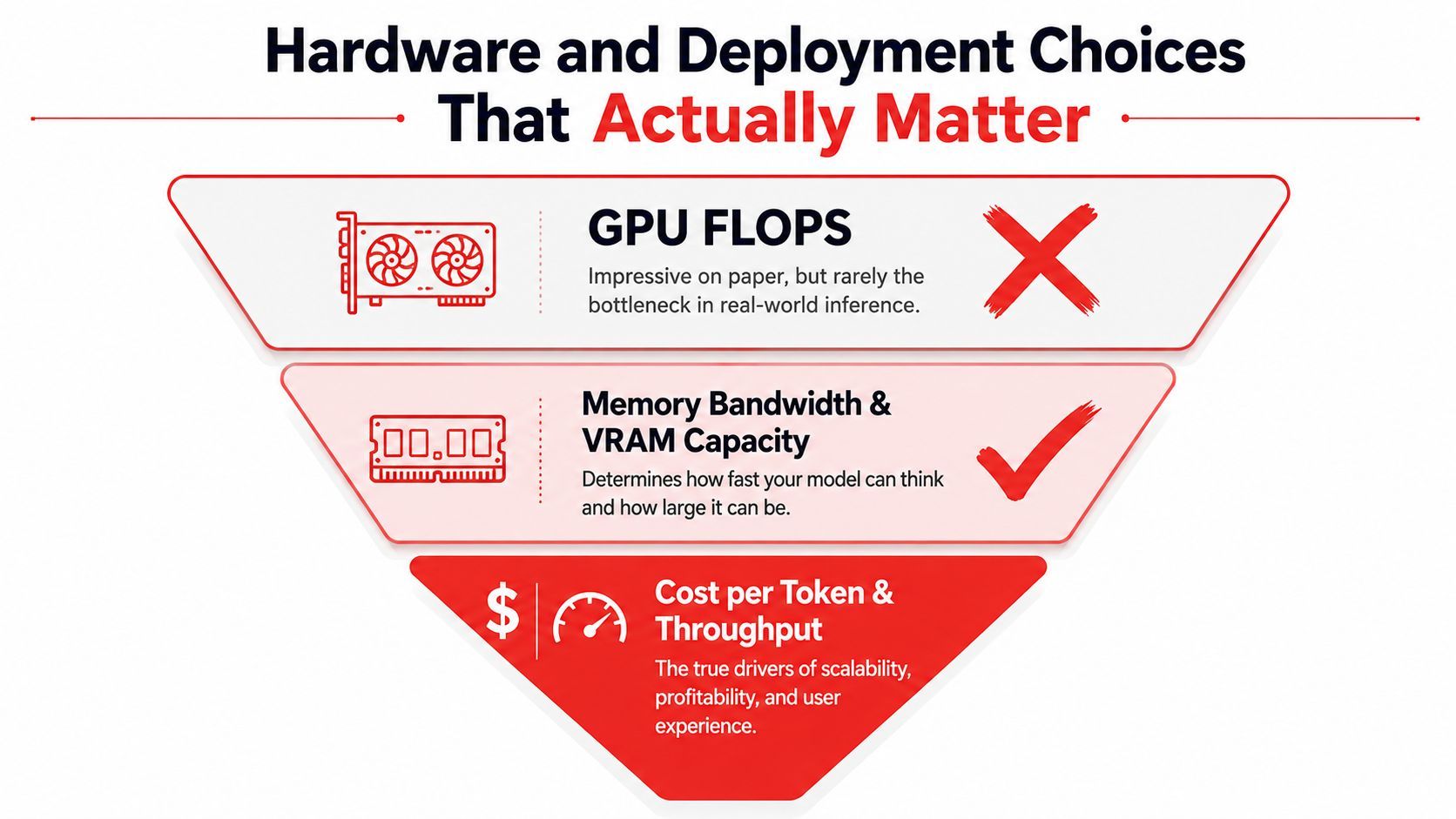
For LLM inference, memory bandwidth and VRAM capacity usually matter more than raw FLOPs because autoregressive decoding rereads model weights from memory for every generated token Inference Engineering. That changes the buying sequence. First, check whether the model fits in VRAM. Then compare platforms by memory bandwidth per dollar so you're optimizing for tokens per second per dollar, not just marketing-grade GPU specs.
Deployment is a placement decision
Fully managed APIs are the easiest path when you want to move fast and avoid infrastructure work. Dedicated cloud, neocloud, on-prem, and edge deployments make sense when data locality, governance, or predictable performance matter more than convenience. There isn't a universal lowest-latency cloud for inference, because performance depends on model size, user region, accelerator type, and network path InfoWorld.
That means the deployment choice is workload-specific. A customer-facing app in one region has a different answer than an internal assistant with private data or a control loop running near the device.
Edge only wins in the right cases
Neutral edge guidance says to adopt edge inference only where it makes sense, prefer hybrid cloud-edge strategies over extreme all-cloud or all-edge choices, and plan for updates, monitoring, and maintenance from the start InfoWorld. That's the right stance. Edge is not a default, it's a trade-off.
If the model can stay centralized without hurting latency or data handling, do that first. If not, move the smallest necessary part of inference closer to the user or device and keep the control plane somewhere you can operate it.
Real Workload Patterns and Their Trade-Offs
A customer chatbot, a multi-modal generator, an agent workflow, and a batch analysis job all stress different parts of the stack. Treating them as the same “LLM use case” leads to bad platform choices, because the bottleneck changes with the workload.
Customer chatbots care about response feel
Chatbots care about latency, conversation memory, and graceful fallback. Users notice delay fast, especially when the assistant is supposed to feel interactive. The platform should preserve context safely, but not at the cost of routing every turn through the most expensive path.
Multi-modal pipelines need unified visibility
Text, image, audio, video, and JSON workloads create a logging problem as much as a generation problem. If each modality has a separate pipeline and separate logs, debugging gets painful quickly. A platform needs one place to inspect requests, outputs, and failures across formats, because otherwise the workflow turns into a collection of disconnected services.
Agents and batch jobs stress different limits
Agents chain steps, so orchestration and fallbacks matter more than raw token speed. One failed tool call can damage the rest of the run, which is why retries, buffering, and routing controls are so useful. Batch analysis jobs are different. They care more about throughput and unit cost than first-token feel, so they're a natural fit for queueing, batching, and lower-priority models when the task allows it.
The practical lesson is blunt. “Best platform” only makes sense after you name the workload mix. A platform that feels perfect for chat can be a poor fit for batch processing, and a great orchestration layer can be overkill for a single-turn extractor.
An Evaluation Checklist for Choosing a Platform
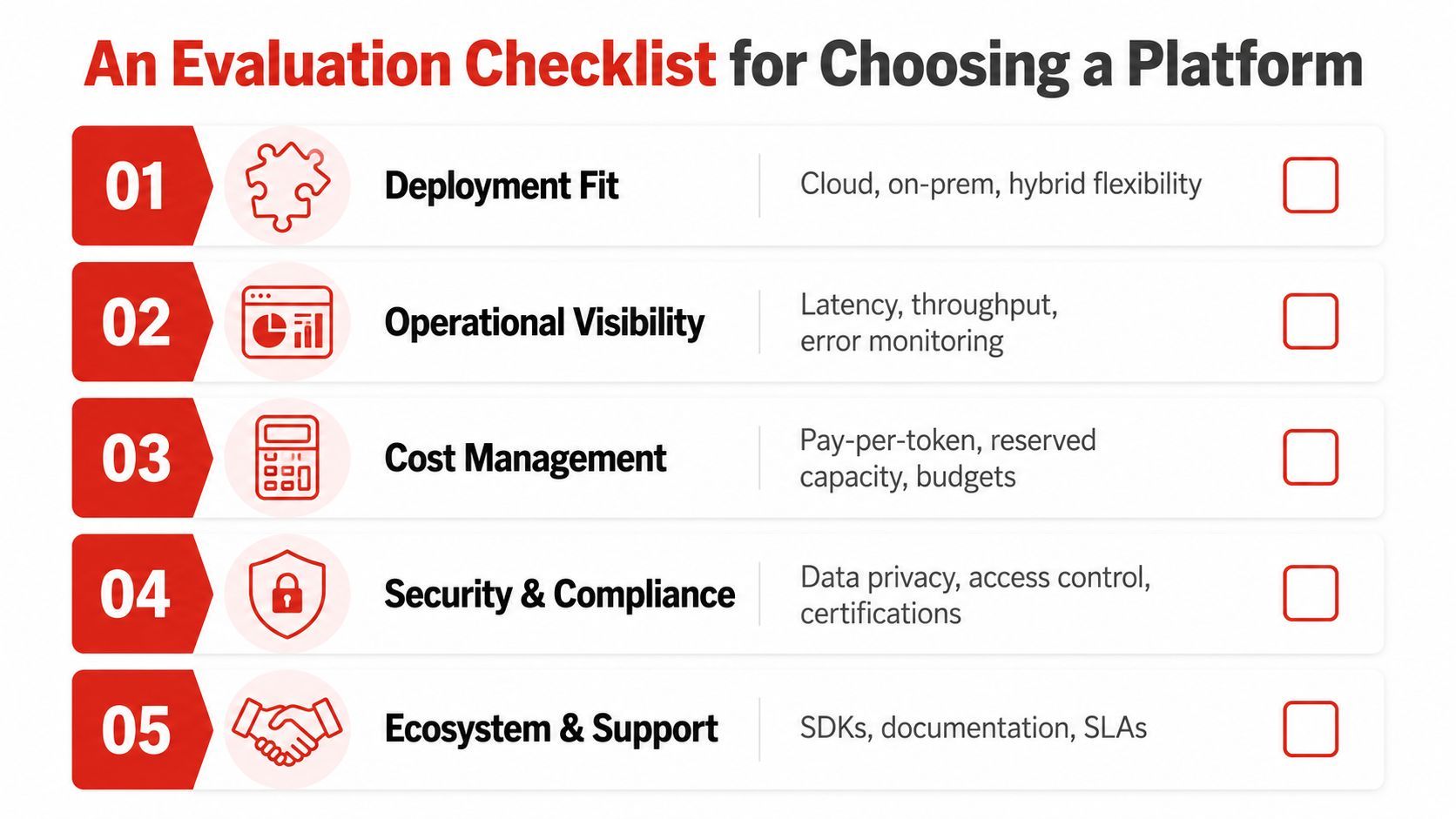
Most vendor calls drift toward the wrong questions. Raw TPS, glossy demos, and benchmark slides are easy to overvalue because they're simple to compare. Your workload isn't simple, so your checklist shouldn't be either.
Deployment fit
Can it run where you need it, in the cloud, on-premises, or in a hybrid environment? Can it support the model types and traffic patterns you use today? Can it move between providers without forcing an application rewrite?
Operational visibility
Can you inspect per-call latency, token counts, inputs, outputs, and errors? Can you see which prompt version produced the result? Can you trace a bad answer back to the model path that generated it?
Cost control
Can you set budgets, route by task type, and keep cheap requests off expensive models? Can you compare provider spend in one place? Can you prove to finance why the bill changed?
Security and workflow
Can it isolate provider keys, handle sensitive data carefully, and enforce access controls? Can developers update prompts or routes without a redeploy? Can the platform support the human review process your team needs?
Practical rule: if a vendor can't answer your own workload questions with your own sample requests, their benchmark doesn't matter much.
Why a Unified Backend Speeds Up Adoption
The fastest path for a small team is usually a single backend that handles routing, prompt versions, fallbacks, and logs without forcing code changes. That sounds like an architecture preference. In practice, it's an adoption strategy.
When the backend is unified, product teams can change a prompt through a dashboard, watch the impact on latency and cost, and roll back if the result is worse. That avoids the usual redeploy cycle where even a small prompt tweak becomes a full engineering task. It also keeps the model layer consistent when the app uses multiple modalities or agent endpoints.
Why this matters for real teams
A unified backend reduces integration friction. Instead of wiring a different SDK for each provider, the app talks to one control point and lets the backend decide which provider or model should answer. That makes it easier to experiment with better models without scattering provider logic across services.
It also makes agent setups cleaner. If your agent stack can reach the backend through one URL, with OAuth where needed, you don't need to build a separate integration path for every model capability. The app team gets one operational surface instead of a pile of special cases.
A 30-Day Pilot Plan to Get Started
Start by inventorying every place your app calls a model, including prompts, providers, and failure modes. Then run a small scripted workload through two or three candidate platforms and compare the results in conditions that resemble production, not a demo page. Track the things that matter in real use, latency, cost, developer friction, and rollback speed.
In week four, migrate one feature, not the whole app. Keep the rollback path documented and test it once. The right platform is the one that turns a painful redeploy into a quick dashboard update.
A CTA for Supagen.