
AI Governance Platform: Your Guide to Shipping AI Safely
You ship the first AI feature fast. A support assistant answers common questions. Then marketing wants content generation. Then ops wants document analysis. Then someone adds a second model because the first one is too expensive for routine calls. A week later, prompts live in source code, API keys are scattered across environments, and nobody can answer basic production questions like: Which prompt version handled this request? Why did latency spike? Why did cost jump? Which model saw sensitive input?
That's the point where organizations realize they don't have an AI stack. They have AI sprawl.
An AI governance platform fixes that, but not in the stiff, policy-manual sense people often imagine. In practice, it acts like a production layer between your app and the models you call. It gives product teams one place to manage prompts, route traffic, inspect failures, control access, and trace decisions after something goes wrong. Legal and compliance teams benefit too, but builders get the first win: less hardcoding, fewer risky redeploys, and far better visibility.
The operational gap is real. Trustible's 2026 analysis of AI governance platform types notes that 78% of governance platforms offer model registry and static risk assessments, while fewer than 12% provide granular, per-call observability including token usage, latency, I/O, and cost tracking for active agent decisions. That matters because modern AI systems don't fail on a quarterly review cycle. They fail request by request, route by route, prompt by prompt.
Table of Contents
- Introduction Beyond the AI Wild West
- What Is an AI Governance Platform Really
- The 9 Core Capabilities You Cannot Ignore
- How to Evaluate an AI Governance Platform
- Integration Patterns and Implementation Playbook
- Real-World Use Cases for Product Teams
- Your First Step to Production-Ready AI
Introduction Beyond the AI Wild West
A lot of teams start with the same pattern. One engineer wires up OpenAI for chat. Another adds Anthropic for better long-form output. Someone else experiments with image generation. Prompts go into config files at first, then into code because it's quicker, then into Slack messages because nobody knows which version is current. The app still works, but the team has lost control of the system they're shipping.
That's the AI Wild West. Not because people are careless, but because AI features are easy to start and messy to scale.
The pain usually shows up in ordinary product work, not dramatic failures. A PM wants to tweak a prompt without waiting for a full release. Support wants to inspect a bad response but can't see the exact input and model settings. Finance asks why usage costs moved. Security asks which tools are sending customer data to which providers. Engineering ends up doing archaeology in logs, code history, and vendor dashboards.
Practical rule: If changing a prompt requires a redeploy and debugging a bad output requires checking three separate systems, your AI stack is already too fragmented.
An AI governance platform is the layer that brings that fragmentation back under control. For a small team, that might mean centralized prompt versions, provider routing, and request logs. For a larger team, it expands into access controls, auditability, policy enforcement, and lineage. The point is the same in both cases: ship faster without turning every feature into infrastructure debt.
Real-time governance beats static paperwork
A lot of governance tooling still assumes a slower world. Teams document models, fill out risk templates, and approve usage before deployment. Those steps matter, but they don't help much when an agent changes model providers at runtime, a fallback route activates, or a prompt edit degrades output in production.
The gap between static oversight and live operations is why many builders dismiss governance as something “for later.” They associate it with review boards and compliance checklists instead of seeing it as a developer tool.
That's a mistake. The useful version of governance is operational. It tells you what happened on a single call, why it happened, and what to change next.
Why this matters for smaller teams too
You don't need a compliance department to need governance. You need one AI feature that users rely on.
A startup with a support assistant still needs guardrails around prompts, model selection, and output quality. A solo founder still needs to know why one customer input failed and another succeeded. A product team still needs a clean way to swap providers or tune prompts without rewriting business logic. Governance becomes practical the moment AI moves from a demo into a user-facing workflow.
What Is an AI Governance Platform Really
The simplest useful definition is this: an AI governance platform is an API gateway for AI.
Most developers already understand why API gateways exist. You don't want every service reinventing authentication, routing, retries, logging, and traffic policy on its own. So you insert a control layer between clients and services. That layer standardizes how requests flow and how operators understand what happened.
AI needs the same treatment.
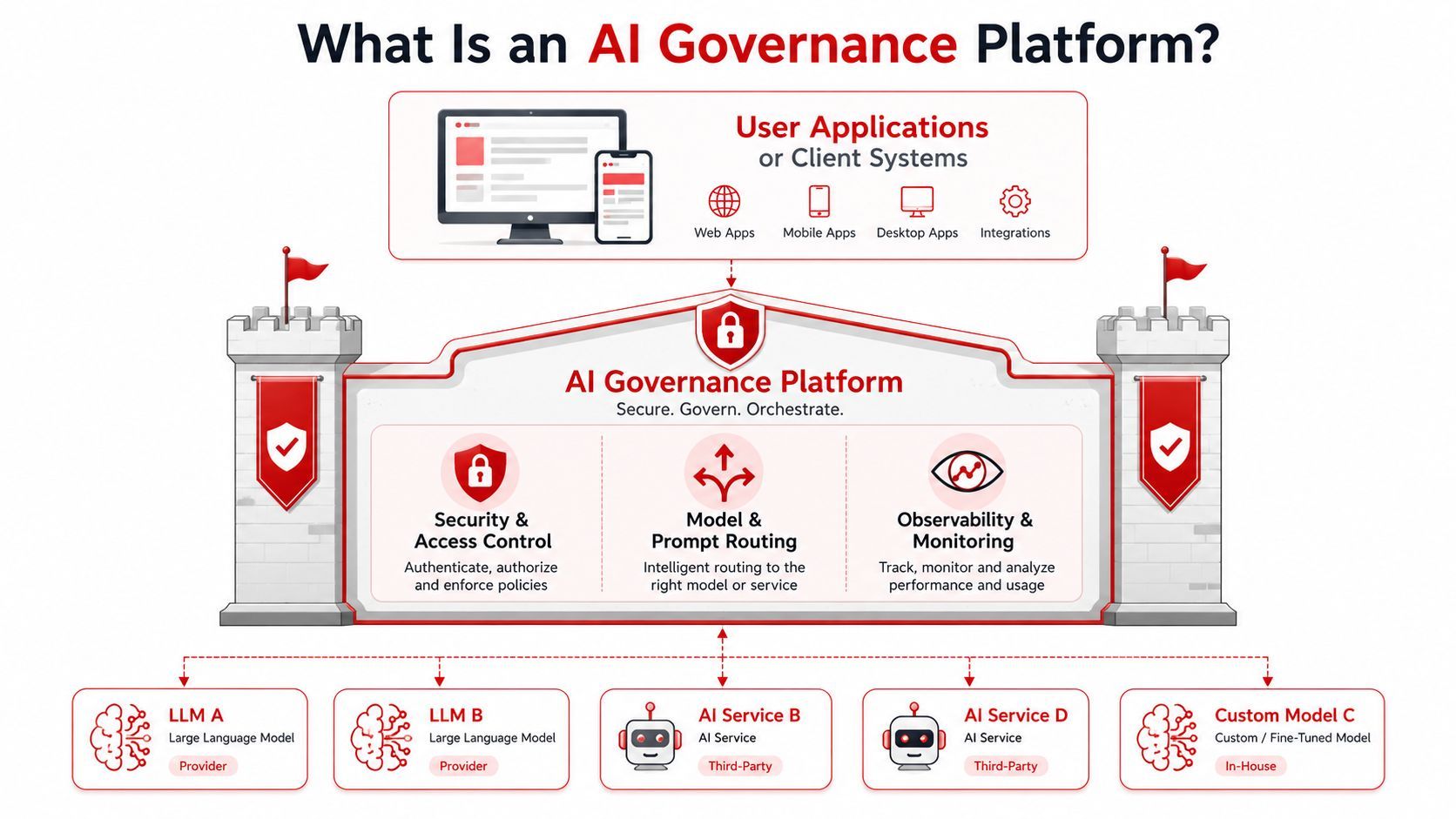
Instead of every feature calling models directly, the application talks to a governance layer. That layer handles prompt configuration, provider selection, access rules, logs, fallback behavior, and operational telemetry. Your app asks for an outcome. The platform decides how that request should be fulfilled within the rules you've defined.
It separates product logic from model logic
This separation is the biggest practical win.
Your application should know that a user clicked “summarize contract” or “generate title ideas.” It shouldn't have to hardcode which model handles the task, which prompt version is active, what fallback route to use if the primary provider errors, or how to tag the request for audit review. Once those concerns live inside application code, simple AI changes become software releases.
That slows teams down. It also makes experimentation risky.
With a governance layer in place, teams can update prompt versions, switch providers, tune parameters, or route specific workloads differently without touching the main product codepath. That doesn't remove engineering discipline. It puts the right concerns in the right layer.
An app without AI governance is like a microservice architecture with no gateway, no tracing, and no centralized auth. It works until it doesn't, then every incident becomes a scavenger hunt.
It's infrastructure, not just a dashboard
A lot of tools call themselves governance platforms when they're really reporting tools. They give you inventories, review flows, or model documentation. Those are useful, but they're not enough for production systems where requests move across multiple providers and agents make decisions in real time.
A real platform sits in the request path or tightly alongside it. It influences runtime behavior.
That distinction helps explain why the category is growing so quickly. MarketsandMarkets projects the global AI governance market will grow from USD 0.89 billion in 2024 to USD 5.78 billion by 2029, with a 45.3% CAGR. Teams aren't buying this software because policy documents got more fashionable. They're buying it because AI moved into production, and production needs control planes.
What good governance feels like day to day
For product teams, a solid platform changes the daily workflow in concrete ways:
- Prompt changes become managed updates instead of code edits buried in a release.
- Provider switching becomes operational instead of architectural.
- Debugging starts with per-call evidence instead of guesswork.
- Access policy lives centrally instead of spreading through app code.
- Cost review becomes part of the same system where you inspect quality and latency.
That's why the best teams don't treat governance as a brake. They treat it as the missing backend for AI features.
The 9 Core Capabilities You Cannot Ignore
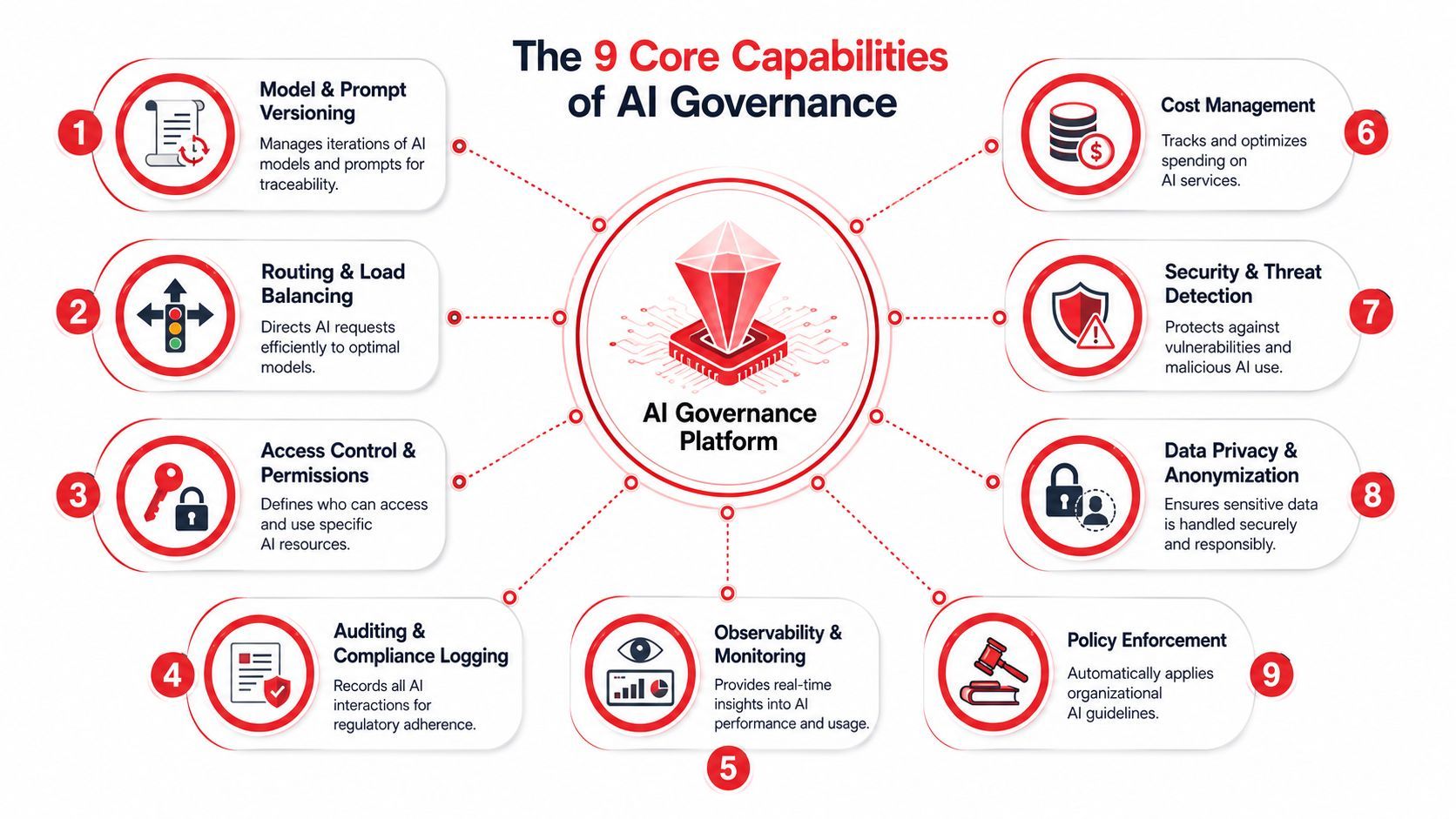
A useful AI governance platform doesn't need to do everything on day one. But it does need to cover the core capabilities that keep AI systems controllable after launch.
Think in three pillars
The easiest way to evaluate the capability set is to group it into three pillars:
- Management and control
- Visibility and accountability
- Safety and compliance
If a platform is weak in any one of those, your team will feel the gap in production.
Management and control
This pillar is about making AI behavior configurable instead of accidental.
- Model and prompt versioning keeps a record of which prompt, model, and settings were active for a specific call. When output quality changes, teams can compare versions instead of debating what they think changed.
- Routing and load balancing decides which model should handle which request. That can mean matching tasks to providers, applying fallbacks, or steering low-risk requests to cheaper options.
- Access control and permissions determines who can edit prompts, switch routes, view logs, or use restricted models. Without this, “just one quick change” becomes a production risk.
A practical example: a content feature may need one route for fast drafts, another for structured JSON, and a fallback when the primary provider is unavailable. Routing shouldn't be embedded across app code. It should live in the governance layer where operators can inspect and change it safely.
Visibility and accountability
This is the pillar teams miss first, then regret fastest.
- Auditing and compliance logging records what happened, when, under which configuration, and by whom.
- Observability and monitoring shows per-call behavior such as latency, failures, outputs, and model performance over time.
- Cost tracking connects usage to prompts, routes, features, or customers so spend doesn't disappear into a vendor invoice.
Here's a simple test. If a user reports a bad answer, can your team pull up the exact request, prompt version, provider, model response, and operational metadata in one place? If not, you don't have observability. You have fragments.
A lot of AI teams discover that traditional app monitoring doesn't answer AI-specific questions. It can tell you the endpoint responded. It can't tell you whether the prompt template broke, the fallback route kicked in, or a provider-specific behavior changed output quality.
This walkthrough gives a useful visual sense of what teams should expect from a modern control layer:
Safety and compliance
The last pillar matters even if you don't operate in a heavily regulated industry, because safety failures often begin as engineering failures.
- Policy controls let teams define what is allowed. That might include blocking certain input types, requiring human review for some outputs, or limiting which providers can process sensitive workflows.
- Data lineage tracks where data came from, how it moved, and which model decision used it.
- Compliance support helps teams meet internal and external requirements without inventing documentation after the fact.
Witness argues that an AI governance platform must implement end-to-end data lineage tracking with immutable audit logging to satisfy transparency mandates such as the EU AI Act and ISO/IEC 42001. That sounds regulatory, but the engineering takeaway is straightforward: if you can't trace a model decision back to its originating data and transformations, you can't reliably explain or defend that decision later.
Good lineage is the difference between “we think this answer used the CRM sync from yesterday” and “we know exactly which source, transformation path, and prompt configuration produced it.”
For product teams, these nine capabilities aren't abstract boxes on a procurement sheet. They're the pieces that keep AI features operable after the first launch week.
How to Evaluate an AI Governance Platform
Most platform evaluations fail because teams ask broad questions instead of operational ones. They ask whether a tool supports governance, compliance, or observability. Every vendor says yes. The better question is whether the platform fits the way your product team ships.
What to test first
Start with integration friction. If a platform takes major rewiring before you can route a single production feature through it, the rollout will stall. A strong option should let you centralize prompts, route requests, and inspect logs quickly. Fancy controls matter later. Adoption starts with a path of least resistance.
Then test provider flexibility. Many teams start on one model vendor and add others later for quality, price, latency, or modality reasons. If the platform makes provider switching awkward, you'll feel vendor lock-in early. The whole point of a governance layer is to decouple your app from provider-specific logic.
After that, inspect runtime visibility. Batch reports and static dashboards don't help when support asks why a user request failed fifteen minutes ago. You want per-call detail, searchable logs, and a clean view of request metadata.
Selection advice: Run the evaluation with one real feature, one real team, and one real incident scenario. If the tool only looks good in a slide deck, it won't hold up under production pressure.
AI Governance Platform Evaluation Checklist
A good evaluation also includes failure drills. Trigger a malformed prompt. Force a provider timeout. Simulate a route fallback. Ask the platform to show what happened. The best tools make these moments boring. Boring is what you want.
Integration Patterns and Implementation Playbook
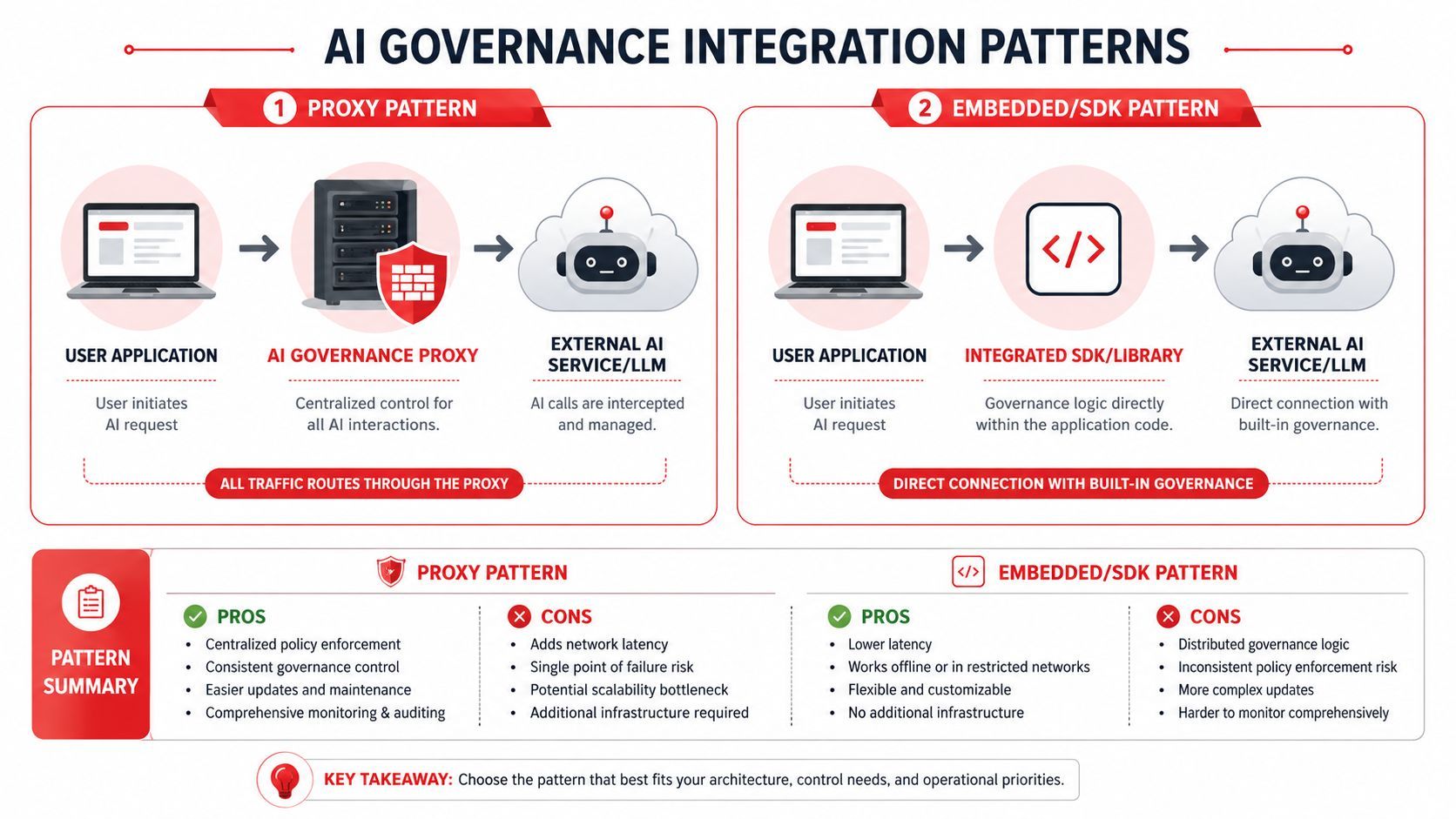
There are two common ways teams add governance to an existing AI product. One is centralized and opinionated. The other is lighter to start but easier to fragment later.
Proxy pattern versus embedded pattern
The proxy pattern routes AI traffic through a central layer. Your app sends one request to the governance system, and that system talks to the model provider.
This gives you consistency. Routing, auth, logging, policy checks, and observability all happen in one place. It's the cleaner model when multiple teams or services are shipping AI features at once. The trade-off is that it becomes a critical dependency, so you need to think about reliability and latency.
The embedded pattern puts governance logic into the application through an SDK or library. That can be easier for teams that want to move quickly with minimal architecture change. It also gives developers fine-grained control close to the feature code. The downside is drift. Different services can instrument things differently, and governance becomes harder to standardize.
A simple comparison helps:
Splunk's overview of AI governance platforms notes that top-tier platforms use real-time monitoring to detect data drift and bias with sub-second latency. That matters in either pattern, but it's easier to implement consistently when the request path is centralized.
A migration path that won't stall delivery
Teams often overcomplicate the rollout. They try to govern every model, every prompt, and every workflow at once. That's how projects drag.
A better playbook looks like this:
- Pick one non-critical feature. Choose a workflow with clear usage but limited blast radius, like summarization or internal search assistance.
- Centralize provider credentials and prompt config. Even before full governance, stop scattering these across services.
- Move traffic through one controlled path. Use either a proxy or embedded integration, but make the route explicit.
- Turn on per-call logs first. Before you write a long policy matrix, make sure the team can see requests, outputs, errors, and latency clearly.
- Add versioning and change control. Prompt and routing updates should become auditable operational changes.
- Layer in policy rules gradually. Start with simple restrictions around access, logging, and approved providers.
Don't begin with your hardest compliance workflow. Begin with the feature that will teach your team how the platform behaves under live traffic.
The common failure mode is trying to boil the ocean. Teams define too many rules before they've seen real production patterns. They spend weeks modeling perfect governance for edge cases while ordinary incidents remain hard to debug.
The practical order is visibility first, control second, sophistication third.
Real-World Use Cases for Product Teams
Governance becomes easier to justify once you stop describing it as “risk management” and start describing the work it removes from product teams.
Optro's summary of Gartner's 2026 AI governance analysis says spending on dedicated AI governance platforms is projected to reach $492 million in 2026, and 76% of organizations now have a formal AI governance strategy in place. That rise makes sense when you look at the day-to-day problems these platforms solve.
Three situations teams hit early
A support product needs smarter routing.
A chatbot team launches with a single provider. Soon they notice that basic FAQ replies don't need the same model as edge-case troubleshooting. With a governance layer, they can route simple requests one way and more complex ones another way, while keeping the application logic stable. The benefit isn't abstract. They gain tighter control over quality, latency, and spend without scattering routing rules through backend code.
A content workflow needs safer iteration.
A product team ships title generation, summaries, and SEO descriptions. Prompt quality changes often because users respond differently than expected. Without governance, every prompt edit becomes a code change and a release coordination problem. With versioned prompts in a central layer, the team can test and roll forward or back more cleanly. PMs get faster iteration. Engineers keep the app code focused on product behavior instead of prompt bookkeeping.
An indie tool needs better debugging.
A solo founder builds a document analysis app and starts getting reports that some uploads return weak or inconsistent answers. Traditional app logs show that requests completed. They don't show enough AI context to explain the behavior. With per-call observability, the founder can inspect the exact request path, prompt, model response, and latency pattern, then pinpoint whether the issue came from input formatting, provider behavior, or route selection.
The biggest early win usually isn't compliance. It's getting from “something went wrong” to “here's the exact call and configuration that caused it” without losing half a day.
These are not enterprise-only problems. They show up as soon as AI features become part of the product instead of an experiment in a branch.
Your First Step to Production-Ready AI
AI governance sounds heavy until you've lived without it. Then it looks like what it really is: the missing production layer.
It keeps prompts out of brittle code paths. It gives teams one place to route models and inspect failures. It turns provider changes, prompt updates, and fallback rules into controlled operational actions instead of risky releases. It also gives you a cleaner answer when someone asks what happened on a specific request, which is one of the first questions every serious AI product eventually has to answer.
You don't need to start with a full governance program. Start with one feature that matters but won't sink the business if the integration takes a week longer than expected. Route it through a platform. Turn on per-call observability. Centralize prompt versions. Review one real incident through that lens. Once a team sees the difference, governance stops feeling like process and starts feeling like an advantage.
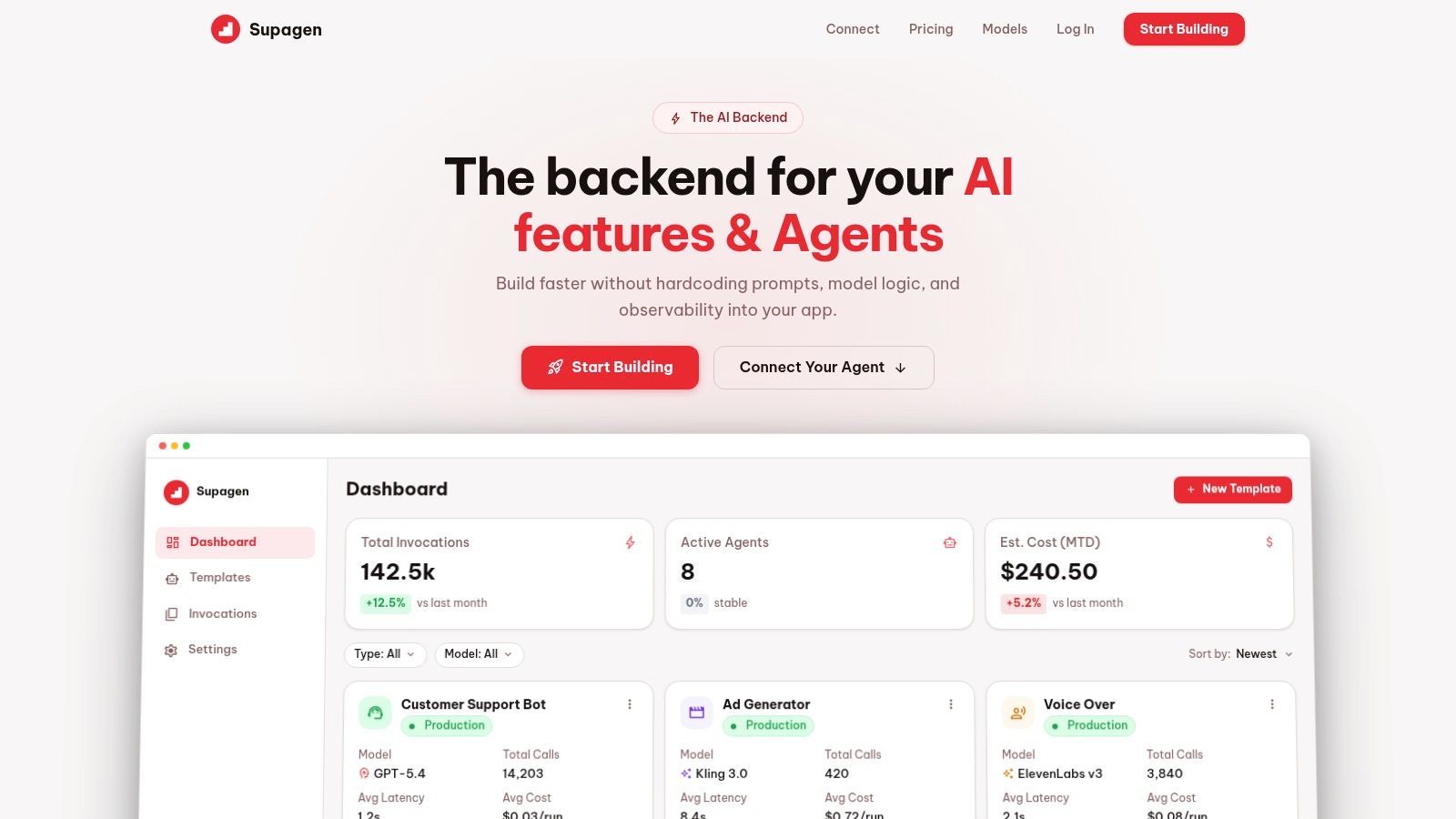
If you want a low-friction way to try this in practice, Supagen is built as a unified AI backend for shipping AI features and agents without hardcoding prompts, routing, or observability into your app. It's a practical first step for teams that want centralized control, per-call visibility, and faster iteration without turning every AI change into a redeploy.