
AI Cost Estimation: A Practical Guide for 2026
You ship an AI feature, test it with a handful of friendly users, and the math looks simple. A prompt goes in, a response comes out, and the model vendor publishes a clean pricing page. Then production starts. Users paste huge documents, retries multiply, prompts keep changing, and someone asks for a second provider as a fallback. The bill stops looking simple.
That's why AI cost estimation breaks for so many teams. The common failure isn't bad arithmetic. It's treating AI spend like a single API line item when it's really a moving system with product, infrastructure, and labor costs wrapped together.
For founders, indie hackers, and product teams, the fix isn't more guesswork. It's a more complete way to estimate spend. One that includes hidden total cost of ownership, separates baseline cost from variance, and produces an estimate you can defend in a budget review.
Table of Contents
- Why AI Cost Estimation Is Often Wrong
- Deconstructing Your Total AI Spend
- How to Calculate Core AI Project Costs
- Estimating Costs for Real World AI Features
- Why Your Initial AI Estimate Will Be Wrong
- The Supagen Solution for AI Cost Control
- From Estimation to Confident Scaling
Why AI Cost Estimation Is Often Wrong
A common approach is to start with token pricing because it feels concrete. You can count prompt size, estimate response size, multiply by request volume, and get a neat spreadsheet. That spreadsheet usually survives right up until launch.
The core problem is that production usage doesn't behave like a clean demo. Features get retries. Prompts get longer. Support asks for logging. Security asks for retention rules. Product wants better quality and swaps in a more capable model. None of that shows up in a basic calculator.
The planning gap is widespread. In 2026, 80 to 85 percent of enterprises are projected to miss their AI cost forecasts by 25 percent or more, even as global AI expenditure is forecast to reach $2.52 trillion, according to AppVerticals' roundup of Gartner-linked AI cloud cost projections.
Practical rule: If your estimate only models tokens, it isn't an AI cost estimate. It's an API invoice estimate.
That distinction matters because teams rarely fail on direct model cost alone. They fail on everything attached to making the feature reliable. Logging, prompt iteration, data cleanup, fallback logic, evaluation runs, and production safeguards turn a cheap prototype into an expensive product.
A useful AI cost estimation process does three things differently:
- It separates direct usage from operating overhead. API charges and infrastructure sit in one bucket. Engineering and operational drag sit in another.
- It models uncertainty explicitly. You need a range for normal, high, and ugly usage.
- It stays explainable. If finance or investors ask why the number moved, you should be able to trace the change to a driver, not shrug and say “the model got expensive.”
That's the shift. Stop asking, “What does this model cost?” Start asking, “What does this feature cost to run, maintain, and justify?”
Deconstructing Your Total AI Spend
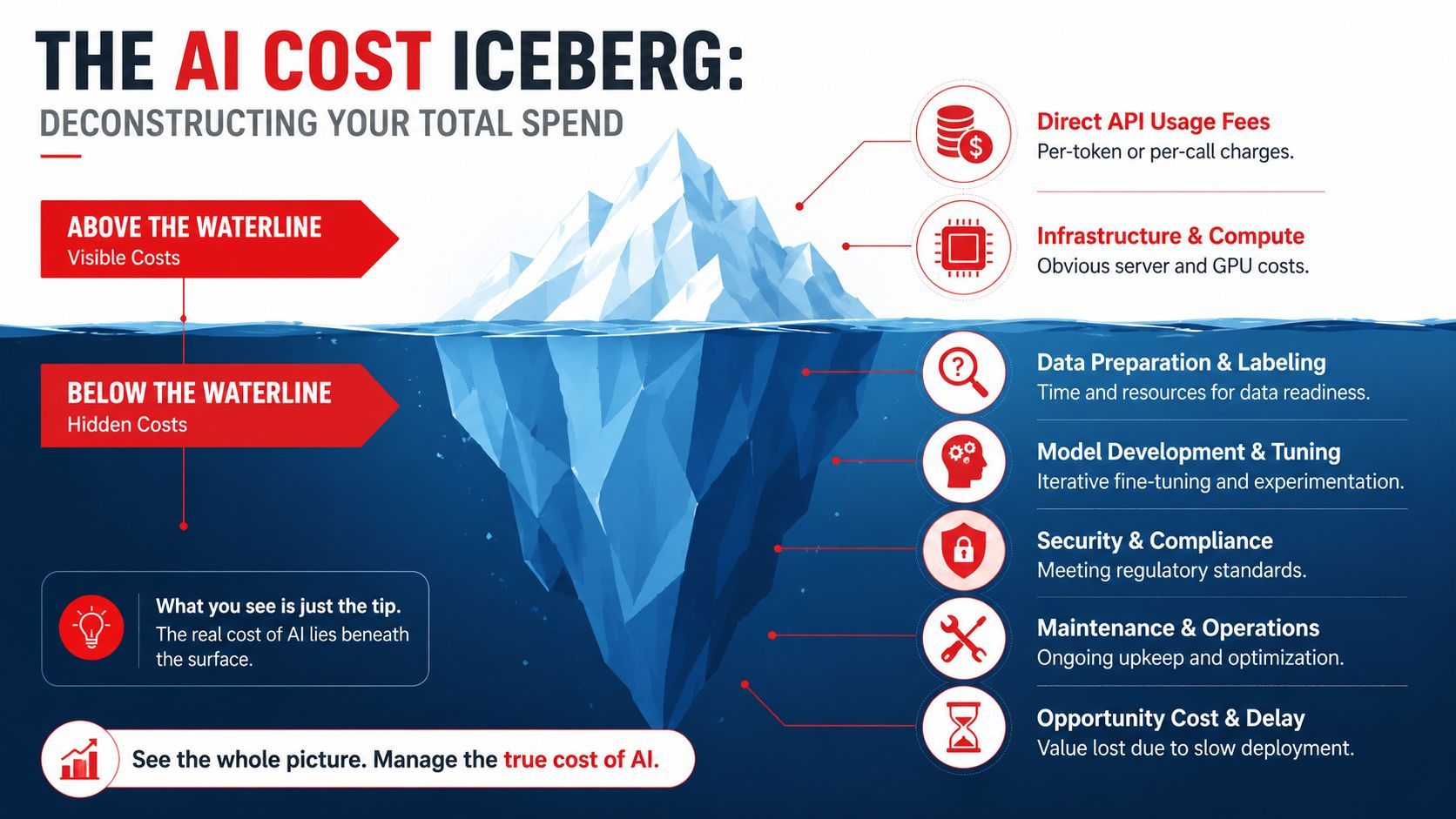
The easiest way to understand AI cost estimation is to treat it like an iceberg. The visible part is small and easy to count. The larger mass sits below the surface and sinks budgets when teams ignore it.
The visible layer
These are the costs commonly modeled first:
- Model usage fees. Per-token or per-call charges from providers such as OpenAI, Anthropic, Google, or other model vendors.
- Compute and hosting. App servers, workers, queues, vector databases, storage, and any supporting infrastructure.
- Third-party tools. Guardrails, transcription, image generation, retrieval systems, or evaluation tooling that sit around the model call.
This layer matters, but it's only the top of the picture. It's also the part vendors make easy to understand, because it's billable and published.
The hidden layer
The harder part is AI total cost of ownership. The FinOps Foundation working group on AI workload cost estimation points out that true AI TCO includes hidden costs such as engineering labor for prompt iteration, data cleansing, and even a 50%+ utilization redundancy penalty when spanning two regions.
Those costs show up in familiar ways:
- Prompt iteration work. Developers and PMs keep adjusting instructions, output schemas, and fallback behaviors. Each revision adds test time, review time, and redeploy time.
- Data preparation. Raw customer data rarely enters a model-ready pipeline in clean form. Teams scrub fields, normalize structure, and repair edge cases.
- Reliability overhead. Production systems often need retries, vendor failover, regional redundancy, and monitoring hooks.
- Compliance and security work. Logging policy, PII handling, access controls, and approval workflows create labor and tooling costs.
- Operational support. Someone has to investigate weird outputs, latency spikes, and broken workflows after launch.
AI teams often discover that the hidden labor around the model costs more than the model itself.
A practical checklist before you approve a budget:
When teams miss AI budgets, it's usually because the estimate stopped at row one.
How to Calculate Core AI Project Costs
A good estimate starts with a baseline formula. Keep it simple enough that anyone on the team can inspect it. If only one engineer understands the spreadsheet, the estimate won't survive product changes.

Start with a unit cost
For a single request, use this structure:
Cost per request = input cost + output cost + auxiliary service cost + infrastructure cost per request
That's intentionally plain. The exact numbers depend on the provider and model you choose, so pull current pricing directly from the vendor you plan to use. Don't estimate from memory, and don't mix pricing across model versions.
Typically, the first workable sheet includes these variables:
- Input tokens per request
- Output tokens per request
- Retry rate
- Fallback rate
- Non-model services per request
- Infra allocation per request
If you use retrieval, split the request into stages instead of pretending it's one call. A RAG flow may include query rewriting, embedding, retrieval, reranking, and final generation. Price each stage separately.
Build a monthly estimate
Once you have a per-request baseline, scale it up:
Monthly direct AI cost = cost per request × monthly request volume
Then add labor and operating overhead:
Monthly total AI cost = monthly direct AI cost + monthly engineering cost + monthly data operations cost + monthly platform cost
If you prefer a more operational planning view, use a work breakdown structure:
- Inference workload. Every model call that serves end users.
- Background workload. Batch summarization, indexing, reprocessing, or evaluation jobs.
- Human support workload. Prompt changes, incident review, quality checks.
- Shared platform workload. Observability, routing, storage, secrets, deployment systems.
This helps when product asks why a “small AI feature” needs more budget than the raw API math suggested.
Use a range, not a single number
Single-point estimates create false confidence. A practical sheet should include at least three scenarios:
The fastest way to lose trust in an AI budget is to present one exact number for a system that changes every week.
The baseline estimate isn't supposed to predict reality perfectly. It gives you a unit model you can revise as real traffic arrives. That's what makes AI cost estimation useful in practice. It's less about being exact on day one, and more about being adjustable without rebuilding the whole budget.
Estimating Costs for Real World AI Features
Different AI features fail in different ways. A support chatbot and an agentic workflow may both use the same provider, but their cost shape is completely different. That's why feature-level estimation works better than a single company-wide AI budget.
Simple chatbot
A simple chatbot usually looks cheap in testing because each exchange is short. The trap is volume. Once it's embedded in a product, users ask many small questions, repeat themselves, and trigger long conversation history windows.
The main drivers are request count, conversation memory strategy, and fallback behavior. Teams that keep sending full history with every turn often discover that “simple chat” isn't simple anymore.
Content generation
Content generation usually has the opposite profile. Request count may be moderate, but output size gets expensive fast. Marketing tools, product description generators, SEO assistants, and email writers all push the model to produce long responses.
The cost driver isn't just prompt size. It's output expansion, regeneration, and editorial retries. If the UI makes it easy to click “rewrite,” you need to budget for that behavior.
Embeddings and RAG
Retrieval systems spread cost across multiple operations. A single user question can trigger embedding, search, reranking, and final synthesis. Teams often underestimate RAG because each individual step looks affordable on its own.
The practical mistake is ignoring index maintenance and ingestion jobs. The user-facing query cost is only part of the bill. Re-chunking documents, re-embedding content, and repairing bad retrieval pipelines all create background spend.
Agentic workflows
Calculators break down fastest. Agentic systems loop, branch, call tools, retry substeps, and spend tokens deciding what to do next. Cost is driven as much by architecture as by raw model pricing.
A stark example comes from Evals for AI's analysis of evaluation cost bottlenecks, which found that a single GAIA evaluation run on a frontier model can cost $2,829 before caching. That's the kind of number that forces teams to stop thinking in per-prompt terms and start thinking in workflow economics.
For agents, “cost per message” is the wrong metric. Use cost per successful outcome.
Here's a simple comparison frame you can use when scoping features:
A feature estimate gets better when you ask one question: what behavior creates the bill here? For chat, it's repetition. For generation, it's long outputs. For RAG, it's pipeline depth. For agents, it's compounding steps.
Why Your Initial AI Estimate Will Be Wrong
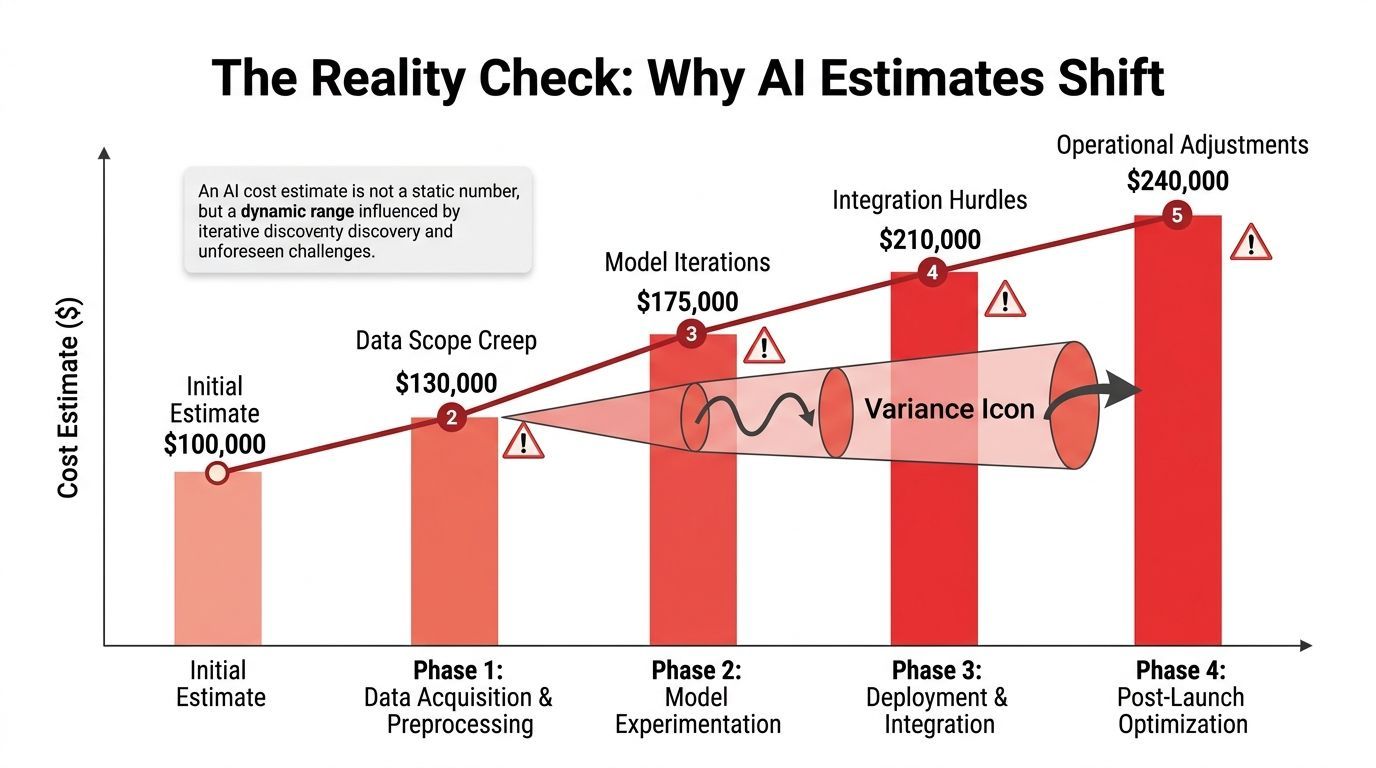
The first version of your estimate will be wrong even if your spreadsheet is clean. That isn't a failure. It's the normal result of shipping a probabilistic system into real user behavior.
User behavior changes the bill
Users won't behave like your internal testers. Some paste huge inputs. Some regenerate output repeatedly. Some use the feature in bursts that force more concurrency than expected. Others trigger edge cases that multiply retries and support load.
This is why production estimates need caps, quotas, and guardrails. Without them, your cost model depends on goodwill.
Better results often cost more than expected
Teams assume model prices will get cheaper over time and solve the budget problem. However, the situation is messier. According to research on frontier model evaluation economics, the cost of evaluating frontier AI models is increasing at 3x to 18x per year, even while the price for achieving a specific level of benchmark performance is decreasing by about 5x to 10x per year.
That divergence matters in product work. A cheaper token doesn't guarantee a cheaper system. If your feature now requires more reasoning steps, more eval coverage, or more repeated inference to verify quality, total spend can still rise.
Iteration is a cost center
Every AI team iterates more than planned. Product asks for brand tone control. Legal wants safer outputs. Support finds a failure mode. Engineering adds traces. Then someone proposes A/B testing two prompts across two models.
None of that is free. It consumes engineering time, evaluation time, and operational attention.
A realistic estimate should reserve room for:
- Prompt churn. The version you launch won't be the version you keep.
- Testing overhead. Side-by-side comparisons and quality review take time.
- Routing changes. Teams often swap models after seeing real latency, quality, or cost trade-offs.
- Post-launch cleanup. Bad logs, poor retrieval, and weak fallbacks surface after users arrive.
If the product is still learning what “good output” means, the budget should assume ongoing experimentation.
The right mindset is to treat AI cost estimation as a living range with active risk controls. The estimate improves when you instrument usage, watch failure patterns, and revise assumptions quickly. The teams that get burned are usually the ones that freeze the first number and call it done.
The Supagen Solution for AI Cost Control
A cost estimate stops being useful the first time finance asks, “What changed?” and nobody can answer beyond “usage went up.” At that point, the problem is not pricing math. It is missing traceability between the estimate, the runtime, and the actual feature behavior in production.
Traceability matters more than another calculator
The DHS paper on intersections of AI and cost estimating explainability makes a useful point. AI cost estimates lose credibility when teams cannot trace the source data, assumptions, and method behind the number. That is the same failure mode product teams run into when an AI feature ships. The estimate lives in a spreadsheet, but actual costs show up across prompts, retries, fallbacks, background jobs, and model routing rules.
A centralized runtime layer fixes that gap by turning each request into an auditable record. Instead of arguing about whether the estimate was wrong, teams can inspect what changed. Prompt version. Model choice. Context length. Retry rate. Latency spikes that triggered fallbacks. Those details are what make a cost model explainable enough for engineering, product, and finance to trust.
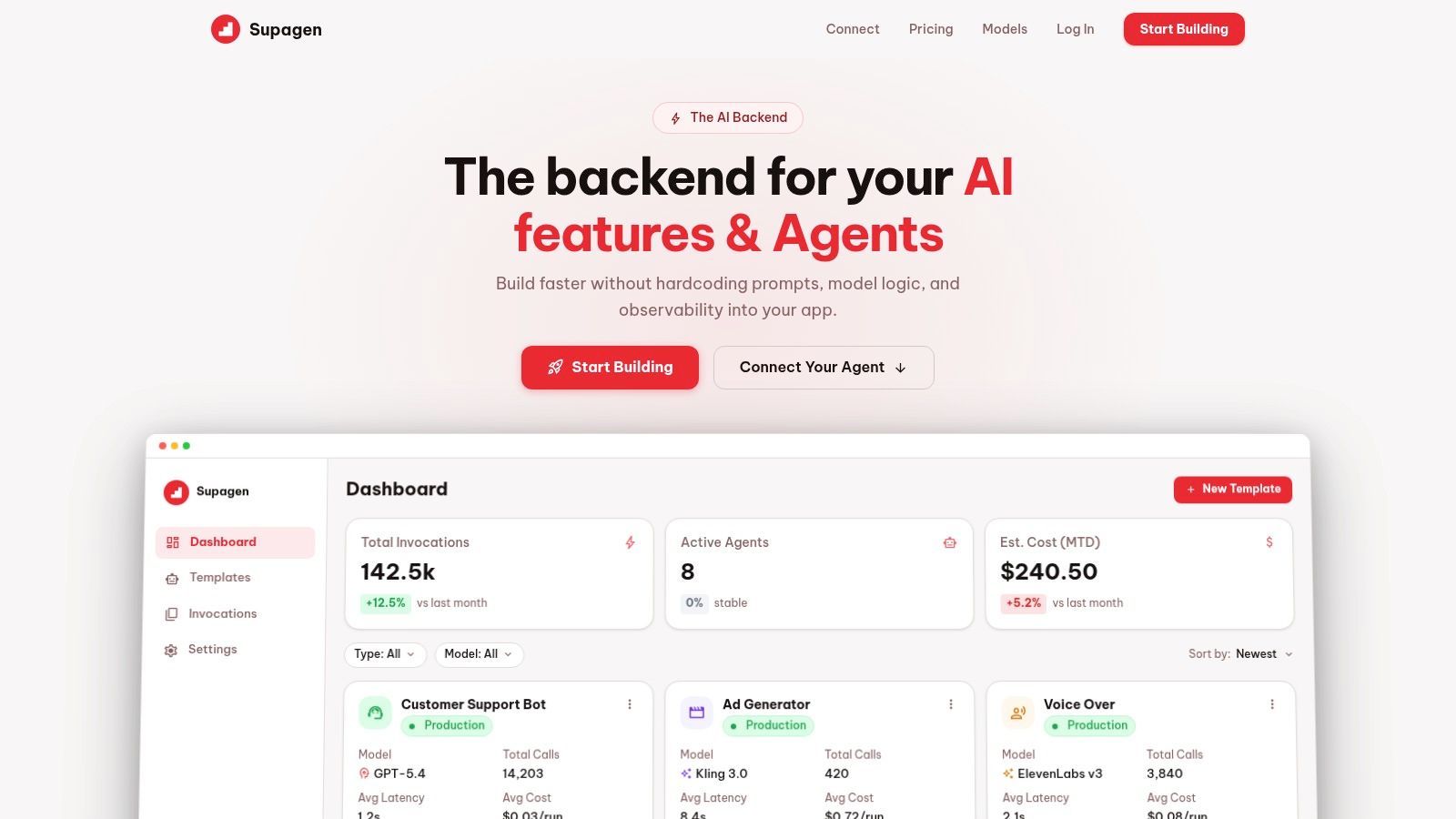
Supagen fits that operating model. It gives teams one integration point for prompt management, model routing, and observability across providers, with per-call logs for tokens, latency, inputs, outputs, and cost. That matters because vendor invoices answer “how much,” while production logs answer “why.”
Control requires a runtime layer
Cost control gets harder once AI behavior is hardcoded into the application. A small pricing change, quality issue, or provider outage then turns into a code change, test cycle, and deployment. That extra work is part of AI TCO, and it rarely shows up in the first estimate.
A unified backend lowers that operational tax and makes the estimate easier to defend later. Teams can:
- Route by policy. Send low-risk or simple requests to cheaper models and reserve expensive models for cases that need them.
- Set fallbacks cleanly. Keep failover logic in one place instead of duplicating it across services.
- Adjust prompts without redeploy friction. Reduce the engineering hours tied to prompt iteration.
- Inspect cost per feature. Give product, engineering, and finance the same view of actual spend.
That last point matters more than it sounds. If support assistant traffic, document processing, and agent workflows all hit the same provider bill, cost control becomes guesswork. If each feature has its own logs, routes, and prompt history, teams can explain variance and update estimates with evidence.
A short product walkthrough helps make that concrete:
The practical goal is not another dashboard. It is a system where estimates map to real runtime behavior, cost spikes can be traced to a specific change, and optimization does not require digging through application code. That is how AI cost estimation becomes auditable instead of fragile.
From Estimation to Confident Scaling
Good AI cost estimation starts with arithmetic and ends with operations. You still need the baseline formulas. You still need to know what one request costs. But that's only the first layer.
The fuller picture includes hidden TCO, background jobs, human iteration, reliability overhead, and the reality that user behavior changes once a feature goes live. It also includes explainability. If nobody can trace a cost spike back to a model route, prompt version, or workflow change, the estimate won't survive scrutiny.
The practical approach is straightforward. Build a baseline. Turn it into scenarios. Watch actuals by feature, not just by vendor invoice. Revise the estimate as product behavior becomes real. Put controls around retries, long contexts, fallbacks, and agent loops before they become expensive habits.
Teams don't need perfect prediction. They need a budgeting system that stays usable as the product changes.
That's what gives you confidence to scale. Not the belief that AI spend is simple, but the knowledge that you can see it, explain it, and control it before it surprises you.
If you want a cleaner way to manage prompts, route models, and make AI spend traceable in production, Supagen gives you a unified backend for shipping and operating AI features without hardcoding the messy parts into your app.