
AI Agent Management: Build & Scale Agents in 2026
You can ship an AI agent that looks smart in a demo and still be completely unready for real users. The first prompt edit goes out, the tone changes, a tool call starts failing, and suddenly you're the person reading logs at midnight while trying to guess which version broke the flow. That's the part most founders don't plan for, because the hard work starts after the agent can answer one clean notebook prompt.
The core task is AI agent management, the layer that keeps a live agent reliable when users change their inputs, providers change their behavior, and your own team keeps updating prompts. The market signal is hard to ignore, too. One forecast puts the AI agents market at $7.63 billion in 2025, $10.91 billion in 2026, and $50.31 billion by 2030, with a 45.8% CAGR from 2025 to 2030, while another projects $182.97 billion by 2033 from the same 2025 starting point (AI agent statistics forecast). That kind of growth means the control layer stops being optional fast.
What breaks in production is usually boring, not dramatic. A prompt change that wasn't versioned. A fallback that was never configured. A token leak that let one agent touch too much. A dashboard that showed usage, but not what the agent did. When you understand those failure modes, you stop treating the agent like a clever feature and start treating it like software that needs a control plane.
Table of Contents
- Why Shipping an AI Agent Is Only Half the Job
- What AI Agent Management Actually Means
- Prompts and Version Management Done Right
- Model Routing, Fallbacks, and Parameter Control
- Observability and Cost Tracking in One Dashboard
- Permissions, Access Control, and Agent Sprawl
- Three Real Use Cases and How They Manage Differently
- Your AI Agent Management Checklist and Troubleshooting Map
Why Shipping an AI Agent Is Only Half the Job
A solo founder ships a support agent on a Thursday afternoon. It works, the replies sound decent, and the first few users think it's helpful. Then the founder edits the greeting prompt to sound warmer, sends it live, and the quality slips just enough that no one can immediately tell whether the model changed, the prompt changed, or the tool chain changed.
That's the moment teams often discover they don't have AI agent management. They have a demo with no release discipline.
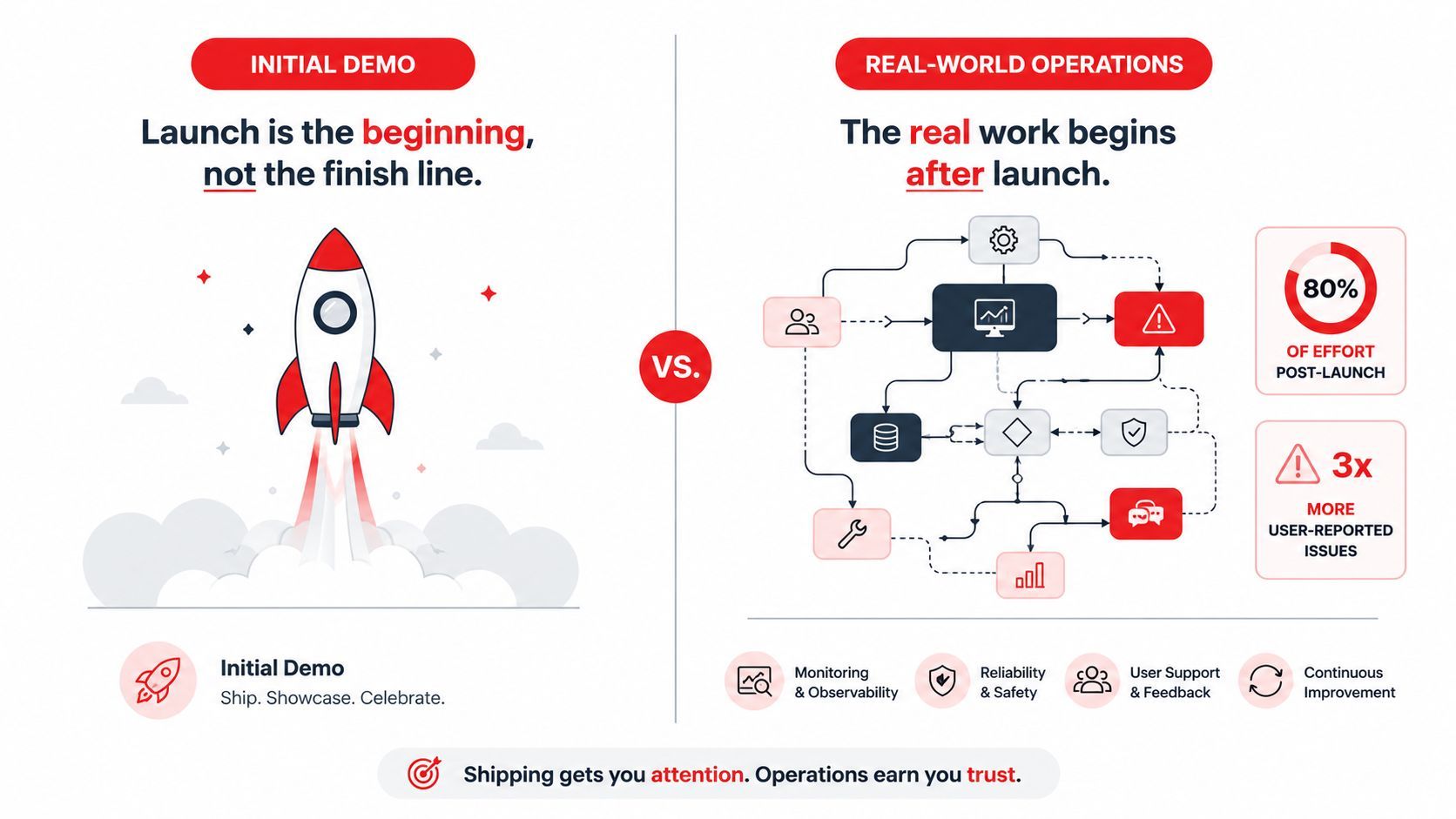
The gap between “it works” and “it runs”
The demo phase hides the mess. You test one happy path, one model, one prompt, and one output. Production adds changing users, messy inputs, retries, edge cases, and real consequences when the agent is wrong.
That's why operational control matters. As agent systems move into production, teams need prompt versioning, routing, observability, fallbacks, and cost tracking just to keep behavior stable. The scale story reinforces the point. When a category grows from single-digit billions toward tens of billions in a few years, the management layer becomes part of core infrastructure, not a nice extra (AI agent statistics forecast).
Practical rule: if a prompt edit, model swap, or routing change can reach users without a controlled release path, you're one mistake away from a long debugging session.
Why teams rebuild the control plane under pressure
Teams usually don't plan to build this layer twice. They skip it early because the product feels small, then bolt it on after the first incident. That second build is always harder because the agent is already live, users already depend on it, and the team now has to preserve behavior while changing the architecture underneath.
The better mental model is simple. A demo is a proof of possibility. AI agent management is what lets you sleep while that possibility becomes a service. Once you see the split clearly, the rest of the system stops looking like a pile of features and starts looking like a control plane with specific jobs.
What AI Agent Management Actually Means
A useful mental model treats the agent like the aircraft and the management layer like the control tower. The plane can still fly on its own, but the tower is what coordinates routes, watches conditions, handles exceptions, and keeps traffic from turning into a mess when weather or demand changes.
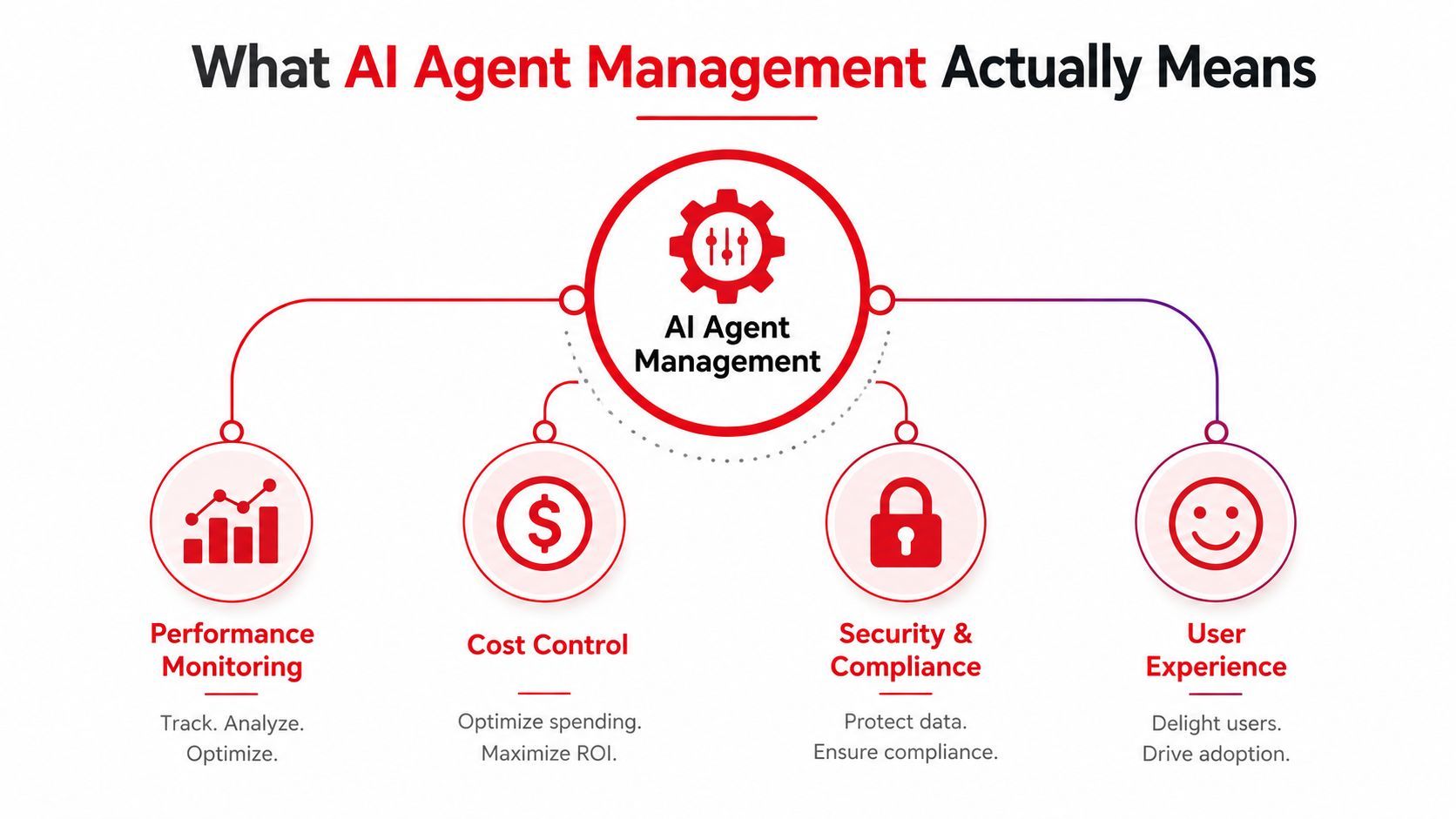
That is the right way to understand AI agent management. It is the operating discipline that keeps an agent reliable, observable, affordable, and safe after real users start depending on it.
The six parts that matter most
A practical management layer usually covers prompt and version management, model routing and fallbacks, observability and tracing, cost tracking, multimodal I/O handling, and access control. Different platforms package those pieces in different ways, but the jobs stay the same. If one of them is missing, the agent may still respond, but it becomes much harder to trust, tune, and defend.
That matters because the production layer grows up around the agent. As more systems move from experiments into live workflows, teams need a way to see what changed, why a response happened, and whether the agent should have been allowed to do it. In practice, that means the management layer becomes part of the product, not a sidecar built after the first incident.
A good control plane answers three questions fast, what did the agent see, what did it do, and who is allowed to let it do that?
What founders usually confuse
Founders often blur the line between building an agent and managing one. A builder creates the reasoning loop and workflow. A manager watches runtime behavior, enforces policy, and records enough context to reproduce or undo a bad outcome.
That difference is why a nice prompt editor by itself is not management. If you cannot see version history, route traffic by environment, inspect traces, or cut off risky access, you do not have a control plane. You just have a faster way to edit the text.
Prompts and Version Management Done Right
Teams often treat prompts like notes in a document. They open a text box, make a tweak, save it, and hope the next response is better. That's fine for experiments, but it's a fragile way to run a live agent because you can't reliably answer the simplest production question, who changed what and when?
Prompts need the same discipline as code
Prompts should live in a versioned store, not as invisible text buried in application logic. The point isn't ceremony for its own sake, it's being able to compare versions, test changes, and roll back when a small edit makes the behavior worse.
A practical workflow looks like this. A builder drafts a new prompt version in a visual editor. The draft gets checked against a small set of cases. It's deployed to a limited slice of traffic. If response quality drops, the previous version comes back immediately. That's not overengineering, that's the minimum needed to keep a support or sales agent from drifting.
Environment separation keeps mistakes contained
Prompt changes should also stay separated by environment. A dev prompt can be conversational and rough. A production prompt should be curated, reviewed, and auditable. If staging and production share the same config path, you'll eventually ship a test tweak to live users and lose time untangling the blast radius.
Templating belongs here too. Variables such as user context, retrieved snippets, or tool outputs shouldn't be mixed into ad hoc source code where they're hard to inspect. Keep the template logic close to the versioned prompt so the full behavior is visible in one place.
Practical rule: if you can't diff a prompt, test it, and roll it back without a redeploy, it's not managed yet.
A support greeting is the easiest place to see the difference
A support agent greeting is a good example because the change seems harmless. You add a little empathy, deploy it, and expect a better first impression. But a prompt that's too verbose can waste tokens, change tone, or delay the first useful tool call.
The right workflow is small and boring on purpose. Draft. Test. Limit exposure. Review the outcome. Roll back if the behavior worsens. That loop turns prompt editing from guesswork into an operational process.
Model Routing, Fallbacks, and Parameter Control
A lot of agents rely on one model provider until that provider slows down, rate-limits them, or performs poorly on a specific task. Then the team discovers the app wasn't really designed; it was only coupled to one happy path.
Routing is traffic management, not a code trick
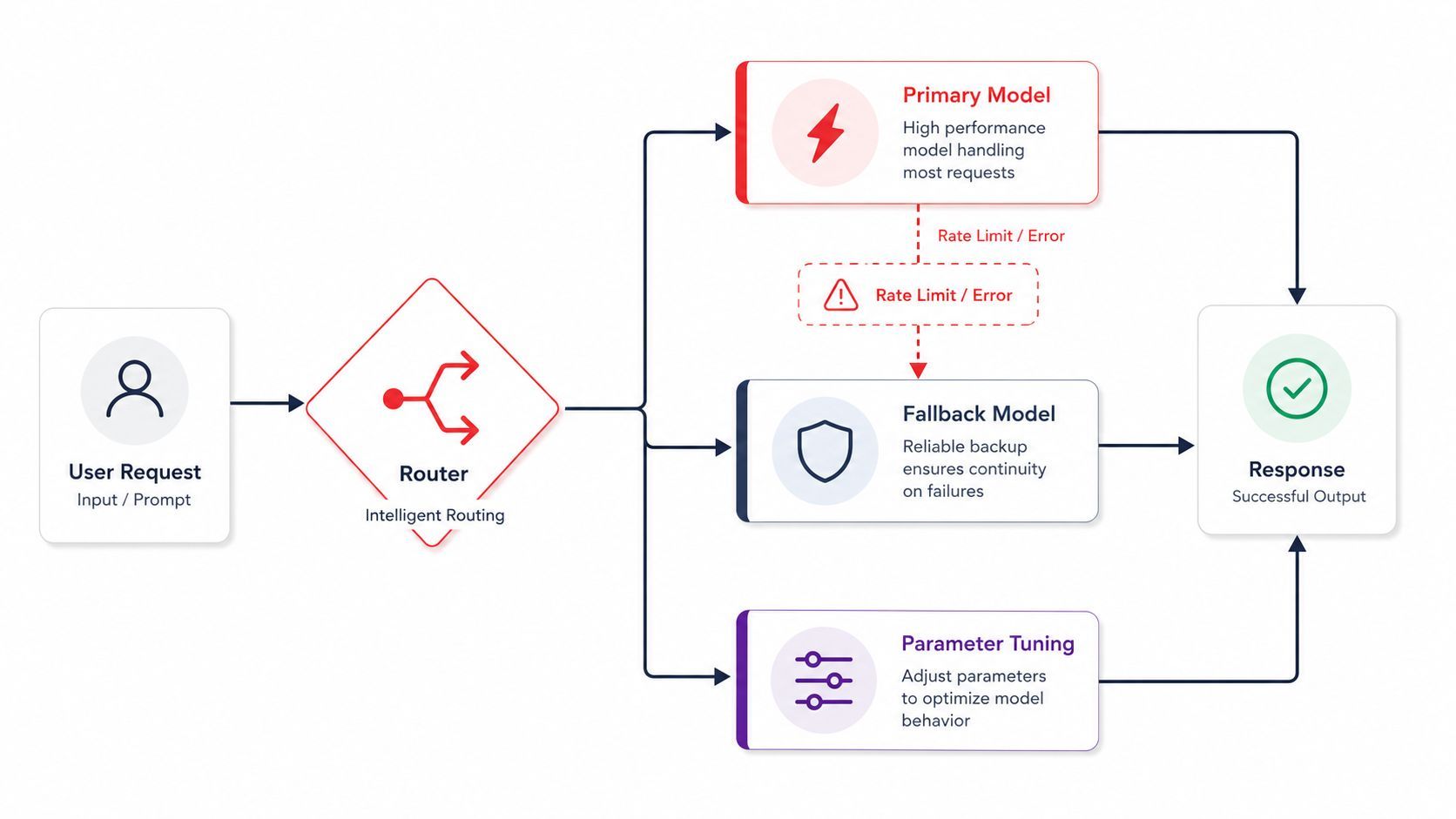
Routing means deciding which model handles which request. A cheap fast model may be fine for a draft reply, while a stronger model may be better for a complex synthesis task. The decision can depend on prompt type, latency budget, or safety needs.
Fallbacks are the safety valve. If the primary provider fails, the system can retry, swap providers, or degrade gracefully instead of hard failing. That logic should live in the management layer, where you can change it without rewriting the app and where you can see which path each request took.
Parameter control should be visible, not hardcoded
Temperature, max output length, and other model parameters shape behavior just as much as the model choice itself. Hardcoding them in the application is a quiet way to freeze bad assumptions into production.
A better setup lets you tune parameters from a dashboard, by environment or by agent type. That way, a support agent can stay crisp while a research workflow can tolerate longer outputs. The important part is traceability. If a call went through a fallback model or used different parameters, you need that fact visible in the log.
A simple decision checklist
Use the cheaper, faster model when the task is routine, low risk, and easy to validate. Escalate to a stronger model when accuracy matters more than speed, or when a bad answer would create manual cleanup. Route around outages automatically, and keep the routing path visible so you can tune it later.
The best routing setups feel invisible to users because they absorb failure before users do. That only happens when fallback behavior and parameter controls are adjustable outside the app itself.
Observability and Cost Tracking in One Dashboard
An agent usually fails in ways that look small at first. It answers slowly, calls the wrong tool, repeats the same step, or spends more than expected before anyone notices. The first questions are always the same. What did it see? What did it do? How long did it take? What did it cost? If the answer to any of those is “we don't know,” debugging turns into archaeology.
One log entry should tell the story
A useful trace usually includes the prompt, retrieved context, tool calls, model choice, timestamps, user identity, agent identity, approvals, and the outcome. For runtime debugging, it also helps to include latency, input and output size, and a correlation ID so one request can be followed across systems.
That style of logging is not just about troubleshooting. Governance guidance for production agents recommends that level of traceability because, without it, root-cause analysis becomes guesswork and policy enforcement weakens fast (AI agent governance guidance). Teams cannot reconstruct a bad action from a thin log line, the same way a mechanic cannot diagnose an engine from a dashboard with no gauges.
If you can't replay the decision path, you can't confidently explain the failure.
Cost visibility changes product decisions
Cost tracking belongs in the same dashboard because it uses the same per-call data. Once you can see cost by conversation or by user, you can set sensible usage limits, decide where to use cheaper models, and catch prompt changes that unexpectedly inflate token usage.
That matters more as agent usage grows. As noted earlier, the economics only make sense if teams can measure the unit cost behind each call. The point is not to guess whether spend is “probably fine,” it is to see which workflow, model, or prompt revision is driving the bill.
Core Metrics Every AI Agent Dashboard Should Surface
A unified dashboard should let a founder spot a runaway loop, a slow provider, or a prompt that suddenly bloated token usage without running a query. It should also make cost spikes visible beside behavior changes, so a “small” prompt edit or routing change does not hide inside a healthy-looking success rate. If the logs exist but the dashboard is hard to read, the team still loses time.
Permissions, Access Control, and Agent Sprawl
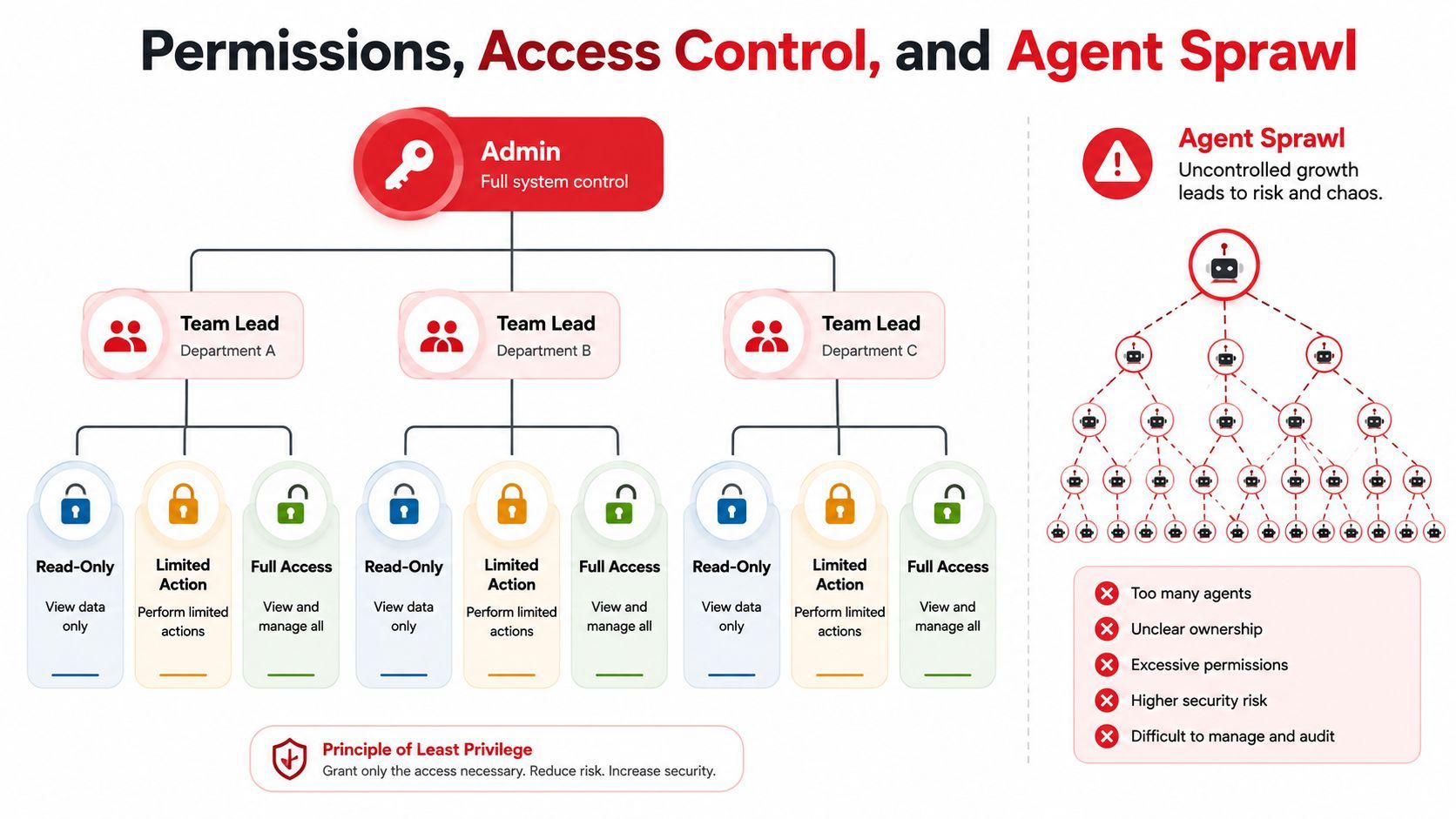
Many guides gloss over the complexities that follow. An agent limited to text generation is one thing. An agent that calls APIs, updates records, or triggers workflows demands a much tighter permission model.
Ask one question first, what can this agent reach
The core access-control question is simple. Who can the agent call, what can it do there, and how fast can that access be cut off when behavior changes? If the answer is broad or fuzzy, the agent is too dangerous for production.
Security guidance for high-stakes environments recommends distinct identities, least-privilege reachability, inline session inspection, operator-custodied logs, and a tested isolation plan. It also warns against broad or unrestricted access and says teams should start with low-risk use cases first (AI agent access security guidance). That framing matters because the hardest problem isn't policy text, it's execution-time control.
Sprawl creates hidden coordination failures
Agent sprawl happens when teams ship many small agents without a shared control plane. They duplicate work, drift in policy, and collide on shared resources. Coordination risks show up as stale shared memory, rate-limit collisions, circular dependencies, and unclear ownership, especially when agents start handing tasks to each other (multi-agent governance guidance).
The fix is partly technical and partly organizational. Give each agent a distinct identity. Scope access tightly. Track ownership. Put escalation checkpoints in the workflow. Use task IDs and timestamps so handoffs can be audited later.
Practical rule: constrained autonomy with rollback beats open-ended autonomy almost every time.
One useful way to think about this is that more agents don't automatically mean more flexibility. Past a point, they create more state to manage, more approval paths to coordinate, and more ways for a system to become brittle. That's why access control and lifecycle management belong in the same operating discipline as routing and logs.
Three Real Use Cases and How They Manage Differently
A customer support agent, a content agent, and a multi-agent research workflow all need management, but not in the same way. The right controls change with the job.
Support agents care most about speed and tone
For support, the big risks are slow replies, confused tone, and bad escalations. That means heavy attention on latency, prompt stability, and strict permissions if the agent can touch customer systems. Small prompt edits should be especially conservative, because a greeting that sounds warmer can accidentally become longer, slower, or less useful.
Content agents care most about cost and consistency
For content generation, the main concern is usually brand consistency paired with controlled spend. A cheap model might draft first-pass copy, while a stronger model polishes the final version. Routing and cost tracking matter more here than raw response speed, because you need to know which path produced which output and how much each template costs to run.
Multi-agent workflows need coordination discipline
In a workflow where agents hand tasks to each other, the biggest risk is hidden complexity. You need task IDs, escalation checkpoints, and explicit approval for irreversible steps like publishing or spending money. The more agents you add, the more important it becomes to keep ownership and handoff rules visible.
Supagen is one option in this category, since it provides a unified backend for versioned prompts, model routing, fallbacks, multimodal logs, and cost visibility across agent calls. It fits the same control-layer idea discussed here, where the production system needs a place to manage behavior outside the app code.
Your AI Agent Management Checklist and Troubleshooting Map
Start with the boring stuff. Version every prompt. Log every call. Set one fallback provider. Expose cost per conversation. Require approval for irreversible actions. Write a one-page runbook for the top three failure modes. That's enough to make a live agent safer this week.
The five failures you'll meet first are usually silent quality regressions, runaway token costs, provider outages, prompt injection, and permission leaks. If quality slips, check recent prompt or model changes first. If cost spikes, inspect output length and routing. If a provider fails, flip the fallback. If someone tries prompt injection, tighten tool access and context boundaries. If permissions leak, cut access immediately and review the agent's identity and scope.
The goal isn't perfect control. It's enough control to notice drift early and contain it fast.
If you want a production layer for prompts, routing, observability, and cost tracking without wiring all of it into your app, take a look at Supagen. It gives teams a centralized place to manage agent behavior, logs, and fallbacks so changes stay auditable instead of hiding in code.