
Master AI Agent Integration with Supagen
You probably already have an agent demo that works.
It reads a support request, drafts a reply, maybe calls a tool, maybe updates a record. In a local test, it looks sharp. Then you try to put it into a real product and the cracks show up fast. Prompts live in source code. Model settings are buried in environment variables. One provider timeout breaks a user flow. Nobody can answer a simple question like why the agent chose an action, what it cost, or which version of the prompt produced the result.
That gap between demo and deployment is where most ai agent integration projects either mature or turn into expensive glue code. The hard part isn't getting a model to respond. The hard part is operating an agent service that can change without redeploys, connect to real systems safely, and stay understandable when something fails.
Table of Contents
- Why Direct AI Agent Integration Is a Trap
- Adopting a Unified AI Backend Architecture
- Connecting Your Agent via a Unified Endpoint
- Managing Prompts and Models Without Code Changes
- Achieving Production-Ready Observability and Control
- Real-World Examples and Troubleshooting
Why Direct AI Agent Integration Is a Trap
The first version usually starts the same way. A developer wires an app straight to one model API, adds a prompt string in code, and gets a useful result in a day. That speed is real, and for prototyping it's often the right call.
The trap appears when the agent becomes part of an actual workflow. Product wants to adjust behavior without waiting for a deployment. Support needs to inspect failed runs. Finance asks what feature usage is costing. Security wants to know which systems the agent can touch. The direct integration that felt clean in week one becomes a pile of hidden dependencies.
A lot of teams still treat agent logic like view logic. It isn't. Agent behavior changes constantly because prompts, tools, routing rules, and model choices all shift under real usage. If those choices are hardcoded into the application layer, every improvement becomes a release task.
Practical rule: if changing a prompt requires a code deploy, your ai agent integration is still a prototype.
Agentic AI isn't staying on the edge of enterprise software. Gartner projects that by 2028, 33% of enterprise software applications will include agentic AI, up from less than 1% in 2024, according to a summary of Gartner's projection. That projection signals a shift from novelty feature to expected infrastructure.
The debt shows up in boring places
The failure modes aren't glamorous:
- Prompt drift: one engineer updates instructions in a branch and nobody knows which users saw which behavior.
- Provider lock-in: your app assumes one response format, one token policy, and one error model.
- Zero audit trail: a bad tool call happens, and all you have is an application log saying "request failed."
- Scattered secrets: API keys end up spread across workers, cron jobs, and staging environments.
- No operational boundary: model logic, business logic, and integration logic all live in the same deployable unit.
A direct provider integration is fine for proving demand. It's bad for running a service.
What works instead
Treat the agent as its own operational system. Give it a dedicated control layer for prompts, routing, logs, and tool access. Keep application code focused on product behavior and user state, not on the mechanics of model orchestration.
That separation feels slower on day one. It becomes much faster once users start depending on the feature.
Adopting a Unified AI Backend Architecture
A hardcoded agent usually breaks the same way. The app starts with one model, one prompt file, and a couple of direct tool calls. A month later, product wants a fallback model, support wants better logs, and engineering is tracing failures across three dashboards. The fix is architectural, not cosmetic.
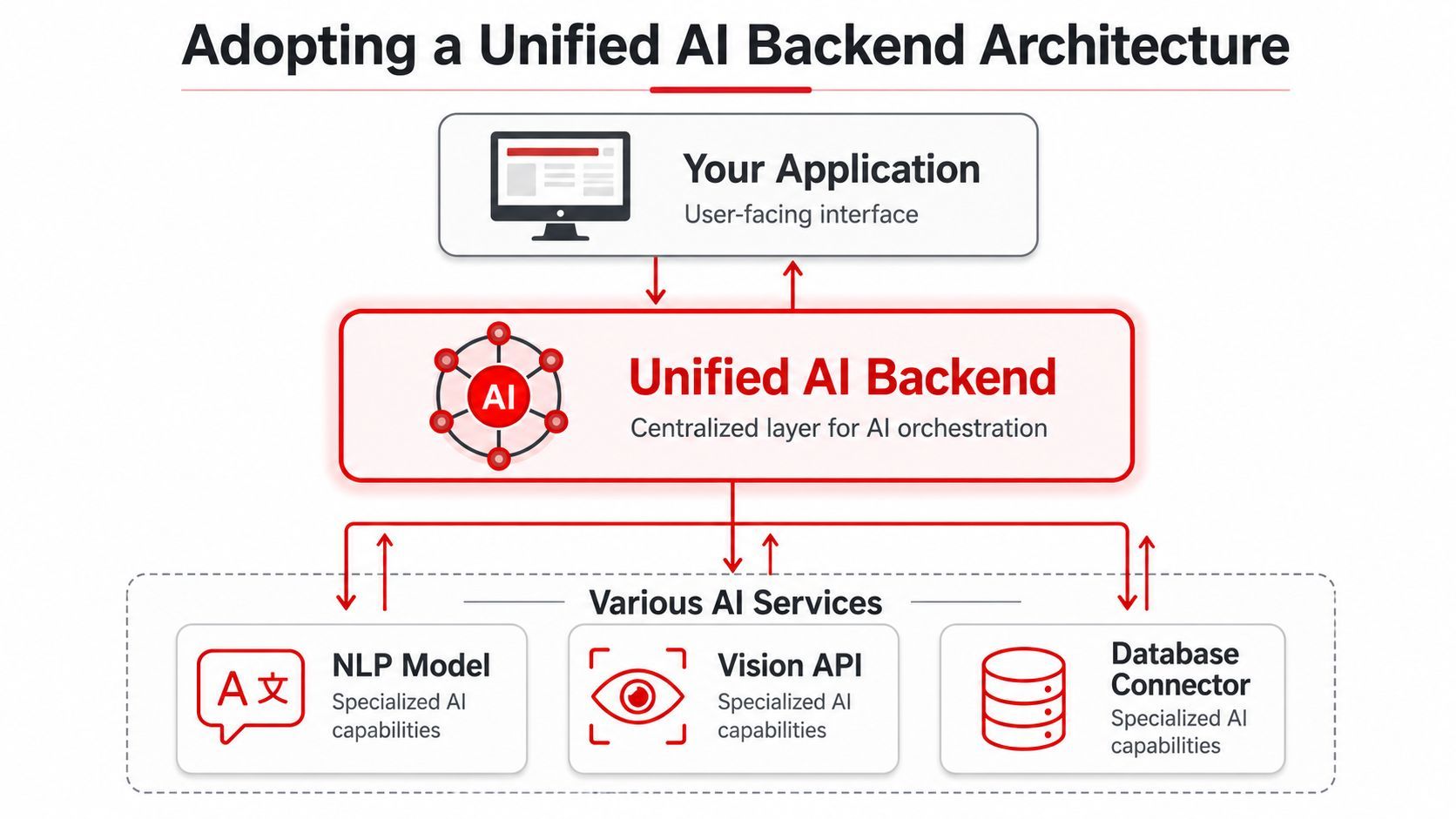
A production setup needs a middle layer between your application and the models or tools it depends on. Call it a unified AI backend. The label matters less than the boundary. Application code should express user intent and business rules. The backend should handle prompt execution, routing, tools, retries, and traceability.
What direct integration turns into
Without that backend layer, the codebase usually drifts into point-to-point integrations that are fast to ship and expensive to operate:
That design is fine for a proof of concept. It becomes painful when you need to swap models, test prompt variants, add rate limits, or explain why an agent made a bad call for one customer but not another.
The core mistake is coupling fast-changing AI behavior to slower-changing product code. Once those concerns are mixed together, every model change becomes an application deployment, and every provider quirk becomes your team's problem.
What belongs in the backend layer
A unified backend should own the parts of ai agent integration that change often, fail often, or need operational controls:
- Prompt management: versioned system prompts, reusable templates, and controlled experiments
- Model routing: pick models by task type, latency target, cost ceiling, or input type
- Fallback behavior: retry or switch providers without rewriting application logic
- Tool orchestration: expose narrow functions with structured inputs instead of hoping the model formats API calls correctly
- Observability: capture inputs, outputs, latency, token use, and tool traces in one place
- Access control: define which agent can call which tool, with which permissions, under which identity
That split inside the agent layer matters too. For production systems, retrieval and action should stay separate. As outlined in this guide to AI agent tool integration, RAG is for fetching context and tool calling is for taking bounded actions. Keeping those roles distinct makes incidents easier to diagnose and behavior easier to test.
Small tools beat clever tools.
An agent gets more reliable when each tool does one job, has a clear schema, and fails in predictable ways. If a refund tool only creates refunds, you can inspect the prompt, validate the arguments, and audit the downstream API result. If one tool tries to "handle customer billing issues," you lose that clarity fast.
This is also where teams make a practical trade-off. Building the backend yourself gives maximum control, but it adds real platform work: secrets management, routing rules, versioning, tracing, and provider adapters. Using a product in this category can shorten that path if it centralizes prompt management, model routing, observability, and multi-provider access behind one service. Supagen is one example of that category.
The goal is not abstraction for its own sake. The goal is a system you can change without redeploying the app, inspect without guessing, and run without every new model decision turning into application complexity.
Connecting Your Agent via a Unified Endpoint
The first integration should be boring. If setup feels clever, it's probably too coupled.
Your goal is one stable endpoint that your agent can use regardless of which model, tool, or provider sits behind it. That gives you a clean contract. The app or agent framework talks to a single interface. The backend handles the moving parts.
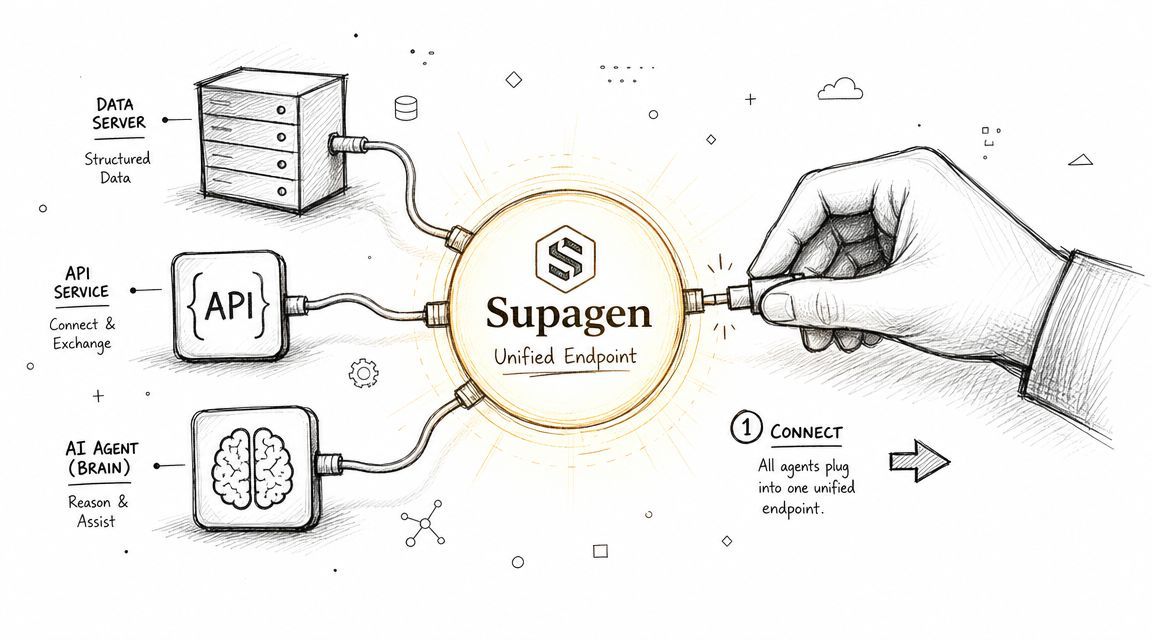
A stable endpoint matters because production usage is already widespread. In 2026, 51% of enterprises have AI agents in production and another 23% are actively scaling them, according to these 2026 AI agent market figures. Once agents are part of real operations, the integration layer can't be an afterthought.
Start with one stable connection
When you're connecting an agent through an MCP-compatible URL or similar unified endpoint, keep the first pass narrow:
- Create a dedicated environment
Use separate credentials and configuration for local, staging, and production. Don't let test runs share the same prompt versions or tool permissions as live traffic. - Authenticate once at the platform boundary
The app shouldn't juggle credentials for every provider behind the scenes. Put provider authentication, token refresh behavior, and connection policy in the backend layer. - Register a minimal tool set
Start with read-only capabilities if possible. A search tool, a knowledge lookup tool, or a CRM fetch tool is safer than letting the agent mutate records on day one. - Pass structured context
Send user ID, tenant ID, role, and relevant workflow metadata in a predictable shape. Most "the model behaved weirdly" issues are typically "the request context was incomplete."
What to configure first
A good first connection isn't about giving the agent maximum power. It's about giving it enough bounded power to be useful.
Set these controls early:
- Identity scope: which user or service account is the agent acting for
- Tool permissions: what systems it may read from or write to
- Prompt version: which instruction set should apply to this environment
- Response contract: whether you want free text, JSON, classification labels, or tool calls
- Fallback rule: what should happen if the primary model or tool path fails
A lot of teams skip the response contract. That's a mistake. If your application expects structured output, enforce it at the backend contract layer. Don't rely on "please respond in valid JSON" as your only guarantee.
The easiest way to reduce agent bugs is to remove opportunities for free-form behavior where structure is required.
What a good first integration should do
For an early production-grade ai agent integration, look for this behavior:
What doesn't help is wiring five tools, three models, and autonomous write actions into the first release. That increases demo value and lowers production confidence.
The right early win is smaller. Connect the agent through one endpoint, confirm the identity and context are correct, inspect logs, and make sure you can change behavior without touching the app. If that foundation is solid, adding more capability later is straightforward. If it isn't, every new tool will magnify the mess.
Managing Prompts and Models Without Code Changes
Hardcoded prompts feel harmless until the third urgent change request.
Someone wants the agent to stop sounding too formal. Someone else wants it to ask one clarifying question before taking action. A provider changes behavior and your current prompt starts over-explaining. If those edits require a developer, a pull request, and a deployment pipeline, the team will either move too slowly or bypass process entirely.
Prompts should be treated like versioned configuration
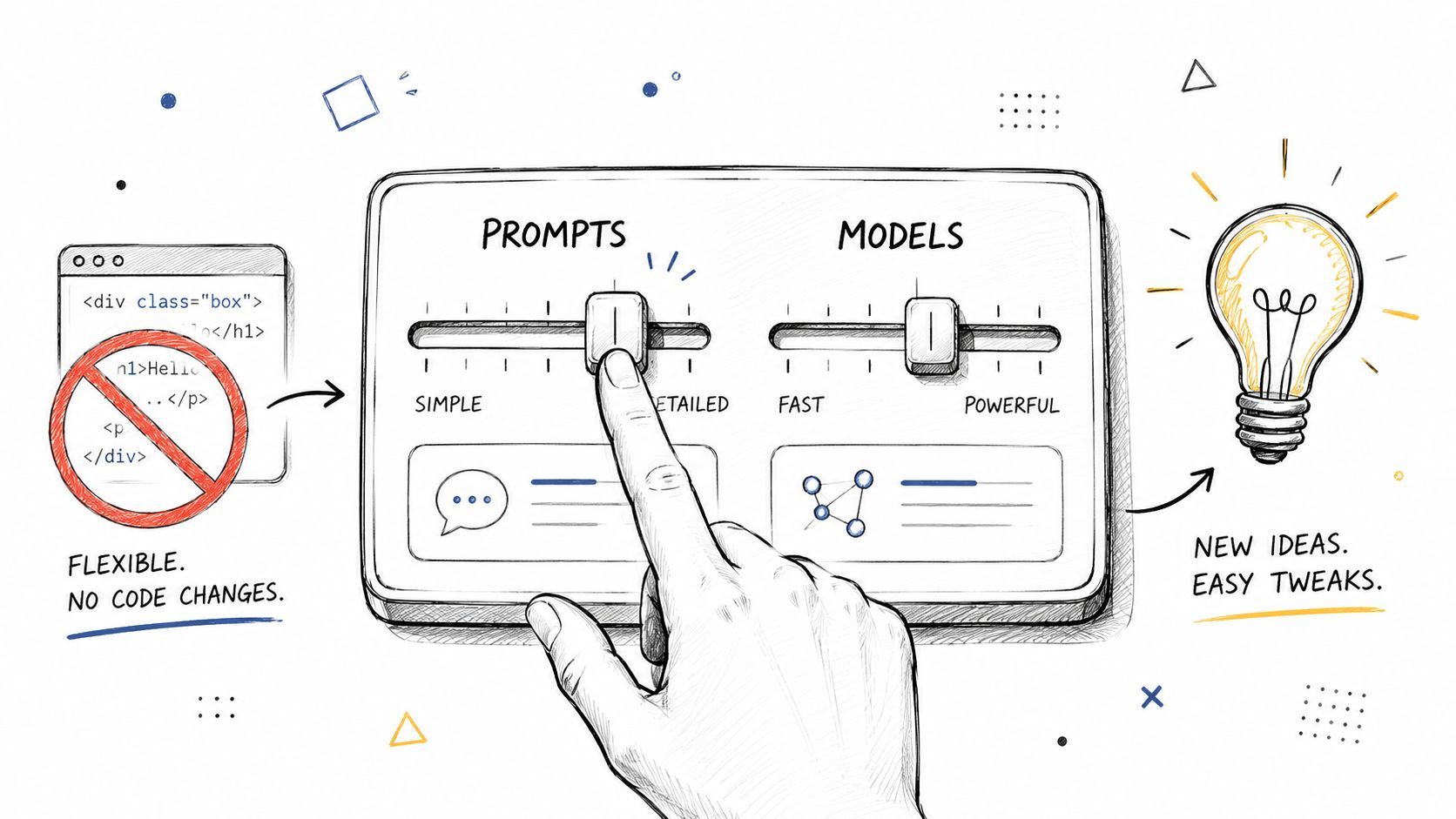
Prompt logic belongs next to other runtime configuration, not buried in application code. That means:
- storing prompt versions with clear names
- tracking when a version changed
- attaching versions to environments
- testing revisions before promoting them
- keeping a rollback path
This isn't overengineering. It's the minimum needed to answer "what changed?" after an output quality incident.
The governance problem shows up exactly here. The hard part in ai agent integration isn't the demo. It's managing versioned prompts, fallback routing, auditability, and observability across multiple providers and modalities, as discussed in this piece on customizable deep-tech agents. That logic needs to move out of app code if you want controlled iteration.
Routing rules matter more than model loyalty
A lot of teams pick one favorite model and force every request through it. That's simple. It's rarely optimal.
Different tasks want different trade-offs:
- Long-context review: route to a model that handles large context windows well.
- Short classification work: use a cheaper, faster model with a strict output shape.
- Multimodal analysis: send image or audio tasks to a model built for that modality.
- High-stakes flows: prefer a more stable route, even if it's slower or costlier.
- Degraded mode: if the primary model fails, use a fallback that preserves the workflow.
That routing should be policy-driven. It shouldn't require a code edit every time you learn something new about model behavior.
What to keep out of application code
Keep this logic out of the app whenever possible:
A practical way to work is to let the app define intent, such as "triage_support_ticket" or "generate_account_summary," then let the backend map that intent to a prompt version, model, response schema, and fallback chain.
If your frontend knows the name of a model provider, your abstraction boundary is probably in the wrong place.
One more point that teams learn late: prompts and models should evolve independently. Sometimes the right fix is prompt refinement. Sometimes it's routing a task to a different model. When both are tightly coupled in code, teams change both at once and lose the ability to reason about the result.
The cleaner pattern is controlled variation. Change one variable, inspect the logs, compare outcomes, then keep or roll back. That's how you turn a fragile PoC into an agent service you can manage.
Achieving Production-Ready Observability and Control
Once the agent is live, every incident turns into the same three questions.
What did it receive? What did it do? What did it cost?
If you can't answer those quickly, you don't have production readiness. You have an API integration with hope attached to it.
Observe the full request path
Basic success and error logs aren't enough for ai agent integration. You need request-level visibility across the entire chain:
- Input context: user message, retrieved context, tool availability, environment
- Prompt version: the exact instructions used for that run
- Model response: raw output before your app transforms it
- Tool trace: which tool was called, with what arguments, and what came back
- Operational metrics: latency, token usage, and per-call cost
- Final decision: whether the backend returned text, JSON, a tool result, or an escalation
Without this, debugging gets distorted. Teams blame prompts for issues caused by missing retrieval context. They blame the model for failures caused by a malformed tool schema. They blame cost on "AI usage" when one route is responsible for most spend.
Use shadow mode before live actions
A safer rollout pattern is to let the agent make decisions without letting it affect production state. Compare its outputs against what a human operator did. Then review mismatches and adjust prompts, tools, or routing.
That phased approach is part of a practical integration methodology described in this step-by-step guide to integrating AI agents into business workflows. It recommends shadow-mode testing, comparing agent decisions with human actions, then monitoring drift and refining the system through feedback loops.
That advice is solid because it catches the subtle failures that sandbox tests miss. A prompt can look perfect in a playground and still fail when real tickets arrive with messy formatting, missing fields, or contradictory context.
Control spend and blast radius
Observability tells you what happened. Control determines what can happen.
Use a centralized layer to enforce limits such as:
- Budget caps: stop or degrade expensive routes before they surprise you.
- Rate limits: prevent loops, abuse, or accidental replays from spiking usage.
- Tool gating: restrict write actions to approved agents and approved environments.
- Fallback policy: decide whether failures should retry, downgrade, escalate, or stop.
- Access review: make sure sensitive tools aren't available by default.
A small table helps clarify the difference:
The biggest mistake here is trying to infer agent behavior from scattered app logs and provider dashboards. Centralized observability isn't nice to have. It's how you keep the system legible after the first real outage.
Real-World Examples and Troubleshooting
A support triage agent is a good test case because it looks simple and becomes messy fast. Tickets arrive in inconsistent formats. Customers mix billing and technical issues in the same message. Some requests need a fast answer. Others need a human.
Here's a workflow that fits a small business support setup.
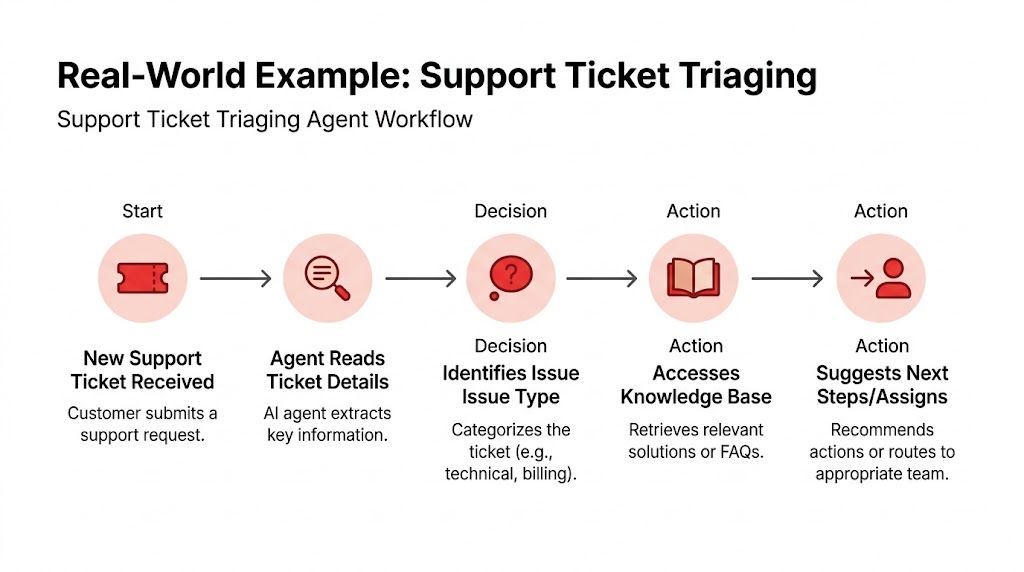
A support triage agent that fits a real workflow
The agent receives an inbound email or form submission. It extracts the account identifier, issue summary, urgency cues, and product area. Then it does two separate things.
First, it queries a knowledge source through retrieval so it can see current help content, policy notes, and internal support guidance. Second, if the workflow allows it, it calls bounded tools to tag the ticket, assign a queue, or request missing information.
The critical detail is escalation. The system shouldn't try to "replace support." It should automate the clean cases and hand off the ambiguous ones. That pattern matches a broader lesson from underserved-market workflows. Success depends less on raw model capability and more on data plumbing, local context, workflow fit, and safe escalation for human review, as discussed by the World Economic Forum's coverage of agentic AI in financial services.
That lesson transfers well to support. The problem usually isn't that the model can't read. The problem is that the surrounding workflow is messy.
Good agents don't eliminate human review. They make human review narrower, faster, and easier to justify.
Troubleshooting when the playground lies
Common production problems usually fall into a few buckets:
- Malformed JSON
The model looked fine in testing but returns broken structure in production. Tighten the response contract, simplify the schema, and inspect whether tool results or retrieval chunks are injecting unexpected text. - Prompt works in the editor but fails live
Compare the actual runtime context. Production requests often carry missing fields, longer histories, or irrelevant retrieved content that never appeared in the playground. - Wrong tool gets called
Tool descriptions are probably overlapping or too broad. Narrow each tool's purpose and give the agent fewer choices. - The agent is overconfident
Add explicit escalation rules. Tell it when to stop, not just what to do.
A short checklist helps:
- Inspect the exact prompt version used.
- Verify the retrieved context for noise or missing data.
- Check tool schema and argument mapping.
- Review whether fallback routing changed the model path.
- Confirm the issue in logs before changing the prompt.
If you're at the point where your AI feature works in a demo but feels brittle in production, a unified backend is usually the next practical step. Supagen gives teams one integration point for prompts, model routing, observability, cost tracking, and MCP-compatible agent connectivity so they can change agent behavior without pushing those concerns into application code.